automation
150 TopicsYour Sentinel AMA Logs & Queries Are Public by Default - AMPLS Architectures to Fix That
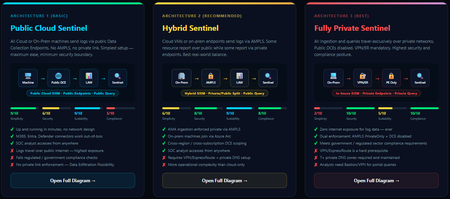
When you deploy Microsoft Sentinel, security log ingestion travels over public Azure Data Collection Endpoints by default. The connection is encrypted, and the data arrives correctly — but the endpoint is publicly reachable, and so is the workspace itself, queryable from any browser on any network. For many organisations, that trade-off is fine. For others — regulated industries, healthcare, financial services, critical infrastructure — it is the exact problem they need to solve. Azure Monitor Private Link Scope (AMPLS) is how you solve it. What AMPLS Actually Does AMPLS is a single Azure resource that wraps your monitoring pipeline and controls two settings: Where logs are allowed to go (ingestion mode: Open or PrivateOnly) Where analysts are allowed to query from (query mode: Open or PrivateOnly) Change those two settings and you fundamentally change the security posture — not as a policy recommendation, but as a hard platform enforcement. Set ingestion to PrivateOnly and the public endpoint stops working. It does not fall back gracefully. It returns an error. That is the point. It is not a firewall rule someone can bypass or a policy someone can override. Control is baked in at the infrastructure level. Three Patterns — One Spectrum There is no universally correct answer. The right architecture depends on your organisation's risk appetite, existing network infrastructure, and how much operational complexity your team can realistically manage. These three patterns cover the full range: Architecture 1 — Open / Public (Basic) No AMPLS. Logs travel to public Data Collection Endpoints over the internet. The workspace is open to queries from anywhere. This is the default — operational in minutes with zero network setup. Cloud service connectors (Microsoft 365, Defender, third-party) work immediately because they are server-side/API/Graph pulls and are unaffected by AMPLS. Azure Monitor Agents and Azure Arc agents handle ingestion from cloud or on-prem machines via public network. Simplicity: 9/10 | Security: 6/10 Good for: Dev environments, teams getting started, low-sensitivity workloads Architecture 2 — Hybrid: Private Ingestion, Open Queries (Recommended for most) AMPLS is in place. Ingestion is locked to PrivateOnly — logs from virtual machines travel through a Private Endpoint inside your own network, never touching a public route. On-premises or hybrid machines connect through Azure Arc over VPN or a dedicated circuit and feed into the same private pipeline. Query access stays open, so analysts can work from anywhere without needing a VPN/Jumpbox to reach the Sentinel portal — the investigation workflow stays flexible, but the log ingestion path is fully ring-fenced. You can also split ingestion mode per DCE if you need some sources public and some private. This is the architecture most organisations land on as their steady state. Simplicity: 6/10 | Security: 8/10 Good for: Organisations with mixed cloud and on-premises estates that need private ingestion without restricting analyst access Architecture 3 — Fully Private (Maximum Control) Infrastructure is essentially identical to Architecture 2 — AMPLS, Private Endpoints, Private DNS zones, VPN or dedicated circuit, Azure Arc for on-premises machines. The single difference: query mode is also set to PrivateOnly. Analysts can only reach Sentinel from inside the private network. VPN or Jumpbox required to access the portal. Both the pipe that carries logs in and the channel analysts use to read them are fully contained within the defined boundary. This is the right choice when your organisation needs to demonstrate — not just claim — that security data never moves outside a defined network perimeter. Simplicity: 2/10 | Security: 10/10 Good for: Organisations with strict data boundary requirements (regulated industries, audit, compliance mandates) Quick Reference — Which Pattern Fits? Scenario Architecture Getting started / low-sensitivity workloads Arch 1 — No network setup, public endpoints accepted Private log ingestion, analysts work anywhere Arch 2 — AMPLS PrivateOnly ingestion, query mode open Both ingestion and queries must be fully private Arch 3 — Same as Arch 2 + query mode set to PrivateOnly One thing all three share: Microsoft 365, Entra ID, and Defender connectors work in every pattern — they are server-side pulls by Sentinel and are not affected by your network posture. Please feel free to reach out if you have any questions regarding the information provided.1KViews3likes2Comments
What caught you off guard when onboarding Sentinel to the Defender portal?
Following on from a previous discussion around what actually changes versus what doesn't in the Sentinel to Defender portal migration, I wanted to open a more specific conversation around the onboarding moment itself. One thing I have been writing about is how much happens automatically the moment you connect your workspace. The Defender XDR connector enables on its own, a bi-directional sync starts immediately, and if your Microsoft incident creation rules are still active across Defender for Endpoint, Identity, Office 365, Cloud Apps, and Entra ID Protection, you are going to see duplicate incidents before you have had a chance to do anything about it. That is one of the reasons I keep coming back to the inventory phase as the most underestimated part of this migration. Most of the painful post-migration experiences I hear about trace back to things that could have been caught in a pre-migration audit: analytics rules with incident title dependencies, automation conditions that assumed stable incident naming, RBAC gaps that only become visible when someone tries to access the data lake for the first time. A few things I would genuinely love to hear from practitioners who have been through this: - When you onboarded, what was the first thing that behaved unexpectedly that you had not anticipated from the documentation? - For those who have reviewed automation rules post-onboarding: did you find conditions relying on incident title matching that broke, and how did you remediate them? - For anyone managing access across multiple tenants: how are you currently handling the GDAP gap while Microsoft completes that capability? I am writing up a detailed pre-migration inventory framework covering all four areas and the community experience here is genuinely useful for making sure the practitioner angle covers the right ground. Happy to discuss anything above in more detail.Solved493Views2likes3Comments
[DevOps] dps.sentinel.azure.com no longer responds
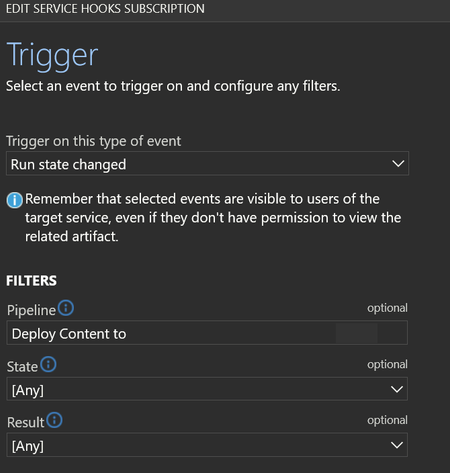
Hello, Ive been using Repository connections in sentinel to a central DevOps for almost two years now. Today i got my first automated email on error for a webhook related to my last commit from the central repo to my Sentinel intances. Its a webhook that is automticly created in connections that are made the last year (the once from 2 years ago dont have this webhook automaticly created). The hook is found in devops -> service hooks -> webhooks "run state change" for each connected sentinel However, after todays run (which was successfull, all content deployed) this hook generates alerts. It says it cant reach: (EU in my case) eu.prod.dps.sentinel.azure.com full url: https://eu.prod.dps.sentinel.azure.com/webhooks/ado/workspaces/[REDACTED]/sourceControls/[REDACTED] So, what happened to this domain? why is it no longer responding and when was it going offline? I THINK this is the hook that sets the status under Sentinel -> Repositories in the GUI. this success status in screenshoot is from 2025/02/06, no new success has been registered in the receiving Sentinel instance. For the Sentinel that is 2 year old and dont have a hook in my DevOps that last deployment status says "Unknown" - so im fairly sure thats what the webhook is doing. So a second question would be, how can i set up a new webhook ? (it want ID and password of the "Azure Sentinel Content Deployment App" - i will never know that password....) so i cant manually add ieather (if the URL ever comes back online or if a new one exists?). please let me know.357Views2likes3Comments
Sentinel incident playbook - get alert entities
Hi! My main task is to get all alerts (alerts, not incidents) from sentinel (analytics rules and Defender XDR) to external case management. For different reasons we need to do this on alert level. Alert trigger by design works perfectly, but this does not trigger on Defender alerts on Sentinel, only analytic rules. When using Sentinel incident trigger, then i'm not able to extract entities related to alerts, only incident releated entities. Final output is sent with HTTP post to our external system using logic app. Any ideas how to get in logic app all alerts with their entities?891Views1like5Comments
Behavior Analytics, investigation Priority
Hello, Regarding the field investigation Priority in the Behavior Analytics table, what would be the value that Microsoft considers to be high/critical to look into the user's account? By analyzing the logs i would say, 7 or higher, if someone could tell me, and thank you in advance.290Views1like1CommentUpdate content package Metadata
Hello Sentinel community and Microsoft. Ive been working on a script where i use this command: https://learn.microsoft.com/en-us/rest/api/securityinsights/content-package/install?view=rest-securityinsights-2024-09-01&tabs=HTTP Ive managed to successfully create everything from retrieving whats installed, uninstalling, reinstalling and lastly updating (updating needed to be "list, delete, install" however :'), there was no flag for "update available"). However, now to my issue. As this work like a charm through powershell, the metadata and hyperlinking is not being deployed - at all. So i have my 40 content packages successfully installed through the REST-api, but then i have to visit the content hub in sentinel in the GUI, filter for "installed" and mark them all, then press "install". When i do this the metadata and hyperlinking is created. (Its most noticeable that the analytic rules for the content hubs are not available under analytic rules -> Rule templates after installing through the rest api). But once you press install button in the GUI, they appear. So i looked in to the request that is made when pressing the button. It uses another API version, fine, i can add that to my script. But it also uses 2 variables that are not documented and encrypted-data. they are called c and t: Im also located in EU and it makes a request to SentinelUS. im OK with that, also as mentioned, another API version (2020-06-01) while the REST APi to install content packages above has 2024-09-01. NP. But i can not simulate this last request as the variables are encrypted and not available through the install rest api. They are also not possible to simulate. it ONLY works in the GUI when pressing install. Lastly i get another API version back when it successfully ran through install in GUI, so in total its 3 api versions. Here is my code snippet i tried (it is basically a mimic of the post request in the network tab of the browser then pressing "install" on the package in content hub, after i successfully installed it through the official rest api). function Refresh-WorkspaceMetadata { param ( [Parameter(Mandatory = $true)] [string]$SubscriptionId, [Parameter(Mandatory = $true)] [string]$ResourceGroup, [Parameter(Mandatory = $true)] [string]$WorkspaceName, [Parameter(Mandatory = $true)] [string]$AccessToken ) # Use the API version from the portal sample $apiVeri = "?api-version=" $RefreshapiVersion = "2020-06-01" # Build the batch endpoint URL with the query string on the batch URI $batchUri = "https://management.azure.com/\$batch$apiVeri$RefreshapiVersion" # Construct a relative URL for the workspace resource. # Append dummy t and c parameters to mimic the portal's request. $workspaceUrl = "/subscriptions/$SubscriptionId/resourceGroups/$ResourceGroup/providers/Microsoft.OperationalInsights/workspaces/$WorkspaceName$apiVeri$RefreshapiVersion&t=123456789&c=dummy" # Create a batch payload with several GET requests $requests = @() for ($i = 0; $i -lt 5; $i++) { $requests += @{ httpMethod = "GET" name = [guid]::NewGuid().ToString() requestHeaderDetails = @{ commandName = "Microsoft_Azure_SentinelUS.ContenthubWorkspaceClient/get" } url = $workspaceUrl } } $body = @{ requests = $requests } | ConvertTo-Json -Depth 5 try { $response = Invoke-RestMethod -Uri $batchUri -Method Post -Headers @{ "Authorization" = "Bearer $AccessToken" "Content-Type" = "application/json" } -Body $body Write-Host "[+] Workspace metadata refresh triggered successfully." -ForegroundColor Green } catch { Write-Host "[!] Failed to trigger workspace metadata refresh. Error: $_" -ForegroundColor Red } } Refresh-WorkspaceMetadata -SubscriptionId $subscriptionId -ResourceGroup $resourceGroup -WorkspaceName $workspaceName -AccessToken $accessToken (note: i have variables higher up in my script for subscriptionid, resourcegroup, workspacename and token etc). Ive tried with and without mimicing the T and C variable. none works. So for me, currently, installing content hub packages for sentinel is always: Install through script to get all 40 packages Visit webpage, filter for 'Installed', mark them and press 'Install' You now have all metadata and hyperlinking available to you in your Sentinel (such as hunting rules, analytic rules, workbooks, playbooks -templates). Anyone else manage to get around this or is it "GUI" gated ? Greatly appreciated.Solved765Views1like6Comments
Fetching alerts from Sentinel using logic apps
Hello everyone, I have a requirement to archive alerts from sentinel. To do that I need to do the following: Retrieve the alerts from Sentinel Send the data to an external file share As a solution, I decided to proceed with using logic apps where I will be running a script to automate this process. My questions are the following: -> Which API endpoints in sentinel are relevant to retrieve alerts or to run kql queries to get the needed data. -> I know that I will need some sort of permissions to interact with the API endpoint. What type of service account inside azure should I create and what permissions should I provision to it ? -> Is there any existing examples of logic apps interacting with ms sentinel ? That would be helpful for me as I am new to Azure. Any help is much appreciated !679Views1like4Comments
Can we deploy Bicep through Sentinel repo
Hi there, Im new here, but 😅.... With the problem statement being "Deploying and managing sentinel infrastructure through git repository. I had looked into Sentinel Repository feature which is still in Preview. With added limitations of not being able to deploy watchlists or custom log analytical functions ( custom parsers ). There is also a limitation of deploying only ARM content My guess would be that the product folks at msft are working on this 😋 My hypothesized (just started the rnd, as of writing this) options would be to Fully go above and beyond with Bicep; Create bicep deployment files for both the rules as well as their dependencies like LAW functions, watchlists and the whole nine yards. Need to write pipelines for the deployment. The CI/CD would also need extra work to implement Hit that sweet spot; Deploy the currently supported resources using sentinel repo and write a pipeline to deploy the watchlists using Bicep. But not sure if this will be relevant to solutions to clients. When the whole shtick is that we are updating now so we dont have to later. Go back to the dark ages: Stick to the currently supported sentinel content through ARM & repo. And deploy the watchlists and dependencies using GUI 🙃 I will soon confirm the first two methods, but may take some time. As you know, I may or may not be new to sentinel...or devops.. But wanted to kick off the conversation, to see how close to being utterly wrong I am. 😎 Thanks, mal_sec114Views1like0Comments
Working around the "Analytics rule start time" for mass deploying using Workspace Manager
Hi! What are some of your thoughts/experiences of working around the "The Analytics rule start time must be between 10 minutes and 30 days from now" for mass deploying using Workspace Manager? Lets say I have 100 Analytic rules that I want to deploy to current customer using Workspace manager. This goes fine, but when a new customer arrives 1 month later, I have to redo the start time of all the Analytic rules that hasn't been changed in the last month. Doing this manually is just not an option. What I can see as a possible solution, is to use Repositories at the same time, where I would use a script to mass update the start time for all rules I need. Then sync back to Analytic rules and deploy again to new customer.229Views1like0Comments