auditing
49 Topics
How much of your Microsoft 365 environment can you actually see at once?
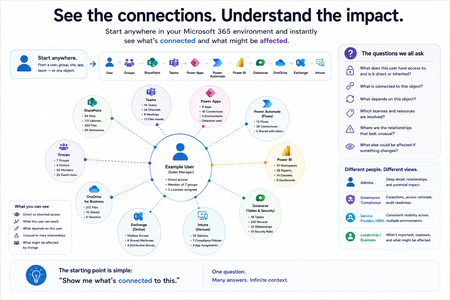
Not how many users you have. Not how many sites, teams, apps or flows you have. How much of it can you actually see connected together? I've been working across Microsoft 365 environments for a while, and I kept running into the same thing. There is no shortage of information. If anything, there is probably too much of it. Users, groups, permissions, SharePoint, Teams, Power Apps, Power Automate, Power BI, Dataverse, OneDrive, Exchange, Intune, licensing, configuration... It's all there. But when you're actually trying to understand how everything fits together, it can be a different story. You open one blade. Find something. Open another. Cross-check it. Go back. Open something else. Before long, you're jumping between different parts of the tenant trying to build the bigger picture in your head. And if you're working with larger environments, that gets difficult pretty quickly. The information isn't necessarily missing. The relationships between the information are what can be difficult to see. That got me thinking about a slightly different question: Instead of "where do I find this information?" "Show me what's connected to this." That's where VisibleState started. Start anywhere. Follow the connections. Imagine starting with a single user. Instead of seeing that user simply as a record with a list of properties, imagine being able to explore the relationships around them: User → Groups → SharePoint → Teams → Power Apps → Power Automate → Power BI → Dataverse → OneDrive → Exchange → Intune Then the questions become different: What does this user have access to? Is that access direct or coming through a group? What resources are connected to them? What depends on something they're associated with? Which licenses are involved? Are there relationships that look unusual? If something changes, what else might be affected? Those questions aren't necessarily about finding another piece of information. They're about putting information that already exists into context. A report can tell you that something exists. A connected view helps you understand what it is connected to. Illustrative example below — not a real customer environment. I'm not suggesting Microsoft 365 doesn't already give us this information Quite the opposite. Microsoft 365 already gives administrators an incredible amount of information and tooling. The thing I've been thinking about is what happens when you want to look across those boundaries. Sometimes I don't want another export. I don't want another list. I don't necessarily want another dashboard. I want to start with something I'm looking at and ask: "What's connected to this?" And then keep following the trail. That's the idea I'm exploring with VisibleState. The interesting part is what happens when you change the viewpoint The same relationships can be useful for completely different reasons. For example: Administrators may want to understand access, permissions and dependencies. Security and governance teams may want to find unusual relationships or exceptions. Compliance teams may need to understand who can access something and why. People managing multiple environments may want a consistent way to understand what's there without rebuilding the picture manually every time. Leadership may not need to see the graph at all. They may simply want to know what's important, what's exposed and what could be affected. It's still the same underlying environment. You're just looking at it from a different angle. And that's where I think things get interesting. Where I'm at with it VisibleState started as something I was building to make my own work easier. I was spending a lot of time investigating environments, tracing access and putting information together for reports. The individual tasks weren't necessarily difficult. It was the jumping between different places and reconstructing the bigger picture that took the time. So I started building something that would let me approach the environment through the relationships instead. It's grown quite a bit from where it started, and I'm continuing to build it. I'm not posting this as a product launch, and I'm not looking for people to sign up. I'm genuinely interested in whether the problem I'm seeing is familiar to other people working with Microsoft 365. So I'm curious... If you could start with any object in your Microsoft 365 environment and immediately see what it's connected to, where would you start? Would it be: Users and access Groups and permissions SharePoint and Teams Power Apps, Power Automate, Power BI and Dataverse Licensing and resources Governance and unusual relationships Something completely different Maybe you've already got a good way of doing this. Maybe you still find yourself jumping between different services and piecing things together manually. Or maybe I'm looking at the problem from the wrong direction. What's the one relationship in your Microsoft 365 environment that you wish you could see instantly?171Views0likes0CommentsI built a free, open-source M365 security assessment tool - looking for feedback
I work as an IT consultant, and a good chunk of my time is spent assessing Microsoft 365 environments for small and mid-sized businesses. Every engagement started the same way: connect to five different PowerShell modules, run dozens of commands across Entra ID, Exchange Online, Defender, SharePoint, and Teams, manually compare each setting against CIS benchmarks, then spend hours assembling everything into a report the client could actually read. The tools that automate this either cost thousands per year, require standing up Azure infrastructure just to run, or only cover one service area. I wanted something simpler: one command that connects, assesses, and produces a client-ready deliverable. So I built it. What M365 Assess does https://github.com/Daren9m/M365-Assess is a PowerShell-based security assessment tool that runs against a Microsoft 365 tenant and produces a comprehensive set of reports. Here is what you get from a single run: 57 automated security checks aligned to the CIS Microsoft 365 Foundations Benchmark v6.0.1, covering Entra ID, Exchange Online, Defender for Office 365, SharePoint Online, and Teams 12 compliance frameworks mapped simultaneously -- every finding is cross-referenced against NIST 800-53, NIST CSF 2.0, ISO 27001:2022, SOC 2, HIPAA, PCI DSS v4.0.1, CMMC 2.0, CISA SCuBA, and DISA STIG (plus CIS profiles for E3 L1/L2 and E5 L1/L2) 20+ CSV exports covering users, mailboxes, MFA status, admin roles, conditional access policies, mail flow rules, device compliance, and more A self-contained HTML report with an executive summary, severity badges, sortable tables, and a compliance overview dashboard -- no external dependencies, fully base64-encoded, just open it in any browser or email it directly The entire assessment is read-only. It never modifies tenant settings. Only Get-* cmdlets are used. A few things I'm proud of Real-time progress in the console. As the assessment runs, you see each check complete with live status indicators and timing. No staring at a blank terminal wondering if it hung. The HTML report is a single file. Logos, backgrounds, fonts -- everything is embedded. You can email the report as an attachment and it renders perfectly. It supports dark mode (auto-detects system preference), and all tables are sortable by clicking column headers. Compliance framework mapping. This was the feature that took the most work. The compliance overview shows coverage percentages across all 12 frameworks, with drill-down to individual controls. Each finding links back to its CIS control ID and maps to every applicable framework control. Pass/Fail detail tables. Each security check shows the CIS control reference, what was checked, what the expected value is, what the actual value is, and a clear Pass/Fail/Warning status. Findings include remediation descriptions to help prioritize fixes. Quick start If you want to try it out, it takes about 5 minutes to get running: # Install prerequisites (if you don't have them already) Install-Module Microsoft.Graph, ExchangeOnlineManagement -Scope CurrentUser Clone and run git clone https://github.com/Daren9m/M365-Assess.git cd M365-Assess .\Invoke-M365Assessment.ps1 The interactive wizard walks you through selecting assessment sections, entering your tenant ID, and choosing an authentication method (interactive browser login, certificate-based, or pre-existing connections). Results land in a timestamped folder with all CSVs and the HTML report. Requires PowerShell 7.x and runs on Windows (macOS and Linux are experimental -- I would love help testing those platforms). Cloud support M365 Assess works with: Commercial (global) tenants GCC, GCC High, and DoD environments If you work in government cloud, the tool handles the different endpoint URIs automatically. What is next This is actively maintained and I have a roadmap of improvements: More automated checks -- 140 CIS v6.0.1 controls are tracked in the registry, with 57 automated today. Expanding coverage is the top priority. Remediation commands -- PowerShell snippets and portal steps for each finding, so you can fix issues directly from the report. XLSX compliance matrix -- A spreadsheet export for audit teams who need to work in Excel. Standalone report regeneration -- Re-run the report from existing CSV data without re-assessing the tenant. I would love your feedback I have been building this for my own consulting work, but I think it could be useful to the broader community. If you try it, I would genuinely appreciate hearing: What checks should I prioritize next? Which security controls matter most in your environment? What compliance frameworks are most requested by your clients or auditors? How does the report land with non-technical stakeholders? Is the executive summary useful, or does it need work? macOS/Linux users -- does it run? What breaks? I have tested it on macOS, but not extensively. Bug reports, feature requests, and contributions are all welcome on GitHub. Repository: https://github.com/Daren9m/M365-Assess License: MIT (free for commercial and personal use) Runtime: PowerShell 7.x Thanks for reading. Happy to answer any questions in the comments.4.9KViews2likes2CommentsSearch-UnifiedAuditLog Updated to Make Large Searches Easier to Manage
The advent of the MoreRecordsAvailable property gives the Search-UnifiedAuditLog cmdlet more precise control over fetching large numbers of audit records (up to 50,000 records). It’s a welcome change to report something positive about the Microsoft Purview Audit solution because most of the time we complain about its stability, slowness, and bugs. Things are looking up. https://office365itpros.com/2026/05/18/morerecordsavailable-property85Views0likes0CommentsAn Explosion of Audit Events for Legacy SharePoint Online Authentication
Microsoft phased out the legacy IDCRL authentication mechanism from SharePoint Online on May 1, 2026. Sounds good, until you notice the explosion of IDCRLBlockedDueToSoftEnforcement events created by SharePoint Online in the unified audit log. The events are associated with Microsoft Office apps like Word, which SharePoint appears to think are still using IDCRL. For whatever reason, the audit log is now cluttered with unwanted events generated by the interaction between SharePoint and Office. https://office365itpros.com/2026/05/07/idcrl-audit-events/228Views1like0CommentsPrimer: How to Use RBAC for Applications to Control App Use of the Mail.Send Permission
The temptation to use the Mail.Send application permission in scripts can lead PowerShell developers into trouble because the permission allows access to all mailboxes, including sensitive executive and financial mailboxes. Fortunately, RBAC for Applications allows tenants to control the access that apps have to mailboxes and other Exchange content. All explained here with an example script to test RBAC of Applications. https://office365itpros.com/2026/02/17/mail-send-rbac-for-applications/794Views3likes4CommentsMicrosoft Fixes Copilot Audit Records
After a report to the MSRC about some missing file data from Copilot audit records, Microsoft fixed the problem and audit records now contain details about the SharePoint Online files reviewed by Copilot to construct answers to user prompts. Having solid audit and compliance data is a good thing, unless you’re a lawyer charged with defending an eDiscovery action who might be asked to produce the files. https://office365itpros.com/2025/08/22/copilot-audit-records-fixed/151Views0likes0Comments
Purview and auditing file modifications
I have full M365 E5 license and use Purview auditing a lot for investigations. I noticed is reports file modified which is create but some of my files would get modified constantly. I'm curious if it can log and provide a report on what exactly was modified. For example: If text was added or deleted, can it tell me what was added or deleted i.e. the actual text and the action (Add\Delete) If an image was pasted into a word document, can it tell me that? If possible, down to a copy of the image that was inserted? If it can't do this level of detail anyone have suggestions of a product that can?173Views0likes1Comment
Auditing Resource Bookings
I am once again dealing with overlapped bookings on rooms set to not allow overlapped bookings. I've verified this in PowerShell. I've limited who can make these to 2 users. I've trained these users. They are using Outlook on the web - just in case the app doesn't update. STILL, I am getting bookings on top of each other. One person books something - then another person books something on top of it. I need to audit this. I have enabled resource auditing. I have tried 1) Purview auditing the booking users - everything they do related to Exchange. This returns hundreds of entries for the time periods specified, and I genuinely do not have time to parse all of this. 2) using purview to search only for entries on the room resource. These apparently have no data, ever. 3) Using purview to search for activities related to booking.. Too bad the activity dropdown does not work, and 80% of the entries are repeats. Maybe I can find operation names from the documentation? (no) 4) Maybe Copilot can help me find operation names? (no, he just hallucinates) 6) Abandoning Purview, I open Exchange and head to the Collect Logs entries. I run both Resource Bookings and Calendar logs. Because that is, essentially, exactly what I want. Unfortunately neither of these are even remotely useful to a human - except to confirm this shouldn't be possible. I spend an hour parsing through the endless nigh-identically named fields, to find data relevant to me - What I can find isn't accurate, and isn't useful. 7) I open Outlook, and try to look at the actual mail interactions on that shared mailbox. Unfortunately, there is nothing for these days. No sent, inbox, deleted items referencing the bookings at all. 8) I open powershell, i try commands microsoft gives. These are deprecated. This should really not be this hard. In fact, it should be REALLY EASY to see when bookings came in and out. I am really close to looking for a 3rd party solution just so i don't have to waste any more time on this172Views0likes1CommentUse Audit Data to Improve Finding Inactive Copilot Users
A previous article explained how Microsoft 365 usage report data can highlight inactive Copilot users. If we add audit data to the mix, the analysis becomes much richer because we can see exactly what use people make of different Copilot apps, like Word, Chat, Outlook, and so on. Better data means better decisions! https://practical365.com/inactive-copilot-users/135Views0likes0Comments
Report all active users in tenant and their installed integrated apps
Our security team has requested that we block the install of any Copilot apps until our AI policy is in place. Before we do this, I'd like to know what apps from Microsoft 365 admin center > Settings > Integrated apps > Available apps are currently installed by our users. I don't see any way that the UI offers this capability, so I believe it will be PowerShell. I did already run the following script, but it returns only 2 apps, which are apps we have deployed to our users. It's possible our 2600 users haven't installed anything else, but not probable. Install-Module O365CentralizedAddInDeployment Import-Module -Name O365CentralizedAddInDeployment Connect-OrganizationAddInService Get-OrganizationAddIn If the above isn't possible, it would also be useful to find a script that would give me a list of users who have a given app (from 365 Integrated apps > Available apps) installed, such as CopilotForce or Microsoft Copilot Studio.817Views0likes2Comments