artificial intelligence
417 TopicsMoonshot AI’s Kimi K3.1 Pro comes to Microsoft Foundry
The hardest work for an AI agent rarely fits into a single prompt. A coding agent may need to follow a change across a large repository. A research agent may need to work through lengthy documents, charts, and images before it can give a useful answer. In both cases, the challenge is not just generating a response, but keeping track of the work as it unfolds Today, Moonshot AI’s Kimi K3.1 Pro is coming to Microsoft Foundry. It is an open-weight model built for agentic work, with text and image understanding and a context window of up to 1 million tokens. That combination makes it an interesting choice for developers building coding, research, and document-heavy applications. Where Kimi K3.1 Pro stands out Kimi K3.1 Pro is the first model in Moonshot AI’s K3.1 series. It builds on Kimi K3 with improvements across coding, research, and other multi-step tasks. Its large context window gives applications room to bring more relevant material into a task, while its multimodal capabilities let the model work with images alongside text. That opens up practical possibilities: Coding across a larger body of work. Give an agent the context it needs to investigate a change, understand related files, and work through an engineering task. Research grounded in source material. Bring lengthy reports and supporting material into a workflow so the model can examine the evidence before producing a synthesis. Work that combines text and visuals. Build applications that need to interpret images, charts, or document pages as part of a broader task. A large context window is useful, but it is not a shortcut to a good application. What matters is whether the model can use that context effectively, complete the task, and do so at a cost and speed that work for the customer. Choose based on the work your users need done Moonshot AI’s benchmarks have strong results for Kimi K3.1 Pro across coding, agentic, and multimodal evaluations. Those benchmarks are a useful starting point, but they do not answer the question every developer ultimately has: Will this model perform well in my application? The best way to find out is to test it on representative tasks. Compare the quality of the completed work, not just the first response. Look at how reliably the agent handles long inputs, where it needs tools, how it performs with visual material, and the cost per successful task. That is the value of bringing another capable model into Microsoft Foundry. Developers can evaluate Kimi K3.1 Pro alongside other models and make a choice grounded in their own workload, rather than assuming one model is right for every step. Pricing table Model Input Price /M Tokens Cache Price /M Tokens Output Price /M Tokens Kimi 3.1 Pro $2.30 $0.23 $11.50 Get started in Microsoft Foundry Explore Kimi K3.1 Pro in the Microsoft Foundry model catalog.. Start with a real coding, research, or document workflow, establish a baseline with the model you use today, and see where Kimi K3.1 Pro makes a meaningful difference. The opportunity is not simply to fit more into a prompt. It is to build agents that can stay with a complex task long enough to deliver a better result. We understand from customers how important a variety of open weight models are for their specific workloads and needs. Today’s launch of Kimi K3.1 Pro on Microsoft Foundry is the latest in our ongoing investment in the open weight model ecosystem. Microsoft Foundry features a wide range of open-weight models from providers including NVIDIA, OpenAI, DeepSeek, MiniMax, Mistral AI, Moonshot AI, and Qwen. Even more models are available through partners, such as Fireworks on Foundry.453Views0likes0CommentsBuilding the next generation of multimodal AI experiences with fal in Microsoft Foundry
Video workloads do not all start with the same input or aim for the same result. A creative team might explore several interpretations of a written brief. A retailer might turn an approved product image into a short motion concept. An application developer might combine image generation and video generation into a workflow that takes an idea from description to frame to scene. Each scenario brings different requirements for visual quality, motion, creative control, turnaround time, and cost. All of this means that a multi-model solution is necessary to realize a full vision. Today, Microsoft and fal are helping developers find the right tools for their workloads. We are excited to announce that Kling, LTX, and MiniMax video models are rolling out to in public preview in Microsoft Foundry through our new partnership with fal. Available as a first-party Azure service, these text-to-video and image-to-video options give creators and developers more ways to utilize video generation with the experiences they want to build. The partnership expands the choices available in Microsoft Foundry while bringing video into the broader platform developers use to build AI applications. The goal is to let developers pick the right model for each step of an experience, then connect those steps into a working application. “fal has seen incredible adoption this year alone with generative media across all industries from advertising to marketing to gaming. Partnering with Microsoft allows both of us to truly enable the wide creative ecosystem and ensure that all AI solutions that lean on generative media, becomes a multi-model one.” - Burkay Gur, Cofounder Bringing fal’s generative media focus to enterprise builders fal is the full stack for generative media, built for creators and developers, with APIs for over 1500 models across image, video, audio, 3D, and generative worlds. As a truly encapsulating platform, fal provides inference, training, and infrastructure to run generative media workloads in production, while also providing innovative post trained models that pushes the boundaries on speed and quality. That specialization matters because generative media is both a creative and an engineering workload. A compelling demo is only the start. Production applications also need to handle real traffic, scale with demand, and balance output quality, latency, and cost. Through this partnership, developers will be able to access a selected set of video models in Microsoft Foundry, served by fal and sourced from the companies that build them. The initial portfolio gives teams a choice of models for different creative requirements instead of relying on one model for every task, with more models planned over time. A portfolio for different video experiences The initial portfolio spans Kling v3 Pro, LTX-2.5 Fast, LTX-2.5 Pro, MiniMax H3 Max, and MiniMax H3 Max Turbo. These models give developers different starting points for generating video from text and animating existing images. A team rapidly exploring creative concepts may prioritize speed and cost, while a team producing fewer, higher-fidelity assets may weigh output quality more heavily. Whether an application starts from text or an existing image, and what it needs in output quality and cost, also shapes the choice. Kling: From a still image to a directed scene Kling v3 Pro combines cinematic visuals and fluid motion with native audio generation and custom element support. Its image-to-video capabilities give developers control over how a starting image becomes a moving scene, a fit for applications that prioritize visual direction and motion. LTX: One model for fast drafts, one for final output For rapid iteration and previews, LTX-2.5 Fast is the speed-optimized option; for high-fidelity final output, LTX-2.5 Pro is the quality-optimized option. Both support text-to-video and image-to-video generation with synchronized audio. MiniMax: Another approach to video generation MiniMax H3 Max and MiniMax H3 Max Turbo are post-trained variants of MiniMax H3 focused on prompt adherence, aesthetics, and inference performance. For developers, they provide additional options to evaluate against an application’s creative brief, quality requirements, and performance needs. “When building with video models, the details matter: how closely the output follows your prompt, how well it preserves your reference images/videos/audios and how quickly you can try another idea. Kling gives developers control over detailed reference to video generation. LTX offers fast iteration and high-quality output through its Fast and Pro variants. H3 Max brings fal's post-training and inference optimizations to improve quality and speed. Having these models available through Microsoft Foundry gives developers more flexibility to choose what works best for the application they are building." - Gökay Aydoğan, Creative Engineer Built for enterprise video workloads Bringing video generation into an enterprise application requires more than choosing the right model. Teams need a platform where they can evaluate different options, build with the models that fit their requirements, and operate those experiences alongside the rest of their applications. The initial portfolio of video models is hosted in the US, and Microsoft Foundry is the first provider to offer a US-hosted Kling endpoint. Key considerations for enterprise teams: Data residency: For organizations with data residency requirements, hosting location is one factor to weigh. Review each model's documented data processing and storage terms to confirm it meets your requirements. Model evaluation: Teams can assess quality, performance, and cost, then connect video generation with the other models and capabilities their applications need. Production readiness: As they move toward production, they can use the evaluation, optimization, governance, security, observability, and infrastructure capabilities supported for their selected offering. Pricing Video generation pricing varies by model and output resolution, giving teams options to balance creative requirements with their application’s budget. The table below shows pricing in USD per minute of generated video for LTX and MiniMax models, making it easier to compare costs across the available options. Model name Deployment type Format Resolution Price per video second (USD) MiniMax H3 Max Global Standard Text to video Image to video Reference to video 480p $0.05 768p $0.08 1080p $0.16 MiniMax H3 Max Turbo Global Standard Text to video Image to video 480p $0.025 768p $0.04 1080p $0.08 LTX-2.5 Fast Global Standard Text to video Image to video 720p $0.09 1080p $0.13 1440p $0.19 4K $0.30 LTX-2.5 Pro Global Standard Text to video Image to video 720p $0.12 1080p $0.17 Kling v3 Pro US Data Zone Text to video Image to video audio off $0.1232 Kling v3 Pro US Data Zone Text to video Image to video audio on $0.1848 Kling v3 Pro US Data Zone Text to video Image to video audio + voice control $0.2156 Pricing will be updated and listed on our Azure pricing page within the coming weeks. Get started Ready to start building? Join us at Ignite for BRK256: Video AI at Scale with fal on Microsoft Foundry. Naomi Moneypenny and Alexander Hughes from Microsoft will be joined by Burkay Gur and Lovis Odin from fal on stage to explore this partnership on Thursday, November 19 at 11:00 AM - 11:45 AM CT. Register today! Explore Kling v3 Pro, LTX-2.5 Fast, LTX-2.5 Pro, MiniMax H3 Max, and MiniMax H3 Max Turbo in Microsoft Foundry and find the model that fits your video experience. Explore the models in Microsoft Foundry Learn more about fal Read the quick start guide to using fal models with ComfyUI here If you are interested in testing out new models, check the Microsoft Foundry Model Releases Repository430Views1like0CommentsGPT-6.1 Terra now generally available in Microsoft Foundry: build agents that see and act
AI agents that read dense charts, navigate desktop apps, and process scanned documents are only as capable as the model behind them. OpenAI’s GPT-6.1 Terra, now generally available in Microsoft Foundry, delivers significant gains in visual reasoning and computer-use speed, so the apps and agents you build can see more and act faster. AI projects often slow down on identity, networking, governance, data handling, evaluation, and compliance. Microsoft Foundry brings these fundamentals together in Azure, so you can take GPT-6.1 Terra from prototype to production with speed and trust. What's new in GPT-6.1 Terra GPT-6.1 Terra is a quick, efficient model built for day-to-day professional tasks, with four core strengths: Stronger vision. Improved visual reasoning helps the model pick out the details that matter in product photos, technical drawings, floor plans, and application screens. Faster, more precise computer use. The model pairs what it sees with quick, accurate actions across browsers, desktop software, and apps, so agents can go from reviewing information to finishing the task. Clear writing. Summarizes what it finds in plain, approachable language and drafts natural-sounding emails and proposals for everyday work. GPT-6.1 Terra also provides: Large context window. Up to 1M input tokens. Multimodal input. Accepts text and images. Developer controls. Tune reasoning effort, including a none setting for latency-sensitive calls, and adjust verbosity to match response length to the task. Interim updates. When your orchestration layer supports it, the model can send interim messages to the user while it continues working toward a final response, keeping long-running tasks responsive. Where GPT-6.1 Terra fits GPT-6.1 Terra is built for work that starts with visual analysis and ends with action inside software: Forms, email, and proposals. Complete forms and draft emails and proposals as part of routine administrative work. Design and technical visuals. Review campaign assets for cropping and text placement and turn issues into a clear list of fixes or read technical drawings and update floor plans in the right tools. Visual analysis to action. Review what appears in images or on application screens and use those insights to drive the next step in a software workflow. Retail catalog upkeep. Match supplier product images to existing catalog entries, spot gaps in product details, and update listings in the browser. Video workflows. Find a specific moment in a video and make edits through video applications. GPT-6.1 Terra complements GPT-6 Astra. Astra reasons through open-ended, multi-step work and plans the job. Terra handles the high-volume visual and screen-based tasks inside it, at a lower price point. Built into the Foundry platform GPT-6.1 Terra works with the Foundry APIs and tools you already use. It’s available through the Responses API with no new SDK requirements or schema changes. From day one, GPT-6.1 Terra is available through Foundry Models in Global Standard deployments across all supported regions, and in Data Zone Standard deployments in US, EU and APAC. You can adopt the latest frontier model where you’ve already built and scaled your applications, without trading off performance for data residency. Watch the demo with Naomi Moneypenny for a platform-wide walkthrough of model selection, evaluation on your own data, and approaches to cost optimization. GPT-6.1 Terra Pricing (USD/1M tokens) Model Deployment Context Length Pricing (USD $/million tokens) Input Cached Input Cached Writes Output GPT-6.1 Terra Global Standard Short context $1.00 $0.05 $1.25 $5.00 Long context $2.00 $0.10 $2.50 $7.50 Data Zone Standard (US) Short context $1.10 $0.055 $1.375 $5.50 Long context $2.20 $0.11 $2.75 $8.25 Data Zone Standard (EU) Short context $1.20 $0.06 $1.50 $6.00 Long context $2.40 $0.12 $3.00 $9.00 Data Zone Standard (APAC) Short context $1.20 $0.06 $1.50 $6.00 Long context $2.40 $0.12 $3.00 $9.00 Learn more pricing details in here. Put GPT-6.1 Terra to work on your next AI app Deploy GPT-6.1 Terra in Microsoft Foundry today to build apps and agents that read complex visuals and act on screen faster. Some steps in your app need a fast, structured answer instead of generated text, such as classifying content or routing a request. For those, use the Decisions API. Last week, we announced the general availability of OpenAI’s Decisions API with GPT-6 Luna in Microsoft Foundry. Terra handles the visual and on-screen work, and the Decisions API makes the quick call on what happens next. Whichever you start with, you get development, evaluation, and governance on one platform, so you can move from prototype to production with confidence.2.8KViews0likes3CommentsAzure OpenAI Decisions API: Now generally available in Microsoft Foundry
AI applications and agents do more than generate content. They constantly make decisions about what should happen next. Which model should handle this request? Is a customer issue urgent? Did an agent’s output meet the required criteria? Should a workflow continue, try another approach, or involve a person? As agents become more sophisticated, these decisions can happen hundreds or even thousands of times across a workflow, and not every one of them requires a full generative response. On October 22, we brought the OpenAI Decisions API to Microsoft Foundry, giving developers a purpose-built way to make fast, focused decisions across AI applications and agentic workflows. The Decisions API evaluates text, images, and structured inputs and turns them into actionable choices, probabilities, and scores. It brings intelligence directly into the control flow of an application, helping developers determine what should happen next without relying on traditional generative inference for every step. This represents an important evolution in how models can be used within AI systems. Sometimes you need a model to create. Sometimes you need it to reason deeply across a complex problem. And sometimes, the most valuable thing a model can do is make a focused decision that helps the rest of the system move forward. Decision-making is becoming a core part of agentic applications Consider an AI customer service agent handling an incoming request. Before it generates a response, the application may need to understand what the customer is asking about, determine how urgent the issue is, identify which model or tool is best suited to handle it, and decide whether specialized expertise is required. Once a response has been generated, the application may need to evaluate it again, determining whether it adequately addressed the customer's issue, met the application's requirements, or should be escalated for human review. For an agentic workflow, that distinction can be significant. Before work begins, an application can evaluate an incoming request and route it to the right model or tool. During execution, an agent can assess possible actions and choose the appropriate next step. After another model completes a task, the application can evaluate the output against defined criteria and decide whether to continue, retry, take a different path, or bring a person into the workflow. Before work begins: Evaluate an incoming request and route it to the right model or tool. During execution: Assess possible actions and choose the appropriate next step. After a task completes: Evaluate the output against defined criteria and decide whether to continue, retry, take a different path, or bring a person into the workflow. These decisions may be small individually, but collectively they shape how an agent behaves. Giving developers a model designed specifically for these moments creates an opportunity to build systems that can make these choices efficiently while reserving more computationally intensive reasoning and generation for the parts of the experience that need them. Turn inputs into decisions your application can use The Decisions API gives developers a dedicated endpoint for evaluating inputs against questions they define. Each question supports one of three focused outcomes: a probability, a choice from a predefined set of options, or a score against a defined rubric. Instead of parsing generated text to determine what a model meant, application code can work with defined values designed to inform what happens next. Probability: Determine whether a condition is true and return a confidence value. Multiple choice: Select from a predefined set of options. Rubric scoring: Score an input against defined criteria. Instead of parsing generated text to determine what a model meant, application code can work with defined values designed to inform what happens next. Use the right model for the right moment What makes this especially powerful is the impact on real-world agentic applications. As agents become more sophisticated, they make hundreds or even thousands of decisions across workflows. The latency and cost of each decision can quickly compound. With the Decisions API, developers can bring intelligence directly into these critical decision points, from dynamically routing requests and prioritizing customer issues to evaluating agent outputs and deciding when human intervention is needed. This is an important shift from using AI primarily to generate content toward using AI to drive responsive, efficient, and intelligent systems. For developers, the opportunity isn't simply to build agents capable of doing more. It's to make those agents faster, more cost-efficient, and practical to operate at enterprise scale. That could mean routing a request to the appropriate model rather than automatically using a larger model, prioritizing customer issues before an agent begins working on them, or evaluating an agent's output before deciding whether a workflow can continue autonomously. In each of these cases, the model isn't responsible for producing the final experience. It's helping the application intelligently decide how that experience should unfold. Building AI systems that can decide what comes next The broader shift here is from thinking about AI primarily as something that generates an answer to thinking about intelligence as something that can be embedded throughout an application. Generative models remain essential for creating, reasoning, and interacting with users, but increasingly sophisticated agents also need intelligence between those moments to continuously determine what to do next. Developers can use it alongside other models to create workflows where reasoning, generation, evaluation, routing, and decision-making each happen where they make the most sense. As those workflows become longer and more autonomous, having a focused way to make the many smaller decisions along the way can become just as important as the models performing the largest tasks. Get started with the Decisions API For developers, the Decisions API is available through a dedicated /openai/v1/decisions endpoint on an Azure OpenAI resource and is available with GPT-6 Luna. Developers can call the endpoint using OpenAI SDKs or REST, pass their GPT-6 Luna deployment name in the model field, and authenticate using an API key or Microsoft Entra ID. Learn more about the Decisions API → Learn how it works here. Try the Decisions API in Microsoft Foundry → https://ai.azure.com As we continue expanding the models and capabilities available through Microsoft Foundry, I'm particularly excited about what this unlocks for developers building the next generation of AI applications. The opportunity isn't simply to give agents access to increasingly capable models. It's to build systems that can apply the right intelligence at the right moment, from the complex reasoning and generation that users see to the many decisions happening behind the scenes. The next generation of AI applications won't just be defined by how well they generate. They'll also be defined by how intelligently and efficiently they decide what to do next. Pricing (per 1M tokens) Decision API supported model Input Output Cached input 30-minute cached write GPT-6 Luna $0.10 N/A $0.01 $0.125 Start building with the Azure OpenAI Decisions API in Microsoft Foundry today to bring reliable, structured decision-making to your apps and agents.3.1KViews2likes0CommentsImplementing Next Best Action (NBA) in Foundry with Microsoft-Decision-1
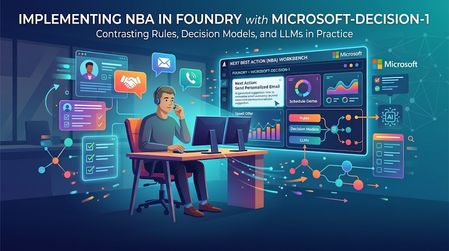
Imagine a sales rep opening their account list at the start of the day. One customer wants a product demo. Another has a larger potential deal, but its requirements may not match what your product can do. A third has asked you not to contact them for another week. A construction permit looks promising, but you are not even sure the applicant is the company in your CRM. You do not need another summary of the list. You need to know: what should I do next? That is the starting point for this demo: a next best action workbench for sales reps, built with Microsoft Foundry. It compares rules, GPT-4o, and Microsoft-Decision-1 against the same evidence. The accounts and evidence are synthetic; the hosted model responses are real. The interesting part is not which model wins. It is how the sales question changes, and what that reveals about the kind of decision support we need. A Bigger Deal Is Not Always the Next Call The first scenario puts four fictional sales motions in front of the rep: Apex: a $76,000 expansion. The buyer has requested a dispatch demo, and the capability exists today. Summit: a $210,000 cross-sell. The buyer wants capabilities that are not all established as currently supported. Coastal: a $158,000 expansion. The customer has explicitly paused sales contact until October 23. A similar-name permit applicant: a $3.1 million construction project, but an unverified account match and unknown software opportunity value. Sorting by the largest number would miss the point. A construction budget is not software revenue. A large opportunity does not justify promising a roadmap feature. A territory's quota pressure does not override a customer's request not to be contacted. So "next best action" is really two questions: which account deserves attention, and what kind of attention is appropriate? Contact now, clarify requirements, defer, and request human review are different outcomes. Doing nothing yet can be the correct one. Some of those decisions should not be left to a model. In this application, code enforces contact restrictions, evidence requirements, and identity checks before any model recommendation is accepted. Coastal's pause is a boundary, not a factor a model can trade against deal size. The unverified applicant needs review, not a confident sales approach. With those boundaries in place, we can compare how each method handles the remaining judgment. First, Try the Simple Answer The first version uses a transparent scoring formula: software opportunity value, territory quota shortfall, a requested meeting, and whether the buyer needs an unavailable capability. In the recorded routine comparison, all three methods agreed on the ranking and next actions. Rules needed no model tokens and were the simplest adequate implementation for that case. That is a useful outcome. If the relevant facts are already explicit and a few conditions capture the decision, adding a model may add latency and cost without adding useful capability. But consider what happens when "meeting requested" stops telling the whole story. The Same Meeting Request Can Mean Different Things The second scenario is a separate authored version of the synthetic evidence, not a claim that these accounts changed in real time. Apex now has the larger seller-entered estimate, but the meeting is exploratory: there is no established buying process or approved budget. Summit has a smaller funded pilot, completed requirements review, and near-term rollout readiness. Both have requested a meeting. Both need supported capabilities. To the fixed formula, those meeting requests look the same. It ranks Apex first. To a rep reading the context, a discovery invitation and a funded pilot are not equivalent signals. We could extend the rules with readiness fields and more conditions. That may be the right choice. But this is also where a different kind of model becomes interesting: one that interprets the evidence and returns a bounded decision rather than a paragraph. Where Decision Models Fit Models such as TypeSafe AI's Jev have brought attention to this decision-first approach. Supply the situation, define the possible answers, and receive structured choices or scores that software can use directly. TypeSafe calls this a System One model. Microsoft-Decision-1 brings that approach to Microsoft Foundry. Instead of asking it to write a recommendation, this application asks two questions for each eligible account: what action fits, and how much priority should it receive? The application defines the available actions and the priority scale. Decision-1 does not generate a written rationale. It returns a selected action and a score. Its API also supports yes/no probability questions. Jev is context for the emerging category, not a model tested in this comparison. In the recorded contextual runs, both Decision-1 and GPT-4o ranked Summit first, while rules ranked Apex first. One earlier run also showed a useful distinction: GPT-4o suggested outreach for Apex; Decision-1 suggested researching it further. The takeaway is not that models understand sales better than rules. It is narrower: the context changed the models' recommendation in a way this particular formula could not express. That is a reason to evaluate contextual judgment, not proof of better revenue outcomes. These are authored teaching cases, and "Summit first" is the intended case criterion, not a measured commercial result. Choosing the Account Is Only the Beginning Now change the question again. It is no longer just "should we pursue the funded pilot?" It becomes: Can we propose a rollout that fits the customer's deadline and budget? A selected action is no longer the complete answer. The rep needs a proposal: phases, dates, costs, and remaining budget. That is the third scenario. All methods receive the same operational facts, but only the generative adapter is implemented to produce a plan. Rules and Decision-1 remain explicitly decision-only. GPT-4o uses a calculation tool for the budget, then returns a structured schedule and proposal. The successful recorded plan finished on October 22, cost $23,200, and left $300 of budget. Application code independently checked phase order, business-day durations, non-overlap, costs, deadline assessment, and supplied references. The path to that result matters. Earlier model attempts produced correct schedules but incorrect costs, and the application rejected them. The fix was to provide an arithmetic tool, not weaken the checks or substitute a prewritten answer. This is a role for generation alongside deterministic tools. It is not a claim that only an LLM can solve a schedule: a purpose-built scheduler could solve these fixed constraints too. It shows why choosing an action and producing a usable plan are different tasks. The Use Case Gives Us the Framework We started with one sales question, but uncovered three kinds of work: What the rep needs A mechanism to consider What still belongs in code An action from explicit, structured facts Rules The conditions, formula, and permitted actions. A contextual choice within known options A bounded decision model, compared with a structured-output LLM Evidence checks, action boundaries, and output validation. A proposed plan or other generated artifact A generative LLM with tools, or a purpose-built solver where appropriate Calculations, constraint checks, and approval before action. This is why I find "rules, bounded decisions, and generation" more useful here than simply "deterministic versus non-deterministic." Repeatability alone does not tell us whether a recommendation is useful or correct. The required output and the cost of an error tell us more. These mechanisms can coexist in one workflow. Keep hard boundaries deterministic. Use contextual judgment where it adds value. Use generation when you need a generated artifact. Microsoft Agent Framework coordinates the comparison: What This Demo Does, and Does Not, Show The comparison is deliberately small and inspectable. Every method receives the same prepared evidence; expected teaching outcomes stay out of model input. In the recorded decision-only runs, Decision-1 had lower measured branch time and estimated token cost than GPT-4o. Those are single-run observations, not a general speed, quality, or savings benchmark. The planning case performs additional work and is not a like-for-like latency comparison. The scenarios use a fixed simulation time of October 15, 2026, at 12:00 UTC. The primary demo retrieves versioned synthetic snapshots from Azure AI Search, not live CRM or live IQ-agent responses. It does not turn historical records into fresh facts. The workbench opens editable synthetic drafts; it sends no outreach and makes no CRM changes. "Best" therefore means a suggested next action under the supplied evidence and rubric, not a proven optimal action or a prediction of sales success. A valid response shape or evidence reference does not establish a correct judgment. Production use would need representative held-out evaluation, verified access controls, and appropriate human approval. The practical starting point is simple: take a decision your users already make, define the available actions, identify the non-negotiable boundaries, and compare the simplest adequate implementation with the alternatives. Let the use case earn the complexity. Try the Workbench The decision-lead-agent-demo repository contains the local workbench and the three scenarios. Follow the local setup instructions to reproduce the comparison with approved model deployments and credentials. Hosted calls can incur charges. Start with the routine case, where all three may agree. Then inspect what changes in the contextual case, and what extra work the planning task requires. The question to carry into your own application is not "where can I add AI?" It is "what does the next action require that my current approach cannot provide?" Technical Walkthrough: The Code Behind the Comparison The story above does not require reading the implementation. For builders, the following sections retain the exact rules and invocation code, pinned to commit d1a16a5. Microsoft Agent Framework runs each method against an isolated copy of the same prepared snapshot. Shared checks restrict actions before the decision and validate the result afterward. Invalid results are rejected rather than repaired and reported as successes. Snapshot fingerprints verify comparable inputs; evidence-reference checks verify membership, not the truth of a model's judgment. 1. The Rules Baseline The baseline is intentionally transparent. It weights capped software opportunity value at 30%, proportional territory quota shortfall at 20%, a requested meeting at 30%, and no unavailable-capability requirement at 20%. It scales the result to 0-3. Here is the complete rules runner from the implementation at the demo commit. The territory-specific branch supports the separate live research mode; the synthetic comparison uses the opportunity formula. async def rules_runner(snapshot: dict[str, Any]) -> dict[str, Any]: suggestions = [] for candidate in snapshot["candidates"]: signals, policy = candidate["buyingSignals"], candidate["policy"] performance = candidate["territoryPerformance"] gap = max(0, performance["quota"] - performance["revenue"]) / performance["quota"] score = ( 30 * min((candidate["opportunityAmount"] or 0) / 250000, 1) + 20 * min(gap, 1) + 30 * (signals["meetingRequested"] is True) + 20 * (signals["requiresUnavailableCapability"] is False) ) if snapshot.get("scope") == "territory-prospecting": score = 100 * min(gap, 1) action = "outreach" if signals["requiresUnavailableCapability"] is False and signals["meetingRequested"] is True else "research" if not {"outreach", "research"}.intersection(policy["allowedActions"]): action, score = ("defer" if "defer" in policy["allowedActions"] else "cannot_tell"), 0 suggestions.append({ "candidateId": candidate["candidateId"], "action": action, "priority": round(score * 3 / 100, 4), "evidenceIds": [item["evidenceId"] for item in candidate["evidence"]] + [item["evidenceId"] for item in snapshot["productEvidence"]], "basis": (f"Territory research only: proportional quota shortfall {gap:.2f}; no inferred buyer intent." if snapshot.get("scope") == "territory-prospecting" else f"Rules: value {min((candidate['opportunityAmount'] or 0) / 250000, 1):.2f}; quota gap {gap:.2f}; meeting {signals['meetingRequested']}; unavailable capability {signals['requiresUnavailableCapability']}."), }) return validate_recommendations({"status": "ok", "model": "Deterministic rules v1", "suggestions": suggestions, "usage": None, "inferenceCostUsd": 0}, snapshot) These weights are demonstration heuristics, not validated sales economics. Their advantage is that their behavior is easy to inspect. Their limitation is equally concrete: the formula does not read whether a meeting is exploratory or follows an approved, funded pilot. That limitation is not inherent to all rules systems. We could add structured readiness fields or more rules. The question is whether maintaining that logic is preferable to using a model for the contextual part. 2. Invoke Microsoft-Decision-1 Decision-1 is not a drop-in model-name change on the chat endpoint. It uses a different request contract: POST <resource-origin>/providers/microsoft/v1/systemone The request contains the deployment name, shared state, and questions. The following is the complete adapter method from the model adapters. Its surrounding class supplies the HTTP transport; policy_exclusions, ACTIONS, and token_cost are repository helpers. async def decision1(self, snapshot): rubric = snapshot.get("rubric", RUBRIC) priority_criteria = (["No research priority or review required", "Low research priority", "Moderate research priority", "High research priority"] if snapshot.get("scope") == "territory-prospecting" else ["Not actionable or review required", "Exploratory", "Timely but uncertain", "Ready and timely"]) questions, suggestions = {}, policy_exclusions(snapshot) for candidate in snapshot["candidates"]: candidate_id = candidate["candidateId"] allowed = candidate["policy"]["allowedActions"] if not {"outreach", "research"}.intersection(allowed): continue questions[f"action_{candidate_id}"] = { "type": "choice", "instructions": f"{rubric} Choose the next action for {candidate_id}.", "criteria": {action: ACTIONS[action] for action in allowed}, } questions[f"priority_{candidate_id}"] = { "type": "score", "instructions": f"{rubric} Rate attention priority for {candidate_id}.", "criteria": priority_criteria, } if not questions: return {"status": "ok", "model": "No model call: all candidates policy-gated", "suggestions": suggestions, "usage": None, "inferenceCostUsd": 0} response = await self.transport( os.environ["DECISION1_ENDPOINT"].rstrip("/") + "/providers/microsoft/v1/systemone", {"model": os.environ["DECISION1_DEPLOYMENT"], "state": snapshot, "questions": questions}, ) answers = response["answers"] for candidate in snapshot["candidates"]: candidate_id = candidate["candidateId"] if not {"outreach", "research"}.intersection(candidate["policy"]["allowedActions"]): continue action_answer, score_answer = answers[f"action_{candidate_id}"], answers[f"priority_{candidate_id}"] if action_answer.get("type") != "choice" or score_answer.get("type") != "score": raise ValueError("Unexpected Decision-1 answer type") suggestions.append({"candidateId": candidate_id, "action": action_answer["choice"], "priority": score_answer["score"], "evidenceIds": supplied_ids(candidate, snapshot), "basis": "Supplied evidence references; Decision-1 provides no written rationale."}) return {"status": "ok", "suggestions": suggestions, "usage": response.get("usage"), "model": response.get("model", os.environ["DECISION1_DEPLOYMENT"]), "inferenceCostUsd": token_cost(response.get("usage"), "DECISION1")} Two details matter. First, each question identifies the candidate in its instructions, not only in its dictionary key. Second, action criteria come from the application's policy-allowed set. Related action and priority questions share one request and one state. The four score levels run from 0 to 3; a returned score can fall between levels. The demo consumes the selected action and score, not the full probability distributions. The evidence IDs attached here are supplied references, not model-generated citations or a written explanation. 3. Invoke GPT-4o With Structured Output The LLM receives the same snapshot and qualitative rubric, but uses Chat Completions with a strict JSON schema. The basic comparison asks for decisions, not a persuasive paragraph. That gives the LLM a bounded task too, rather than making it generate an explanation that Decision-1 cannot provide. These are exact excerpts from HostedModels.llm, not a standalone script. The method derives eligible_ids from policy and defines this schema: item_schema = { "type": "object", "additionalProperties": False, "properties": {"candidateId": {"type": "string", "enum": eligible_ids}, "action": {"type": "string", "enum": ["outreach", "research", "cannot_tell"]}, "priority": {"type": "number"}, "evidenceIds": {"type": "array", "items": {"type": "string"}}}, "required": ["candidateId", "action", "priority", "evidenceIds"], } schema = {"type": "object", "additionalProperties": False, "properties": {"suggestions": {"type": "array", "items": item_schema}}, "required": ["suggestions"]} For the decision-only task, plan_instruction is "Do not generate an explanation." The payload and endpoint are: payload = { "model": os.environ["LLM_DEPLOYMENT"], "messages": [{"role": "system", "content": rubric + f" Return JSON suggestions ONLY for these eligible candidate IDs: {json.dumps(eligible_ids)}. The application supplies excluded candidates separately. Use candidateId, action, priority and evidenceIds. " + plan_instruction}, {"role": "user", "content": json.dumps(snapshot)}], "response_format": {"type": "json_schema", "json_schema": {"name": "seller_priorities", "strict": True, "schema": schema}}, } endpoint = os.environ["LLM_ENDPOINT"].rstrip("/") + "/openai/v1/chat/completions" After any optional planning-tool interaction, the actual call and parsing are: response = await self.transport(endpoint, payload) responses.append(response) result = json.loads(response["choices"][0]["message"]["content"]) The schema constrains response structure. Shared application validation still checks policy, candidate coverage, score bounds, and evidence references. Structured output is not a substitute for those checks. 4. Run the Demo Locally To try the story yourself, clone the demo repository and open it in WSL. You need Node.js/npm compatible with the project, Python 3.13, and uv. For the full comparison, you also need access to existing GPT-4o and Microsoft-Decision-1 deployments and an Azure AI Search index containing the synthetic snapshots. Starting the local app does not provision those services. Configure your environment. Create a root .env using the repository's .env.example as a template. Set these values for your own resources: Setting What to provide LLM_ENDPOINT / LLM_DEPLOYMENT Your GPT-4o resource origin and deployment name. DECISION1_ENDPOINT / DECISION1_DEPLOYMENT Your Decision-1 resource origin and deployment name. DECISION_RECORDS_SEARCH_ENDPOINT Your Azure AI Search service endpoint. DECISION_RECORDS_SEARCH_INDEX decision-demo-snapshots-v1, populated with the repository's canonical records. Model endpoints must be HTTPS resource origins, not project URLs or complete API paths. Sign in with a local Azure developer identity permitted to invoke both models and read the Search documents; the backend uses that identity, not the simulated UI persona. No credentials belong in the browser configuration. Follow the snapshot-seeding instructions to populate your own index before comparing. Setting its name alone does not create or load it. The seeding tool offers a credential-free preview; uploading requires approved access and index/document-write permissions. The focused three-tab UI retrieves these stored synthetic records and does not silently substitute local fixtures if retrieval fails. You do not need to deploy the separate IQ agents for this path. Start the comparison backend. From the repository root in a WSL terminal: uv venv --python 3.13 .venv uv pip install --python .venv/bin/python -r agent/requirements-workflow.txt npm ci npm run workflow The backend listens on http://127.0.0.1:8008. Restart it after changing environment settings. Start the workbench. In a second WSL terminal, from the same repository root: npm run dev Open http://localhost:5175/. If that port is occupied, run npm run dev -- --port 5176 instead and open http://localhost:5176/. Use the development server, not vite preview: the development server forwards comparison requests to the local backend. Walk through the three scenarios. Select a scenario tab, inspect the account context, then press Compare approaches. Switching tabs does not itself call a model. Start with the routine case, move to the discovery-versus-readiness case, and finish with the rollout plan. Compare the returned actions and ranks, then inspect branch times, token estimates, and the plan's independent checks. If a branch is unavailable or fails, treat that as an incomplete comparison, not a model recommendation. Hosted inference and Search can incur charges. The deployment used for the recorded demo permits one Decision-1 request per minute, so allow at least a minute between comparisons on that deployment; your own limits may differ. This is a local development app: keep the backend on loopback and do not expose it publicly. 5. Measurement Details The repository records these hosted browser observations from October 16, 2026. Each comparison confirmed matching prepared snapshot fingerprints across branches. Scenario Observed result Branch time / estimated inference token cost Routine, 06:06 UTC All methods agreed on ranks and actions. Rules: 0.13 ms / $0; GPT-4o: 3,364.12 ms / $0.003690; Decision-1: 2,570.10 ms / $0.000110418. Contextual, 06:07 UTC Both models ranked Summit first; rules ranked Apex first. GPT-4o: 6,509.38 ms / $0.003795; Decision-1: 3,619.02 ms / $0.000115248. Decision plus plan, 06:04 UTC Tool-assisted GPT-4o plan passed independent checks. Other adapters supplied no plan. GPT-4o: 7,386.28 ms / $0.016510, including both requests. These are single-run observations on deliberately authored synthetic cases, not latency distributions, a held-out accuracy study, or a general savings claim. A future run can produce different timings or decisions. GPT-4o is the existing general-purpose baseline, not an exhaustive search for the best alternative model. Costs use returned token usage and configured retail rates. Cached GPT-4o input is priced separately without double-counting. Estimates exclude Search, IQ retrieval, hosting, taxes, and contract-specific adjustments; $0 for rules means no inference token charge, not zero operating cost. Microsoft's launch pricing lists Decision-1 at $0.042 per million input tokens with free output. Recheck current pricing, deployment availability, and preview lifecycle before reproducing the experiment. Before relying on model scores, evaluate representative held-out cases, paraphrases, and option ordering. Measure abstentions, invalid outputs, failures, latency distributions, and cost per successfully validated task. A priority score is not a probability of closing a sale, and matching actions or rankings does not imply calibrated score equivalence. For model setup and the current API contract, see Deploy and use Microsoft-Decision-1 in Microsoft Foundry.447Views1like0Comments
Building a Self-Updating RAG System: Handling Document Uploads, Updates and Deletions
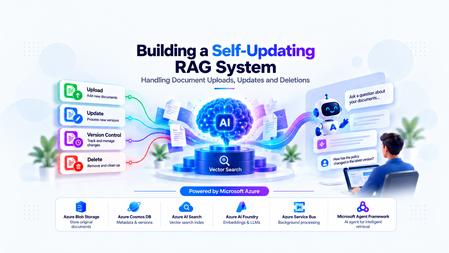
The Hidden Challenge of Production RAG Imagine your organization has deployed an AI assistant to answer questions about employee policies. An employee asks, “How many days of annual leave am I entitled to?” The assistant responds confidently: “15 days.” There is just one problem. The company updated its policy last week. Employees are now entitled to 20 days. The updated PDF was uploaded successfully. The storage service is healthy. The search index is responding. The language model is generating answers without errors. Yet the answer is wrong. This is a different kind of production failure. Nothing appears to be broken at the infrastructure level. The failure lies in the relationship between the source document and the information the AI retrieves. Retrieval-Augmented Generation (RAG) systems depend on external knowledge to ground their responses. But that knowledge is not static. Policies change, contracts get revised, product documentation evolves, and outdated documents are removed. When the underlying documents change, the associated chunks, embeddings, metadata, and search-index entries must be managed accordingly. Otherwise, the system can continue generating plausible answers from information that is no longer valid. Building a RAG pipeline is a retrieval problem. Keeping it correct as data changes is a data lifecycle engineering problem. In this article, we will design a self-updating RAG system that handles document creation, updates, and deletion while addressing asynchronous processing, version consistency, failed jobs, and stale retrieval results. The goal is not simply to index documents automatically. It is to make sure that the right version of the right document is available to the right user when a query is executed. Understand the Problem Before Designing the Architecture A basic RAG pipeline is relatively straightforward: Load a document. Extract its text. Split the text into smaller chunks. Generate an embedding for each chunk. Store the chunks and embeddings in a searchable index. Retrieve relevant chunks when a user asks a question. Pass the retrieved context to a language model to generate an answer. This works well when the document collection is relatively static. The difficulty begins when the source data changes after indexing. Consider three common scenarios. Scenario A: A document is uploaded A new policy is added to the knowledge base. The system must process it and make its content searchable. Until indexing finishes, the document may not be available to the chatbot. Scenario B: A document is updated The original policy allows 15 days of annual leave. A revised policy allows 20 days. If the new version is indexed without correctly deactivating the old version, both versions may appear in search results. The language model may then select the wrong passage or combine conflicting information. Scenario C: A document is deleted An administrator removes a document from the application. However, deleting the original PDF from storage does not automatically delete the corresponding records from Azure AI Search. The content may remain searchable until its indexed chunks are removed. Azure AI Search document deletion itself can also take time to be reflected in index statistics. Microsoft Learn: Delete documents in Azure AI Search These scenarios reveal an important design principle: The source document, its metadata, the background processing jobs, and the search index must be treated as parts of one logical lifecycle—even though they are separate systems. We need a design that can handle failures between these systems without exposing outdated or unauthorized content. Design the System Around Clear Responsibilities Rather than making the upload API responsible for every operation, we can separate the system into a document management path, an asynchronous processing path, and a query path. The Proposed Architecture The design uses the following components: Component Responsibility Azure Blob Storage Stores the original document files Azure Cosmos DB Maintains document metadata, versions, and lifecycle state Azure Service Bus Queues ingestion and deletion jobs Background worker Extracts text, creates chunks, generates embeddings, and updates the index Microsoft Foundry Provides the models used for embedding generation and response generation Azure AI Search Stores searchable document chunks, metadata, and vectors FastAPI Exposes document management and chat APIs Microsoft Agent Framework Supports agentic query workflows when multi-step reasoning or tool use is required The background worker can be implemented as a separate Python service or another suitable compute component. It does not have to be part of the FastAPI process. Why separate these responsibilities? Suppose a user uploads a 100-page contract. The application may need to extract text, split thousands of characters into chunks, generate embeddings, and send multiple indexing requests. Performing all of that synchronously inside the upload request increases latency and makes the API vulnerable to timeouts. Instead, FastAPI accepts the request, persists the document and its metadata, and arranges for the work to be processed asynchronously. The worker performs the expensive operations independently. This allows ingestion to scale separately from query traffic and makes retries easier to manage. The query path remains separate: it retrieves eligible, relevant chunks and uses them to ground the model's response. Establish a source of truth Azure Cosmos DB should hold the authoritative lifecycle metadata in this design. Azure AI Search is the retrieval index, not the authority on whether a document is currently active. For example, a document record might look like this: { "id": "policy-123", "documentId": "policy-123", "currentVersion": 2, "indexedVersion": 1, "status": "PROCESSING", "blobPath": "policies/leave-policy.pdf" } Here, version 2 is the desired version, but version 1 is still the last successfully indexed version. The application must not assume that the latest upload has already become searchable simply because the metadata record has been updated. This distinction between the desired version and the indexed version is central to reliable lifecycle management. Implementing Document Uploads A reliable upload operation involves more than storing a file and sending a message to a queue. It must establish a durable record of the document, identify the version being processed, and ensure that background processing can be retried safely. Step 1: Accept and persist the document When a client uploads a document, FastAPI validates the request, checks the user's permissions, and stores the original file in Azure Blob Storage. The application then creates or updates the document metadata in Cosmos DB. At this stage, the document can be marked as PROCESSING until the ingestion pipeline completes. Step 2: Schedule background processing The system creates an ingestion job containing enough information for the worker to locate the source and determine exactly which version to process. For example: { "operationId": "op-789", "operation": "INGEST", "documentId": "policy-123", "documentVersion": 2, "blobPath": "policies/leave-policy-v2.pdf" } The worker should process the specified version rather than blindly reading whatever file happens to exist at a mutable storage path. For systems that overwrite the same blob path, use blob versioning, an immutable version-specific path, or another mechanism that ensures the worker reads the intended content. Step 3: Extract, chunk, and embed The worker downloads the appropriate document and extracts its text. The extracted text is divided into chunks. Each chunk should carry identifiers that connect it to its parent document and version. For example: { "id": "policy-123-v2-chunk-001", "documentId": "policy-123", "documentVersion": 2, "chunkNumber": 1, "content": "Employees are entitled to 20 days of annual leave." } The worker generates an embedding for each chunk and writes the chunk, its metadata, and its vector to Azure AI Search. The exact index schema depends on the retrieval strategy, embedding dimensions, filtering requirements, and whether hybrid search is used. Step 4: Mark the version as indexed After the worker confirms that all required indexing operations succeeded, it updates the document metadata to record the indexed version and processing status. For example: { "id": "policy-123", "currentVersion": 2, "indexedVersion": 2, "status": "ACTIVE" } This update must be conditional on the document still being at version 2. If a newer version has already been uploaded, the older job must not mark itself as the current version. Why idempotency matters Distributed systems can deliver the same job more than once. A worker may finish indexing but fail before acknowledging the queue message. The message can then be delivered again. If every attempt creates new chunk IDs, duplicate content may accumulate in the index. A practical solution is to derive chunk IDs deterministically from the document ID, version, and chunk identifier. Reprocessing the same version then targets the same index records instead of creating a new set each time. This does not eliminate every failure mode, but it makes repeated indexing much safer. Azure Service Bus supports duplicate detection for eligible tiers, but queue-level duplicate detection is not a substitute for idempotent worker logic. Microsoft Learn: Duplicate detection Updating Documents Without Serving Stale Content Document updates are the most interesting part of the lifecycle because they introduce a consistency problem. Imagine the current leave policy is version 1, allowing 15 days. An administrator uploads version 2, allowing 20 days. The worker starts processing version 2, but embedding generation takes time. Meanwhile, users continue querying the application. What should those users see? There are two common strategies. The right choice depends on whether the system prioritizes availability or strict freshness. Strategy A: Make the new version active after indexing succeeds In this approach, the existing active version remains available while the new version is processed. The workflow is: Create version 2 and mark it as processing. Extract text and generate embeddings for version 2. Index all required version 2 chunks. Verify indexing success. Atomically update the authoritative metadata to make version 2 active. Clean up version 1's indexed chunks asynchronously. This minimizes the time during which the document is unavailable. However, it means that version 1 can remain available while version 2 is being processed. That may be acceptable for some knowledge bases but inappropriate for policies that must become effective immediately. Strategy B: Disable the old version as soon as an update is accepted For high-sensitivity documents, the application can immediately mark the old version as ineligible for retrieval. It then processes the new version and activates it only after successful indexing. The trade-off is that the document may temporarily have no eligible version. The application should return a clear message or use an approved fallback rather than silently serving obsolete information. Prevent old jobs from overwriting new versions Consider this sequence: Version 2 starts processing. Version 3 is uploaded before version 2 finishes. Version 3 finishes indexing first. Version 2 finishes later and attempts to update the metadata. Without version checks, the late version 2 job could incorrectly reactivate stale content. The worker must therefore use conditional updates or optimistic concurrency checks against the authoritative document version. A job may complete its indexing work, but it must not activate its version unless it is still eligible to do so. Handle the lack of a cross-service transaction Cosmos DB and Azure AI Search do not participate in a single distributed transaction in this architecture. A metadata update can succeed while an indexing request fails. An indexing request can succeed while the subsequent metadata update fails. The system should account for these partial failures using: Explicit lifecycle states. Conditional version updates. Retryable and idempotent operations. Periodic reconciliation between metadata and indexed records. The important engineering principle is to make incomplete operations detectable and recoverable, rather than assuming every multi-step workflow succeeds atomically. Deleting Documents Safely Deletion requires special treatment because removing a document from the source does not automatically remove its indexed content. More importantly, waiting for physical index cleanup before preventing retrieval creates a window in which content that should no longer be available may still be returned. Step 1: Make the document ineligible for retrieval When an authorized deletion request arrives, the application updates the authoritative metadata to indicate that the document is being deleted or has been logically deleted. The retrieval path must check that status before using retrieved content. For sensitive documents, this check must happen before the content is added to the LLM context. Merely hiding a document in the user interface is insufficient. Step 2: Schedule physical cleanup The application enqueues a deletion job that identifies the document and all indexed records associated with it. The worker queries or otherwise identifies the corresponding chunk keys and deletes those records from Azure AI Search. The deletion operation should be idempotent. Retrying a deletion for an already-removed chunk should not cause the workflow to fail unnecessarily. Step 3: Verify cleanup The worker checks whether the targeted records have been removed and records the cleanup result. If an operation fails, the job should be retried according to a defined policy. Jobs that continue failing should be sent to a dead-letter queue for investigation and controlled recovery. Azure AI Search supports deleting indexed documents by their document keys. Its documentation also describes how to verify deletion and why index statistics may not update immediately. Microsoft Learn: Delete documents A simplified FastAPI deletion endpoint The following example illustrates the API boundary. The helper functions represent application-specific implementations. from fastapi import FastAPI, HTTPException app = FastAPI() @app.delete("/documents/{document_id}") async def delete_document(document_id: str): document = await get_document_metadata(document_id) if document is None: raise HTTPException( status_code=404, detail="Document not found" ) # Must enforce authorization and use a # concurrency-safe lifecycle transition. await mark_document_deleting(document_id) # The job must be published reliably. await enqueue_deletion_job( document_id=document_id, document_version=document["currentVersion"] ) return { "documentId": document_id, "status": "DELETING" } This is an illustrative example, not a complete production implementation. In particular, the metadata transition and message publication must be coordinated reliably. One approach is the transactional outbox pattern: write the lifecycle change and an outbox event in the same Cosmos DB transactional batch when the data model and partitioning allow it, then publish the event asynchronously. The publisher can retry without losing the intent to schedule cleanup. Deletion must also account for in-flight queries Suppose a query retrieves a document's chunks just before the deletion request is processed. The query might still hold those chunks in memory even after the document is marked deleted. For stricter deletion guarantees, the application needs a defined policy for in-flight requests, cache invalidation, and authorization checks immediately before content is sent to the model. If the requirement is that no response may contain content after a deletion takes effect, that guarantee must explicitly cover requests already in progress. Physical cleanup and retrieval eligibility are separate responsibilities. Both matter. Coordinate Lifecycle Changes Reliably Once ingestion and deletion run asynchronously, the queue becomes part of the system's correctness model. A production worker should not assume that each message is delivered exactly once or that messages for a particular document always finish in order. Design for at-least-once processing A practical worker lifecycle is: Receive a message using a lock-based delivery mode. Validate the document ID, version, and operation. Check whether the operation is still eligible to run. Perform idempotent indexing or deletion. Update lifecycle metadata conditionally. Acknowledge the message only after successful processing. If the worker fails before acknowledging the message, the message may be delivered again. That is expected behavior and should be handled by the design. Add retry and dead-letter policies Not all failures should be treated equally. Transient network errors or throttling may succeed after a delay. Invalid documents, unsupported file formats, and persistent schema mismatches may require manual investigation. The system should use bounded retries with appropriate backoff, record meaningful failure details, and route repeatedly failing messages to a dead-letter queue. Use reconciliation as a safety net Even with retries, the system needs a way to detect inconsistencies that escaped the normal workflow. A reconciliation job can compare authoritative metadata against indexed document versions and lifecycle states. It can identify cases such as: A document marked active whose current version is not fully indexed. Chunks belonging to an obsolete version. Search records for a logically deleted document. An operation that remained in a processing state beyond its expected duration. Reconciliation should repair only states it can safely determine. It should not reactivate a version simply because its chunks exist in the index. For applications using Azure Cosmos DB change feed, document metadata changes can also drive incremental background processing. The change feed captures inserts and updates in its standard latest-version mode; capturing deletions requires selecting and configuring an appropriate supported mode or using explicit lifecycle events. Microsoft Learn: Cosmos DB change feed Where Microsoft Agent Framework Fits A common mistake is to assume that every part of an agentic RAG application should be implemented as an AI agent. Document uploads, version transitions, embedding generation, and index deletion are predictable operations with explicit success and failure conditions. These are generally best implemented with conventional application logic and background workers. Microsoft Agent Framework becomes useful when the query itself requires multi-step reasoning, tool selection, or orchestration. For example, a user might ask: “Compare the current leave policy with the previous version and explain the changes that affect employees.” An agent could use approved tools to retrieve the current policy and the permitted historical version, compare the relevant passages, and generate an evidence-based explanation. The application must still control which documents and versions are eligible for retrieval. The agent should not independently decide whether a deleted document is authorized for use. This distinction is important: deterministic workflows protect data integrity; agentic workflows help solve tasks that benefit from reasoning and tool use. Microsoft Agent Framework provides both agent and workflow capabilities, allowing developers to choose an appropriate orchestration model for the task. Microsoft Agent Framework documentation Production Readiness: What Should We Measure? A pipeline that successfully indexes a document once is not necessarily production-ready. The system needs observable lifecycle states and measurable recovery behavior. Area What to validate Ingestion Can a failed upload or indexing job be retried safely? Idempotency Does processing the same document version twice create duplicate records? Version consistency Can a delayed job reactivate an older version? Deletion Can logically deleted content enter the LLM context? Authorization Are tenant and document-level permissions enforced during retrieval? Recovery Can reconciliation detect and repair partial failures? Observability Can operators identify stuck jobs, indexing failures, and cleanup delays? Performance How long does it take for an accepted update to become searchable? Useful operational metrics include ingestion success rate, queue age, indexing latency, retry counts, dead-letter queue depth, time spent in each lifecycle state, and deletion cleanup latency. Also test race conditions deliberately. Upload a new version while an earlier job is still running. Delete a document while a query is in flight. Simulate an indexing failure after metadata has been updated. Restart a worker after it has indexed content but before it acknowledges the message. These tests expose the problems that a happy-path demonstration will not reveal. Bringing It All Together Keeping a RAG system accurate is not simply a matter of re-running embeddings whenever a file changes. It requires a deliberate lifecycle design that connects source documents, versioned metadata, asynchronous processing, search-index operations, and retrieval-time authorization. Azure Blob Storage can preserve the source documents, Cosmos DB can track authoritative lifecycle state, Service Bus can distribute background work, and Azure AI Search can provide retrieval. Microsoft Foundry supplies the models, while Microsoft Agent Framework can support the parts of the application that genuinely benefit from agentic orchestration. The architecture becomes reliable when it assumes that failures will happen: messages may be repeated, jobs may finish out of order, index operations may partially succeed, and cleanup may take time. Version checks, idempotent operations, explicit lifecycle states, reliable event publication, and reconciliation turn those failure modes into manageable engineering problems. The objective is not merely to keep the index populated. It is to ensure that every answer is grounded in information that is current, eligible, and authorized for the user who asked the question. Further Reading Azure AI Search: Delete documents Azure Cosmos DB: Change feed Azure Service Bus: Duplicate detection Microsoft Agent Framework I'd be interested to hear from engineers building production RAG systems: how do you coordinate document updates and deletions across your source of truth and search index?655Views4likes2Comments
Now in Foundry: Meta Muse Spark Open, NVIDIA Nemotron 3.5 Super VL, and Reflection Beam
This week's Model Mondays edition highlights three Hugging Face models newly available in Microsoft Foundry, giving developers more open-weight options for enterprise coding and agentic work: Meta's Muse Spark Open, NVIDIA's Nemotron 3.5 Super VL, and Reflection's Beam 1.0. Models of the week Meta: Muse-Spark-Open-816B-A42B-NVFP4 Model Specs Parameters / size: 816B total / 42B active; Mixture of Experts, which activates a subset of parameters for each token; NVIDIA's 4-bit floating-point format (NVFP4). Context length: 1,048,576 tokens in the Foundry deployment. Primary task: Multimodal reasoning, multi-step reasoning, coding, and agentic task completion. Why it's interesting Published agent and coding evaluations: Meta reports scores of 89.2 on MCP-Atlas, which evaluates tool use through the Model Context Protocol (MCP), and 76.4 on Terminal-Bench 2.1, using the Terminus 2 agent. These are Muse Spark Open results at xhigh reasoning effort; the benchmark table does not identify them as NVFP4-specific measurements. Adjust reasoning effort to the task: The model supports planning, sequential tool calls, and recovery from tool failures. Its reasoning_effort setting offers low, medium, high, and xhigh; Meta recommends the higher settings for complex coding and agentic work. See the model card. Bring visual and conversational evidence into the same workflow: Muse Spark is natively multimodal. It can interpret screenshots, documents, and recordings alongside text. For developers building a product support agent, that opens up end-to-end agentic task completion. Hardware and deployment configuration: Muse Spark's NVFP4 deployment on Azure Foundry has a 1M-context deployment template on NVIDIA H200, intended for long-context reasoning, coding, agentic tasks, and multimodal workloads. Eight GPUs jointly serve one model instance, with both the model tensors and its experts distributed across them. Configuration H200 template Best for Long-context coding and reasoning, multimodal analysis, and extended tool-using workflows Hardware per model instance 8 × NVIDIA H200, 141 GB GPU memory each Azure instance type Standard_ND96isr_H200_v5 Model weights NVFP4 Maximum context 1,048,576 tokens Inputs / output Text, images, audio, and video / text Agent capabilities Tool calling and reasoning; per-request effort of low, medium, high, or xhigh (default) Request timeout 5 minutes This preset retains the model's full native context window, allowing prompts, media, tool results, and generated output to share a single extended context. NVIDIA: NVIDIA-Nemotron-3.5-Super-VL-120B-A12B-BF16 Model Specs Parameters / size: 120B total / 12B active; hybrid MoE architecture; Brain Floating Point 16 (BF16) weights. Context length: Up to 1M tokens natively; 524,288 tokens in the current Foundry deployment presets. Primary task: Vision-language reasoning, document and video understanding, coding, and tool use; text, image, and video input, with text output. Why it's interesting Visual understanding alongside reasoning. A vision encoder connects images and video frames to a language backbone combining Mamba-2 state-space layers, attention, and sparse experts. Developers can use the model to interpret document layouts, charts, and application screens in the same workflow as textual instructions. Reasoning that can be switched on or off. The model supports configurable thinking, giving applications a way to distinguish straightforward extraction from questions that require several reasoning steps. Document and chart evaluation results. NVIDIA reports 62.82 on MMLongBench-Doc, 65.08 on OCR-Reasoning (optical character recognition with reasoning), and 80.82 on CharXiv reasoning, which tests understanding of scientific charts. These are publisher-reported results for the BF16 model; see the benchmark table and evaluation methodology. Hardware and deployment configurations: Nemotron's BF16 deployment on Azure Foundry is available on NVIDIA A100 and H100 templates, both configured for 512K context. Each uses four GPUs per model instance. The main configuration difference is the attention cache, which stores information from earlier tokens: the A100 preset retains BF16 precision, while the H100 preset uses 8-bit floating point (FP8) to reduce cache memory. Configuration A100 template H100 template Best for Document, chart, and application-screen understanding when preserving BF16 cache precision matters The same visual and reasoning tasks when faster generation and shorter waits on long prompts matter Hardware per model instance 4 × NVIDIA A100, 80 GB GPU memory each 4 × NVIDIA H100, 80 GB GPU memory each Azure instance type Standard_ND96amsr_A100_v4 Standard_ND96isr_H100_v5 Model weights BF16 BF16 Attention-cache precision BF16 FP8 Maximum context 524,288 tokens 524,288 tokens Active sequence cap per instance 32 32 Request timeout 90 seconds 90 seconds Choose A100 for cache precision; choose H100 for response speed. The template descriptions position H100 as the faster option for generation and long-prompt processing, using a lower-precision cache while keeping the model weights in BF16. Both presets offer the same context window and active sequence cap, so this choice is about cache precision and performance rather than additional context capacity. Both templates enable tool calling, reasoning, and reuse of cached prompt prefixes. They accept text plus up to one image and one video per prompt; video sampling is configured at two frames per second, with a maximum of 256 sampled frames. Both also enable speculative decoding with three proposed tokens per step, using the model's ability to predict multiple upcoming tokens to accelerate generation. Reflection: Beam-1.0-501B-A23B Model Specs Parameters / size: 501.3B total / 23.4B active; sparse MoE; available with BF16, FP8, and NVFP4 weights. Context length: 1,048,576 tokens natively; 524,288 tokens in the Foundry BF16 preset and 262,144 tokens in the FP8 and NVFP4 presets. Primary task: Text generation for software engineering, reasoning, and agentic tool use; developed predominantly for English. Why it's interesting Built around software engineering workflows. Beam is designed to work with repositories, terminal environments, and tools across extended tasks. Its text-only interface fits coding agent workflows. Reasoning efficiency is an explicit training objective. Reflection describes training with a length penalty that discourages unnecessary generated tokens while rewarding successful solutions. Its launch post explains the trade-off between reasoning effort and task performance. BF16 coding and tool-use results. The release model card reports 81.6% on SWE-bench Verified, 80.1% on Terminal Bench v2.1, and 80.8% on MCP Atlas for BF16. These cover repository issue resolution, terminal tasks, and tool use respectively. Hardware and deployment configurations: The same Beam model is available in three weight precisions: BF16, FP8, and NVFP4. All retain the same parameter count and text, reasoning, and tool-calling capabilities. The lower-precision releases reduce the memory needed for weights, opening up A100 and H100 deployment options. Weight precision Hardware per model instance Default Azure instance type Maximum context Best for BF16 8 × NVIDIA H200, 141 GB GPU memory each Standard_ND96isr_H200_v5 524,288 tokens (512K) Long-context reasoning and agentic tool use with full-precision weights FP8 8 × NVIDIA A100, 80 GB GPU memory each Standard_ND96amsr_A100_v4 262,144 tokens (256K) Reasoning and tool use on A100 while retaining higher weight precision than NVFP4 FP8 8 × NVIDIA H100, 80 GB GPU memory each Standard_ND96isr_H100_v5 262,144 tokens (256K) The same FP8 workloads when H100 capacity or measured workload performance fits better NVFP4 4 × NVIDIA A100, 80 GB GPU memory each Standard_ND96amsr_A100_v4 262,144 tokens (256K) Reasoning and tool use with a smaller GPU allocation on A100 NVFP4 4 × NVIDIA H100, 80 GB GPU memory each Standard_ND96isr_H100_v5 262,144 tokens (256K) The same four-GPU option when H100 capacity or measured workload performance fits better All five templates use an FP8 attention cache, support tool calling with automatic tool selection and reasoning, enable reuse of cached prompt prefixes and processing long prompts in chunks, and set a 90-second request timeout. Getting started You can deploy these Hugging Face models in Microsoft Foundry by browsing the Hugging Face collection in the Foundry model catalog and selecting a managed endpoint deployment. Read Hugging Face on Azure docs Explore models in Microsoft Foundry494Views0likes0CommentsMicrosoft Foundry Guardrails Getting in Your Way? Here’s How to Dial Them Down
How This All Started So here’s the story. I just got back from a trip and had a pile of footage sitting on my laptop. Being the lazy (sorry, efficient) person I am, I fired up OpenCode and asked GPT-6 Astra, running on Microsoft Foundry, to cut me a travelogue. Nothing fancy: under two minutes, nice lighting, clean transitions, no cringy effects, a quick QA before showing me, and the output in its own folder. Easy, right? Nope. This is what I got instead: “Image processing blocked due to content policy violation.” Seriously? It’s holiday footage! Nothing even remotely dodgy in there. This is a classic false positive from the default guardrails, and the good news is it’s totally fixable. Let me show you how. My Setup Quick context before we dive in: I’ve got two models deployed on Microsoft Foundry, gpt-6-astra and gpt-6-sol. Both were running on Microsoft’s out-of-the-box guardrail. Step 1: Find the Guardrails Page Head over to the Microsoft Foundry portal, click Build, then hit Guardrails in the left menu. You’ll see three guardrails that Microsoft gives you by default: Microsoft.Default, Microsoft.DefaultV2 and Microsoft.MAIDefault. Microsoft.DefaultV2 is the one every new deployment gets, which is why it’s sitting on both of my models. Here’s the catch: you can’t edit or delete these Microsoft-managed defaults. So instead of tweaking them, we’re going to build our own guardrail and swap it in. Step 2: Create Your Own Guardrail Smash that "Create" button and you’ll land on the Create guardrail page. This is where all the knobs and switches live: Every control has three bits: the risk type, the intervention point (does it check what you send in, what the model spits out, or both?) and the action. The magic trick for loosening things up is flipping the action from Block to Annotate. With Annotate, Foundry still scans the content and tags it in the API response, but it stops slamming the door on your request. So What Does Each Setting Actually Do? Before you go on a switching-off spree, it’s worth knowing what each of these does and what you’re giving up when you loosen it. Here’s the quick tour: Jailbreak: This one catches prompts trying to trick the model into ignoring its rules. On Block, those prompts get rejected outright. On Annotate, they go through with a flag. Turn it off completely and you’re trusting the model’s own training to keep it in line. Network (egress rules): Controls which outbound calls a hosted agent is allowed to make. As the portal points out, it only applies to hosted agents, so for plain model deployments like mine it doesn’t change a thing. Indirect prompt injections: Watches user input and tool responses (files, docs, web pages the model reads) for sneaky instructions someone has planted. Leave it on and your agents are protected when they read outside content; switch it off and a dodgy file could quietly hijack your model. For an agentic tool like OpenCode, which reads files and runs shell commands, I’d honestly keep this one on, even if it’s just on Annotate. Spotlighting (Preview): Tags external content inside the prompt so the model can tell your real instructions apart from random untrusted data. Think of it as an extra seatbelt against indirect attacks. Content harms (Hate, Sexual, Self-harm, Violence): Each of these has a severity slider that starts at Medium blocking, meaning anything rated medium or higher gets blocked. Slide it down to Lowest blocking and only the really nasty stuff gets stopped, which kills off most false positives like mine. The asterisk means these four are mandatory: you can turn the dial down, but you can’t switch them off. Blocklists: Want to ban specific words or phrases, like profanity or your competitor’s name? This is where you do it. It’s off by default. Protected material for code and text: Checks whether the model is about to spit out known copyrighted text (song lyrics, articles and so on) or code lifted from public repos. Block stops it; Annotate lets it through with a flag. Switch it off and you’re rolling the dice on your app reproducing someone else’s copyrighted work. Step 3: Pick Your Models Hit Next and Foundry asks which agents and models you want this guardrail on. Any model you’ve already deployed in your project shows up here. For me that’s gpt-6-astra and gpt-6-sol, so I ticked both. Step 4: Name It and Pick a Streaming Mode One more Next and you’re on the Review page. Give your guardrail a name (I went with NoGuardrails, because subtlety isn’t my thing) and pick a streaming mode. You’ve got two choices: Default: Foundry buffers the response and runs it through the guardrail before each chunk goes out. Nothing reaches the user until it’s been checked. Safest option, but you’ll feel a bit of lag when streaming. Asynchronous: Content streams back the moment it’s generated, with the filters running in the background. Much snappier, but flagged content might flash up briefly before the filter catches it, so your app has to clean up after the fact. Microsoft pitches this for low-latency stuff like internal dev tools, which is exactly my use case. Give the summary a quick once-over, then click Create. Done! Did It Work? Yep! With my shiny new guardrail in place, I fired off the exact same request, this time to GPT-6 Sol. And boom: no more content policy error. The model went straight to work scanning my footage and putting the video together. Wrapping Up Look, Microsoft’s default guardrails are a solid starting point, but they can be a bit trigger-happy when you’re doing perfectly legit stuff like video editing, creative work or internal tooling. Since you can’t touch the defaults, the trick is to roll your own: flip Block to Annotate where it makes sense, drag those content harm sliders down, pick the streaming mode that fits your app, and assign it to your deployments. That’s it! One friendly word of warning though: with great power comes great responsibility. Only loosen what you actually need, keep things like indirect prompt injection detection switched on for any agent that reads files or browses the web, and think twice before doing this on anything customer-facing. And if you want to go further than the portal lets you, like switching content filters off completely, you’ll need to apply to Microsoft for approval first. Happy building!430Views1like2CommentsIntroducing Microsoft-Decision-1 in Microsoft Foundry for decision and classification workloads
Not every step in an AI application needs a large language model to generate a response. Many high-volume application steps are decisions: classify an input, select an option, assign a score, verify a condition, prioritize an item, or control a workflow. To suit these tasks, a new class of models have been developed to address these fast, structured, requests. We are excited to be adding Microsoft-Decision-1 to the Foundry Models Catalog. Our newest, decision model for applications that need to choose among predefined options rather than generate open-ended text. What are decision models? As AI applications mature, the industry is moving beyond the idea that every model interaction needs to result in generated content. Developers are increasingly building systems composed of different models, tools, and application logic, each suited to a different part of the workload. Within those systems, many of the most frequent operations are not generation problems at all. They are decisions about what should happen next. Decision models were designed for this emerging layer of the AI stack. Rather than producing an open-ended response, they evaluate a defined set of possibilities and return structured signals that an application can use to take action. That makes them particularly relevant as developers move toward more dynamic AI applications, where models need to work together and applications must continuously determine where requests should go, which actions should be taken, and when additional processing is needed. For developers, this creates an opportunity to be more intentional about where and how different models are used. Instead of relying on a general-purpose generative model for every step, developers can match the model to the task, using generative and reasoning models where their capabilities are needed and decision models for focused, repeatable choices. The result is a more modular approach to AI application design, where generation, reasoning, and decision-making become complementary building blocks for creating intelligent systems. What is Microsoft-Decision-1? Now available in public preview, Microsoft-Decision-1 is a decision model built on Qwen3.5-9B and designed for applications that need to make fast, structured choices among predefined options. It brings a purpose-built decision capability to the Foundry Models catalog, giving developers another building block for designing AI applications where different steps may benefit from different types of models. Built for predefined decisions. Microsoft-Decision-1 supports use cases such as agent controls, model routing, intent analysis, data labeling, AI judging, incident response routing, data validation, and content classification. Structured for application logic. The model produces predefined answers and confidence signals that applications can use to select the next action or route uncertain results for further review. Designed for lower-latency, lower-cost workflows. Microsoft-Decision-1 is intended for simple, repeatable, and time-sensitive decisions that do not require the generative capabilities or extended reasoning of a larger language model. You can explore these capabilities in the Foundry Playground. This example below shows Microsoft-Decision-1 checking urgency, selecting a support team, and scoring priority for a customer request. Microsoft-Decision-1 represents an area of continued model innovation at Microsoft. The team will rebase future iterations of the model on OpenAI models and Microsoft’s MAI models, bringing together advances from Microsoft’s own model portfolio with a model architecture purpose-built for decision-making. Over time, this work could create opportunities to further explore how Microsoft models can be specialized for the high-volume decisions that sit inside applications and agentic systems. For developers, Microsoft-Decision-1 expands the choices available when building applications and agents with Foundry. Rather than using the same model for every step, developers can combine generative and reasoning models with a decision model and choose the capability that best fits each part of the workflow. That model diversity is increasingly important as AI applications evolve from single-model experiences into systems that coordinate specialized models, tools, and actions. How developers are building with Microsoft-Decision-1 Enterprise applications make decisions throughout a workflow: identifying a customer’s intent, selecting a tool, routing an incident or checking whether a response meets specified criteria. For example, a support application could classify a request as a billing question, a technical issue or an account-access problem. An agent could evaluate a proposed response against a quality rubric and determine whether to accept it, revise it or request review. If the player doesn’t load, open the video in a new window: Open video These decisions can sit alongside generative and reasoning steps in the same application. A language model might draft a response, while Microsoft-Decision-1 evaluates it against defined criteria. With Microsoft-Decision-1 in the Foundry catalog, developers can explore decision workloads through the platform they use to discover and deploy models across various scenarios: Classification: Assign inputs to defined categories, such as customer intents or feedback themes. Routing: Select a model, tool, destination or workflow from a set of options. Evaluation and verification: Assess responses or inputs against specified criteria. Workflow control: Decide whether to continue, retry, stop or send a case for review. A different model for a different kind of workload For developers, decision models introduce a different way to think about optimization. An AI application may make thousands of small choices around a comparatively small number of complex generative or reasoning tasks. Running every one of those steps through the same general-purpose model can overlook an opportunity to optimize the system around the work each step actually needs to perform. That pattern is showing up across Microsoft. Xbox Research used Microsoft-Decision-1 to categorize more than 10,000 pieces of open-ended feedback into researcher-defined themes, reporting quality competitive with GPT-5 while running 80–100 times faster. Other Microsoft teams have also evaluated the model for assessing Copilot response quality and supporting adaptive replanning in Microsoft Discovery. These scenarios matter because they are not simply classification benchmarks. They are examples of decisions embedded inside larger applications. As AI architectures become more modular, developers can consider generation, reasoning, and decision-making as distinct workloads, then select models based on what each step actually requires. For benchmark methodology, measured results and additional examples, read the Command Line blog here. Putting Microsoft-Decision-1 to work For tasks with predefined outcomes, evaluate Microsoft-Decision-1 using representative inputs and the quality, latency and cost requirements of your application. Compare decision accuracy, including ambiguous cases, latency under expected traffic and cost per completed decision. Where confidence estimates inform automation or review thresholds, validate their calibration on your own data. Start with a decision in your application: The following Python example shows how to compare support-routing decisions with expected labels and measure request latency. Replace the illustrative messages and category definitions with examples from your own workload. Before running: Deploy Microsoft-Decision-1 in your Microsoft Foundry subscription and configure FOUNDRY_BASE_URL and FOUNDRY_API_KEY. Set FOUNDRY_MODEL to the model or deployment identifier specified in the quickstart. Keep credentials outside the source code. Model requests incur applicable usage charges. Integration note: Confirm the route and authentication header before running it against your deployment. #!/usr/bin/env python3 """Classify support requests with Microsoft-Decision-1.""" import json import os import urllib.error import urllib.request from collections.abc import Mapping from statistics import median from time import perf_counter from typing import Any from azure.identity import DefaultAzureCredential OPTIONS = { "billing": "Charges, invoices, refunds, or subscription payments", "technical": "Software errors, bugs, or integration failures", "account": "Sign-in, password, or account-access problems", } EXAMPLES = [ ("I was charged twice.", "billing"), ("The integration crashes during checkout.", "technical"), ("I cannot sign in after resetting my password.", "account"), ] AZURE_ENDPOINT = os.environ["AZURE_ENDPOINT"].rstrip("/") DEPLOYMENT_NAME = os.environ["DEPLOYMENT_NAME"] TIMEOUT_SECONDS = 60 TOKEN_SCOPE = "https://cognitiveservices.azure.com/.default" CREDENTIAL = DefaultAzureCredential() class DecisionAPIError(RuntimeError): """Raised when the API can't return a valid classification.""" def read_choice( payload: Any, options: Mapping[str, str], ) -> str: if not isinstance(payload, dict): raise DecisionAPIError("The API returned an invalid response.") answers = payload.get("answers") if not isinstance(answers, dict): raise DecisionAPIError("The API returned no answers object.") answer = answers.get("team") if not isinstance(answer, dict) or answer.get("type") != "choice": raise DecisionAPIError("The API returned an invalid answer.") choice = answer.get("choice") if not isinstance(choice, str) or choice not in options: raise DecisionAPIError( f"The API selected an unsupported team: {choice!r}." ) return choice def predict( text: str, options: Mapping[str, str], ) -> str: if not text.strip(): raise ValueError("text must not be empty.") if len(options) < 2: raise ValueError("options must contain at least two choices.") body = json.dumps( { "model": DEPLOYMENT_NAME, "state": text, "questions": { "team": { "type": "choice", "instructions": ( "Which team should handle this customer support " "request? Select exactly one team based on the " "primary problem." ), "criteria": dict(options), } }, } ).encode("utf-8") access_token = CREDENTIAL.get_token(TOKEN_SCOPE).token request = urllib.request.Request( f"{AZURE_ENDPOINT}/providers/microsoft/v1/systemone", data=body, headers={ "Authorization": f"Bearer {access_token}", "Content-Type": "application/json", "Accept": "application/json", }, method="POST", ) try: with urllib.request.urlopen( request, timeout=TIMEOUT_SECONDS, ) as response: response_body = response.read() except urllib.error.HTTPError as exc: raise DecisionAPIError( f"The API returned HTTP {exc.code}." ) from exc except urllib.error.URLError as exc: raise DecisionAPIError( f"Couldn't reach the API: {exc.reason}." ) from exc try: payload = json.loads(response_body) except (json.JSONDecodeError, UnicodeDecodeError) as exc: raise DecisionAPIError( "The API returned invalid JSON." ) from exc return read_choice(payload, options) def main() -> None: correct = 0 latencies_ms = [] for text, expected in EXAMPLES: start = perf_counter() predicted = predict(text, OPTIONS) elapsed_ms = (perf_counter() - start) * 1000 correct += int(predicted == expected) latencies_ms.append(elapsed_ms) print( f"Expected={expected}, predicted={predicted}, " f"latency={elapsed_ms:.1f} ms" ) accuracy = correct / len(EXAMPLES) print(f"Accuracy: {accuracy:.1%}") print( "Median request latency: " f"{median(latencies_ms):.1f} ms" ) if __name__ == "__main__": main() This small dataset illustrates the evaluation process. For meaningful results, use a larger, representative labeled dataset and inspect errors by category. The measured latency includes the client call and network time; sequential requests do not measure latency under production load. Assess cost and confidence calibration separately. Your application defines the available options and resulting actions. Use evaluation results to determine where automation is appropriate and where additional validation or human review is needed. Pricing Model Deployment Type Input Tokens (#/1M) Output tokens (#/1M) Microsoft-Decision-1 US Datazone $0.042 N/A EU Datazone $0.042 N/A Get started Explore Microsoft-Decision-1 in the Foundry catalog to make your first request. We look forward to seeing how developers use Microsoft-Decision-1 to bring structured decisions into their applications and agents through Microsoft Foundry.9.8KViews1like1CommentClosing the AI Agent Governance Gap with Microsoft Foundry
Developers are shipping agents faster than security teams can catalog them. As organizations move beyond pilots and begin operating dozens or hundreds of agents, one question keeps coming up: how do we actually get visibility into our AI agents across our environment? In this article, we'll walk through how Azure services can help establish visibility, guardrails, and cost accountability across your AI estate. Governance for AI happens across four layers: Resources – who can create new AI resources Builders – who can develop and publish agents in a certain scope Behavior – how agent outputs are evaluated, monitored, and governed Dependencies – what models, tools, APIs, and MCP servers agents can interact with Most organizations already have governance controls for identities, networking, and compliance. The challenge isn't creating new controls. It's connecting existing controls into an operating model that works for AI agents. Below we walk through each area and go a bit deeper on how to close the gap. Setting up boundaries with Azure Policy First, let's start in the Azure portal with Azure Policy. Azure Policy lets you set guardrails on what can be deployed in your environment and flags or blocks anything that doesn't comply. For AI workloads, the built-in definitions range from limiting models that people in your organization can deploy to locking down the network through enabling private endpoints. Some policies you get started with: Foundry model deployments should only use approved models: Restricts deployments to models or publishers your organization has explicitly approved Foundry model deployments should meet eligibility requirements (preview): Applies rules based on model attributes like preview vs. GA status and distribution source Azure AI Services resources should have key access disabled: Makes Microsoft Entra ID the only entry point The full list of policies related to Azure AI Services are available here: List of built-in policy definitions - Azure Policy | Microsoft Learn Why this comes first: Policy checks resources before they are created, so it proactively keeps your environment aligned with your standards. Implementing role-based access control (RBAC) Once these boundaries are in place, the next step is RBAC. Setting RBAC up early ensures that people and identities building agents have the right scope for what they actually need to do. Foundry roles only apply when you authenticate using Microsoft Entra ID. If you're using key-based authentication instead, the key grants full access with without role restrictions. API keys are convenient for quick development usage but when moving towards production, Microsoft Entra ID is the preferred method. Roles can be assigned at three scopes: the Foundry resource, a Foundry project, or an individual agent itself. Below is an example of how different personas within organization can map to a certain scope for creating and building agents with Foundry. Here's how each role in the diagram compares, from least to most privileged: Role Privilege Level What it does in Microsoft Foundry Foundry Agent Consumer Least Interact with agent endpoints in a project. This is your least-privilege role for people who only need to use agents. Foundry User Low Grants reader access to the Foundry project, the Foundry resource, and data actions for your Foundry project. Least-privilege access role for developers building and testing agents. Foundry Project Manager Medium This role lets you perform management actions on Foundry projects, build and develop with projects, and conditionally assign the Foundry User role to other user principals. Foundry Account Owner Higher Grants full access to manage Foundry projects and resources, and lets you assign the Foundry User role to other user principals. Foundry Owner Highest Grants full access to manage Foundry projects and resources to build and develop with projects. This role can also assign the Foundry User, ACR, and monitoring roles to users in the environment. Source: Role-based access control for Microsoft Foundry - Microsoft Foundry | Microsoft Learn For the agent resources themselves, assign managed identities rather than API keys since it lowers the risk of having compromised credentials. Note if you're scripting RBAC permissions: these roles were recently renamed from Azure AI User, Azure AI Owner, Azure AI Account Owner, and Azure AI Project Manager. The role IDs and permissions didn't change, so use the role definition GUID in your code to avoid issues while the rename rolls out. Observability in Microsoft Foundry Governance requires more than access control. Organizations also need evidence of how agents are being used. Observability provides the audit trail needed to investigate incidents, understand usage patterns, and track costs. The Foundry Control Plane brings these observability and governance tools together in one place, alongside services like Azure Monitor, Microsoft Entra, Microsoft Purview, and Azure Policy. In the Foundry portal, tracing is a good starting point. Once you connect an Application Insights resource to your project, Foundry turns on tracing automatically so every run, including the ones you test in the playground, is logged. After it is completed, you can search by Response ID or Trace ID to see the conversation history, token usage, run steps, tool calls, and inputs and outputs between the user and the agent. For more granular queries, you can write KQL to dive into individual agent runs or use the prebuilt Grafana dashboards in Azure Monitor. With client-side tracing, you can also export traces to observability tools you may already use, such as Datadog or Jaeger. Note: Permissions required for viewing this telemetry requires the Log Analytics Reader role on the connected Application Insights resource, and Privileged Monitoring Data Reader on top of that if the underlying Log Analytics tables are protected. Alongside all of these monitoring features, every agent comes with content safety guardrails and evaluations let you test and optimize performance before and after you publish your agents. When agents get published to Microsoft Teams and Microsoft 365 Copilot, Microsoft 365 admins can approve usage requests. These requests can be further scoped to a limited group for pilot testing/department usage or the full organization. Adding an AI gateway Observability tells you what your agents are doing, but how do you actually control them? This is where Azure API Management comes in. Once you have more than one agent, model deployment, or multiple teams consuming them, you need a single enforcement point between the agents and the resources they call. Adding Azure API Management in front of Microsoft Foundry gives you: Rate limiting and load balancing across regions and model deployments Consistent authentication and quota policies for model and tool traffic Usage tracking per team or cost center so you can accurately charge back to different departments Governed access to your custom and remote MCP servers Note: When choosing MCP servers, start with trusted, enterprise supported sources (GitHub, Microsoft, internally developed servers, etc.) that have documented security controls, enterprise authentication, clear ownership, and least-privilege permissions. Treat community MCP servers as untrusted until they have undergone a formal security review and are verified by organizations. Adding an AI gateway completes the governance picture. Azure Policy governs what can be deployed. RBAC governs who can build and manage agents. Observability provides evidence of how agents behave in production. The AI gateway extends governance into runtime, controlling how agents interact with models, tools, and external systems. Combined, these layers help organizations move beyond simply building agents to operating them responsibly at scale. Extend governance across the wider estate A few directions to take this further: MCP registry in Azure API Center – As MCP usage grows, you can create an approved inventory of MCP servers and APIs that can be used across an organization. Microsoft Agent 365 – Microsoft's enterprise control plane for AI agents. It gives every agent its own Microsoft Entra Agent ID and published Foundry agents sync to its registry automatically. This gives your IT team one place to run access reviews, lifecycle policies, and owner attestation across every agent in the tenant, including shadow agents discovered outside Foundry. Copilot Studio – when you add an MCP tool, you can point it at the API Management URL instead of the direct remote endpoint to gain additional observability through the gateway. GitHub Copilot – you can apply the same AI gateway-fronted MCP registry, applied to the developer side. Microsoft Purview – data classification, DLP, audit, and AI interaction governance across the wider estate. Where to go next Looking for a quick start? Turn on the three Azure Policy definitions above in audit mode against a non-production subscription and see what gets flagged that is out of compliance. Ready to design the end-to-end pattern? Take a look at this Cloud Adoption Framework guidance on AI governance and governing Azure platform services for AI. Want to go deeper on agent observability? Start with these articles around Application Insights integrations with Foundry: Use Insights in Microsoft Foundry and Monitor AI Agents with Application Insights Governing AI agents doesn't require starting from scratch. The identity, policy, monitoring, and cost controls you already use for the rest of your Azure estate can extend to AI workloads. Start with one layer, connect the next, and build a governance foundation that grows with your AI adoption.803Views3likes0Comments