artifical intelligence
79 TopicsFoundry IQ: Unlocking ubiquitous knowledge for agents
Introducing Foundry IQ by Azure AI Search in Microsoft Foundry. Foundry IQ is a centralized knowledge layer that connects agents to data with the next generation of retrieval-augmented generation (RAG). Foundry IQ includes the following features: Knowledge bases: Available directly in the new Foundry portal, knowledge bases are reusable, topic-centric collections that ground multiple agents and applications through a single API. Automated indexed and federated knowledge sources – Expand what data an agent can reach by connecting to both indexed and remote knowledge sources. For indexed sources, Foundry IQ delivers automatic indexing, vectorization, and enrichment for text, images, and complex documents. Agentic retrieval engine in knowledge bases – A self-reflective query engine that uses AI to plan, select sources, search, rank and synthesize answers across sources with configurable “retrieval reasoning effort.” Enterprise-grade security and governance – Support for document-level access control, alignment with existing permissions models, and options for both indexed and remote data. Foundry IQ is available in public preview through the new Foundry portal and Azure portal with Azure AI Search. Foundry IQ is part of Microsoft's intelligence layer with Fabric IQ and Work IQ.45KViews6likes4CommentsNew Azure Open AI models bring fast, expressive, and real‑time AI experiences in Microsoft Foundry
Modern AI applications, whether voice‑first experiences or building large software systems, rarely fit into a single prompt. Real work unfolds over time: maintaining context, following instructions, invoking tools, and adapting as requirements evolve. When these foundations break down through latency spikes, instruction drift, or unreliable tool calls, both user conversations and developer workflows are impacted. OpenAI’s latest models address this shared challenge by prioritizing continuity and reliability across real‑time interaction and long‑running engineering tasks. Starting today, GPT-Realtime-1.5, GPT-Audio-1.5, and GPT-5.3-Codex are rolling out into Microsoft Foundry. Together, these models reflect the growing needs of the modern developer and push the needle from short, stateless interactions toward AI systems that can reason, act, and collaborate over time. GPT-5.3-Codex at a glance GPT‑5.3‑Codex brings together advanced coding capability with broader reasoning and professional problem solving in a single model built for real engineering work. It unifies the frontier coding performance of GPT-5.2-Codex with the reasoning and professional knowledge capabilities of GPT5.2 in one system. This shifts the experience from optimizing isolated outputs to supporting longer running development efforts; where repositories are large, changes span multiple steps, and requirements aren’t always fully specified at the start. What’s improved Model experiences 25% faster execution time, according to Open AI, than its predecessors so developers can accelerate development of new applications. Built for long-running tasks that involve research, tool use, and complex, multi‑step execution while maintaining context. Midtask steerability and frequent updates allow developers to redirect and collaborate with the model as it works without losing context. Stronger computer-use capabilities allow developers to execute across the full spectrum of technical work. Common use cases Developers and teams can apply GPT‑5.3‑Codex across a wide range of scenarios, including: Refactoring and modernizing large or legacy applications Performing multi‑step migrations or upgrades Running agentic developer workflows that span analysis, implementation, testing, and remediation Automating code reviews, test generation, and defect detection Supporting development in security‑sensitive or regulated environments Pricing Model Input Price/1M Tokens Cached Input Price/1M Tokens Output Price/1M Tokens GPT-5.3-Codex $1.75 $0.175 $14.00 GPT-Realtime-1.5 and GPT-Audio-1.5 at a glance The models deliver measurable gains in reasoning and speech understanding for real‑time voice interactions on Microsoft Foundry. In OpenAI’s evaluations, it shows a +5% lift on Big Bench Audio (reasoning), a +10.23% improvement in alphanumeric transcription, and a +7% gain in instruction following, while maintaining low‑latency performance. Key improvements include: What's improved More natural‑sounding speech: Audio output is smoother and more conversational, with improved pacing and prosody. Higher audio quality: Clearer, more consistent audio output across supported voices. Improved instruction following: Better alignment with developer‑provided system and user instructions during live interactions. Function calling support: Enables structured, tool‑driven interactions within real‑time audio flows. Common use cases Developers are using GPT-Realtime-1.5 and GPT-Audio-1.5 for scenarios where low‑latency voice interaction is essential, including: Conversational voice agents for customer support or internal help desks Voice‑enabled assistants embedded in applications or devices Live voice interfaces for kiosks, demos, and interactive experiences Hands‑free workflows where audio input and output replace keyboard interaction Pricing Model Text Audio Image Input Cached Input Output Input Cached Input Output Input Cached Input Output GPT-Realtime-1.5 $4.00 $0.04 $16.0 $32.0 $0.40 $64.00 $4.00 $0.04 $16.0 GPT-Audio-1.5 $2.50 n/a $10.0 $32.00 n/a $64.00 $2.50 n/a $10.0 Getting started in Microsoft Foundry Start building in Microsoft Foundry, evaluate performance, and explore Azure Open AI models today. Foundry brings evaluation, deployment, and governance into a single workflow, helping teams progress from experiments to scalable applications while maintaining security and operational controls.20KViews1like0CommentsIntroducing OpenAI's GPT-image-2 in Microsoft Foundry
Take a small design team running a global social campaign. They have the creative vision to produce localized imagery for every market, but not the resources to reshoot, reformat, or outsource that scale. Every asset needs to fit a different platform, a different dimension, a different cultural context, and they all need to ship at the same time. This is where flexible image generation comes in handy. OpenAI's GPT-image-2 is now generally available and rolling out today to Microsoft Foundry, introducing a step change in image generation. Developers and designers now get more control over image output, so a small team can execute with the reach and flexibility of a much larger one. What is new in GPT-image-2? GPT-image-2 brings real world intelligence, multilingual understanding, improved instruction following, increased resolution support, and an intelligent routing layer giving developers the tools to scale image generation for production workflows. Real world intelligence GPT-image-2 has a knowledge cut off of December 2025, meaning that it is able to give you more contextually relevant and accurate outputs. The model also comes with enhanced thinking capabilities that allow it to search the web, check its own outputs, and create multiple images from just one prompt. These enhancements shift image generation models away from being simple tools and runs them into creative sidekicks. Multilingual understanding GPT-image-2 includes increased language support across Japanese, Korean, Chinese, Hindi, and Bengali, as well as new thinking capabilities. This means the model can create images and render text that feels localized. Increased resolution support GPT-image-2 introduces 4K resolution support, giving developers the ability to generate rich, detailed, and photorealistic images at custom dimensions. Resolution guidelines to keep in mind: Constraint Detail Total pixel budget Maximum pixels in final image cannot exceed 8,294,400 Minimum pixels in final image cannot be less than 655,360 Requests exceeding this are automatically resized to fit. Resolutions 4K, 1024x1024, 1536x1024, and 1024x1536 Dimension alignment Each dimension must be a multiple of 16 Note: If your requested resolution exceeds the pixel budget, the service will automatically resize it down. Intelligent routing layer GPT-image-2 also includes an expanded routing layer with two distinct modes, allowing the service to intelligently select the right generation configuration for a request without requiring an explicitly set size value. Mode 1 — Legacy size selection In Mode 1, the routing layer selects one of the three legacy size tiers to use for generation: Size tier Description smimage Small image output image Standard image output xlimage Large image output This mode is useful for teams already familiar with the legacy size tiers who want to benefit from automatic selection without making any manual changes. Mode 2 — Token size bucket selection In Mode 2, the routing layer selects from six token size buckets — 16, 24, 36, 48, 64, 96 — which map roughly to the legacy size tiers: Token bucket Approximate legacy size 16, 24 smimage 36, 48 image 64, 96 xlimage This approach can allow for more flexibility in the number of tokens generated, which in turn helps to better optimize output quality and efficiency for a given prompt. See it in action GPT-image-2 shows improved image fidelity across visual styles, generating more detailed and refined images. But, don’t just take our word for it, let's see the model in action with a few prompts and edits. Here is the example we used: Prompt: Interior of an empty subway car (no people). Wide-angle view looking down the aisle. Clean, modern subway car with seats, poles, route map strip, and ad frames above the windows. Realistic lighting with a slight cool fluorescent tone, realistic materials (metal poles, vinyl seats, textured floor). As you can see, when using the same base prompt, the image quality and realism improved with each model. Now let’s take a look at adding incremental changes to the same image: Prompt: Populate the ad frames with a cohesive ad campaign for “Zava Flower Delivery” and use an array of flower types. And our subway is now full of ads for the new ZAVA flower delivery service. Let's ask for another small change: Prompt: In all Zava Flower Delivery advertisements, change the flowers shown to roses (red and pink roses). And in three simple prompts, we've created a mockup of a flower delivery ad. From marketing material to website creation to UX design, GPT-image-2 now allows developers to deliver production-grade assets for real business use cases. Image generation across industries These new capabilities open the door to richer, more production-ready image generation workflows across a range of enterprise scenarios: Retail & e-commerce: Generate product imagery at exact platform-required dimensions, from square thumbnails to wide banners, without post-processing. Marketing: Produce crisp, rich in color campaign visuals and social assets localized to different markets. Media & entertainment: Generate storyboard panels and scene at resolutions suited to production pipelines. Education & training: Create visual learning aids and course materials formatted to exact display requirements across devices. UI/UX design: Accelerate mockup and prototype workflows by generating interface assets at the precise dimensions your design system requires. Trust and safety At Microsoft, our mission to empower people and organizations remains constant. As part of this commitment, models made available through Foundry undergo internal reviews and are deployed with safeguards designed to support responsible use at scale. Learn more about responsible AI at Microsoft. For GPT-image-2, Microsoft applied an in-depth safety approach that addresses disallowed content and misuse while maintaining human oversight. The deployment combines OpenAI’s image generation safety mitigations with Azure AI Content Safety, including filters and classifiers for sensitive content. Pricing Model Offer type Pricing - Image Pricing - Text GPT-image-2 Standard Global Input Tokens: $8 Cached Input Tokens: $2 Output Tokens: $30 Input Tokens: $5 Cached Input Tokens: $1.25 Note: All prices are per 1M token. There is no billing for output tokens for the GPT-image-2 model. Getting started Whether you’re building a personalized retail experience, automating visual content pipelines or accelerating design workflows. GPT-image-2 gives your team the resolution control and intelligent routing to generate images that fit your exact needs. Try the GPT-image-2 in Microsoft Foundry today! Deploy the model in Microsoft Foundry Experiment with the model in the Image playground Read the documentation to learn more18KViews3likes3CommentsIntroducing OpenAI’s GPT-5.4 mini and GPT-5.4 nano for low-latency AI
Imagine you’re a developer building a research assistant agent on top of GPT‑5.4. The agent retrieves documents, summarizes findings, and answers follow‑up questions across multiple turns. In early testing, the reasoning quality is strong, but as the agent chains together retrieval, tool calls, and generation, latency starts to add up. For interactive experiences, those delays matter—so many teams adopt a multi‑model approach, using a larger model to plan and smaller models to execute subtasks quickly at scale. This is where GPT‑5.4 mini and GPT‑5.4 nano come in. These smaller variants of GPT-5.4 are optimized for developer workloads where latency, cost savings, and agentic design are top of mind. GPT-5.4 mini and GPT-5.4 nano will be rolling out today in Microsoft Foundry, so you can evaluate them in the model catalog and deploy the right option for each workload. GPT-5.4 mini: efficient reasoning for production workflows GPT-5.4 mini distills GPT-5.4’s strengths into a smaller, more efficient model for developer workloads where responsiveness matters. It significantly improves over GPT-5 mini across coding, reasoning, multimodal understanding, and tool use while running about 2X faster. Text and image inputs: build multimodal experiences that combine prompts with screenshots or other images. Tool use and function calling: reliably invoke tools and APIs for agentic workflows. Web search and file search: ground responses in external or enterprise content as part of multi-step tasks. Computer use: support software-interaction loops where the model interprets UI state and takes well-scoped actions. Where GPT-5.4 mini thrives Developer copilots and coding assistants: latency-sensitive coding help, code review suggestions, and fast iteration loops where turnaround time matters. Multimodal developer workflows: applications that interpret screenshots, understand UI state, or process images as part of coding and debugging loops. Computer-use sub-agents: fast executors that take well-scoped actions in software (for example, navigating UIs or completing repetitive steps) within a larger agent loop coordinated by a planner model. GPT-5.4 nano: ultra-low latency automation at scale GPT-5.4 nano is the smallest and fastest model in the lineup, designed for low-latency and low-cost API usage at high throughput. It’s optimized for short-turn tasks like classification, extraction, and ranking, plus lightweight sub-agent work where speed and cost are the priority and extended multi-step reasoning isn’t required. Strong instruction following: consistent adherence to developer intent across short, well-defined interactions. Function and tool calling: dependable invocation of tools and APIs for lightweight agent and automation scenarios. Coding support: optimized performance for common coding tasks where fast turnaround is required. Image understanding: multimodal image input support for basic image interpretation alongside text. Low-latency, low-cost execution: designed to deliver responses quickly and efficiently at scale. Where GPT-5.4 nano thrives GPT-5.4 nano is a strong fit when you need predictable behavior at very high throughput and the task can be expressed as short, well-scoped instructions. Classification and intent detection: fast labeling and routing decisions for high-volume requests. Extraction and normalization: pull structured fields from text, validate formats, and standardize outputs. Ranking and triage: reorder candidates, prioritize tickets/leads, and select best-next actions under tight latency budgets. Guardrails and policy checks: lightweight safety and policy classification, prompt gating, and enforcement decisions before dispatching to tools or larger models. High-volume text processing pipelines: batch transformation, cleanup, deduping, and normalization steps where unit cost and throughput dominate. Routing and prioritization at the edge: select the right downstream workflow (template, queue, or model) for each request under tight latency budgets. Choosing the right GPT-5.4 model Microsoft Foundry makes it possible to deploy multiple GPT-5.4 variants side by side, so teams can route requests to the model that best fits each task. Here’s a practical way to think about the lineup: Model Best suited for Typical workloads GPT-5.4 Sustained, multi-step reasoning with reliable follow-through Agentic workflows, research assistants, document analysis, complex internal tools GPT-5.4 Pro Deeper, higher-reliability reasoning for complex production scenarios High-stakes agentic workflows, long-form analysis and synthesis, complex planning, advanced internal copilots GPT-5.4 mini Balanced reasoning with lower latency for interactive systems Real-time agents, developer tools, retrieval-augmented applications GPT-5.4 nano Ultra-low latency and high throughput High-volume request routing, real-time chat, lightweight automation Responsible AI in Microsoft Foundry At Microsoft, our mission to empower people and organizations remains constant. In the age of AI, trust is foundational to adoption, and earning that trust requires a commitment to transparency, safety, and accountability. Microsoft Foundry provides governance controls, monitoring, and evaluation capabilities to help organizations deploy GPT-5.4 models responsibly in production environments, aligned with Microsoft's Responsible AI principles. Pricing Model Deployment Input (USD $/M tokens) Cached input (USD $/M tokens) Output (USD $/M tokens) GPT-5.4 mini Standard Global $0.75 $0.075 $4.5 GPT-5.4 nano Standard Global $0.20 $0.02 $1.25 The models are also available in Data Zone US. It is rolling out to Data Zone EU. Getting started Explore the models in Microsoft Foundry. Sign in to the Foundry portal and browse the model catalog to evaluate GPT-5.4 mini and GPT-5.4 nano alongside other options, then deploy the right model for each workload.15KViews0likes1CommentBuilding Production-Ready, Secure, Observable, AI Agents with Real-Time Voice with Microsoft Foundry
We're excited to announce the general availability of Foundry Agent Service, Observability in Foundry Control Plane, and the Microsoft Foundry portal — plus Voice Live integration with Agent Service in public preview — giving teams a production-ready platform to build, deploy, and operate intelligent AI agents with enterprise-grade security and observability.11KViews2likes0CommentsIntroducing OpenAI's newest chat model in Microsoft Foundry
OpenAI's GPT-5.5 Instant (or Chat-latest in the API) begins rolling out in Microsoft Foundry today as GPT-chat-latest. Built on GPT-5.4 and GPT-5.3-chat, the new model delivers measurable gains in factual accuracy, tool calling, and response efficiency. These improvements translate directly into more reliable production deployments. GPT-chat-latest is designed for the workflows builders are actually shipping: multi-turn assistants, agentic systems that orchestrate tools, and retrieval-grounded applications where precision and grounding matter as much as conversational quality. Why the name is changing In Microsoft Foundry, we are introducing GPT-chat-latest as the product name for this release, while the model continues to follow the existing Preview lifecycle and standard notice periods. We are also evaluating ways to simplify how customers access continuously updated models over time, but current behavior remains unchanged as that work continue Smarter, more factually reliable GPT-chat-latest closes the factuality gap from prior iterations with significant reductions in hallucinations, especially in domains where accuracy matters most. According to OpenAI, the new model produces 52.5% fewer hallucinations and reduces hallucinated claims by 37.3% on conversations previously flagged for factual errors when compared to GPT-5.3-chat. These gains extend beyond text. GPT-chat-latest shows improvements in visual reasoning, expert multimodal understanding, and STEM tasks, with measurable lifts across standard benchmarks: Benchmark GPT-5.3-chat GPT-chat-latest CharXiv-reasoning Scientific Chart Reasoning 75.0 81.6 MMMU-Pro Expert multimodal reasoning 69.2 76.0 GPQA PhD-level science questions 78.5 85.6 AIME 2025 Competition math 65.4 81.2 *Data shown comes from OpenAI’s testing” For builders shipping into regulated workloads such as clinical decision support, legal research, financial advisory, and technical analysis, these improvements raise the bar on the kinds of applications GPT-chat-latest can assist with. More efficient outputs GPT-chat-latest produces responses that may be more to-the-point without losing substance. The model may reduce verbosity and over formatting, ask fewer follow-up questions, and avoid cluttered output patterns that often require post-processing in production UIs. For builders, this can translate to two concrete benefits: lower output token costs at scale, and cleaner responses that drop into product surfaces with less downstream cleanup. In comparative testing from OpenAI, GPT-chat-latest produced roughly 25–30% fewer words than GPT-5.3-chat across a range of common prompts while preserving response quality, and in many cases improving it. Improving intelligence and tool calling GPT-chat-latest introduces measurable improvements in how the model interacts with tools, including better judgment about when and how to invoke them. The model produces more structured and context-aware tool invocation outputs, which is particularly relevant for workflows that rely on function calling, retrieval-augmented generation, and multi-step reasoning. Equally important, the model is better at deciding whether a tool is needed in the first place, reducing unnecessary tool calls in scenarios where it already has the information to answer directly. Improved search and context handling GPT-chat-latest includes targeted improvements to how the model retrieves, interprets, and synthesizes information when search is involved, with enhancements to query formulation, result ranking, and filtering, plus more grounded synthesis of retrieved content into final responses. These changes improve handling of ambiguous or underspecified queries and reduce noise in answers that depend on retrieved content. The model also makes better use of the context developers pass in, including system prompts, conversation history, retrieved documents, and structured data. Applications that maintain long-running state or stitch together multiple retrieval steps produce more coherent, context-aware outputs without developers having to over-engineer prompt scaffolding. Use Cases: When to choose the chat model Developers typically choose a chat-optimized model like GPT-5.5-chat when the application needs to sustain multi-turn conversations while reliably following instructions and coordinating external tools. This is a fit for assistants and agentic workflows where the model must interpret user intent over time, decide when to retrieve additional context, and produce structured outputs for downstream systems rather than just generate free-form text. Customer support and contact centers: virtual agents that maintain conversational context across a case, retrieve policy or product documentation via search, and hand off to a ticketing or CRM system through tool calls when escalation is needed. Retail and e-commerce: shopping and service assistants that clarify preferences over multiple turns, reference catalogs and policies via retrieval, and generate structured actions such as returns, exchanges, and order lookups through integrated tools. Manufacturing and field service: technician-facing assistants that combine conversational guidance with retrieval of manuals and work instructions, plus structured task creation in maintenance systems. Use GPT-chat-latest Use GPT-5.5 Reasoning Multi-turn assistants and customer-facing chat experiences Harder problems that benefit from more deliberate, step-by-step thinking Agentic workflows that coordinate tools (search, retrieval, ticketing, CRM) and benefit from structured tool outputs Complex analysis, planning, or decision support where correctness matters more than conversational flow Interactive experiences where you want quick back-and-forth clarification and task completion Tasks involving multi-constraint reasoning (policy interpretation, detailed requirements, long-horizon plans) RAG-based apps where the model must decide when to retrieve and then synthesize grounded answers Offline or low-tool scenarios where the main value is deeper reasoning over provided context Pricing Model Input ($/1M tokens) Cached input ($/1M tokens) Output ($/1M tokens) GPT-chat-latest $5 $0.50 $30 Responsible AI in Microsoft Foundry At Microsoft, our mission to empower people and organizations remains constant. In the age of AI, trust is foundational to adoption, and earning that trust requires a commitment to transparency, safety, and accountability. Microsoft Foundry provides governance controls, monitoring, and evaluation capabilities to help organizations deploy models responsibly in production environments, aligned with Microsoft's Responsible AI principles. Getting started GPT-chat-latest is rolling out in Microsoft Foundry today.11KViews1like0CommentsIntroducing OpenAI’s GPT-image-1.5 in Microsoft Foundry
Developers building with visual AI can often run into the same frustrations: images that drift from the prompt, inconsistent object placement, text that renders unpredictably, and editing workflows that break when iterating on a single asset. That’s why we are excited to announce OpenAI's GPT Image 1.5 is now generally available in Microsoft Foundry. This model can bring sharper image fidelity, stronger prompt alignment, and faster image generation that supports iterative workflows. Starting today, customers can request access to the model and start building in the Foundry platform. Meet GPT Image 1.5 AI driven image generation began with early models like OpenAI's DALL-E, which introduced the ability to transform text prompts into visuals. Since then, image generation models have been evolving to enhance multimodal AI across industries. GPT Image 1.5 represents continuous improvement in enterprise-grade image generation. Building on the success of GPT Image 1 and GPT Image 1 mini, these enhanced models introduce advanced capabilities that cater to both creative and operational needs. The new image model offer: Text-to-image: Stronger instruction following and highly precise editing. Image-to-image: Transform existing images to iteratively refine specific regions Improved visual fidelity: More detailed scenes and realistic rendering. Accelerated creation times: Up to 4x faster generation speed. Enterprise integration: Deploy and scale securely in Microsoft Foundry. GPT Image 1.5 delivers stronger image preservation and editing capabilities, maintaining critical details like facial likeness, lighting, composition, and color tone across iterative changes. You’ll see more consistent preservation of branded logos and key visuals, making it especially powerful for marketing, brand design, and ecommerce workflows—from graphics and logo creation to generating full product catalogs (variants, environments, and angles) from a single source image. Benchmarks Based on an internal Microsoft dataset, GPT Image 1.5 performs higher than other image generation models in prompt alignment and infographics tasks. It focuses on making clear, strong edits – performing best on single-turn modification, delivering the higher visual quality in both single and multi-turn settings. The following results were found across image generation and editing: Text to image Prompt alignment Diagram / Flowchart GPT Image 1.5 91.2% 96.9% GPT Image 1 87.3% 90.0% Qwen Image 83.9% 33.9% Nano Banana Pro 87.9% 95.3% Image editing Evaluation Aspect Modification Preservation Visual Quality Face Preservation Metrics BinaryEval SC (semantic) DINO (Visual) BinaryEval AuraFace Single-turn GPT image 1 99.2% 51.0% 0.14 79.5% 0.30 Qwen image 81.9% 63.9% 0.44 76.0% 0.85 GPT Image 1.5 100% 56.77% 0.14 89.96% 0.39 Multi-turn GPT Image 1 93.5% 54.7% 0.10 82.8% 0.24 Qwen image 77.3% 68.2% 0.43 77.6% 0.63 GPT image 1.5 92.49% 60.55% 0.15 89.46% 0.28 Using GPT Image 1.5 across industries Whether you’re creating immersive visuals for campaigns, accelerating UI and product design, or producing assets for interactive learning GPT Image 1.5 gives modern enterprises the flexibility and scalability they need. Image models can allow teams to drive deeper engagement through compelling visuals, speed up design cycles for apps, websites, and marketing initiatives, and support inclusivity by generating accessible, high‑quality content for diverse audiences. Watch how Foundry enables developers to iterate with multimodal AI across Black Forest Labs, OpenAI, and more: Microsoft Foundry empowers organizations to deploy these capabilities at scale, integrating image generation seamlessly into enterprise workflows. Explore the use of AI image generation here across industries like: Retail: Generate product imagery for catalogs, e-commerce listings, and personalized shopping experiences. Marketing: Create campaign visuals and social media graphics. Education: Develop interactive learning materials or visual aids. Entertainment: Edit storyboards, character designs, and dynamic scenes for films and games. UI/UX: Accelerate design workflows for apps and websites. Microsoft Foundry provides security and compliance with built-in content safety filters, role-based access, network isolation, and Azure Monitor logging. Integrated governance via Azure Policy, Purview, and Sentinel gives teams real-time visibility and control, so privacy and safety are embedded in every deployment. Learn more about responsible AI at Microsoft. Pricing Model Pricing (per 1M tokens) - Global GPT-image-1.5 Input Tokens: $8 Cached Input Tokens: $2 Output Tokens: $32 Cost efficiency improves as well: image inputs and outputs are now cheaper compared to GPT Image 1, enabling organizations to generate and iterate on more creative assets within the same budget. For detailed pricing, refer here. Getting started Learn more about image generation, explore code samples, and read about responsible AI protections here. Try GPT Image 1.5 in Microsoft Foundry and start building multimodal experiences today. Whether you’re designing educational materials, crafting visual narratives, or accelerating UI workflows, these models deliver the flexibility and performance your organization needs.9.8KViews2likes1CommentFoundry IQ: boost response relevance by 36% with agentic retrieval
The latest RAG performance evaluations and results for knowledge bases and built-in agentic retrieval engine. Foundry IQ by Azure AI Search is a unified knowledge layer for agents, designed to improve response performance, automate RAG workflows and enable enterprise-ready grounding. These evaluations tested RAG performance for knowledge bases and new features including retrieval reasoning effort and federated sources like web and SharePoint for M365. Foundry IQ and Azure AI Search are part of Microsoft Foundry.9.1KViews5likes0CommentsAnnouncing GPT‑5‑Codex: Redefining Developer Experience in Azure AI Foundry
Today, we’re excited to announce OpenAI’s GPT‑5‑Codex is generally available in Azure AI Foundry, and in public preview for GitHub Copilot in Visual Studio Code. This release is the next step in our continuous commitment to empower developers with the latest model innovation, now building on the proven strengths of the earlier Codex generation along with the speed and CLI fluency many teams have adopted with the latest codex‑mini. Next-level features for developers Multimodal coding in a single flow: GPT-5-Codex accepts multimodal inputs including text and image. With this multimodal intelligence, developers are now empowered to tackle complex tasks, delivering context-aware, repository-scale solutions in one single workflow. Advanced tool use across various experiences: GPT-5-Codex is built for real-world developer experiences. Developers in Azure AI Foundry can get seamless automation and deep integration via the Response API, improving developers’ productivity and reducing development time. Code review expertise: GPT‑5‑Codex is specially trained to conduct code reviews and surface critical flows, helping developers catch issues early and improve code quality with AI-powered insights. It transforms code review from a manual bottleneck into an intelligent, adaptive and integrated process, empowering developers to deliver high-quality code experience. How GPT‑5‑Codex makes your life easier Stay in flow, not in friction: With GPT‑5‑Codex, move smoothly from reading issues to writing code and checking UI; all in one place. It keeps context, so developers stay focused and productive. No more jumping between tools or losing track of what they were doing. Refactor and migrate with confidence: Whether cleaning up code or moving to a new framework, GPT‑5‑Codex helps stage updates, run tests, and fix issues as you go. It’s like having a digital colleague for those tricky transitions. Hero use cases: real impact for developers Repo‑aware refactoring assistant: Feed repo and architecture diagrams to GPT‑5‑Codex. Get cohesive refactors, automated builds, and visual verification via screenshots. Flaky test hunter: Target failing test matrices. The model executes runs, polls status, inspects logs, and recommends fixes looping until stability. Cloud migration copilot: Edit IaC scripts, kick off CLI commands, and iterate on errors in a controlled loop, reducing manual toil. Pricing and Deployment available at GA Deployment Available Region Pricing ($/million tokens) Standard Global East US 2 Sweden Central Input Cached Input Output $1.25 $0.125 $10.00 GPT-5-Codex is bringing developers’ coding experience to a new level. Don’t just write code. Let’s redefine what’s possible. Start building with GPT-5-Codex today and turn your bold ideas into reality now powered by the latest innovation in Azure AI Foundry.7.6KViews2likes2Comments
Three tiers of Agentic AI - and when to use none of them
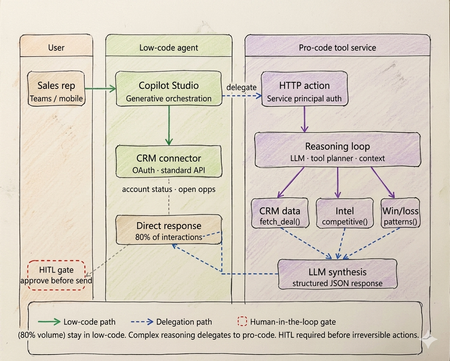
Every enterprise has an AI agent. Almost none of them work in production. Walk into any enterprise technology review right now and you will find the same thing. Pilots running. Demos recorded. Steering committees impressed. And somewhere in the background, a quiet acknowledgment that the thing does not actually work at scale yet. OutSystems surveyed nearly 1,900 global IT leaders and found that 96% of organizations are already running AI agents in some capacity. Yet only one in nine has those agents operating in production at scale. The experiments are everywhere. The production systems are not. That gap is not a capability problem. The infrastructure has matured. Tool calling is standard across all major models. Frameworks like LangGraph, CrewAI, and Microsoft Agent Framework abstract orchestration logic. Model Context Protocol standardizes how agents access external tools and data sources. Google's Agent-to-Agent protocol now under Linux Foundation governance with over 50 enterprise technology partners including Salesforce, SAP, ServiceNow, and Workday standardizes how agents coordinate with each other. The protocols are in place. The frameworks are production ready. The gap is a selection and governance problem. Teams are building agents on problems that do not need them. Choosing the wrong tier for the ones that do. And treating governance as a compliance checkbox to add after launch, rather than an architectural input to design in from the start. The same OutSystems research found that 94% of organizations are concerned that AI sprawl is increasing complexity, technical debt, and security risk and only 12% have a centralized approach to managing it. Teams are deploying agents the way shadow IT spread through enterprises a decade ago: fast, fragmented, and without a shared definition of what production-ready actually means. I've built agentic systems across enterprise clients in logistics, retail, and B2B services. The failures I keep seeing are not technology failures. They are architecture and judgment failures problems that existed before the first line of code was written, in the conversation where nobody asked the prior question. This article is the framework I use before any platform conversation starts. What has genuinely shifted in the agentic landscape Three changes are shaping how enterprise agent architecture should be designed today and they are not incremental improvements on what existed before. The first is the move from single agents to multi-agent systems. Databricks' State of AI Agents report drawing on data from over 20,000 organizations, including more than 60% of the Fortune 500 found that multi-agent workflows on their platform grew 327% in just four months. This is not experimentation. It is production architecture shifting. A single agent handling everything routing, retrieval, reasoning, execution is being replaced by specialized agents coordinating through defined interfaces. A financial organization, for example, might run separate agents for intent classification, document retrieval, and compliance checking each narrow in scope, each connected to the next through a standardized protocol rather than tightly coupled code. The second is protocol standardization. MCP handles vertical connectivity how agents access tools, data sources, and APIs through a typed manifest and standardized invocation pattern. A2A handles horizontal connectivity how agents discover peer agents, delegate subtasks, and coordinate workflows. Production systems today use both. The practical consequence is that multi-agent architectures can be composed and governed as a platform rather than managed as a collection of one-off integrations. The third is governance as the differentiating factor between teams that ship and teams that stall. Databricks found that companies using AI governance tools get over 12 times more AI projects into production compared to those without. The teams running production agents are not running more sophisticated models. They built evaluation pipelines, audit trails, and human oversight gates before scaling not after the first incident. Tier 1 - Low-code agents: fast delivery with a defined ceiling The low-code tier is more capable than it was eighteen months ago. Copilot Studio, Salesforce Agentforce, and equivalent platforms now support richer connector libraries, better generative orchestration, and more flexible topic models. The ceiling is higher than it was. It is still a ceiling. The core pattern remains: a visual topic model drives a platform-managed LLM that classifies intent and routes to named execution branches. Connectors abstract credential management and API surface. A business team — analyst, citizen developer, IT operations — can build, deploy, and iterate without engineering involvement on every change. For bounded conversational problems, this is the fastest path from requirement to production. The production reality is documented clearly. Gartner data found that only 5% of Copilot Studio pilots moved to larger-scale deployment. A European telecom with dedicated IT resources and a full Microsoft enterprise agreement spent six months and did not deliver a single production agent. The visual builder works. The path from prototype to production, production-grade integrations, error handling, compliance logging, exception routing is where most enterprises get stuck, because it requires Power Platform expertise that most business teams do not have. The platform ceiling shows up predictably at four points. Async processing anything beyond a synchronous connector call, including approval chains, document pipelines, or batch operations cannot be handled natively. Full payload audit logs platform logs give conversation transcripts and connector summaries, not structured records of every API call and its parameters. Production volume concurrency limits and message throughput budgets bind faster than planning assumptions suggest. Root cause analysis in production you cannot inspect the LLM's confidence score or the alternatives it considered, which makes diagnosing misbehavior significantly harder than it should be. The correct diagnostic: can this use case be owned end-to-end by a business team, covered by standard connectors, with no latency SLA below three seconds and no payload-level compliance requirement? Yes, low code is the correct tier. Not a compromise. If no on any point, continue. If low-code is the right call for your use case: Copilot Studio quickstart Tier 2 - Pro-code agents: the architecture the current landscape demands The defining pattern in production pro-code architecture today is multi-agent. Specialized agents per domain, coordinating through MCP for tool access and A2A for peer-to-peer delegation, with a governance layer spanning the entire system. What this looks like in practice: a financial organization handling incoming compliance queries runs separate agents for intent classification, document retrieval, and the compliance check itself. None of these agents tries to do all three jobs. Each has a narrow responsibility, a defined input/output contract typed against a JSON Schema, and a clear handoff boundary. The 327% growth in multi-agent workflows reflects production teams discovering that the failure modes of monolithic agents topic collision, context overflow, degraded classification as scope expands are solved by specialization, not by making a single agent more capable. The discipline that makes multi-agent systems reliable is identical to what makes single-agent systems reliable, just enforced across more boundaries: the LLM layer reasons and coordinates; deterministic tool functions enforce. In a compliance pipeline, no LLM decides whether a document satisfies a regulatory requirement. That evaluation runs in a deterministic tool with a versioned rule set, testable outputs, and an immutable audit log. The LLM orchestrates the sequence. The tool produces the compliance record. Mixing these letting an LLM evaluate whether a rule pass collapses the audit trail and introduces probabilistic outputs on questions that have regulatory answers. MCP is the tool interface standard today. An MCP server exposes a typed manifest any compliant agent runtime can discover at startup. Tools are versioned, independently deployable, and reusable across agents without bespoke integration code. A2A extends this horizontally: agents advertise capability cards, discover peers, and delegate subtasks through a standardised protocol. The practical consequence is that multi-agent systems built on both protocols can be composed and governed as a platform rather than managed as a collection of one-off integrations. Observability is the architectural element that separates teams shipping production agents from teams perpetually in pilot. Build evaluation pipelines, distributed traces across all agent boundaries, and human review gates before scaling. The teams that add these after the first production incident spend months retrofitting what should have been designed in. If pro-code is the right call for your use case: Foundry Agent Service The hybrid pattern: still where production deployments land The shift to multi-agent architecture does not change the hybrid pattern it deepens it. Low-code at the conversational surface, pro-code multi-agent systems behind it, with a governance layer spanning both. On a logistics client engagement, the brief was a sales assistant for account managers shipment status, account health, and competitive context inside Teams. The business team wanted everything in Copilot Studio. Engineering wanted a custom agent runtime. Both were wrong. What we built: Copilot Studio handled all high-frequency, low-complexity queries shipment tracking, account status, open cases through Power Platform connectors. Zero custom code. That covered roughly 78% of actual interaction volume. Requests requiring multi-source reasoning competitive positioning on a specific lane, churn risk across an account portfolio, contract renewal analysis delegated via authenticated HTTP action to a pro-code multi-agent service on Azure. A retrieval agent pulled deal history and market intelligence through MCP-exposed tools. A synthesis agent composed the recommendation with confidence scoring. Structured JSON back to the low-code layer, rendered as an adaptive card in Teams. The HITL gate was non-negotiable and designed before deployment, not added after the first incident. No output reached a customer without a manager approval step. The agent drafts. A human sends. This boundary low-code for conversational volume, pro-code for reasoning depth maps directly to what the research shows separates teams that ship from teams that stall. The organizations running agents in production drew the line correctly between what the platform can own and what engineering needs to own. Then they built governance into both sides before scaling. The four gates - the prior question that still gets skipped Run every candidate use case through these four checks before the platform conversation begins. None of the recent infrastructure improvements change what they are checking, because none of them change the fundamental cost structure of agentic reasoning. Gate 1 - is the logic fully deterministic? If every valid output for every valid input can be enumerated in unit tests, the problem does not need an LLM. A rules engine executes in microseconds at zero inference cost and cannot produce a plausible-but-wrong answer. NeuBird AI's production ops agents which have resolved over a million alerts and saved enterprises over $2 million in engineering hours work because alert triage logic that can be expressed as rules runs in deterministic code, and the LLM only handles cases where pattern-matching is insufficient. That boundary is not incidental to the system's reliability. It is the reason for it. Gate 2 - is zero hallucination tolerance required? With over 80% of databases now being built by AI agents per Databricks' State of AI Agents report the surface area for hallucination-induced data errors has grown significantly. In domains where a wrong answer is a compliance event financial calculation, medical logic, regulatory determinations irreducible LLM output uncertainty is disqualifying regardless of model version or prompt engineering effort. Exit to deterministic code or classical ML with bounded output spaces. Gate 3 - is a sub-100ms latency SLA required? LLM inference is faster than it was eighteen months ago. It is not fast enough for payment transaction processing, real-time fraud scoring, or live inventory management. A three-agent system with MCP tool calls has a P50 latency measured in seconds. These problems need purpose-built transactional architecture. Gate 4 - is regulatory explainability required? A2A enables complex agent coordination and delegation. It does not make LLM reasoning reproducible in a regulatory sense. Temperature above zero means the same input produces different outputs across invocations. Regulators in financial services, healthcare, and consumer credit require deterministic, auditable decision rationale. Exit to deterministic workflow with structured audit logging at every Five production failure modes - one of them new The four original anti-patterns are still showing up in production. A fifth has been added by scale. Routing data retrieval through a reasoning loop. A direct API call returns account status in under 10ms. Routing the same request through an LLM reasoning step adds hundreds of milliseconds, consumes tokens on every call, and introduces output parsing on data that is already structured. The agent calls a structured tool. The tool calls the API. The agent never acts as the integration layer. Encoding business rules in prompts. Rules expressed in prompt text drift as models update. They produce probabilistic output across invocations and fail in ways that are difficult to reproduce and diagnose. A rule that must evaluate correctly every time belongs in a deterministic tool function unit-tested, version-controlled, independently deployable via MCP. No approval gate on CRUD operations. CRUD operations without a human approval step will eventually misfire on the input that testing did not cover. The gate needs to be designed before deployment, not added after the first incident involving a financial posting, a customer-facing communication, or a data deletion. Monolithic agent for all domains. A single agent accumulating every domain leads predictably to topic collision, context overflow, and maintenance that becomes impossible as scope expands. Specialized agents per domain, coordinating through A2A, is the architecture that scales. Ungoverned agent sprawl. This is the new one and currently the most prevalent. OutSystems found 94% of organizations concerned about it, with only 12% having a centralized response. Teams building agents independently across fragmented stacks, without shared governance, evaluation standards, or audit infrastructure, produce exactly the same organizational debt that shadow IT created but with higher stakes, because these systems make autonomous decisions rather than just storing and retrieving data. The fix is treating governance as an architectural input before deployment, not a compliance requirement after something breaks. The infrastructure is ready. The judgment is not. The tier decision sequence has not changed. Does the problem need natural language understanding or dynamic generation? No — deterministic system, stop. Can a business team own it through standard connectors with no sub-3-second latency SLA and no payload-level compliance requirement? Yes — low-code. Does it need custom orchestration, multi-agent coordination, or audit-grade observability? Yes — pro-code with MCP and A2A. Does it need both a conversational surface and deep backend reasoning? Hybrid, with a governance layer spanning both. What has changed is that governance is no longer optional infrastructure to add when you have time. The data is unambiguous. Companies with governance tools get over 12 times more AI projects into production than those without. Evaluation pipelines, distributed tracing across agent boundaries, human oversight gates, and centralised agent lifecycle management are not overhead. They are what converts experiments into production systems. The teams still stuck in pilot are not stuck because the technology failed them. They are stuck because they skipped this layer. The protocols are standardised. The frameworks are mature. The infrastructure exists. None of that is what is holding most enterprise agent programmes back. What is holding them back is a selection problem disguised as a technology problem — teams building agents before asking whether agents are warranted, choosing platforms before running the four gates, and treating governance as a checkpoint rather than an architectural input. I have built agents that should have been workflow engines. Not because the technology was wrong, but because nobody stopped early enough to ask whether it was necessary. The four gates in this article exist because I learned those lessons at clients' expense, not mine. The most useful thing I can offer any team starting an agentic AI project is not a framework selection guide. It is permission to say no — and a clear basis for saying it. Take the four gates framework to your next architecture review. If you have already shipped agents to production, I would like to hear what worked and what did not - comment below What to do next Three concrete steps depending on where you are right now. If you have pilots that have not reached production: Run them through the four gates in this article before the next sprint. Gate 1 alone will eliminate a meaningful percentage of them. The ones that survive all four are your real candidates for production investment. Download the attached file for gated checklist and take it into your next architecture review. If you are starting a new agent project: Do not open a platform before you have answered the gate questions. Once you have confirmed an agent is warranted and identified the tier, start here: Copilot Studio guided setup for low-code scenarios, or Foundry Agent Service for pro-code patterns with MCP and multi-agent coordination built in. Build governance infrastructure - evaluation pipeline, distributed tracing, HITL gates - before you scale, not after. If you have already shipped agents to production: Share what worked and what did not in the Azure AI Tech Community — tag posts with #AgentArchitecture. The most useful signal for teams still in pilot is hearing from practitioners who have been through production, not vendors describing what production should look like. References OutSystems — State of AI Development Report - https://www.outsystems.com/1/state-ai-development-report Databricks — State of AI Agents Report - https://www.databricks.com/resources/ebook/state-of-ai-agents Gartner — 2025 Microsoft 365 and Copilot Survey - https://www.gartner.com/en/documents/6548002 (Paywalled primary source — publicly reported via techpartner.news: https://www.techpartner.news/news/gartner-microsoft-copilot-hype-offset-by-roi-and-readiness-realities-618118) Anthropic — Model Context Protocol (MCP) - https://modelcontextprotocol.io Google Cloud — Agent-to-Agent Protocol (A2A) . https://developers.googleblog.com/en/a2a-a-new-era-of-agent-interoperability NeuBird AI — Production Operations Deployment Announcement NeuBird AI Closes $19.3M Funding Round to Scale Agentic AI Across Enterprise Production Operations ReAct: Synergizing Reasoning and Acting in Language Models — Yao et al. https://arxiv.org/abs/2210.03629 Enterprise Integration Patterns — Gregor Hohpe & Bobby Woolf, Addison-Wesley https://www.enterpriseintegrationpatterns.com6KViews4likes1Comment