artifical intelligence
79 TopicsAzure OpenAI Decisions API: Now generally available in Microsoft Foundry
AI applications and agents do more than generate content. They constantly make decisions about what should happen next. Which model should handle this request? Is a customer issue urgent? Did an agent’s output meet the required criteria? Should a workflow continue, try another approach, or involve a person? As agents become more sophisticated, these decisions can happen hundreds or even thousands of times across a workflow, and not every one of them requires a full generative response. On October 22, we brought the OpenAI Decisions API to Microsoft Foundry, giving developers a purpose-built way to make fast, focused decisions across AI applications and agentic workflows. The Decisions API evaluates text, images, and structured inputs and turns them into actionable choices, probabilities, and scores. It brings intelligence directly into the control flow of an application, helping developers determine what should happen next without relying on traditional generative inference for every step. This represents an important evolution in how models can be used within AI systems. Sometimes you need a model to create. Sometimes you need it to reason deeply across a complex problem. And sometimes, the most valuable thing a model can do is make a focused decision that helps the rest of the system move forward. Decision-making is becoming a core part of agentic applications Consider an AI customer service agent handling an incoming request. Before it generates a response, the application may need to understand what the customer is asking about, determine how urgent the issue is, identify which model or tool is best suited to handle it, and decide whether specialized expertise is required. Once a response has been generated, the application may need to evaluate it again, determining whether it adequately addressed the customer's issue, met the application's requirements, or should be escalated for human review. For an agentic workflow, that distinction can be significant. Before work begins, an application can evaluate an incoming request and route it to the right model or tool. During execution, an agent can assess possible actions and choose the appropriate next step. After another model completes a task, the application can evaluate the output against defined criteria and decide whether to continue, retry, take a different path, or bring a person into the workflow. Before work begins: Evaluate an incoming request and route it to the right model or tool. During execution: Assess possible actions and choose the appropriate next step. After a task completes: Evaluate the output against defined criteria and decide whether to continue, retry, take a different path, or bring a person into the workflow. These decisions may be small individually, but collectively they shape how an agent behaves. Giving developers a model designed specifically for these moments creates an opportunity to build systems that can make these choices efficiently while reserving more computationally intensive reasoning and generation for the parts of the experience that need them. Turn inputs into decisions your application can use The Decisions API gives developers a dedicated endpoint for evaluating inputs against questions they define. Each question supports one of three focused outcomes: a probability, a choice from a predefined set of options, or a score against a defined rubric. Instead of parsing generated text to determine what a model meant, application code can work with defined values designed to inform what happens next. Probability: Determine whether a condition is true and return a confidence value. Multiple choice: Select from a predefined set of options. Rubric scoring: Score an input against defined criteria. Instead of parsing generated text to determine what a model meant, application code can work with defined values designed to inform what happens next. Use the right model for the right moment What makes this especially powerful is the impact on real-world agentic applications. As agents become more sophisticated, they make hundreds or even thousands of decisions across workflows. The latency and cost of each decision can quickly compound. With the Decisions API, developers can bring intelligence directly into these critical decision points, from dynamically routing requests and prioritizing customer issues to evaluating agent outputs and deciding when human intervention is needed. This is an important shift from using AI primarily to generate content toward using AI to drive responsive, efficient, and intelligent systems. For developers, the opportunity isn't simply to build agents capable of doing more. It's to make those agents faster, more cost-efficient, and practical to operate at enterprise scale. That could mean routing a request to the appropriate model rather than automatically using a larger model, prioritizing customer issues before an agent begins working on them, or evaluating an agent's output before deciding whether a workflow can continue autonomously. In each of these cases, the model isn't responsible for producing the final experience. It's helping the application intelligently decide how that experience should unfold. Building AI systems that can decide what comes next The broader shift here is from thinking about AI primarily as something that generates an answer to thinking about intelligence as something that can be embedded throughout an application. Generative models remain essential for creating, reasoning, and interacting with users, but increasingly sophisticated agents also need intelligence between those moments to continuously determine what to do next. Developers can use it alongside other models to create workflows where reasoning, generation, evaluation, routing, and decision-making each happen where they make the most sense. As those workflows become longer and more autonomous, having a focused way to make the many smaller decisions along the way can become just as important as the models performing the largest tasks. Get started with the Decisions API For developers, the Decisions API is available through a dedicated /openai/v1/decisions endpoint on an Azure OpenAI resource and is available with GPT-6 Luna. Developers can call the endpoint using OpenAI SDKs or REST, pass their GPT-6 Luna deployment name in the model field, and authenticate using an API key or Microsoft Entra ID. Learn more about the Decisions API → Learn how it works here. Try the Decisions API in Microsoft Foundry → https://ai.azure.com As we continue expanding the models and capabilities available through Microsoft Foundry, I'm particularly excited about what this unlocks for developers building the next generation of AI applications. The opportunity isn't simply to give agents access to increasingly capable models. It's to build systems that can apply the right intelligence at the right moment, from the complex reasoning and generation that users see to the many decisions happening behind the scenes. The next generation of AI applications won't just be defined by how well they generate. They'll also be defined by how intelligently and efficiently they decide what to do next. Pricing (per 1M tokens) Decision API supported model Input Output Cached input 30-minute cached write GPT-6 Luna $0.10 N/A $0.01 $0.125 Start building with the Azure OpenAI Decisions API in Microsoft Foundry today to bring reliable, structured decision-making to your apps and agents.1.8KViews2likes0Comments
Now in Foundry: Meta Muse Spark Open, NVIDIA Nemotron 3.5 Super VL, and Reflection Beam
This week's Model Mondays edition highlights three Hugging Face models newly available in Microsoft Foundry, giving developers more open-weight options for enterprise coding and agentic work: Meta's Muse Spark Open, NVIDIA's Nemotron 3.5 Super VL, and Reflection's Beam 1.0. Models of the week Meta: Muse-Spark-Open-816B-A42B-NVFP4 Model Specs Parameters / size: 816B total / 42B active; Mixture of Experts, which activates a subset of parameters for each token; NVIDIA's 4-bit floating-point format (NVFP4). Context length: 1,048,576 tokens in the Foundry deployment. Primary task: Multimodal reasoning, multi-step reasoning, coding, and agentic task completion. Why it's interesting Published agent and coding evaluations: Meta reports scores of 89.2 on MCP-Atlas, which evaluates tool use through the Model Context Protocol (MCP), and 76.4 on Terminal-Bench 2.1, using the Terminus 2 agent. These are Muse Spark Open results at xhigh reasoning effort; the benchmark table does not identify them as NVFP4-specific measurements. Adjust reasoning effort to the task: The model supports planning, sequential tool calls, and recovery from tool failures. Its reasoning_effort setting offers low, medium, high, and xhigh; Meta recommends the higher settings for complex coding and agentic work. See the model card. Bring visual and conversational evidence into the same workflow: Muse Spark is natively multimodal. It can interpret screenshots, documents, and recordings alongside text. For developers building a product support agent, that opens up end-to-end agentic task completion. Hardware and deployment configuration: Muse Spark's NVFP4 deployment on Azure Foundry has a 1M-context deployment template on NVIDIA H200, intended for long-context reasoning, coding, agentic tasks, and multimodal workloads. Eight GPUs jointly serve one model instance, with both the model tensors and its experts distributed across them. Configuration H200 template Best for Long-context coding and reasoning, multimodal analysis, and extended tool-using workflows Hardware per model instance 8 × NVIDIA H200, 141 GB GPU memory each Azure instance type Standard_ND96isr_H200_v5 Model weights NVFP4 Maximum context 1,048,576 tokens Inputs / output Text, images, audio, and video / text Agent capabilities Tool calling and reasoning; per-request effort of low, medium, high, or xhigh (default) Request timeout 5 minutes This preset retains the model's full native context window, allowing prompts, media, tool results, and generated output to share a single extended context. NVIDIA: NVIDIA-Nemotron-3.5-Super-VL-120B-A12B-BF16 Model Specs Parameters / size: 120B total / 12B active; hybrid MoE architecture; Brain Floating Point 16 (BF16) weights. Context length: Up to 1M tokens natively; 524,288 tokens in the current Foundry deployment presets. Primary task: Vision-language reasoning, document and video understanding, coding, and tool use; text, image, and video input, with text output. Why it's interesting Visual understanding alongside reasoning. A vision encoder connects images and video frames to a language backbone combining Mamba-2 state-space layers, attention, and sparse experts. Developers can use the model to interpret document layouts, charts, and application screens in the same workflow as textual instructions. Reasoning that can be switched on or off. The model supports configurable thinking, giving applications a way to distinguish straightforward extraction from questions that require several reasoning steps. Document and chart evaluation results. NVIDIA reports 62.82 on MMLongBench-Doc, 65.08 on OCR-Reasoning (optical character recognition with reasoning), and 80.82 on CharXiv reasoning, which tests understanding of scientific charts. These are publisher-reported results for the BF16 model; see the benchmark table and evaluation methodology. Hardware and deployment configurations: Nemotron's BF16 deployment on Azure Foundry is available on NVIDIA A100 and H100 templates, both configured for 512K context. Each uses four GPUs per model instance. The main configuration difference is the attention cache, which stores information from earlier tokens: the A100 preset retains BF16 precision, while the H100 preset uses 8-bit floating point (FP8) to reduce cache memory. Configuration A100 template H100 template Best for Document, chart, and application-screen understanding when preserving BF16 cache precision matters The same visual and reasoning tasks when faster generation and shorter waits on long prompts matter Hardware per model instance 4 × NVIDIA A100, 80 GB GPU memory each 4 × NVIDIA H100, 80 GB GPU memory each Azure instance type Standard_ND96amsr_A100_v4 Standard_ND96isr_H100_v5 Model weights BF16 BF16 Attention-cache precision BF16 FP8 Maximum context 524,288 tokens 524,288 tokens Active sequence cap per instance 32 32 Request timeout 90 seconds 90 seconds Choose A100 for cache precision; choose H100 for response speed. The template descriptions position H100 as the faster option for generation and long-prompt processing, using a lower-precision cache while keeping the model weights in BF16. Both presets offer the same context window and active sequence cap, so this choice is about cache precision and performance rather than additional context capacity. Both templates enable tool calling, reasoning, and reuse of cached prompt prefixes. They accept text plus up to one image and one video per prompt; video sampling is configured at two frames per second, with a maximum of 256 sampled frames. Both also enable speculative decoding with three proposed tokens per step, using the model's ability to predict multiple upcoming tokens to accelerate generation. Reflection: Beam-1.0-501B-A23B Model Specs Parameters / size: 501.3B total / 23.4B active; sparse MoE; available with BF16, FP8, and NVFP4 weights. Context length: 1,048,576 tokens natively; 524,288 tokens in the Foundry BF16 preset and 262,144 tokens in the FP8 and NVFP4 presets. Primary task: Text generation for software engineering, reasoning, and agentic tool use; developed predominantly for English. Why it's interesting Built around software engineering workflows. Beam is designed to work with repositories, terminal environments, and tools across extended tasks. Its text-only interface fits coding agent workflows. Reasoning efficiency is an explicit training objective. Reflection describes training with a length penalty that discourages unnecessary generated tokens while rewarding successful solutions. Its launch post explains the trade-off between reasoning effort and task performance. BF16 coding and tool-use results. The release model card reports 81.6% on SWE-bench Verified, 80.1% on Terminal Bench v2.1, and 80.8% on MCP Atlas for BF16. These cover repository issue resolution, terminal tasks, and tool use respectively. Hardware and deployment configurations: The same Beam model is available in three weight precisions: BF16, FP8, and NVFP4. All retain the same parameter count and text, reasoning, and tool-calling capabilities. The lower-precision releases reduce the memory needed for weights, opening up A100 and H100 deployment options. Weight precision Hardware per model instance Default Azure instance type Maximum context Best for BF16 8 × NVIDIA H200, 141 GB GPU memory each Standard_ND96isr_H200_v5 524,288 tokens (512K) Long-context reasoning and agentic tool use with full-precision weights FP8 8 × NVIDIA A100, 80 GB GPU memory each Standard_ND96amsr_A100_v4 262,144 tokens (256K) Reasoning and tool use on A100 while retaining higher weight precision than NVFP4 FP8 8 × NVIDIA H100, 80 GB GPU memory each Standard_ND96isr_H100_v5 262,144 tokens (256K) The same FP8 workloads when H100 capacity or measured workload performance fits better NVFP4 4 × NVIDIA A100, 80 GB GPU memory each Standard_ND96amsr_A100_v4 262,144 tokens (256K) Reasoning and tool use with a smaller GPU allocation on A100 NVFP4 4 × NVIDIA H100, 80 GB GPU memory each Standard_ND96isr_H100_v5 262,144 tokens (256K) The same four-GPU option when H100 capacity or measured workload performance fits better All five templates use an FP8 attention cache, support tool calling with automatic tool selection and reasoning, enable reuse of cached prompt prefixes and processing long prompts in chunks, and set a 90-second request timeout. Getting started You can deploy these Hugging Face models in Microsoft Foundry by browsing the Hugging Face collection in the Foundry model catalog and selecting a managed endpoint deployment. Read Hugging Face on Azure docs Explore models in Microsoft Foundry398Views0likes0CommentsFoundry Fine-Tuning: open-source model expansion, MAI-Code, and shared multi-LoRA deployments
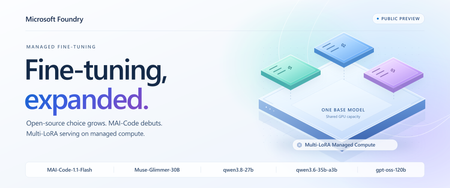
Today, Microsoft Foundry Managed Fine-Tuning expands its collection with four new open-source models and brings MAI-Code-1.1-Flash to Foundry resources, all in public preview. Alongside them, Multi-LoRA Managed Compute deployments enter public preview, letting compatible adapters share base-model weights and GPU capacity instead of each needing a separate serving allocation. More open-source choice for your next custom model Muse-Glimmer-30B, qwen3.8-27b, qwen3.6-35b-a3b and gpt-oss-120b join Foundry's managed open-source model collection, with supervised fine-tuning (SFT) support across all four. You can now bring your example-driven customization workflow to more backbones, choosing for tool-use reliability, coding efficiency, extended planning or reasoning capacity. Here's what each option brings: Model Why put it on your shortlist? Muse-Glimmer-30B Resilient tool orchestration: precise tool calls, interpreting unexpected results and recovering when a workflow goes off-script. qwen3.8-27b Extended research and planning: a dense backbone for sustained autonomous work that adapts to feedback from its environment. qwen3.6-35b-a3b Repository and frontend coding: a sparse mixture-of-experts backbone for navigating codebases and making coordinated changes. gpt-oss-120b Reasoning headroom: a higher-capacity alternative to the existing gpt-oss-20b option for difficult analytical and problem-solving tasks. Use SFT to tailor these models to your application's needs: Coding conventions: organization-specific library usage and preferred implementation patterns. Structured outputs: JSON schemas and extraction responses used by downstream applications. Domain workflows: product terminology, support tone, and classification or triage decisions. Distillation: use teacher-generated example responses to specialize a smaller model for your task. All four also support reinforcement fine-tuning (RFT) if your workflow calls for more advanced, reward-based optimization. MAI makes its fine-tuning debut in Foundry In addition to the open-source models above, we're introducing MAI-Code-1.1-Flash, the first Microsoft model available for Managed Fine-Tuning on Foundry resources. With the base model already available in GitHub Copilot, this compact, coding-focused model brings particular strengths in software development tasks. Its emphasis on responsiveness and token efficiency makes it a compelling backbone for repeated edit-build-test loops, where inspecting code, proposing edits and responding to compiler or test feedback all contribute to the task's latency and token budget. MAI-Code-1.1-Flash supports RFT only in this preview. Use it to target outcomes you can verify: a change that passes task-specific tests, correctly uses an internal software library, or satisfies your repository's acceptance checks. Build rewards around correctness and the required scope of the change, rather than whether an answer reproduces a reference patch. That leaves room for different valid solutions while keeping the customization anchored to your engineering requirements. Share hardware across adapters to reduce serving costs Previously, Foundry's managed fine-tuning outputs went to serverless pay-as-you-go deployments: input/output token charges plus hosting fees for each fine-tuned deployment. More traffic increased usage charges; more deployed variants added hosting costs. With Multi-LoRA adapter deployment on Managed Compute, compatible adapters share LoRA-enabled base-model deployment and GPU capacity. You pay an hourly rate for that hardware, rather than per-token inference charges, so multiple customizations can use one serving allocation instead of funding separate GPU footprints. Three task-specific qwen3.8-27b adapters, for example, can share a LoRA-enabled base deployment while remaining separately addressable. When their combined traffic fits, adding an adapter doesn't mean another hardware bill. You avoid duplicating base-model serving capacity and can improve utilization by pooling requests across variants, instead of paying separate serverless hosting fees for each one. The tradeoff is utilization: running hardware is billed even when idle, so size for aggregate concurrency and context lengths. More traffic can require additional capacity, while serverless remains an option for intermittent workloads on eligible models. The managed compute deployment path supports Muse-Glimmer-30B, both new Qwen models and gpt-oss-120b. Adapters must match the same base model and version; the base deployment needs a compatible LoRA-enabled template. Accelerator quota is required. Put the new models to work in your agents The expanded model collection helps you pick a backbone suited to your tasks; Multi-LoRA lets compatible customizations share serving capacity. These choices come together in agent applications, where different roles can need different model behavior. A coding assistant and a code-review agent, for example, can use separate adapters on the same supported OSS base model while sharing the hardware that serves them. Fine-tuning customizes model behavior, but the goal is to improve the agent application that uses it. Connect your tuned models to your agent applications in Foundry and evaluate them alongside the instructions, tools and workflows they'll use in production. That keeps customization focused on better application outcomes, not just better training results. Put these new capabilities behind your agent's next iteration. Get started with Foundry Fine-Tuning today.446Views2likes0CommentsImplementing Next Best Action (NBA) in Foundry with Microsoft-Decision-1
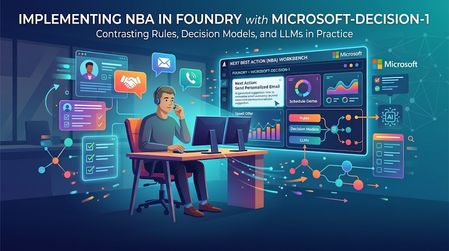
Imagine a sales rep opening their account list at the start of the day. One customer wants a product demo. Another has a larger potential deal, but its requirements may not match what your product can do. A third has asked you not to contact them for another week. A construction permit looks promising, but you are not even sure the applicant is the company in your CRM. You do not need another summary of the list. You need to know: what should I do next? That is the starting point for this demo: a next best action workbench for sales reps, built with Microsoft Foundry. It compares rules, GPT-4o, and Microsoft-Decision-1 against the same evidence. The accounts and evidence are synthetic; the hosted model responses are real. The interesting part is not which model wins. It is how the sales question changes, and what that reveals about the kind of decision support we need. A Bigger Deal Is Not Always the Next Call The first scenario puts four fictional sales motions in front of the rep: Apex: a $76,000 expansion. The buyer has requested a dispatch demo, and the capability exists today. Summit: a $210,000 cross-sell. The buyer wants capabilities that are not all established as currently supported. Coastal: a $158,000 expansion. The customer has explicitly paused sales contact until October 23. A similar-name permit applicant: a $3.1 million construction project, but an unverified account match and unknown software opportunity value. Sorting by the largest number would miss the point. A construction budget is not software revenue. A large opportunity does not justify promising a roadmap feature. A territory's quota pressure does not override a customer's request not to be contacted. So "next best action" is really two questions: which account deserves attention, and what kind of attention is appropriate? Contact now, clarify requirements, defer, and request human review are different outcomes. Doing nothing yet can be the correct one. Some of those decisions should not be left to a model. In this application, code enforces contact restrictions, evidence requirements, and identity checks before any model recommendation is accepted. Coastal's pause is a boundary, not a factor a model can trade against deal size. The unverified applicant needs review, not a confident sales approach. With those boundaries in place, we can compare how each method handles the remaining judgment. First, Try the Simple Answer The first version uses a transparent scoring formula: software opportunity value, territory quota shortfall, a requested meeting, and whether the buyer needs an unavailable capability. In the recorded routine comparison, all three methods agreed on the ranking and next actions. Rules needed no model tokens and were the simplest adequate implementation for that case. That is a useful outcome. If the relevant facts are already explicit and a few conditions capture the decision, adding a model may add latency and cost without adding useful capability. But consider what happens when "meeting requested" stops telling the whole story. The Same Meeting Request Can Mean Different Things The second scenario is a separate authored version of the synthetic evidence, not a claim that these accounts changed in real time. Apex now has the larger seller-entered estimate, but the meeting is exploratory: there is no established buying process or approved budget. Summit has a smaller funded pilot, completed requirements review, and near-term rollout readiness. Both have requested a meeting. Both need supported capabilities. To the fixed formula, those meeting requests look the same. It ranks Apex first. To a rep reading the context, a discovery invitation and a funded pilot are not equivalent signals. We could extend the rules with readiness fields and more conditions. That may be the right choice. But this is also where a different kind of model becomes interesting: one that interprets the evidence and returns a bounded decision rather than a paragraph. Where Decision Models Fit Models such as TypeSafe AI's Jev have brought attention to this decision-first approach. Supply the situation, define the possible answers, and receive structured choices or scores that software can use directly. TypeSafe calls this a System One model. Microsoft-Decision-1 brings that approach to Microsoft Foundry. Instead of asking it to write a recommendation, this application asks two questions for each eligible account: what action fits, and how much priority should it receive? The application defines the available actions and the priority scale. Decision-1 does not generate a written rationale. It returns a selected action and a score. Its API also supports yes/no probability questions. Jev is context for the emerging category, not a model tested in this comparison. In the recorded contextual runs, both Decision-1 and GPT-4o ranked Summit first, while rules ranked Apex first. One earlier run also showed a useful distinction: GPT-4o suggested outreach for Apex; Decision-1 suggested researching it further. The takeaway is not that models understand sales better than rules. It is narrower: the context changed the models' recommendation in a way this particular formula could not express. That is a reason to evaluate contextual judgment, not proof of better revenue outcomes. These are authored teaching cases, and "Summit first" is the intended case criterion, not a measured commercial result. Choosing the Account Is Only the Beginning Now change the question again. It is no longer just "should we pursue the funded pilot?" It becomes: Can we propose a rollout that fits the customer's deadline and budget? A selected action is no longer the complete answer. The rep needs a proposal: phases, dates, costs, and remaining budget. That is the third scenario. All methods receive the same operational facts, but only the generative adapter is implemented to produce a plan. Rules and Decision-1 remain explicitly decision-only. GPT-4o uses a calculation tool for the budget, then returns a structured schedule and proposal. The successful recorded plan finished on October 22, cost $23,200, and left $300 of budget. Application code independently checked phase order, business-day durations, non-overlap, costs, deadline assessment, and supplied references. The path to that result matters. Earlier model attempts produced correct schedules but incorrect costs, and the application rejected them. The fix was to provide an arithmetic tool, not weaken the checks or substitute a prewritten answer. This is a role for generation alongside deterministic tools. It is not a claim that only an LLM can solve a schedule: a purpose-built scheduler could solve these fixed constraints too. It shows why choosing an action and producing a usable plan are different tasks. The Use Case Gives Us the Framework We started with one sales question, but uncovered three kinds of work: What the rep needs A mechanism to consider What still belongs in code An action from explicit, structured facts Rules The conditions, formula, and permitted actions. A contextual choice within known options A bounded decision model, compared with a structured-output LLM Evidence checks, action boundaries, and output validation. A proposed plan or other generated artifact A generative LLM with tools, or a purpose-built solver where appropriate Calculations, constraint checks, and approval before action. This is why I find "rules, bounded decisions, and generation" more useful here than simply "deterministic versus non-deterministic." Repeatability alone does not tell us whether a recommendation is useful or correct. The required output and the cost of an error tell us more. These mechanisms can coexist in one workflow. Keep hard boundaries deterministic. Use contextual judgment where it adds value. Use generation when you need a generated artifact. Microsoft Agent Framework coordinates the comparison: What This Demo Does, and Does Not, Show The comparison is deliberately small and inspectable. Every method receives the same prepared evidence; expected teaching outcomes stay out of model input. In the recorded decision-only runs, Decision-1 had lower measured branch time and estimated token cost than GPT-4o. Those are single-run observations, not a general speed, quality, or savings benchmark. The planning case performs additional work and is not a like-for-like latency comparison. The scenarios use a fixed simulation time of October 15, 2026, at 12:00 UTC. The primary demo retrieves versioned synthetic snapshots from Azure AI Search, not live CRM or live IQ-agent responses. It does not turn historical records into fresh facts. The workbench opens editable synthetic drafts; it sends no outreach and makes no CRM changes. "Best" therefore means a suggested next action under the supplied evidence and rubric, not a proven optimal action or a prediction of sales success. A valid response shape or evidence reference does not establish a correct judgment. Production use would need representative held-out evaluation, verified access controls, and appropriate human approval. The practical starting point is simple: take a decision your users already make, define the available actions, identify the non-negotiable boundaries, and compare the simplest adequate implementation with the alternatives. Let the use case earn the complexity. Try the Workbench The decision-lead-agent-demo repository contains the local workbench and the three scenarios. Follow the local setup instructions to reproduce the comparison with approved model deployments and credentials. Hosted calls can incur charges. Start with the routine case, where all three may agree. Then inspect what changes in the contextual case, and what extra work the planning task requires. The question to carry into your own application is not "where can I add AI?" It is "what does the next action require that my current approach cannot provide?" Technical Walkthrough: The Code Behind the Comparison The story above does not require reading the implementation. For builders, the following sections retain the exact rules and invocation code, pinned to commit d1a16a5. Microsoft Agent Framework runs each method against an isolated copy of the same prepared snapshot. Shared checks restrict actions before the decision and validate the result afterward. Invalid results are rejected rather than repaired and reported as successes. Snapshot fingerprints verify comparable inputs; evidence-reference checks verify membership, not the truth of a model's judgment. 1. The Rules Baseline The baseline is intentionally transparent. It weights capped software opportunity value at 30%, proportional territory quota shortfall at 20%, a requested meeting at 30%, and no unavailable-capability requirement at 20%. It scales the result to 0-3. Here is the complete rules runner from the implementation at the demo commit. The territory-specific branch supports the separate live research mode; the synthetic comparison uses the opportunity formula. async def rules_runner(snapshot: dict[str, Any]) -> dict[str, Any]: suggestions = [] for candidate in snapshot["candidates"]: signals, policy = candidate["buyingSignals"], candidate["policy"] performance = candidate["territoryPerformance"] gap = max(0, performance["quota"] - performance["revenue"]) / performance["quota"] score = ( 30 * min((candidate["opportunityAmount"] or 0) / 250000, 1) + 20 * min(gap, 1) + 30 * (signals["meetingRequested"] is True) + 20 * (signals["requiresUnavailableCapability"] is False) ) if snapshot.get("scope") == "territory-prospecting": score = 100 * min(gap, 1) action = "outreach" if signals["requiresUnavailableCapability"] is False and signals["meetingRequested"] is True else "research" if not {"outreach", "research"}.intersection(policy["allowedActions"]): action, score = ("defer" if "defer" in policy["allowedActions"] else "cannot_tell"), 0 suggestions.append({ "candidateId": candidate["candidateId"], "action": action, "priority": round(score * 3 / 100, 4), "evidenceIds": [item["evidenceId"] for item in candidate["evidence"]] + [item["evidenceId"] for item in snapshot["productEvidence"]], "basis": (f"Territory research only: proportional quota shortfall {gap:.2f}; no inferred buyer intent." if snapshot.get("scope") == "territory-prospecting" else f"Rules: value {min((candidate['opportunityAmount'] or 0) / 250000, 1):.2f}; quota gap {gap:.2f}; meeting {signals['meetingRequested']}; unavailable capability {signals['requiresUnavailableCapability']}."), }) return validate_recommendations({"status": "ok", "model": "Deterministic rules v1", "suggestions": suggestions, "usage": None, "inferenceCostUsd": 0}, snapshot) These weights are demonstration heuristics, not validated sales economics. Their advantage is that their behavior is easy to inspect. Their limitation is equally concrete: the formula does not read whether a meeting is exploratory or follows an approved, funded pilot. That limitation is not inherent to all rules systems. We could add structured readiness fields or more rules. The question is whether maintaining that logic is preferable to using a model for the contextual part. 2. Invoke Microsoft-Decision-1 Decision-1 is not a drop-in model-name change on the chat endpoint. It uses a different request contract: POST <resource-origin>/providers/microsoft/v1/systemone The request contains the deployment name, shared state, and questions. The following is the complete adapter method from the model adapters. Its surrounding class supplies the HTTP transport; policy_exclusions, ACTIONS, and token_cost are repository helpers. async def decision1(self, snapshot): rubric = snapshot.get("rubric", RUBRIC) priority_criteria = (["No research priority or review required", "Low research priority", "Moderate research priority", "High research priority"] if snapshot.get("scope") == "territory-prospecting" else ["Not actionable or review required", "Exploratory", "Timely but uncertain", "Ready and timely"]) questions, suggestions = {}, policy_exclusions(snapshot) for candidate in snapshot["candidates"]: candidate_id = candidate["candidateId"] allowed = candidate["policy"]["allowedActions"] if not {"outreach", "research"}.intersection(allowed): continue questions[f"action_{candidate_id}"] = { "type": "choice", "instructions": f"{rubric} Choose the next action for {candidate_id}.", "criteria": {action: ACTIONS[action] for action in allowed}, } questions[f"priority_{candidate_id}"] = { "type": "score", "instructions": f"{rubric} Rate attention priority for {candidate_id}.", "criteria": priority_criteria, } if not questions: return {"status": "ok", "model": "No model call: all candidates policy-gated", "suggestions": suggestions, "usage": None, "inferenceCostUsd": 0} response = await self.transport( os.environ["DECISION1_ENDPOINT"].rstrip("/") + "/providers/microsoft/v1/systemone", {"model": os.environ["DECISION1_DEPLOYMENT"], "state": snapshot, "questions": questions}, ) answers = response["answers"] for candidate in snapshot["candidates"]: candidate_id = candidate["candidateId"] if not {"outreach", "research"}.intersection(candidate["policy"]["allowedActions"]): continue action_answer, score_answer = answers[f"action_{candidate_id}"], answers[f"priority_{candidate_id}"] if action_answer.get("type") != "choice" or score_answer.get("type") != "score": raise ValueError("Unexpected Decision-1 answer type") suggestions.append({"candidateId": candidate_id, "action": action_answer["choice"], "priority": score_answer["score"], "evidenceIds": supplied_ids(candidate, snapshot), "basis": "Supplied evidence references; Decision-1 provides no written rationale."}) return {"status": "ok", "suggestions": suggestions, "usage": response.get("usage"), "model": response.get("model", os.environ["DECISION1_DEPLOYMENT"]), "inferenceCostUsd": token_cost(response.get("usage"), "DECISION1")} Two details matter. First, each question identifies the candidate in its instructions, not only in its dictionary key. Second, action criteria come from the application's policy-allowed set. Related action and priority questions share one request and one state. The four score levels run from 0 to 3; a returned score can fall between levels. The demo consumes the selected action and score, not the full probability distributions. The evidence IDs attached here are supplied references, not model-generated citations or a written explanation. 3. Invoke GPT-4o With Structured Output The LLM receives the same snapshot and qualitative rubric, but uses Chat Completions with a strict JSON schema. The basic comparison asks for decisions, not a persuasive paragraph. That gives the LLM a bounded task too, rather than making it generate an explanation that Decision-1 cannot provide. These are exact excerpts from HostedModels.llm, not a standalone script. The method derives eligible_ids from policy and defines this schema: item_schema = { "type": "object", "additionalProperties": False, "properties": {"candidateId": {"type": "string", "enum": eligible_ids}, "action": {"type": "string", "enum": ["outreach", "research", "cannot_tell"]}, "priority": {"type": "number"}, "evidenceIds": {"type": "array", "items": {"type": "string"}}}, "required": ["candidateId", "action", "priority", "evidenceIds"], } schema = {"type": "object", "additionalProperties": False, "properties": {"suggestions": {"type": "array", "items": item_schema}}, "required": ["suggestions"]} For the decision-only task, plan_instruction is "Do not generate an explanation." The payload and endpoint are: payload = { "model": os.environ["LLM_DEPLOYMENT"], "messages": [{"role": "system", "content": rubric + f" Return JSON suggestions ONLY for these eligible candidate IDs: {json.dumps(eligible_ids)}. The application supplies excluded candidates separately. Use candidateId, action, priority and evidenceIds. " + plan_instruction}, {"role": "user", "content": json.dumps(snapshot)}], "response_format": {"type": "json_schema", "json_schema": {"name": "seller_priorities", "strict": True, "schema": schema}}, } endpoint = os.environ["LLM_ENDPOINT"].rstrip("/") + "/openai/v1/chat/completions" After any optional planning-tool interaction, the actual call and parsing are: response = await self.transport(endpoint, payload) responses.append(response) result = json.loads(response["choices"][0]["message"]["content"]) The schema constrains response structure. Shared application validation still checks policy, candidate coverage, score bounds, and evidence references. Structured output is not a substitute for those checks. 4. Run the Demo Locally To try the story yourself, clone the demo repository and open it in WSL. You need Node.js/npm compatible with the project, Python 3.13, and uv. For the full comparison, you also need access to existing GPT-4o and Microsoft-Decision-1 deployments and an Azure AI Search index containing the synthetic snapshots. Starting the local app does not provision those services. Configure your environment. Create a root .env using the repository's .env.example as a template. Set these values for your own resources: Setting What to provide LLM_ENDPOINT / LLM_DEPLOYMENT Your GPT-4o resource origin and deployment name. DECISION1_ENDPOINT / DECISION1_DEPLOYMENT Your Decision-1 resource origin and deployment name. DECISION_RECORDS_SEARCH_ENDPOINT Your Azure AI Search service endpoint. DECISION_RECORDS_SEARCH_INDEX decision-demo-snapshots-v1, populated with the repository's canonical records. Model endpoints must be HTTPS resource origins, not project URLs or complete API paths. Sign in with a local Azure developer identity permitted to invoke both models and read the Search documents; the backend uses that identity, not the simulated UI persona. No credentials belong in the browser configuration. Follow the snapshot-seeding instructions to populate your own index before comparing. Setting its name alone does not create or load it. The seeding tool offers a credential-free preview; uploading requires approved access and index/document-write permissions. The focused three-tab UI retrieves these stored synthetic records and does not silently substitute local fixtures if retrieval fails. You do not need to deploy the separate IQ agents for this path. Start the comparison backend. From the repository root in a WSL terminal: uv venv --python 3.13 .venv uv pip install --python .venv/bin/python -r agent/requirements-workflow.txt npm ci npm run workflow The backend listens on http://127.0.0.1:8008. Restart it after changing environment settings. Start the workbench. In a second WSL terminal, from the same repository root: npm run dev Open http://localhost:5175/. If that port is occupied, run npm run dev -- --port 5176 instead and open http://localhost:5176/. Use the development server, not vite preview: the development server forwards comparison requests to the local backend. Walk through the three scenarios. Select a scenario tab, inspect the account context, then press Compare approaches. Switching tabs does not itself call a model. Start with the routine case, move to the discovery-versus-readiness case, and finish with the rollout plan. Compare the returned actions and ranks, then inspect branch times, token estimates, and the plan's independent checks. If a branch is unavailable or fails, treat that as an incomplete comparison, not a model recommendation. Hosted inference and Search can incur charges. The deployment used for the recorded demo permits one Decision-1 request per minute, so allow at least a minute between comparisons on that deployment; your own limits may differ. This is a local development app: keep the backend on loopback and do not expose it publicly. 5. Measurement Details The repository records these hosted browser observations from October 16, 2026. Each comparison confirmed matching prepared snapshot fingerprints across branches. Scenario Observed result Branch time / estimated inference token cost Routine, 06:06 UTC All methods agreed on ranks and actions. Rules: 0.13 ms / $0; GPT-4o: 3,364.12 ms / $0.003690; Decision-1: 2,570.10 ms / $0.000110418. Contextual, 06:07 UTC Both models ranked Summit first; rules ranked Apex first. GPT-4o: 6,509.38 ms / $0.003795; Decision-1: 3,619.02 ms / $0.000115248. Decision plus plan, 06:04 UTC Tool-assisted GPT-4o plan passed independent checks. Other adapters supplied no plan. GPT-4o: 7,386.28 ms / $0.016510, including both requests. These are single-run observations on deliberately authored synthetic cases, not latency distributions, a held-out accuracy study, or a general savings claim. A future run can produce different timings or decisions. GPT-4o is the existing general-purpose baseline, not an exhaustive search for the best alternative model. Costs use returned token usage and configured retail rates. Cached GPT-4o input is priced separately without double-counting. Estimates exclude Search, IQ retrieval, hosting, taxes, and contract-specific adjustments; $0 for rules means no inference token charge, not zero operating cost. Microsoft's launch pricing lists Decision-1 at $0.042 per million input tokens with free output. Recheck current pricing, deployment availability, and preview lifecycle before reproducing the experiment. Before relying on model scores, evaluate representative held-out cases, paraphrases, and option ordering. Measure abstentions, invalid outputs, failures, latency distributions, and cost per successfully validated task. A priority score is not a probability of closing a sale, and matching actions or rankings does not imply calibrated score equivalence. For model setup and the current API contract, see Deploy and use Microsoft-Decision-1 in Microsoft Foundry.322Views1like0CommentsFrom Business Brief to Production Agent: Building in Three Stages, Not One
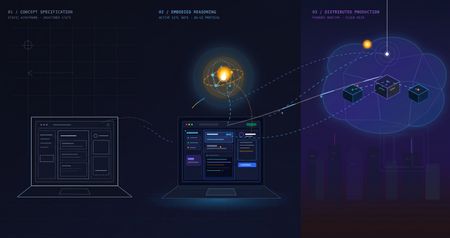
The problem with "AI can help my business" Every non-technical founder has heard some version of "you should put an AI agent on this." Far fewer have seen what it actually costs, in time and money, to find out whether that's true for their specific business — before committing to it. The honest answer is: it shouldn't cost much at all, if you build it in the right order. Most of the expensive AI project failures aren't failures of the model — they're failures of sequencing. Someone commits to real infrastructure, real hosting, and real integration work before anyone has confirmed the underlying idea even holds up. This post walks through a small, realistic project — an autonomous sales-development agent for a fictitious construction-tech company — built in three deliberate stages, each one cheap enough to abandon and each one answering a different question before the next stage spends any more money or time. The point isn't the specific agent. It's the order of operations: what to validate first, what to validate second, and what you only pay for once everything before it has already been proven. The Brief Hi, I'm looking for someone who can help me grow FieldForge, a SaaS platform specifically for general contractors, remodelers, and design-build companies. I'm not looking for generic lead lists. I need someone who can identify qualified construction companies, reach the owner/decision-maker, start conversations, and book demos that can turn into paying SaaS customers. Your experience with B2B lead generation and appointment setting looks relevant. I'd love to hear how you would approach generating qualified leads and growing a construction-focused SaaS. Translated into engineering terms, that's four capabilities: pull in new leads from a data feed (ingest_permits), decide whether each one is worth pursuing (qualify_lead), draft a personalized first-touch email for the ones that qualify (generate_pitch_email), and hand qualified leads off to an outbound sequence (dispatch_sequence). Nothing about that list requires committing to any infrastructure yet — which is exactly the point of Stage 1. Stage 1: Mock prototype — no AI, no backend, no cost The first stage has no real agent in it at all. It's a Vite + React console with the full intended UI — a strategy pane, a live-feed pane, a lead-dossier pane — wired to hand-written mock data and a fake setTimeout standing in for "the AI is thinking." No model calls, no cloud resources, no backend of any kind. It runs entirely in a browser tab: This is deliberately the cheapest possible way to answer the first real question: does this even make sense as a product, before a single token of inference is spent proving it? Is a 3-pane command console the right way to expose "an agent found and qualified these leads for you"? Is a permit-triggered pitch angle a good hook, or does it look contrived once it's actually on screen? Does a business owner look at this and understand what they're being offered? None of those questions need a real agent to answer — they need a UI a person can click through and react to. Running this stage costs essentially nothing beyond development time: no API calls, no cloud spend, nothing to tear down if the idea doesn't land. Where the AI pair programmer actually did the work. This entire stage — the layout, the state management, the mock data shapes, the interaction flow — was built by describing the product in plain language to an AI coding assistant (GitHub Copilot, Claude) and iterating on the generated code directly, rather than dragging components around in a low-code builder. That distinction matters more than it sounds like it should. A low-code prototype is fast to show, but it's still just a prototype — once a real agent needs to sit behind it, most of that first version gets rebuilt in real code anyway. A pro-code prototype, even a fake one, is a keepable asset: the exact same React components, the exact same UI shell, carry forward unchanged into Stage 2 and Stage 3. Nothing here gets rebuilt later — it gets connected to something real. What this stage proves, and what it deliberately doesn't. By the end of Stage 1, you know whether the product concept and the UX hold up — whether the thing you're describing to a non-technical stakeholder actually makes sense once it's on a screen in front of them. What it tells you nothing about: whether a real model can actually do the reasoning this UI is pretending to show. That's a completely different risk, and it's wrong to pay for cloud infrastructure to find out — it just needs a real agent, still running on a laptop: Stage 2: A real agent, still running on a laptop — the convincing part This is the stage that actually matters most, and it's also the cheapest place to find out if the whole idea works. The fakery gets ripped out and replaced with a genuine agent: a Microsoft Agent Framework Agent, backed by a real model deployment on Microsoft Foundry, given the same four tools from the brief — ingest_permits, qualify_lead, generate_pitch_email, dispatch_sequence — as real Python functions it can actually call. Its reasoning streams live into the same terminal-style pane the mock prototype already had, so nothing about the UI needs to change; only what's driving it does. Crucially, the frontend stays on a local dev server and the agent stays a local process on the same machine. There's no cloud hosting, no production auth, no deployment pipeline — the UI just talks to a locally running agent server over a simple streaming protocol. That's the deliberate design of this stage: the only thing worth testing here is whether the agent is actually good, and every question that matters — does it call tools in a sensible order, does it correctly decide which leads qualify, does its drafted email actually reflect the lead's specific trigger event rather than reading like a template — can be answered without touching a cloud resource. The qualify_lead tool is where this gets concrete: it's handed a target definition — commercial/residential remodelers in a specific revenue band, an active permit filing, still running manual/legacy tooling — and has to decide, per lead, whether it's a fit. You'll see this called an ICP (Ideal Customer Profile) constantly in sales and GTM circles right now, to the point of being a bit of a buzzword. Stripped of the jargon it's just this: a precise, written-down definition of a good-fit customer, specific enough that a model can apply it as consistently as a trained human rep would. The reason it matters isn't the term — it's that the agent's usefulness is bounded entirely by how precisely that definition is written, and this stage is exactly where you find out if yours is precise enough. This is also where model choice gets decided, cheaply. Swapping which Foundry model deployment sits behind the agent, or rewriting the system instructions, costs a restart and a few cents of inference — not a redeploy, not a new pipeline run. If gpt-4o isn't giving good enough qualification judgment, or the reasoning is inconsistent between runs, you find out here, in seconds per iteration, for the price of a handful of API calls. Compare that to discovering the same problem after cloud hosting, authentication, and a production pipeline are already built around it. That's why this stage — not Stage 1 — is the genuinely convincing one. Anyone can mock up a UI that looks like an agent found and qualified a lead. Stage 2 is where you can put a real, unscripted permit feed in front of a real model and watch it reason its way to a defensible qualify/reject decision and a genuinely personalized email, live, for the cost of a few model calls. That's the moment a skeptical stakeholder stops asking "does this actually work" and starts asking "when can we have it." What this stage proves, and what it deliberately doesn't. By the end of it, you know the agent itself is sound — right tools, right order, correct ICP logic, real personalization — for a cost barely above Stage 1's. What it hasn't touched: what happens when a real user hits this over the public internet, how auth works outside your own machine, whether the hosting model you eventually pick can actually serve this reliably. That's a different kind of work, and it starts now that there's finally something worth doing that work for. Stage 3: Quasi-production — translating a proven agent into a running service Stage 2 answers "does the agent work." Stage 3 answers a different question entirely: "can this be handed to someone who isn't on my laptop." That's not a continuation of Stage 2's work — it's a translation of it. The agent's logic, tools, and instructions don't change at all going into this stage; what changes is everything around them, as the same proven Agent gets repackaged into something that can actually run as a service instead of a local process. The agent itself deploys as a Foundry Hosted Agent via azd — no hand-written Dockerfile, no Container App config, no Bicep authored from scratch; Foundry's managed hosting owns the runtime, scaling, and session continuity (via previous_response_id chaining on the Responses protocol), and assigns the agent its own managed identity. The frontend and its API layer become an Azure Static Web App: the React build as static assets, plus a small same-origin Azure Function that reverse-proxies requests to the hosted agent. That proxy exists for a concrete reason — Foundry's hosted-agent endpoint has no CORS support, so a browser calling it directly would simply be refused; routing through a same-origin Function sidesteps that entirely, and keeps the real agent URL and credentials server-side instead of sitting in a public JS bundle. None of that is agent work. It's the operational work of turning a validated prototype into a real, addressable, network-reachable thing — the productionization step every agent eventually needs regardless of how it was built, and the part that's easy to underestimate if you haven't budgeted for it as its own phase. Framed plainly, this stage is where the project stops being "a demo that runs on my machine" and starts being "a small SaaS": something with a real URL, a real hosting bill, real auth, and a real deploy pipeline — everything that separates a working prototype from a thing you could actually put a customer in front of. To be clear about the boundary of "quasi": this is not a fully hardened production system. There's no custom domain, no persistent session store beyond what Foundry provides out of the box, and no load testing. What it is: proof that the exact agent validated in Stage 2 can be deployed, reached over a real network, and driven from a real hosted frontend without silently breaking — the last class of risk that only shows up once something leaves your own machine. What this stage proves, and what it deliberately doesn't. By the end of it, you know the whole pipeline holds together end to end, from a hosted UI through a same-origin proxy to a Foundry-managed agent and back, streaming, over a real deployment. What it doesn't prove: that it holds up under real production load, real customer data governance, or a real incident on-call rotation. Those are legitimate next questions — just not the ones this stage was built to answer, and not ones worth paying for before the first two questions were settled. The pattern, not just the project Line the three stages up and the shape becomes obvious: each one is deliberately the cheapest possible way to eliminate one specific class of risk before the next stage spends real money finding out the hard way. Stage 1 kills product/UX risk for the cost of dev time and zero infrastructure. Stage 2 kills agent-quality risk — the right tools, the right model, correct decisions — for the cost of a few model calls, and it's the stage that actually earns anyone's confidence that this is real. Stage 3 kills operational risk — real hosting, real network, real auth — by translating an already-proven agent into a running service, rather than building all of that around an agent nobody has validated yet. Collapse those stages — build the hosting and the agent and the UI all at once, betting everything up front — and you don't save time. You just move all three classes of failure into the same debugging session, at the point where they're most expensive to disentangle and hardest to tell apart. Staged this way, each phase is cheap enough to walk away from if it fails, and each one only gets built on top of a phase that already earned its place. There's a second half to this story that's deliberately not in this post: the data. Everything here ran on synthetic permit feeds and mock company data — a real deployment lives or dies on where its actual leads come from and how well they're structured for a model to reason over. That's its own story, and it gets a dedicated write-up of its own. Project reference Source code: https://github.com/olivierb123/lead-agent-demo Live demo: https://victorious-glacier-03340ff0f.3.azurestaticapps.net265Views0likes0Comments
Your Agents Need More Than a Place to Run
In architecture reviews with enterprise teams moving their first agentic applications toward production, I often hear the same plan: the team has containerized their agent and intends to run it on the managed Kubernetes cluster the organization already trusts. The reasoning is sensible, since the platform team knows the tooling and security has approved the network model, and for the first use case or two it is often the right call. Having watched this unfold in my years leading AgenticAI customer engineers and forward deployed engineers, and now helping customers reach production on Azure, I want to describe what happens next, before leaders commit rather than after. One thing to note is Azure supports multiple ways to build and operate agents. Foundry Agent Service provides an integrated managed runtime around your agent code. Azure Kubernetes Service supports teams that need Kubernetes-level control or want to extend an established platform, while Azure Container Apps provides managed container hosting. These services can work together. The decision is which capabilities and responsibilities best fit the workload. Where the cluster is the right answer A stateless retrieval application, a document extraction pipeline, or a classification job is a web service that happens to call a model, and a container platform runs web services well. A large retail customer of mine ran an invoice extraction agent on containers for over a year with almost no issues, and I never suggested they move it. The cluster remains the right home for several other situations as well. LLM invocations embedded inside existing microservices, event driven, or batch pipelines fit container platforms naturally. Genuine constraints such as air-gapped or sovereign environment, regions where a managed service is not yet offered are a good reason to run your own stack, and strong engineering team that already operates at that level can be a real asset. Even when the agents themselves move to a managed runtime, the tool servers, business APIs, and data services those agents call, often stay on your cluster, so they are complementary far more often than they are competitors. The problem is that these early wins can make agents seem like just another workload. Where the wheels come off The first failure is the state. A research agent that plans, searches, and synthesizes for ninety minutes is a long-running stateful process, while a Kubernetes pod is a disposable container the scheduler may restart at any time. A financial services team I worked with lost costly research run to a routine node upgrade, and responded as capable engineers do by building checkpointing, a durable store, and a resume mechanism. It worked, but they now owned a piece of infrastructure they had to keep correct as their agent's framework changed beneath it. A managed agent runtime absorbs this. Hosted agents in Foundry Agent Service, as one example, give every session a VM-isolated sandbox with a persistent file system, a durable state store that survives crashes and restarts and can hold checkpoints for frameworks such as LangGraph or Microsoft Agent Framework, and a resilient execution mode that recovers long-running work after a process interruption. The second is the human-in-the-loop. A commercial insurance customer’s claims agent needed sign-off from an adjuster and sometimes a second reviewer, with days between steps. Stopping an agent cleanly at the moment it needs a decision, holding its full session for four days without paying to keep it running, and resuming it correctly when the approval arrives is not something a container orchestrator gives out the box. The team built agent session suspend and resume, a queue, a durable state store, notifications, and an approval interface, and ended up with a small workflow engine nobody had planned to own. In hosted agents, an idle session is deprovisioned with its state persisted and restored onto fresh compute when the same session ID returns, so an agent waiting on an approval cost nothing while it waits, and sessions are retained for up to thirty days of inactivity. The approval experience remains yours to design, which is where your engineers' time should go. The third is multi-turn conversation, which quietly pushes teams into building their own context management system. The first version appends each turn to history, and within few turns the history outgrows the context window while cost and latency climb. So, the team adds truncation, then summarization, then retrieval of earlier turns, then per-user and per-tenant scoping, then expiry and deletion rules for privacy. An industrial customer's safety compliance assistant, with conversations stretching across days, followed exactly this path and ended up with a bespoke thread store and summarization pipeline nobody had budgeted for. Its first serious incident came when a summary silently dropped a compliance-relevant instruction. With the Responses protocol in hosted agents in Foundry, conversation history is a durable, platform-managed record keyed by a conversation ID and reachable from any channel, so the thread store is no longer yours to build, although deciding what to summarize or retrieve remains a design choice for your agent. The fourth is identity. On a cluster, the path of least resistance is a shared service account, and in one review a security architect asked which actions had been taken on behalf of which user, only to learn that the logs could not say. Hosted agents create a dedicated Microsoft Entra agent identity for each agent at deploy time, use on-behalf-of flows to act with the user's delegated permissions in interactive scenarios and the agent's own identity in autonomous ones, and keep the agent identifiable for audit in both cases. The fifth is per-user session isolation, which is the difference between an agent that serves many people and an agent that mixes them up. Agents read files, run code, and hold working data, and on a shared pod the default is that many users share a process, a file system, and often a cache. Giving every user session its own sandboxed environment and storage, so that one person's documents and intermediate results can never surface in another's, means engineering hard isolation boundaries and proving them to your security team. Hosted agents make a VM-isolated sandbox per session the default, and their durable state store can partition items per end user, so one store is safe to share across the users of a multitenant agent. And lastly, Evaluation and optimization are where the gap widens. The largest difference between teams that scale and those that stall is evaluation. Because agents are probabilistic and multi-step, staging tests often miss failures such as a wrong tool choice or a policy violation deep in a task. One customer’s agent passed every offline check but degraded unnoticed for weeks after a model update because evaluation stopped at release. Mature teams continuously evaluate production traces, combine automated judges with sampled human review, and red-team regularly.Once quality is measurable, teams can deliberately balance prompts, models, tools, latency, and cost. One team cut per-task cost by routing simple steps to smaller models after evaluation confirmed quality held. Self-built stacks require teams to assemble and maintain tracing, datasets, judges, and release gates. Hosted agents instead combines default OpenTelemetry traces with continuous evaluation, adversarial testing, and datasets generated from agent instructions. Staged closed-loop optimization uses those traces to improve instructions, tool descriptions, and model selection without extra plumbing. The real cost is the velocity gap Leaders usually expect me to quantify the initial build, and that is the smaller number. A team of four building the first agent often becomes ten or twelve within a year, and a growing share of them are maintaining a runtime for agents rather than building agents that serve the business. The enterprise has quietly created an internal agent infrastructure company in a field where the patterns for memory, tools, evaluation, and safety are rewritten every few months, while hyperscalers put hundreds of engineers on exactly this problem and ship at a cadence no single platform group can match. Foundry Agent Service, for instance, bundle content safety guardrails into the runtime and route outbound traffic through a customer virtual network, capabilities that platform teams otherwise assemble one integration at a time. This plumbing does not differentiate your organization, so the question is whether your scarcest engineers should spend years on it or on the workflows, data, and judgment only your company has. This is also why the technology companies held up as examples are a poor template. Many built their own runtimes because managed options did not yet exist and had large platform organizations to carry the load. Even they tend to invest in a custom runtime for the first handful of use cases and then migrate as managed services mature, because the maintenance burden compounds while the strategic value of owning the plumbing does not. What I would do as the leader I am not arguing against Kubernetes or for moving everything tomorrow. Comparable managed runtimes exist across the hyperscalers, and I use hosted agents as the running example only because it is the one I know best from the inside. Managed agent services are still maturing, some workloads have real data residency or customization needs, and abstraction always constrains something. What I am arguing for is a deliberate choice for each use case, guided by three questions: whether the agent must outlive a single request by running long, waiting on humans, or remembering across sessions whether it must act with its own identity, auditable delegation, and policy enforcement whether your team would be building anything a managed service already provides, and who will still maintain it in two years. Key takeaways Match the runtime to the workload. Containers on your existing cluster suit stateless, short-lived agents, while long-running, human-in-the-loop, and memory-dependent agents need capabilities your platform team was never hired to build. Count the hidden team. The real cost of self-hosting is the growing group of engineers maintaining state, identity, memory, guardrails, and tracing instead of solving business problems. Make evaluation continuous and connected to production traces. Pre-release testing alone will miss the drift and trajectory failures that hurt you, and optimization of quality, cost, and latency depends on that evaluation data. Follow the pattern of the leaders, not their early architecture. Companies that built custom runtimes did so before managed options matured, and most of them move toward managed services as those options improve. A practical place to begin is your roadmap for the next twelve months. Sort each use case into stateless and short-lived or long-running and human-dependent, and for every agent in the second group put a price on the engineers who would maintain the runtime rather than the business logic. I would like to hear how you have drawn this line, and where a managed service was not yet ready for something you needed.871Views2likes0CommentsAnnouncing the Public Preview of Reader Endpoint for Azure Database for MySQL
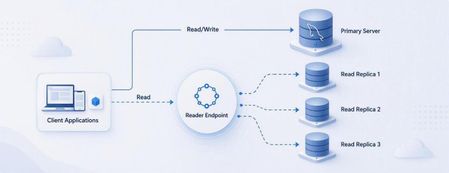
We are excited to announce the Public Preview of Reader Endpoint for Azure Database for MySQL. Read replicas help applications scale read-intensive workloads by moving read traffic away from the primary server. This can include traditional applications, analytics and reporting workloads, and AI-powered applications that retrieve structured context from MySQL. However, as the number of replicas grows, applications traditionally need to maintain separate replica hostnames and implement their own connection-routing logic. Reader Endpoint simplifies that experience. It provides a single DNS endpoint for read replicas and automatically distributes new read connections across eligible replicas. Applications can use one connection endpoint instead of managing every replica individually. Simplified read scaling through one endpoint Reader Endpoint uses connection-level routing and continuously monitors replica availability and replication lag. If a replica becomes unavailable or exceeds the configured replication-lag threshold, Reader Endpoint automatically excludes it from routing. Reader Endpoint does not inspect individual queries and does not route write traffic. Applications should continue directing writes to the primary server. Choose the routing method that fits your workload Reader Endpoint supports two routing methods: Rotational routing: Distributes connections across eligible replicas in a round-robin pattern. Performance routing: Uses geographic proximity to route connections to eligible replicas in the region closest to the client. This gives application teams the flexibility to distribute connections evenly or prioritize geographic proximity. Configure routing for your application’s needs Reader Endpoint allows you to configure: The read replicas that participate in routing The maximum acceptable replication lag for an eligible replica DNS time to live, including a TTL value of 0 Whether the primary server can serve reads when no eligible replica is available Whether newly created replicas are automatically attached to the endpoint Configure the Reader Endpoint name, routing method, DNS TTL, and replication-lag threshold. Select participating replicas and configure fallback and automatic replica attachment. You can also create multiple Reader Endpoints for the same source server. This enables different applications or workloads to use their own replica selections, routing methods, lag thresholds, and DNS TTL settings. For example, an operational application could use one endpoint with a strict replication-lag threshold, while a reporting workload could use another endpoint with a different set of replicas and routing configuration. What is new in Public Preview? Building on the Private Preview, the Public Preview introduces several enhancements: Support for multiple Reader Endpoints per source server The new Performance routing method, alongside Rotational routing Support for configuring DNS TTL to 0 An option to allow the primary server to serve reads when no eligible replica is available Automatic attachment of newly created replicas Scale data retrieval for AI-powered applications AI-powered applications can generate significant read traffic when retrieving structured context, such as product, customer, or application data, from MySQL. Reader Endpoint helps scale these read-intensive operations by distributing new connections across eligible read replicas through a single endpoint. Applications can also use a separate Reader Endpoint for AI workloads, with their own replica selection, routing method, and replication-lag threshold. Other common scenarios Reader Endpoint can simplify connection management for several read-intensive scenarios: Applications that need to scale read traffic across multiple replicas Business intelligence, analytics, and reporting workloads Read-only microservices Applications that need to avoid routing new connections to unavailable or lagging replicas Different workloads requiring independent replica and routing configurations Public Preview considerations The following limitations currently apply: Support for changing the routing method after endpoint creation will be added in an upcoming update. Azure CLI is not yet supported for Reader Endpoint. You can't use SSL connections that use VERIFY_IDENTITY mode through the reader endpoint. Other SSL modes are supported. Reader Endpoint incurs an additional charge. Use the Azure Pricing Calculator to estimate applicable costs. Get started To learn more about routing behaviour, configuration options, pricing, and current limitations, see Read replicas in Azure Database for MySQL. We encourage you to try Reader Endpoint with your read-intensive workloads and share your feedback as we continue improving the experience toward general availability. We invite you to share your experiences or suggestions at AskAzureDBforMySQL@service.microsoft.com Thank you for choosing Azure Database for MySQL!204Views0likes0CommentsChoosing a real-time voice architecture on Microsoft Foundry: three enterprise patterns
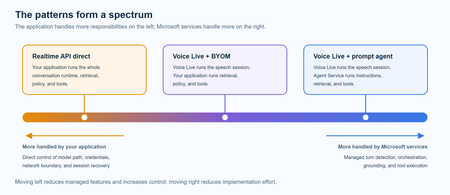
A practical comparison of three real-time voice architectures on Microsoft Foundry, including implementation tradeoffs and four enterprise release gates for residency, networking, retrieval authorization, and tool credentials.985Views2likes0CommentsBuilding Production-Ready AI Agents in Microsoft Foundry: 10 Lessons Learned
A Real-World Scenario Imagine a customer support agent that answers invoice questions. During testing, everything works perfectly. But in production: The Finance API occasionally times out. The knowledge base contains outdated information. Tool calls fail during peak traffic. Token consumption rises unexpectedly. The result isn't a broken AI model. It's an unreliable system. This is where Microsoft Foundry becomes critical. Building production-ready agents requires grounding, observability, resiliency, governance, and continuous monitoring. New challenges appear: Challenge Impact Hallucinated responses Reduced trust Missing citations Verification issues Tool failures Broken workflows High token consumption Increased cost Latency spikes Poor user experience Limited monitoring difficult troubleshooting Security concerns Compliance risks The lesson was clear: Production readiness is not about making the agent smarter. It is about making the agent reliable. My Observation While experimenting with AI agents in Microsoft Foundry, I found that model selection was rarely the primary challenge. Most production issues stemmed from grounding quality, tool reliability, observability, and security controls. Addressing these operational concerns often had a greater impact on user trust than changing the underlying model. Production AI Agent Reference Architecture A production-ready AI agent typically includes several components beyond the language model itself. Layer Technology User Interface Web App, Teams, Copilot Agent Runtime Microsoft Foundry Agent Service Knowledge Layer Azure AI Search Foundation Model GPT-4o Tool Integration APIs and Functions Monitoring Azure Monitor Security Managed Identity and Key Vault Request Flow Lesson 1: Start with the Use Case, Not the Model One of the most common mistakes is beginning with model selection. Many teams ask: Which model should I use? Should I choose GPT-4o? Should I use a larger context window? A more important question is: What business problem are we solving? Before evaluating models, define: Users Business goals Success metrics Compliance requirements Operational constraints An enterprise support agent and a financial compliance agent may use the same model but require completely different architectures. Key Takeaway Successful AI projects start with business outcomes, not model benchmarks. Lesson 2: Grounding Matters More Than Prompting Prompt engineering helps. Grounding drives trust. Without access to reliable enterprise data, even advanced models can generate confident but incorrect responses. Grounding Sources Azure AI Search SharePoint documents Internal knowledge bases Structured enterprise data Approved policy repositories Example from azure.ai.projects import AIProjectClient # Configure grounding with Azure AI Search agent = client.agents.create_agent( model="gpt-4o", name="support-agent", tools=[ { "type": "azure_ai_search", "azure_ai_search": { "index_name": "support-kb", "endpoint": "https://your-search.search.windows.net" } } ] ) In production environments, grounding through Azure AI Search helps agents retrieve trusted enterprise information rather than relying solely on model knowledge. This significantly improves response accuracy and trustworthiness. Try it yourself: Configure Azure AI Search as a knowledge source in Microsoft Foundry and compare grounded versus non-grounded responses. Key Takeaway Reliable retrieval is usually more valuable than sophisticated prompting. Lesson 3: Design Tool Usage Carefully AI agents become powerful when they can interact with external tools. Examples include: CRM systems Databases APIs Ticketing systems Business applications However, every tool increase complexity. Ask yourself: When should the agent call the tool? What happens if the tool is unavailable? How should failures be handled? Example Failure Scenario +-----------------------------+ | User asks for invoice status | +-------------+---------------+ | v +-----------------------------+ | Agent calls Finance API | +-------------+---------------+ | v +-----------------------------+ | API timeout detected | +-------------+---------------+ | v +-----------------------------+ | Fallback response returned | +-----------------------------+ Example Failure Scenario: A production-ready agent should gracefully handle external service failures and return a fallback response instead of failing completely. Key Takeaway Design for failure before designing for capability. Lesson 4: Evaluate Before Deployment Many teams test only for response quality. Production agents require broader evaluation. Evaluation Area Why It Matters Accuracy Correct answers Grounding Quality Faithful responses Latency User experience Safety Risk reduction Cost Sustainability Tool Success Rate Reliability Evaluation should become part of every deployment pipeline. Key Takeaway You cannot improve what you do not measure. Lesson 5: Make Observability a First-Class Feature Observability is often neglected until something breaks. Unfortunately, production systems always encounter unexpected behavior. Track metrics such as: Metric Purpose Request Volume Demand tracking Average Latency Performance Token Usage Cost visibility Grounding Success Rate Quality Tool Failure Rate Reliability User Satisfaction Business value Setting Up Tracing in Foundry from azure.ai.projects import AIProjectClient from azure.monitor.opentelemetry import configure_azure_monitor # Configure Azure Monitor for tracing configure_azure_monitor( connection_string="InstrumentationKey=xxx" ) # Run the agent response = agent.run( thread_id=thread.id, instructions="..." ) Tracing provides visibility into how an AI agent processes requests, invokes tools, and generates responses. By integrating Azure Monitor, teams can track latency, identify failed tool calls, analyze token usage, and troubleshoot unexpected agent behavior. This observability is essential for operating AI agents reliably in production environments. Try it yourself: Enabling tracing and monitoring for a Microsoft Foundry agent using Azure Monitor. Example Dashboard +-----------------------------+ | Production Monitoring Dashboard | +-----------------------------+ | Requests Today | 5,120 | | Average Latency | 3.2s | | Grounding Success | 97% | | Tool Failure Rate | 1% | | Average Tokens | 2,800 | +-----------------------------+ Monitoring production metrics helps teams understand agent performance, reliability, and cost efficiency. Key indicators such as latency, grounding success rate, tool failure rate, and token consumption provide valuable insights into the operational health of an AI agent and enable proactive troubleshooting before users are impacted. Key Takeaway What you can't observe, you can't effectively operate or improve. Tracing is a critical capability for maintaining production-ready AI agents. Lesson 6: Monitor Token Consumption Token usage directly impacts cost. A highly successful agent can quickly become expensive if token growth is unmanaged. Common optimization techniques: Optimization Benefit Prompt Compression Lower token usage Response Caching Reduced model calls RAG Filtering Focused context Context Trimming Smaller requests Model Selection Cost control Key Takeaway Cost optimization should be planned from day one. Lesson 7: Build Security into the Design Security should never be an afterthought. Enterprise AI systems must enforce the same security boundaries as traditional applications. Recommended Controls Control Purpose Managed Identity Secure authentication Azure Key Vault Secret management RBAC Authorization Audit Logs Compliance Content Filtering Safety Private Endpoints Network Security Guiding Principle An AI agent should never access data beyond a user's permissions. Key Takeaway Security is a design requirement, not a deployment task. Lesson 8: Expect Tool Failures External dependencies inevitably fail. Production-ready agents should anticipate: API downtime Authentication failures Network interruptions Rate limiting Unexpected responses Recommended Strategy Key Takeaway async def call_tool_with_resilience(tool_name, params): try: result = await tool_client.execute( tool_name, params, timeout=5.0 ) return result except TimeoutError: return await cache.get_fallback( tool_name, params ) Example Outcome: Introducing retry and fallback logic can significantly improve reliability. By handling temporary API failures gracefully and returning cached responses, when necessary, agents can reduce user-facing errors and provide a more consistent experience. Lesson 9: Evaluate the Process, Not Just the Output A correct answer does not always mean the process was correct. In production environments, teams should evaluate not only the final response but also the steps the agent took to generate that response. An answer may appear accurate even when it was based on incorrect retrieval results, unnecessary tool calls, or incomplete citations. Review: Retrieval quality Tool execution Citation accuracy Security compliance Reasoning path User Query | v Retrieval | v Tool Execution | v Reasoning | v Response For example, an agent might generate the correct answer by chance, even though it retrieved irrelevant documents or used an inefficient workflow. Without evaluating the process, these hidden issues may go unnoticed until they affect reliability, compliance, or user trust. Key Takeaway Inspect the entire workflow, not just the final answer. Lesson 10: Think Like a Production Engineer As adoption grows, operational excellence becomes the differentiator. Ask questions such as: Can we troubleshoot failures? Can we measure business impact? Can we control costs? Can we scale safely? Can we govern usage? These questions become more important than model selection over time. Key Takeaway Production success comes from engineering discipline, not model size. Microsoft Foundry Features That Helped Improve Reliability Foundry Capability Production Benefit Agent Service Agent orchestration Knowledge Sources Grounded responses Evaluations Quality measurement Tracing Workflow visibility Model Catalog Model flexibility Safety Systems Risk mitigation These capabilities help teams move beyond proofs of concept and build solutions that are ready for real-world adoption. Production Readiness Checklist Before releasing an AI agent, verify: ✅ Business goals defined ✅ Grounding strategy implemented ✅ Security controls enabled ✅ Evaluation pipeline established ✅ Monitoring configured ✅ Failure handling tested ✅ Cost optimization reviewed ✅ Governance process defined ✅ User feedback loop available ✅ Deployment rollback strategy prepared Get Started with Production-Ready Agents If you're building AI agents using Microsoft Foundry, start by focusing on grounding, observability, security, and evaluation from day one. Suggested next steps: Build your first agent in Microsoft Foundry Configure Azure AI Search grounding Enable tracing and monitoring Evaluate agent quality before deployment Add resilience and fallback strategies Which of these 10 lessons has been most valuable in your own AI agent journey? Share your experiences and insights in the comments.1.4KViews5likes1CommentModel router updates: new regions, a refreshed model pool, and understanding the hill climb
Across Microsoft, "hill climbing" has become shorthand for how real AI progress happens: not in one dramatic leap, but through a disciplined loop. Microsoft AI defines the hill climb as an organization that continuously improves, cycle after cycle, through more compute, better data, and sharper evaluation. Reinforcement fine-tuning in Foundry defines it as improving the deployable model package one measured step at a time across quality, latency, and cost. Different altitudes, same premise: progress is not a one-shot decision. It's a loop. For most teams, the decision of what model to use when is made manually or with custom routing tools. A developer picks a model based on benchmarks, familiarity, or the last launch that made headlines, ships it, and revisits the choice only when something breaks. In an ecosystem where the frontier moves monthly, that decision goes stale fast. Model router in Foundry Models brings the hill climb to the selection layer. What's new: a bigger pool, in more places This release expands where teams can deploy model router, broaden the supported model pool, and delivers updates through a stable endpoint. Together, these changes help teams run production workloads in more locations, match a wider range of tasks to suitable models, and adopt supported updates without changing the application integration. A refreshed model pool. The supported model list now includes Anthropic Claude Opus 4.8 — a high-capability model built for complex reasoning and long-form generation, for scenarios that demand depth, structure, and quality — and the GPT-5.6 family. Just as importantly, the pool is pruned: gpt-5-chat, gpt-5.2-chat, gpt-5.3-chat, Deepseek-V3.1 have been removed from the model router as models reach the end of their lifecycle and are deprecated in Foundry. New region availability. The model router is now available in 28 regions for global standard and 21 data zone regions. For many organizations, inference requests must stay within specific geographic boundaries for regulatory, governance, or customer-trust reasons — and intelligent routing shouldn't force a compromise on that. Find the full list of regions here. The most important detail is what you don't have to do: these updates occur automatically*. The endpoint remains stable as the supported model pool is refreshed, so teams do not need to redeploy the model router to receive the update. Applications can continue using the same integration while the model router evaluates requests against the current supported pool. Teams should continue monitoring routing traces and application outcomes to confirm that quality, cost, latency, and governance requirements are met. *Models from Anthropic still need to be deployed separately before they can be routed to through the model router. Interested in hearing more about what's new to the model router? Tune in for the next episode of Model Mondays with Sanjeev Jagtap and Lee Stott, where they talk all things model router from evaluations to hill climbing. Sign up here to watch live or view the replay: Model Mondays - Spotlight On Model router in Microsoft Foundry | Microsoft Reactor The selection-layer hill climb At the selection layer, a step is a routing decision. Each one is a micro-optimization against your objective, and each one is instrumented: every response from the model router includes a model field showing which underlying model was selected, so the climb leaves a complete, auditable trail. Model router supports three parts of the optimization loop: A/B testing to compare two router configurations to understand quality, cost, and latency tradeoffs; model decomposition to use routing results to decompose a single-model application into a multi-model or multi-agent design, and continuous routing to keep the router in production for continuous per-request selection. Each pattern turns model choice into a measured, repeatable process rather than a fixed decision. 1. A/B Testing Question: Which model or routing strategy should I use in production? A/B testing helps teams compare candidate models, model families, or router configurations against the same workload. Representative traffic is sent to competing deployments, and teams compare quality, cost, latency, and governance outcomes. The goal is to understand tradeoffs and identify the model or routing strategy that best meets workload requirements before promoting it to production. 2. Model Decomposition Question: What work is my application actually doing? Model decomposition uses model router as a diagnostic tool. By deploying the model router against a representative workload and examining routing telemetry, teams can see how requests naturally separate into different task classes. Simple retrieval, classification, and summarization requests may route to smaller models, while reasoning, planning, and agentic workflows may require more capable models. The goal is not to choose a winner, but to understand the structure of the workload and uncover opportunities for optimization, specialization, or architectural improvements. 3. Route continuously Question: Why choose a single model at all? Route continuously is the pattern model router was designed for but is not limited to. Rather than treating model selection as a one-time decision, teams leave the model router in production and allow the best-fit model to be selected for each request. As the supported model pool, regional availability, and platform capabilities evolve, teams can continue using the same endpoint while evaluating whether updates improve workload outcomes. Model selection becomes an ongoing optimization process rather than a project that must be repeated every time the model landscape changes. Together, these patterns illustrate a broader shift: the model router is more than a model. It is a tool for the optimization loop itself, helping teams evaluate tradeoffs, understand workload behavior, test hypotheses, and continuously refine model selection as requirements evolve. Whether used to compare candidate models, decompose applications into specialized tasks, or automate per-request routing in production, model router turns model selection into an observable, measurable, and repeatable process. As the model landscape continues to change, that optimization loop becomes a durable advantage. Getting Started Ready to start your own hill climb? Whether you're exploring the model router for the first time, evaluating routing strategies against your workload, or building a long-term optimization practice, these resources can help you move from experimentation to production with Microsoft Foundry. What's new in model router? Sign up for the next Model Mondays episode for a deep dive into new features, optimization patterns, and the latest model router updates. How do I build agents with model router? Check out the Model Router Agents Lab and build agent experiences with routing, retrieval, web search, tool calling, and multi-agent patterns. How do I evaluate model router? Compare model router against baseline models using your own prompts, then review quality, cost, latency, and routing decisions with the Auto Evaluation Toolkit. How do I optimize model router for my workload? Start your hill-climbing journey with the Model Mastery workshop, where you'll test one optimization lever at a time and measure how each change impacts workload outcomes. How do I build a model router optimization playbook? Explore the Model Releases repository to track new capabilities, understand the optimization question behind each release, and try focused notebooks that demonstrate one optimization lever at a time.2.9KViews2likes0Comments