apps & devops
67 TopicsAutomating End-to-End testing with Playwright and Azure Pipelines
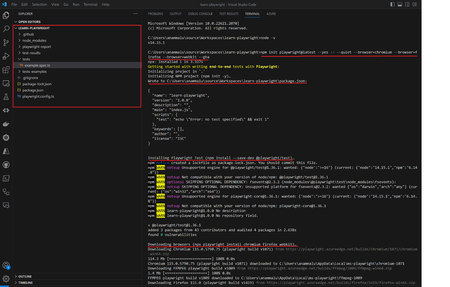
The article discusses the importance of end-to-end testing in software development. It introduces Playwright, an open-source automation framework developed by Microsoft, as a superior alternative to Selenium for writing automated browser tests.74KViews6likes11CommentsBuild image with containerised self-hosted Azure DevOps agent and private Azure Container Registry
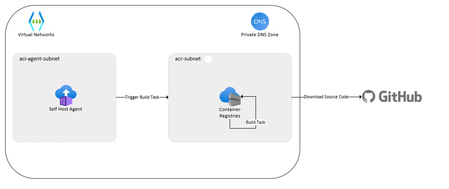
Do you want to know how to use containerized self-hosted agents for Azure Pipelines? In this blog post, you will discover the benefits, challenges, and solutions of running your self-hosted agents in a container. You will also see a proof of concept that demonstrates how to build container images using Azure Container Registry and Azure Container Instances. Read on to find out how you can improve your CI/CD workflow with containerization.21KViews6likes1Comment
How to use Azure Front Door with Azure Kubernetes Service (Tips and Tricks)
Connect your AKS to Azure Front Door through Load Balancer or Ingress. I will only discuss different options to implement Azure Front Door with AKS and will add some critical tips you should be aware of.16KViews3likes0CommentsGranting Azure Resources Access to SharePoint Online Sites Using Managed Identity
When integrating Azure resources like Logic Apps, Function Apps, or Azure VMs with SharePoint Online, you often need secure and granular access control. Rather than handling credentials manually, Managed Identity is the recommended approach to securely authenticate to Microsoft Graph and access SharePoint resources. High-level steps: Step 1: Enable Managed Identity (or App Registration) Step 2: Grant Sites.Selected Permission in Microsoft Entra ID Step 3: Assign SharePoint Site-Level Permission Step 1: Enable Managed Identity (or App Registration) For your Azure resource (e.g., Logic App): Navigate to the Azure portal. Go to the resource (e.g., Logic App). Under Identity, enable System-assigned Managed Identity. Note the Object ID and Client ID (you’ll need the Client ID later). Alternatively, use an App Registration if you prefer a multi-tenant or reusable identity. How to register an app in Microsoft Entra ID - Microsoft identity platform | Microsoft Learn Step 2: Grant Sites.Selected Permission in Microsoft Entra Open Microsoft Entra ID > App registrations. Select your Logic App’s managed identity or app registration. Under API permissions, click Add a permission > Microsoft Graph. Select Application permissions and add: Sites.Selected Click Grant admin consent. Note: Sites.Selected ensures least-privilege access — you must explicitly allow site-level access later. Step 3: Assign SharePoint Site-Level Permission SharePoint Online requires site-level consent for apps with Sites.Selected. Use the script below to assign access. Note: You must be a SharePoint Administrator and have the Sites.FullControl.All permission when running this. PowerShell Script: # Replace with your values $application = @{ id = "{ApplicationID}" # Client ID of the Managed Identity displayName = "{DisplayName}" # Display name (optional but recommended) } $appRole = "write" # Can be "read" or "write" $spoTenant = "contoso.sharepoint.com" # Sharepoint site host $spoSite = "{Sitename}" # Sharepoint site name # Site ID format for Graph API $spoSiteId = $spoTenant + ":/sites/" + $spoSite + ":" # Load Microsoft Graph module Import-Module Microsoft.Graph.Sites # Connect with appropriate permissions Connect-MgGraph -Scope Sites.FullControl.All # Grant site-level permission New-MgSitePermission -SiteId $spoSiteId -Roles $appRole -GrantedToIdentities @{ Application = $application } That's it, Your Logic App or Azure resource can now call Microsoft Graph APIs to interact with that specific SharePoint site (e.g., list files, upload documents). You maintain centralized control and least-privilege access, complying with enterprise security standards. By following this approach, you ensure secure, auditable, and scalable access from Azure services to SharePoint Online — no secrets, no user credentials, just managed identity done right.14KViews2likes6Comments