application management
128 Topics
Microsoft AVD Client Support for Teams camera backgrounds
We are using Dell thin clients running Dell ThinOS. When connected to AVD from those devices using the Microsoft AVD app, camera backgrounds are not available in Teams calls. Please add this feature to future releases of the Microsoft AVD app for Dell ThinOS.153Views0likes1Comment
Update 'Update-AzWvdSessionHost' cmdlet
Today via the PowerShell cmdlet 'Update-AzWvdSessionHost', an administrator can assign a user to a session host without the user being assigned to the applicationgroup. This can cause some confusion to administrators if they are able to perform this task as the user will not be able to see the host in the Windows App. The suggestion would be to either put in a check which denies the assignment if the user is not associated with the applicationgroup directly or indirectly via group association. Or, update the cmdlet to also add an assignment to the application group by adding a required parameter which would assign the user to the application group. It's a small tweak but it may help with the overall stability of the Desktop.Virtualization PowerShell stack. Thanks!96Views0likes0Comments
Fslogix. Add a command line to release the profile.
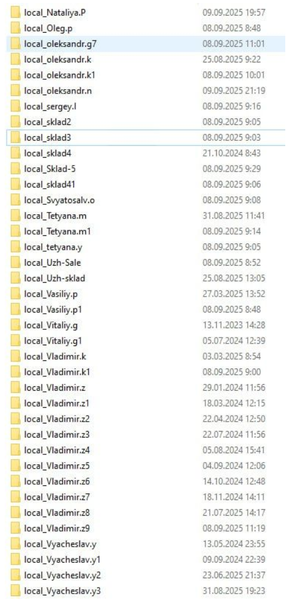
Hello. Add a command line with arguments to be able to release frozen folders in FSlogix. If you don't want to fix the problem, let me automate it myself. In large RDS installations, constant freezes and further duplication of local_%username% folders cause problems.108Views1like0Comments
Implement a feature that allows the RDS HTML5 RDP Web Client to be customized.
It would be great if we could use a PowerShell command to add a branding logo, set a branding color, configure an error logo, and update privacy links. For example, we might do something like: Publish-RDWebClientPackageBranding ` -Type Production ` -BrandingLogoPath "C:\Branding\companylogo.png" ` -BrandingColor "#0078D4" ` -ErrorLogoPath "C:\Branding\errorlogo.png" Having this kind of flexibility would make it much easier to customize the RDS HTML5 RDP Web Client.202Views0likes0CommentsHost Pools session hosts list
Large number of session hosts (1700+) is difficult to handle. Following suggestions would help: Allow to customize the the filters on the different columns Filter on Power State Filter on Health State Filter on user (with wild cards) Allow to export in CSV with filters applied Today, the CSV export exports all the VMs whatever the filter It is a workaround of the lack of filters on different fields Thanks for reading97Views1like0Comments
About the Host Pool Session List
In the host pool, when the list of session hosts is displayed, the number of hosts above a certain number is not displayed until “Load more” is pressed. I would like this to be stopped. It is very inconvenient because I have to press “Load more” again and sometimes I cannot work due to the token packet limitation. In addition to the above situation, it is also inconvenient to have to check the host every time to check the last heartbeat time, so I would like it to be possible to display it in the session list list (other lists). (Similarly, we would like users to be able to arbitrarily select which items to display in the list.)Something is preventing you from using Windows App right now.
After being auto-updated from Windows App version 2.0.327.0 to version 2.0.328.0, some of our users can't launch their Windows App anymore and get an error message says: "Something is preventing you from using Windows App right now." Since there is no way to control the update process, we could only let our desk users use MSRDC instead, as a temporary solution. For the frontline users, I could only pray that this problem will not take place until weekend. If any Microsoft person sees this post, please let the Windows App team know about this and fix this problem ASAP.3.1KViews2likes7Comments
Add a way for an application to detect whether it's running inside the web client or not
Introduction Add a way for an application to detect whether it's running inside the web client or not. I am not aware of any such possibility. For any terminal server session, there is the SystemInformation.TerminalServerSession property. It would be perfect if there could be a SystemInformation.TerminalServerWebclientSession. But any other way is also fine (e.g., a special environment variable). Useful example Instead of writing a file to the "normal" disk (inside the Azure VM), the application could write the file to the "Remote Desktop Virtual Drive"-Download folder. Now the file is truly on the user's local machine.45Views0likes0Comments