apis
25 Topics
Security alerts Graph API and MFA
Hello, Does anyone know if https://learn.microsoft.com/en-us/graph/api/resources/partner-security-partnersecurityalert-api-overview?view=graph-rest-beta Security alerts works with app only method (app + cert or app + secret )? Currently i successfully login to graph using both methods Welcome to Microsoft Graph! Connected via apponly access using "ID number" Then i request to get alerts and i get error code: WARNING: Error body: {"error":{"code":"UnknownError","message":"{\"Error\":{\"Code\":\"Unauthorized_MissingMFA\",\"Message\":\"MFA is required for this request. The provided authentication token does not have MFA I found that old API worked with app+user credential only but it's not mentioned in new one about this restriction.385Views0likes1CommentUsing Microsoft Graph Security API for Custom Security Automations
Hi Security Experts, I’ve recently started exploring the Microsoft Graph Security API to centralize and automate security operations across different Microsoft 365 services. The idea is to build a single automation layer that can: Collect alerts from Defender for Endpoint, Defender for Cloud, and Identity Protection; Enrich them with context (user, device, and location data); And automatically push them to an external system like Jira, n8n, or a custom SOAR workflow. I was able to authenticate and list alerts using the endpoint: “GET https://graph.microsoft.com/v1.0/security/alerts” However, I’m still trying to understand the best practices for handling rate limits, pagination, and permissions — especially when integrating continuous polling or real-time ingestion into external tools. Has anyone here implemented Graph Security API automations in production? I’d love to hear about your experiences — specifically around performance, alert filtering, and authentication (App Registration vs Managed Identity). Thanks in advance, Luca438Views0likes0Comments
Authenticating using ConfidentialClient
Hello, Some of our customers are unable to send out automated emails because support for basic authentication with SMTP is being removed. I am looking at finding a solution and it seems the Graph API is the recommended approach. I have manage to create a working example using `PublicClientApplicationBuilder` however, this class displays a pop-up requiring the user to sign in, since we have automated services with no user interaction, this is not a good solution. I have seen some examples using `ConfidentialClientApplicationBuilder` and this seems idea. However, I have reached multiple dead-ends and everytime receive the error: > Confidential Client flows are not available on mobile platforms or on Mac.See https://aka.ms/msal-net-confidential-availability for details. Please would someone be able to help me. Why do I recieve this error? Whatever I do, whatever project I use, WinForm, Console app and Service I always get this error. I am storing my Client, Tenant and Secret in a database table and here is my code: ``` vb Private Async Function GetAppAuthentication() As Task(Of AuthenticationResult) Dim folderAccess = BLL.L2S.SystemApplicationGateway.GetFolderAccess(mBLL_SY.ReadonlyDbContext) If folderAccess Is Nothing Then Return Nothing End If Dim app = ConfidentialClientApplicationBuilder.Create(folderAccess.Client) _ .WithClientSecret(folderAccess.Secret) _ .WithTenantId(folderAccess.Tenant) _ .Build() Dim scopes As String() = {"https://outlook.office365.com/.default"} Dim result As AuthenticationResult = Await app.AcquireTokenForClient(scopes).ExecuteAsync() Return result End Function ``` I am using .Net Framework 4.7.2, we have Windows Services and WinForms apps and both need to send out emails. The error message is very confusing to me because of course it is not a mobile app, and I have even created a UnitTest that seemingly works fine which again is very confusing to me. This is urgent as this is already causing issues for our customers. Thanks in advanc187Views0likes0CommentsGet Custom Details from Sentinel
How do I go about getting the custom details set using https://learn.microsoft.com/en-us/azure/sentinel/surface-custom-details-in-alerts using REST API? I need to do this outside of logic app and using REST API. The incidents API endpoint doesn’t provide this detail and I couldn’t find any API endpoint listed in https://learn.microsoft.com/en-us/rest/api/securityinsights/operation-groups?view=rest-securityinsights-2024-01-01-preview that would allow me get to get the custom details with the values. Is there a sentinel or a graph API endpoint that’ll allow for me to get this information?467Views0likes1CommentMicrosoft Defender "XDR" endpoint API Access (Powershell Script)
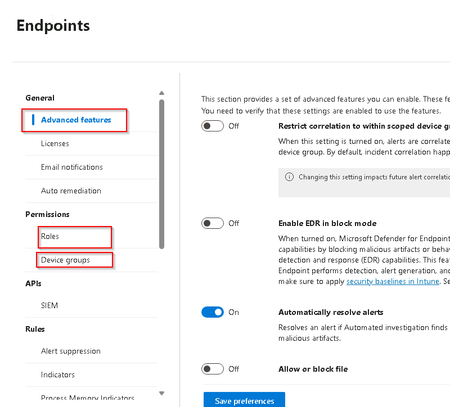
Hi Everyone, We are trying to access different part of Microsoft Defender. More precisely Endpoint after the XDR integration. We want to be able to get the different Permission Role and Device Group created. Also, the list of all advanced feature if they are enabled or not. We want to be able to get information like this The thing is, we try in a lot of way and could not find documentation about this precise request. We try with Graph Api and Rest Api. Always got error 401 (No permission). Could it be that those API are Private API from Microsoft ? https://security.microsoft.com/apiproxy/mtp/rbacManagementApi/rbac/user_roles https://security.microsoft.com/apiproxy/mtp/rbacManagementApi/rbac/machine_groups https://security.microsoft.com/apiproxy/mtp/settings/GetAdvancedFeaturesSetting931Views0likes2Comments
Major Delay with /alerts endpoint
Hey folks, I've been seeing some significant delays with the /alerts API endpoint. Ball park range of 2-5 hours. For example, there is an alert in Azure Sentinel that fires at ~13:00 UTC (based on TimeGenerated field). Our internal process that polls for new events from /alerts every ~2-3minutes doesn't pick up this new alert until ~17:00 UTC. I know there is the /alerts_v2 endpoint, and we're working on upgrading our processes to use that - but for the time being, I'm trying to find a solution / answer to this particular endpoint. Anyone experience this or have any insights?598Views0likes0Comments
MS Graph Authorization issue (Status code 401) - Power Automate Flow for Copilot Studio
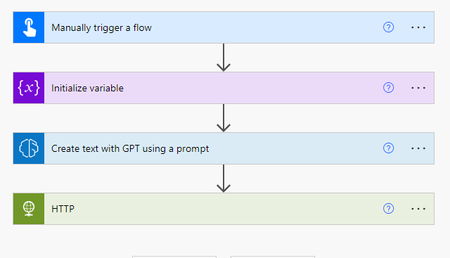
Hi Folks, I am trying to develop a MS Power Automate Flow that can post QMS documents information to Copilot Studio bot based on users' question. I am using 'Create text with GPT using Prompt" to extract users' intention about documents from their natural language. Then use HTTP connector to post the results to Copilot Studio bot. I have done all the steps: 1. Registered App in Azure Portal 2. Granted Sites.Selected (Read) permission to my app so that it can read the information from QMS document library in SharePoint. We only want the app permission related to subsite not the whole site. The issue I am facing is that the HTTP action is still showing unauthorized Status code 401. Could you guide me if there is something incomplete or insufficient? Many thanks. After running please see below error: Best regards, perlite77737Views0likes0CommentsConnect Swimlane to pull Defender for Cloud Alerts
using Swimlane to ingest our alerts from Defender for cloud, I have setup our Access with the following items: URL: https://graph.microsoft.com/v1.0/security/alerts Token URL: https://login.microsoftonline.com/tenant-ID/oauth2/v2.0/token Client ID: pulled from Registered App Client Secret: Created a New Ceretificates & secrets and added that Value Scope: https://graph.microsoft.com/.default When I run my Action to capture the "List of Alerts", I receive the following error: "reason": "Bad Request", "json_body": { "error": "invalid_request", "error_description": "AADSTS90014: The required field 'scope' is missing from the credential. Ensure that you have all the necessary parameters for the login request...." What parameters and how are those added and to which section? I'm new to API calls and not sure of the process. Appreciate your help, Serge523Views0likes0Comments403 Forbidden error when using create team Graph API
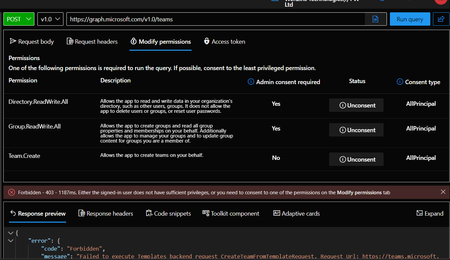
Hi, I have been using the create team API, it was working fine couple days back, there was no change in permissions or even in the code. Since 2 days we are facing 403 forbidden error. URL: https://graph.microsoft.com/v1.0/teams with request payload as mentioned below: { "email address removed for privacy reasons": "https://graph.microsoft.com/v1.0/teamsTemplates('standard')", "displayName": "Architecture test Team", "description": "The team for those in architecture design." } I have provided the required permissions for both application as well as delegated. Please find screenshot of the same The response is: { "error": { "code": "Forbidden", "message": "Failed to execute Templates backend request CreateTeamFromTemplateRequest. Request Url: https://teams.microsoft.com/fabric/apac/templates/api/team, Request Method: POST, Response Status Code: Forbidden, Response Headers: Strict-Transport-Security: max-age=2592000x-operationid: e0e36994bd8341ce936b7ef080a64f52x-telemetryid: 00-e0e36994bd8341ce936b7ef080a64f52-49c1a1267b1789f1-01X-MSEdge-Ref: Ref A: 21AF592ACFD244CA86C67D5750C3F243 Ref B: TYO01EDGE2718 Ref C: 2023-07-19T20:16:46ZDate: Wed, 19 Jul 2023 20:16:46 GMT, ErrorMessage : {\"errors\":[{\"message\":\"Error when calling Middle Tier. Message: ''. Error code: 'GetApplicableSkuCategoriesForUserFailed'. Status code: Forbidden.\",\"errorCode\":\"Unknown\"}],\"operationId\":\"e0e36994bd8341ce936b7ef080a64f52\"}", "innerError": { "message": "Failed to execute Templates backend request CreateTeamFromTemplateRequest. Request Url: https://teams.microsoft.com/fabric/apac/templates/api/team, Request Method: POST, Response Status Code: Forbidden, Response Headers: Strict-Transport-Security: max-age=2592000x-operationid: e0e36994bd8341ce936b7ef080a64f52x-telemetryid: 00-e0e36994bd8341ce936b7ef080a64f52-49c1a1267b1789f1-01X-MSEdge-Ref: Ref A: 21AF592ACFD244CA86C67D5750C3F243 Ref B: TYO01EDGE2718 Ref C: 2023-07-19T20:16:46ZDate: Wed, 19 Jul 2023 20:16:46 GMT, ErrorMessage : {\"errors\":[{\"message\":\"Error when calling Middle Tier. Message: ''. Error code: 'GetApplicableSkuCategoriesForUserFailed'. Status code: Forbidden.\",\"errorCode\":\"Unknown\"}],\"operationId\":\"e0e36994bd8341ce936b7ef080a64f52\"}", "code": "AccessDenied", "innerError": {}, "date": "2023-07-19T20:16:46", "request-id": "e0e36994-bd83-41ce-936b-7ef080a64f52", "client-request-id": "4aa73188-19d4-9382-2235-0530552047ec" } } } Any help in this regard is appriciated. Thank you.2.1KViews0likes1CommentHow to use multiple filter operations in beta Graph API?
I am trying to run the following API: https://graph.microsoft.com/beta/users?$count=true&$filter=signInActivity/lastSignInDateTime le 2022-09-01T00:00:00Z and endsWith(mail,'@alumni.xxx.xxx') and I get the following response: { "error": { "code": "BadRequest", "message": "Filter not supported.", "innerError": { "date": "2022-12-22T19:21:39", "request-id": "d994b51c-xxxx-xxxx-b0d5-97a8923ab5t9", "client-request-id": "d302b51c-xxxx-yyyy-zzzz-12a8035ce9r9" } } } Any idea as to what I'm doing wrong? Thx2.9KViews0likes4Comments