api design
36 TopicsProtect, Augment, and Build GraphQL APIs with Azure API Management
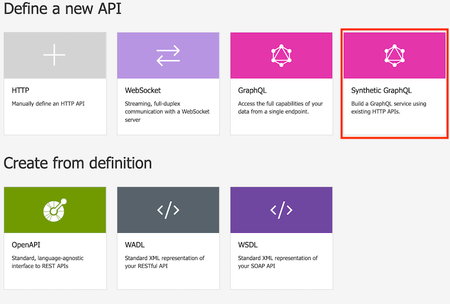
REST APIs have been with us for over 20 years now. In that time, our expectations of client applications have grown. We expect client applications to run on mobile devices with low bandwidth yet still be responsive. Unfortunately, REST APIs restrict us in three basic ways: It takes too many requests to fulfill the data needs for a single page. The REST API returns too much data for the page being rendered. The client application needs to poll to get new information. There have been various attempts to solve these issues, and the current favorite is GraphQL. Azure API Management makes it easy to protect your GraphQL APIs and to build new GraphQL APIs from your existing REST APIs.How To: Retrieve from CosmosDB using Azure API Management
In this How To, I will show a simple mechanism for reading items from CosmosDB using Azure API Management (APIM). There are many scenarios where you might want to do this in order to leverage the capabilities of APIM while having a highly scalable, flexible data store.Using Azure API Management with Azure Front Door for Global, Multi‑Region Architectures
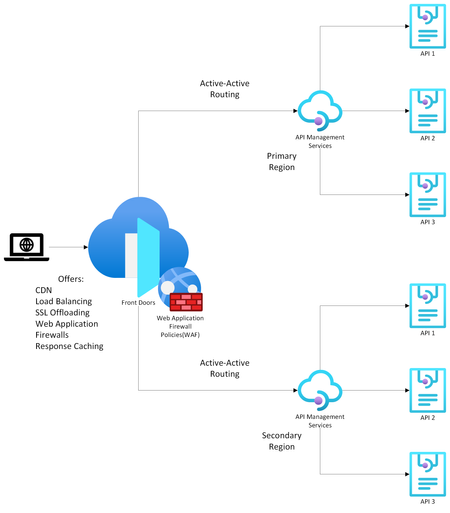
Modern API‑driven applications demand global reach, high availability, and predictable latency. Azure provides two complementary services that help achieve this: Azure API Management (APIM) as the API gateway and Azure Front Door (AFD) as the global entry point and load balancer. Going over the available documentation available, my team and I found this article on how to front a single-region APIM with an Azure Front Door , but we wanted to extend this to a multi-region APIM as well. That led us to design the solution detailed in this article which explains how to configure multi‑regional, active‑active APIM behind Azure Front Door using Custom origins and regional gateway endpoints. (I have also covered topics like why organizations commonly pair APIM with Front Door, when to use internal vs. external APIM modes, etc. but main topic first! Scroll down to the bottom for more info). Configuring Multi‑Regional APIM with Azure Front Door WHAT TO KNOW: If using APIM Premium with multi‑region gateways, each region exposes its own regional gateway endpoint, formatted as: https://<service-name>-<region>-01.regional.azure-api.net Examples: https://mydemo-apim-westeurope-01.regional.azure-api.net https://mydemo-apim-eastus-01.regional.azure-api.net where 'mydemo' is the name of the APIM instance. You will use these regional endpoints and configure them as a separate origin in Azure Front Door—using the Custom origin type. Solution Architecture Azure Front Door Configuration Steps 1. Create an Origin Group Inside your Front Door profile, define a group (Settings -> Origin Groups - > Add -> Add an origin) that will contain all APIM regional gateways. See images below: 2. Add Each APIM Region as a Custom Origin Use the Custom origin type: Origin type: Custom Host name: Use the APIM regional endpoint Example: mydemo-apim-westeurope-01.regional.azure-api.net Origin host header: Same as the host name. Enable certificate subject name validation (Recommended when private link or TLS integrity is required.) Priority: Lower value = higher priority (for failover). Weight: Controls how traffic is distributed across equally prioritized origins. Status: Enable origin. And repeat the same steps for additional APIM regions giving them priority and weightage as you feel appropriate. How to Know Which Region is being Invoked To test this setup, create 2 Virtual Machines (VMs) in Azure - one for each region. For this guide, we chose to create the VMs in West Europe and East US. Open up a Command Prompt from the VM and do a curl on the sample Echo API that comes with every new APIM deployment: Example: curl -v "afd-blah.b01.azurefd.net/echo/resource?param1=sample" Your results should show the region being hit as shown below: How AFD Routes Traffic Across Multiple APIM Regions AFD evaluates origins in this order: Available instances — the Health Probe removes unhealthy origins Priority — selects highest‑priority available origins Latency — optionally selects lowest‑latency pool Weight — round‑robin distribution across selected origins Example When origins are configured as below: West Europe (priority 1, weight 1000) East US (priority 1, weight 500) Central US (priority 2, weight 1000) AFD will: Use West Europe + East US in a 1000:500 ratio. Only use Central US if both West Europe & East US become unavailable. For more information on this nice algorithm, see here: Traffic routing methods to origin - Azure Front Door | Microsoft Learn More Info (as promised) Why Use Azure API Management? Azure API Management is a fully managed service providing: 1. Centralized API Gateway Enforces policies such as authentication, rate limiting, transformations, and caching. Acts as a single façade for backend services, enabling modernization without breaking existing clients. 2. Security & Governance Integrates with Azure AD, OAuth2, and mTLS (mutual TLS). Provides threat protection and schema validation. 3. Developer Ecosystem Developer portal, API documentation, testing console, versioning, and releases. 4. Multi‑Region Gateways (Premium Tier) Allows deployment of additional regional gateways for active‑active, low‑latency global experiences. APIM Deployment Modes: Internal vs. External External Mode The APIM gateway is reachable publicly over the internet. Common when: Exposing APIs to partners, mobile apps, or public clients. You can easily front this with an Azure Front Door for reasons listed in the next section. Internal Mode APIM gateway is deployed inside a VNet, accessible only privately. Used when: APIs must stay private to an enterprise network. Only internal consumers/VPN/VNet peered systems need access. To make your APIM publicly accessible, you need to front it with both an Application Gateway and an Azure Front Door because: Azure Front Door (AFD) cannot directly reach an internal‑mode APIM because AFD requires a publicly routable origin. Application Gateway is a Layer‑7 reverse proxy that can expose a public frontend while still reaching internal private backends (like APIM gateway). [Ref] But Why Put Azure Front Door in Front of API Management? Azure Front Door provides capabilities that APIM alone does not offer: 1. Global Load Balancing As discussed above. 2. Edge Security Web Application Firewall, TLS termination at the edge, DDoS absorption. Reduces load on API gateways. 3. Faster Global Performance Anycast network and global POPs reduce round‑trip latency before requests hit APIM. A POP (Point of Presence) is an Azure Front Door edge location—a physical site in Microsoft’s global network where incoming user traffic first lands. Azure Front Door uses numerous global and local POPs strategically placed close to end‑users (both enterprise and consumer) to improve performance. Anycast is a networking protocol Azure Front Door uses to improve global connectivity. Ref: Traffic acceleration - Azure Front Door | Microsoft Learn 4. Unified Global Endpoint A single public endpoint (e.g., https://api.contoso.com) that intelligently distributes traffic across multiple APIM regions. With all of the above features, it is best to pair API Management with a Front Door, especially when dealing with multi-region architectures. Credits: Junee Singh, Senior Solution Engineer at Microsoft Isiah Hudson, Senior Solution Engineer at Microsoft1.7KViews2likes0CommentsHow To: APIM Asynch to Synch Pattern
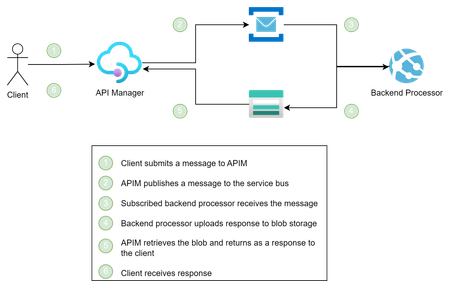
Just because you can do something, does not mean you should... In this How To post, I will use APIM to turn an asynchronous messaging into a synchronous messaging by publishing a message to Azure Service Bus and retrieving the response using Azure Blob Storage.4.7KViews2likes0Comments