android
40 Topics
Edge on Android: Syncs personal data (e.g. history, payment methods), despite me turning them off
Sync settings chosen during first-run setup are ignored. All sync types get turned on. Steps taken Install Outlook. (Link: https://play.google.com/store/apps/details?id=com.microsoft.office.outlook ) Sign in to Outlook. Uninstall and re-install Edge. (Link: https://play.google.com/store/apps/details?id=com.microsoft.emmx ) Choose whether to set Edge as default browser. Tap the tiny blue text, which says "Sync settings". (Not the tiny blue text immediately underneath, which says "Microsoft Privacy Statement"). All sync types are turned on by default. Turn off all sync items except one, e.g. Passwords. Dismiss "Sync settings" Re-open "Sync settings", to confirm your settings are still there. Then dismiss it again. Sign in, or "Continue". Continue setting up Edge. Open the Edge menu. Tap your account Tap Sync. Result: ALL sync items are turned on, despite having turned them off in step 6. Request Is this bug fixed, in a later version of Edge? Note: This bug does not fit in the official feedback method for Edge for Android. I am hoping the helpful elves at the other end of the Edge feedback form are reading this question. Because I have sent them the link to https://learn.microsoft.com/en-us/answers/questions/6035494/edge-on-android-syncs-personal-data-history-paymen. My environment Google Pixel 10a Android 17 Edge version 155.0.4283.48 (also reproduced with earlier version: 154.0.4258.38) OR Edge Canary version 157.0.4338.0 (Downloaded 2026-10-19)45Views0likes0Comments
Crash when submitting web page input fields with soft keyboard Enter
### Summary Microsoft Edge Canary for Android crashes when submitting web page input fields using the Android soft keyboard Enter key. GitHub search is one stable reproduction case, but this is not GitHub-specific. I have also reproduced similar crashes on other websites with text input/search fields. ### Environment - App: Microsoft Edge Canary for Android - Package: `com.microsoft.emmx.canary` - Version: `152.0.4142.0` - Version code: `414200023` - Device: vivo V2417A - Android SDK: 36 - ABI: arm64-v8a ### Reproduction case 1. Open Microsoft Edge Canary on Android. 2. Navigate to `https://github.com/`. 3. Tap the GitHub search box. 4. Type any text. 5. Press Enter on the Android soft keyboard. ### Expected behavior The input/search action should be submitted normally. ### Actual behavior Edge Canary crashes immediately after pressing Enter. ### Scope This does not appear to be specific to GitHub. The same type of crash can also be triggered on other websites when submitting text input/search fields using the Android soft keyboard Enter key. GitHub is used here as a minimal stable repro because it is easy to test. ### Crash information Exception: ```text java.lang.IndexOutOfBoundsException: Index 24 out of bounds for length 0 ``` Relevant stack trace: ```text java.util.ArrayList.get(ArrayList.java:434) android.view.ViewGroup.getAndVerifyPreorderedView(ViewGroup.java:3873) android.view.ViewGroup.gatherTransparentRegion(ViewGroup.java:7438) android.view.ViewRootImpl.performTraversals(ViewRootImpl.java:5207) android.view.Choreographer.doFrame(...) ``` ### Notes - Reproduced directly on the Android phone. - Trigger appears related to submitting web page input/search fields via the Android soft keyboard Enter key.346Views0likes3Comments
[MS Edge Android] UI Glitch: Suggestions Misaligned in Bottom Search Bar Mode
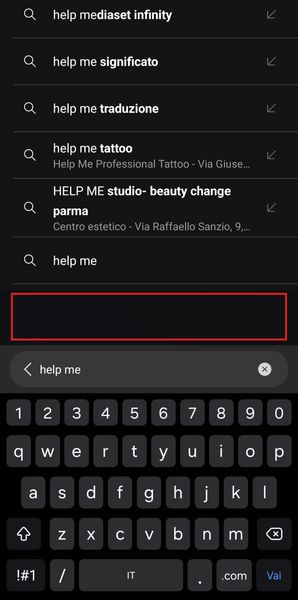
Hi everyone! I'm experiencing a strange issue with the search suggestions when using bottom bar mode. In Microsoft Edge, there's a blank space between the input bar and the suggestions above it, as shown in the attached image (see the red line). Is anyone else seeing this bug? Any idea how to fix it? Thanks in advance383Views0likes1CommentApp theme is not reflected in the in-app browser on Edge for Android
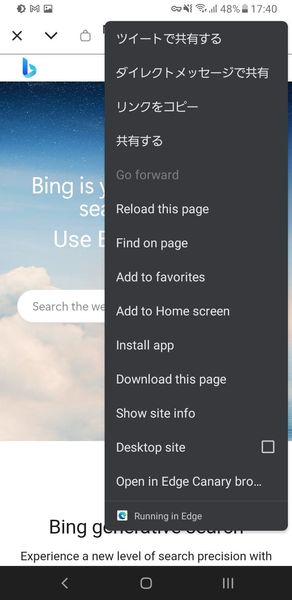
In the MS Edge for Android, we can set the app theme appearance within the app separately from the system dark mode setting, but the in-app browser (Chrome custom tabs) such as Twitter will reflect the system settings instead of the in-app settings. The image was taken using the Twitter app's in-app browser with the system in dark mode and Edge in light mode, but the Edge menu is in dark mode.231Views0likes0CommentsSome extensions don't work on Android Edge Canary when returning to the app
I am using Edge Canary and have installed several extensions through the developer options, but some of the extensions are not working when I resume from the background. The extensions that don't work seem to be automatically disabled internally, so I can disable them from the extension options and then re-enable them to use them again. (However, in the latest Canary build, if this problem occurs, the app crashes when I try to open the extension options.) This issue occurs with uBlock Origin, Stylus, etc., and probably occurs with the Manifest V2 extension. This issue occurs on multiple devices and occurs even after reinstalling, so it is not device-dependent.1.8KViews2likes3Comments
Edge Android does not truly install PWA
I believe Edge Android does not truly installs PWA, instead it creates a shortcut on the home screen. If I install PWA from Chrome, the app is added to the App drawer and also shows up in Settings > Apps list. This is not the case when installing via Edge. It only shows up on the home screen and there is a edge logo at the bottom right corner of the app logo. This is not a site specific issue, I have created multiple PWAs that install perfectly on other platforms and browsers except Edge. I even tried the https://microsoftedge.github.io/Demos/pwamp/ and it also behaves in the same way.2KViews2likes2Comments
When is Microsoft going to bring Microsoft Authenticator windows aka desktop or within edge itself?
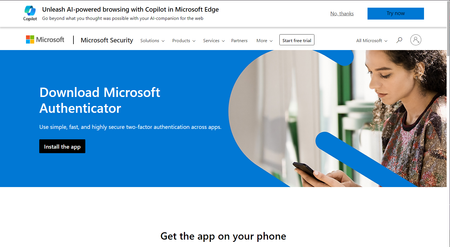
When is Microsoft going to bring Microsoft Authenticator windows aka desktop or within edge itself? (People like me lose mobiles) Isn't Windows device considered anything? Only mobiles and android and iOS devices matter? People like don't store important info on Windows devices? Edge has support for in-built password manager like chrome with chrome and google passwords then why is edge not having 2fa support on windows yet in 2024? Is windows still usable if my phones goes for service center, dies randomly, or is stolen? Can I consider windows devices to be of valuable in 2024 or should I shift 100 percent to android and MacOS and ios? Should I throw my windows devices out of window since it is not dependent device when any other fails? On a sidenote, I tried checking out but WinAuth Authenticator exists for Windows PC is open-source & offers 2-step verification (but unfortunately not updated since 2016) so why Microsoft which focuses so much of AI of everything has been able to bring desktop version for windows users? Or am I asking too much in the name of security and privacy that big tech promotes all the time? Can we trust microsoft and windows devices? Or is everything going to be done by google and chrome?2KViews0likes2Comments(MAJOR BUG) Bookmarks dont shift by drag and drop when selected (even multiple selecting is broken).
(MAJOR BUG) Bookmarks dont shift by drag and drop when selected (even multiple selecting is broken). See invalid button when dragging multple bookmarks. I dont face same issues in any browser including chrome and firefox and opera and brave and vivaldi whatsoever. Only edge browser has these unique bugs. And this bug is common in all edge browsers and on all platforms. Checked before posting this.452Views0likes0Comments