android enterprise
22 Topics
Multi-App Kiosk not applying on Samsung A55 (Android 16)
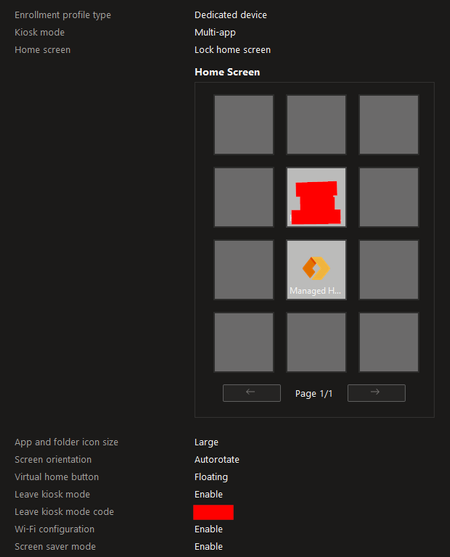
Hello everyone, I’m facing a critical issue with Android Enterprise Multi-App Kiosk mode on a Samsung Galaxy A55 (SM-A556B). The problem started suddenly last week without any configuration changes, and now no Android Enterprise configuration profiles apply anymore. What happened originally The device was running Android 15, and it had been working fine for months in Managed Home Screen (Multi-App Kiosk). Then suddenly: Managed Home Screen stopped showing all apps The device booted into MHS, but the screen was completely empty No policy changes were made on our side I tried several troubleshooting steps, but nothing fixed it. Eventually, I factory-reset the device and re-enrolled it as a Corporate-Owned Dedicated Device (COBO). Current situation after re-enrollment Even after a clean enrollment: No Android Enterprise device restriction profiles apply (Multi-App Kiosk doesn’t start at all) The device stays in the normal Samsung launcher Only very basic commands work: Remote restart App install/uninstall via group assignment All assigned apps show as Installed Profile status in Intune shows Success, but nothing is actually enforced I then upgraded the device to Android 16 (patch 2025-11-01). Unfortunately, the behavior did not change. Current configuration Android Enterprise → Device Restrictions → Multi-App kiosk Allowed apps: Teams, Managed Home Screen, Contacts Managed Home Screen installed Enrollment type: Android Enterprise – Fully Managed / Dedicated No OEM kiosk (no Samsung Knox settings) No Work Profile on the device Symptoms now Managed Home Screen never launches Kiosk mode is completely ignored Device is fully usable like a normal phone Only app deployments work, nothing else This began while still on Android 15 Updating to 16 did NOT resolve the issue Questions Has anyone seen this behavior where Android Enterprise policies stop applying entirely after MHS fails? Is there a known issue with Samsung A55, Android 15/16, or Managed Home Screen? Could this be related to a bug in the Fully Managed/Dedicated enrollment flow for the A55? Any recommended workarounds or known fixes? Any guidance is appreciated — this behavior is completely blocking Kiosk deployments for us. Thanks!754Views0likes2Comments
WiFi profile does not work
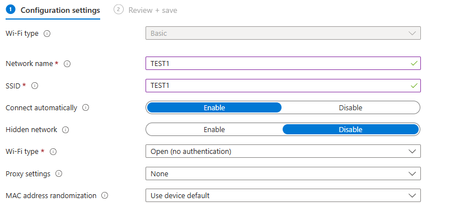
I registered my device as a dedicated device for a single app, and I want to configure it so that it automatically connects to a network that the ESP32 generates, that is, a network without internet, but I am having difficulty doing this, I will show a photo of how I configured it and if there is anything wrong. I'll wait. Note: Android Enterprise platform and does not have a password746Views0likes4CommentsAndroid Enterprise (fully managed) App installation stuck at pending
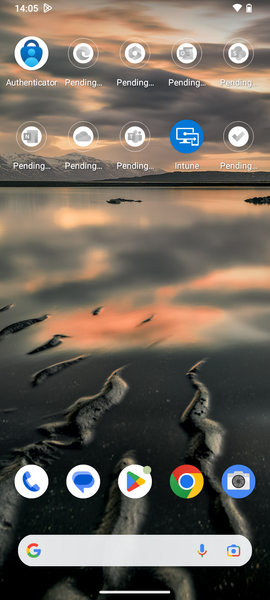
Hi everyone I have an Android Device enrolled with the Android (fully managed) profile. There are several Apps that get deployed to this device. However, the installation stuck at "pending" as seen in my screenshot. After I click on the pending App, the Play Store opens. Then I click on cancel and then install. After that the App gets installed. My Managed Google Play Store Apps in Intune are all Required and targeted to "All users". The Apps get automatically installed on my personally-owned work profile Phones without any issues. When I look under Device install status from the deploying App, I see the device with Status "Failed" and Status Details "The application failed to install, possibly because of insufficient storage or an unreliable network connection. The installation will be retried automatically. (0xC7D24FBA)" Does anyone face the same issue or know how to solve it? Thanks for your help ❤️11KViews0likes3CommentsAndroid Enterprise BYOD Wifi Profile - disable auto-connect not working
Hi all, Been dealing with this issue for Android devices. We're implementing EAP-TLS for an enterprise wifi. Devices are connected to the network. But one thing that brought attention to us is how the android devices keeps on re-enabling the auto connect setting on a device level. That means, devices will auto join the network even without user's consent. We tried using the built-in template in https://learn.microsoft.com/en-us/mem/intune/configuration/wi-fi-settings-android-enterprise#enterprise-personally-owned-work-profile but the option there for Connect automatically is not given. We pulled the diagnostics logs from company portal app and we can see that the wifi profile is actually set to <connectionMode>manual</connectionMode>. We also tried creating a custom wifi profile, uploaded the xml with <connectionMode>manual</connectionMode> but the device keeps re-enabling the auto connect setting. Is there any other setting that I missed with respect to autoconnect issue? If you guys could lead me to proper direction on how to resolve this, I'd really appreciate it.1.3KViews1like1CommentConditional access blocks, even when Smartphone is marked as compliant
Hi Everyone. I'm trying to access my Exchange Mailbox over the Gmail App on my Pixel 8 Pro. Now my Problem is that a conditional access policy is blocking the access. I've created a policy that grants access to the "Office 365 Exchange Online" Resource, if passwordless MFA is satisfied and the device is marked as compliant. At the beginning I was trying to grant access if the Gmail App is protected by an app protection policy, which didn't work because Gmail does not support app protection policies, so I turned that off. So, my Smartphone is a BYOD and I've enrolled it into Intune with the "Android (personally-owned work profile)" enrollment method. A compliance policy is assigned, and Intune shows me that the device is compliant. Intune deploys the Gmail App to my work profile. I've read several documentations and I also deployed Google Chrome, Google Calendar and the Bing Search App just to be sure. But it still blocks access to the resource. I also made an Email configuration profile, to auto-setup the Gmail App with my Credentials. So everytime I open the Gmail App in my Work Profile, it tries to setup the account, I get an MFA number-matching prompt from MS Authenticator and then it tells me to download the company portal app and enroll my smartphone into Intune. Strange behavior because as I mentioned above, my Phone is indeed managed and marked as compliant in Intune. I was going through the Sign-in Logs, and I've seen that every logged attempt claims that the device is not compliant and not even managed. I feel like that I'm missing a big point. I would be thankfull if anyone has an idea to solve this ❤️ Thanks.Solved2.5KViews0likes2Comments
Android Enterprise SCEP user and device issuing errors
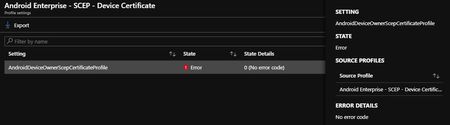
Hi, We are attempting to deliver Android Enterprise SCEP certificates (both user and device based) and both seem to fail. We have our environment set up for iOS SCEP and Android Device Admin SCEP certificates and they work fine. Using the same settings in the Android Enterprise profiles they fail with the error of "0 (No error code)" Does anyone know of anything that might be causing this? I reached out to the networking team to look in the logs, but they don't see any that sticks out that would cause this to fail.11KViews2likes7CommentsLocate Corporate-owned Android Devices
Has anyone figured out how to force the required Location permission to corporate-owned Android devices for the Intune app? I have the Location feature set to Allow in the restrictions profile and the Locate command is available to applicable device records, but the location cannot be reported unless the Location permission is correctly set on the end-user device. I seem to remember there previously being a notification that was automatically sent to devices when the feature was first announced as generally available (Week of February 27, 2023), but it's no longer presenting itself on devices. Thanks in advance.672Views1like0CommentsUsers unable to change Wi-Fi settings on Dedicated Android Kiosk Devices
Hello, I have found little on the internet on this issue (see one reddit post: https://www.reddit.com/r/Intune/comments/s1955o/unable_to_join_wifi_networks_managed_home_screen/ ) with no direct solution. Essentially, We have managed android tablets that use the managed home screen app. Settings are set to allow users to change Wi-Fi settings, but they are unable to actually connect to any. They can see all networks and prompts for a password when tapped, but it never makes a connection attempt after hitting confirm. Please see below for setting information: Please let me know if further information is needed. Thank you!8.6KViews0likes7Comments
Corporate-owned dedicated device with Azure AD shared mode Supported apps
Hi, Case: Currently I am configuring "Corporate-owned dedicated device with Azure AD shared mode" for a customer. I am using Samsung Galaxy Tab S7 FE (Android 11). The base configuration works, the authentication against azure AD works, apps are pushed and installed. The Managed Home Screen app works. Problem: After logging off the user, the device shows the sign in page. After logging in with a different user the only apps that are really logged out and re login with the new authenticated user are MS Teams and Outlook. However most apps don't sign off/close correctly after logging off/in. For example in Edge the authenticated user is still the first signed in user. Even if I configure "Clear local data in apps not optimized for Shared device mode" in the device restriction profile. Question: What apps are supported at the moment and is there a list of apps, and are there going to be more apps available(when)? And are there any workarounds maybe? Ps. its my first post 😉6.5KViews0likes6Comments
Intune Android Enterprise Fully Managed Defender for Endpoint activation
Hi All, Scenario: Intune > Android > Fully Managed profile > Defender for Endpoint deployment Is there any way to reach a zero-touch / silent method for activating Defender for Endpoint on Android devices ? Users currently need to run through a series of questions to activate it and until they do it does not show up in the Security portal Inventory. We are using a Compliance policy based on machine risk score to identify devices which haven't activated Defender - this marks them non-compliant until they do. I'd rather use a deployment/policy to activate Defender silently without any user intervention. As it is a security product on Android Enterprise Fully Managed devices it seems I must be missing a trick here to manage them without user involvement and blocking the user via a non-compliant conditional access policy seems an inefficient way to resolve the issue for everyone. Is it possible ? Many thanks Jas.1.5KViews0likes2Comments