analytics
26 TopicsJoint forces - MS Sentinel and the MITRE framework
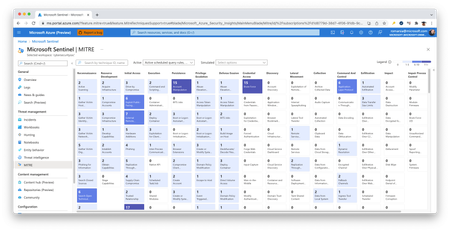
MITRE ATT&CK is a publicly accessible framework and knowledgebase of tactics and techniques that are commonly used by attackers. The MITRE ATT&CK framework is created and maintained by observing real-world scenarios. Many organizations use the MITRE ATT&CK framework to develop specific threat models and methodologies that are used to verify security status in their environments. In this blog post, we discuss the Microsoft Sentinel integration with the MITRE ATT&CK framework, and how it can help you improve your overall security coverage.15KViews9likes2CommentsLooking for unknown anomalies - what is normal? Time Series analysis & its applications in Security
This article provides a practical outline for using Time Series analysis to surface anomalies on security event log data sources, visualizing and alerting on anomalies for further investigation in Azure Sentinel. We will describe the various functions which are used in compiling the query and how to use those KQL queries to either visualize the output or transform it into tabular data outputs to configure alerts on specific anomalies.24KViews6likes5Comments
Help Protect your Exchange Environment With Microsoft Sentinel
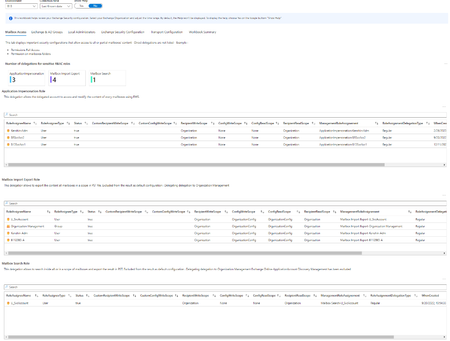
TL;DR; Sentinel + Exchange Servers or Exchange Online = better protected New Microsoft Sentinel security solution for Exchange Online and on premises servers : Microsoft Exchange Security! This content is very useful for any organization concerned about keeping the highest security posture as possible and be alerted in case of suspicious activities for those critical items.19KViews6likes12CommentsHandling ingestion delay in Azure Sentinel scheduled alert rules
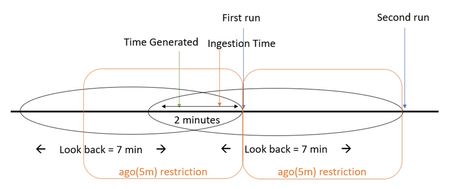
At Azure Sentinel we take pride in the ability to ingest data from a variety of sources. However, data ingestion time may vary for different data sources under different circumstances. In this blog post we will address the delay challenge: understanding the impact of the ingestion delay and how to fix it.16KViews6likes6CommentsDetect Network beaconing via Intra-Request time delta patterns in Azure Sentinel
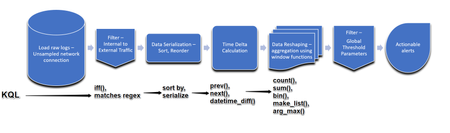
This article will discuss the use case of detecting network beaconing via intra-request time delta patterns using KQL (Kusto query language) in Azure Sentinel. The logic or technique of the use-case was originally discussed at threat hunting project here and also blogged with the open source network analytics tool (flare) implementation by huntoperator here. Implementing this technique natively using KQL allows defenders to quickly apply it over multiple network data sources and easily set up alerts within Azure Sentinel.24KViews4likes3CommentsDynamic alert details - The force awakens
When authoring a new detection, one must keep in mind that the MTTR is highly impacted by the data available in the incident and alerts. Dynamic alert details allow customization of the alert properties resulting in a shorter investigation process. In this blog post we will cover the newly released capability in Microsoft Sentinel scheduled analytics rules to dynamically set the alert properties.8KViews4likes1CommentAccelerate Agent Development: Hacks for Building with Microsoft Sentinel data lake
As a Senior Product Manager | Developer Architect on the App Assure team working to bring Microsoft Sentinel and Security Copilot solutions to market, I interact with many ISVs building agents on Microsoft Sentinel data lake for the first time. I’ve written this article to walk you through one possible approach for agent development – the process I use when building sample agents internally at Microsoft. If you have questions about this, or other methods for building your agent, App Assure offers guidance through our Sentinel Advisory Service. Throughout this post, I include screenshots and examples from Gigamon’s Security Posture Insight Agent. This article assumes you have: An existing SaaS or security product with accessible telemetry. A small ISV team (2–3 engineers + 1 PM). Focus on a single high value scenario for the first agent. The Composite Application Model (What You Are Building) When I begin designing an agent, I think end-to-end, from data ingestion requirements through agentic logic, following the Composite application model. The Composite Application Model consists of five layers: Data Sources – Your product’s raw security, audit, or operational data. Ingestion – Getting that data into Microsoft Sentinel. Sentinel data lake & Microsoft Graph – Normalization, storage, and correlation. Agent – Reasoning logic that queries data and produces outcomes. End User – Security Copilot or SaaS experiences that invoke the agent. This separation allows for evolving data ingestion and agent logic simultaneously. It also helps avoid downstream surprises that require going back and rearchitecting the entire solution. Optional Prerequisite You are enrolled in the ISV Success Program, so you can earn Azure Credits to provision Security Compute Units (SCUs) for Security Copilot Agents. Phase 1: Data Ingestion Design & Implementation Choose Your Ingestion Strategy The first choice I face when designing an agent is how the data is going to flow into my Sentinel workspace. Below I document two primary methods for ingestion. Option A: Codeless Connector Framework (CCF) This is the best option for ISVs with REST APIs. To build a CCF solution, reference our documentation for getting started. Option B: CCF Push (Public Preview) In this instance, an ISV pushes events directly to Sentinel via a CCF Push connector. Our MS Learn documentation is a great place to get started using this method. Additional Note: In the event you find that CCF does not support your needs, reach out to App Assure so we can capture your requirements for future consideration. Azure Functions remains an option if you’ve documented your CCF feature needs. Phase 2: Onboard to Microsoft Sentinel data lake Once my data is flowing into Sentinel, I onboard a single Sentinel workspace to data lake. This is a one-time action and cannot be repeated for additional workspaces. Onboarding Steps Go to the Defender portal. Follow the Sentinel Data lake onboarding instructions. Validate that tables are visible in the lake. See Running KQL Queries in data lake for additional information. Phase 3: Build and Test the Agent in Microsoft Foundry Once my data is successfully ingested into data lake, I begin the agent development process. There are multiple ways to build agents depending on your needs and tooling preferences. For this example, I chose Microsoft Foundry because it fit my needs for real-time logging, cost efficiency, and greater control. 1. Create a Microsoft Foundry Instance Foundry is used as a tool for your development environment. Reference our QuickStart guide for setting up your Foundry instance. Required Permissions: Security Reader (Entra or Subscription) Azure AI Developer at the resource group After setup, click Create Agent. 2. Design the Agent A strong first agent: Solves one narrow security problem. Has deterministic outputs. Uses explicit instructions, not vague prompts. Example agent responsibilities: To query Sentinel data lake (Sentinel data exploration tool). To summarize recent incidents. To correlate ISVs specific signals with Sentinel alerts and other ISV tables (Sentinel data exploration tool). 3. Implement Agent Instructions Well-designed agent instructions should include: Role definition ("You are a security investigation agent…"). Data sources it can access. Step by step reasoning rules. Output format expectations. Sample Instructions can be found here: Agent Instructions 4. Configure the Microsoft Model Context Protocol (MCP) tooling for your agent For your agent to query, summarize and correlate all the data your connector has sent to data lake, take the following steps: Select Tools, and under Catalog, type Sentinel, and then select Microsoft Sentinel Data Exploration. For more information about the data exploration tool collection in MCP server, see our documentation. I always test repeatedly with real data until outputs are consistent. For more information on testing and validating the agent, please reference our documentation. Phase 4: Migrate the Agent to Security Copilot Once the agent works in Foundry, I migrate it to Security Copilot. To do this: Copy the full instruction set from Foundry Provision a SCU for your Security Copilot workspace. For instructions, please reference this documentation. Make note of this process as you will be charged per hour per SCU Once you are done testing you will need to deprovision the capacity to prevent additional charges Open Security Copilot and use Create From Scratch Agent Builder as outlined here. Add Sentinel data exploration MCP tools (these are the same instructions from the Foundry agent in the previous step). For more information on linking the Sentinel MCP tools, please refer to this article. Paste and adapt instructions. At this stage, I always validate the following: Agent Permissions – I have confirmed the agent has the necessary permissions to interact with the MCP tool and read data from your data lake instance. Agent Performance – I have confirmed a successful interaction with measured latency and benchmark results. This step intentionally avoids reimplementation. I am reusing proven logic. Phase 5: Execute, Validate, and Publish After setting up my agent, I navigate to the Agents tab to manually trigger the agent. For more information on testing an agent you can refer to this article. Now that the agent has been executed successfully, I download the agent Manifest file from the environment so that it can be packaged. Click View code on the Agent under the Build tab as outlined in this documentation. Publishing to the Microsoft Security Store If I were publishing my agent to the Microsoft Security Store, these are the steps I would follow: Finalize ingestion reliability. Document required permissions. Define supported scenarios clearly. Package agent instructions and guidance (by following these instructions). Summary Based on my experience developing Security Copilot agents on Microsoft Sentinel data lake, this playbook provides a practical, repeatable framework for ISVs to accelerate their agent development and delivery while maintaining high standards of quality. This foundation enables rapid iteration—future agents can often be built in days, not weeks, by reusing the same ingestion and data lake setup. When starting on your own agent development journey, keep the following in mind: To limit initial scope. To reuse Microsoft managed infrastructure. To separate ingestion from intelligence. What Success Looks Like At the end of this development process, you will have the following: A Microsoft Sentinel data connector live in Content Hub (or in process) that provides a data ingestion path. Data visible in data lake. A tested agent running in Security Copilot. Clear documentation for customers. A key success factor I look for is clarity over completeness. A focused agent is far more likely to be adopted. Need help? If you have any issues as you work to develop your agent, please reach out to the App Assure team for support via our Sentinel Advisory Service . Or if you have any other tips, please comment below, I’d love to hear your feedback.844Views2likes0Comments
What’s New in Microsoft Sentinel: November 2025
Welcome to our new Microsoft Sentinel blog series! We’re excited to launch a new blog series focused on Microsoft Sentinel. From the latest product innovations and feature updates to industry recognition, success stories, and major events, you’ll find it all here. This first post kicks off the series by celebrating Microsoft’s recognition as a Leader in the 2025 Gartner Magic Quadrant for SIEM 1 . It also introduces the latest innovations designed to deliver measurable impact and empower defenders with adaptable, collaborative tools in an evolving threat landscape. Microsoft is recognized as a Leader in 2025 Gartner Magic Quadrant for Security Information and Event Management (SIEM) Microsoft Sentinel continues to drive security innovation—and the industry is taking notice. Microsoft was named a leader in the 2025 Gartner Magic Quadrant for Security Information and Event Management (SIEM) 1 , published on October 8, 2025. We believe this acknowledgment reinforces our commitment to helping organizations stay secure in a rapidly changing threat landscape. Read blog for more information. Take advantage of M365 E5 benefit and Microsoft Sentinel promotional pricing Microsoft 365 E5 benefit Customers with Microsoft 365 E5, A5, F5, or G5 licenses automatically receive up to 5 MB of free data ingestion per user per day, covering key security data sources like Azure AD sign-in logs and Microsoft Cloud App Security discovery logs—no enrollment required. Read more about M365 benefits for Microsoft Sentinel. New 50GB promotional pricing To make Microsoft Sentinel more accessible to small and mid-sized organizations, we introduced a new 50 GB commitment tier in public preview, with promotional pricing starting October 1, 2025, through March 31, 2026. Customers who choose the 50 GB commitment tier during this period will maintain their promotional rate until March 31, 2027. Available globally with regional variations in regional pricing it is accessible through EA, CSP, and Direct channels. For more information see Microsoft Sentinel pricing page. Partner Integrations: Strengthening TI collaboration and workflow automation Microsoft Sentinel continues to expand its ecosystem with powerful partner integrations that enhance security operations. With Cyware, customers can now share threat intelligence bi-directionally across trusted destinations, ISACs, and multi-tenant environments—enabling real-time intelligence exchange that strengthens defenses and accelerates coordinated response. Learn more about the Cyware integration. Learn more about the Cyware integration here. Meanwhile, BlinkOps integration combined with Sentinel’s SOAR capabilities empowers SOC teams to automate repetitive tasks, orchestrate complex playbooks, and streamline workflows end-to-end. This automation reduces operational overhead, cuts Mean Time to Respond (MTTR) and frees analysts for strategic threat hunting. Learn more about the BlinkOps integration. Learn more about the BlinkOps integration. Harnessing Microsoft Sentinel Innovations Security is being reengineered for the AI era, moving beyond static, rule-based controls and reactive post-breach response toward platform-led, machine-speed defense. To overcome fragmented tools, sprawling signals, and legacy architectures that cannot keep pace with modern attacks, Microsoft Sentinel has evolved into both a SIEM and a unified security platform for agentic defense. These updates introduce architectural enhancements and advanced capabilities that enable AI-driven security operations at scale, helping organizations detect, investigate, and respond with unprecedented speed and precision. Microsoft Sentinel graph – Public Preview Unified graph analytics for deeper context and threat reasoning. Microsoft Sentinel graph delivers an interactive, visual map of entity relationships, helping analysts uncover hidden attack paths, lateral movement, and root causes for pre- and post-breach investigations. Read tech community blog for more details. Microsoft Sentinel Model Context Protocol (MCP) server – Public Preview Context is key to effective security automation. Microsoft Sentinel MCP server introduces a standardized protocol for building context-aware solutions, enabling developers to create smarter integrations and workflows within Sentinel. This opens the door to richer automation scenarios and more adaptive security operations. Read tech community blog for more details. Enhanced UEBA with New Data Sources – Public Preview We are excited to announce support for six new sources in our user entity and behavior analytics algorithm, including AWS, GCP, Okta, and Azure. Now, customers can gain deeper, cross-platform visibility into anomalous behavior for earlier and more confident detection. Read our blog and check out our Ninja Training to learn more. Developer Solutions for Microsoft Sentinel platform – Public Preview Expanded APIs, solution templates, and integration capabilities empower developers to build and distribute custom workflows and apps via Microsoft Security Store. This unlocks faster innovation, streamlined operations, and new revenue opportunities, extending Sentinel beyond out-of-the-box functionality for greater agility and resilience. Read tech community blog for more details. Growing ecosystem of Microsoft Sentinel data connectors We are excited to announce the general availability of four new data connectors: AWS Server Access Logs, Google Kubernetes Engine, Palo Alto CSPM, and Palo Alto Cortex Xpanse. Visit find your Microsoft Sentinel data connector page for the list of data connectors currently supported. We are also inviting Private Previews for four additional connectors: AWS EKS, Qualys VM KB, Alibaba Cloud Network, and Holm Security towards our commitment to expand the breadth and depth to support new data sources. Our customer support team can help you sign up for previews. New agentless data connector for Microsoft Sentinel Solution for SAP applications We’re excited to announce the general availability of a new agentless connector for Microsoft Sentinel solution for SAP applications, designed to simplify integration and enhance security visibility. This connector enables seamless ingestion of SAP logs and telemetry directly into Microsoft Sentinel, helping SOC teams monitor critical business processes, detect anomalies, and respond to threats faster—all while reducing operational overhead. Events, Webinars and Training Stay connected with the latest security innovation and best practices. From global conferences to expert-led sessions, these events offer opportunities to learn, network, and explore how Microsoft is shaping AI-driven, end-to-end security for the modern enterprise. Microsoft Ignite 2025 Security takes center stage at Microsoft Ignite, with dedicated sessions and hands-on experiences for security professionals and leaders. Join us in San Francisco, November 17–21, 2025, or online, to explore our AI-first, end-to-end security platform designed to protect identities, devices, data, applications, clouds, infrastructure—and critically—AI systems and agents. Register today! Microsoft Security Webinars Stay ahead of emerging threats and best practices with expert-led webinars from the Microsoft Security Community. Discover upcoming sessions on Microsoft Sentinel SIEM & platform, Defender, Intune, and more. Sign up today and be part of the conversation that shapes security for everyone. Learn more about upcoming webinars. Onboard Microsoft Sentinel in Defender – Video Series Microsoft leads the industry in both SIEM and XDR, delivering a unified experience that brings these capabilities together seamlessly in the Microsoft Defender portal. This integration empowers security teams to correlate insights, streamline workflows, and strengthen defenses across the entire threat landscape. Ready to get started? Explore our video series to learn how to onboard your Microsoft Sentinel experience and unlock the full potential of integrated security. Watch Microsoft Sentinel is now in Defender video series. MDTI Convergence into Microsoft Sentinel & Defender XDR overview Discover how Microsoft Defender Threat Intelligence Premium is transforming cybersecurity by integrating into Defender XDR, Sentinel, and the Defender portal. Watch this session to learn about new features, expanded access to threat intelligence, and how these updates strengthen your security posture. Partner Sentinel Bootcamp Transform your security team from Sentinel beginners to advanced practitioners. This comprehensive 2-day bootcamp helps participants master architecture design, data ingestion strategies, multi-tenant management, and advanced analytics while learning to leverage Microsoft's AI-first security platform for real-world threat detection and response. Register here for the bootcamp. Looking to dive deeper into Microsoft Sentinel development? Check out the official https://aka.ms/AppAssure_SentinelDeveloper. It’s the central reference for developers and security teams who want to build custom integrations, automate workflows, and extend Sentinel’s capabilities. Bookmark this link as your starting point for hands-on guidance and tools. Stay Connected Check back each month for the latest innovations, updates, and events to ensure you’re getting the most out of Microsoft Sentinel. 1 Gartner® Magic Quadrant™ for Security Information and Event Management, Andrew Davies, Eric Ahlm, Angel Berrios, Darren Livingstone, 8 October 20253.6KViews2likes3Comments
Automate Extraction of Microsoft Sentinel Analytical Rules from GitHub Solutions
🔧 Enhancing Pre-Deployment Rule Insights Extracting metadata like Rule Name, Severity, MITRE Tactics, and Techniques for out-of-the-box analytical rules across multiple solutions can be time-consuming when done manually—especially before the rules are deployed. 🚀 Script Overview The PowerShell script, hosted on GitHub, lets you: Provide the exact Microsoft Sentinel solution name as input, from Microsoft Sentinel GitHub: Azure-Sentinel/Solutions at master · Azure/Azure-Sentinel · GitHub Automatically query the [Microsoft Sentinel GitHub repo] Parse all associated analytical rule YAMLs under that solution Export relevant metadata into a structured CSV 📥 GitHub Link This is My GitHub repository where the custom PowerShell script is hosted. It allows you to extract built-in analytical rules from Microsoft Sentinel solutions based on the solution name: 🔗 GitHub - SentinelArtifactExtract (Optimized Script) 📝 Pre-Requisites: Generate GitHub Personal Access token: GitHub official page to generate PAT: Managing your personal access tokens - GitHub Docs Why GitHub PAT token: It will help us to Authenticate and overcome the GitHub API rate limit Error (403). Download the Script from GitHub to Azure CloudShell: Use Invoke-WebRequest or curl to download the raw script: Command to Download the Raw Script from GitHub: Invoke-WebRequest -Uri "https://raw.githubusercontent.com/vdabhi123/SentinelArtifactExtract/main/Extract%20Sentinel%20Analytical%20Rule%20with%20Solution%20Name%20prompt/OptimizedVersionPromptforSolutionNameOnly" -OutFile "ExtractRules.ps1 Invoke-WebRequest in Azure CloudShell Update the Script with you GitHub PAT (generated in pre-requisite 1) in main script: To update the PAT token you can use vim and ensure to run the updated script. 🧪 How to Use the Script Open Azure Cloud Shell (PowerShell). Upload and run the script. (This is Optional if Pre-requisite 3 is followed) Run the Script and Enter the **exact** solution name (e.g., `McAfee ePolicy Orchestrator`). The script fetches rule metadata and exports to CSV in the same directory. Download the CSV from Cloud Shell. & 2 as highlighted. 📤 Sample Output The script generates a CSV with the following columns: - `Solution` - `AnalyticalRuleName` - `Description` - `Severity` - `MITRE_Tactics` - `MITRE_Techniques` Example file name: Formatted Output with all Analytical Rule and other metadata for the Solution: ✅ Benefits Streamlines discovery of built-in analytical rules for initial Microsoft Sentinel deployments. Accelerates requirements gathering by exporting rules into a shareable CSV format. Enables collaborative planning—output can be shared with clients or Microsoft to determine which rules to implement or recommend. Eliminates manual effort of browsing GitHub or Microsoft Sentinel UI or exporting and reviewing full JSON rule files individually. 💡 Pro Tips Always verify the solution name from the official Microsoft Sentinel GitHub Solutions folder. Azure-Sentinel/Solutions at master · Azure/Azure-Sentinel · GitHub 📌 Final Thoughts This script was created in response to a real-world project need and is focused on improving the discovery and extraction of Microsoft Sentinel analytical rules. A follow-up blog covering the export of additional Sentinel artifacts—such as Playbooks, Workbooks, and Hunting Queries—will be published soon.2KViews2likes0Comments