alerts
10 Topics
Is the Security Graph ever going to be brought back?
Over six years ago, Microsoft explored the concept of a Security Graph, with the vision of bringing together insights from across the security ecosystem into a unified relationship-driven platform. The goal was to connect security data, signals, and intelligence from multiple vendors to provide deeper visibility, context, and understanding of complex security environments. Over time, much of this effort was consolidated into the broader Microsoft Graph strategy, which emphasized centralized data access and integration. While that approach delivered significant benefits, the emergence of AI and graph-based intelligence highlights the value of domain-specific models where relationships are intentionally defined, preserved, and analyzed rather than inferred after the fact. I believe the time has come for Microsoft to revisit and revive the concept of the Security Graph. While I understand the rationale behind consolidating security data into centralized platforms to simplify implementation and improve accessibility, the rapid advancement of AI has demonstrated the value of specialized models with purpose-built relationships and context. A dedicated Security Graph would provide significant advantages by explicitly defining relationships between security entities, events, controls, assets, identities, and findings rather than relying solely on correlation and inference. This approach would enable deeper analytics, more accurate investigations, enhanced threat detection, and improved decision-making across the security ecosystem. However, the framework should evolve beyond traditional log aggregation and align with the operational data that security vendors already generate. Each security assessment, validation, or monitoring submission should include structured metadata describing: The objective of the capability or validation being performed. The methodology used, including specific tests executed and the environments, controls, and assets evaluated. The toolset details, including product name, version, identity or service account used, supporting datasets, and systems interacted with during testing. Findings and observed results. Coverage gaps, including tests not completed, areas not evaluated, and data not analyzed. The underlying raw logs and telemetry currently generated and submitted by the tool. To ensure integrity and accountability, all submissions should be cryptographically signed, providing verifiable evidence of who performed the assessment, when it was performed, and what data was collected. With this richer, evidence-based data model, a Security Graph could be constructed that not only enables security teams to trace activities, relationships, and attack paths with greater confidence, but also provides substantial value for risk management, governance, compliance, and audit functions. The resulting graph would move beyond simple event correlation to become a trusted system of record for continuous security validation, assurance, and accountability. Thoughts???17Views0likes0CommentsSecurity alerts Graph API and MFA
Hello, Does anyone know if https://learn.microsoft.com/en-us/graph/api/resources/partner-security-partnersecurityalert-api-overview?view=graph-rest-beta Security alerts works with app only method (app + cert or app + secret )? Currently i successfully login to graph using both methods Welcome to Microsoft Graph! Connected via apponly access using "ID number" Then i request to get alerts and i get error code: WARNING: Error body: {"error":{"code":"UnknownError","message":"{\"Error\":{\"Code\":\"Unauthorized_MissingMFA\",\"Message\":\"MFA is required for this request. The provided authentication token does not have MFA I found that old API worked with app+user credential only but it's not mentioned in new one about this restriction.411Views0likes1Comment
Major Delay with /alerts endpoint
Hey folks, I've been seeing some significant delays with the /alerts API endpoint. Ball park range of 2-5 hours. For example, there is an alert in Azure Sentinel that fires at ~13:00 UTC (based on TimeGenerated field). Our internal process that polls for new events from /alerts every ~2-3minutes doesn't pick up this new alert until ~17:00 UTC. I know there is the /alerts_v2 endpoint, and we're working on upgrading our processes to use that - but for the time being, I'm trying to find a solution / answer to this particular endpoint. Anyone experience this or have any insights?614Views0likes0CommentsConnect Swimlane to pull Defender for Cloud Alerts
using Swimlane to ingest our alerts from Defender for cloud, I have setup our Access with the following items: URL: https://graph.microsoft.com/v1.0/security/alerts Token URL: https://login.microsoftonline.com/tenant-ID/oauth2/v2.0/token Client ID: pulled from Registered App Client Secret: Created a New Ceretificates & secrets and added that Value Scope: https://graph.microsoft.com/.default When I run my Action to capture the "List of Alerts", I receive the following error: "reason": "Bad Request", "json_body": { "error": "invalid_request", "error_description": "AADSTS90014: The required field 'scope' is missing from the credential. Ensure that you have all the necessary parameters for the login request...." What parameters and how are those added and to which section? I'm new to API calls and not sure of the process. Appreciate your help, Serge544Views0likes0Comments
Create alert when a login was attempted from certain IP address (or block of addresses)
I'm trying to create an alert when there is a login attempt to certain IP, using the following MG Graph PS command: $newAlert = Invoke-RestMethod -Uri $alertUrl -Method Post -Headers $authHeader -Body $alertBody The response I got is: Invoke-RestMethod: {"error":{"code":"","message":"POST is not supported".... $alertUrl = "https://graph.microsoft.com/v1.0/security/alerts" $AlertBody = { "networkConnections": [{ "destinationAddress": "30.1XX.XX.XX" }], "title": "Login Attempt from Specific IP", "category": "SuspiciousActivity", "description": "Login attempt detected from IP address: 30.1XX.XX.XX", "vendorInformation": { "subProvider": "Sub Prov EFI", "provider": "Prov EFI"}, "assignedTo": "me", "cloudAppStates": [{ "servicePlanId": "00000000-0000-0000-0000-000000000000", "appId": "00000002-0000-0ff1-ce00-000000000000"}] } Assume Headers are OK (they are, verified) Question: What caused the error?. Is that the endpoint URI is not the correct one? or is that this kind of alerts cannot be set using Graph?3KViews0likes3CommentsAuditing / Configuring Defender Alerts/Rules/Emails/Notifications
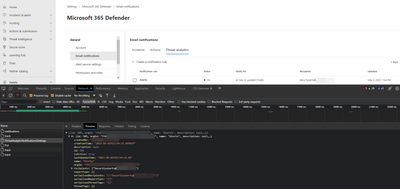
Hey there! I am trying to find a way to audit (and hopefully configure!) the Defender notification emails to make sure they are configured to send to our helpdesk, so it can start our ticketing process. Short of creating a custom application, and trying to subscribe or poll manually across every tenant, the best I have found so far is manually opening these for every separate customer to try and setup the settings So starting from https://security.microsoft.com/ for each customer, going to Settings, and following the mentioned path, or navigating to the URL on the right in turn with each customer tenantID filled in Incident Notifs M365 Defender > Email Notifs > Incidents https://security.microsoft.com/securitysettings/defender/email_notifications?emailNotificationRuleType=incidents&tid=<EachCustomerTenantID> Actions M365 Defender > Email Notifs > Actions https://security.microsoft.com/securitysettings/defender/email_notifications?emailNotificationRuleType=actions&tid=<EachCustomerTenantID> Threat Analytics M365 Defender > Email Notifs > Threat Analytics https://security.microsoft.com/securitysettings/defender/email_notifications?emailNotificationRuleType=threat_analytics&tid=<EachCustomerTenantID> Alert Tuning/Suppression M365 Defender > Alert Tuning https://security.microsoft.com/securitysettings/defender/alert_suppression?tid=<EachCustomerTenantID> Endpoint Alerts Endpoints > Email Notifications > Alerts https://security.microsoft.com/securitysettings/endpoints/email_notifications?childviewid=alerts&tid=<EachCustomerTenantID> Endpoint Vulnerabilities Endpoints > Email Notifications > Vulnerabilities https://security.microsoft.com/securitysettings/endpoints/email_notifications?childviewid=vulnerabilities&tid=<EachCustomerTenantID> Identity Health Notifs Microsoft Defender for Identity > Health Issues https://security.microsoft.com/settings/identities?tabid=healthIssuesNotifications&tid=<EachCustomerTenantID> Identity Alerts Microsoft Defender for Identity > Alert https://security.microsoft.com/settings/identities?tabid=securityAlertsNotifications&tid=<EachCustomerTenantID> I can easily get Incidents or Alerts for a specific tenant, even across tenants through DAP/GDAP/CSP rights. However - rather than querying hundreds of tenants, or trying to set up WebHook subscriptions or similar for them - I was going to just start with Auditing (and possibly manually configuring) the Notification Emails and Alerts to send an email to our ticketing system that we could follow up on. However, I can't find any PowerShell commands or API where I can access these notification settings (access the actual ALERTS themselves, no problem, but not audit the actual Notification Configuration on more than an individual Alert/Incident level) The backend of security.microsoft.com uses private API endpoints like https://security.microsoft.com/apiproxy/mtp/k8s/settings/ThreatAnalyticNotificationsSettings or https://security.microsoft.com/apiproxy/mtp/k8s/cloud/public/internal/IncidentNotificationSettingsV2 as an example for Incident Notifications. The list above is the URLs that you access as the Administrator to configure these by hand, but I am hoping to find a way to get API/Programmatic/Scripted access to these values - but I cannot find any (public) API that seems to access them other than manually. Does anyone have an idea?1.8KViews0likes0Comments
IPC Security Alerts userStates data now returning null instead of information
Hello, I've noticed that all new security alerts generated from the IPC provider since 27 September no longer contain full userStates data. Specifically the accountName, domainName and userPrincipalName are all set to null. The only user identifier that is maintained is the aadUserId. Is anyone else seeing this issue? I pull alerts with a GET /v1.0/security/alerts?$filter=vendorinformation/provider eq 'IPC' Example snippet of the issue: New alerts: userStates": [ { "aadUserId": "protecting-the-inno-cent-users", "accountName": null, "domainName": null, "emailRole": "unknown", "isVpn": null, "logonDateTime": "2022-09-27T20:06:19.5816216Z", "logonId": null, "logonIp": "127.83.247.216", "logonLocation": "Location, PT", "logonType": null, "onPremisesSecurityIdentifier": null, "riskScore": null, "userAccountType": null, "userPrincipalName": null } ], versus an old alert userStates": [ { "aadUserId": "protecting-the-inno-cent-users", "accountName": "john.doe", "domainName": "example.net", "emailRole": "unknown", "isVpn": null, "logonDateTime": "2022-09-27T18:17:53.5121378Z", "logonId": null, "logonIp": "127.2.185.40", "logonLocation": "Location, CA", "logonType": null, "onPremisesSecurityIdentifier": null, "riskScore": null, "userAccountType": null, "userPrincipalName": "email address removed for privacy reasons" } ], I have a ticket open, but I do not have high hopes of explanation or resolution,4.2KViews1like3CommentsCategory assignment to generated alerts
Microsoft defender for cloud apps allows to create policies which when observed in connected apps, generate alerts. These generated alerts have field named "category". I want to understand how names are assigned to this category field of the generated alerts. Is there predefined list of categories for default policies? For example there is default policy called "Suspicious inbox manipulation rule". If this policy triggers an alert then what will be the category for the policy in alert logs?1.2KViews0likes1CommentTopic search not working in People API
For the past 1 month, the topic search is not working in the People API. When a topic is added and the query is provided, an error message is shown below. I have tried it multiple user accounts, multiple topics and as well as with different tenants as well but the issue seems to persist. Here is the API query provided and the error response: https://graph.microsoft.com/v1.0/me/people/?$search="topic: microsoft" { "error": { "code": "ErrorInternalServerError", "message": "An internal server error occurred. The operation failed.", "innerError": { "request-id": "21856e34-e8b5-4caa-afa7-d0c596555c59", "date": "2019-05-05T10:01:55" } } }1.5KViews0likes1Comment