alerts
382 Topics
Windows Forwarded Events connector with Windows Security Events NRT rules
Hello, We are testing Microsoft Sentinel using the official Windows Forwarded Events connector. Environment - Windows Server WEC - Windows Event Forwarding - Azure Arc - Azure Monitor Agent - Windows Forwarded Events connector Everything works correctly. Forwarded security events are successfully ingested into the WindowsEvent table. For example: - Event ID 1102 - Event ID 4732 However, the built-in Windows Security Events NRT Analytics Rules (Content Hub version 1.0.1) query only the SecurityEvent table. Example: NRT Security Event log cleared SecurityEvent | where EventID == 1102 As a result, forwarded events received through the Windows Forwarded Events connector never trigger these NRT rules. Question: Is this expected behavior? Should Windows Forwarded Events customers use a different set of analytics rules (ASIM or other templates), or should these built-in NRT rules also support WindowsEvent? Thank you.665Views0likes4CommentsYour Sentinel AMA Logs & Queries Are Public by Default - AMPLS Architectures to Fix That
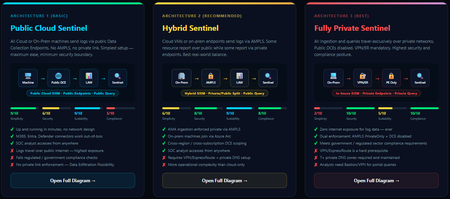
When you deploy Microsoft Sentinel, security log ingestion travels over public Azure Data Collection Endpoints by default. The connection is encrypted, and the data arrives correctly — but the endpoint is publicly reachable, and so is the workspace itself, queryable from any browser on any network. For many organisations, that trade-off is fine. For others — regulated industries, healthcare, financial services, critical infrastructure — it is the exact problem they need to solve. Azure Monitor Private Link Scope (AMPLS) is how you solve it. What AMPLS Actually Does AMPLS is a single Azure resource that wraps your monitoring pipeline and controls two settings: Where logs are allowed to go (ingestion mode: Open or PrivateOnly) Where analysts are allowed to query from (query mode: Open or PrivateOnly) Change those two settings and you fundamentally change the security posture — not as a policy recommendation, but as a hard platform enforcement. Set ingestion to PrivateOnly and the public endpoint stops working. It does not fall back gracefully. It returns an error. That is the point. It is not a firewall rule someone can bypass or a policy someone can override. Control is baked in at the infrastructure level. Three Patterns — One Spectrum There is no universally correct answer. The right architecture depends on your organisation's risk appetite, existing network infrastructure, and how much operational complexity your team can realistically manage. These three patterns cover the full range: Architecture 1 — Open / Public (Basic) No AMPLS. Logs travel to public Data Collection Endpoints over the internet. The workspace is open to queries from anywhere. This is the default — operational in minutes with zero network setup. Cloud service connectors (Microsoft 365, Defender, third-party) work immediately because they are server-side/API/Graph pulls and are unaffected by AMPLS. Azure Monitor Agents and Azure Arc agents handle ingestion from cloud or on-prem machines via public network. Simplicity: 9/10 | Security: 6/10 Good for: Dev environments, teams getting started, low-sensitivity workloads Architecture 2 — Hybrid: Private Ingestion, Open Queries (Recommended for most) AMPLS is in place. Ingestion is locked to PrivateOnly — logs from virtual machines travel through a Private Endpoint inside your own network, never touching a public route. On-premises or hybrid machines connect through Azure Arc over VPN or a dedicated circuit and feed into the same private pipeline. Query access stays open, so analysts can work from anywhere without needing a VPN/Jumpbox to reach the Sentinel portal — the investigation workflow stays flexible, but the log ingestion path is fully ring-fenced. You can also split ingestion mode per DCE if you need some sources public and some private. This is the architecture most organisations land on as their steady state. Simplicity: 6/10 | Security: 8/10 Good for: Organisations with mixed cloud and on-premises estates that need private ingestion without restricting analyst access Architecture 3 — Fully Private (Maximum Control) Infrastructure is essentially identical to Architecture 2 — AMPLS, Private Endpoints, Private DNS zones, VPN or dedicated circuit, Azure Arc for on-premises machines. The single difference: query mode is also set to PrivateOnly. Analysts can only reach Sentinel from inside the private network. VPN or Jumpbox required to access the portal. Both the pipe that carries logs in and the channel analysts use to read them are fully contained within the defined boundary. This is the right choice when your organisation needs to demonstrate — not just claim — that security data never moves outside a defined network perimeter. Simplicity: 2/10 | Security: 10/10 Good for: Organisations with strict data boundary requirements (regulated industries, audit, compliance mandates) Quick Reference — Which Pattern Fits? Scenario Architecture Getting started / low-sensitivity workloads Arch 1 — No network setup, public endpoints accepted Private log ingestion, analysts work anywhere Arch 2 — AMPLS PrivateOnly ingestion, query mode open Both ingestion and queries must be fully private Arch 3 — Same as Arch 2 + query mode set to PrivateOnly One thing all three share: Microsoft 365, Entra ID, and Defender connectors work in every pattern — they are server-side pulls by Sentinel and are not affected by your network posture. Please feel free to reach out if you have any questions regarding the information provided.893Views3likes2CommentsSentinel Foundry - MCP Server (Github Community Release)
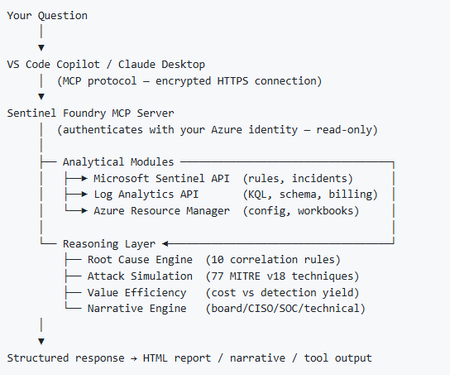
I’ve been cooking something that a lot of people in SOC have been struggling with — especially on the engineering side of Microsoft Sentinel. Thanks to the Microsoft Security team for shaping the capabilities of Sentinel even better with Sentinel Data Lake & Modern SecOps. Today’s the day I can finally share it. Note: This is not an official Microsoft product, but it is designed to make the Sentinel Build even better (complement) with much more intelligence. 🚀 Sentinel Foundry is now in public preview with 43 tools. (Sentinel Foundry - MCP Server) It’s an MCP server built to act like the brain of a strong Sentinel engineer — helping make building, improving, and operating Sentinel far more practical, faster, and honestly more enjoyable. For a lot of teams, the challenge is not understanding what Sentinel can do. The hard part is the engineering work around it: -> Deciding what data should actually be ingested -> Building a clean, scalable Sentinel foundation -> Writing useful detections instead of noisy ones -> Balancing security value with cost -> Turning ideas into deployable engineering outputs That is exactly why I built Sentinel Foundry to help communities grow stronger. It helps with the real engineering tasks behind Sentinel — from architecture thinking to detection design, deployment planning, ingestion strategy, automation ideas, and many of the workflows outlined in the GitHub project. How does it work? Here’s one of the flagship prompts I ran with it: “Give me a complete security posture report for our workspace. Score each pillar and tell me what to prioritise.” And within seconds, it produced a structured engineering blueprint that would normally take a lot longer to pull together manually. You can see the example prompts here in what it can do: https://github.com/prabhukiranveesam/Sentinel-Foundry#what-can-it-do I want building Sentinel to feel less like repetitive engineering overhead — and more like real security engineering that is fast, creative, and enjoyable. If you work with Sentinel as a SOC L2 analyst, engineer, detection engineer, consultant, or architect, I’d genuinely love for you to try it and tell me what you think. 🔗 Public Preview: https://github.com/prabhukiranveesam/Sentinel-Foundry This is just the start of an AI era — and I’m excited to keep shaping it with more powerful features over the coming days. This is very easy to set up and will be available to all of you at no cost during this month as part of the public preview, and your feedback is extremely valuable to shape this as a powerful solution.1.1KViews0likes2Comments
Are you getting the most out of your Azure Log Analytics Workspace (LAW) investment?
Using a LAW is a great way to consolidate various types of data (performance, events, security, etc.) and signals from multiple sources. That's the easy part - mining this data for actionable insights is often the real challenge. One way we did this was by surfacing events related to disks across our physical server estate. We were already sending event data to our LAW; it was just a matter of parsing it with KQL and adding to a Power Bi dashboard for additional visibility. The snippet from the Power Bi dashboard shows when the alert was first triggered and when the disk was eventually replaced. Here's the KQL query we came up with. let start_time=ago(30d); let end_time=now(); Event | where TimeGenerated > start_time and TimeGenerated < end_time | where EventLog contains 'System' | where Source contains 'Storage Agents' | where RenderedDescription contains 'Drive Array Physical Drive Status Change' | parse kind=relaxed RenderedDescription with * 'Drive Array Physical Drive Status Change. The ' Drive ' with serial number ""' Serial '"", has a new status of ' Status '. (Drive status values:'* | project Computer, Drive, Serial, Status, TimeGenerated, EventLevelName You can of course set up alerting with Alerts for Azure Monitor. I hope this example helps you get more value from your LAW.744Views2likes5CommentsSentinel - Defender XDR KQL Queries Library
Hello all, I’ve been building something over the past few weeks that I think the security community might find useful. https://goxdr.fyi is a searchable KQL query library for Microsoft Sentinel and Defender XDR. The name comes from a nickname my colleagues gave me (GoX) combined with XDR. I also picked up https://goxdr.fyi as a short and easy to remember domain for it. You can check it out here: https://goxdr.fyi The idea came from my own day to day work as someone working in IAM and SOC operations. I constantly find myself writing and refining KQL queries for threat hunting, detection engineering and incident investigation. Over time I realized I had a growing collection of queries that I kept going back to and I thought why not make these available to others? It currently has 117 queries covering identity security, BEC/AiTM detection, NTLM and LDAP attack hunting, OAuth governance, AI/Copilot security, Sentinel alert trending, SOC performance metrics and more. Some of these queries are ones I wrote from scratch based on real scenarios I encountered in production environments. Others are community queries I tested and validated in my own setup. Only the ones I found genuinely useful and that actually worked against real data made it in. Each query comes with a description explaining what it detects and why it matters, along with severity levels, platform tags (Sentinel, XDR or both) and a copy button so you can paste it directly into Advanced Hunting or use it as the basis for an Analytics Rule. The site is open source, hosted on GitHub Pages and licensed under CC BY 4.0. No sign-up, no paywall, no tracking. The source is available. I’ll keep adding queries as new scenarios come up. If there’s enough interest I’m also considering adding Cortex XQL queries for Palo Alto environments. Suggestions, feedback or ideas for new detections are always welcome. Feel free to reach out. Thanks255Views0likes0Comments
Vaihdoit uuteen puhelimeen. Authenticator ongelma
Vaihdoit uuteen puhelimeen. Microsoft Authenticator ei ole enää saatavilla vanhalla laitteellasi. Et voi kirjautua Microsoft 365 -työtilillesi, koska MFA-vahvistus vaaditaan. Sinulla ei ole pääsyä mihinkään vaihtoehtoiseen todennusmenetelmään. Tarvitset apua suomeksi, jos mahdollista.339Views0likes1CommentClosing the loop on container security: From code to runtime in the AI era
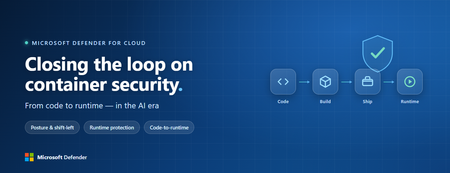
Containers are the backbone of modern cloud-native apps — and increasingly, the infrastructure powering AI, from AI assistants to a new wave of intelligent agents. They also blur the line between build, deploy, and runtime: a single code change can become a running workload in minutes. A misconfiguration committed in the morning can be deployed in minutes and exploited before noon. At that speed, container security can no longer be a point-in-time check, it has to work as one continuous loop. The numbers back this up. For the first time, 31% of breaches now begin with an attacker exploiting a software vulnerability — overtaking stolen credentials as the most common way in — and 15% of attack techniques are now accelerated by generative AI, with adversaries using it to find gaps and write malware faster at every stage. Source: Verizon 2026 Data Breach Investigations Report (incidents Nov 2024–Oct 2025). Over the last few quarters, Microsoft Defender for Cloud has been evolving to offer you this continuous security, end to end. Explore container security’s new capabilities across posture, shift-left, runtime, multicloud coverage, and operations. Collectively they form a more comprehensive approach to container security — one that offers security right during developing a code to a running pod across Azure, AWS, and GCP. There is a second reason why container security matters more in 2026: containers are increasingly where AI runs. Many AI workloads — from model-serving APIs to retrieval systems and intelligent agents — now live as pods on AKS, EKS, and GKE (the managed Kubernetes services from Azure, AWS, and Google), often connected to some of an organization’s most sensitive models and data. As those crown jewels move into the cluster, the same posture, code‑to‑runtime, and runtime protections described in this post extend to AI workloads. The contest is increasingly AI against AI: attackers use it to find and reach the cluster faster, while defenders use it to push back — surfacing the risks that matter most and turning runtime findings into AI‑assisted code fixes. One platform, code to runtime A container finding is not treated as an isolated issue; it is connected to the identity it runs under, the registry and code repository it came from, and the cluster where it is running - all unified under one Microsoft Defender platform. Container posture and shift-left security are now redesigned for least vulnerabilities in production Conventional container security posture offered challenges to scale: a single grouped recommendation could stack thousands of findings under one bucket, making ownership, exemptions, and risk scoring too coarse to act on. That experience is now evolved. We have rebuilt the experience so that each finding is its own recommendation — per software, per image, per container. If two CVEs in the same image belong to two different teams, they can now be triaged, exempted, and reported separately. The grouped recommendations are deprecated and will be removed on July 30, 2026, We suggest updating any automation, export rules, and ServiceNow integrations to target the new per-finding recommendations before that date. That per-finding precision becomes even more powerful once you connect each finding to its source code and to the runtime resources it impacts. Defender for Cloud — part of Microsoft Defender suite — connects this code-to-runtime chain end-to-end. For example, an image built through Azure DevOps or GitHub, pushed to ACR, ECR, Google Artifact Registry, Docker Hub, or JFrog, and pulled by AKS, EKS, or GKE is one continuous evidence chain — traceable from a running container back to the pull request (PR) and line of code that introduced the risk. With GitHub Advanced Security integrated (GA), secrets, code, and dependency findings join the same attack story. The developer-first Defender for Cloud CLI runs the same scanner locally or in any CI/CD pipeline, with consistent exit codes for gating. In this diagram, you can see how we have embedded container security at every stage of the software development lifecycle (SDLC), not just the endpoints. At Code, GitHub Advanced Security and the Defender for Cloud CLI catch secrets, vulnerable dependencies, and insecure code before commit. At Build, the same scanner runs as a CI/CD gate — in GitHub Actions, Azure DevOps, Jenkins, or Bitbucket — failing the pipeline on critical findings. At Ship, registry scanning and Gated Deployment block risky or misconfigured images at the cluster door. And at Runtime, the sensor enforces anti-malware and binary-drift policy on the live workload. No stage is left as a blind spot, and a finding can be traced forward to the running pod or backward to the developer who introduced it. Visibility without enforcement only creates backlog. Gated Deployment — a Kubernetes admission controller — uses the same vulnerability signal, you trust, to block risky images at the cluster level. It supports phased rollout (audit, then deny), targets rules by cluster, namespace, pod, image, or label, and runs across AKS (including AKS Automatic), EKS, and GKE. A newer extension gates on Kubernetes misconfigurations too. Posture practitioners also get KSPM at container granularity — Kubernetes security posture management, available through both Defender for Containers and Defender CSPM — and, on Azure, a new actionable recommendation, Upgrade Azure Kubernetes Service Version (preview), that helps you remediate vulnerabilities in AKS-managed system pods. Coverage that matches containers’ evolution Historically, many container security programs concentrated on managed Kubernetes clusters in AKS, EKS, and GKE. The 2026 reality is broader: a growing share of production runs on serverless container platforms that abstract the cluster away, many sensitive workloads sit behind private, network-isolated clusters, and platform teams increasingly standardize on hardened or distroless base images. The surfaces that were blind spots are now part of the same posture graph as everything else. Serverless compute posture is now generally available across AWS Lambda, Azure Functions, and Web Apps, while Serverless containers posture (preview) takes the same idea to Azure Container Apps, ACI, and AWS Fargate. Together, they bring more of today’s cloud-native production footprint into the same posture graph. Coverage also improves where platform teams are standardizing on locked-down environments. The long-standing gap around private EKS and GKE clusters is closed, bringing some of the hardest-to-reach environments into the same security model. Scanning now works on hardened images from Docker Hardened or Minimus, and runtime protection supports BottleRocket on EKS — with the full feature set also available in Azure Government, which matters for teams running regulated workloads. Runtime threat protection that prevents, not just detects Posture closes the door on attackers; runtime threat protection guards the room if they still succeed. The key shift is that the Defender for Containers sensor now adds prevention on top of detection. The goal is simple: stop malicious code before it runs. Anti-malware detection and prevention (GA) scans container workloads and Kubernetes nodes and, based on the policies you define, blocks malicious execution instead of only alerting. Those alerts then flow into Microsoft Defender XDR’s unified incident model. The second is binary drift detection and prevention (preview). Containers are meant to be immutable. When a process starts from a binary that was not part of the original image, that is drift — and one of the highest-signal indicators of compromise in cloud-native workloads. Defender detects drifts and, with policy enabled, can now also block the drifted process before it executes. Anti-malware and Drift policies can be scoped by cloud, cluster, namespace, image, or label, with allow-lists for legitimate cases. Anti-malware policies can alert, block, or ignore — scoped to clusters, namespaces, pods, labels, or images. Rounding out runtime protection, DNS-based threat detection (GA) catches command-and-control beaconing, DGA traffic, and exfiltration over DNS. A unified approach to container security Step back, and the bigger picture is simple. The same platform that secured your VMs and identities now extends across AKS, EKS, GKE, private clusters, serverless containers, and serverless compute. The same Code-to-Runtime chain that once tied Infrastructure as Code (IaC) findings to running infrastructure now connects Dockerfile commits — through CI/CD and any major registry — to the running pod. Admission control turns posture findings into prevention at deploy time, and runtime protection actively blocks. That is a continuous container security loop living inside Microsoft Defender — not a checklist bolted onto Kubernetes. And it rebalances the fight: as attackers use AI to find and exploit gaps faster, the durable answer is security teams using AI of their own — protecting and triaging at machine speed. If you’ve already enabled container security with Microsoft, the clearest next step is to strengthen the core lifecycle stages first: Code + build: connect GitHub Advanced Security and integrate the Defender for Cloud CLI into your pipelines so findings are caught early and CI/CD gates can fail builds before an image is pushed. Ship: stand up Gated Deployment in audit mode on a non-production cluster, tune it, then flip to deny; extend it to Kubernetes misconfigurations. Run: enable the Defender for Containers sensor, extend it to private EKS and GKE clusters, then tune anti-malware and binary-drift rules in Block mode — starting with your crown-jewel namespaces. Extend protection: turn on serverless compute posture for Lambda, Functions, and Web Apps, and enable serverless container posture for Container Apps, ACI, or Fargate.1.1KViews3likes2CommentsDetecting AI agents and non-human identities in Microsoft Sentinel: the classic-agent blind spot
Build 2026 made the direction official. The industry is moving from the app era into the agent era, and Microsoft spent a real share of the keynote on securing agents across their lifecycle, from discovering what is exploitable to governing what is running in production. On the identity side the centerpiece is Microsoft Entra Agent ID, now generally available, which gives AI agents first-class identities and extends Conditional Access, Identity Protection, and full audit logging to them. That is good news for agents you build the new way. It is not the whole picture, and the gap is where most SOCs will get hurt first. Modern agents are covered. Classic agents are not. Entra Agent ID draws a hard line between two kinds of agent. Modern agents are created through the Agent ID platform, each backed by an agent identity blueprint. They carry a proper Agent ID, a full audit trail, and the complete set of governance capabilities, including Identity Protection for Agents, which establishes a baseline for an agent's normal activity and flags anomalies automatically. Classic agents are everything that came before, or that gets built outside the platform: AI agents implemented as ordinary service principals or app registrations, for example Copilot Studio agents created before Agent ID was enabled, or any home-grown automation calling Graph with client credentials. In the Entra agent registry they appear with "Has Agent ID: No," and that flag matters, because the Agent ID protections apply to identities that actually hold an Agent ID. Classic agents sit outside Identity Protection for Agents and Conditional Access for Agents. Here is the uncomfortable part. The non-human identities you already run, the service principals behind your pipelines, your integrations, your scripts, your pre-platform Copilot Studio bots, are almost all classic agents. They tend to outnumber your human accounts, they have no MFA in any meaningful sense, and a credential added to one does not show up in the Azure portal. The new platform protections do not reach them. Until you migrate them, the only place you get detection coverage on that population is your SIEM. So this is the job Sentinel does that Agent ID does not: detect risky behavior on the classic, service-principal-backed agents that the platform cannot yet protect. The telemetry you have, and the one switch people forget Three tables carry most of the signal. AADServicePrincipalSignInLogs records service principal authentications, the client-credentials sign-ins your agents and automation use. No user, no MFA, just an app proving it holds a secret or certificate. AADManagedIdentitySignInLogs does the same for managed identities. AuditLogs records directory changes, including the one that matters most for persistence: a new credential added to an application or service principal. One practical warning before any of this works. Service principal and managed identity sign-in logs are not streamed by default. You have to enable those categories explicitly in the Entra diagnostic settings feeding your workspace. Plenty of teams write the detection, never check, and never notice the table is empty. Verify that first. Detection 1: a new credential on a service principal or app Adding a secret or certificate to an existing service principal is one of the cleanest persistence techniques in a Microsoft cloud. The attacker compromises a privileged user or app, drops a fresh credential on a service principal that already holds useful Graph permissions, and now has access that survives password resets and session revocation. It maps to MITRE T1098.001, Account Manipulation: Additional Cloud Credentials. For a classic agent it is especially nasty, because there is no Identity Protection baseline watching it. // Detection 1: new secret or certificate added to an application or service principal // MITRE T1098.001 - Account Manipulation: Additional Cloud Credentials AuditLogs | where OperationName has_any ("Add service principal", "Certificates and secrets management") | where Result =~ "success" | extend Initiator = coalesce( tostring(InitiatedBy.user.userPrincipalName), tostring(InitiatedBy.app.displayName)) | extend InitiatorIp = tostring(InitiatedBy.user.ipAddress) | mv-apply Target = TargetResources on ( where Target.type =~ "Application" | extend TargetName = tostring(Target.displayName), TargetId = tostring(Target.id), KeyChanges = Target.modifiedProperties ) | mv-apply Prop = KeyChanges on ( where tostring(Prop.displayName) =~ "KeyDescription" | extend NewKeys = parse_json(tostring(Prop.newValue)), OldKeys = parse_json(tostring(Prop.oldValue)) ) | extend AddedKeys = set_difference(NewKeys, OldKeys) | where array_length(AddedKeys) > 0 | project TimeGenerated, Initiator, InitiatorIp, TargetName, TargetId, AddedKeys | order by TimeGenerated desc The operation filter catches the three shapes this event takes in the log: "Add service principal," "Add service principal credentials," and "Update application - Certificates and secrets management." The modifiedProperties parsing isolates the KeyDescription change, and set_difference confirms a key was actually added rather than removed, so rotating out an old credential does not, on its own, fire the rule. False positives come from legitimate rotation and from automation that provisions app credentials (CI/CD, infrastructure as code). The initiator is the discriminant. A credential added by your deployment pipeline's service account at the usual time is routine. The same change initiated by an interactive admin out of hours, or by an account that never normally touches app credentials, is what you want to surface. Allow-list the expected initiators, not the targets. Detection 2: a classic agent signing in from a first-seen IP A service principal that has only ever authenticated from your Azure regions and suddenly signs in from somewhere new is a strong signal that its credential has been lifted and is being used elsewhere. Service principals have stable, boring network behavior, which makes a first-seen IP a far cleaner indicator for them than it is for roaming human users. This is the behavioral baseline Identity Protection gives you for free on modern agents, rebuilt in KQL for the classic ones it ignores. MITRE T1078.004, Valid Accounts: Cloud Accounts. // Detection 2: classic-agent service principal signing in from a previously unseen IP // MITRE T1078.004 - Valid Accounts: Cloud Accounts let baseline = 14d; let detection = 1d; let KnownIPs = AADServicePrincipalSignInLogs | where TimeGenerated between (ago(baseline + detection) .. ago(detection)) | where tostring(ResultType) == "0" | summarize KnownIPSet = make_set(IPAddress) by AppId; AADServicePrincipalSignInLogs | where TimeGenerated > ago(detection) | where tostring(ResultType) == "0" | lookup kind=leftouter KnownIPs on AppId | where set_has_element(KnownIPSet, IPAddress) == false | summarize FirstSeen = min(TimeGenerated), Resources = make_set(ResourceDisplayName, 10) by ServicePrincipalName, AppId, IPAddress | order by FirstSeen desc The query builds a per-application baseline of source IPs over the previous two weeks, then flags any successful sign-in today from an address outside that set. Two tuning notes. Brand-new service principals have no baseline, so they surface on first use. That is usually worth seeing once, but you can exclude AppIds younger than the baseline window if it gets noisy. And if your agents egress through shifting cloud IP ranges, widen the comparison from an exact IP to the autonomous system number or a known-range allow-list, otherwise you will chase your own infrastructure. This complements Agent ID, it does not replace it! The endgame is not to run these rules forever. It is to shrink the population they apply to. Inventory your tenant for agents marked "Has Agent ID: No," prioritize the ones holding sensitive Graph permissions, and migrate them onto the Agent ID platform, where Identity Protection and Conditional Access take over the baselining you are doing here by hand. Microsoft has signaled a migration path from classic to modern agents. Treat these two detections as the coverage you need in the meantime, and as a permanent safety net for anything that never makes the move. If you do one thing this week: enable the service principal sign-in log category, deploy detection 1, and pull a list of every service principal that had a credential added in the last 90 days. That list alone tends to be more interesting than people expect. Cheers, Marcel701Views0likes0CommentsOperational Notes on Microsoft Security Copilot Agents in Defender XDR and Microsoft Entra ID
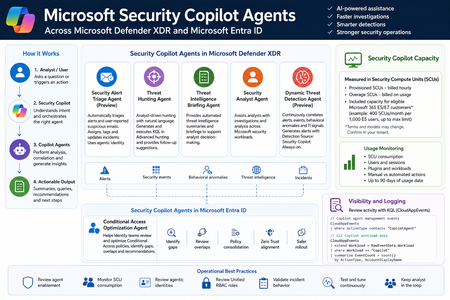
Microsoft Security Copilot is now becoming more visible inside day-to-day security operations, especially through embedded experiences and agent-based workflows across Microsoft Defender XDR, Microsoft Entra ID, Microsoft Intune, and Microsoft Purview. Instead of looking at Security Copilot only as a standalone prompt interface, SOC and identity teams should also understand how Security Copilot agents are deployed, how they consume Security Compute Units, how they appear in operational workflows, and where activity can be monitored. This post summarizes practical observations from a security operations perspective, with a focus on Microsoft Defender XDR, Microsoft Entra ID, usage monitoring, and KQL-based activity review. Licensing & Capacity Units Requirements Requires eligible Microsoft security licensing, typically: Microsoft 365 E5 Microsoft 365 E7 Security Compute Units (SCUs) Security Copilot capacity is measured using Security Compute Units (SCUs). SCUs are billed based on provisioned capacity. Indicative pricing: $4 per Provisionied SCU/hour $6 per Overage SCU/hour Billing is calculated hourly, based on the amount of SCUs provisioned. Included Capacity Organizations with: 1,000 Microsoft 365 E5 licenses Receive: 400 included SCUs Included SCUs are shared across the tenant within a common capacity pool. Scaling SCU capacity can be scaled dynamically based on operational requirements and workload demand. Data Retention Security Copilot session and interaction data without active SCU-backed retention is typically retained for: 90 days Security Copilot Agents - Microsoft Defender This section outlines the Microsoft Security Copilot agents currently available in the Microsoft Defender portal. NameKey characteristics Security Alert Triage Agent (Preview) Manual setup from Defender portal Automatically creates Unified RBAC custom role Runs automatically when a user reports a suspicious email or when a new supported alert is generated, supported alert sources: MDI, MDC, MDO If an alert tuning rule is enabled, it will be automatically disabled when the agent is deployed. Creates and connects with agentic user account: Phishing Triage Agent (Security Copilot) Automatic alert assignment to SecurityCopilotAgentUser-db16fec3-f1fb-4632-843e-46d07408c584@<tenant-domain>Alert was assigned to Phishing Triage Agent (Security Copilot). Adds Tag Agent to the created Incidents Threat Hunting Agent Manual setup from Defender portal Automatically creates Unified RBAC custom role This agent runs manually. There isn't an automatic trigger. Creates and connects with agentic user account: Threat Hunting Agent (Security Copilot) Analyst Questions in natural language Generates and executed KQL queries in Advanced hunting Provides charts, dynamic follow-up questions and remediation actions recommendations No activity is identified from agent's identity during agent execution Threat Intelligence Briefing Agent Manual setup from Defender portal Provides automated TI briefing summary Configured from https://security.microsoft.com/securitysettings/defender/agent_configuration-threatintelligencebriefingagent Security Analyst Agent Manual setup from Defender portal Dynamic Threat Detection Agent (Preview) Automatically enabled always-on, runs continuously in the background Correlates: Alerts, Security events, Behavioral anomalies, TI signals Generates Alerts with Detection Source: Security Copilot The Alerts can be correlated with existing Multi-Stage Incidents No agentic user account identity is used by this agent Available free of charge during public preview, will begin consuming Security Compute Units (SCUs) once generally available (GA) Incidents handled by Security Alert Triage Agent: Alerts created by Dynamic Threat Detection Agent: Execution of Threat Hunting Agent: View agents in use: https://security.microsoft.com/security-copilot/agents View Unified RBAC custom roles: https://security.microsoft.com/mtp_roles View Security Copilot user identities in Microsoft Entra ID: Notes: CloudAppEvents activity logs only from the following agents: Phishing Triage Agent Conditional Access Optimization Agent Security Copilot Agents - Microsoft Entra ID Conditional Access Optimization Agent Usage Monitoring Sign-in to Security Copilot portal using Global Admin account and navigate to the following location: https://securitycopilot.microsoft.com/usage-monitoring Reference: https://learn.microsoft.com/en-us/copilot/security/manage-usage Logging Activity Copilot Agents Management: CloudAppEvents | where ActionType contains "CopilotAgent" | extend AgentName = RawEventData.AgentName | extend Workload = RawEventData.Workload | extend ResultStatus = RawEventData.ResultStatus | project TimeGenerated, ActionType, ResultStatus, AgentName, Application, Workload All Copilot Workload data: CloudAppEvents | extend Workload = RawEventData.Workload | where Workload == "Copilot" | summarize EventCount = count() by ActionType, AccountDisplayName669Views3likes1CommentXdrLogRaider Defender XDR portal telemetry
A Microsoft Sentinel custom data connector that ingests Microsoft Defender XDR portal-only telemetry — configuration, compliance, drift, exposure, governance — that public Microsoft APIs (Graph Security, Microsoft 365 Defender, MDE) don't expose. https://github.com/akefallonitis/xdrlograider— Defender XDR portal telemetry Happy Hunting 🥳 🎉434Views0likes2Comments