ai
203 TopicsChoosing the Right Model in GitHub Copilot: A Practical Guide for Developers
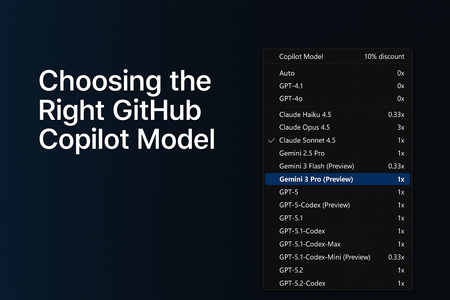
AI-assisted development has grown far beyond simple code suggestions. GitHub Copilot now supports multiple AI models, each optimized for different workflows, from quick edits to deep debugging to multi-step agentic tasks that generate or modify code across your entire repository. As developers, this flexibility is powerful… but only if we know how to choose the right model at the right time. In this guide, I’ll break down: Why model selection matters The four major categories of development tasks A simplified, developer-friendly model comparison table Enterprise considerations and practical tips This is written from the perspective of real-world customer conversations, GitHub Copilot demos, and enterprise adoption journeys Why Model Selection Matters GitHub Copilot isn’t tied to a single model. Instead, it offers a range of models, each with different strengths: Some are optimized for speed Others are optimized for reasoning depth Some are built for agentic workflows Choosing the right model can dramatically improve: The quality of the output The speed of your workflow The accuracy of Copilot’s reasoning The effectiveness of Agents and Plan Mode Your usage efficiency under enterprise quotas Model selection is now a core part of modern software development, just like choosing the right library, framework, or cloud service. The Four Task Categories (and which Model Fits) To simplify model selection, I group tasks into four categories. Each category aligns naturally with specific types of models. 1. Everyday Development Tasks Examples: Writing new functions Improving readability Generating tests Creating documentation Best fit: General-purpose coding models (e.g., GPT‑4.1, GPT‑5‑mini, Claude Sonnet) These models offer the best balance between speed and quality. 2. Fast, Lightweight Edits Examples: Quick explanations JSON/YAML transformations Small refactors Regex generation Short Q&A tasks Best fit: Lightweight models (e.g., Claude Haiku 4.5) These models give near-instant responses and keep you “in flow.” 3. Complex Debugging & Deep Reasoning Examples: Analyzing unfamiliar code Debugging tricky production issues Architecture decisions Multi-step reasoning Performance analysis Best fit: Deep reasoning models (e.g., GPT‑5, GPT‑5.1, GPT‑5.2, Claude Opus) These models handle large context, produce structured reasoning, and give the most reliable insights for complex engineering tasks. 4. Multi-step Agentic Development Examples: Repo-wide refactors Migrating a codebase Scaffolding entire features Implementing multi-file plans in Agent Mode Automated workflows (Plan → Execute → Modify) Best fit: Agent-capable models (e.g., GPT‑5.1‑Codex‑Max, GPT‑5.2‑Codex) These models are ideal when you need Copilot to execute multi-step tasks across your repository. GitHub Copilot Models - Developer Friendly Comparison The set of models you can choose from depends on your Copilot subscription, and the available options may evolve over time. Each model also has its own premium request multiplier, which reflects the compute resources it requires. If you're using a paid Copilot plan, the multiplier determines how many premium requests are deducted whenever that model is used. Model Category Example Models (Premium request Multiplier for paid plans) What they’re best at When to Use Them Fast Lightweight Models Claude Haiku 4.5, Gemini 3 Flash (0.33x) Grok Code Fast 1 (0.25x) Low latency, quick responses Small edits, Q&A, simple code tasks General-Purpose Coding Models GPT‑4.1, GPT‑5‑mini (0x) GPT-5-Codex, Claude Sonnet 4.5 (1x) Reliable day‑to‑day development Writing functions, small tests, documentation Deep Reasoning Models GPT-5.1 Codex Mini (0.33x) GPT‑5, GPT‑5.1, GPT-5.1 Codex, GPT‑5.2, Claude Sonnet 4.0, Gemini 2.5 Pro, Gemini 3 Pro (1x) Claude Opus 4.5 (3x) Complex reasoning and debugging Architecture work, deep bug diagnosis Agentic / Multi-step Models GPT‑5.1‑Codex‑Max, GPT‑5.2‑Codex (1x) Planning + execution workflows Repo-wide changes, feature scaffolding Enterprise Considerations For organizations using Copilot Enterprise or Business: Admins can control which models employees can use Model selection may be restricted due to security, regulation, or data governance You may see fewer available models depending on your organization’s Copilot policies Using "Auto" Model selection in GitHub Copilot GitHub Copilot’s Auto model selection automatically chooses the best available model for your prompts, reducing the mental load of picking a model and helping you avoid rate‑limiting. When enabled, Copilot prioritizes model availability and selects from a rotating set of eligible models such as GPT‑4.1, GPT‑5 mini, GPT‑5.2‑Codex, Claude Haiku 4.5, and Claude Sonnet 4.5 while respecting your subscription level and any administrator‑imposed restrictions. Auto also excludes models blocked by policies, models with premium multipliers greater than 1, and models unavailable in your plan. For paid plans, Auto provides an additional benefit: a 10% discount on premium request multipliers when used in Copilot Chat. Overall, Auto offers a balanced, optimized experience by dynamically selecting a performant and cost‑efficient model without requiring developers to switch models manually. Read more about the 'Auto' Model selection here - About Copilot auto model selection - GitHub Docs Final Thoughts GitHub Copilot is becoming a core part of the developer workflows. Choosing the right model can dramatically improve your productivity, the accuracy of Copilot’s responses, your experience with multi-step agentic tasks, your ability to navigate complex codebases Whether you’re building features, debugging complex issues, or orchestrating repo-wide changes, picking the right model helps you get the best out of GitHub Copilot. References and Further Reading To explore each model further, visit the GitHub Copilot model comparison documentation or try switching models in Copilot Chat to see how they impact your workflow. AI model comparison - GitHub Docs Requests in GitHub Copilot - GitHub Docs About Copilot auto model selection - GitHub DocsBuilding a Multi-Agent On-Call Copilot with Microsoft Agent Framework
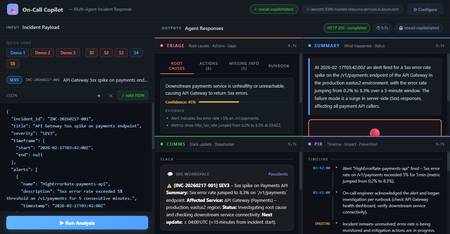
Four AI agents, one incident payload, structured triage in under 60 seconds powered by Microsoft Agent Framework and Foundry Hosted Agents. Multi-Agent Microsoft Agent Framework Foundry Hosted Agents Python SRE / Incident Response When an incident fires at 3 AM, every second the on-call engineer spends piecing together alerts, logs, and metrics is a second not spent fixing the problem. What if an AI system could ingest the raw incident signals and hand you a structured triage, a Slack update, a stakeholder brief, and a draft post-incident report, all in under 10 seconds? That’s exactly what On-Call Copilot does. In this post, we’ll walk through how we built it using the Microsoft Agent Framework, deployed it as a Foundry Hosted Agent, and discuss the key design decisions that make multi-agent orchestration practical for production workloads. The full source code is open-source on GitHub. You can deploy your own instance with a single azd up . Why Multi-Agent? The Problem with Single-Prompt Triage Early AI incident assistants used a single large prompt: “Here is the incident. Give me root causes, actions, a Slack message, and a post-incident report.” This approach has two fundamental problems: Context overload. A real incident may have 800 lines of logs, 10 alert lines, and dense metrics. Asking one model to process everything and produce four distinct output formats in a single turn pushes token limits and degrades quality. Conflicting concerns. Triage reasoning and communication drafting are cognitively different tasks. A model optimised for structured JSON analysis often produces stilted Slack messages—and vice versa. The fix is specialisation: decompose the task into focused agents, give each agent a narrow instruction set, and run them in parallel. This is the core pattern that the Microsoft Agent Framework makes easy. Architecture: Four Agents Running Concurrently On-Call Copilot is deployed as a Foundry Hosted Agent—a containerised Python service running on Microsoft Foundry’s managed infrastructure. The core orchestrator uses ConcurrentBuilder from the Microsoft Agent Framework SDK to run four specialist agents in parallel via asyncio.gather() . All four panels populated simultaneously: Triage (red), Summary (blue), Comms (green), PIR (purple). Architecture: The orchestrator runs four specialist agents concurrently via asyncio.gather(), then merges their JSON fragments into a single response. All four agents The solution share a single Azure OpenAI Model Router deployment. Rather than hardcoding gpt-4o or gpt-4o-mini , Model Router analyses request complexity and routes automatically. A simple triage prompt costs less; a long post-incident synthesis uses a more capable model. One deployment name, zero model-selection code. Meet the Four Agents 🔍 Triage Agent Root cause analysis, immediate actions, missing data identification, and runbook alignment. suspected_root_causes · immediate_actions · missing_information · runbook_alignment 📋 Summary Agent Concise incident narrative: what happened and current status (ONGOING / MITIGATED / RESOLVED). summary.what_happened · summary.current_status 📢 Comms Agent Audience-appropriate communications: Slack channel update with emoji conventions, plus a non-technical stakeholder brief. comms.slack_update · comms.stakeholder_update 📝 PIR Agent Post-incident report: chronological timeline, quantified customer impact, and specific prevention actions. post_incident_report.timeline · .customer_impact · .prevention_actions The Code: Building the Orchestrator The entry point is remarkably concise. ConcurrentBuilder handles all the async wiring—you just declare the agents and let the framework handle parallelism, error propagation, and response merging. main.py — Orchestrator from agent_framework import ConcurrentBuilder from agent_framework.azure import AzureOpenAIChatClient from azure.ai.agentserver.agentframework import from_agent_framework from azure.identity import DefaultAzureCredential, get_bearer_token_provider from app.agents.triage import TRIAGE_INSTRUCTIONS from app.agents.comms import COMMS_INSTRUCTIONS from app.agents.pir import PIR_INSTRUCTIONS from app.agents.summary import SUMMARY_INSTRUCTIONS _credential = DefaultAzureCredential() _token_provider = get_bearer_token_provider( _credential, "https://cognitiveservices.azure.com/.default" ) def create_workflow_builder(): """Create 4 specialist agents and wire them into a ConcurrentBuilder.""" triage = AzureOpenAIChatClient(ad_token_provider=_token_provider).create_agent( instructions=TRIAGE_INSTRUCTIONS, name="triage-agent", ) summary = AzureOpenAIChatClient(ad_token_provider=_token_provider).create_agent( instructions=SUMMARY_INSTRUCTIONS, name="summary-agent", ) comms = AzureOpenAIChatClient(ad_token_provider=_token_provider).create_agent( instructions=COMMS_INSTRUCTIONS, name="comms-agent", ) pir = AzureOpenAIChatClient(ad_token_provider=_token_provider).create_agent( instructions=PIR_INSTRUCTIONS, name="pir-agent", ) return ConcurrentBuilder().participants([triage, summary, comms, pir]) def main(): builder = create_workflow_builder() from_agent_framework(builder.build).run() # starts on port 8088 if __name__ == "__main__": main() Key insight: DefaultAzureCredential means there are no API keys anywhere in the codebase. The container uses managed identity in production; local development uses your az login session. The same code runs in both environments without modification. Agent Instructions: Prompts as Configuration Each agent receives a tightly scoped system prompt that defines its output schema and guardrails. Here’s the Triage Agent—the most complex of the four: app/agents/triage.py TRIAGE_INSTRUCTIONS = """\ You are the **Triage Agent**, an expert Site Reliability Engineer specialising in root cause analysis and incident response. ## Task Analyse the incident data and return a single JSON object with ONLY these keys: { "suspected_root_causes": [ { "hypothesis": "string – concise root cause hypothesis", "evidence": ["string – supporting evidence from the input"], "confidence": 0.0 // 0-1, how confident you are } ], "immediate_actions": [ { "step": "string – concrete action with runnable command if applicable", "owner_role": "oncall-eng | dba | infra-eng | platform-eng", "priority": "P0 | P1 | P2 | P3" } ], "missing_information": [ { "question": "string – what data is missing", "why_it_matters": "string – why this data would help" } ], "runbook_alignment": { "matched_steps": ["string – runbook steps that match the situation"], "gaps": ["string – gaps or missing runbook coverage"] } } ## Guardrails 1. **No secrets** – redact any credential-like material as [REDACTED]. 2. **No hallucination** – if data is insufficient, set confidence to 0 and add entries to missing_information. 3. **Diagnostic suggestions** – when data is sparse, include diagnostic steps in immediate_actions. 4. **Structured output only** – return ONLY valid JSON, no prose. """ The Comms Agent follows the same pattern but targets a different audience: app/agents/comms.py COMMS_INSTRUCTIONS = """\ You are the **Comms Agent**, an expert incident communications writer. ## Task Return a single JSON object with ONLY this key: { "comms": { "slack_update": "Slack-formatted message with emoji, severity, status, impact, next steps, and ETA", "stakeholder_update": "Non-technical summary for executives. Focus on business impact and resolution." } } ## Guidelines - Slack: Use :rotating_light: for active SEV1/2, :warning: for degraded, :white_check_mark: for resolved. - Stakeholder: No jargon. Translate to business impact. - Tone: Calm, factual, action-oriented. Never blame individuals. - Structured output only – return ONLY valid JSON, no prose. """ Instructions as config, not code. Agent behaviour is defined entirely by instruction text strings. A non-developer can refine agent behaviour by editing the prompt and redeploying no Python changes needed. The Incident Envelope: What Goes In The agent accepts a single JSON envelope. It can come from a monitoring alert webhook, a PagerDuty payload, or a manual CLI invocation: Incident Input (JSON) { "incident_id": "INC-20260217-002", "title": "DB connection pool exhausted — checkout-api degraded", "severity": "SEV1", "timeframe": { "start": "2026-02-17T14:02:00Z", "end": null }, "alerts": [ { "name": "DatabaseConnectionPoolNearLimit", "description": "Connection pool at 99.7% on orders-db-primary", "timestamp": "2026-02-17T14:03:00Z" } ], "logs": [ { "source": "order-worker", "lines": [ "ERROR: connection timeout after 30s (attempt 3/3)", "WARN: pool exhausted, queueing request (queue_depth=847)" ] } ], "metrics": [ { "name": "db_connection_pool_utilization_pct", "window": "5m", "values_summary": "Jumped from 22% to 99.7% at 14:03Z" } ], "runbook_excerpt": "Step 1: Check DB connection dashboard...", "constraints": { "max_time_minutes": 15, "environment": "production", "region": "swedencentral" } } Declaring the Hosted Agent The agent is registered with Microsoft Foundry via a declarative agent.yaml file. This tells Foundry how to discover and route requests to the container: agent.yaml kind: hosted name: oncall-copilot description: | Multi-agent hosted agent that ingests incident signals and runs 4 specialist agents concurrently via Microsoft Agent Framework ConcurrentBuilder. metadata: tags: - Azure AI AgentServer - Microsoft Agent Framework - Multi-Agent - Model Router protocols: - protocol: responses environment_variables: - name: AZURE_OPENAI_ENDPOINT value: ${AZURE_OPENAI_ENDPOINT} - name: AZURE_OPENAI_CHAT_DEPLOYMENT_NAME value: model-router The protocols: [responses] declaration exposes the agent via the Foundry Responses API on port 8088. Clients can invoke it with a standard HTTP POST no custom API needed. Invoking the Agent Once deployed, you can invoke the agent with the project’s built-in scripts or directly via curl : CLI / curl # Using the included invoke script python scripts/invoke.py --demo 2 # multi-signal SEV1 demo python scripts/invoke.py --scenario 1 # Redis cluster outage # Or with curl directly TOKEN=$(az account get-access-token \ --resource https://ai.azure.com --query accessToken -o tsv) curl -X POST \ "$AZURE_AI_PROJECT_ENDPOINT/openai/responses?api-version=2025-05-15-preview" \ -H "Authorization: Bearer $TOKEN" \ -H "Content-Type: application/json" \ -d '{ "input": [ {"role": "user", "content": "<incident JSON here>"} ], "agent": { "type": "agent_reference", "name": "oncall-copilot" } }' The Browser UI The project includes a zero-dependency browser UI built with plain HTML, CSS, and vanilla JavaScript—no React, no bundler. A Python http.server backend proxies requests to the Foundry endpoint. The empty state. Quick-load buttons pre-populate the JSON editor with demo incidents or scenario files. Demo 1 loaded: API Gateway 5xx spike, SEV3. The JSON is fully editable before submitting. Agent Output Panels Triage: Root causes ranked by confidence. Evidence is collapsed under each hypothesis. Triage: Immediate actions with P0/P1/P2 priority badges and owner roles. Comms: Slack card with emoji substitution and a stakeholder executive summary. PIR: Chronological timeline with an ONGOING marker, customer impact in a red-bordered box. Performance: Parallel Execution Matters Incident Type Complexity Parallel Latency Sequential (est.) Single alert, minimal context (SEV4) Low 4–6 s ~16 s Multi-signal, logs + metrics (SEV2) Medium 7–10 s ~28 s Full SEV1 with long log lines High 10–15 s ~40 s Post-incident synthesis (resolved) High 10–14 s ~38 s asyncio.gather() running four independent agents cuts total latency by 3–4× compared to sequential execution. For a SEV1 at 3 AM, that’s the difference between a 10-second AI-powered head start and a 40-second wait. Five Key Design Decisions Parallel over sequential Each agent is independent and processes the full incident payload in isolation. ConcurrentBuilder with asyncio.gather() is the right primitive—no inter-agent dependencies, no shared state. JSON-only agent instructions Every agent returns only valid JSON with a defined schema. The orchestrator merges fragments with merged.update(agent_output) . No parsing, no extraction, no post-processing. No hardcoded model names AZURE_OPENAI_CHAT_DEPLOYMENT_NAME=model-router is the only model reference. Model Router selects the best model at runtime based on prompt complexity. When new models ship, the agent gets better for free. DefaultAzureCredential everywhere No API keys. No token management code. Managed identity in production, az login in development. Same code, both environments. Instructions as configuration Each agent’s system prompt is a plain Python string. Behaviour changes are text edits, not code logic. A non-developer can refine prompts and redeploy. Guardrails: Built into the Prompts The agent instructions include explicit guardrails that don’t require external filtering: No hallucination: When data is insufficient, the agent sets confidence: 0 and populates missing_information rather than inventing facts. Secret redaction: Each agent is instructed to redact credential-like patterns as [REDACTED] in its output. Mark unknowns: Undeterminable fields use the literal string "UNKNOWN" rather than plausible-sounding guesses. Diagnostic suggestions: When signal is sparse, immediate_actions includes diagnostic steps that gather missing information before prescribing a fix. Model Router: Automatic Model Selection One of the most powerful aspects of this architecture is Model Router. Instead of choosing between gpt-4o , gpt-4o-mini , or o3-mini per agent, you deploy a single model-router endpoint. Model Router analyses each request’s complexity and routes it to the most cost-effective model that can handle it. Model Router insights: models selected per request with associated costs. Model Router telemetry from Microsoft Foundry: request distribution and cost analysis. This means you get optimal cost-performance without writing any model-selection logic. A simple Summary Agent prompt may route to gpt-4o-mini , while a complex Triage Agent prompt with 800 lines of logs routes to gpt-4o all automatically. Deployment: One Command The repo includes both azure.yaml and agent.yaml , so deployment is a single command: Deploy to Foundry # Deploy everything: infra + container + Model Router + Hosted Agent azd up This provisions the Foundry project resources, builds the Docker image, pushes to Azure Container Registry, deploys a Model Router instance, and creates the Hosted Agent. For more control, you can use the SDK deploy script: Manual Docker + SDK deploy # Build and push (must be linux/amd64) docker build --platform linux/amd64 -t oncall-copilot:v1 . docker tag oncall-copilot:v1 $ACR_IMAGE docker push $ACR_IMAGE # Create the hosted agent python scripts/deploy_sdk.py Getting Started Quickstart # Clone git clone https://github.com/microsoft-foundry/oncall-copilot cd oncall-copilot # Install python -m venv .venv source .venv/bin/activate # .venv\Scripts\activate on Windows pip install -r requirements.txt # Set environment variables export AZURE_OPENAI_ENDPOINT="https://<account>.openai.azure.com/" export AZURE_OPENAI_CHAT_DEPLOYMENT_NAME="model-router" export AZURE_AI_PROJECT_ENDPOINT="https://<account>.services.ai.azure.com/api/projects/<project>" # Validate schemas locally (no Azure needed) MOCK_MODE=true python scripts/validate.py # Deploy to Foundry azd up # Invoke the deployed agent python scripts/invoke.py --demo 1 # Start the browser UI python ui/server.py # → http://localhost:7860 Extending: Add Your Own Agent Adding a fifth agent is straightforward. Follow this pattern: Create app/agents/<name>.py with a *_INSTRUCTIONS constant following the existing pattern. Add the agent’s output keys to app/schemas.py . Register it in main.py : main.py — Adding a 5th agent from app.agents.my_new_agent import NEW_INSTRUCTIONS new_agent = AzureOpenAIChatClient( ad_token_provider=_token_provider ).create_agent( instructions=NEW_INSTRUCTIONS, name="new-agent", ) workflow = ConcurrentBuilder().participants( [triage, summary, comms, pir, new_agent] ) Ideas for extensions: a ticket auto-creation agent that creates Jira or Azure DevOps items from the PIR output, a webhook adapter agent that normalises PagerDuty or Datadog payloads, or a human-in-the-loop agent that surfaces missing_information as an interactive form. Key Takeaways for AI Engineers The multi-agent pattern isn’t just for chatbots. Any task that can be decomposed into independent subtasks with distinct output schemas is a candidate. Incident response, document processing, code review, data pipeline validation—the pattern transfers. Microsoft Agent Framework gives you ConcurrentBuilder for parallel execution and AzureOpenAIChatClient for Azure-native auth—you write the prompts, the framework handles the plumbing. Foundry Hosted Agents let you deploy containerised agents with managed infrastructure, automatic scaling, and built-in telemetry. No Kubernetes, no custom API gateway. Model Router eliminates the model selection problem. One deployment name handles all scenarios with optimal cost-performance tradeoffs. Prompt-as-config means your agents are iterable by anyone who can edit text. The feedback loop from “this output could be better” to “deployed improvement” is minutes, not sprints. Resources Microsoft Agent Framework SDK powering the multi-agent orchestration Model Router Automatic model selection based on prompt complexity Foundry Hosted Agents Deploy containerised agents on managed infrastructure ConcurrentBuilder Samples Official agents-in-workflow sample this project follows DefaultAzureCredential Zero-config auth chain used throughout Hosted Agents Concepts Architecture overview of Foundry Hosted Agents The On-Call Copilot sample is open source under the MIT licence. Contributions, scenario files, and agent instruction improvements are welcome via pull request.Complete Guide to Deploying OpenClaw on Azure Windows 11 Virtual Machine
1. Introduction to OpenClaw OpenClaw is an open-source AI personal assistant platform that runs on your own devices and executes real-world tasks. Unlike traditional cloud-based AI assistants, OpenClaw emphasizes local deployment and privacy protection, giving you complete control over your data. Key Features of OpenClaw Cross-Platform Support: Runs on Windows, macOS, Linux, and other operating systems Multi-Channel Integration: Interact with AI through messaging platforms like WhatsApp, Telegram, and Discord Task Automation: Execute file operations, browser control, system commands, and more Persistent Memory: AI remembers your preferences and contextual information Flexible AI Backends: Supports multiple large language models including Anthropic Claude and OpenAI GPT OpenClaw is built on Node.js and can be quickly installed and deployed via npm. 2. Security Advantages of Running OpenClaw on Azure VM Deploying OpenClaw on an Azure virtual machine instead of your personal computer offers significant security benefits: 1. Environment Isolation Azure VMs provide a completely isolated runtime environment. Even if the AI agent exhibits abnormal behavior or is maliciously exploited, it won't affect your personal computer or local data. This isolation mechanism forms the foundation of a zero-trust security architecture. 2. Network Security Controls Through Azure Network Security Groups (NSGs), you can precisely control which IP addresses can access your virtual machine. The RDP rules configured in the deployment script allow you to securely connect to your Windows 11 VM via Remote Desktop while enabling further restrictions on access sources. 3. Data Persistence and Backup Azure VM managed disks support automatic snapshots and backups. Even if the virtual machine encounters issues, your OpenClaw configuration and data remain safe. 4. Elastic Resource Management You can adjust VM specifications (memory, CPU) at any time based on actual needs, or stop the VM when not in use to save costs, maintaining maximum flexibility. 5. Enterprise-Grade Authentication Azure supports integration with Azure Active Directory (Entra ID) for identity verification, allowing you to assign different access permissions to team members for granular access control. 6. Audit and Compliance Azure provides detailed activity logs and audit trails, making it easy to trace any suspicious activity and meet enterprise compliance requirements. 3. Deployment Steps Explained This deployment script uses Azure CLI to automate the installation of OpenClaw and its dependencies on a Windows 11 virtual machine. Here are the detailed execution steps: Prerequisites Before running the script, ensure you have: Install Azure CLI # Windows users can download the MSI installer https://aka.ms/installazurecliwindows # macOS users brew install azure-cli # Linux users curl -sL https://aka.ms/InstallAzureCLIDeb | sudo bash 2. Log in to Azure Account az login 3. Prepare Deployment Script Save the provided deploy-windows11-vm.sh script locally and grant execute permissions: chmod +x deploy-windows11-vm.sh Step 1: Configure Deployment Parameters The script begins by defining key configuration variables that you can modify as needed: RESOURCE_GROUP="Your Azure Resource Group Name" # Resource group name VM_NAME="win11-openclaw-vm" # Virtual machine name LOCATION="Your Azure Regison Name" # Azure region ADMIN_USERNAME="Your Azure VM Administrator Name" # Administrator username ADMIN_PASSWORD="our Azure VM Administrator Password" # Administrator password (change to a strong password) VM_SIZE="Your Azure VM Size" # VM size (4GB memory) Security Recommendations: Always change ADMIN_PASSWORD to your own strong password Passwords should contain uppercase and lowercase letters, numbers, and special characters Never commit scripts containing real passwords to code repositories Step 2: Check and Create Resource Group The script first checks if the specified resource group exists, and creates it automatically if it doesn't: echo "Checking resource group $RESOURCE_GROUP..." az group show --name $RESOURCE_GROUP &> /dev/null if [ $? -ne 0 ]; then echo "Creating resource group $RESOURCE_GROUP..." az group create --name $RESOURCE_GROUP --location $LOCATION fi A resource group is a logical container in Azure used to organize and manage related resources. All associated resources (VMs, networks, storage, etc.) will be created within this resource group. Step 3: Create Windows 11 Virtual Machine This is the core step, using the az vm create command to create a Windows 11 Pro virtual machine: az vm create \ --resource-group $RESOURCE_GROUP \ --name $VM_NAME \ --image MicrosoftWindowsDesktop:windows-11:win11-24h2-pro:latest \ --size $VM_SIZE \ --admin-username $ADMIN_USERNAME \ --admin-password $ADMIN_PASSWORD \ --public-ip-sku Standard \ --nsg-rule RDP Parameter Explanations: --image: Uses the latest Windows 11 24H2 Professional edition image --size: Standard_B2s provides 2 vCPUs and 4GB memory, suitable for running OpenClaw --public-ip-sku Standard: Assigns a standard public IP --nsg-rule RDP: Automatically creates network security group rules allowing RDP (port 3389) inbound traffic Step 4: Retrieve Virtual Machine Public IP After VM creation completes, the script retrieves its public IP address: PUBLIC_IP=$(az vm show -d -g $RESOURCE_GROUP -n $VM_NAME --query publicIps -o tsv) echo "VM Public IP: $PUBLIC_IP" This IP address will be used for subsequent RDP remote connections. Step 5: Install Chocolatey Package Manager Using az vm run-command to execute PowerShell scripts inside the VM, first installing Chocolatey: az vm run-command invoke -g $RESOURCE_GROUP -n $VM_NAME --command-id RunPowerShellScript \ --scripts "Set-ExecutionPolicy Bypass -Scope Process -Force; [System.Net.ServicePointManager]::SecurityProtocol = [System.Net.ServicePointManager]::SecurityProtocol -bor 3072; iex ((New-Object System.Net.WebClient).DownloadString( 'https://community.chocolatey.org/install.ps1'))" Chocolatey is a package manager for Windows, similar to apt or yum on Linux, simplifying subsequent software installations. Step 6: Install Git Git is a dependency for many npm packages, especially those that need to download source code from GitHub for compilation: az vm run-command invoke -g $RESOURCE_GROUP -n $VM_NAME --command-id RunPowerShellScript \ --scripts "C:\ProgramData\chocolatey\bin\choco.exe install git -y" Step 7: Install CMake and Visual Studio Build Tools Some of OpenClaw's native modules require compilation, necessitating the installation of C++ build toolchain: az vm run-command invoke -g $RESOURCE_GROUP -n $VM_NAME --command-id RunPowerShellScript \ --scripts "C:\ProgramData\chocolatey\bin\choco.exe install cmake visualstudio2022buildtools visualstudio2022-workload-vctools -y" Component Descriptions: cmake: Cross-platform build system visualstudio2022buildtools: VS 2022 Build Tools visualstudio2022-workload-vctools: C++ development toolchain Step 8: Install Node.js LTS Install the Node.js Long Term Support version, which is the core runtime environment for OpenClaw: az vm run-command invoke -g $RESOURCE_GROUP -n $VM_NAME --command-id RunPowerShellScript \ --scripts "$env:Path = [System.Environment]::GetEnvironmentVariable('Path','Machine') + ';' + [System.Environment]::GetEnvironmentVariable('Path','User'); C:\ProgramData\chocolatey\bin\choco.exe install nodejs-lts -y" The script refreshes environment variables first to ensure Chocolatey is in the PATH, then installs Node.js LTS. Step 9: Globally Install OpenClaw Use npm to globally install OpenClaw: az vm run-command invoke -g $RESOURCE_GROUP -n $VM_NAME --command-id RunPowerShellScript \ --scripts "$env:Path = [System.Environment]::GetEnvironmentVariable('Path','Machine') + ';' + [System.Environment]::GetEnvironmentVariable('Path','User'); npm install -g openclaw" Global installation makes the openclaw command available from anywhere in the system. Step 10: Configure Environment Variables Add Node.js and npm global paths to the system PATH environment variable: az vm run-command invoke -g $RESOURCE_GROUP -n $VM_NAME --command-id RunPowerShellScript \ --scripts " $npmGlobalPath = 'C:\Program Files\nodejs'; $npmUserPath = [System.Environment]::GetFolderPath('ApplicationData') + '\npm'; $currentPath = [System.Environment]::GetEnvironmentVariable('Path', 'Machine'); if ($currentPath -notlike \"*$npmGlobalPath*\") { $newPath = $currentPath + ';' + $npmGlobalPath; [System.Environment]::SetEnvironmentVariable('Path', $newPath, 'Machine'); Write-Host 'Added Node.js path to system PATH'; } if ($currentPath -notlike \"*$npmUserPath*\") { $newPath = [System.Environment]::GetEnvironmentVariable('Path', 'Machine') + ';' + $npmUserPath; [System.Environment]::SetEnvironmentVariable('Path', $newPath, 'Machine'); Write-Host 'Added npm global path to system PATH'; } Write-Host 'Environment variables updated successfully!'; " This ensures that node, npm, and openclaw commands can be used directly even in new terminal sessions. Step 11: Verify Installation The script finally verifies that all software is correctly installed: az vm run-command invoke -g $RESOURCE_GROUP -n $VM_NAME --command-id RunPowerShellScript \ --scripts "$env:Path = [System.Environment]::GetEnvironmentVariable('Path','Machine') + ';' + [System.Environment]::GetEnvironmentVariable('Path','User'); Write-Host 'Node.js version:'; node --version; Write-Host 'npm version:'; npm --version; Write-Host 'openclaw:'; npm list -g openclaw" Successful output should look similar to: Node.js version: v20.x.x npm version: 10.x.x openclaw: openclaw@x.x.x Step 12: Connect to Virtual Machine After deployment completes, the script outputs connection information: ============================================ Deployment completed! ============================================ Resource Group: Your Azure Resource Group Name VM Name: win11-openclaw-vm Public IP: xx.xx.xx.xx Admin Username: Your Administrator UserName VM Size: Your VM Size Connect via RDP: mstsc /v:xx.xx.xx.xx ============================================ Connection Methods: Windows Users: Press Win + R to open Run dialog Enter mstsc /v:public_ip and press Enter Log in using the username and password set in the script macOS Users: Download "Windows App" from the App Store Add PC connection with the public IP Log in using the username and password set in the script Linux Users: # Use Remmina or xfreerdp xfreerdp /u:username /v:public_ip Step 13: Initialize OpenClaw After connecting to the VM, run the following in PowerShell or Command Prompt # Initialize OpenClaw openclaw onboard # Configure AI model API key # Edit configuration file: C:\Users\username\.openclaw\openclaw.json notepad $env:USERPROFILE\.openclaw\openclaw.json Add your AI API key in the configuration file: { "agents": { "defaults": { "model": "Your Model Name", "apiKey": "your-api-key-here" } } } Step 14: Start OpenClaw # Start Gateway service openclaw gateway # In another terminal, connect messaging channels (e.g., WhatsApp) openclaw channels login Follow the prompts to scan the QR code and connect OpenClaw to your messaging app. 4. Summary Through this guide, we've successfully implemented the complete process of automatically deploying OpenClaw on an Azure Windows 11 virtual machine. The entire deployment process is highly automated, completing everything from VM creation to installing all dependencies and OpenClaw itself through a single script. Key Takeaways Automation Benefits: Using az vm run-command allows executing configuration scripts immediately after VM creation without manual RDP login Dependency Management: Chocolatey simplifies the Windows package installation workflow Environment Isolation: Running AI agents on cloud VMs protects local computers and data Scalability: Scripted deployment facilitates replication and team collaboration, easily deploying multiple instances Cost Optimization Tips Standard_B2s VMs cost approximately $0.05/hour (~$37/month) on pay-as-you-go pricing When not in use, stop the VM to only pay for storage costs Consider Azure Reserved Instances to save up to 72% Security Hardening Recommendations Change Default Port: Modify RDP port from 3389 to a custom port Enable JIT Access: Use Azure Security Center's just-in-time access feature Configure Firewall Rules: Only allow specific IP addresses to access Regular System Updates: Enable automatic Windows Updates Use Azure Key Vault: Store API keys in Key Vault instead of configuration files 5. Additional Resources Official Documentation OpenClaw Website: https://openclaw.ai OpenClaw GitHub: https://github.com/openclaw/openclaw OpenClaw Documentation: https://docs.openclaw.ai Azure CLI Documentation: https://docs.microsoft.com/cli/azure/ Azure Resources Azure VM Pricing Calculator: https://azure.microsoft.com/pricing/calculator/ Azure Free Account: https://azure.microsoft.com/free/ (new users receive $200 credit) Azure Security Center: https://azure.microsoft.com/services/security-center/ Azure Key Vault: https://azure.microsoft.com/services/key-vault/17KViews4likes4CommentsDemystifying GitHub Copilot Security Controls: easing concerns for organizational adoption
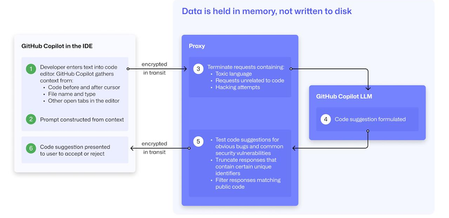
At a recent developer conference, I delivered a session on Legacy Code Rescue using GitHub Copilot App Modernization. Throughout the day, conversations with developers revealed a clear divide: some have fully embraced Agentic AI in their daily coding, while others remain cautious. Often, this hesitation isn't due to reluctance but stems from organizational concerns around security and regulatory compliance. Having witnessed similar patterns during past technology shifts, I understand how these barriers can slow adoption. In this blog, I'll demystify the most common security concerns about GitHub Copilot and explain how its built-in features address them, empowering organizations to confidently modernize their development workflows. GitHub Copilot Model Training A common question I received at the conference was whether GitHub uses your code as training data for GitHub Copilot. I always direct customers to the GitHub Copilot Trust Center for clarity, but the answer is straightforward: “No. GitHub uses neither Copilot Business nor Enterprise data to train the GitHub model.” Notice this restriction also applies to third-party models as well (e.g. Anthropic, Google). GitHub Copilot Intellectual Property indemnification policy A frequent concern I hear is, since GitHub Copilot’s underlying models are trained on sources that include public code, it might simply “copy and paste” code from those sources. Let’s clarify how this actually works: Does GitHub Copilot “copy/paste”? “The AI models that create Copilot’s suggestions may be trained on public code, but do not contain any code. When they generate a suggestion, they are not “copying and pasting” from any codebase.” To provide an additional layer of protection, GitHub Copilot includes a “duplicate detection filter”. This feature helps prevent suggestions that closely match public code from being surfaced. (Note: This duplicate detection currently does not apply to the Copilot coding agent.) More importantly, customers are protected by an Intellectual Property indemnification policy. This means that if you receive an unmodified suggestion from GitHub Copilot and face a copyright claim as a result, Microsoft will defend you in court. GitHub Copilot Data Retention Another frequent question I hear concerns GitHub Copilot’s data retention policies. For organizations on GitHub Copilot Business and Enterprise plans, retention practices depend on how and where the service is accessed from: Access through IDE for Chat and Code Completions: Prompts and Suggestions: Not retained. User Engagement Data: Kept for two years. Feedback Data: Stored for as long as needed for its intended purpose. Other GitHub Copilot access and use: Prompts and Suggestions: Retained for 28 days. User Engagement Data: Kept for two years. Feedback Data: Stored for as long as needed for its intended purpose. For Copilot Coding Agent, session logs are retained for the life of the account in order to provide the service. Excluding content from GitHub Copilot To prevent GitHub Copilot from indexing sensitive files, you can configure content exclusions at the repository or organization level. In VS Code, use the .copilotignore file to exclude files client-side. Note that files listed in .gitignore are not indexed by default but may still be referenced if open or explicitly referenced (unless they’re excluded through .copilotignore or content exclusions). The life cycle of a GitHub Copilot code suggestion Here are the key protections at each stage of the life cycle of a GitHub Copilot code suggestion: In the IDE: Content exclusions prevent files, folders, or patterns from being included. GitHub proxy (pre-model safety): Prompts go through a GitHub proxy hosted in Microsoft Azure for pre-inference checks: screening for toxic or inappropriate language, relevance, and hacking attempts/jailbreak-style prompts before reaching the model. Model response: With the public code filter enabled, some suggestions are suppressed. The vulnerability protection feature blocks insecure coding patterns like hardcoded credentials or SQL injections in real time. Disable access to GitHub Copilot Free Due to the varying policies associated with GitHub Copilot Free, it is crucial for organizations to ensure it is disabled both in the IDE and on GitHub.com. Since not all IDEs currently offer a built-in option to disable Copilot Free, the most reliable method to prevent both accidental and intentional access is to implement firewall rule changes, as outlined in the official documentation. Agent Mode Allow List Accidental file system deletion by Agentic AI assistants can happen. With GitHub Copilot agent mode, the "Terminal auto approve” setting in VS Code can be used to prevent this. This setting can be managed centrally using a VS Code policy. MCP registry Organizations often want to restrict access to allow only trusted MCP servers. GitHub now offers an MCP registry feature for this purpose. This feature isn’t available in all IDEs and clients yet, but it's being developed. Compliance Certifications The GitHub Copilot Trust Center page lists GitHub Copilot's broad compliance credentials, surpassing many competitors in financial, security, privacy, cloud, and industry coverage. SOC 1 Type 2: Assurance over internal controls for financial reporting. SOC 2 Type 2: In-depth report covering Security, Availability, Processing Integrity, Confidentiality, and Privacy over time. SOC 3: General-use version of SOC 2 with broad executive-level assurance. ISO/IEC 27001:2013: Certification for a formal Information Security Management System (ISMS), based on risk management controls. CSA STAR Level 2: Includes a third-party attestation combining ISO 27001 or SOC 2 with additional cloud control matrix (CCM) requirements. TISAX: Trusted Information Security Assessment Exchange, covering automotive-sector security standards. In summary, while the adoption of AI tools like GitHub Copilot in software development can raise important questions around security, privacy, and compliance, it’s clear that existing safeguards in place help address these concerns. By understanding the safeguards, configurable controls, and robust compliance certifications offered, organizations and developers alike can feel more confident in embracing GitHub Copilot to accelerate innovation while maintaining trust and peace of mind.
The Future of Agentic AI: Inside Microsoft Agent Framework 1.0
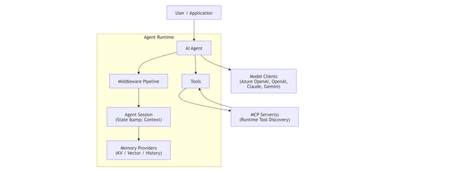
Agentic AI is rapidly moving beyond demos and chatbots toward long‑running, autonomous systems that reason, call tools, collaborate with other agents, and operate reliably in production. On April 3, 2026, Microsoft marked a major milestone with the General Availability (GA) release of Microsoft Agent Framework 1.0, a production‑ready, open‑source framework for building agents and multi‑agent workflows in.NET and Python. [techcommun...rosoft.com] In this post, we’ll deep‑dive into: What Microsoft Agent Framework actually is Its core architecture and design principles What’s new in version 1.0 How it differs from other agent frameworks When and how to use it—with real code examples What Is Microsoft Agent Framework? According to the official announcement, Microsoft Agent Framework is an open‑source SDK and runtime for building AI agents and multi‑agent workflows with strong enterprise foundations. Agent Framework provides two primary capability categories: 1. Agents Agents are long‑lived runtime components that: Use LLMs to interpret inputs Call tools and MCP servers Maintain session state Generate responses They are not just prompt wrappers, but stateful execution units. 2. Workflows Workflows are graph‑based orchestration engines that: Connect agents and functions Enforce execution order Support checkpointing and human‑in‑the‑loop scenarios This leads to a clean separation of responsibilities: Concern Handled By Reasoning & interpretation Agent Execution policy & control flow Workflow This separation is a foundational design decision. High‑Level Architecture From the official overview, Agent Framework is composed of several core building blocks: Model clients (chat completions & responses) Agent sessions (state & conversation management) Context providers (memory and retrieval) Middleware pipeline (interception, filtering, telemetry) MCP clients (tool discovery and invocation) Workflow engine (graph‑based orchestration) Conceptual Flow 🌟 What’s New in Version 1.0 Version 1.0 marks the transition from "Release Candidate" to "General Availability" (GA). Production-Ready Stability: Unlike the earlier experimental packages, 1.0 offers stable APIs, versioned releases, and a commitment to long-term support (LTS). A2A Protocol (Agent-to-Agent): A new structured messaging protocol that allows agents to communicate across different runtimes. For example, an agent built in Python can seamlessly coordinate with an agent running in a .NET environment. MCP (Model Context Protocol) Support: Full integration with the Model Context Protocol, enabling agents to dynamically discover and invoke external tools and data sources without manual integration code. Multi-Agent Orchestration Patterns: Stable implementations of complex patterns, including: Sequential: Linear handoffs between specialized agents. Group Chat: Collaborative reasoning where agents discuss and solve problems. Magentic-One: A sophisticated pattern for task-oriented reasoning and planning. Middleware Pipeline: The new middleware architecture lets you inject logic into the agent's execution loop without modifying the core prompts. This is essential for Responsible AI (RAI), allowing you to add content safety filters, logging, and compliance checks globally. DevUI Debugger: A browser-based local debugger that provides a real-time visual representation of agent message flows, tool calls, and state changes. Code Examples Creating a Simple Agent (C#) From Microsoft Learn : using Azure.AI.Projects; using Azure.Identity; using Microsoft.Agents.AI; AIAgent agent = new AIProjectClient( new Uri("https://your-foundry-service.services.ai.azure.com/api/projects/your-project"), new AzureCliCredential()) .AsAIAgent( model: "gpt-5.4-mini", instructions: "You are a friendly assistant. Keep your answers brief."); Console.WriteLine(await agent.RunAsync("What is the largest city in France?")); This shows: Provider‑agnostic model access Session‑aware agent execution Minimal setup for production agents Creating a Simple Agent (Python) from agent_framework.foundry import FoundryChatClient from azure.identity import AzureCliCredential client = FoundryChatClient( project_endpoint="https://your-foundry-service.services.ai.azure.com/api/projects/your-project", model="gpt-5.4-mini", credential=AzureCliCredential(), ) agent = client.as_agent( name="HelloAgent", instructions="You are a friendly assistant. Keep your answers brief.", ) result = await agent.run("What is the largest city in France?") print(result) The same agent abstraction applies across languages. When to Use Agents vs Workflows Microsoft provides clear guidance: Use an Agent when… Use a Workflow when… Task is open‑ended Steps are well‑defined Autonomous tool use is needed Execution order matters Single decision point Multiple agents/functions collaborate Key principle: If you can solve the task with deterministic code, do that instead of using an AI agent. 🔄 How It Differs from Other Frameworks Microsoft Agent Framework 1.0 distinguishes itself by focusing on "Enterprise Readiness" and "Interoperability." Feature Microsoft Agent Framework 1.0 Semantic Kernel / AutoGen LangChain / CrewAI Philosophy Unified, production-ready SDK. Research-focused or tool-specific. High-level, developer-friendly abstractions. Integration Deeply integrated with Microsoft Foundry and Azure. Varied; often requires more glue code. Generally cloud-agnostic. Interoperability Native A2A and MCP for cross-framework tasks. Limited to internal ecosystem. Uses proprietary connectors. Runtime Identical API parity for .NET and Python. Primarily Python-first (SK has C#). Primarily Python. Control Graph-based deterministic workflows. More non-deterministic/experimental. Mixture of role-based and agentic. 🛠️ Key Technical Components Agent Harness: The execution layer that provides agents with controlled access to the shell, file system, and messaging loops. Agent Skills: A portable, file-based or code-defined format for packaging domain expertise. Implementation Tip: If you are coming from Semantic Kernel, Microsoft provides migration assistants that analyze your existing code and generate step-by-step plans to upgrade to the new Agent Framework 1.0 standards. Microsoft Agent Framework Version 1.0 | Microsoft Agent Framework Agent Framework documentation 🎯 Summary Microsoft Agent Framework 1.0 is the "grown-up" version of AI orchestration. By standardizing the way agents talk to each other (A2A), discover tools (MCP), and process information (Middleware), Microsoft has provided a clear path for taking AI experiments into production. For more detailed guides, check out the official Microsoft Agent Framework DocumentationMicrosoft Agent Framework - .NET AI Community StandupVectorless Reasoning-Based RAG: A New Approach to Retrieval-Augmented Generation
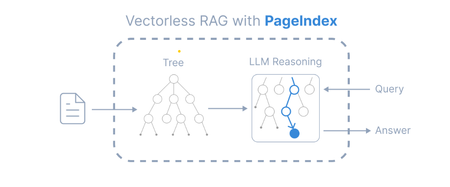
Introduction Retrieval-Augmented Generation (RAG) has become a widely adopted architecture for building AI applications that combine Large Language Models (LLMs) with external knowledge sources. Traditional RAG pipelines rely heavily on vector embeddings and similarity search to retrieve relevant documents. While this works well for many scenarios, it introduces challenges such as: Requires chunking documents into small segments Important context can be split across chunks Embedding generation and vector databases add infrastructure complexity A new paradigm called Vectorless Reasoning-Based RAG is emerging to address these challenges. One framework enabling this approach is PageIndex, an open-source document indexing system that organizes documents into a hierarchical tree structure and allows Large Language Models (LLMs) to perform reasoning-based retrieval over that structure. Vectorless Reasoning-Based RAG Instead of vectors, this approach uses structured document navigation. User Query ->Document Tree Structure ->LLM Reasoning ->Relevant Nodes Retrieved ->LLM Generates Answer This mimics how humans read documents: Look at the table of contents Identify relevant sections Read the relevant content Answer the question Core features No Vector Database: It relies on document structure and LLM reasoning for retrieval. It does not depend on vector similarity search. No Chunking: Documents are not split into artificial chunks. Instead, they are organized using their natural structure, such as pages and sections. Human-like Retrieval: The system mimics how human experts read documents. It navigates through sections and extracts information from relevant parts. Better Explainability and Traceability: Retrieval is based on reasoning. The results can be traced back to specific pages and sections. This makes the process easier to interpret. It avoids opaque and approximate vector search, often called “vibe retrieval.” When to Use Vectorless RAG Vectorless RAG works best when: Data is structured or semi-structured Documents have clear metadata Knowledge sources are well organized Queries require reasoning rather than semantic similarity Examples: enterprise knowledge bases internal documentation systems compliance and policy search healthcare documentation financial reporting Implementing Vectorless RAG with Azure AI Foundry Step 1 : Install Pageindex using pip command, from pageindex import PageIndexClient import pageindex.utils as utils # Get your PageIndex API key from https://dash.pageindex.ai/api-keys PAGEINDEX_API_KEY = "YOUR_PAGEINDEX_API_KEY" pi_client = PageIndexClient(api_key=PAGEINDEX_API_KEY) Step 2 : Set up your LLM Example using Azure OpenAI: from openai import AsyncAzureOpenAI client = AsyncAzureOpenAI( api_key=AZURE_OPENAI_API_KEY, azure_endpoint=AZURE_OPENAI_ENDPOINT, api_version=AZURE_OPENAI_API_VERSION ) async def call_llm(prompt, temperature=0): response = await client.chat.completions.create( model=AZURE_DEPLOYMENT_NAME, messages=[{"role": "user", "content": prompt}], temperature=temperature ) return response.choices[0].message.content.strip() Step 3: Page Tree Generation import os, requests pdf_url = "https://arxiv.org/pdf/2501.12948.pdf" //give the pdf url for tree generation, here given one for example pdf_path = os.path.join("../data", pdf_url.split('/')[-1]) os.makedirs(os.path.dirname(pdf_path), exist_ok=True) response = requests.get(pdf_url) with open(pdf_path, "wb") as f: f.write(response.content) print(f"Downloaded {pdf_url}") doc_id = pi_client.submit_document(pdf_path)["doc_id"] print('Document Submitted:', doc_id) Step 4 : Print the generated pageindex tree structure if pi_client.is_retrieval_ready(doc_id): tree = pi_client.get_tree(doc_id, node_summary=True)['result'] print('Simplified Tree Structure of the Document:') utils.print_tree(tree) else: print("Processing document, please try again later...") Step 5 : Use LLM for tree search and identify nodes that might contain relevant context import json query = "What are the conclusions in this document?" tree_without_text = utils.remove_fields(tree.copy(), fields=['text']) search_prompt = f""" You are given a question and a tree structure of a document. Each node contains a node id, node title, and a corresponding summary. Your task is to find all nodes that are likely to contain the answer to the question. Question: {query} Document tree structure: {json.dumps(tree_without_text, indent=2)} Please reply in the following JSON format: {{ "thinking": "<Your thinking process on which nodes are relevant to the question>", "node_list": ["node_id_1", "node_id_2", ..., "node_id_n"] }} Directly return the final JSON structure. Do not output anything else. """ tree_search_result = await call_llm(search_prompt) Step 6 : Print retrieved nodes and reasoning process node_map = utils.create_node_mapping(tree) tree_search_result_json = json.loads(tree_search_result) print('Reasoning Process:') utils.print_wrapped(tree_search_result_json['thinking']) print('\nRetrieved Nodes:') for node_id in tree_search_result_json["node_list"]: node = node_map[node_id] print(f"Node ID: {node['node_id']}\t Page: {node['page_index']}\t Title: {node['title']}") Step 7: Answer generation node_list = json.loads(tree_search_result)["node_list"] relevant_content = "\n\n".join(node_map[node_id]["text"] for node_id in node_list) print('Retrieved Context:\n') utils.print_wrapped(relevant_content[:1000] + '...') answer_prompt = f""" Answer the question based on the context: Question: {query} Context: {relevant_content} Provide a clear, concise answer based only on the context provided. """ print('Generated Answer:\n') answer = await call_llm(answer_prompt) utils.print_wrapped(answer) When to Use Each Approach Both vector-based RAG and vectorless RAG have their strengths. Choosing the right approach depends on the nature of the documents and the type of retrieval required. When to Use Vector Database–Based RAG Vector-based retrieval works best when dealing with large collections of unrelated or loosely structured documents. In such cases, semantic similarity is often sufficient to identify relevant information quickly. Use vector RAG when: Searching across many independent documents Semantic similarity is sufficient to locate relevant content Real-time retrieval is required over very large datasets Common use cases include: Customer support knowledge bases Conversational chatbots Product and content search systems When to Use Vectorless RAG Vectorless approaches such as PageIndex are better suited for long, structured documents where understanding the logical organization of the content is important. Use vectorless RAG when: Documents contain clear hierarchical structure Logical reasoning across sections is required High retrieval accuracy is critical Typical examples include: Financial filings and regulatory reports Legal documents and contracts Technical manuals and documentation Academic and research papers In these scenarios, navigating the document structure allows the system to identify the exact section that logically contains the answer, rather than relying only on semantic similarity. Conclusion Vector databases significantly advanced RAG architectures by enabling scalable semantic search across large datasets. However, they are not the optimal solution for every type of document. Vectorless approaches such as PageIndex introduce a different philosophy: instead of retrieving text that is merely semantically similar, they retrieve text that is logically relevant by reasoning over the structure of the document. As RAG architectures continue to evolve, the future will likely combine the strengths of both approaches. Hybrid systems that integrate vector search for broad retrieval and reasoning-based navigation for precision may offer the best balance of scalability and accuracy for enterprise AI applications.How to Integrate Playwright MCP for AI-Driven Test Automation
Test automation has come a long way, from scripted flows to self-healing and now AI-driven testing. With the introduction of Model Context Protocol (MCP), Playwright can now interact with AI models and external tools to make smarter testing decisions. This guide walks you through integrating MCP with Playwright in VSCode, starting from the basics, enabling you to build smarter, adaptive tests today. What Is Playwright MCP? Playwright: An open-source framework for web testing and automation. It supports multiple browsers (Chromium, Firefox, and WebKit) and offers robust features like auto-wait, capturing screenshots, along with some great tooling like Codegen, Trace Viewer. MCP (Model Context Protocol): A protocol that enables external tools to communicate with AI models or services in a structured, secure way. By combining Playwright with MCP, you unlock: AI-assisted test generation. Dynamic test data. Smarter debugging and adaptive workflows. Why Integrate MCP with Playwright? AI-powered test generation: Reduce manual scripting. Dynamic context awareness: Tests adapt to real-time data. Improved debugging: AI can suggest fixes for failing tests. Smarter locator selection: AI helps pick stable, reliable selectors to reduce flaky tests. Natural language instructions: Write or trigger tests using plain English prompts. Getting Started in VS Code Prerequisites Node.js Download: nodejs.org Minimum version: v18.0.0 or higher (recommended: latest LTS) Check version: node --version Playwright Install Playwright: npm install @playwright/test Step 1: Create Project Folder mkdir playwrightMCP-demo cd playwrightMCP-demo Step 2: Initialize Project npm init playwright@latest Step 3: Install MCP Server for VS Code Navigate to GitHub - microsoft/playwright-mcp: Playwright MCP server and click install server for VS Code Search for 'MCP: Open user configuration' (type ‘>mcp’ in the search box) You will see a file mcp.json is created in your user -> app data folder, which is having the server details. { "servers": { "playwright": { "command": "npx", "args": [ "@playwright/mcp@latest" ], "type": "stdio" } }, "inputs": [] } Alternatively, install an MCP server directly GitHub MCP server registry using the Extensions view in VS Code. From GitHub MCP server registry Verify installation: Open Copilot Chat → select Agent Mode → click Configure Tools → confirm microsoft/playwright-mcp appears in the list. Step 4: Create a Simple Test Using MCP Once your project and MCP setup are ready in VS Code, you can create a simple test that demonstrates MCP’s capabilities. MCP can help in multiple scenarios, below is the example for Test Generation using AI: Scenario: AI-Assisted Test Generation- Use natural language prompts to generate Playwright tests automatically. Test Scenario - Validate that a user can switch the Playwright documentation language dropdown to Python, search for “Frames,” and navigate to the Frames documentation page. Confirm that the page heading correctly displays “Frames.” Sample Prompt to Use in VS Code (Copilot Agent Mode):Create a Playwright automated test in JavaScript that verifies navigation to the 'Frames' documentation page following below steps and be more specific about locators to avoid strict mode violation error Navigate to : Playwright documentation select “Python” from the dropdown options, labelled “Node.js” Type the keyword “Frames” into the search box. Click the search result for the Frames documentation page Verify that the page header reads “Frames”. Log success or provide a failure message with details. Copilot will generate the test automatically in your tests folder Step 5: Run Test npx playwright test Conclusion Integrating Playwright with MCP in VS Code helps you build smarter, adaptive tests without adding complexity. Start small, follow best practices, and scale as you grow. Note - Installation steps may vary depending on your environment. Refer to MCP Registry · GitHub for the latest instructions.Building Agents with GitHub Copilot SDK: A Practical Guide to Automated Tech Update Tracking
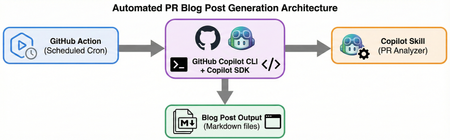
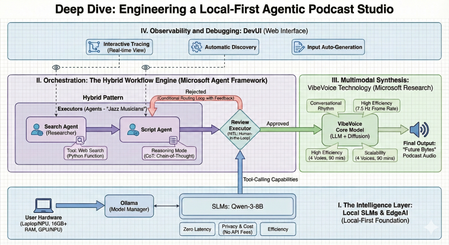
Introduction In the rapidly evolving tech landscape, staying on top of key project updates is crucial. This article explores how to leverage GitHub's newly released Copilot SDK to build intelligent agent systems, featuring a practical case study on automating daily update tracking and analysis for Microsoft's Agent Framework. GitHub Copilot SDK: Embedding AI Capabilities into Any Application SDK Overview On January 22, 2026, GitHub officially launched the GitHub Copilot SDK technical preview, marking a new era in AI agent development. The SDK provides these core capabilities: Production-grade execution loop: The same battle-tested agentic engine powering GitHub Copilot CLI Multi-language support: Node.js, Python, Go, and .NET Multi-model routing: Flexible model selection for different tasks MCP server integration: Native Model Context Protocol support Real-time streaming: Support for streaming responses and live interactions Tool orchestration: Automated tool invocation and command execution Core Advantages Building agentic workflows from scratch presents numerous challenges: Context management across conversation turns Orchestrating tools and commands Routing between models Handling permissions, safety boundaries, and failure modes The Copilot SDK encapsulates all this complexity. As Mario Rodriguez, GitHub's Chief Product Officer, explains: "The SDK takes the agentic power of Copilot CLI and makes it available in your favorite programming language... GitHub handles authentication, model management, MCP servers, custom agents, and chat sessions plus streaming. That means you are in control of what gets built on top of those building blocks." Quick Start Examples Here's a simple TypeScript example using the Copilot SDK: import { CopilotClient } from "@github/copilot-sdk"; const client = new CopilotClient(); await client.start(); const session = await client.createSession({ model: "gpt-5", }); await session.send({ prompt: "Hello, world!" }); And in Python, it's equally straightforward: from copilot import CopilotClient client = CopilotClient() await client.start() session = await client.create_session({ "model": "claude-sonnet-4.5", "streaming": True, "skill_directories": ["./.copilot_skills/pr-analyzer/SKILL.md"] }) await session.send_and_wait({ "prompt": "Analyze PRs from microsoft/agent-framework merged yesterday" }) Real-World Case Study: Automated Agent Framework Daily Updates Project Background agent-framework-update-everyday is an automated system built with GitHub Copilot SDK and CLI that tracks daily code changes in Microsoft's Agent Framework and generates high-quality technical blog posts. System Architecture The project leverages the following technology stack: GitHub Copilot CLI (@github/copilot): Command-line AI capabilities GitHub Copilot SDK (github-copilot-sdk): Programmatic AI interactions Copilot Skills: Custom PR analysis behaviors GitHub Actions: CI/CD automation pipeline Core Workflow The system runs fully automated via GitHub Actions, executing Monday through Friday at UTC 00:00 with these steps: Step Action Description 1 Checkout repository Clone the repo using actions/checkout@v4 2 Setup Node.js Configure Node.js 22 environment for Copilot CLI 3 Install Copilot CLI Install via npm i -g github/copilot 4 Setup Python Configure Python 3.11 environment 5 Install Python dependencies Install github-copilot-sdk package 6 Run PR Analysis Execute pr_trigger_v2.py with Copilot authentication 7 Commit and push Auto-commit generated blog posts to repository Technical Implementation Details 1. Copilot Skill Definition The project uses a custom Copilot Skill (.copilot_skills/pr-analyzer/SKILL.md) to define: PR analysis behavior patterns Blog post structure requirements Breaking changes priority strategy Code snippet extraction rules This skill-based approach enables the AI agent to focus on domain-specific tasks and produce higher-quality outputs. 2. Python SDK Integration The core script pr_trigger_v2.py demonstrates Python SDK usage: from copilot import CopilotClient # Initialize client client = CopilotClient() await client.start() # Create session with model and skill specification session = await client.create_session({ "model": "claude-sonnet-4.5", "streaming": True, "skill_directories": ["./.copilot_skills/pr-analyzer/SKILL.md"] }) # Send analysis request await session.send_and_wait({ "prompt": "Analyze PRs from microsoft/agent-framework merged yesterday" }) 3. CI/CD Integration The GitHub Actions workflow (.github/workflows/daily-pr-analysis.yml) ensures automated execution: name: Daily PR Analysis on: schedule: - cron: '0 0 * * 1-5' # Monday-Friday at UTC 00:00 workflow_dispatch: # Support manual triggers jobs: analyze: runs-on: ubuntu-latest steps: - name: Setup and Run Analysis env: COPILOT_GITHUB_TOKEN: ${{ secrets.COPILOT_GITHUB_TOKEN }} run: | npm i -g github/copilot pip install github-copilot-sdk --break-system-packages python pr_trigger_v2.py Output Results The system automatically generates structured blog posts saved in the blog/ directory with naming convention: blog/agent-framework-pr-summary-{YYYY-MM-DD}.md Each post includes: Breaking Changes (highlighted first) Major Updates (with code examples) Minor Updates and Bug Fixes Summary and impact assessment Latest Advancements in GitHub Copilot CLI Released alongside the SDK, Copilot CLI has also received major updates, making it an even more powerful development tool: Enhanced Core Capabilities Persistent Memory: Cross-session context retention and intelligent compaction Multi-Model Collaboration: Choose different models for explore, plan, and review workflows Autonomous Execution: Custom agent support Agent skill system Full MCP support Async task delegation Real-World Applications Development teams have already built innovative applications using the SDK: YouTube chapter generators Custom GUI interfaces for agents Speech-to-command workflows for desktop apps Games where you compete with AI Content summarization tools These examples showcase the flexibility and power of the Copilot SDK. SDK vs CLI: Complementary, Not Competing Understanding the relationship between SDK and CLI is important: CLI: An interactive tool for end users, providing a complete development experience SDK: A programmable layer for developers to build customized applications The SDK essentially provides programmatic access to the CLI's core capabilities, enabling developers to: Integrate Copilot agent capabilities into any environment Build graphical user interfaces Create personal productivity tools Run custom internal agents in enterprise workflows GitHub handles the underlying authentication, model management, MCP servers, and session management, while developers focus on building value on top of these building blocks. Best Practices and Recommendations Based on experience from the agent-framework-update-everyday project, here are practical recommendations: 1. Leverage Copilot Skills Effectively Define clear skill files that specify: Input and output formats for tasks Rules for handling edge cases Quality standards and priorities 2. Choose Models Wisely Use different models for different tasks: Exploratory tasks: Use more powerful models (e.g., GPT-5) Execution tasks: Use faster models (e.g., Claude Sonnet) Cost-sensitive tasks: Balance performance and budget 3. Implement Robust Error Handling AI calls in CI/CD environments need to consider: Network timeout and retry strategies API rate limit handling Output validation and fallback mechanisms 4. Secure Authentication Management Use fine-grained Personal Access Tokens (PAT): Create dedicated Copilot access tokens Set minimum permission scope (Copilot Requests: Read) Store securely using GitHub Secrets 5. Version Control and Traceability Automated systems should: Log metadata for each execution Preserve historical outputs for comparison Implement auditable change tracking Future Outlook The release of GitHub Copilot SDK marks the democratization of AI agent development. Developers can now: Lower Development Barriers: No need to deeply understand complex AI infrastructure Accelerate Innovation: Focus on business logic rather than underlying implementation Flexible Integration: Embed AI capabilities into any application scenario Production-Ready: Leverage proven execution loops and security mechanisms As the SDK moves from technical preview to general availability, we can expect: Official support for more languages Richer tool ecosystem More powerful MCP integration capabilities Community-driven best practice libraries Conclusion This article demonstrates how to build practical automation systems using GitHub Copilot SDK through the agent-framework-update-everyday project. This case study not only validates the SDK's technical capabilities but, more importantly, showcases a new development paradigm: Using AI agents as programmable building blocks, integrated into daily development workflows, to liberate developer creativity. Whether you want to build personal productivity tools, enterprise internal agents, or innovative AI applications, the Copilot SDK provides a solid technical foundation. Visit github/copilot-sdk to start your AI agent journey today! Reference Resources GitHub Copilot SDK Official Repository Agent Framework Update Everyday Project GitHub Copilot CLI Documentation Microsoft Agent Framework Build an agent into any app with the GitHub Copilot SDK12KViews3likes0CommentsEngineering a Local-First Agentic Podcast Studio: A Deep Dive into Multi-Agent Orchestration
The transition from standalone Large Language Models (LLMs) to Agentic Orchestration marks the next frontier in AI development. We are moving away from simple "prompt-and-response" cycles toward a paradigm where specialized, autonomous units—AI Agents—collaborate to solve complex, multi-step problems. As a Technology Evangelist, my focus is on building these production-grade systems entirely on the edge, ensuring privacy, speed, and cost-efficiency. This technical guide explores the architecture and implementation of The AI Podcast Studio. This project demonstrates the seamless integration of the Microsoft Agent Framework, Local Small Language Models (SLMs), and VibeVoice to automate a complete tech podcast pipeline. I. The Strategic Intelligence Layer: Why Local-First? At the core of our studio is a Local-First philosophy. While cloud-based LLMs are powerful, they introduce friction in high-frequency, creative pipelines. By using Ollama as a model manager, we run SLMs like Qwen-3-8B directly on user hardware. 1. Architectural Comparison: Local vs. Cloud Choosing the deployment environment is a fundamental architectural decision. For an agentic podcasting workflow, the edge offers distinct advantages: Dimension Local Models (e.g., Qwen-3-8B) Cloud Models (e.g., GPT-5.2) Latency Zero/Ultra-low: Instant token generation without network "jitter". Variable: Dependent on network stability and API traffic. Privacy Total Sovereignty: Creative data and drafts never leave the local device. Shared Risk: Data is processed on third-party servers. Cost Zero API Fees: One-time hardware investment; free to run infinite tokens. Pay-as-you-go: Costs scale with token count and frequency of calls. Availability Offline: The studio remains functional without an internet connection. Online Only: Requires a stable, high-speed connection. 2. Reasoning and Tool-Calling on the Edge To move beyond simple chat, we implement Reasoning Mode, utilizing Chain-of-Thought (CoT) prompting. This allows our local agents to "think" through the podcast structure before writing. Furthermore, we grant them "superpowers" through Tool-Calling, allowing them to execute Python functions for real-time web searches to gather the latest news. II. The Orchestration Engine: Microsoft Agent Framework The true complexity of this project lies in Agent Orchestration—the coordination of specialized agents to work as a cohesive team. We distinguish between Agents, who act as "Jazz Musicians" making flexible decisions, and Workflows, which act as the "Orchestra" following a predefined score. 1. Advanced Orchestration Patterns Drawing from the WorkshopForAgentic architecture, the studio utilizes several sophisticated patterns: Sequential: A strict pipeline where the output of the Researcher flows into the Scriptwriter. Concurrent (Parallel): Multiple agents search different news sources simultaneously to speed up data gathering. Handoff: An agent dynamically "transfers" control to another specialist based on the context of the task. Magentic-One: A high-level "Manager" agent decides which specialist should handle the next task in real-time. III. Implementation: Code Analysis (Workshop Patterns) To maintain a production-grade codebase, we follow the modular structure found in the WorkshopForAgentic/code directory. This ensures that agents, clients, and workflows are decoupled and maintainable. 1. Configuration: Connecting to Local SLMs The first step is initializing the local model client using the framework's Ollama integration. # Based on WorkshopForAgentic/code/config.py from agent_framework.ollama import OllamaChatClient # Initialize the local client for Qwen-3-8B # Standard Ollama endpoint on localhost chat_client = OllamaChatClient( model_id="qwen3:8b", endpoint="http://localhost:11434" ) 2. Agent Definition: Specialized Roles Each agent is a ChatAgent instance defined by its persona and instructions. # Based on WorkshopForAgentic/code/agents.py from agent_framework import ChatAgent # The Researcher Agent: Responsible for web discovery researcher_agent = client.create_agent( name="SearchAgent", instructions="You are my assistant. Answer the questions based on the search engine.", tools=[web_search], ) # The Scriptwriter Agent: Responsible for conversational narrative generate_script_agent = client.create_agent( name="GenerateScriptAgent", instructions=""" You are my podcast script generation assistant. Please generate a 10-minute Chinese podcast script based on the provided content. The podcast script should be co-hosted by Lucy (the host) and Ken (the expert). The script content should be generated based on the input, and the final output format should be as follows: Speaker 1: …… Speaker 2: …… Speaker 1: …… Speaker 2: …… Speaker 1: …… Speaker 2: …… """ ) 3. Workflow Setup: The Sequential Pipeline For a deterministic production line, we use the WorkflowBuilder to connect our agents. # Based on WorkshopForAgentic/code/workflow_setup.py from agent_framework import WorkflowBuilder # Building the podcast pipeline search_executor = AgentExecutor(agent=search_agent, id="search_executor") gen_script_executor = AgentExecutor(agent=gen_script_agent, id="gen_script_executor") review_executor = ReviewExecutor(id="review_executor", genscript_agent_id="gen_script_executor") # Build workflow with approval loop # search_executor -> gen_script_executor -> review_executor # If not approved, review_executor -> gen_script_executor (loop back) workflow = ( WorkflowBuilder() .set_start_executor(search_executor) .add_edge(search_executor, gen_script_executor) .add_edge(gen_script_executor, review_executor) .add_edge(review_executor, gen_script_executor) # Loop back for regeneration .build() ) IV. Multimodal Synthesis: VibeVoice Technology The "Future Bytes" podcast is brought to life using VibeVoice, a specialized technology from Microsoft Research designed for natural conversational synthesis. Conversational Rhythm: It automatically handles natural turn-taking and speech cadences. High Efficiency: By operating at an ultra-low 7.5 Hz frame rate, it significantly reduces the compute power required for high-fidelity audio. Scalability: The system supports up to 4 distinct voices and can generate up to 90 minutes of continuous audio. V. Observability and Debugging: DevUI Building multi-agent systems requires deep visibility into the agentic "thinking" process. We leverage DevUI, a specialized web interface for testing and tracing: Interactive Tracing: Developers can watch the message flow and tool-calling in real-time. Automatic Discovery: DevUI auto-discovers agents defined within the project structure. Input Auto-Generation: The UI generates input fields based on workflow requirements, allowing for rapid iteration. VI. Technical Requirements for Edge Deployment Deploying this studio locally requires specific hardware and software configurations to handle simultaneous LLM and TTS inference: Software: Python 3.10+, Ollama, and the Microsoft Agent Framework. Hardware: 16GB+ RAM is the minimum requirement; 32GB is recommended for running multiple agents and VibeVoice concurrently. Compute: A modern GPU/NPU (e.g., NVIDIA RTX or Snapdragon X Elite) is essential for smooth inference. Final Perspective: From Coding to Directing The AI Podcast Studio represents a significant shift toward Agentic Content Creation. By mastering these orchestration patterns and leveraging local EdgeAI, developers move from simply writing code to directing entire ecosystems of intelligent agents. This "local-first" model ensures that the future of creativity is private, efficient, and infinitely scalable. Download sample Here Resource EdgeAI for Beginners - https://github.com/microsoft/edgeai-for-beginners Microsoft Agent Framework - https://github.com/microsoft/agent-framework Microsoft Agent Framework Samples - https://github.com/microsoft/agent-framework-samples9.3KViews3likes0CommentsFrom Concept to Code: Building Production-Ready Multi-Agent Systems with Microsoft Foundry
We have reached a critical inflection point in AI development. Within the Microsoft Foundry ecosystem, the core value proposition of "Agents" is shifting decisively—moving from passive content generation to active task execution and process automation. These are no longer just conversational interfaces. They are intelligent entities capable of connecting models, data, and tools to actively execute complex business logic. To support this evolution, Microsoft has introduced a powerful suite of capabilities: the Microsoft Agent Framework for sophisticated orchestration, the Agent V2 SDK, and integrated Microsoft Foundry VSCode Extensions. These innovations provide the tooling necessary to bridge the gap between theoretical research and secure, scalable enterprise landing. But how do you turn these separate components into a cohesive business solution? That is the challenge we address today. This post dives into the practical application of these tools, demonstrating how to connect the dots and transform complex multi-agent concepts into deployed reality. The Scenario: Recruitment through an "Agentic Lens" Let’s ground this theoretical discussion with a real-world scenario that perfectly models a multi-agent environment: The Recruitment Process. By examining recruitment through an agentic lens, we can identify distinct entities with specific mandates: The Recruiter Agent: Tasked with setting boundary conditions (job requirements) and preparing data retrieval mechanisms (interview questions). The Applicant Agent: Objective is to process incoming queries and synthesize the best possible output to meet the recruiter's acceptance criteria. Phase 1: Design Achieving Orchestration via Microsoft Foundry Workflows To bridge the gap between our scenario and technical reality, we start with Foundry Workflows. Workflows serves as the visual integration environment within Foundry. It allows you to build declarative pipelines that seamlessly combine deterministic business logic with the probabilistic nature of autonomous AI agents. By adopting this visual, low-code paradigm, you eliminate the need to write complex orchestration logic from scratch. Workflows empowers you to coordinate specialized agents intuitively, creating adaptive systems that solve complex business problems collaboratively. Visually Orchestrating the Cycle Microsoft Foundry provides an intuitive, web-based drag-and-drop interface. This canvas allows you to integrate specialized AI agents alongside standard procedural logic blocks, transforming abstract ideas into executable processes without writing extensive glue code. To translate our recruitment scenario into a functional workflow, we follow a structured approach: Agent Prerequisites: We pre-configure our specialized agents within Foundry. We create a Recruiter Agent (prompted to generate evaluation criteria) and an Applicant Agent (prompted to synthesize responses). Orchestrating the Interaction: We drag these nodes onto the board and define the data flow. The process begins with the Recruiter generating questions, piping that output directly as input for the Applicant agent. Adding Business Logic: A true workflow requires decision-making. We introduce control flow logic, such as IF/ELSE conditional blocks, to evaluate the recruiter's questions based on predefined criteria. This allows the workflow to branch dynamically—if satisfied, the candidate answers the questions; if not, the questions are regenerated. Alternative: YAML Configuration For developers who prefer a code-first approach or wish to rapidly replicate this logic across environments, Foundry allows you to export the underlying YAML. kind: workflow trigger: kind: OnConversationStart id: trigger_wf actions: - kind: SetVariable id: action-1763742724000 variable: Local.LatestMessage value: =UserMessage(System.LastMessageText) - kind: InvokeAzureAgent id: action-1763736666888 agent: name: HiringManager input: messages: =System.LastMessage output: autoSend: true messages: Local.LatestMessage - kind: Question variable: Local.Input id: action-1763737142539 entity: StringPrebuiltEntity skipQuestionMode: SkipOnFirstExecutionIfVariableHasValue prompt: Boss, can you confirm this ? - kind: ConditionGroup conditions: - condition: =Local.Input="Yes" actions: - kind: InvokeAzureAgent id: action-1763744279421 agent: name: ApplyAgent input: messages: =Local.LatestMessage output: autoSend: true messages: Local.LatestMessage - kind: EndConversation id: action-1763740066007 id: if-action-1763736954795-0 id: action-1763736954795 elseActions: - kind: GotoAction actionId: action-1763736666888 id: action-1763737425562 id: "" name: HRDemo description: "" Simulating the End-to-End Process Once constructed, Foundry provides a robust, built-in testing environment. You can trigger the workflow with sample input data to simulate the end-to-end cycle. This allows you to debug hand-offs and interactions in real-time before writing a single line of application code. Phase 2: Develop From Cloud Canvas to Local Code with VSCode Foundry Workflows excels at rapid prototyping. However, a visual UI is rarely sufficient for enterprise-grade production. The critical question becomes: How do we integrate these visual definitions into a rigorous Software Development Lifecycle (SDLC)? While the cloud portal is ideal for design, enterprise application delivery happens in the local IDE. The Microsoft Foundry VSCode Extension bridges this gap. This extension allows developers to: Sync: Pull down workflow definitions from the cloud to your local machine. Inspect: Review the underlying logic in your preferred environment. Scaffold: Rapidly generate the underlying code structures needed to run the flow. This accelerates the shift from "understanding" the flow to "implementing" it. Phase 3: Deploy Productionizing Intelligence with the Microsoft Agent Framework Once the multi-agent orchestration has been validated locally, the final step is transforming it into a shipping application. This is where the Microsoft Agent Framework shines as a runtime engine. It natively ingests the declarative Workflow definitions (YAML) exported from Foundry. This allows artifacts from the prototyping phase to be directly promoted to application deployment. By simply referencing the workflow configuration libraries, you can "hydrate" the entire multi-agent system with minimal boilerplate. Here is the code required to initialize and run the workflow within your application. Note - Check the source code https://github.com/microsoft/Agent-Framework-Samples/tree/main/09.Cases/MicrosoftFoundryWithAITKAndMAF Summary: The Journey from Conversation to Action Microsoft Foundry is more than just a toolbox; it is a comprehensive solution designed to bridge the chasm between theoretical AI research and secure, scalable enterprise applications. In this post, we walked through the three critical stages of modern AI development: Design (Low-Code): Leveraging Foundry Workflows to visually orchestrate specialized agents (Recruiter vs. Applicant) mixed with deterministic business rules. Develop (Local SDLC): Utilizing the VSCode Extension to break down the barriers between the cloud canvas and the local IDE, enabling seamless synchronization and debugging. Deploy (Native Runtime): Using the Microsoft Agent Framework to ingest declarative YAML, realizing the promise of "Configuration as Code" and eliminating tedious logic rewriting. By following this path, developers can move beyond simple content generation and build adaptive, multi-agent systems that drive real business value. Learning Resoures What's Microsoft Foundry (https://learn.microsoft.com/azure/ai-foundry/what-is-azure-ai-foundry?view=foundry) Work with Declarative (Low-code) Agent workflows in Visual Studio Code (preview) (https://learn.microsoft.com/azure/ai-foundry/agents/how-to/vs-code-agents-workflow-low-code?view=foundry) Microsoft Agent Framework(https://github.com/microsoft/agent-framework) Microsoft Foundry VSCode Extension(https://marketplace.visualstudio.com/items?itemName=TeamsDevApp.vscode-ai-foundry)8.6KViews1like0Comments