ai
2 TopicsContainer Network Insights Agent (CNIA): Your AI Teammate for AKS Networking Incidents
Hello Folks! If you run AKS in production, you already know the script. A pod cannot reach an external service, every dashboard says the cluster is healthy, and somebody is SSHing into a node with five browser tabs open trying to piece the story together. This session from the Microsoft Azure Infra Summit 2026 tackles that exact pain. Shaifali Garg (PM for Azure Container Networking on AKS) sits down with Jonathan Wang, an AKS operator running 30 clusters across two regions on Cilium, and they walk through what a real networking incident feels like, then introduce the Container Network Insights Agent (CNIA) live in the cluster. Why IT Pros Should Care In Jonathan’s environment, about 40% of incidents end up being networking problems. The tools all exist (kubectl, dashboards, detectors, Hubble), but the time sink is figuring out which layer the problem lives in and what to check next. CNIA goes after that gap. Here is what you actually get back: A symptom-to-classification jump in seconds, so you skip the first 30 minutes of “is this DNS, policy, node, or app?” One chat window with one evidence table, one root cause, and one copy-paste fix command, instead of jumping across five tabs Senior SRE tribal knowledge baked into the workflow, so anyone on the team can run the same investigation a principal engineer would Read-only by design, so the agent never changes anything on your cluster. You stay the human in the loop Installs as an AKS extension (no Helm chart, no YAML to babysit), and Azure handles the lifecycle In short, CNIA is not trying to replace your SRE team. It hands them back 20 or 30 minutes on every networking ticket, which adds up fast across a fleet. What CNIA Is, A Technical Overview Think of CNIA as an AI teammate that lives inside your AKS cluster as a pod. You describe what is broken in plain English, the way you would ping a senior engineer on Slack, and behind the scenes the agent does four things in order. It classifies the kind of problem (DNS, egress, policy, node, app), it pulls live evidence from your cluster, it analyzes that evidence, and it hands you back a clean report with evidence, root cause, and a copy-paste exec command. Two architectural choices stand out. First, the agent uses your own Azure OpenAI resource (bring your own), so prompts and diagnostic content stay in your tenant and your region. Microsoft does not see your diagnostic data, and nothing gets persisted externally. Second, the answer is grounded in evidence pulled from your cluster, not from the internet. Your pods, your policies, your CoreDNS, your host-level NIC and kernel counters. If the evidence is inconclusive, CNIA says so rather than fabricating a root cause. That last bit is what earns trust with senior SREs. CNIA fits inside the broader Advanced Container Networking Services (ACNS) story on AKS. ACNS gives you metrics in Azure Managed Prometheus and Grafana, stored and on-demand network logs with Hubble, and FQDN-based filtering with Cilium. CNIA sits on top, automating the triage loop across those signals so you do not have to walk through the playbook by hand every time. How It Works, Under the Hood The install is an AKS extension. Roughly 5 to 7 minutes from “az aks extension” to “you have an SRE buddy in your cluster.” One small pod runs continuously. A second helper only spins up on the node during a deep packet-drop investigation, reads host-level network counters, and is cleaned up right after. Nothing left behind. Permissions are deliberately narrow: Read-only RBAC on the cluster. The agent looks, it never changes anything A workload identity tied to your Azure OpenAI resource. No shared credentials Outbound traffic is HTTPS to your OpenAI endpoint on port 443, and nothing else. If you want to log that further through an NSG or firewall, that is supported On the safety side, CNIA layers two protections against prompt injection. The agent is scope-restricted by design, so off-topic requests get rejected straight away. In one of Jonathan’s demos, Shefali asks the agent to “delete core-dns” and to “write a script to scrape LinkedIn profiles.” Both are refused on the spot. The second layer is the read-only RBAC at the cluster level. Even if someone tricked the prompt into emitting a destructive command, the cluster itself would refuse. The pod’s execution is scoped to specific diagnostic commands. It is not an open shell. Honest tradeoffs, because you will ask: It is one cluster at a time. Multi-cluster correlation is not in scope yet It does not auto-remediate. It tells you the fix, you verify and run it It is AKS only. EKS and GKE are not supported today Session state lives in the pod in memory. If the pod restarts, you start a fresh chat (past sessions are still available in history) Heavy packet-drop investigations have been validated up to around 7 concurrent users on smaller clusters. The team is actively scaling that up Real-World Value The session includes two demos that map directly to incidents you have probably lived through. Demo 1, egress that silently dies. Pods cannot reach google.com. CoreDNS resolves it fine, example.com works from the same pod, every dashboard says healthy. CNIA classifies it as an egress connectivity problem (not DNS) and surfaces the actual culprit: a Cilium network policy named “restrict external FQDN” with a toFQDN rule that only allows example.com. Everything else gets silently dropped at the egress gate. DNS was allowed, the TCP connection was not. The fix command (a kubectl patch to add google.com to the allow list) is right there in the report. End-to-end fix in under a minute. Demo 2, the target port typo. A service is down with connection refused. Pods running, service exists, endpoints populated, no network policies. The agent goes inside the pod, looks at the actual listening sockets, and proves the mismatch: target port 8080, but nginx listens on port 80. One-digit typo in YAML that no kubectl get would surface on its own. The ROI math is straightforward. If your team handles networking incidents weekly and each one costs 20 to 30 minutes of “where do I even start,” that capacity adds up across the org. And critically, the win is not just speed. When the one engineer who knows where to look goes on leave, the rest of the team is no longer stuck calling them at home. Getting Started Three steps. That is it. Read the public docs, get an overview, scan the use cases, and understand what CNIA does and does not cover Pick a cluster (dev or staging is a great place to start) and install the AKS extension. Give it 5 to 7 minutes Run a few real network tickets through it. Compare your time-to-answer before and after. Hit thumbs-up or thumbs-down in the chat so the product team sees real signal Pricing in preview: no license fee. You pay for the Azure OpenAI tokens it uses (your tenant, your resource), plus the tiny bit of cluster compute for the pod. If you already have Azure OpenAI in your tenant, just point CNIA at it. Resources Diagnose and resolve AKS network issues with Advanced Container Networking Services Advanced Container Networking Services overview Configure Azure CNI Powered by Cilium in AKS AKS cluster extensions Deploy and configure Microsoft Entra Workload ID on an AKS cluster What is Azure OpenAI Service? Keep Learning at the Summit Catch the full Microsoft Azure Infra Summit 2026 session playlist here: https://www.youtube.com/playlist?list=PLjt5SKzX1iI8con7FJDB56G6hHqxGm7ki Cheers! Pierre Roman271Views0likes0CommentsAnnouncing the new Microsoft Learn Plan - Preparing for your organization's AI workloads
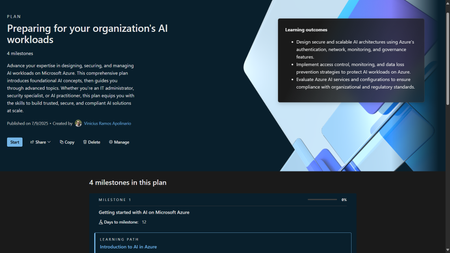
We're pleased to announce the new "Preparing for your organization's AI workloads" Microsoft Learn Plan - focused the IT/Ops audience and now available on Microsoft Learn! This set of content was curated by our team and is targeted at helping IT Professionals who want to learn how to support their organization's AI applications and infrastructure. The Learning Plan is composed of 4 milestones, which in its turn are composed of a total of 22 modules: Milestone 1: Getting Started with AI on Microsoft Azure - Learning Path: Introduction to AI in Azure - 12 modules Milestone 2: Introduction to AI Services Infrastructure on Azure - Learning Path: Manage Authentication, Authorization, and RBAC for AI Workloads on Azure - 3 modules - Learning Path: Manage Network Access for AI Workloads - 2 modules Milestone 3: Monitoring AI Services on Azure - Learning Path: Monitor AI Workloads on Azure - 3 modules Milestone 4: Advanced Management of AI Workloads on Azure - Learning Path: AI Workload Governance and DLP - 2 modules This comprehensive plan introduces foundational AI concepts, then guides you through advanced topics. Whether you're an IT administrator, security specialist, or AI practitioner, this plan equips you with the skills to build trusted, secure, and compliant AI solutions at scale. We hope you enjoy learning! Let us know what you think about this content in the comment section below! If you'd like to see more of this type of content, or have any suggestions, let us know as well!1.9KViews4likes1Comment