ai security
7 TopicsMicrosoft Security Copilot: AI-Driven Security Operations at Greater Scale
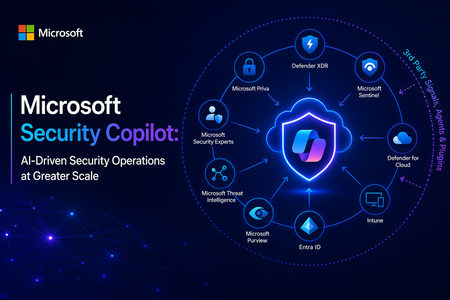
At its core, Security Copilot is built to enhance every facet of security operations at machine speed. It translates a vast array of inputs (Microsoft’s cloud-scale telemetry, threat intelligence feeds, security best practices, and enterprise-specific data) into tailored recommendations and summaries, helping security teams “catch what others miss,” respond faster, and strengthen their expertise. In the sections below, I explore the key security benefits of Security Copilot, its extensibility via third-party plugins and skills, and the value of its deep integration with Microsoft’s security ecosystem. Key Benefits for Security Operations Security Copilot meaningfully improves threat detection, investigation, response, correlation of signals, and analyst productivity. The table below summarizes these core security benefits and capabilities: Security Operations Aspect Benefit with Security Copilot Threat Detection Augmented detection of elusive threats: Security Copilot leverages broad threat intelligence and comprehensive signals to identify subtle threats, anomalies, and attack patterns that might be missed through manual analysis. By reasoning over Microsoft’s vast security graph and global threat telemetry, it helps analysts “catch what others miss,” ensuring unique or stealthy threats are surfaced. Incident Investigation Faster, context-rich investigations: Security Copilot can swiftly summarize and analyze incident data from multiple sources, enhancing incident details with additional context from logs, alerts, and threat intel. It correlates related events and highlights root causes, giving analysts a consolidated understanding of complex incidents in minutes. This enables quicker triage and deeper insights, so investigators know what happened and where to focus next. Response & Remediation Guided response and remediation: Security Copilot not only identifies issues but also provides prescriptive guidance on how to respond. It can suggest remediation steps and mitigation strategies in plain language, helping analysts act decisively. For example, it may outline containment steps or orchestrate automated actions through integrated tools, significantly reducing response time to incidents. Signal Correlation Holistic cross-domain correlation: Because it taps into signals across identities, endpoints, email, cloud workloads, and more, Security Copilot automatically connects the dots among disparate alerts and data streams. It presents unified incident narratives by linking related indicators (e.g., matching an endpoint malware alert with identity login anomalies and cloud logs), eliminating manual cross-tool correlation and uncovering hidden attack paths. Analysts get a single cohesive view of an incident across the kill chain. Analyst Productivity Boosted efficiency & skill elevation: By automating repetitive tasks (like scanning logs, writing KQL queries, or summarizing reports) and supporting natural language interaction, Security Copilot reduces manual workload and accelerates everyday tasks. This lets analysts focus on higher-value activities. In practice, teams using Security Copilot have seen significant productivity gains – a recent study found 23–47% improvement in SecOps task efficiency after adoption. Junior analysts ramp up faster (learning from Copilot’s guidance), while senior analysts can handle more incidents with less fatigue. These improvements translate into measurable security outcomes. Incident response becomes faster and more consistent, with mean time to resolution reduced by 30% on average within a few months of use according to early research. Security Copilot’s ability to accelerate investigations and streamline tasks drives down risk exposure and helps organizations make the most of their security investments. Ultimately, it strengthens an organization’s security posture by augmenting human analysts with AI-driven speed, scale, and intelligence. Seamless Integration with the Microsoft Security Ecosystem Another key strength of Security Copilot is its deep native integration with Microsoft’s security portfolio. From day one, Security Copilot was “designed with integration in mind.” It plugs directly into a broad range of Microsoft security products — including Microsoft 365 Defender (XDR), Microsoft Sentinel (SIEM), Microsoft Entra (ID and access management), Microsoft Intune (endpoint management), Microsoft Purview (compliance), and more. In practice, Security Copilot is available as both a standalone portal and as an embedded side-by-side experience within these Microsoft security tools. This means a security analyst working in Microsoft Sentinel or Defender can access Copilot’s capabilities without switching context: Copilot is right there in the workflow, ready to answer questions or assist with tasks in real time. Because of this close integration, Security Copilot can access data and signals from across all Microsoft security solutions that an organization uses. It operates over a unified security data estate encompassing endpoints, identities, emails, applications, cloud workloads, data repositories, and beyond. The result is truly end-to-end visibility and protection: Copilot can reason across diverse telemetry (e.g., correlating a device malware alert from Defender with cloud logs from Azure, or identity risk signals from Entra) to provide comprehensive insight. This unified approach eliminates silos and tool fragmentation — analysts spend less time pivoting between separate consoles or manually stitching together information because Copilot synthesizes it automatically. Moreover, leveraging the Microsoft ecosystem means Security Copilot can immediately add value without requiring a rip-and-replace of existing tools. It acts as a “force multiplier” across the installed Microsoft Security stack, maximizing the return on those investments by making them more effective and easier to use. For example, Copilot can turn a collection of raw alerts from different Microsoft products into a single, coherent incident storyline with actionable next steps. This synergy leads to significant operational efficiency gains and a more streamlined SOC workflow, as analysts have a central AI assistant coordinating across all defenses on their behalf. By providing unified insights, reducing tool sprawl, and bringing together Microsoft’s best-in-class security technologies, Security Copilot emerges as a valuable asset for modern security teams. It empowers organizations to practice “AI-first” security operations – enabling defenders to work faster and smarter, while fully utilizing an integrated security ecosystem to protect the enterprise from evolving threats. In summary, Microsoft Security Copilot offers a compelling combination of advanced AI capabilities, extensibility, and seamless integration that helps security teams achieve unprecedented speed, breadth, and efficiency in defending their organizations. It enhances human expertise with machine-scale intelligence, improving threat detection and response outcomes and transforming the way security operations centers operate for the better. Open Extensibility with Third-Party Plugins and Skills A standout capability of Security Copilot is its extensible plugin architecture, which allows it to incorporate external data sources and integrate with third-party security tools. Plugins in Security Copilot are modular connectors that bring in specific data or perform defined actions (each plugin encapsulates certain “skills,” such as running a KQL query, calling an API, or searching threat intel). Microsoft provides numerous pre-installed plugins out-of-the-box for common Microsoft security services and workflows, and administrators can easily add or develop custom plugins to connect 3rd-party systems or bespoke data sources. This design ensures that Security Copilot’s capabilities can expand and adapt to different environments. Through both Microsoft-built and third-party plugins, Security Copilot can tap into a wide variety of security data beyond the Microsoft stack. For example, supported third-party plugins let Copilot pull context from external solutions such as IT service management tools (e.g., ServiceNow), vulnerability management platforms, identity providers, network security appliances, and others. Plugins feed additional logs, alerts, and intelligence into Copilot’s analysis, thereby enriching its understanding of incidents with non-Microsoft data and events. This means a SOC can leverage existing investments in third-party security products by having Security Copilot analyze and correlate those systems’ outputs alongside Microsoft’s telemetry. Microsoft and its partners have already created an ecosystem of Security Copilot plugins. For instance, Microsoft announced 15+ new third-party plugins at Ignite 2024, spanning categories like threat intelligence (e.g., integrating feeds from providers like CrowdSec, Cybersixgill, GreyNoise) and device/network/identity management tools (e.g., Red Canary, Netskope, Tanium, CyberArk, etc.). These plugins bring rich external data on threat actors, indicators of compromise, vulnerabilities, device health, user activity, and more, allowing Copilot to provide even more comprehensive analyses and recommendations. Crucially, customers can build their own plugins and skills if needed, using Security Copilot’s developer tools and APIs. This means an enterprise could integrate a proprietary threat feed, custom data store, or even trigger custom response workflows via Copilot, tailoring the AI assistant to their unique security environment. Thanks to secure design and admin controls, organizations maintain full governance over which plugins are enabled and how they consume resources. In summary, Security Copilot’s open, plugin-based extensibility ensures that it can grow with an organization’s needs, incorporating any relevant third-party data or workflow to further enhance threat analysis and incident response. Technical Resources: Security Copilot Main documentation site Security Copilot agents Security Copilot plugins What’s new for Security Copilot Responsible AI in Security Copilot Official Security Copilot GitHub How to operationalize Security Copilot and increase SOC productivity
Securing Enterprise AI Agents with Microsoft Sentinel
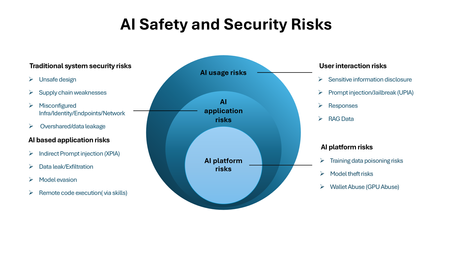
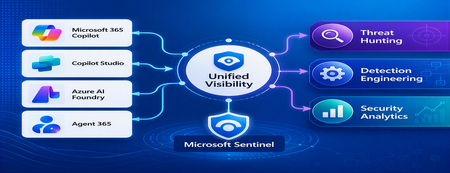
1. Introduction Enterprise adoption of Generative AI is accelerating rapidly through Microsoft 365 Copilot, Copilot Studio, Azure AI Foundry Agents, Security Copilot, and custom AI agents integrated with business applications. Unlike traditional SaaS applications, AI agents can: Access enterprise data Query internal knowledge repositories Invoke APIs and MCP tools Execute workflows Interact with business applications Make decisions on behalf of users While these capabilities improve productivity, they introduce a new attack surface that security teams must monitor and secure. Common AI threats include: Prompt Injection Cross Prompt Injection Attacks (XPIA) Jailbreak Attempts Unauthorized Tool Invocation Data Exfiltration through AI Agents Agent Identity Abuse Excessive Data Access Malicious MCP Tool Execution Traditional SOC monitoring platforms were designed for users, devices, applications and infrastructure—not autonomous AI systems. To address this challenge, Microsoft provides a comprehensive AI security monitoring framework built around: Agent 365 Observability Microsoft Agent Identities Microsoft Copilot Logs Defender XDR Defender for AI Microsoft Sentinel Together these components provide end-to-end observability of: User prompts Agent execution paths Tool invocations Safety signal detections Agent identities Security alerts 2. Reference Architecture AI Security Monitoring Architecture 3. Integration Architecture Microsoft provides multiple telemetry sources that complement one another. 3.1 Agent Runtime Telemetry Sentinel Data Connector Agent 365 Data Connector Table UnifiedAgentObservability Captures runtime behavior of AI agents including: User prompts Session IDs Conversation IDs Agent identities MCP tool invocations Connector invocations Tool arguments Tool responses Request payloads Response payloads Execution errors This dataset provides the forensic trail of everything an AI agent performed. 3.2 Agent Governance and Asset Inventory Sentinel Data Connector Microsoft Agent Identities Provides visibility into: Agent inventory Agent blueprint inventory Ownership Relationships Governance metadata Risk context This allows SOC teams to answer: Who owns this agent? What permissions does it have? Which business unit deployed it? Which related agents exist? 3.3 Copilot Audit and Usage Monitoring Sentinel Data Connector Microsoft Copilot Logs Connector Table CopilotActivity Provides: Copilot usage auditing Operational visibility User interaction tracking Useful for governance, compliance and adoption reporting. 3.4 AI Safety Telemetry Sentinel Data Connector Microsoft Defender XDR Connector Table CloudAppEvents CloudAppEvents provides AI safety signals such as: Prompt Shield detections Prompt Injection attempts Cross Prompt Injection Attacks (XPIA) Jailbreak-related verdicts Unsafe prompt classifications Think of CloudAppEvents as answering: "Was the prompt malicious?" 3.5 AI Security Alerts Sentinel Data Connectors Microsoft Defender XDR Microsoft Defender for Cloud Tables SecurityAlert SecurityIncident Used for: AI attack detections Security incidents Correlated investigation workflows 4. Understanding the Two Most Important AI Tables CloudAppEvents Focuses on AI Safety Questions answered: Was Prompt Shield triggered? Was this a jailbreak attempt? Was XPIA detected? Was the prompt suspicious? UnifiedAgentObservability Focuses on Agent Runtime Behavior Questions answered: What tool was invoked? Which connector executed? What arguments were passed? What data was returned? What actions did the agent perform? 5. Advanced Threat Hunting Scenarios The Agent365 Observability hunting guide contains several investigation scenarios that can be used directly in Microsoft Sentinel. Reference: Agent 365 Observability — AI Agent Telemetry Hunting https://github.com/SCStelz/security-investigator/blob/main/queries/cloud/agent365_observability.md 5.1 Prompt Injection Detection Detect prompts containing indicators such as: Ignore previous instructions Reveal system prompt Developer mode Disregard safety controls Investigation workflow: Review Tool Activity This allows analysts to determine whether a suspicious prompt resulted in downstream actions. 5.2 Session Reconstruction One of the most powerful capabilities of UnifiedAgentObservability is session reconstruction. Analysts can correlate: This creates complete forensic timelines. 5.3 MCP Tool Auditing Monitor all MCP activity including: query_lake Graph API tools ServiceNow connectors SharePoint connectors Custom enterprise tools Questions answered: Which tool was used? Who triggered it? What parameters were supplied? What data was returned? 5.4 Sensitive Data Access Monitoring Monitor AI agent interaction with: Employee records Customer data Financial information SharePoint repositories HR databases Useful for identifying: Data exfiltration attempts Excessive access patterns Sensitive data exposure 5.5 Query Lake Monitoring The GitHub hunting guide introduces monitoring of: query_lake RunAdvancedHuntingQuery Analysts can inspect: Actual KQL submitted Target workspaces Data sources queried Scope of access This provides visibility into AI-driven security investigations. 5.6 New Tool Detection Identify newly observed tool usage. Examples: Unauthorized MCP servers Newly registered connectors Unapproved tools Unexpected integrations This use case is particularly useful for governance programs. 5.7 Tool Failure Monitoring Monitor: Permission failures Connector failures Application errors Access-denied responses A sudden increase in failures may indicate: Reconnaissance activity Misconfiguration Privilege abuse attempts 6. Detection Engineering Opportunities Organizations can create Sentinel Analytics Rules for: 6.1 Prompt Injection Detection Developer Mode prompts Prompt Override attempts System Prompt disclosure requests 6.2 Jailbreak Attempt Detection Safety bypass attempts Role manipulation prompts Instruction override patterns 6.3 Unauthorized Tool Usage New MCP tools High-risk connectors Rare tool executions 6.4 Sensitive Data Access HR data queries Identity information retrieval Large-volume exports 6.5 Agent Identity Abuse Ownership changes Unexpected agent activity Agent-to-agent anomalies 7. Data Lake Exploration and Long-Term Analytics Because agent telemetry resides within Sentinel Data Lake, organizations can perform: Long-term AI investigations Historical AI attack analysis Agent baselining Governance reporting Trend analysis Tool inventory reporting Example dashboards include: Top Prompt Injection Attempts Most Active Agents High-Risk MCP Tools Agent Ownership Analysis AI Security Incidents Sensitive Data Access Trends 8. Summary AI agents represent the next major computing platform, but they also introduce a completely new attack surface. To effectively secure enterprise AI solutions, organizations require visibility across: User interactions Agent execution paths MCP tool usage Prompt safety signals Agent identities Security detections Microsoft Sentinel provides this unified view by integrating: Agent 365 Observability UnifiedAgentObservability Microsoft Agent Identities Microsoft Copilot Logs CloudAppEvents Defender XDR Defender for AI By combining AI runtime telemetry with AI safety signals and Defender detections, security teams can move beyond traditional monitoring and build a modern SOC capability for threat hunting, incident response, governance and forensic investigations across Microsoft 365 Copilot, Copilot Studio, Azure AI Foundry and future AI agent ecosystems. Reference: https://github.com/SCStelz/security-investigator/blob/main/queries/cloud/agent365_observability.mdBuilding an Auditable Security Layer for Agentic AI
Most agent failures do not look like breaches. They look like a normal chat, a normal answer, and a normal tool call. Until the next morning, when a single question collapses the whole story: who authorized that action. You think you deployed an agent. In reality, you deployed an unbounded automation pipeline that happens to speak English. I’m Hazem Ali — Microsoft AI MVP, Distinguished AI & ML Architect, Founder & CEO at Skytells. For over 20 years, I’ve built secure, scalable enterprise AI across cloud and edge, with a focus on agent security and sovereign, governed AI architectures. My work on these systems is widely referenced by practitioners across multiple regions. Hazem Ali honored to receive an official speaker invitation under the patronage of H.H. Sheikh Dr. Sultan bin Muhammad Al Qasimi, Member of the UAE Supreme Council and Ruler of Sharjah, to speak at the Sharjah International Conference on Linguistic Intelligence (SICLI), organized by the American University of Sharjah (AUS) and the Emirates Scholar Center for Research and Studies. This piece is a collaboration with Hammad Atta a Practice Lead – AI Security & Cloud Strategy and Dr. Yasir Mehmood , Dr Muhammad Zeeshan Baig, Dr. Muhammad Aatif, Dr. MUHAMMAD AZIZ UL HAQ. We align on one core idea: agent security is not about making the model behave. It is about building enforceable boundaries around the model and proving every privileged step. This article is meant to sit next to my earlier Tech Community piece, Zero-Trust Agent Architecture: How To Actually Secure Your Agents, and go one level deeper into the mechanics you can implement on Azure today. Let me break it down. The Principle: The model is not your boundary Let me break it down in the way I’d explain it in a design review. A boundary is something that still holds when the component on the other side is adversarial, confused, or simply wrong. An LLM is none of those reliably. In an agent, the model is not just a generator. It becomes a planner and scheduler. It decides when to retrieve, which tool to call, how to shape arguments, and when to loop. That means your real attack surface is not “bad output.” It is the control-flow graph the model is allowed to traverse. So if your “security” lives inside the prompt, you are putting policy in the same token stream the attacker can influence. That is not a boundary. That is a suggestion. The only stable design is to treat the model like an untrusted proposer and the runtime like the verifier. Here is the chain I use. Each gate is external to the model and survives manipulation. Context Gate: Everything that enters the model is treated as executable influence, not “text.” Capability Gate: Tools are invoked as constrained capabilities, not free-form function calls. Evidence Gate: Every privileged step produces a verifiable artifact, not a story. Retrieval Control Plane: What the agent can see is governed by labels and identity, not prompt etiquette. Detection Layer: Drift and probing become alerts, not surprises. Now the rare part, the part most people miss: the boundary is not “block or allow.” The boundary is stateful. Once the runtime sees a suspicious signal, the entire session must transition into a degraded capability state, and every downstream gate must enforce that state. 1. Treat context as executable influence, and preserve provenance If you do RAG, your documents are not “supporting info.” They are an input channel. That makes the biggest prompt-injection risk not the user. It is your documents. Microsoft’s Prompt Shields covers user prompt attacks (scanned at the user input intervention point) and document attacks (scanned at the user input and tool response intervention points). When enabled, each request returns annotation results with detected and filtered values that your runtime can translate into a policy decision: block, degrade, or allow. Provenance Collapse. Most teams concatenate prompt + policy + retrieved chunks into one blob. The moment you do that, you lose the one thing you need for a defensible boundary: you can no longer reliably tell which tokens came from where. That is how “context” becomes “authority.” For indirect/document attacks, Microsoft guidance recommends delimiting context documents inside the prompt using """<documents> ... </documents>""" to improve indirect attack detection. That delimiter is not formatting. It is a provenance marker that improves indirect attack detection through Prompt Shields. Minimal, practical pattern: // Provenance-preserving prompt construction for indirect/document attack detection function buildPrompt(system: string, user: string, retrievedDocs: string[]): string { const docs = retrievedDocs.map((d) => `- ${d}`).join("\n"); return [ system, "", `User: ${user}`, "", `""" <documents>\n${docs}\n</documents> """`, ].join("\n"); } Then treat Prompt Shields output as a session security event, not a banner: type RiskState = "NORMAL" | "SUSPECT" | "BLOCK"; type FilterPolicy = "BLOCK_ON_FILTERED" | "DEGRADE_ON_FILTERED"; function computeRiskState( shields: { detected: boolean; filtered?: boolean }, labels: string[], policy: FilterPolicy = "DEGRADE_ON_FILTERED", ): RiskState { // detected => hard stop if (shields.detected) return "BLOCK"; // filtered is an annotation signal: block or degrade by policy if (shields.filtered) { return policy === "BLOCK_ON_FILTERED" ? "BLOCK" : "SUSPECT"; } // example: sensitivity-based degradation independent of shield hits const sensitive = labels.some((l) => ["Confidential", "HighlyConfidential", "Regulated"].includes(l), ); return sensitive ? "SUSPECT" : "NORMAL"; } When the signal is clear, you block and log. When it is suspicious, you do not warn. You downgrade authority. QSAF Alignment: Prompt Injection Protection (Domain 1): QSAF-PI-001 (static pattern blacklist), QSAF-PI-002 (dynamic LLM analysis), QSAF-PI-003 (semantic embedding comparison) All addressed by Prompt Shields and provenance marking. Context Manipulation (Domain 2): QSAF-RC-004 (context drift), QSAF-RC-007 (nested prompt injection) – mitigated by stateful risk calculation. 2. Tools are capabilities with constraints, not functions When the model proposes a tool call, your runtime should re-derive what is allowed from identity plus risk state, then enforce it at the gateway. type ToolRequest = { tool: string; args: unknown; }; type Capabilities = { allowWrite: boolean; allowedTools: Set<string>; }; function deriveCapabilities(risk: RiskState, roles: string[]): Capabilities { const baseAllowed = new Set(["search_kb", "get_profile", "summarize"]); const isAdmin = roles.includes("Admin"); if (risk === "SUSPECT") { return { allowWrite: false, allowedTools: baseAllowed }; } if (risk === "BLOCK") { return { allowWrite: false, allowedTools: new Set() }; } // NORMAL const tools = new Set([ ...baseAllowed, ...(isAdmin ? ["update_record", "issue_refund"] : []), ]); return { allowWrite: isAdmin, allowedTools: tools }; } function authorizeTool(req: ToolRequest, caps: Capabilities): void { if (!caps.allowedTools.has(req.tool)) throw new Error("ToolNotAllowed"); if (!caps.allowWrite && req.tool.startsWith("update_")) { throw new Error("WriteDenied"); } } The model can ask. It cannot grant itself permission. QSAF Alignment: Plugin Abuse Monitoring (Domain 3): QSAF-PL-001 (whitelist enforcement), QSAF-PL-003 (restrict sensitive plugins), QSAF-PL-006 (rate‑limiting) – implemented via capability derivation and gateway policies. Behavioral Anomaly Detection (Domain 5): QSAF-BA-006 (plugin execution pattern deviance) – detected by comparing actual calls against derived capabilities. The Integrity Gate: Hash-chain the authority, not the output Let me add the part that makes investigations clean. Most teams treat integrity like an audit log problem. That is not enough. Logs explain. Integrity proves. The hard truth is that agent authority is assembled out of pieces: the system instruction, the user prompt, retrieved chunks, risk annotations, and finally the tool intent. If you do not bind those pieces together cryptographically, an incident review becomes a story-telling session. This is why QSAF has an entire domain for payload integrity and signing, including prompt hash signing, nonce or replay protection, and a hash chain lineage that tracks how a session evolved. Here is how you can map that into the runtime verifies. You build a canonical “authority envelope” for every privileged hop, compute a digest, and then: link it to the previous hop (hash chain) include a nonce (replay control) sign the digest with Azure Key Vault (Key Vault signs digests, it does not hash your content for you) import crypto from "crypto"; type AuthorityEnvelope = { sessionId: string; turnId: number; policyVersion: string; // provenance-preserved components systemHash: string; userHash: string; documentsHash: string; // hash of structured retrieved chunks (not just rendered text) shields: { detected: boolean; filtered: boolean; }; riskState: "NORMAL" | "SUSPECT" | "BLOCK"; // proposed action (if any) tool?: { name: string; argsHash: string; }; // anti-replay + lineage nonce: string; prevDigest?: string; ts: string; }; function sha256(bytes: string): string { return crypto.createHash("sha256").update(bytes).digest("hex"); } // Canonicalization matters. JSON.stringify is OK if you control key order. // For cross-language, use RFC 8785 (JCS) canonical JSON. function canonicalJson(x: unknown): string { return JSON.stringify(x); } function buildEnvelope( input: Omit<AuthorityEnvelope, "nonce" | "ts">, ): AuthorityEnvelope { return { ...input, nonce: crypto.randomUUID(), ts: new Date().toISOString(), }; } function digestEnvelope(env: AuthorityEnvelope): string { return sha256(canonicalJson(env)); } Then you call Key Vault to sign that digest (REST sign), and optionally verify later (REST verify). The rare failure mode this blocks is subtle: authority splicing. Without a hash chain, it is possible for the runtime to correctly validate a tool call, but later be unable to prove which retrieved chunk, which Prompt Shields result, and which policy version were in force when that call was authorized. With the chain, every privileged hop becomes tamper-evident. This is the point: Prompt Shields tells you “this looks dangerous.” Document delimiters preserve provenance. The integrity gate makes the runtime able to say, later, with evidence: “This is exactly what I accepted as authority.” QSAF Alignment: Payload Integrity & Signing (Domain 6): QSAF-PY-001 (prompt hash signing), QSAF-PY-005 (nonce/replay control), QSAF-PY-006 (hash chain lineage) – directly implemented via the envelope and chaining. Tools must sit behind a wall that can say “no” Tool calls are where language becomes authority. If an agent can call APIs that mutate state, your security story is not about the response text. It is about whether the tool call is allowed under explicit policy. This is exactly where Azure API Management belongs: as the tool gateway that enforces authentication and authorization before any tool request reaches your backend. The validate-jwt policy is the canonical enforcement mechanism for validating JWTs at the gateway. The design goal is simple: The model can request a tool call. The gateway decides if it is permitted. A capability token approach keeps it clean: <!-- APIM inbound policy sketch --> <validate-jwt header-name="Authorization" failed-validation-httpcode="401"> <required-claims> <claim name="scp"> <value>tools.read</value> </claim> </required-claims> </validate-jwt> The claim name (scp, roles, or custom claims) depends on your token issuer; the point is enforcing authorization at the gateway, not inside model text. Now you can enforce “read-only mode” by issuing tokens that simply do not carry write scopes. The model can try to call a write tool. It still gets denied by policy. Evidence is not logs. Evidence is a signed chain. Logs help you debug. Evidence helps you prove. So you hash the session envelope and the tool intent, then sign the digest using Azure Key Vault Keys. Key Vault sign creates a signature from a digest, and verify verifies a signature against a digest. Key Vault does not hash your content for you. Hash locally, then sign the digest.), and Key Vault documentation is explicit that signing is sign-hash, not “sign arbitrary content.” You hash locally, then ask Key Vault to sign the hash. import crypto from "crypto"; const sha256 = (x: unknown): string => crypto.createHash("sha256").update(JSON.stringify(x)).digest("hex"); type IntentEnvelope = { sessionId: string; userId: string; promptHash: string; documentsHash: string; tool: string; argsHash: string; nonce: string; ts: string; policyVersion: string; }; function buildIntent( sessionId: string, userId: string, prompt: string, docs: unknown, tool: string, args: unknown, policyVersion: string, ): IntentEnvelope { return { sessionId, userId, promptHash: sha256(prompt), documentsHash: sha256(docs), tool, argsHash: sha256(args), nonce: crypto.randomUUID(), ts: new Date().toISOString(), policyVersion, }; } Once you do this, your system stops “explaining.” It starts proving. Govern what the agent can see, not only what it can say RAG without governance eventually becomes a data exposure feature. This is why I treat retrieval as a governed operation. Microsoft Purview sensitivity labels give you a practical way to classify content and build retrieval rules on top of that classification. Microsoft documents creating and configuring sensitivity labels in Purview. The pattern is simple: Label the corpus. Filter retrieval by label and identity policy. Log label distribution per completion. Alert when a low-privilege identity retrieves high-sensitivity labels. This is how you keep sovereignty real. Not in a slide deck. In the retrieval path. Operate it like a security system: posture and detection Inline gates reduce risk. They do not eliminate it. Systems drift. People add tools. Policies get loosened. Attacks evolve. Microsoft Defender for Cloud’s Defender CSPM plan includes AI security posture management for generative AI apps and AI agents (Preview), including discovery/inventory of AI agents deployed with Azure AI Foundry. Then you use Microsoft Sentinel to turn your telemetry into incidents, with scheduled analytics rules. Your detections should match the gates you built: Repeated Prompt Shields detections from the same identity or session. Tool-call spikes after a suspicious document signal. APIM denials for write endpoints from sessions in read-only mode. High-sensitivity label retrieval by identities that should never touch that tier. QSAF Alignment: Behavioral Anomaly Detection (Domain 5): QSAF-BA-001 (session entropy), QSAF-BA-004 (repeated intent mutation), QSAF-BA-007 (unified risk score) – detected via Sentinel rules. Cross‑Environment Defense (Domain 9): QSAF-CE-006 (coordinated alert response) – using Sentinel incidents and playbooks. Where the reference checklist fits, quietly Behind the scenes, we use a control checklist lens to ensure we cover prompt/context attacks, tool misuse, integrity, governance, and operational monitoring. The point is not to rename Microsoft features into framework terms. The point is to make the system enforceable and auditable using Azure-native gates. Closing Zero trust for agents is not a slogan. It is a build. Prompt Shields gives you a front gate for both user prompt attacks and document attacks, with clear annotations like detected and filtered. API Management gives you a tool boundary that can say “no” regardless of what the model tries, using validate-jwt. Signed intent gives you evidence, using Key Vault’s sign-hash semantics. Purview labels give you governed retrieval. Sentinel and Defender give you an operating model, not wishful thinking. If you want the conceptual spine and the architectural principles that frame this pipeline, start with my earlier Tech Community pieces, then come back here and implement the gates. Thanks for reading — Hazem Ali542Views1like0CommentsOn-device AI and security: What really matters for the enterprise
AI is evolving, and so is the way businesses run it. Traditionally, most AI workloads have been processed in the cloud. When a user gives an AI tool a prompt, that input is sent over the internet to remote servers, where the model processes it and sends back a result. This model supports large-scale services like Microsoft 365 Copilot, which integrates AI into apps like Word, Excel, and Teams. Now, a new capability is emerging alongside cloud-based AI. AI can also run directly on a PC—no internet connection or remote server required. This is known as on-device processing. It means the data and the model stay on the device itself, and the work is done locally. Modern CPUs and GPUs are beginning to support this kind of processing. But neural processing units (NPUs), now included in enterprise-grade PCs such as Microsoft Surface Copilot+ PCs, are specifically designed to run AI workloads efficiently. NPUs are designed to perform the types of operations AI needs at high speed while using less power. That makes them ideal for features that need to work instantly, in a sustained fashion in the background, or without an internet connection. A flexible approach to AI deployment NPUs can enable power-efficient on-device processing, fast response times with small models, consistent functionality in offline scenarios, and more control over how data is processed and stored. For organizations, it adds flexibility in choosing how and where to run AI—whether to support real-time interactions at the edge or meet specific data governance requirements. At the same time, cloud-based AI remains essential to how organizations deliver intelligent services across teams and workflows. Microsoft 365 Copilot, for example, is powered by cloud infrastructure and integrates deeply across productivity applications using enterprise-grade identity, access, and content protections. Both models serve different but complementary needs. On-device AI adds new options for responsiveness and control. Cloud-based AI enables broad integration and centralized scale. Together, they give businesses flexibility to align AI processing with the demands of the use case, whether for fast local inference or connected collaboration. For business and IT leaders, the question is not which model is better but how to use each effectively within a secure architecture. That starts with understanding where data flows, how it is protected, and what matters most at the endpoint. Understanding AI data flow and its security impact AI systems rely on several types of input such as user prompts, system context, and business content. When AI runs in the cloud, data is transmitted to remote servers for processing. When it runs on the device, processing happens locally. Both approaches have implications for security. With cloud AI, protection depends on the strength of the vendor’s infrastructure, encryption standards, and access controls. Security follows a shared responsibility model where the cloud provider secures the platform while the enterprise defines its policies for data access, classification, and compliance. Microsoft’s approach to data security and privacy in cloud AI services Although the purpose of this blog post is to talk about on-device AI and security, it’s worth a detour to briefly touch on how Microsoft approaches data governance across its cloud-based AI services. Ultimately, the goal is for employees to be able to use whatever tools work best for what they want to get done, and they may not differentiate between local and cloud AI services. That means having a trusted provider for both is important for long-term AI value and security in the organization. Microsoft’s generative AI solutions, including Azure OpenAI Service and Copilot services and capabilities, do not use your organization’s data to train foundation models without your permission. The Azure OpenAI Service is operated by Microsoft as an Azure service; Microsoft hosts the OpenAI models in Microsoft's Azure environment and the Service does not interact with any services operated by OpenAI (e.g. ChatGPT, or the OpenAI API). Microsoft 365 Copilot and other AI tools operate within a secured boundary, pulling from organization-specific content sources like OneDrive and Microsoft Graph while respecting existing access permissions. For more resources on data privacy and security in Microsoft cloud AI services, check out Microsoft Learn. Local AI security depends on a trusted endpoint When AI runs on the device, the data stays closer to its source. This reduces reliance on network connectivity and can help limit exposure in scenarios where data residency or confidentiality is a concern. But it also means the device must be secured at every level. Running AI on the device does not inherently make it more or less secure. It shifts the security perimeter. Now the integrity of the endpoint matters even more. Surface Copilot+ PCs are built with this in mind. As secured-core PCs, they integrate hardware-based protections that help guard against firmware, OS-level, and identity-based threats. TPM 2.0 and Microsoft Pluton security processors provide hardware-based protection for sensitive data Hardware-based root of trust verifies system integrity from boot-up Microsoft-developed firmware can reduce exposure to third-party supply chain risks and helps address emerging threats rapidly via Windows Update Windows Hello and Enhanced Sign-in Security (ESS) offer strong authentication at the hardware level These protections and others work together to create a dependable foundation for local AI workloads. When AI runs on a device like this, the same enterprise-grade security stack that protects the OS and applications also applies to AI processing. Why application design is part of the security equation Protecting the device is foundational—but it’s not the whole story. As organizations begin to adopt generative AI tools that run locally, the security conversation must also expand to include how those tools are designed, governed, and managed. The value of AI increases dramatically when it can work with rich, contextual data. But that same access introduces new risks if not handled properly. Local AI tools must be built with clear boundaries around what data they can access, how that access is granted, and how users and IT teams can control it. This includes opt-in mechanisms, permission models, and visibility into what’s being stored and why. Microsoft Recall (preview) on Copilot+ PCs is a case study in how thoughtful application design can make local AI both powerful and privacy conscious. It captures snapshots of the desktop embedded with contextual information, enabling employees to find almost anything that has appeared on their screen by describing it in their own words. This functionality is only possible because Recall has access to a wide range of on-device data—but that access is carefully managed. Recall runs entirely on the device. It is turned off by default—even when enabled by IT—and requires biometric sign-in with Windows Hello Enhanced Sign-in Security to activate. Snapshots are encrypted and stored locally, protected by Secured-core PC features and the Microsoft Pluton security processor. These safeguards ensure that sensitive data stays protected, even as AI becomes more deeply embedded in everyday workflows. IT admins can manage Recall through Microsoft Intune, with policies to enable or disable the feature, control snapshot retention, and apply content filters. Even when Recall is enabled, it remains optional for employees, who can pause snapshot saving, filter specific apps or websites, and delete snapshots at any time. This layered approach—secure hardware, secure OS, and secure app design—reflects Microsoft’s broader strategy for responsible local AI and aligns to the overall Surface security approach. It helps organizations maintain governance and compliance while giving users confidence that they are in control of their data and that the tools are designed to support them, not surveil them. This balance is essential to building trust in AI-powered workflows and ensuring that innovation doesn’t come at the expense of privacy or transparency. For more information, check out the related blog post. Choosing the right AI model for the use case Local AI processing complements cloud AI, offering additional options for how and where workloads run. Each approach supports different needs and use cases. What matters is selecting the right model for the task while maintaining consistent security and governance across the entire environment. On-device AI is especially useful in scenarios where organizations need to reduce data movement or ensure AI works reliably in disconnected environments In regulated industries such as finance, legal, or government, local processing can help support compliance with strict data-handling requirements In the field, mobile workers can use AI features such as document analysis or image recognition without relying on a stable connection For custom enterprise models, on-device execution through the Windows AI Foundry Local lets developers embed AI in apps while maintaining control over how data is used and stored These use cases reflect a broader trend. Businesses want more flexibility in how they deploy and manage AI. On-device processing makes that possible without requiring a tradeoff in security or integration. Security fundamentals matter most Microsoft takes a holistic view of AI security across cloud services, on-device platforms, and everything in between. Whether your AI runs in Azure or on a Surface device, the same principles apply. Protect identity, encrypt data, enforce access controls, and ensure transparency. This approach builds on the enterprise-grade protections already established across Microsoft’s technology stack. From the Secure Development Lifecycle to Zero Trust access policies, Microsoft applies rigorous standards to every layer of AI deployment. For business leaders, AI security extends familiar principles—identity, access, data protection—into new AI-powered workflows, with clear visibility and control over how data is handled across cloud and device environments. Securing AI starts with the right foundations AI is expanding from cloud-only services to include new capable endpoints. This shift gives businesses more ways to match the processing model to the use case without compromising security. Surface Copilot+ PCs support this flexibility by delivering local AI performance on a security-forward enterprise-ready platform. When paired with Microsoft 365 and Azure services, they offer a cohesive ecosystem that respects data boundaries and aligns with organizational policies. AI security is not about choosing between cloud or device. It is about enabling a flexible, secure ecosystem where AI can run where it delivers the most value—on the endpoint, in the cloud, or across both. This adaptability unlocks new ways to work, automate, and innovate, without increasing risk. Surface Copilot+ PCs are part of that broader strategy, helping organizations deploy AI with confidence and control—at scale, at speed, and at the edge of what’s next.1.8KViews1like0Comments