ai , employment rights , technology. health and safety
1 TopicAI Gateway tier of API Management now in public preview
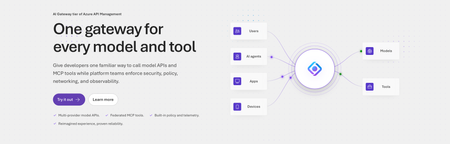
Today, we are introducing the AI Gateway tier of Azure API Management, now in public preview. It gives platform teams a purpose-built experience built specifically for AI workloads - publishing and governing models and MCP servers. Controls are configured through policy cards rather than XML and expressions, and the portal experience and control plane are structured around models, MCP servers, and tools rather than APIs. (For brevity, we refer to the AI Gateway tier as AI Gateway throughout the rest of this article.) AI Gateway is built on Azure API Management, bringing proven operational capabilities to AI workloads. The resource runs in your subscription, uses your Entra tenant, and sends telemetry to destinations you control. The operating model will be familiar to existing API Management customers, but the interface is built around AI workloads. The AI Gateway tier is intended for teams that want this focused experience; other API Management tiers remain the right choice when organizations also need general-purpose API management or capabilities not included in the AI Gateway experience. A practical model for platform teams The AI Gateway gives platform teams a shared place to manage models, MCP servers, policies, and observability destinations, with access controlled through Azure RBAC. For example, a central platform group can connect a set of approved models and tools and publish them for application teams. The application teams can test those assets in the test console and build against them without routing every change through the central group. The platform group still owns the shared guardrails and can see how the assets are being used. After an asset is published, developers can create a named runtime key and begin calling the gateway immediately. Bring the models and tools you already use Most organizations don't standardize on a single model provider. Different models are selected based on quality, latency, cost, geography, or specialized capabilities. The preview supports models from Microsoft Foundry including OpenAI, Anthropic, Mistral, and other Foundry hosted models, as well as models hosted in AWS Bedrock, Google Vertex AI, OpenAI, and Anthropic. A guided wizard simplifies importing models from Microsoft Foundry. Other providers can be added by configuring a connection, with backend authentication configured as part of that connection. All published models are available under the same stable endpoint. Applications continue to use supported API formats such as OpenAI Chat Completions and Responses or Anthropic Messages directly or via SDKs. The AI Gateway extends governance beyond models to the MCP servers and tools agents use to interact with enterprise systems. You can expose an existing MCP server over SSE or Streamable HTTP, turn all or selected operations from a REST API into an MCP server by uploading its OpenAPI specification, or use more than 1,400 connector-backed tools from the Power Platform and Logic Apps library. You can also federate multiple MCP servers behind a single server, so an agent connects once and sees the tools across those servers. Backend authentication supports an API key, OAuth client credentials, managed identity, or mTLS. Governance that's built in Organizations need consistent governance across models and MCP servers without requiring every application team to implement those capabilities independently. The AI Gateway portal presents governance policies through an intuitive card-based experience rather than requiring policy XML. The same policies are expressed as JSON properties, making them easy to manage as infrastructure as code and to audit and enforce across a fleet with Azure Policy. In the public preview, those cards cover request and token rate limits, token quotas, Azure AI Content Safety, and fallback to a secondary model. Policies are applied per asset, making it clear which controls protect each model or MCP server. OpenTelemetry-based token metrics The AI Gateway emits token-usage metrics through OpenTelemetry, with attributes following GenAI and cloud semantic conventions. Metrics can be sent to Application Insights, Datadog, Splunk, Grafana Cloud, or another OTLP endpoint. The portal provides a monitoring view over Application Insights data. Better together: Microsoft Foundry and AI Gateway With AI Gateway, teams can extend the same governance controls, for example token rate limits and quotas, across models hosted in Microsoft Foundry and models hosted elsewhere. Foundry and non-Foundry models are published through gateway-managed endpoints, giving applications and agents a consistent way to access governed models regardless of where they are hosted. Foundry-hosted agents can consume curated sets of tools from Foundry toolboxes, with access to the underlying MCP servers and APIs governed through AI Gateway. Together, Microsoft Foundry and AI Gateway cover the enterprise application lifecycle: Foundry for building and running AI applications, and AI Gateway for publishing, governing, and observing models, tools, and MCP servers across your AI estate. The new AI Gateway tier will soon be available through the gateway experience in Microsoft Foundry portal. We are working toward a seamless, integrated AI Gateway experience within Foundry portal and will share more about that work separately. Available today in public preview The AI Gateway tier is available today at no cost in public preview in East US 2 and Sweden Central. Pricing will be shared separately. To provision a resource, add a model or MCP server, and make a first call click this to go to the AI Gateway tier portal and try it. If you prefer to start from code, use a sample to deploy all the required resources for a Foundry-hosted agent configured to access its model and tools through AI Gateway. We look forward to your feedback as we continue to rapidly evolve AI Gateway.3.6KViews3likes4CommentsComing soon: Updated Partner Center verification experience for the Microsoft AI Cloud Partner Program and Cloud Solution Providers
Starting July 28, 2026, we will be modernizing the Microsoft AI Cloud Partner Program and Cloud Solution Provider user experience in Partner Center to streamline how partners navigate vetting, along with a new look and feel and a more consistent verification flow. Learn more Be sure to follow our Cloud Solution Provider Partner discussion board where you connect with subject matter experts and other CSP partners.84Views0likes0CommentsSpin Up MongoDB Atlas Clusters in Azure (Preview)
Your data platform just got a lot closer to home. You can now create MongoDB Atlas projects and deploy clusters directly from the Azure portal - the same place you already manage the rest of your cloud. This builds on the general availability of MongoDB Atlas as an Azure Native Integration. Back then, you could provision an Atlas organization from Azure and manage billing through the Azure Marketplace. Now the workflow goes all the way down to the thing that runs your app: the cluster. Atlas Projects & Clusters An Atlas Project is a logical container that groups clusters and related resources within your Atlas organization. Create one per app, team, or environment and then deploy clusters into it. An Atlas cluster is a fully managed MongoDB deployment running in the cloud. It is where your data lives and where it scales, replicates, backs itself up, and serves every read and write your application makes. Getting the cluster right is what turns a project into a production-ready app: Performance & scale - pick a tier that matches your traffic, from free experiments to high-throughput dedicated workloads. Data residency - the Azure region you choose for the cluster is where your data is stored, so you stay aligned with compliance requirements. Resilience - clusters come with backups and health state you can view at a glance. Organization - clusters live inside projects, giving you clean logical boundaries for teams, environments, and apps. What you can do now, right from Azure Create and browse Atlas projects from your MongoDB Atlas resource. Deploy clusters - Free (M0), Flex, or dedicated M10 / M30 tiers. Choose the Azure region where each cluster's data lives. View cluster details: MongoDB version, region, tier, backups, and state. Keep billing unified through your existing Azure Marketplace plan. Get started in minutes If you already have a MongoDB Atlas resource in Azure, you're four clicks from a running cluster: In the Azure portal, open your MongoDB Atlas resource (search All resources if you need to find it). In the service menu, select Projects (preview), then + Create project and give it a unique name Open the project and, in the Clusters section, select + Create Cluster. Pick a tier, enter a cluster name and Azure region, and select Create. That's it - your cluster deploys. Don't have an Atlas resource yet? Search for MongoDB Atlas in the Azure portal and create one against your subscription first to follow the steps above. You'll need the Owner role on the Atlas organization to create projects and clusters. Choosing your cluster tier Start small and grow. You can begin free and move up as your app takes off. Built for what's next: vector search & AI agents A cluster is the foundation for AI-powered apps. MongoDB Atlas brings native vector search right alongside your operational data, so you can build semantic search and Retrieval-Augmented Generation (RAG) experiences that ground large language models in Foundry in your own enterprise data. That story goes further with agents. As covered in Build and connect Microsoft Foundry agents to MongoDB Atlas, the MongoDB MCP Server is available in the Microsoft Foundry Tool Catalog - letting agents run vector search and database operations against the very clusters you just deployed, with enterprise-grade governance built in. Ready to build? Head to the Azure portal, create a project, and deploy your first cluster today. Start free, then scale when you're ready. Create projects and clusters in MongoDB Atlas — step-by-step docs MongoDB Atlas is generally available as an Azure Native Integration Connect Microsoft Foundry agents to MongoDB Atlas Create a free Azure account53Views0likes0CommentsNew Microsoft 365 Certified: AI Services Administrator Associate Certification
As AI moves deeper into mission-critical work, organizations need trusted administrators who can govern access, secure data, monitor services, and keep Microsoft 365 AI experiences running at enterprise scale. Show you’re ready with new Exam AB-650 (beta). AI-powered productivity is no longer just about enabling new capabilities, it’s about operating them with the right controls, safeguards, and visibility. Organizations need administrators who can help make Microsoft 365, Microsoft 365 Copilot, agents, and connected AI services secure, compliant, reliable, and scalable across the enterprise. The new Microsoft 365 Certified: AI Services Administrator Associate Certification validates the skills to configure, manage, secure, govern, and continuously optimize Microsoft 365 tenants, workloads, and AI services so organizations can adopt AI with confidence and drive effective outcomes at scale. To earn this Microsoft Certification, you’ll need to pass Exam AB-650: Administering Microsoft 365 and AI Services, currently in beta. Is this the right Certification for you? Candidates for this Certification: Configure, manage, secure, and govern Microsoft 365 tenants, workloads, and AI services, including Copilot, agents, and connected AI capabilities. Govern data access, protect information, and support collaboration between users and agents. Operate and continuously optimize Microsoft 365 and AI services at enterprise scale, helping to ensure reliable and effective outcomes in an AI-powered workplace. Candidates should have experience with Microsoft 365 workloads and Microsoft Entra ID, an understanding of Defender XDR capabilities, and familiarity with Microsoft Graph PowerShell. Ready to prove your skills? Take advantage of the discounted beta exam offer. The first 300 people who take Exam AB-650 (beta) on or before August 18, 2026, can get 80% off. To receive the discount, when you register for the exam and are prompted for payment, use code AB-650SkyClub . This is not a private access code. The seats are offered on a first-come, first-served basis. As noted, you must take the exam on or before August 18, 2026. Please note that this discount is not available in Turkey, Pakistan, India, or China. How to prepare Get ready to take Exam AB-650 (beta): Review the Exam AB-650 (beta) page for training resources, exam registration, and other details. The Exam AB-650 study guide explores key topics covered in the exam. Connect with Microsoft Training Services Partners in your area for in-person offerings. Need other preparation ideas? Check out Just How Does One Prepare for Beta Exams? Ready to get started? You can take Certification exams online, from your home or office. Get the details in Online proctored exams: What to expect and how to prepare. Remember, only the first 300 candidates can get 80% off Exam AB-650 (beta) with code AB-650SkyClub on or before August 18, 2026. Beta exam rescoring begins when the exam goes live, with final results released approximately 10 days later. For more details, read Creating high-quality exams: The path from beta to live. Stay tuned for general availability of this Certification in October 2026. Additional information For more Certification updates, read our recent blog post, Microsoft Credentials roundup: June 2026. Follow our credentials news on The Skills Hub Blog as we roll out additional new Certifications in August and September 2026. Join our Microsoft Worldwide Learning SME Group for Credentials on LinkedIn for beta exam alerts and opportunities to help shape future Microsoft learning and assessments. Explore Microsoft Credentials on AI Skills Navigator.8KViews4likes32CommentsGive Your E-Commerce App a Memory: Adding Agents That Actually Remember Your Customers
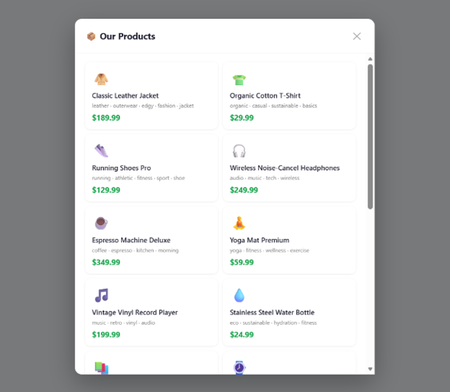
Ever shopped online and felt like the app had no idea who you are? You browse jackets every week, you told the chatbot you hate polyester, and yet it keeps showing you the same generic recommendations. That’s the problem. Most e-commerce apps treat every interaction as a blank slate. What if your app could remember? What if a customer could say “I told you last week I like leather jackets” and the app actually knew that? That’s what we’re building here — an AI shopping assistant with persistent memory, powered by Microsoft Agent Framework and SQL Server. The Problem: Amnesia in E-Commerce Traditional e-commerce chatbots have a fundamental issue — they forget everything the moment the session ends. Here’s what that looks like in practice: Monday: > Customer: “I’m looking for a warm winter jacket, something in leather” > Bot: “Great! Here are some leather jackets…” Wednesday: > Customer: “Show me more options like what we discussed” > Bot: “I’m sorry, could you tell me what you’re looking for?” The customer told you their preferences. They invested time in a conversation. And the app just… forgot. This isn’t just a bad user experience — it’s a missed opportunity. Every preference a customer shares is data you could use to serve them better next time. The Solution: An Agent That Remembers At a high level, what we want is simple: Chats naturally — the customer can talk about what they like and don’t like. Remembers across sessions — log out, come back tomorrow, and it still knows you prefer leather over polyester. Makes smart recommendations — uses the full conversation history to suggest products that actually match. The trick isn’t building a chatbot — that part is easy these days. The trick is giving it memory that persists and scales. Our Architecture The architecture has three layers: a FastAPI backend serving a browser SPA, conversational agents built on Microsoft Agent Framework, and SQL Server as the persistent memory layer. Architecture diagram The key piece that ties it all together is the history provider — a component that plugs into the framework and handles loading/saving conversation history automatically. The agent doesn’t manage its own memory; the framework does, through this provider abstraction. Why Microsoft Agent Framework Microsoft Agent Framework is an open-source Python framework for building AI agents. Think of it as the plumbing between your application logic and the LLM — it handles sessions, conversation history, context injection, and tool execution so you can focus on what your agent actually does. Why use it instead of rolling your own? Session management — built-in support for creating and tracking user sessions. Context providers — a clean abstraction for injecting history, user profiles, or any other context before each LLM call. Provider pattern — swap out your storage backend (SQL Server, Cosmos DB, in-memory) without changing agent code. Tool integration — define functions the agent can call, and the framework handles the execution loop. At its simplest, creating an agent looks like this: from agent_framework import Agent agent = Agent( client=chat_client, instructions="You are a helpful assistant.", ) session = agent.create_session() response = await agent.run("Hello!", session=session) print(response) That gives you a stateless agent — no memory between calls. To add memory, you provide a context provider that loads and saves messages: from agent_framework import Agent, BaseHistoryProvider class MyHistoryProvider(BaseHistoryProvider): async def get_messages(self, session_id, **kwargs): # Load messages from your storage return load_from_db(session_id) async def save_messages(self, session_id, messages, **kwargs): # Persist messages to your storage save_to_db(session_id, messages) agent = Agent( client=chat_client, instructions="You are a helpful assistant.", context_providers=[MyHistoryProvider()] ) The framework calls get_messages() before each run and save_messages() after. Your agent now has memory — and you didn’t have to manually wire load/save into every request handler. Why SQL Server for the Memory Layer So, we need a database behind that history provider. Why SQL Server over, say, PostgreSQL? Both are solid, relational databases. Both can store conversation history just fine. But for this use case — agent memory that starts local and grows to production — SQL Server has a smoother story: Consideration SQL Server PostgreSQL Local dev One Docker command, no config files Needs pg_hba.conf, postgresql.conf tuning Cloud path Docker → Azure SQL Database, same driver, zero code changes Docker → various managed options (Cloud SQL, RDS, Azure DB for PostgreSQL), often with driver/extension differences Managed scaling Azure SQL auto-scales compute, Hyperscale handles 100TB+, license-free option Managed Postgres varies by provider, Citus for scale-out adds complexity Free tier 10 free databases per Azure subscription Varies by cloud provider Agent framework fit First-class mssql_python driver, tested with MAF samples Works, but you’re wiring your own driver integration The short version: PostgreSQL is a great database, but SQL Server gives us a single continuum from docker run on a laptop all the way to a globally distributed managed service — same engine, same queries, same connection driver. When your agent goes from prototype to production, you change a connection string, not your architecture. We’ll go deeper on the cloud scaling story later in this post. For now, let’s build the thing. Setting Up the Infrastructure Getting SQL Server running locally is one Docker command: docker run -d ` --name sql ` -e "ACCEPT_EULA=Y" ` -e "MSSQL_SA_PASSWORD=YourStrong!Passw0rd" ` -p 1433:1433 ` -v sqlvolume:/var/opt/mssql ` mcr.microsoft.com/mssql/server:2022-latest We also need local LLMs via Ollama — Llama 3.1 for conversational quality and Phi-3 Mini for fast structured recommendations: foundry download llama3.1 foundry download phi3:mini And then our Python dependencies: cd commerce-agent uv sync uv pip install fastapi uvicorn httpx The Database Schema The schema is straightforward — Users, Sessions, and ChatHistory. The important relationship is that ChatHistory is scoped to a session, and sessions belong to users. This means each user gets their own isolated conversation history. CREATE TABLE Users ( Id INT IDENTITY PRIMARY KEY, Username NVARCHAR(100) UNIQUE NOT NULL, DisplayName NVARCHAR(200) NOT NULL, CreatedAt DATETIME2 DEFAULT GETUTCDATE() ) CREATE TABLE Sessions ( Id NVARCHAR(100) PRIMARY KEY, UserId INT NOT NULL FOREIGN KEY REFERENCES Users(Id), CreatedAt DATETIME2 DEFAULT GETUTCDATE(), LastActiveAt DATETIME2 DEFAULT GETUTCDATE() ) CREATE TABLE ChatHistory ( Id INT IDENTITY PRIMARY KEY, SessionId NVARCHAR(100) NOT NULL FOREIGN KEY REFERENCES Sessions(Id), Role NVARCHAR(50), Content NVARCHAR(MAX), CreatedAt DATETIME2 DEFAULT GETUTCDATE() ) Every message — whether from the user or the assistant — gets stored with a timestamp and role. When the agent needs context, it pulls the full conversation history for that session. The History Provider: Plugging Memory into the Framework Here’s where it gets interesting. Microsoft Agent Framework has a concept called BaseHistoryProvider. You extend it, implement two methods — get_messages() and save_messages() — and the framework handles the rest. It calls get_messages() before each agent run to load context, and save_messages() after to persist new messages. from agent_framework import BaseHistoryProvider, Message class CommerceHistoryProvider(BaseHistoryProvider): def __init__(self, source_id: str = "commerce-history"): super().__init__(source_id) async def get_messages( self, session_id: str | None, *, state: dict[str, Any] | None = None, **kwargs: Any ) -> list[Message]: if not session_id: return [] conn = get_conn() cursor = conn.cursor() cursor.execute(""" SELECT Role, Content FROM ChatHistory WHERE SessionId = ? ORDER BY CreatedAt """, (session_id,)) rows = cursor.fetchall() conn.close() return [Message(role=role, text=content) for role, content in rows] async def save_messages( self, session_id: str | None, messages: Sequence[Message], *, state: dict[str, Any] | None = None, **kwargs: Any, ) -> None: if not session_id: return conn = get_conn() cursor = conn.cursor() for msg in messages: text = msg.text or "" if not text and msg.contents: text = "".join(c.text for c in msg.contents if hasattr(c, "text")) cursor.execute( "INSERT INTO ChatHistory (SessionId, Role, Content) VALUES (?, ?, ?)", (session_id, msg.role, text) ) conn.commit() conn.close() That’s it — that’s the memory layer. The framework calls these methods at the right time, so you never have to manually load or save history in your route handlers. Wiring It Up: The Agent With the history provider in place, creating the agent is clean: from agent_framework import Agent history_provider = CommerceHistoryProvider() chat_client = create_chat_client() agent = Agent( client=chat_client, instructions=( "You are a friendly shopping assistant. Help users discover products they'll love. " "Ask about their interests, hobbies, and preferences. Remember what they tell you. " "Be conversational and warm." ), context_providers=[history_provider] ) The context_providers parameter is the key. By passing our history provider here, the agent automatically gets the user’s full conversation history as context before generating a response. No manual plumbing required. Handling a Chat Request When a user sends a message, here’s what happens end-to-end: app.post("/api/chat") async def chat(req: ChatRequest): user = get_user(req.username) if not user: raise HTTPException(status_code=401, detail="Not logged in") session_id = get_or_create_session(user["id"]) session = agent.create_session(session_id=session_id) response = await agent.run(req.message, session=session) return {"response": str(response)} Behind the scenes: 1. We look up (or create) a session for this user. 2. The framework calls get_messages() to load all prior conversation. 3. The LLM sees the full history + the new message and generates a contextual response. 4. The framework calls save_messages() to persist the new exchange. The customer says “I told you I like leather jackets” and the agent actually knows because it has the full history. Smart Recommendations The real payoff comes when you combine memory with recommendations. Because we have the full conversation history, we can analyze what the customer has told us and match against our product catalog: app.post("/api/recommendations") async def recommendations(req: RecommendationRequest): user = get_user(req.username) session_id = get_or_create_session(user["id"]) history = get_session_history(session_id) if not history: all_prods = get_all_products()[:6] return {"best_match": all_prods[0], "other": all_prods[1:]} matched = score_products(history) return { "best_match": matched[0] if matched else None, "other": matched[1:] if len(matched) > 1 else matched, "message": f"Based on your preferences, {user['display_name']}!" } The score_products() function takes the conversation history, extracts preferences, and scores products against them. If a customer said they love outdoor gear and hate synthetic materials — that’s reflected in what gets recommended. Why This Matters Adding persistent memory to your e-commerce agent isn’t just a technical exercise. It fundamentally changes the customer relationship: Customers feel heard — they don’t have to repeat themselves. Recommendations improve over time — the more they chat, the better you understand them. Sessions become cumulative — each visit builds on the last instead of starting fresh. The Microsoft Agent Framework makes this surprisingly straightforward. You implement a history provider, plug it in via context_providers, and the framework handles the lifecycle. SQL Server gives you durable, queryable storage. And because the provider interface is clean, moving to the cloud doesn’t require rewriting anything. Growing Up: From Docker to the Cloud We wanted to start easy — Foundry Local for the LLM, SQL Server from a Docker container, everything running on your laptop. That’s great for prototyping and proving out the concept. But what does the grow-up story look like when you’re ready to serve real customers at scale? Let’s talk about that next. The good news: because we used SQL Server locally, the path to production is a straight line — not a migration. Azure SQL Database Azure SQL Database is the managed version of what you’ve been running in Docker. Same engine, same T-SQL, same connection driver. Your CommerceHistoryProvider code doesn’t change at all — you just update the connection string. What you get by moving to Azure SQL Database: Feature Why it matters for agents Auto-scaling Conversation spikes during sales events? The database scales compute up and back down automatically. 10 free databases per subscription Experiment with separate DBs per agent or environment without worrying about cost during development. Built-in high availability 99.99% SLA — your agent’s memory doesn’t go down because a container crashed. Geo-replication Serve users globally with read replicas close to them — conversation history loads fast regardless of region. Automatic backups Point-in-time restore up to 35 days. Accidentally dropped the ChatHistory table? Roll back. Hyperscale: When Conversations Get Big As your user base grows, conversation history grows with it. A single user might accumulate thousands of messages over months. Multiply that by millions of users and you’re looking at serious storage. Azure SQL Hyperscale is designed for exactly this: Up to 100 TB of storage — your conversation history can grow without partition gymnastics. License-free — Hyperscale has a license-free option, so you only pay for compute and storage, not per-core licensing. Near-instant scale-out — add read replicas in seconds for analytics workloads (e.g., “what are the trending preferences across all users this week?”). Fast database snapshots — spin up a copy of production for testing or ML training without waiting hours for a restore. The Connection String Is the Only Change Here’s what the transition looks like in code. Your local setup: DB_CONFIG = { "server": "localhost", "port": 1433, "user": "sa", "password": "YourStrong!Passw0rd", "database": "agentdb" } Your production setup on Azure SQL: DB_CONFIG = { "server": "your-agent-db.database.windows.net", "port": 1433, "user": "agent-app", "password": os.environ["AZURE_SQL_PASSWORD"], "database": "agentdb" } Same schema. Same queries. Same CommerceHistoryProvider. The agent doesn’t know or care that it moved from a Docker container to a globally distributed managed database — it just works, faster and more reliably. See It in Action Here’s Steve chatting with the assistant about outdoor gear, with Foundry selected as the recommendation provider. Notice how the recommendations on the right reflect his stated preferences: Steve chatting with the shopping agent — Foundry provider selected And here’s Marla, a completely different user with different tastes. Same app, same agent — but her conversation history and recommendations are entirely her own: Marla chatting with the shopping agent — Foundry provider selected Each user gets isolated conversation history. The agent remembers what they said, not what someone else said. That’s the power of session-scoped memory backed by SQL Server. Running It Yourself 1. Clone the repo: https://github.com/softchris/ecommerce-agent-memory 2. Install dependencies (make sure you installed the prereqs as laid out by the README file first) uv sync 3. Run the app uv run uvicorn app:app --reload --port 8000 4. Navigate to http://localhost:8000, log in as Marla or Steve, and start chatting. Tell the assistant what you like. Log out. Come back. Ask for recommendations. The agent remembers. That’s the difference between a chatbot and an assistant that actually knows your customers. Call to Actions Ready to build your own agent with memory? Here’s where to go next: 📖 Microsoft Agent Framework Documentation — official docs covering agents, context providers, sessions, tool use, and more. Start here to understand the full capabilities of the framework. 🧪 Foundry Local Python Samples — hands-on sample code showing how to run agents locally with Foundry. Great for getting something running fast without cloud dependencies. 🛍️ This project’s source code — the full e-commerce agent with persistent SQL Server memory. Clone it, run it, and adapt it to your own use case.Introducing GPT-transcribe and GPT-live-transcribe in Microsoft Foundry
A transcription model hears “account number 8-4-7-2” but returns “account number eighty-four seventy-two.” A single error can break a downstream automation workflow. Developers building voice applications need transcription models that can handle real-world audio conditions, natural speech patterns, and business-critical details, including codes, dates, addresses, account numbers, mixed-language conversations, specialized terminology, and quiet or low-volume speech. GPT-transcribe and GPT-live-transcribe do just that and are available in Microsoft Foundry today. Two updates to the audio model family designed to improve automatic speech recognition across asynchronous transcription and live streaming scenarios. Built for More Accurate Transcription in Real-World Audio GPT-transcribe is the highest accuracy ASR model from Open AI, designed for asynchronous speech-to-text transcription of completed audio files and batch workloads. It accepts audio input and returns text output, making it a strong fit for workflows that process recorded, uploaded, or submitted audio, including meeting recordings, voicemails, and media files. GPT-live-transcribe is designed for low-latency streaming transcription through the Realtime API. It supports real-time audio input and text output, helping developers build live experiences where speech needs to be transcribed continuously as audio arrives. This model also introduces “tunable latency” where developers can adjust the latency/accuracy trade-off for streaming. It is a strong fit for live captions, voice assistants, contact center workflows, accessibility experiences, field service applications, real-time intake, and monitoring systems. Together, these models give developers transcription options in Microsoft Foundry for stored audio and live voice interactions. Their text output can support downstream workflows such as search, summarization, routing, analytics, automation, and quality review. What’s New in Both Models The features of the new transcription models focus on improving transcription quality in real-world audio environments where speech can be brief, noisy, accented, quiet, domain-specific, or mixed across languages. Key capabilities include: Background noise: Helps isolate speech in noisy environments so transcription quality can remain more reliable when audio conditions are not controlled. Short utterances: Improves recognition of brief commands, confirmations, interruptions, and clipped speech that can be difficult to capture accurately. Alphanumeric perception: Strengthens transcription of IDs, codes, phone numbers, dates, addresses, account numbers, and mixed letter-number sequences. Domain terminology understanding: Improves recognition of specialized vocabulary used in product, workflow, industry, and business-process contexts. Codemix: Improves understanding when speakers switch between languages within a conversation or utterance. Context awareness: Uses topic hints and past conversation context to improve transcription accuracy and help maintain consistency. Accent robustness: Improves handling of regional accents, non-native accents, dialects, and varied speaking styles. Whispering: Improves recognition of quiet or low-volume speech, including whispered commands and private dictation. Live captioning and accessibility experiences: Generate real-time captions for meetings, events, media experiences, and assistive applications. Contact center and voice workflows: Capture spoken details as conversations happen, supporting routing, quality review, summarization, and downstream automation. Monitoring, analytics, and compliance workflows: Provide text visibility into ongoing spoken input so teams can analyze, review, and act on conversation data. Also Available: GPT-realtime-2.1 and GPT-realtime-mini-2.1 gpt-realtime-2.1 and gpt-realtime-mini-2.1 are also available in Microsoft Foundry for developers building speech-to-speech applications. Unlike GPT-transcribe and GPT-live-transcribe, which return text, these models accept audio and generate audio for low-latency conversational experiences over the Realtime API. gpt-realtime-2.1 focuses on interaction quality and robustness, while gpt-realtime-mini-2.1 provides a smaller, faster, and more cost-efficient option for high-volume deployments. Together with GPT-transcribe and GPT-live-transcribe, these realtime audio updates give developers more flexibility to build voice applications that need both accurate transcription and responsive spoken interaction, whether the experience is centered on capturing speech as text, responding with audio, or combining both patterns in a single workflow. Use Cases by Model GPT-transcribe Use GPT-transcribe when the application needs accurate text transcripts from recorded, uploaded, or submitted audio. It is a strong fit for meeting and call transcription, media transcription, customer support intake, voicemail and message processing, quality review, compliance workflows, and domain-specific transcription where short utterances, structured alphanumeric details, specialized terminology, accents, background noise, code-mixed speech, or quiet audio can affect downstream accuracy. GPT-live-transcribe Use GPT-live-transcribe when the application needs live streaming transcription with low latency. It is designed for real-time captions, accessibility experiences, contact center transcription, voice-enabled workflows, live monitoring, operational dashboards, and agent-assist scenarios where spoken input needs to become text continuously as the interaction unfolds. Pricing The following pricing example shows Global Standard rates by model and modality. Rates for GPT-realtime-2.1 and GPT-realtime-mini-2.1 are listed per 1 million tokens. GPT-transcribe and GPT-live-transcribe are listed per audio hour. Model Deployment Modality Input Cached Input Output GPT-realtime-2.1 Global Standard Audio $32.00 $0.40 $64.00 Text $4.00 $0.40 $24.00 Image $5.00 $0.50 -- GPT-realtime-mini-2.1 Global Standard Audio $10.00 $0.30 $20.00 Text $0.60 $0.06 $2.40 Image $0.80 $0.08 -- GPT-live-transcribe Global Standard Audio -- -- $1.02/hour GPT-transcribe Global Standard Audio -- -- $0.27/hour Getting Started Choose GPT-transcribe when your application processes complete audio files asynchronously, or GPT-live-transcribe when it needs text continuously as speech arrives. Try the models in Microsoft Foundry, then use the resources below to explore the Realtime API, follow the audio quickstart, compare available models, and review Azure OpenAI in Foundry Models documentation. For asynchronous transcription, submit a complete audio file to GPT-transcribe and process the returned transcript after the request completes. This pattern works well for recordings, voicemails, and uploaded media. For streaming transcription, open a Realtime API session with GPT-live-transcribe, send audio as it is captured, and handle incremental transcript events. This pattern supports live captioning and agent-assist experiences that need text during an active interaction. Refer to the linked quickstart and Realtime API documentation for current SDK setup, authentication, request schemas, and supported audio formats. Explore Microsoft Learn documentation to learn more: Use GPT Realtime API for speech and audio with Azure OpenAI in Foundry Models GPT Realtime audio quickstart Azure OpenAI in Foundry Models overview1.5KViews0likes0CommentsHow multiparty private offers are unlocking new channel growth opportunities in Australia
As Microsoft Marketplace continues to evolve as a strategic go-to-market platform, the introduction of multiparty private offers (MPOs) in Australia is creating new opportunities for software companies, resellers, distributors, managed service providers, and systems integrators to collaborate more effectively. This new capability enables multiple partners to participate in a single Microsoft Marketplace transaction, helping simplify procurement, streamline commercial workflows, and strengthen partner-to-partner collaboration. By bringing software solutions, implementation expertise, managed services, and Microsoft cloud investments together through one purchasing experience, organizations can focus on delivering customer outcomes rather than managing transactional complexity. In this article, explore how multiparty private offers support channel-led growth, when to use MPOs versus resale-enabled offers, how Azure benefit eligible solutions can enhance customer conversations, and the foundational steps partners should take to build a scalable Marketplace strategy. Read the full article to learn how Australian partners can leverage Microsoft Marketplace to accelerate growth, expand customer reach, and create repeatable go-to-market motions powered by collaborative selling. Read the blog Multiparty private offers are creating new opportunities for channel-led growth in Australia24Views0likes0CommentsMultiparty private offers are creating new opportunities for channel-led growth in Australia
The launch of multiparty private offers in Australia marks more than the availability of a new Microsoft Marketplace capability. It signals a meaningful shift in how software companies, channel partners, distributors, and Microsoft can collaborate to deliver customer outcomes through a single commercial experience. For years, many partner-led software transactions followed a fragmented model. A software company sold the application. A reseller owned the customer relationship. A services partner supported deployment or implementation. The customer then had to navigate separate commercial relationships, invoices, and procurement steps. Each participant added value, but the commercial process often created unnecessary complexity. Multiparty private offers help address that challenge by bringing software companies and channel partners into one Marketplace transaction. The model gives partners a more structured way to collaborate on customer opportunities, align commercial roles, and simplify procurement through Microsoft Marketplace. For partners developing a Marketplace strategy in Australia, this capability creates a practical path to combine software, customer expertise, implementation knowledge, and Microsoft cloud investments into a more cohesive go-to-market motion. Microsoft Marketplace is becoming a go-to-market platform Organizations are modernizing infrastructure, strengthening security, and improving data and analytics capabilities while looking for simpler ways to procure and deploy cloud solutions. Software remains a critical part of these initiatives, but customers often need more than a single application. They need software, implementation expertise, managed services, and customer-specific customization to come together in a practical solution. Microsoft Marketplace provides a framework for bringing those elements together. Software companies can publish applications through Marketplace while channel partners contribute implementation expertise, managed services, and customization for regulatory or proprietary needs. Microsoft cloud services provide the platform foundation, and Marketplace creates the commercial pathway that supports the software solution. This approach allows partners to move beyond individual product conversations and focus on solving broader business challenges. Instead of discussing a single application, partners can bring together software from relevant software companies with Azure, security, data and analytics capabilities, implementation support, and customer-specific customization. The result is a larger customer conversation centered on outcomes rather than individual technologies. Multiparty private offers bring multiple partners together in one transaction Multiparty private offers are designed to support collaborative selling through Microsoft Marketplace. The workflow begins when a channel partner identifies a customer opportunity. That opportunity may come from a software renewal, an Azure modernization project, a security initiative, or a broader business transformation need. After the opportunity is qualified, the channel partner engages the software company. The software company creates a multiparty private offer in Partner Center and extends it to the channel partner. The channel partner can then customize the offer, add margin, and present the final customer-ready offer through Marketplace. Once the customer accepts and purchases the offer, Microsoft manages invoicing and payment processing. Microsoft collects payment from the customer and distributes funds according to the transaction structure. This approach reduces operational complexity while preserving the commercial role of both the software company and the channel partner. For customers, the value is a more streamlined purchasing experience. They can acquire a partner-led software solution through a single Marketplace transaction instead of coordinating separate commercial relationships across multiple providers. For partners, the value is a clearer structure for collaboration, margin, customer engagement, and participation in Microsoft Marketplace-led sales motions. Channel-led growth is central to Marketplace success Successful software adoption rarely happens without partner expertise. Customers often depend on trusted advisors, managed service providers, systems integrators, distributors, and resellers to evaluate technology options, design solutions, manage implementation, and optimize long-term value. Multiparty private offers recognize that reality by placing the channel partner directly inside the Marketplace transaction. Rather than operating outside the software sale, the channel partner can participate in the commercial workflow and contribute differentiated customer value. For software companies, this model can extend reach through the Microsoft partner ecosystem. Channel partners often have established customer relationships, industry expertise, and delivery capabilities that help software companies enter or expand within target markets. For channel partners, multiparty private offers create a more direct way to participate in Marketplace software transactions. Partners can strengthen customer relationships, collaborate more closely with software companies, and engage Microsoft sellers around opportunities that align with eligible Marketplace offers. The result is stronger commercial alignment across the organizations responsible for delivering customer outcomes. Partners should choose the Marketplace offer model that fits the sales motion Resale enabled offers and multiparty private offers both support channel-led Marketplace selling, but they serve different collaboration patterns. Resale enabled offers are useful when a software company wants to delegate more of the transaction workflow to a trusted channel partner or distributor. In that model, the reseller assumes greater responsibility for creating the offer, managing the customer transaction, and handling partner-to-partner financial arrangements outside Microsoft’s direct view. Multiparty private offers are better suited to collaborative selling scenarios where both the software company and the channel partner remain actively involved in shaping the customer opportunity. The software company creates the offer and sends it to the channel partner, while the channel partner customizes and presents the offer to the customer. Partners deciding between the two models should evaluate several practical factors: The level of collaboration required between the software company and channel partner. Existing distributor or reseller relationships. Preferred payment and revenue recognition models. Geographic availability of each Marketplace capability. Customer purchasing agreements, including whether the customer buys through an Enterprise Agreement, Microsoft Customer Agreement, or Cloud Solution Provider motion. Whether the software company or channel partner needs to manage more of the commercial workflow. Multiparty private offers do not replace resale enabled offers. They expand Marketplace flexibility by giving partners another way to structure customer engagements based on the relationship, transaction model, and customer buying path. Azure benefit eligible offers can strengthen customer conversations Azure benefit eligible offers play an important role in Marketplace transactions because many enterprise customers have Microsoft Azure consumption commitments, commonly referred to as MACC. When customers purchase eligible solutions through Microsoft Marketplace, those purchases can contribute toward fulfilling their Azure consumption commitments. This creates a practical connection between software procurement and cloud investment strategy. Instead of treating a software purchase and an Azure commitment as separate discussions, customers can evaluate how Marketplace procurement may support both technology needs and existing Microsoft cloud commitments. For software companies and channel partners, this context can make customer conversations more relevant and actionable. If a customer has a MACC, partners can prioritize Azure benefit eligible offers and explain how Marketplace purchasing may help the customer apply eligible spend toward that commitment. This is especially important in enterprise sales cycles, where procurement efficiency, budget alignment, and cloud investment optimization can influence how customers evaluate software options. Repeatable Marketplace growth starts with partner readiness Channel partners that want to transact multiparty private offers must complete foundational Marketplace readiness steps. They need to be Microsoft partners, enroll in commercial Marketplace through Partner Center, receive a seller ID, and complete the associated tax and payment profile. Completing these steps helps partners become eligible to participate in multiparty private offer transactions. It can also support broader Marketplace engagement, including Marketplace Rewards and engagement with Microsoft sellers on eligible Marketplace opportunities. Readiness alone, however, is not enough to build a sustainable Marketplace business. Partners also need strategic focus. Rather than pursuing every software vendor relationship, channel partners should prioritize software companies that align with their customer base, delivery capabilities, and growth priorities. A security-focused partner may choose to build relationships with cybersecurity software providers. A data modernization partner may focus on analytics, monitoring, or data platform providers. An application development partner may look for software companies that complement application development, monitoring, or modernization work. By selecting aligned software relationships and creating repeatable solution patterns, partners can turn Marketplace from a transaction channel into a scalable go-to-market motion. The future of Marketplace collaboration is already taking shape Customer interest in Marketplace procurement is increasing as organizations seek more agile purchasing experiences and faster deployment timelines. Industries ranging from financial services to education and mining are exploring how Marketplace can help them simplify procurement and accelerate technology adoption. At the same time, Microsoft sellers are becoming increasingly aligned to Marketplace-driven opportunities, creating additional incentives for collaboration across the ecosystem. Together, these trends point toward a future where Marketplace serves not only as a procurement destination but also as the foundation for solution selling across software companies, distributors, channel partners, and Microsoft teams. Watch the full session to explore the complete Marketplace opportunity The launch of multiparty private offers in Australia creates new possibilities for software companies, distributors, managed service providers, systems integrators, and resellers seeking to expand their Marketplace business. By enabling collaborative selling, simplifying transactions, and aligning customer procurement with Azure investments, multiparty private offers provide a framework for building stronger customer solutions through Microsoft Marketplace. To hear the complete discussion, explore the decision frameworks, and learn directly from the Microsoft experts who shared these insights, watch the full Marketplace partner office hour session and continue the conversation in the Marketplace community. Watch and learn Multiparty private offers through Marketplace: channel growth in Australia61Views0likes0CommentsBuild channel-led Marketplace growth in Japan
Multiparty private offers are now available in Japan, opening new opportunities for software companies and channel partners to sell collaboratively through Microsoft Marketplace. Join this session conducted in Japanese to learn how offers move between software companies, distributors, systems integrators, resellers, and customers and what each participant needs to do next. The Enterprise Partner Solutions team will cover eligible offer types, prerequisites, practical first steps, and how eligible purchases can contribute toward a customer’s Azure consumption commitment. Attendees will gain guidance for identifying opportunities, aligning partner roles, strengthening co-sell conversations, and telling a clearer customer-value story. A live Q&A will address practical questions from the Japanese partner ecosystem. Registration is not required. Add the session to your calendar, sign in to Tech Community, and select Attend to receive reminders. Multiparty private offers through Microsoft Marketplace: channel growth in Japan21Views0likes0CommentsUnderstanding Microsoft 365 Copilot Risk Surface and Mitigations
Microsoft 365 Copilot acts on the access users already have. It does not grant new permissions — it is a force multiplier that makes existing access faster and easier to discover, aggregate, and act on across Microsoft 365. That speed and accessibility can also amplify existing security and governance gaps. In environments with overshared content, excessive permissions, or inconsistent governance, users may gain faster access to sensitive information than organizations realize. It’s a shift that carries important security implications organizations should understand before scaling deployment. Customers with Microsoft 365 E5 licensing may already have access to many of the tools that can help identify and reduce Copilot-related risk, but licensing alone does not reduce exposure. What’s often missing during early Copilot deployments is a clear understanding of the risk surface itself: what data is exposed, who can access it, and through which vectors.