agents in teams
2 TopicsTurn conversations into code with GitHub Copilot in Microsoft Teams
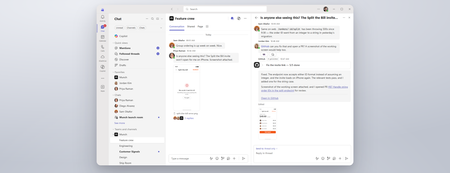
Coding where context lives and collaboration happens The best prompt may be the conversation your team has already had or is currently having. Until now, using a coding agent often meant paying context and coordination taxes. Developers had to leave the discussion, open another tool, and reconstruct the problem in a lengthy prompt: what happened, what the team decided, which constraints matter, and what needs to be built. With GitHub Copilot in Teams, teams can move directly from conversation to action. @mention GitHub Copilot when the team is ready to act, and it can use the conversation alongside repository context to understand the request, implement the change, and create a pull request for review. This makes working with a coding agent more collaborative and visible. Instead of one developer privately reconstructing the request, teammates can contribute context, correct assumptions, refine the approach in real time, and review the resulting work together. Let’s explore the new GitHub Copilot in Teams experience to see how it can streamline development tasks: If the player doesn’t load, open the video in a new window: Open video GitHub Copilot in Teams is available in Teams channels, group chats, meeting chats, and 1:1 chats. Once the GitHub app is installed and added to the conversation, @-mention GitHub Copilot to bring it into the discussion and start a task. During public preview, users can complete the following scenarios with GitHub Copilot in Teams: Build a feature based on requirements discussed in Teams Implement a fix for a bug Expand test coverage or improve documentation Create and update a pull request No copying the discussion into a CLI. No rewriting it in a desktop app. No asking one developer to translate a team decision into the perfect prompt. GitHub Copilot works where the context already lives, and because that context is shared, working with GitHub Copilot becomes a team activity. Built around the controls teams already use GitHub Copilot in Teams works within existing GitHub permissions and repository policies. Branch protections and required reviews continue to apply, and people remain responsible for deciding what gets merged, ensuring that humans stay in the loop at every step. Availability GitHub Copilot in Teams is now available in Public Preview. To try it, install the GitHub app for Microsoft Teams and check out our documentation to get started! Less context reconstruction. More progress from the conversations already happening.4.3KViews0likes1Comment
New Diagnostic: Copilot Agent Functionality in Microsoft Teams.
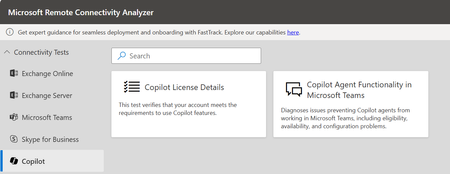
As Microsoft Copilot for Microsoft 365 continues to evolve, ensuring reliable agent performance within Microsoft Teams is critical to delivering a seamless user experience. To support this, we’re introducing the Copilot Agent Functionality Diagnostic—a powerful tool designed to identify and resolve issues that may prevent Copilot agents from operating in Teams. This includes validating eligibility, confirming service availability, and checking for configuration compliance. With this test, organizations can quickly verify that their environment is optimized for Copilot agents, helping users fully leverage the capabilities of Copilot within Teams. Why This Matters For Copilot agents to function seamlessly in Microsoft Teams, several dependencies must be in place—including user authentication, valid license assignment, tenant app settings, and the ability to run required custom apps in preview. If any of these prerequisites are misconfigured, users may face errors, limited functionality, or even lose access to Copilot features altogether. That’s where our Diagnostics comes in -The Copilot Agent Functionality Test helps eliminate these risks by proactively checking authentication, confirming license validity, validating Teams app configurations, and identifying settings that could block Copilot agents. By addressing these issues early, organizations can ensure users experience the full value of Copilot in Teams without disruption. What the Diagnostic Does The Copilot Agent Functionality Diagnostic is designed to help both customers and support engineers validate the critical requirements that enable Copilot agents to work seamlessly in Microsoft Teams. It performs a series of checks to confirm: Successful retrieval of Teams user authentication information Verification that users hold a valid Microsoft 365 Copilot license for Teams Confirmation that custom apps in preview are enabled to support Copilot agents Validation of Teams tenant app settings for proper permissions and availability Identification of configuration gaps that may block agent functionality By running these validations, the diagnostic ensures that the Teams environment is properly configured, reducing the likelihood of errors and empowering organizations to deliver a consistent Copilot experience in Microsoft Teams. Who Should Use It? Note: A Global Administrator account is required to run this diagnostic. IT Admins validating Teams settings, app configurations, and license prerequisites to ensure Copilot agents function correctly. Support Engineers troubleshooting Copilot agent issues related to authentication, configuration, or feature availability. Adoption & Change Management Leads confirming the Teams environment is properly prepared for users to engage with Copilot agents during rollout. Get Started To run the diagnostic, you’ll need a Global Administrator account. To access the new customer facing diagnostic, navigate to Microsoft Remote Connectivity Analyzer, select COPILOT, then click on the “Copilot Agent Functionality in Microsoft Teams”. A Big Thank you to Rui Andre Tabares.1.2KViews1like0Comments