agentic ai
23 TopicsLand Your Offer - Anatomy of Revenue Generating Partner Offer - Part 2 - Copilot Envisioning
In Part 1 we dissected Copilot in 30 — a $0 trial offer for SMB customers. This time the customer is larger, the engagement is funded rather than free, and the anatomy of revenue changes with it. It also lands when Microsoft just introduced the new Copilot — Home, Code and Autopilot, running on usage-based billing and governed through FinOps for AI — which makes a structured envisioning engagement the front door to a much bigger conversation. Most organisations with 300 or more seats already believe Copilot and agents matter. What they lack is a clear picture of where AI will pay off, what it will take to get ready, and how they'll prove it before committing budget. The Frontier Accelerate for Copilot: Envisioning & POC engagement gives you a pre-sales, partner-led answer to all three — funded by Microsoft and sized from a 10-hour readiness sprint to a 280-hour enterprise programme. Package it as a Microsoft Marketplace offer and you have a repeatable front door to every Copilot, Agent 365 and Microsoft 365 E7 opportunity in your territory. Start Here: Why Publishing on Microsoft Marketplace Matters Microsoft Marketplace is Microsoft's partner-focused business platform, designed to help you reach more customers and simplify how you sell. A published offer gives your practice a permanent, discoverable storefront in the place customers and Microsoft sellers already look for Copilot expertise. More importantly, an offer turns your expertise into something repeatable. Define the engagement once — phases, activities, deliverables, sizing — and run it across every qualified customer instead of scoping from scratch. Professional service and managed service offer types are available in Partner Center, so one listing can carry the envisioning engagement, the POC and the ongoing services that follow. The Enterprise Opportunity: Interest Is High, Direction Is Missing The customers for this offer are organisations with at least 300 Office 365 / Microsoft 365 seats — mid-market through to the largest enterprises. They are the customers with the most to gain from Copilot and agents, and the most complexity to work through first: security and governance, tenant and access dependencies, adoption and change, and a credible way to measure value. That gap between ambition and a plan is where partners win. Microsoft is investing in the full Copilot journey in FY27, from envisioning and proof of concept through deployment and adoption — and the envisioning stage is where you shape the roadmap, the scope and the commercial conversation before anyone else does. Why Copilot and Agents Are the Right Place to Start Microsoft 365 Copilot puts AI inside the apps people already use every day — Outlook, Teams, Word, Excel and PowerPoint — so value arrives without a platform change. For larger organisations, that is only the first layer: Agent 365, custom agents built with Copilot Studio, and Microsoft 365 E7 extend Copilot from personal productivity into role-based and process-level automation. The new Copilot adds a third layer. Cowork takes delegated work and returns a finished result; Code lets knowledge workers build apps, dashboards and automations in natural language, hosted on Copilot Managed Runtime; and Autopilot is a persistent agent with its own identity that keeps work moving without a prompt. All three run on usage-based billing rather than the per-user subscription, which means every customer now has to decide which users and which scenarios justify consumption spend — and how to govern it with FinOps for AI. Each layer brings its own questions — which personas, which scenarios, what governance, what consumption model, which capabilities are worth paying for by the task — and each question is an envisioning conversation a partner is best placed to lead. Meet the Offer: Envisioning & POC, Sized to the Customer The Frontier Accelerate for Copilot: Envisioning & POC engagement is a pre-sales, partner-led engagement that identifies personas and use cases and builds a business case for Microsoft 365 Copilot, Agent 365, Microsoft 365 E7 and/or agents — with an optional proof of concept. The essentials: Who qualifies: Customers with a minimum of 300 Office 365 / Microsoft 365 seats; larger tiers unlock at 500, 1,000, 1,500, 3,000 / 5,000 and 10,000+ seats How it's sized: Six tiers — XXS (10 hrs), XS (20 hrs), S (40 hrs), M (100 hrs), L/XL (150 hrs) and XXL (280 hrs) — with hours scaling with the seats in scope What it covers: Five phases — Assess, Inspire, Design, POC and Executive Summary — with a working POC and measured results from the S tier upward What Microsoft provides: A delivery guide, pre-engagement planning resources and Microsoft Commercial Incentives (MCI) funding tied to proof of execution What the customer gets: Readiness findings, a business case and value plan including usage-based billing and Copilot Credits, technical requirements and a remediation plan, an adoption roadmap, a working POC and an executive readout Microsoft funds the engagement. You own the scope, the relationship and everything that follows. Your Role: From Trusted Assessor to Transformation Partner An envisioning engagement is not a workshop; it is a guided decision. Your job is to move the customer from curiosity to a signed proposal, with evidence at every step. Assess — identify high-value scenarios, choose the right assessments, define what success looks like and deliver readiness findings the customer can act on. Inspire — show what Copilot and agents can do across roles; make security, governance, adoption and reporting concrete rather than abstract concerns. Design — turn findings into a business case and value plan (including usage-based billing), a remediation plan, technical requirements, an adoption roadmap and clear POC criteria with risks, owners and dates. Prove — scope the POC users and products, prepare the environment, build the agent or solution, train the users and measure results including Copilot Credits consumed. Summarise — deliver the executive readout on seat growth and consumption, then convert: trial to paid licences, commercial proposal and signature, and a named wave 2 expansion plan. Every phase produces something the customer keeps — and every deliverable positions you as the partner who should build what comes next. Inside the Offer: Activities and Hours by Engagement Size Below is the full activity plan behind the offer, with hours for each of the six engagement sizes. Use it to size your own offer plans and statements of work. ID Phase Activity XXS XS S M L/XL XXL — Pre-req Customer eligibility (min. O365/M365 seats) 300+ 500+ 1,000+ 1,500+ 3,000+ / 5,000+ 10,000+ A1 Assess Identify high-value scenarios 0.5 1 1.75 3.75 5.5 10.5 A2 Assess Select assessment(s) 0.5 0.5 1 2.25 3.5 6.25 A3 Assess Define success 0.5 0.75 1.5 3 4.5 8.5 A4 Assess Deliver readiness assessment(s) 1 1.75 2.75 6 9 16.75 I1 Inspire Product overviews & demos across Copilot and agent capabilities 1 1.5 2 4.5 6.75 12.5 I2 Inspire Security/governance overview, incl. tenant and access dependencies 0.5 1 1.5 3 4.5 8.5 I3 Inspire Adoption/change overview 0.5 0.75 1 2.25 3.5 6.25 I4 Inspire Reporting/analytics overview 0.5 0.75 1 2.25 3.5 6.25 I5 Inspire Stories & Scenario Library 0.5 1 1.5 3 4.25 8.5 D1 Design Business case/value plan, incl. usage-based billing (UBB) 1 1.75 2.75 6.25 9.5 17.5 D2 Design Remediation plan 0.5 1 1.75 3.75 5.5 10.5 D3 Design Technical/functional requirements 0.75 1.5 2.25 5 7.5 14 D4 Design Adoption roadmap 0.5 1 1.75 3.75 5.5 10.5 D5 Design POC success criteria & environment prep 0.5 1 1.75 3.75 5.5 10.5 D6 Design Recommendations/risks/owners/dates, incl. validation and next-step owners 0.25 0.75 0.75 2.5 4 7 P1 POC Scope/users/products/features 0 0.25 1 3.5 5.25 9.75 P2 POC Confirm requirements/design 0 0.25 1 3.5 5.25 9.75 P3 POC IT access & environment prep 0 0.25 1.75 5.25 8 14.75 P4 POC Trial licenses 0 0.25 1 3.5 5.25 9.75 P5 POC Build POC agent(s)/solution(s); confirm Copilot Credits consumption 0 0.5 3.75 12.25 18.5 34.25 P6 POC Train POC users 0 0.25 1 3.5 5.25 9.75 P7 POC Measure/evaluate results, incl. usage and Copilot Credits consumed 0 0.25 1.5 3.5 5 10 E1 Exec summary Executive readout: seat growth and consumption implications 1 2 4 10 15 28 TOTAL Hours 10 20 40 100 150 280 Land Your Offer: What One Customer Is Worth The table below is the revenue anatomy of one Envisioning & POC engagement at each of the six sizes — and it shows that the funded engagement is only the first of three revenue streams. They stack on top of each other: MCI engagement incentive — Microsoft funds the envisioning and POC work itself, from $2K for a 10-hour XXS engagement to $100K for a 280-hour XXL programme, paid against proof of execution. CSP incentive on the licences that follow — earned on the Copilot revenue the business case unlocks, from the trial-to-paid conversion (T1) through the wave 2 expansion (X1), and growing as agent consumption and Copilot Credits scale. Managed services and follow-on professional services — the recurring engagement described in After the Readout, which is where the largest and most durable share of revenue lives. Item XXS XS S M L/XL XXL Minimum customer seats 300+ 500+ 1,000+ 1,500+ 3,000+ / 5,000+ 10,000+ Engagement hours 10 20 40 100 150 280 Post-delivery outcomes: Copilot rev (K) | Agent consumption (K) | Agent MAU 10 | 6 | 300 25 | 15 | 500 50 | 30 | 1,000 125 | 75 | 1,500 250/375 | 150/225 | 3,000/5,000 500 | 300 | 10,000 MCI engagement incentive (K) $2K $5K $10K $25K $50K / $75K $100K CSP incentive on Copilot revenue (K)† $1.95K $4.88K $9.75K $24.38K $48.75K / $73.13K $97.5K † CSP incentive shown at a blended 19.5% of the Copilot revenue outcome (direct bill 2.5 + 7 + 10; indirect reseller 7 + 12.5). Illustrative estimates from the offer plan — confirm current MCI payouts, CSP rates, eligibility and proof-of-execution requirements in the Microsoft Commercial Partner Incentives Guide. Now multiply. Everything above is the anatomy of a single customer. Landing the offer means running it across every qualifying customer in your territory — and you don't need to guess who they are. Partner Center's growth insights reporting, available through the AI Business Solutions & Security Insights (ASPX) dashboard, gives you account-level Copilot eligibility and seat whitespace, E7 opportunity, data security maturity, MCI eligibility and potential earnings for the customers you already manage. How the Offer Fits Together: From Sizing to Proof of Execution The offer runs left to right in three layers: Sizing & value — six engagement sizes from XXS (10 hrs) to XXL (280 hrs). Hours scale with the seats in scope, and value is tracked in the customer's own metrics. Five phases — Assess (A1–A4), Inspire (I1–I5), Design (D1–D6), POC (P1–P7) and Executive Summary (E1, T1, T2, X1). Each phase produces a concrete output the sponsor can see. Proof of execution — readiness and assessment findings; a business case and value plan including usage-based billing and Copilot Credits; technical requirements and a remediation plan; an adoption roadmap; a working POC with measured results; an executive readout covering next steps and consumption implications — and a named wave 2 expansion beyond the pilot team. The highlighted activities — security & governance (I2), adoption & change (I3), remediation plan (D2), technical requirements (D3), adoption roadmap (D4), IT access & environment (P3), build POC solution (P5), train POC users (P6), trial-to-paid conversion (T1), commercial proposal (T2) and the wave 2 expansion plan (X1) — are where the engagement stops being a project and becomes an ongoing relationship: managed services, ongoing optimisation and follow-on professional services after the engagement closes. After the Readout: Managed Services That Keep Delivering The executive readout is the start of the real engagement. Package these as standing services in your offer. Each one is sized in partner days so you can price it, and each one is tied to a result the customer's sponsor will recognise without a glossary: Managed service Partner activity — what you deliver and measure Customer business outcome — what it drives (illustrative targets, 1,500-seat customer) Deployment and remediation delivery • Effort: 5–10 days per wave • Activity: Close every item on the remediation plan and technical requirements (D2, D3) against dated owners, then licence and activate the wave's users by the roadmap date • Reported as: Items closed on time; seats activated; days from readout to go-live • Wave 1 live within 30 days of the readout, not 90 — two extra months of value on every seat • ≥95% of paid seats assigned and active; 75 idle seats would waste ≈$27K a year • Roll-out delivered within ±5% of the business-case budget Security and governance management • Effort: 2 days a month • Activity: Maintain the admin-settings baseline and data-protection controls, review agent permissions and access dependencies, approve plugins through the plugin registry and govern apps hosted on Copilot Managed Runtime, act on every Admin Settings Recommendation • Reported as: Recommended settings enabled; findings opened and closed; agents, plugins and apps with a named owner • Zero Copilot-related oversharing incidents; one enterprise data breach averages $4M+ • 100% of recommended settings on; findings closed within 30 days • Audit evidence produced in hours, not weeks — Data Security Maturity at Advanced-Healthy Adoption and change management • Effort: 3–4 days a month • Activity: Run the adoption roadmap (D4): coach champions, deliver role-based training, refresh scenarios, hold the monthly Copilot Analytics business review • Reported as: Active users as a share of assigned seats; people trained; low-activity users re-engaged • ≥80% of assigned seats active every month • 2–4 hours saved per user a week (≈3,000–6,000 hours across 1,500 seats) • ≈$0.5–1M a month of staff time released at $40/hour Agent and solution build-out • Effort: 5–15 days per agent or solution, then half a day a month to tune • Activity: Take each POC agent (P5) into production with Copilot Studio and Agent 365; release new Copilot Studio agents, Code-built apps and Autopilot agents from the scenario backlog, hosted on Copilot Managed Runtime • Reported as: Agents and apps live; active users per agent; tasks completed; Copilot Credits per completed task • 20–40% of tier-1 tickets or cases deflected per automated process • Cycle time cut 30–50% on each agent-run workflow; 200–500 hours removed a month per agent • Cost per completed task tracked and falling quarter on quarter FinOps for AI: consumption and licence management • Effort: 1-2 days a month • Activity: Track Copilot Credits and usage-based billing across Cowork, Code and Autopilot; set budgets, limits and model-family policies per user group; route credit requests through the customer's approval workflow; forecast spend and align seat additions, renewals and terms to each wave • Reported as: Reported as: Forecast versus actual variance; credits per active user; spend per business outcome; seats added; renewals completed on schedule • AI spend held within ±10% of forecast — no unplanned overage • Zero unused seats at renewal; 100% of renewals on schedule • Cost per outcome down 10–20% a year as usage matures Quarterly value reviews • Effort: 2 days a quarter • Activity: Refresh the business case (D1) with actuals, capture proof points in the customer's own words, agree and date the next named expansion wave with the executive sponsor • Reported as: Realised versus forecast value; proof points captured; next wave scheduled • ROI in dollars: ≈$125K a year of Copilot seats vs. $6M+ of time released • ≥3 quantified proof points in the sponsor's words each quarter • Each review dates the next wave: +100–300 seats or +1–2 agents a quarter Effort shown is indicative for an M-tier customer (1,500+ seats) and scales with seats and agents in scope, exactly as the engagement hours above do. Add the recurring rows together and one M-tier customer with three agents in production sustains roughly 9–10 partner days a month after the readout, before wave deployments and new agent or solution builds are counted. Every row pairs a number you can invoice against with a result the customer already cares about, which is what turns a recurring service into a renewable one and keeps you positioned as the customer's AI transformation partner as their ambitions grow. Each of these is a recurring, outcome-based service rather than a one-off project — and each keeps you positioned as the customer's AI transformation partner as their ambitions grow. Ready to Build Your Envisioning & POC Offer? Read the engagement terms in the Microsoft Commercial Partner Incentives Guide and download the delivery guide and pre-engagement planning resources. Confirm your eligibility for Microsoft Commercial Incentives engagements in Partner Center and align your delivery team on the five-phase model. Publish your offer in Partner Center as a professional service (Envisioning & POC) with a managed service follow-on (deployment, adoption and optimisation). Pick your first cohort — customers with 300+ Microsoft 365 seats and no clear Copilot or agent roadmap yet, then size each one to the right tier. Book the executive readout before Assess begins — so the conversion, proposal and wave 2 conversation is already on the calendar. The customers are already in your base. Publish the offer and open the conversation. Resources Frontier Accelerate for Copilot: Envisioning & POC | Microsoft Commercial Partner Incentives Guide Copilot Envisioning & POC — Delivery Guide Copilot Envisioning & POC — Pre-Engagement Planning The new Copilot is here: the opportunity for Microsoft partners282Views1like0CommentsLand Your Offer - Anatomy of Revenue Generating Partner Offer - Part 1 - Copilot in 30
Copilot in 30: A Ready-Made Marketplace Offer to Grow Your SMB Practice Thirty days. Twenty-five users. One repeatable offer that turns AI curiosity into a long-term customer relationship. Small and medium businesses know AI matters. What they lack is a trusted guide and a low-risk way to start. Copilot in 30 gives you both: a $0, 25-user, 30-day Microsoft 365 Copilot Business trial from Microsoft, wrapped in a structured journey that only a partner can deliver. Package it as a Microsoft Marketplace offer and you have a scalable on-ramp to every SMB customer in your base — and to the managed services that follow. Start Here: Why Publishing on Microsoft Marketplace Matters Microsoft Marketplace is Microsoft's partner-focused business platform, designed to help you reach more customers and simplify how you sell. A published offer gives your practice a permanent, discoverable storefront in the place customers already look for Copilot help. More importantly, an offer turns your expertise into something repeatable. Instead of scoping every engagement from scratch, you define the journey once — activities, timeline, deliverables — and run it across dozens of customers. Professional service and managed service offer types are available in Partner Center, so the same offer can carry both the 30-day journey and what comes after it. The SMB Opportunity Hiding in Plain Sight SMB customer segment is still early in their AI journey. These are organisations with 300 or fewer users on Microsoft 365 Business Basic, Standard or Premium — typically without an in-house AI team. That combination is exactly where partners win: high demand, limited internal capacity, and a customer base large enough that a well-designed, repeatable offer scales far beyond what bespoke projects can. Why Copilot Is the Right First AI Step for SMBs Microsoft 365 Copilot Business is the cost-effective Copilot add-on built for SMB customers, delivering the same capabilities as Microsoft 365 Copilot inside the apps their people already use — Outlook, Teams, Word, Excel and PowerPoint. No platform overhaul, minimal training, immediate relevance. Copilot is also the on-ramp. Once a team works confidently with Copilot, the natural next steps are agents, automated workflows and Copilot Cowork — each one deepening the customer's dependence on the partner who guided them there. Meet Copilot in 30: 25 Users, 30 Days, $0 Copilot in 30 is a limited-time, CSP partner-led Microsoft 365 Copilot Business trial for SMB customers with fewer than 300 employees. The essentials: What the customer gets: 25 Microsoft 365 Copilot Business seats for 30 days at $0, transacted through CSP New Commerce (Product ID CFQ7TTC0MM8R · SKU 006Z) Who qualifies: Customers on Microsoft 365 Business Basic, Standard or Premium with no paid Microsoft 365 Copilot today — one trial per customer How long it runs: Available to transact until 31 December 2026 What happens at Day 30: The trial auto-converts to a paid subscription unless renewal settings are changed, with a 7-day cancellation window What Microsoft provides: A launch kit, campaign materials, setup guidance, the Copilot Success Planner and conversion guidance Microsoft supplies the licences and the assets. The offer — and the customer relationship — is yours. Your Role: The Guide Who Turns a Trial Into a Habit A trial alone rarely changes behaviour. A guided trial does. Your job across the 30 days is to make sure 25 people experience real value in real work, and that the sponsor can see it. Before Day 0 — pick the right customers, become "Customer Zero" by using Copilot in your own business, secure a named sponsor and Copilot admin, and build a 30-day success plan with agreed measures. Day 0 — transact the trial, set the paid renewal quantity and term, complete admin setup, assign all 25 licences and run the kick-off with starter prompts. Days 1–28 — lead a weekly scenario (Outlook, Teams, Apps, Agents), review Copilot Analytics, re-engage low-activity users and capture proof points in the customer's own words. Days 29–30 — run the outcome and ROI review, confirm the paid offer and open the expansion and consumption conversation. Every touchpoint is partner expertise the customer cannot get from a licence alone — and every one moves the decision at Day 30 from "should we?" to "how much more?" Inside the Offer: Activities, Timeline and Deliverables Below is the full activity plan behind the offer, ready to drop into your own offer description or statement of work. ID Stage Activity Trial day (of 30) Key deliverables — Pre-req Customer eligibility (Copilot Business trial) Before Day 0 Active M365 Business base licence; no paid M365 Copilot; one $0 trial per customer; CSP New Commerce transactable; offer open to 31 Dec 2026 I1 Identify Build the prioritised target list Pre-trial Tier A/B target list from ASPX and Cloud Ascent; 50–300 eligible seats I2 Identify Confirm eligibility and trial fit Pre-trial Eligibility check: M365 Business base licence, no paid Copilot, one trial I3 Identify Launch the acquisition campaign Pre-trial Campaign email sent; briefing delivered; responses triaged into pipeline I4 Identify Be Customer Zero: complete microskilling Pre-trial Microskilling complete; internal Copilot experience; team briefed P1 Plan Confirm sponsor and success measures Pre-trial Named sponsor and admin; 25 trial users; agreed success measures P2 Plan Build the 30-day success plan Pre-trial Personalised Success Planner output; weekly scenarios; admin and user views P3 Plan Confirm technical and compliance readiness Pre-trial Minimum requirements verified; data and compliance review; blocker log A1 Activate Transact the trial in CSP New Commerce Day 0 25-seat, 30-day, $0 trial ordered (CFQ7TTC0MM8R · SKU 006Z) A2 Activate Configure the paid renewal settings Day 0 Renewal quantity, term and billing set; Cowork usage-based billing if in scope A3 Activate Complete admin setup and assign licences Day 0 Recommended settings on; 25 licences assigned (starts the clock) A4 Activate Run the kick-off and share starter prompts Day 0 Kick-off email; starter prompts; four-week prompt series scheduled X1 Experience Week 1 · Outlook — catch up and communicate Days 1–7 Week 1 prompts landed; first-week activation rate reviewed X2 Experience Week 2 · Teams — meetings that run themselves Days 8–14 Copilot Analytics checkpoint; recaps adopted; low-activity users re-engaged X3 Experience Week 3 · Apps — create in minutes Days 15–21 App scenarios and proof points; week 3 training gate before day 30 X4 Experience Week 4 · Agents — unlock the next level Days 22–28 Role-built agents trialled; 30-day usage trends from the admin centre C1 Convert Outcome review, paid offer and expansion plan Days 29–30 ROI review; 50-seat offer confirmed in 7 days; wave 2 plan; consumption conversation opened Land Your Offer: What One Customer Is Worth The table below is the revenue anatomy of one Copilot in 30 engagement — and it shows that the money is not in the trial, but in what the trial sets up. Item Value Detail Offer duration 30 days Trial clock runs Days 1–30; identify, plan and Day 0 setup precede it Trial offer 25 seats M365 Copilot Business · 30 days · $0 · one per customer · to 31 Dec 2026 CSP incentive — 25 seats (K) $0.32K 5.0% direct bill (2.5% M365 CSP Core + 2.5% Strategic Product Accelerator Tier 1) on 25 M365 Copilot Business seats x $21/mo† ≈ $6.3K/yr; indirect reseller 2.5% ≈ $0.16K Conversion target 50 seats Lead with 50 paid seats at conversion; sets up the wave 2 expansion plan CSP incentive — 50 seats (K) $0.63K 5.0% direct bill (Core + SPA Tier 1) on 50 M365 Copilot Business seats x $21/mo† ≈ $12.6K/yr; indirect reseller 2.5% ≈ $0.32K Frontier Accelerate deployment funding (K) $2.5K Microsoft Commercial Incentives funding for the Copilot deployment engagement when the conversion lands with 50 paid seats†; funds the deployment and adoption work that leads into managed services † Illustrative estimates from the offer plan. Confirm current incentive rates, funding and eligibility in Partner Center. Three streams stack on top of each other: CSP incentive — earned on every paid Copilot Business seat from the moment the trial converts, and growing again when the customer expands from 25 to 50 seats. Frontier Accelerate deployment funding — $2,500 available when you lead the conversion with 50 paid seats, paying for the deployment work that makes the expansion stick. Managed services — the recurring engagement described in Day 31 and Beyond, which is where the largest and most durable share of revenue lives. Now multiply. Everything above is the anatomy of a single customer. Landing the offer means running it across every eligible customer in your base — and you don't need to guess who they are. Partner Center's growth insights reporting, available through the AI Business Solutions & Security Insights (ASPX) dashboard, gives you account-level Copilot eligibility, seat whitespace, free Copilot Chat usage and adoption signals for the customers you already manage. To turn that export into a ranked target list, my colleague Brian O'Shea has built a Copilot for 30 Power BI dashboard that sits over your ASPX data and scores each customer on a 0–100 priority scale from eligible seats, whitespace, free-to-paid potential and opportunity signals — so your first cohort is the ten customers most likely to convert, not the first ten who reply. How the Offer Fits Together: From Trial Inputs to Proof of Value The offer runs left to right in three layers: Trial inputs — 25 users, 30 days, $0 CSP trial SKU; an SMB with 50–300 eligible Microsoft 365 seats; no paid Copilot today; a Business Basic, Standard or Premium base; one trial per customer to 31 Dec 2026; a named sponsor and Copilot admin; auto-conversion to paid unless changed. Five stages — Identify (I1–I4), Plan (P1–P3), Activate (A1–A4), Experience (X1–X4) and Convert (C1, T1, T2, W2). Each stage produces a concrete output the sponsor can see. Proof of value — a prioritised list and campaign responses; agreed use cases and success measures; a provisioned trial with 25 licences assigned; weekly usage from the Microsoft 365 admin centre; adoption proof points in the customer's words; paid conversion confirmed in Partner Center — and a named wave 2 expansion beyond the first 25. The highlighted activities — admin setup (A3), Week 4 agents (X4), 25→50 paid seats (T1), Frontier Accelerate funding (T2) and the wave 2 expansion plan (W2) — are where the engagement stops being a project and starts becoming an ongoing relationship: managed services, agent build-out, Copilot Studio and Copilot Cowork follow-on once the trial converts. Day 31 and Beyond: Managed Services That Keep Delivering The end of the trial is the start of the real engagement. Package these as standing services in your offer: Copilot adoption management — monthly Copilot Analytics business reviews, prompt and scenario refreshes, champion programme and onboarding for each new wave of users Licence and expansion management — take the customer from 25 to 50 paid seats and on to wave 2, aligning renewals, terms and billing as the footprint grows Agent build-out — design, build and maintain role-based agents with Copilot Studio for sales, service, finance and operations scenarios surfaced in Week 4 Copilot Cowork enablement and governance — introduce consumption-based Cowork scenarios, set budgets and cost controls, and report on usage each month Security, compliance and readiness — keep data protection, permissions and governance in step with expanding AI use, including a path to Microsoft 365 Business Premium Quarterly value reviews — refresh success measures, capture new proof points and agree the next expansion plan with the sponsor Each of these is a recurring, outcome-based service rather than a one-off project — and each keeps you positioned as the customer's AI partner as their needs grow. Ready to Build Your Copilot in 30 Offer? Download the Copilot in 30 launch kit and Microsoft 365 Copilot Partner FAQ from the Microsoft AI Cloud Partner Program. Be Customer Zero — run Copilot and the microskilling series inside your own business first. Publish your offer in Partner Center as a professional service (the 30-day journey) with a managed service follow-on (Day 31 and beyond). Pick your first cohort — customers with 50–300 seats on a Microsoft 365 Business plan and no paid Copilot today. Transact your first trial through CSP New Commerce (Product ID CFQ7TTC0MM8R · SKU 006Z) and set the paid renewal on Day 0. Book the Day 30 review before Day 1 — so the conversion and expansion conversation is already on the calendar. The window closes on 31 December 2026. The customers are already in your base. Publish the offer and start the clock. Resources From AI curiosity to Copilot adoption in 30 days — Microsoft Partner Blog Copilot in 30 Launch Kit — partner GTM playbook, customer trial guide, invitation and weekly prompt emails, admin setup guidance Build Your 30-Day Copilot Success Plan Copilot Success Planner Walkthrough video Partner Skilling Hub | Microskilling for Copilot in 30 Power BI Dashboard that integrates with your ASPXi Partner Data · By Brian O'Shea Create compelling customer business cases589Views2likes1CommentWhen AI Stops Waiting for Instructions
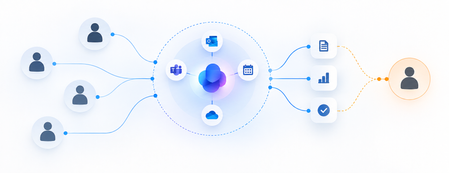
Microsoft’s Autopilots mark a shift from AI that responds to prompts to persistent agents with identity, initiative and standing responsibilities. As AI begins to hold a “job,” the enterprise challenge moves beyond deploying agents to defining what they should own, how far their autonomy should extend, and where human accountability must remain.273Views1like0CommentsBeyond Tokens: Rethinking AI Economics with Microsoft Foundry
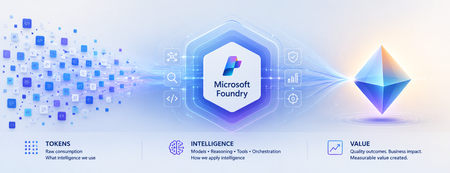
Beyond Tokens: Rethinking AI Economics with Microsoft Foundry From the cost of intelligence to the value of outcomes Enterprise AI has an accounting problem. Executives expect agentic AI to return roughly 171% on investment, according to one widely cited survey. Yet McKinsey finds only about 39% of organizations can attribute any earnings impact to AI at all. Both numbers can be true at once — because the gap between them is not a technology gap. It is a measurement gap. For the first few years of generative AI, one number dominated the economics conversation: tokens. How many tokens did a model consume? What was the cost per million tokens? Could a smaller model perform the same task? Those questions mattered when enterprises were experimenting with AI. They are no longer enough as AI moves into production. An enterprise agent doesn't simply consume tokens. It reasons, retrieves context, invokes tools, calls APIs, verifies its work, retries unsuccessful actions and sometimes escalates exceptions to humans. The model call might cost pennies. The business outcome could cost considerably more. Which leads to an increasingly important question: What is the right economic unit for intelligence? From AI experimentation to economic accountability The first wave of enterprise AI was about possibility: Can AI do this? The next wave is about production, as AI becomes embedded in software engineering, customer service, finance, healthcare and supply chains. And production changes the question: Should AI do this and at what cost? Microsoft has moved decisively onto this ground. In August 2026, the Microsoft Foundry team launched its Economics of Agent Optimization series, arguing that "tokens have become the new unit of technology spend" and that AI should be run as a managed investment system. On the latest earnings call, Satya Nadella described Microsoft's objective as "advancing the frontier on the cost-to-outcome curve, ensuring every customer can turn tokens into business results." The discipline is going mainstream too: 98% of FinOps teams now manage AI spend, up from 31% two years ago. Microsoft's series is largely about the numerator of that curve - making every request, agent and dollar more efficient. This article is about the denominator: what an outcome is, what it truly costs, and what it is worth. The evolution of Microsoft Foundry reflects the same shift. At Build 2026, Microsoft expanded the conversation beyond building agents toward tracing behavior, evaluating quality, monitoring production performance, optimizing agents and connecting their operation to ROI. Think of the progression as: Trace → Evaluate → Monitor → Optimize → ROI This is more than a technology roadmap. It represents a shift from observing AI as technology to managing AI as an economic asset. Tokens became the unit of spend. They were never the unit of value. Consider two AI agents handling the same customer-service workflow. Agent A costs $0.08 per interaction. Agent B costs $0.20. Agent A appears cheaper. But suppose Agent A successfully resolves only 55% of cases, while Agent B resolves 90%. The remainder require retries, additional reasoning or human intervention. Which agent is actually cheaper? The inexpensive interaction may produce the expensive resolution. This illustrates a fundamental problem: We often measure AI where it is consumed rather than where value is created. Tokens are a unit of consumption. Businesses operate in outcomes. A customer-service leader cares about issues resolved. An engineering leader cares about high-quality software reaching production. A finance leader cares about reconciliations completed accurately. The economic denominator needs to move closer to the business. The AI Economic Ladder I think of this evolution as an AI Economic Ladder: Tokens → Interactions → Tasks → Outcomes → Value Each step moves measurement closer to what the enterprise actually cares about. At the token level: What intelligence did we consume? At the interaction level: What did each AI run cost? At the task level: What did it cost to complete the work? At the outcome level: What did a successful result cost? At the value level: Was the outcome worth creating? An AI system can become more efficient at every technical metric while creating little economic value. Conversely, an expensive AI workflow could be extraordinarily valuable if it prevents revenue leakage, reduces operational risk or accelerates a critical business process. The objective isn't cheaper AI. It is better economics. Not every completed task is a successful outcome There is another complication. If an agent completes a workflow, should we count it as a successful outcome? Not necessarily. A meaningful outcome needs three characteristics: Completed. Quality-gated. Attributable. It must reach its intended end state, meet an explicit standard for quality, accuracy, safety or business acceptability, and be attributable to the agent or workflow that produced it. That gives us a more meaningful measure: Cost per Successful Outcome = Fully Loaded AI Workflow Cost / Completed, Quality-Gated, Attributable Outcomes The denominator becomes real only when named in business language: cost per prior authorization resolved in healthcare, per pull request triaged and tested in engineering, per disputed invoice reconciled in finance operations. If you cannot name the outcome in a sentence the process owner recognizes, you are not ready to measure it. The quality gate matters. With AI, "the system ran successfully" and "the system produced a good outcome" are not the same thing. Microsoft Foundry's tracing and evaluation capabilities become economically important for precisely this reason. Evaluation isn't merely quality control. It helps determine what gets counted as value. What does an AI outcome really cost? The true economic footprint goes far beyond inference: Model + Reasoning + Grounding + Tools + Orchestration + Infrastructure + Retries + Evaluation + Governance + Human Intervention Human intervention is particularly easy to overlook. Every time someone must review, correct, approve or recover an AI-generated outcome, the economics change. The same applies to verification. An agent reaching an acceptable result in three steps has different economics from one requiring fifteen steps and multiple retries. And verification is not a rounding error — it is the bulk of the bill. McKinsey's 2026 analysis of production agentic workflows found roughly 60% of an agentic task's cost is tied to refining answers — checking, repairing, re-verifying — not generating the initial response. Most of what you pay for is not intelligence. It is assurance. This means quality and economics are connected. The quality bar you set influences the cost you pay. The challenge isn't simply minimizing consumption. It is finding the right balance between quality, cost, speed and risk. Cost per outcome is only half the equation Now imagine two agents. Both cost $5 per successful outcome. One saves an employee ten minutes of administrative work. The other prevents $500 in revenue leakage. Their cost efficiency is identical. Their economics clearly aren't. So we need to move another step up the ladder: from Cost per Outcome to Value per Outcome. The question isn't only how cheaply AI can complete the work. It is: How much economic value does this outcome create relative to the intelligence required to produce it? Now the CIO, CFO, CAIO and business leader have a common conversation. Give every outcome an Intelligence Budget Not every problem deserves the smartest model available. Classifying an email may require relatively little intelligence. Resolving a complicated customer complaint may justify more context and reasoning. Assessing the risks in a multimillion-dollar contract may justify sophisticated reasoning, multiple validations and human review. Every business outcome therefore has an economically rational amount of intelligence worth spending on it. Call it an Intelligence Budget. This changes the architecture question from which model should we standardize on, to: What combination of model, reasoning, context, tools and human judgment does this outcome deserve? This is where Microsoft Foundry's model router becomes interesting. Individual requests can be dynamically routed so simpler work doesn't consume the same model resources as complex reasoning. If the Intelligence Budget is the economic principle, intelligent routing is one way of operationalizing it. The future enterprise AI architecture won't be about one model doing everything. It will route intelligence according to the economics, quality and risk of the outcome. Making AI economics observable None of this works without visibility. An AI system can be technically healthy and economically unhealthy — responsive and error-free while repeatedly choosing inefficient reasoning paths, invoking unnecessary tools or producing outputs requiring expensive human correction. AI economics and AI observability are becoming inseparable. Microsoft Foundry increasingly connects these disciplines. Tracing shows what an agent did. Evaluation determines whether it met required criteria. Observability helps monitor production behavior. Agent optimizer can test improvements across prompts, skills and models. Microsoft's emerging ROI capabilities take the next step by connecting operating costs with measures such as task completion, time saved and cost efficiency. Attribution is the bridge to the finance conversation. Teams place Azure API Management in front of Foundry endpoints as an AI Gateway, stream token telemetry into Application Insights, and use Entra Agent ID to give every agent run a discrete identity that maps cost to its cost center. Microsoft Agent 365 extends the discipline tenant-wide — spending policies, budget caps and departmental chargeback across Microsoft and third-party agents. Together, they create something enterprises have historically lacked: A feedback loop between how intelligence is consumed and what that intelligence accomplishes. The paradox of cheaper intelligence There is another reason AI economics will become more important as models get cheaper. The Jevons paradox suggests that when technology makes a resource cheaper and more efficient, total consumption can actually increase. AI may experience the same effect. Cheaper intelligence enables more agents, more reasoning and more workflows that were previously uneconomic. So we could see cost per unit of intelligence fall while total intelligence consumed rises. Cheaper AI may therefore produce larger AI bills. That isn't necessarily bad — provided value grows faster than consumption. The objective isn't minimum AI consumption. It is maximum economic value from AI consumption. From workload economics to portfolio economics As AI scales, economics becomes a capital-allocation question. I see three levels. Workload Economics: Is this AI system running efficiently? Outcome Economics: Is it producing quality outcomes economically? Portfolio Economics: Where should we put our next AI dollar? That final question will become increasingly important. An enterprise with hundreds of AI initiatives shouldn't assume every one deserves continued investment. Some should scale. Some need optimization. Some should be redesigned or consolidated. And some should be stopped. The ability to experiment cheaply created the first explosion of enterprise AI. The discipline to allocate capital intelligently will determine what scales. Who owns AI economics? Once an agent becomes part of how work gets done, its economics cannot remain purely an IT metric. The business understands the value of the outcome. Technology understands the architecture and optimization levers. Finance brings economic discipline and comparability. That suggests a shared model: Business owns the outcome. Technology owns the optimization levers. Finance owns the economic discipline. AI economics ultimately isn't just a technology-cost conversation. It is a business-performance and capital-allocation conversation. From abundant intelligence to intelligent economics We are entering an era where intelligence is becoming an increasingly abundant, programmable and variable-cost resource. Microsoft Foundry and the broader Microsoft AI stack are making it easier to build, evaluate, observe, optimize and govern that intelligence. But abundant intelligence does not guarantee abundant value. Enterprises still need to decide where AI belongs, how much intelligence each problem deserves, what defines a successful outcome, when humans should remain involved and which AI investments deserve more capital. The winners won't necessarily use the cheapest models. They won't consume the fewest tokens. And they won't be the organizations that build the most agents. They will become exceptionally good at moving up the AI Economic Ladder: from consumption, to outcomes, to value. Because the next era of AI won't be won by organizations that buy intelligence most cheaply. It will be won by those that convert intelligence into value most efficiently. Where to start: the first 90 days Define the denominator for your top three agents — what counts as done, what quality gate applies, who signs off. Instrument attribution — Azure API Management as an AI Gateway, token telemetry to Application Insights, Entra Agent ID on every run. Wire evaluations into the cost pipeline so only quality-gated outcomes count. Set Intelligence Budgets — model router per request, agent optimizer against your evaluators, Agent 365 policies as circuit breakers. Stand up a joint monthly review — business, technology and finance on one dashboard: outcomes delivered, cost per outcome, value per outcome. Frequently asked questions What is Cost per Successful Outcome in enterprise AI? The fully loaded cost of an AI workload divided by outputs that were completed, quality-gated and attributable - for example, cost per prior authorization resolved or per pull request triaged. It turns token metrics into the unit economics of AI-performed work. What is an Intelligence Budget? The economically rational amount of intelligence - model capability, reasoning, context, tools and human review — worth spending on a given outcome, based on its value and risk. Model router in Microsoft Foundry is one way to operationalize it. Why do AI agents cost more than single model calls? One agent task can involve planning, tool calls, retries and verification - many model calls with compounding context. Research on production agentic workflows attributes roughly 60% of task cost to refining and verifying answers, not generating the first response. Will falling model prices make AI cost management unnecessary? No. By the Jevons paradox, cheaper intelligence expands consumption, so total AI spend typically rises as unit prices fall. The discipline that matters is maximizing value per unit of intelligence. Who should own AI economics? A shared model: the business owns the outcome and its value, technology owns the optimization levers, and finance owns the economic discipline and review cadence. #MicrosoftFoundry #Agent365 #AzureAI #FinOps #AgenticAI #AIAgents #Azure #MicrosoftCostManagement #AIEconomics #Tokens References Microsoft Azure Blog: "The Economics of Agent Optimization: From pilots to measurable returns" (August 12, 2026) Microsoft FY26 Q4 earnings call (Satya Nadella, July 2026) McKinsey — "Cost versus value: managing agentic AI system performance" (July 2026) FinOps Foundation — State of FinOps 2026; Microsoft Learn — Model router for Microsoft Foundry; Agent optimizer; Foundry Control Plane cost optimization874Views1like2CommentsAdding a Fallback Model to Hermes with Microsoft Foundry
So the plan was simple. Leave the Bedrock configuration untouched, then wire Microsoft Foundry in behind it as a fallback, so Hermes always has somewhere else to go when the primary provider is not responding. A few other reasons pushed me towards Foundry in particular: Redundancy that does not need me. If Bedrock is throttled or out of quota, I want Hermes to fail over on its own rather than waiting for me to notice. A catalogue I already pay for. Foundry puts the latest GPT models next to open-weight and partner models in one place, so I can pick a model that suits the task instead of settling for whatever a single provider happens to offer. Enterprise controls out of the box. Region pinning, private networking, content filters and per-deployment quota all sit in the same portal, which makes the setup far easier to defend to a security reviewer. Learning the mechanics before I need them. Working out how Hermes handles a provider chain is much nicer on a quiet Tuesday than during a live outage. Here is the short version, if you are deciding whether to read on. Time: about thirty minutes if nothing goes wrong. Cost: pay-as-you-go tokens only, and none at all while the fallback sits idle. Result: an assistant that keeps answering when your primary provider stops. Before you start, you will need three things: a machine with Hermes already installed and a working primary provider configured, an Azure subscription with access to Microsoft Foundry in a region you can actually deploy into, and enough quota in that region to create a deployment. One thing that made this easy to justify: Foundry deployments bill per token on the standard pay-as-you-go tier. A fallback provider that never gets invoked costs nothing beyond the requests it actually serves, so the insurance is close to free until the day you need it. Chat surface (CLI, messaging) → Hermes Gateway → Primary Amazon Bedrock → Fallback Microsoft Foundry Figure 1: Where the fallback sits. Every request goes through the Hermes gateway to the primary provider; only when that provider is unavailable does the chain continue to Microsoft Foundry. Part 1: Deploying a Model on Microsoft Foundry The first half of this job happens entirely inside the Microsoft Foundry portal and has nothing to do with Hermes yet. All you are really doing here is making sure your Azure subscription can serve a model, and that you hold an endpoint and key Hermes can authenticate with later. 1. Deploy model in Foundry → 2. Copy endpoint + key → 3. hermes fallback add → 4. Authenticate → 5. Select models, test Figure 2: The whole setup in five moves. The first two happen in the Microsoft Foundry portal (orange); the rest happen on the Hermes machine (blue). Go to Microsoft Foundry > Build > Models > Deploy > Deploy a base model. You can deploy a fine-tuned model instead if you already have one, which works just as well with Hermes. Check the region shown at the top of the portal before you commit, because both model availability and deployment quota differ from one region to the next. Then deploy the model you have selected: In this case I deployed gpt-5.6-sol, which is the model Hermes will fall back to. The choice was deliberate rather than exciting. My primary model on Bedrock is a general-purpose chat model, and a fallback is only useful if the answers it gives feel like a continuation of the same conversation rather than a different assistant wearing the same name. The gpt-5.6-sol deployment matches that behaviour closely, it was available in the region I wanted to pin, and the quota I was granted comfortably covers a day of normal use. If a fallback surprises you the first time it fires, it is the wrong fallback. Once the deployment finishes, open it and take note of two values: the target endpoint URI and the API key. Copy both somewhere safe now, because you will be pasting them into Hermes in the next part. If your organisation rotates keys on a schedule, use a key with the longest life you are allowed, since a fallback secured with a credential that expires quietly stops being a fallback. What to copy Where it lives in the portal Where Hermes asks for it Target endpoint URI Deployment > Endpoint > Target URI "Endpoint" prompt in hermes fallback add API key Deployment > Endpoint > Key "API key" prompt, or choose Entra ID instead Deployment name Deployment > Details > Name Shown in the model list Hermes returns Region Top of the portal, next to the resource Must match the region you deployed into Figure 3: Everything Hermes will ask for, and where to find each value before you leave the portal. Part 2: Adding Foundry to Hermes as a Fallback With the Foundry side sorted, everything from here happens in the Hermes CLI. One thing worth knowing before you start: this is the fallback command, not the primary model command, so your existing Bedrock configuration is left completely alone. Nothing in this section can break what is already working, which makes it a good one to try on a live setup. Run the Hermes fallback command: When Hermes asks which provider to add, choose Azure Foundry. The picker still carries the old name; it is the same service that the portal now calls Microsoft Foundry. Paste the target endpoint URI from your deployment, then authenticate with the API key you copied earlier. Hermes also offers Microsoft Entra ID at this prompt, which is the better option if your organisation would rather not have a static key sitting on the machine. If authentication fails here, check the endpoint before you start suspecting the key. In my experience the endpoint is wrong far more often than the credential is, usually because the deployment name at the end of the URI does not match the deployment you actually created. Once authentication succeeds, Hermes lists the deployments your Foundry resource exposes and asks which ones you want to use. You can select more than one, and the order is not cosmetic: Hermes walks down the chain from top to bottom whenever the provider above is unavailable. Treat that list as a priority order, not a shopping basket. What happens to the primary What Hermes does What you see in the chat Responds normally Routes every request to the primary and never touches the chain Nothing. The fallback stays idle Throttled or out of quota Retries the next provider down the chain on the same request A reply, served by the fallback model Endpoint unreachable Keeps failing over on each new request until the primary recovers Slightly different tone and latency, but a working assistant Every provider fails Returns the error rather than hanging An error worth chasing with hermes status Figure 4: The chain in practice. The fallback only earns its keep in the middle two rows, which is exactly why it is easy to forget you configured it. Part 3: Promoting Foundry to the Primary Model At this stage Foundry is sitting in the back seat as a backup. I wanted to reverse the arrangement and make Foundry the primary while Bedrock slides down into the fallback slot, partly because I preferred keeping day-to-day traffic inside my Azure subscription, and partly because I wanted proof the chain works in both directions. Before promotion After promotion Primary: Amazon Bedrock → Primary: Microsoft Foundry Fallback: Microsoft Foundry → Fallback: Amazon Bedrock Figure 5: The promotion, in effect. Nothing is added or removed; the two providers simply trade places in the chain. There is no dedicated "promote" command in Hermes, so the manual route is a short sequence of steps rather than a single instruction: Select the fallback provider/model as the new primary: hermes model Remove the now-duplicate model from the fallback chain: hermes fallback remove Optionally add the old primary model as a fallback: hermes fallback add Restart the messaging gateway: hermes gateway restart Verify the result: hermes status / hermes fallback list That sequence works, and it is good to know what is happening underneath. But since I already had a working provider configured, I would rather just ask Hermes to rearrange itself. This is the part I genuinely enjoy about the tool: the configuration is something you can talk to, not only something you type commands at. Prompt: Okay now please make the model I configured on Microsoft Foundry into the main model, and make the Bedrock one the fallback model! Hermes rewrites the provider chain on its own and confirms the swap once it is done, which is a great deal less error-prone than running the five commands by hand. Part 4: Testing the Switch Configuration you have not tested is just an assumption with extra steps, so the next thing is to confirm Hermes really is talking to Foundry. Type /model when running Hermes to bring up the model picker. You will be prompted to select a provider first. Pick the Microsoft Foundry entry, then choose the specific deployment from the list underneath it. The active model should switch straight away. Send it a plain "Hello" to check that the deployment actually responds, rather than just looking correct in the menu. Appearing in a dropdown and serving a request are two very different things. A second test is worth the thirty seconds it costs: run hermes status to confirm which provider is live, then hermes fallback list to confirm the chain is ordered the way you intended. The picker tells you what you selected; those two commands tell you what Hermes will actually do at three in the morning. Part 5: The Obstacle, and What It Actually Taught Me Every walkthrough has the part the author quietly leaves out. Here is mine: the wrinkle was not the model, it was capacity. My first attempt deployed into the region closest to me out of habit, and the portal turned it down because there was no capacity left for that model at the tier I asked for. The model was clearly listed in the catalogue; being listed and being deployable in your region, on your subscription, at your quota, are three separate questions. Redeploying in a different region fixed it in a couple of minutes, but it meant the endpoint URI changed, which in turn meant the value I had already pasted into Hermes was stale. Re-running hermes fallback add against the new endpoint sorted it out. The lesson is cheap enough to hand over for free: check quota and regional capacity for your specific subscription before you design a walkthrough, a demo or a production fallback around one deployment. In the Foundry portal, Management then Quota shows exactly what you have been granted per region and per model family, which is the only list that matters. Symptom Likely cause Fix Deployment rejected in the portal No capacity for that model at the tier you asked for, in that region Deploy in another region, or drop to a smaller tier Hermes rejects the credential Endpoint URI does not match the deployment you created Re-copy the target URI from the deployment, not the resource Provider authenticates but lists nothing Key belongs to a different Foundry resource Check you are in the right resource, then re-run hermes fallback add Fallback never fires Chain ordered the wrong way round hermes fallback list, then reorder Figure 6: The four things that went wrong, or nearly did, and what fixed each one. There is a silver lining worth stating plainly. Because the fallback chain was already in place, a deployment that refused to come up did not take the assistant down with it. That is precisely the scenario this whole exercise was meant to cover, and it turned up on day one without me having to simulate it. Command Cheat Sheet Everything used in this walkthrough, collected in one place: hermes fallback add: attach a provider to the fallback chain hermes fallback remove: drop a provider from the chain hermes fallback list: show the chain in priority order hermes model: set the primary model hermes gateway restart: restart the messaging gateway after a change hermes status: confirm which provider is currently live /model: switch models from inside a running session Conclusion Adding Microsoft Foundry as a fallback behind my existing Bedrock setup took an afternoon, and most of that was spent recovering from a regional capacity limit I should have checked first. The work itself is small: deploy a model, copy the endpoint and key, run hermes fallback add, authenticate, pick your deployments. The payoff is that Hermes no longer depends on one provider staying healthy. Three things are worth carrying away from this: Check quota, not just the catalogue. The Foundry catalogue shows what Microsoft offers. It does not show what your subscription and region can actually deploy today. Confirm that first, before you build anything on top of a specific deployment. Order your fallback chain deliberately. Hermes works down the list from top to bottom, so the sequence you choose during setup is the failover policy you are going to live with. Put the model you actually trust at the top. Treat the endpoint as part of the credential. Redeploying in a new region changes the endpoint URI, and a fallback pointed at an endpoint that no longer exists is not a fallback. Re-run the setup whenever the deployment moves. The switch from Bedrock primary to Foundry primary also proved the chain runs in both directions, which is the real point. Provider redundancy is only useful if you have watched it work. Next on my list is deliberately breaking the primary provider to confirm the failover triggers on its own, without me typing a single command. If you run this against a different model, region or provider pairing, I would genuinely like to know how it went, particularly if your quota experience was better than mine. Drop it in the comments.345Views0likes0CommentsSimplify AKS observability with Azure Native New Relic Service
An Azure Native path to New Relic Intelligent Observability for AKS AKS environments are dynamic by design. Applications can span clusters, namespaces, nodes, pods, and containers, while workloads scale and change continuously. Obtaining consistent visibility often requires platform teams to deploy and maintain monitoring components separately on every cluster. Azure Native New Relic Service simplifies this process by integrating New Relic onboarding and management into Azure. Customers can already use the service to: Create a new New Relic account or link an existing account from Azure. Configure the forwarding of Azure platform metrics and logs to New Relic. View the monitoring status of Azure resources. Consolidate procurement and eligible New Relic charges through Azure Marketplace. Monitor multiple Azure subscriptions through a single New Relic resource. With AKS extension support, customers can now extend this native management experience to their Kubernetes clusters. Install the New Relic integration from the Azure portal The new experience follows the same simple model used by Azure Native integrations for other compute resources. From an Azure Native New Relic Service resource, customers can navigate to New Relic account config > Azure Kubernetes Services, select an eligible AKS cluster, and choose Install Extension. Azure then deploys the New Relic Kubernetes integration by using the AKS cluster extensions framework. After deployment completes, the portal displays the installation status for the cluster. Customers can return to the same experience to review the status or select Uninstall Extension when monitoring is no longer required. AKS cluster extensions provide an Azure Resource Manager-based approach for installing and managing services on AKS. This gives customers a consistent Azure control plane experience for deployment and lifecycle operations instead of requiring a separate, manual Helm installation for each cluster. Gain deeper visibility into Kubernetes workloads The extension deploys the New Relic Kubernetes integration to the selected AKS cluster. The integration provides visibility across Kubernetes infrastructure and workloads, including cluster, node, namespace, deployment, pod, and container health and performance. Depending on the enabled New Relic configuration, customers can also bring together Kubernetes events, logs, and Prometheus-formatted metrics with application and Azure platform telemetry in New Relic. This helps application, platform, and site reliability engineering teams investigate issues across the stack without stitching together disconnected views. Teams can use New Relic to: Understand resource consumption and health across clusters, nodes, pods, and containers. Identify unhealthy workloads, container restarts, and capacity constraints. Correlate Kubernetes infrastructure signals with application performance data. Explore Kubernetes entities and relationships through New Relic's cluster experience. Create dashboards, alerts, and operational workflows using telemetry from Azure and AKS. The result is a more direct path from detecting an issue to understanding its impact on applications and users. Reduce operational toil with unified telemetry For organizations operating multiple AKS clusters, consistency is as important as visibility. Manual installation can lead to configuration drift, missed clusters, and additional work whenever monitoring components need to be changed. The Azure Native New Relic Service experience helps address these challenges by providing: Simplified onboarding: Install the integration from the Azure portal without building a separate deployment workflow. Centralized visibility: Review AKS extension status alongside other Azure resources connected to New Relic. Azure governance alignment: Use Azure Resource Manager and Azure role-based access control as part of the management experience. Lifecycle management: Install or remove the extension through a consistent Azure workflow. Unified, full-stack observability: Connect AKS telemetry with application, infrastructure, log, and Azure platform data in New Relic. This experience is particularly useful for platform teams that want to make observability available as a standardized service while allowing development teams to use New Relic for troubleshooting and performance optimization. Get started To begin monitoring AKS with Azure Native New Relic Service: Either browse to the Marketplace offer listing or in the Azure portal, create an Azure Native New Relic Service resource. Go to New Relic account config > Azure Kubernetes Services. Select the AKS cluster that you want to monitor. Select Install Extension and then confirm the installation. After the status changes to Installed, open New Relic to explore your Kubernetes data and configure the dashboards and alerts appropriate for your environment. If you face any technical challenges do raise a support ticket and share your feedback.323Views0likes0CommentsSizing Copilot Credits for Cowork? Let Your Users Use Cowork Investment Advisor Agent.
Right, let's talk about a headache. If you're helping a customer allocate Copilot Credits for M365 Copilot Cowork, you have to size it all up first — and doing that by hand is a fiddly, time-consuming job. Here's the problem, and a much easier way to solve it. Start with the Cowork Estimator Here's the good news: you don't have to start from scratch. Microsoft has published the Customer Cowork Estimator — a handy tool that turns personas, prompt complexity and expected usage into an estimated credit number. It's the perfect place to begin, and it does the core maths for you. To get the most out of it, you just need to feed it good inputs — and that's where a little groundwork comes in. For each part of the business, you'll want to: Work out who's who. There are four types of user — corporate knowledge workers, management and senior leaders, customer-facing folks, and technical staff. Count how many of each. Quick for a small team, a bit more involved for a big one. Pin down what they'd genuinely use Cowork for. The real multi-step workflows that hop across apps and actually do things — not just a quick chat or a summary. Judge how heavy each workflow is. Light, Medium or Heavy — since each level uses a different number of credits per run. Estimate how often it runs. Daily adds up to a lot of runs a month; weekly is far fewer. The estimator handles the sums beautifully once those inputs are in. Gathering the inputs themselves — persona by persona, workflow by workflow, across a few thousand people — is simply the part that takes time. And that's exactly where this agent lends a hand: it builds on the estimator by automating the groundwork that feeds it. How this agent helps This agent takes on that groundwork for you. Instead of sizing everyone from the outside, the admin simply switches the agent on for every user. Each person then sizes their own needs — and the agent does the clever bits for them, ready to drop into the estimator. Here's what it does behind the scenes: Spots the right persona. It works out which of the four personas each user fits. Finds the real workflows. It looks at the top Cowork scenarios the user would actually run. Keeps it honest. It checks each one is a genuine Cowork job — several steps, more than one app, real actions and a bit of decision-making — not something a Scheduled Prompt or plain Copilot Chat could do just as well. Grounds it in evidence. It reads the signals from recent work — emails, meetings, documents and Teams chats — so the estimate is based on what people actually do, not thin air. Does the sums. It maps each workflow's complexity to credits per run and totals it up — giving you numbers that line up neatly with the estimator. Shows the value. It gives a view of pay-as-you-go versus a pre-purchase plan, and a sense of the return on the spend. Stays transparent. It states its assumptions, flags how confident it is, and sticks to permitted data and the usual privacy and compliance rules. And here's the kind of report it hands back — persona, the top workflows, complexity, credits, cost and a clear recommendation, all in one place: Why this approach works better So why hand it to the users? A few good reasons: More accurate. The numbers come from each person's real workload, not a top-down guess. Consistent by design. Everyone follows the same method — same personas, same complexity bands, same maths — so the results line up and roll into one clean figure. No over-buying. Because it weeds out the workflows that don't really need Cowork, your customer only pays for credits they'll genuinely use. A proper business case. You get cost clarity and a feel for the return, so you're handing over more than just a number. It scales. Ten users or ten thousand — the effort on your side stays much the same. It saves you hours. You swap manual sizing for gathering and rolling up. Your time goes on advising, not tallying. Not ready to roll it out? Other ways in If an admin isn't quite ready to switch the agent on for everyone, that's OK— there's no need to. This agent is an M365 Copilot agent, and it has free access to Work IQ — the same engine that will eventually power Cowork. Because that access is free, the agent can read how people really work and take the guesswork right out of sizing. And there's more than one way to get at it: Build it with Agent Builder. Ready-made instructions, a description and a starter prompt are all sitting in the GitHub repo. Anyone with access to M365 Copilot can pop them into Agent Builder and stand the agent up in minutes. Prefer not to build an agent? Just use the prompt. There's a comprehensive prompt you can drop straight into the M365 Copilot Chat experience. Same sizing, same evidence — no agent to create. Ready to give it a go? Whichever route suits you best, getting started is dead simple. If you're rolling the agent out to your users: Have a quick word with your customer's admin about switching the agent on for their users. Let each person size their own Cowork needs. Gather it all up and roll it into a single estimate. Prefer to keep it in your own hands? Build the agent from the GitHub repo with Agent Builder, or drop the comprehensive prompt into M365 Copilot Chat — you'll get to the same place with even less setup. THE BOTTOM LINE That's the heavy lifting done for you. You'll save yourself hours, spare yourself the guesswork, and hand your customer a credit plan they can genuinely trust — with the numbers and the business case sitting right behind it. Give it a spin on your next engagement and see how much quicker it gets you there. Resources Everything you need is in one place: Customer Cowork Estimator — https://aka.ms/CustomerCoworkEstimator GitHub repo — agent instructions, description, starter prompt and the full Copilot Chat prompt: Cowork Investment Assessment1.4KViews1like0Comments
From insight to action: how Adobe and Microsoft are helping marketers move faster with AI
Today’s marketing leaders are under pressure to do more than ever—deliver meaningful personalization, accelerate execution, and prove measurable business impact. At the same time, teams are navigating increasing complexity: fragmented data, disconnected tools, and insights that arrive too late to act on. AI can change this—but only when it’s embedded directly into how people already work. That’s why Microsoft and Adobe are deepening our partnership: bringing customer experience intelligence, AI-powered workflows, and enterprise-grade AI directly into Microsoft 365 Copilot—so teams can move from insight to alignment to execution in one continuous workflow. The result is faster decisions, more coordinated execution, and clearer business outcomes—without breaking flow or context. Bringing customer experience intelligence into the flow of work Marketing teams don’t struggle because they lack data. They struggle because insights live in one place, collaboration in another, and execution somewhere else entirely. That disconnect slows teams down and creates unnecessary friction between analysis and action. Together, Adobe and Microsoft are changing that dynamic by connecting Adobe’s customer experience capabilities with Microsoft 365 Copilot and Copilot Cowork—so insight, collaboration, and next-best action can happen where work already happens: in Copilot Chat and in everyday apps like Teams, Word, and PowerPoint. Marketers can ask questions, explore insights, align with teammates, and take action without jumping between tools—turning intelligence into impact at the moment it matters. Adobe Marketing Agent for Microsoft 365 Copilot: now generally available A major milestone in this journey is the general availability of the Adobe Marketing Agent for Microsoft 365 Copilot, now available via Microsoft Commercial Marketplace. The Adobe Marketing Agent brings Adobe customer experience intelligence directly into Copilot, enabling marketing teams to: Accelerate time from insight to decision Move seamlessly from analysis to execution Keep humans firmly in control, with AI supporting—not replacing—decision‑making Importantly, the agent is enterprise-ready by design. IT administrators can deploy and manage the experience through the Microsoft 365 admin center, ensuring security, governance, and compliance at scale. Expanding executive experiences with Copilot Cowork Looking ahead, Adobe skills designed for customer experience orchestration will be accessible in Copilot Cowork—in a future release. This upcoming experience will enable customer experience leaders to engage with customer experience insights in a more direct, conversational way, bringing strategic visibility into the same Copilot environments where decisions are made and actions are coordinated. Built on Azure to scale securely and responsibly The technology foundation of this innovation is Azure. Adobe Experience Platform, Adobe Experience Platform Agent Orchestrator, and Adobe AI Agents are built on Azure and leverage Azure AI models, providing the scalability, security, and reliability enterprises require. By running on Azure, these agentic experiences benefit from Microsoft’s global infrastructure, enterprise‑grade security, and responsible AI commitments—supporting customer trust as organizations scale AI across their business. Designed for interoperability across agent ecosystems Modern enterprises don’t operate in a single ecosystem—and their agents shouldn’t either. Adobe agents are built to interoperate with agents created using Microsoft Azure AI Foundry or Copilot Studio, enabling customers to orchestrate richer, cross‑functional workflows across marketing, sales, service, and operations. This architecture is designed to enable organizations to compose agentic solutions that reflect how work actually happens—across systems, teams, and business processes. Moving from experimentation to execution This partnership reflects a broader shift in how organizations adopt AI—moving from experimentation to embedded, enterprise‑ready execution. By bringing the full power of Adobe Experience Platform together with Microsoft’s AI platform, cloud infrastructure, and Copilot experiences, we’re helping teams move faster with clarity, confidence, and control. This is how AI becomes not just powerful—but practical. Learn more Adobe + Microsoft partnership page Adobe Marketing Agent for Microsoft Copilot page376Views1like0CommentsAzure Native Integrations: Public Preview of Napster Companion API on Azure
What is Napster Companion API? Napster Companion API is Napster's platform for building Omniagents: persistent, multi-channel AI agents with one identity, one memory, and one set of tools that show up across every channel an end user touches. The same Omniagent meets the customer on the website, in the mobile app, on video, and on the phone line with the same face, the same voice, and the same memory of the last conversation. The Omniagent as a digital worker The clearest way to think about an Omniagent is as a digital worker: It has a role (customer support specialist, sales advisor, internal IT assistant). It carries the memory of past shifts and prior conversations. It has the tools it needs to do the job which include APIs, knowledge bases, ticketing systems, CRMs. It shows up across every surface the end user touches, like a human worker who answers the door, the phone, and the inbox. When something is outside its scope, it hands off to a human colleague with the context already attached and picks the thread back up when the human is done. Use cases for the Companion API Teams are already exploring the Companion API across a wide range of scenarios: Agentic commerce. Agents that guide end users through discovery, recommendations, purchase, and post-sales support all in one continuous conversation across channels. Customer service. Agents that resolve issues end to end, escalate to humans with full context attached, and pick the thread back up across sessions. Internal operations and digital coworkers. Agents that orchestrate workflows, retrieve knowledge, and automate repetitive tasks for the workforce. Capabilities introduced by Napster Companion API The Companion API public preview brings the following capabilities to Azure customers: Persistent multi-channel agents that maintain identity, memory, and context across web, mobile, voice, video, and telephony. Real-time multimodal interactions across voice, video, and text for natural back-and-forth conversation. Tool and API orchestration that lets agents take real actions like opening tickets, updating records, retrieving documents, and triggering workflows. Persona-driven agents with configurable behavior, conversational style, and avatar-based interaction. Knowledge bases and deterministic question-and-answer pairs for grounded, accurate responses on topics where exactness matters. Developer SDKs and a no-code Dashboard for building, testing, deploying, and iterating on agents. Better together: Napster and Microsoft This integration is the result of a long-term Azure-native partnership between Napster and Microsoft. It is not an external service layered onto Azure infrastructure but it is a co-engineered offering designed to help enterprises operationalize persistent AI agents at scale. In practice, the Azure Native integration delivers: Benefit What it means for you Seamless development experience Provision and manage Companion API resources directly from the Azure portal, alongside your other Azure services. Build and operate Omniagents in the Napster Dashboard, reached through single sign-on. Bring your own model or use Napster Hosted Connect your Azure OpenAI realtime deployment on Microsoft Foundry so inference runs in your tenant. Or use the Napster Hosted tier where Napster manages the model for you. Simplified billing Manage Companion API spend through Azure Marketplace, on the same invoice as the rest of your Azure consumption which means no separate procurement, no separate billing relationship. Single sign-on with Microsoft Entra Switch between Azure resources and the Companion API Dashboard without re-entering credentials. Enterprise-ready foundation Built on Azure's compliance, security, and global infrastructure footprint. How it works?    If the player doesn’t load, open the video in a new window: Open video Get started in minutes Provisioning Napster Companion API on Azure takes just a few clicks: Open the Azure portal and search for *Napster Companion API*. Create a new resource and choose your subscription, resource group, region, and pricing tier. Link your Napster organization (or create one as part of resource provisioning). Launch the Companion API Dashboard from the resource overview page using single sign-on, and start building your first Omniagent in the Napster portal. Full step-by-step guidance is available in the Napster Companion API documentation on Microsoft Learn Resources Product documentation: Napster Companion API on Microsoft Learn Quickstart: Create a Napster Companion API resource Azure Marketplace listing: Napster Companion API Napster for partners: napster.com/partners Azure Native Integrations overview: Azure partner solutions What's next This public preview is the first milestone on a broader roadmap. We are eager to hear from early adopters. Try the public preview, build your first Omniagent, and let us know what you think as your feedback will shape what ships next. Get started today by searching for Napster Companion API in the Azure portal.1.8KViews1like1CommentModel Mondays S2E11: Exploring Speech AI in Azure AI Foundry
1. Weekly Highlights This week’s top news in the Azure AI ecosystem included: Lakuna — Copilot Studio Agent for Product Teams: A hackathon project built with Copilot Studio and Azure AI Foundry, Lakuna analyzes your requirements and docs to surface hidden assumptions, helping teams reflect, test, and reduce bias in product planning. Azure ND H200 v5 VMs for AI: Azure Machine Learning introduced ND H200 v5 VMs, featuring NVIDIA H200 GPUs (over 1TB GPU memory per VM!) for massive models, bigger context windows, and ultra-fast throughput. Agent Factory Blog Series: The next wave of agentic AI is about extensibility: plug your agents into hundreds of APIs and services using Model Connector Protocol (MCP) for portable, reusable tool integrations. GPT-5 Tool Calling on Azure AI Foundry: GPT-5 models now support free-form tool calling—no more rigid JSON! Output SQL, Python, configs, and more in your preferred format for natural, flexible workflows. Microsoft a Leader in 2025 Gartner Magic Quadrant: Azure was again named a leader for Cloud Native Application Platforms—validating its end-to-end runway for AI, microservices, DevOps, and more. 2. Spotlight On: Azure AI Foundry Speech Playground The main segment featured a live demo of the new Azure AI Speech Playground (now part of Foundry), showing how developers can experiment with and deploy cutting-edge voice, transcription, and avatar capabilities. Key Features & Demos: Speech Recognition (Speech-to-Text): Try real-time transcription directly in the playground—recognizing natural speech, pauses, accents, and domain terms. Batch and Fast transcription options for large files and blob storage. Custom Speech: Fine-tune models for your industry, vocabulary, and noise conditions. Text to Speech (TTS): Instantly convert text into natural, expressive audio in 150+ languages with 600+ neural voices. Demo: Listen to pre-built voices, explore whispering, cheerful, angry, and more styles. Custom Neural Voice: Clone and train your own professional or personal voice (with strict Responsible AI controls). Avatars & Video Translation: Bring your apps to life with prebuilt avatars and video translation, which syncs voice-overs to speakers in multilingual videos. Voice Live API: Voice Live API (Preview) integrates all premium speech capabilities with large language models, enabling real-time, proactive voice agents and chatbots. Demo: Language learning agent with voice, avatars, and proactive engagement. One-click code export for deployment in your IDE. 3. Customer Story: Hilo Health This week’s customer spotlight featured Helo Health—a healthcare technology company using Azure AI to boost efficiency for doctors, staff, and patients. How Hilo Uses Azure AI: Document Management: Automates fax/document filing, splits multi-page faxes by patient, reduces staff effort and errors using Azure Computer Vision and Document Intelligence. Ambient Listening: Ambient clinical note transcription captures doctor-patient conversations and summarizes them for easy EHR documentation. Genie AI Contact Center: Agentic voice assistants handle patient calls, book appointments, answer billing/refill questions, escalate to humans, and assist human agents—using Azure Communication Services, Azure Functions, FastAPI (community), and Azure OpenAI. Conversational Campaigns: Outbound reminders, procedure preps, and follow-ups all handled by voice AI—freeing up human staff. Impact: Hilo reaches 16,000+ physician practices and 180,000 providers, automates millions of communications, and processes $2B+ in payments annually—demonstrating how multimodal AI transforms patient journeys from first call to post-visit care. 4. Key Takeaways Here’s what you need to know from S2E11: Speech AI is Accessible: The Azure AI Foundry Speech Playground makes experimenting with voice recognition, TTS, and avatars easy for everyone. From Playground to Production: Fine-tune, export code, and deploy speech models in your own apps with Azure Speech Service. Responsible AI Built-In: Custom Neural Voice and avatars require application and approval, ensuring ethical, secure use. Agentic AI Everywhere: Voice Live API brings real-time, multimodal voice agents to any workflow. Healthcare Example: Hilo’s use of Azure AI shows the real-world impact of speech and agentic AI, from patient intake to after-visit care. Join the Community: Keep learning and building—join the Discord and Forum. Sharda's Tips: How I Wrote This Blog I organize key moments from each episode, highlight product demos and customer stories, and use GitHub Copilot for structure. For this recap, I tested the Speech Playground myself, explored the docs, and summarized answers to common developer questions on security, dialects, and deployment. Here’s my favorite Copilot prompt this week: "Generate a technical blog post for Model Mondays S2E11 based on the transcript and episode details. Focus on Azure Speech Playground, TTS, avatars, Voice Live API, and healthcare use cases. Add practical links for developers and students!" Coming Up Next Week Next week: Observability! Learn how to monitor, evaluate, and debug your AI models and workflows using Azure and OpenAI tools. Register For The Livestream – Sep 1, 2025 Register For The AMA – Sep 5, 2025 Ask Questions & View Recaps – Discussion Forum About Model Mondays Model Mondays is your weekly Azure AI learning series: 5-Minute Highlights: Latest AI news and product updates 15-Minute Spotlight: Demos and deep dives with product teams 30-Minute AMA Fridays: Ask anything in Discord or the forum Start building: Register For Livestreams Watch Past Replays Register For AMA Recap Past AMAs Join The Community Don’t build alone! The Azure AI Developer Community is here for real-time chats, events, and support: Join the Discord Explore the Forum About Me I'm Sharda, a Gold Microsoft Learn Student Ambassador focused on cloud and AI. Find me on GitHub, Dev.to, Tech Community, and LinkedIn. In this blog series, I share takeaways from each week’s Model Mondays livestream.489Views0likes0Comments