agentic ai
29 TopicsIntegrating Microsoft Foundry with OpenClaw: Step by Step Model Configuration
Step 1: Deploying Models on Microsoft Foundry Let us kick things off in the Azure portal. To get our OpenClaw agent thinking like a genius, we need to deploy our models in Microsoft Foundry. For this guide, we are going to focus on deploying gpt-5.2-codex on Microsoft Foundry with OpenClaw. Navigate to your AI Hub, head over to the model catalog, choose the model you wish to use with OpenClaw and hit deploy. Once your deployment is successful, head to the endpoints section. Important: Grab your Endpoint URL and your API Keys right now and save them in a secure note. We will need these exact values to connect OpenClaw in a few minutes. Step 2: Installing and Initializing OpenClaw Next up, we need to get OpenClaw running on your machine. Open up your terminal and run the official installation script: curl -fsSL https://openclaw.ai/install.sh | bash The wizard will walk you through a few prompts. Here is exactly how to answer them to link up with our Azure setup: First Page (Model Selection): Choose "Skip for now". Second Page (Provider): Select azure-openai-responses. Model Selection: Select gpt-5.2-codex , For now only the models listed (hosted on Microsoft Foundry) in the picture below are available to be used with OpenClaw. Follow the rest of the standard prompts to finish the initial setup. Step 3: Editing the OpenClaw Configuration File Now for the fun part. We need to manually configure OpenClaw to talk to Microsoft Foundry. Open your configuration file located at ~/.openclaw/openclaw.json in your favorite text editor. Replace the contents of the models and agents sections with the following code block: { "models": { "providers": { "azure-openai-responses": { "baseUrl": "https://<YOUR_RESOURCE_NAME>.openai.azure.com/openai/v1", "apiKey": "<YOUR_AZURE_OPENAI_API_KEY>", "api": "openai-responses", "authHeader": false, "headers": { "api-key": "<YOUR_AZURE_OPENAI_API_KEY>" }, "models": [ { "id": "gpt-5.2-codex", "name": "GPT-5.2-Codex (Azure)", "reasoning": true, "input": ["text", "image"], "cost": { "input": 0, "output": 0, "cacheRead": 0, "cacheWrite": 0 }, "contextWindow": 400000, "maxTokens": 16384, "compat": { "supportsStore": false } }, { "id": "gpt-5.2", "name": "GPT-5.2 (Azure)", "reasoning": false, "input": ["text", "image"], "cost": { "input": 0, "output": 0, "cacheRead": 0, "cacheWrite": 0 }, "contextWindow": 272000, "maxTokens": 16384, "compat": { "supportsStore": false } } ] } } }, "agents": { "defaults": { "model": { "primary": "azure-openai-responses/gpt-5.2-codex" }, "models": { "azure-openai-responses/gpt-5.2-codex": {} }, "workspace": "/home/<USERNAME>/.openclaw/workspace", "compaction": { "mode": "safeguard" }, "maxConcurrent": 4, "subagents": { "maxConcurrent": 8 } } } } You will notice a few placeholders in that JSON. Here is exactly what you need to swap out: Placeholder Variable What It Is Where to Find It <YOUR_RESOURCE_NAME> The unique name of your Azure OpenAI resource. Found in your Azure Portal under the Azure OpenAI resource overview. <YOUR_AZURE_OPENAI_API_KEY> The secret key required to authenticate your requests. Found in Microsoft Foundry under your project endpoints or Azure Portal keys section. <USERNAME> Your local computer's user profile name. Open your terminal and type whoami to find this. Step 4: Restart the Gateway After saving the configuration file, you must restart the OpenClaw gateway for the new Foundry settings to take effect. Run this simple command: openclaw gateway restart Configuration Notes & Deep Dive If you are curious about why we configured the JSON that way, here is a quick breakdown of the technical details. Authentication Differences Azure OpenAI uses the api-key HTTP header for authentication. This is entirely different from the standard OpenAI Authorization: Bearer header. Our configuration file addresses this in two ways: Setting "authHeader": false completely disables the default Bearer header. Adding "headers": { "api-key": "<key>" } forces OpenClaw to send the API key via Azure's native header format. Important Note: Your API key must appear in both the apiKey field AND the headers.api-key field within the JSON for this to work correctly. The Base URL Azure OpenAI's v1-compatible endpoint follows this specific format: https://<your_resource_name>.openai.azure.com/openai/v1 The beautiful thing about this v1 endpoint is that it is largely compatible with the standard OpenAI API and does not require you to manually pass an api-version query parameter. Model Compatibility Settings "compat": { "supportsStore": false } disables the store parameter since Azure OpenAI does not currently support it. "reasoning": true enables the thinking mode for GPT-5.2-Codex. This supports low, medium, high, and xhigh levels. "reasoning": false is set for GPT-5.2 because it is a standard, non-reasoning model. Model Specifications & Cost Tracking If you want OpenClaw to accurately track your token usage costs, you can update the cost fields from 0 to the current Azure pricing. Here are the specs and costs for the models we just deployed: Model Specifications Model Context Window Max Output Tokens Image Input Reasoning gpt-5.2-codex 400,000 tokens 16,384 tokens Yes Yes gpt-5.2 272,000 tokens 16,384 tokens Yes No Current Cost (Adjust in JSON) Model Input (per 1M tokens) Output (per 1M tokens) Cached Input (per 1M tokens) gpt-5.2-codex $1.75 $14.00 $0.175 gpt-5.2 $2.00 $8.00 $0.50 Conclusion: And there you have it! You have successfully bridged the gap between the enterprise-grade infrastructure of Microsoft Foundry and the local autonomy of OpenClaw. By following these steps, you are not just running a chatbot; you are running a sophisticated agent capable of reasoning, coding, and executing tasks with the full power of GPT-5.2-codex behind it. The combination of Azure's reliability and OpenClaw's flexibility opens up a world of possibilities. Whether you are building an automated devops assistant, a research agent, or just exploring the bleeding edge of AI, you now have a robust foundation to build upon. Now it is time to let your agent loose on some real tasks. Go forth, experiment with different system prompts, and see what you can build. If you run into any interesting edge cases or come up with a unique configuration, let me know in the comments below. Happy coding!12KViews2likes2CommentsBuild Enterprise-Ready AI Agents with the New Azure Postgres LangChain + LangGraph Connector
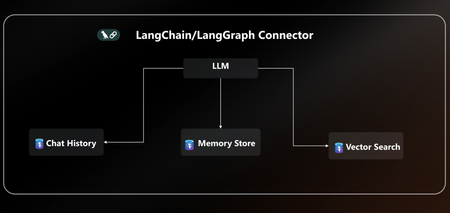
AI agents are only as powerful as the data layer behind them. That’s why we’re excited to announce native LangChain + LangGraph connector for Azure Database for PostgreSQL. With this release, Postgres becomes your single source of truth for AI agents, handling knowledge retrieval, chat history, and long-term memory all in one place. This new connector is packed with everything you need to build secure, scalable and enterprise-ready AI agents on Azure without the complexity. With EntraID authentication, DiskANN acceleration, vector store, and a dedicated agent store, you can go from prototype to production on Azure faster than ever. You can quickly get started with the LangChain + LangGraph connector today pip install langchain-azure-postgresql In this post, we’ll cover: How Azure Postgres connector for LangGraph can serve as the single persistence + retrieval layer for an AI agent New first-class connector for LangChain +LangGraph A practical example to help you get started Azure PostgreSQL as the single persistence + retrieval layer for an AI agent When building AI agents today, developers face a fragmented stack: Vector storage and search require a library, service or separate database. Chat history & short-term memory need yet another data source. Long-term memory often means bolting on yet another system. This sprawl leads to complex integrations, higher costs, and weaker security, making it hard to scale AI agents reliably. The Solution The new Azure Postgres connector for LangChain + LangGraph transforms your Azure Postgres database to the single persistence + retrieval layer for AI agents. Instead of working on a fragmented stack, developers can now: Run embeddings + semantic search with built-in DiskANN acceleration in the same database that powers their application logic. Persist chat history and short-term memory and keep agent conversations grounded via seamless context retrieval from data stored in Postgres. Capture, retrieve, and evolve knowledge over time with a built-in long-term memory without bolting on external systems. All in one database, simplified, secure, and enterprise ready. Postgres becomes the persistent and retrieval data layer for your AI agent. Built for Enterprise Readiness: LangChain + LangGraph Connector This release unlocks several new capabilities that make it easy to build robust, production-ready agents: Auth with EntraID: Enterprise-grade identity to securely connect LangChain + LangGraph workflows to Azure Database for PostgreSQL within a centrally managed security perimeter based on identity. DiskANN & Extensions: First-class support for faster vector search using pgvector combined with DiskANN indexing, enabling support for high-dimensional vectors and cost-efficient search. Additionally, helper functions ensure your favorite extensions are installed. Native Vector Store: Store and query embeddings, enabling semantic search and Retrieval-Augmented Generation (RAG) scenarios. Dedicated Agent Store: Persist agent state, memory, and chat history with structured access patterns, perfect for multi-turn conversations and long-term context. Together, these features give developers a turnkey persistence solution for building reliable AI agents without stitching together multiple storage systems. Using LangGraph on Azure Database for PostgreSQL Using LangGraph with Azure Database for PostgreSQL is easy. Enable the vector & pg_diskann Extension: Allowlist the vector and pg_diskann extension within your server configuration. Import LangChain + LangGraph connector pip install langchain-azure-postgresql pip install -qU langchain-openai pip install -qU azure-identity Login to Azure, to your Entra ID Run az login in your terminal, where you will also run the LangGraph code. az login To get started, you need to set up a production-ready vector store for your agent in a few lines of code. # 1. Auth: Securely connect to Azure Postgres connection_pool = AzurePGConnectionPool(azure_conn_info=ConnectionInfo(host=os.environ["PGHOST"])) #2. Create embeddings embeddings = AzureOpenAIEmbeddings(model="text-embedding-3-small") # 3. Initialize a vector store in Postgres with DiskANN vector_store = AzurePGVectorStore(connection=connection, embedding=embeddings) Use LangGraph to build a sample agent. Here’s a practical example that combines vector search and checkpointer inside Postgres: #4 Define the tool for data retrieval. def get_data_from_vector_store(query: str) -> str: """Get data from the vector store.""" results = vector_store.similarity_search(query) return results #5 Define the agent, checkpointer and memory store. with connection_pool.getconn() as conn: agent = create_react_agent( model=model, tools=[get_data_from_vector_store], checkpointer=PostgresSaver(conn) ) #6 Run the agent and print results config = {"configurable": {"thread_id": "1", "user_id": "1"}} response = agent.invoke( {"messages": [{"role": "user", "content": "What does my database say about cats? Make sure you address me with my name"}]}, config ) for msg in response["messages"][-2:]: msg.pretty_print() With just a few lines of code, you can: Uses the vector store backed by Postgres Enable DiskANN for semantic search Use checkpointers for short-term conversation history Learn More This is just the beginning. With native LangChain + LangGraph support in Azure PostgreSQL, developers can now rely on a single, secure, high-performance data layer for building the next generation of AI agents. 👉 Ready to start? All the code are available in the Azure Postgres Agents Demo GitHub repository. See how easy it is to bring your AI agent to life on Azure. 👉 Check out the docs for more details on the LangChain + LangGraph connector.4.5KViews3likes0CommentsAgent Builder, Copilot Studio, or Azure AI Foundry: How We Decide for Every Client
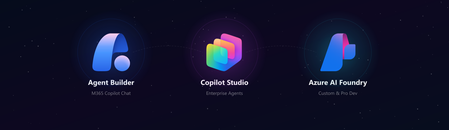
Every client conversation starts the same way. Someone has seen a demo, attended an Ignite session, or read a press release. They want to build an agent. Then comes the question that derails more projects than any technical challenge: "Which tool should we use?" After deploying agents for clients across industries - insurance, professional services, manufacturing, public sector - we have developed a repeatable framework for answering that question. It is not based on which tool is newest or which has the best marketing. It is based on where projects actually succeed or fail in production. The three tools are not competitors The first mistake most teams make is treating Agent Builder, Copilot Studio, and Azure AI Foundry as a hierarchy - basic, intermediate, advanced. That framing leads to bad decisions. They are not a ladder. They are three distinct tools built for three distinct contexts. The right question is not "which tool is most powerful?" It is "which tool fits this project's constraints?" The framework: 4 questions We evaluate every project against four dimensions before recommending a tool: Who is building it? Where do users live? How complex is the logic? Who owns it after go-live? Agent Builder Copilot Studio Azure AI Foundry Builder profile Maker, no code Developer / power user Pro developer, Python User surface M365 Copilot Chat Teams, web, M365 Copilot Custom app, any surface Logic complexity Simple Q&A, task routing Multi-step flows, connectors Fully custom orchestration Post-go-live ownership Business team IT + Business joint Engineering team Governance M365 Admin Center Power Platform DLP Custom, Azure RBAC When we recommend Agent Builder Agent Builder is the right call when the business team wants to own the agent end-to-end, the use case is bounded, and the users already live inside M365 Copilot Chat. The key advantage is distribution - an Agent Builder agent surfaces natively inside Copilot Chat with zero additional deployment work. No IT ticket, no app registration, no Teams app package. The ceiling is real. Agent Builder does not support complex branching logic, external API calls, or dynamic prompt injection. The moment a client asks "can it also update a record in our CRM?" the answer is usually no. Use it when: The maker owns it, the use case is narrow, and M365 Copilot is already the user's primary surface. When we recommend Copilot Studio Copilot Studio is our default recommendation for the majority of enterprise agent projects. It covers the wide middle ground between no-code simplicity and full-code flexibility - within the Microsoft governance perimeter most enterprise IT teams already control. Power Platform connectors - 1,000+ out-of-the-box connectors means most enterprise data sources are reachable without custom API development M365 Copilot channel - surface a Copilot Studio agent directly inside M365 Copilot Chat, Agent Builder-level distribution with enterprise-grade logic underneath Topic-level governance - fallback behaviors, confidence thresholds, escalation paths configurable without code DLP policy enforcement - the agent operates within the same data loss prevention perimeter as the rest of the Power Platform tenant The most common mistake: under-investing in the knowledge layer. The agent authoring is the easy part. Getting SharePoint content structured, metadata consistent, and documents deduplicated is where most projects hit delays. Budget for it. Use it when: The use case requires connectors, dynamic responses, or M365 Copilot integration - and you want IT to own governance without requiring a developer team. When we recommend Azure AI Foundry Foundry is the right call when you need to bring your own model, build a fully custom orchestration pipeline, or integrate into a surface that has nothing to do with Microsoft 365. In practice, this means one of three scenarios: The client has a model fine-tuned on proprietary data that must be used The agent is embedded inside a custom-built web or mobile application The logic requires Python-level control - complex reasoning chains, multi-agent coordination, custom evaluation loops Foundry projects require a professional developer, take longer, and produce something the business team cannot maintain without engineering support. That is not a reason to avoid it - it is a reason to be honest with the client upfront. Use it when: You need full control of the model, the orchestration, or the surface - and you have a developer team to own it. The question that resolves most debates When a client is torn between Copilot Studio and Foundry, we ask one question: "Who is answering the 2am support call when this breaks in production?" If the answer is a developer, Foundry is viable. If the answer is the IT admin or the business owner, Copilot Studio is the right call. Not because Foundry is unreliable, but because the operational model has to match the tool. More projects fail from ownership mismatch than from technical limitations. What we see go wrong Reaching for Foundry too early. Developers often want full control and reach for Foundry before validating the use case. We have rebuilt several Foundry POCs in Copilot Studio when the production constraints called for it - faster to ship and cheaper to run. Under-scoping Agent Builder. Business teams choose Agent Builder because it looks simple, then hit the ceiling at month two. The re-platform cost is higher than building in Copilot Studio from the start. Ignoring the M365 Copilot channel. Many Copilot Studio projects are deployed as standalone Teams apps when they could surface directly inside M365 Copilot Chat. The distribution advantage is significant and underused. The short version Agent Builder - maker-owned, bounded use case, M365 Copilot surface, fast Copilot Studio - IT + business joint ownership, connectors, production governance, M365 Copilot integration Azure AI Foundry - developer-owned, custom model or surface, full control, higher cost Start with the ownership model. Everything else follows. Elliot Margot - Team Lead Jumpstart, Copilot and Agents at Witivio (Microsoft Partner). Connect on https://www.linkedin.com/in/elliot-margot-52742a156/.2KViews1like0CommentsAzure Native Integrations: Public Preview of Napster Companion API on Azure
What is Napster Companion API? Napster Companion API is Napster's platform for building Omniagents: persistent, multi-channel AI agents with one identity, one memory, and one set of tools that show up across every channel an end user touches. The same Omniagent meets the customer on the website, in the mobile app, on video, and on the phone line with the same face, the same voice, and the same memory of the last conversation. The Omniagent as a digital worker The clearest way to think about an Omniagent is as a digital worker: It has a role (customer support specialist, sales advisor, internal IT assistant). It carries the memory of past shifts and prior conversations. It has the tools it needs to do the job which include APIs, knowledge bases, ticketing systems, CRMs. It shows up across every surface the end user touches, like a human worker who answers the door, the phone, and the inbox. When something is outside its scope, it hands off to a human colleague with the context already attached and picks the thread back up when the human is done. Use cases for the Companion API Teams are already exploring the Companion API across a wide range of scenarios: Agentic commerce. Agents that guide end users through discovery, recommendations, purchase, and post-sales support all in one continuous conversation across channels. Customer service. Agents that resolve issues end to end, escalate to humans with full context attached, and pick the thread back up across sessions. Internal operations and digital coworkers. Agents that orchestrate workflows, retrieve knowledge, and automate repetitive tasks for the workforce. Capabilities introduced by Napster Companion API The Companion API public preview brings the following capabilities to Azure customers: Persistent multi-channel agents that maintain identity, memory, and context across web, mobile, voice, video, and telephony. Real-time multimodal interactions across voice, video, and text for natural back-and-forth conversation. Tool and API orchestration that lets agents take real actions like opening tickets, updating records, retrieving documents, and triggering workflows. Persona-driven agents with configurable behavior, conversational style, and avatar-based interaction. Knowledge bases and deterministic question-and-answer pairs for grounded, accurate responses on topics where exactness matters. Developer SDKs and a no-code Dashboard for building, testing, deploying, and iterating on agents. Better together: Napster and Microsoft This integration is the result of a long-term Azure-native partnership between Napster and Microsoft. It is not an external service layered onto Azure infrastructure but it is a co-engineered offering designed to help enterprises operationalize persistent AI agents at scale. In practice, the Azure Native integration delivers: Benefit What it means for you Seamless development experience Provision and manage Companion API resources directly from the Azure portal, alongside your other Azure services. Build and operate Omniagents in the Napster Dashboard, reached through single sign-on. Bring your own model or use Napster Hosted Connect your Azure OpenAI realtime deployment on Microsoft Foundry so inference runs in your tenant. Or use the Napster Hosted tier where Napster manages the model for you. Simplified billing Manage Companion API spend through Azure Marketplace, on the same invoice as the rest of your Azure consumption which means no separate procurement, no separate billing relationship. Single sign-on with Microsoft Entra Switch between Azure resources and the Companion API Dashboard without re-entering credentials. Enterprise-ready foundation Built on Azure's compliance, security, and global infrastructure footprint. How it works? &amp;amp;amp;amp;nbsp;&amp;amp;amp;amp;nbsp; If the player doesn’t load, open the video in a new window: Open video Get started in minutes Provisioning Napster Companion API on Azure takes just a few clicks: Open the Azure portal and search for *Napster Companion API*. Create a new resource and choose your subscription, resource group, region, and pricing tier. Link your Napster organization (or create one as part of resource provisioning). Launch the Companion API Dashboard from the resource overview page using single sign-on, and start building your first Omniagent in the Napster portal. Full step-by-step guidance is available in the Napster Companion API documentation on Microsoft Learn Resources Product documentation: Napster Companion API on Microsoft Learn Quickstart: Create a Napster Companion API resource Azure Marketplace listing: Napster Companion API Napster for partners: napster.com/partners Azure Native Integrations overview: Azure partner solutions What's next This public preview is the first milestone on a broader roadmap. We are eager to hear from early adopters. Try the public preview, build your first Omniagent, and let us know what you think as your feedback will shape what ships next. Get started today by searching for Napster Companion API in the Azure portal.1.8KViews1like1CommentAI Agents in Production: From Prototype to Reality - Part 10
This blog post, the tenth and final installment in a series on AI agents, focuses on deploying AI agents to production. It covers evaluating agent performance, addressing common issues, and managing costs. The post emphasizes the importance of a robust evaluation system, providing potential solutions for performance issues, and outlining cost management strategies such as response caching, using smaller models, and implementing router models.1.7KViews3likes1CommentSizing Copilot Credits for Cowork? Let Your Users Use Cowork Investment Advisor Agent.
Right, let's talk about a headache. If you're helping a customer allocate Copilot Credits for M365 Copilot Cowork, you have to size it all up first — and doing that by hand is a fiddly, time-consuming job. Here's the problem, and a much easier way to solve it. Start with the Cowork Estimator Here's the good news: you don't have to start from scratch. Microsoft has published the Customer Cowork Estimator — a handy tool that turns personas, prompt complexity and expected usage into an estimated credit number. It's the perfect place to begin, and it does the core maths for you. To get the most out of it, you just need to feed it good inputs — and that's where a little groundwork comes in. For each part of the business, you'll want to: Work out who's who. There are four types of user — corporate knowledge workers, management and senior leaders, customer-facing folks, and technical staff. Count how many of each. Quick for a small team, a bit more involved for a big one. Pin down what they'd genuinely use Cowork for. The real multi-step workflows that hop across apps and actually do things — not just a quick chat or a summary. Judge how heavy each workflow is. Light, Medium or Heavy — since each level uses a different number of credits per run. Estimate how often it runs. Daily adds up to a lot of runs a month; weekly is far fewer. The estimator handles the sums beautifully once those inputs are in. Gathering the inputs themselves — persona by persona, workflow by workflow, across a few thousand people — is simply the part that takes time. And that's exactly where this agent lends a hand: it builds on the estimator by automating the groundwork that feeds it. How this agent helps This agent takes on that groundwork for you. Instead of sizing everyone from the outside, the admin simply switches the agent on for every user. Each person then sizes their own needs — and the agent does the clever bits for them, ready to drop into the estimator. Here's what it does behind the scenes: Spots the right persona. It works out which of the four personas each user fits. Finds the real workflows. It looks at the top Cowork scenarios the user would actually run. Keeps it honest. It checks each one is a genuine Cowork job — several steps, more than one app, real actions and a bit of decision-making — not something a Scheduled Prompt or plain Copilot Chat could do just as well. Grounds it in evidence. It reads the signals from recent work — emails, meetings, documents and Teams chats — so the estimate is based on what people actually do, not thin air. Does the sums. It maps each workflow's complexity to credits per run and totals it up — giving you numbers that line up neatly with the estimator. Shows the value. It gives a view of pay-as-you-go versus a pre-purchase plan, and a sense of the return on the spend. Stays transparent. It states its assumptions, flags how confident it is, and sticks to permitted data and the usual privacy and compliance rules. And here's the kind of report it hands back — persona, the top workflows, complexity, credits, cost and a clear recommendation, all in one place: Why this approach works better So why hand it to the users? A few good reasons: More accurate. The numbers come from each person's real workload, not a top-down guess. Consistent by design. Everyone follows the same method — same personas, same complexity bands, same maths — so the results line up and roll into one clean figure. No over-buying. Because it weeds out the workflows that don't really need Cowork, your customer only pays for credits they'll genuinely use. A proper business case. You get cost clarity and a feel for the return, so you're handing over more than just a number. It scales. Ten users or ten thousand — the effort on your side stays much the same. It saves you hours. You swap manual sizing for gathering and rolling up. Your time goes on advising, not tallying. Not ready to roll it out? Other ways in If an admin isn't quite ready to switch the agent on for everyone, that's OK— there's no need to. This agent is an M365 Copilot agent, and it has free access to Work IQ — the same engine that will eventually power Cowork. Because that access is free, the agent can read how people really work and take the guesswork right out of sizing. And there's more than one way to get at it: Build it with Agent Builder. Ready-made instructions, a description and a starter prompt are all sitting in the GitHub repo. Anyone with access to M365 Copilot can pop them into Agent Builder and stand the agent up in minutes. Prefer not to build an agent? Just use the prompt. There's a comprehensive prompt you can drop straight into the M365 Copilot Chat experience. Same sizing, same evidence — no agent to create. Ready to give it a go? Whichever route suits you best, getting started is dead simple. If you're rolling the agent out to your users: Have a quick word with your customer's admin about switching the agent on for their users. Let each person size their own Cowork needs. Gather it all up and roll it into a single estimate. Prefer to keep it in your own hands? Build the agent from the GitHub repo with Agent Builder, or drop the comprehensive prompt into M365 Copilot Chat — you'll get to the same place with even less setup. THE BOTTOM LINE That's the heavy lifting done for you. You'll save yourself hours, spare yourself the guesswork, and hand your customer a credit plan they can genuinely trust — with the numbers and the business case sitting right behind it. Give it a spin on your next engagement and see how much quicker it gets you there. Resources Everything you need is in one place: Customer Cowork Estimator — https://aka.ms/CustomerCoworkEstimator GitHub repo — agent instructions, description, starter prompt and the full Copilot Chat prompt: Cowork Investment Assessment1.4KViews1like0CommentsThree Tiers, One Platform: Building Agents Together with the Build-Along Series
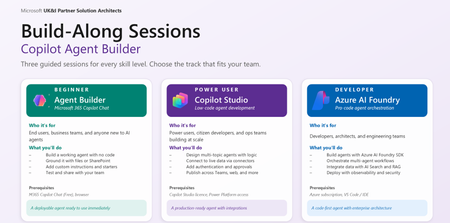
The Agentic Opportunity Every partner has agent ambition, but a single workshop format cannot serve every builder. Business makers want a fast win without writing code. Citizen developers want to orchestrate real processes across enterprise systems. Pro developers want a code-first surface with evaluations, tracing, and managed identity. Run the wrong session for the wrong audience, and engagement collapses - too abstract for one group, too constrained for another. The Agent Build-Along Series solves that by meeting builders exactly where they are, across three tiers of the Microsoft platform stack. Behind the series sits a self-serve GitHub repository - a curated library of build-along sessions with easy-to-follow, step-by-step instructions, scoped to specific industry scenarios and business functions. Partners pick the scenario that fits the room, clone the assets, and run the session. No bespoke content build, no facilitator guesswork. A Self-Serve Repository for Build-Along Sessions Diagram illustrating three tiers of agent building The repo at Agent Build-Along Github is a self-serve catalog of ready-to-run workshops. Every session is curated for a specific industry and business function, with easy-to-follow instructions a facilitator can pick up and deliver. Pick the combination that matches the room and run the session - the content, scenario, and assets are already there. Sessions are organised across three axes so partners can find the right fit fast: Industry - Financial Services, Healthcare, Retail, Manufacturing, Public Sector, Energy, Professional Services Business function - Sales, Marketing, Finance, HR, Operations, IT, Customer Service Workload - Agent Builder, Copilot Studio and Azure AI Foundry Each session in the repo includes a real-world scenario, step-by-step build instructions, sample data, prompts and configuration, and a facilitator narrative. Clone, brief the room, build the agent - that is the loop. Three Tiers - Meet Builders Where They Are The pyramid is intentional. Builders start where their skills are today and move up as confidence grows. The tier defines platform, audience, duration, and approach - content stays consistent. Tier Platform Audience Duration Approach 1 - Foundation Microsoft 365 Copilot Agent Builder Business makers, end users, departmental teams 60 min No-code 2 - Extend Copilot Studio Citizen developers, power users, ops teams 90 min Low-code 3 - Pro-Code Azure AI Foundry Pro developers, architects, AI engineers 180+ min Code-first Tier 1 - M365 Copilot Agent Builder Author your first agent - no code required. Microsoft 365 Copilot Agent Builder virtual workshop overview, What your customers will build A custom agent scoped to a real workplace scenario Grounded with knowledge sources (SharePoint sites, files, web URLs) Configured with custom instructions and conversation starters Tested in the preview pane and shared with a team Session flow Define → Ground → Refine → Test & Share Prerequisites Microsoft 365 Copilot licence (or Copilot Chat free) Modern browser (Edge / Chrome) A workplace scenario in mind, or use our template Outcome Attendees leave with a working agent they can use immediately, plus a repeatable pattern for future use cases. This is the right entry point for departmental teams who want to operationalise Copilot without engineering involvement. Tier 2 - Copilot Studio Orchestrate multi-step agents across enterprise systems. Microsoft Copilot Studio virtual workshop overview What your customers will build A copilot with generative answers and authored topics Custom actions that call APIs and Power Platform connectors Knowledge sources spanning SharePoint, Dataverse, public web, and enterprise data Channel deployment to Microsoft Teams and a public web embed Session flow Design → Connect → Author → Publish Prerequisites M365 Copilot license with access to Copilot Studio Familiarity with Power Platform helpful, not required A multi-step workflow or process in mind Outcome Attendees leave with a published copilot running in Teams or on the web, plus a pattern for connecting copilots to enterprise systems. This is where citizen developers and ops teams turn manual processes into orchestrated, agent-driven workflows. Tier 3 - Azure AI Foundry Ship a code-first agent with evaluations and observability. What your customers will build A code-first agent with custom tools and function calling Grounding via Azure AI Search and the customer's own data Model selection from the Foundry catalog, with optional fine-tuning Evaluations, tracing, and managed-identity deployment Session flow Provision → Build → Evaluate → Deploy Prerequisites Azure subscription with Azure AI Foundry access VS Code, plus Python or .NET familiarity Sample data or a use case ready to ground on Outcome Attendees leave with a deployed agent - code, evaluations, and tracing in place - plus reusable SDK templates. This is the right tier for architects and AI engineers shipping agents into production with the governance bar enterprise customers expect. How the Repository Works The repo removes the heaviest lift in running these workshops: content creation. Every session is curated against the same three axes - industry, business function, tier - and shipped with step-by-step instructions a facilitator can follow with minimum prep. Industry/Business Function × Tier → Ready-to-run Build-Along Each session in the repo ships with: A real-world scenario grounded in the chosen industry and business function Step-by-step build instructions tuned to the selected tier Sample data the agent can ground against Prompts, conversation starters, and configuration snippets Facilitator narrative so anyone can run the session Need an enterprise agent that can handle integrate with CRM data? There is a curated Copilot Studio session with a deal-desk scenario and sample CRM data. Need a pro-code health care agent? Choose the Foundry session with a patient-flow scenario and a grounded dataset. Same repo, different curated paths - at the right depth for the room. What Attendees Walk Away With Agent-Builder - A working agent in Microsoft 365 Copilot, ready to share with colleagues. Copilot Studio - A published copilot running in Teams or on the web, connected to enterprise systems. Foundry - A deployed Foundry agent with evaluations, tracing, and SDK templates for the next build. In all cases attendees leave with assets - not slides - and the confidence to build the next one without facilitation. Next Steps - Host a Build-Along Pick your tier - Start where your skills are today. Move up the pyramid as confidence grows. Drive Registration – Socialise your Build-Along session to maximise attendance. Show up and build. Bring a real scenario. Customers leave with a working agent to share. Where to Next Browse the self-serve repository of Build-Along sessions - curated by industry and business function, with step-by-step instructions ready to run: Agent Build Along.1.4KViews0likes1CommentTransforming Enterprise AKS: Multi-Tenancy at Scale with Agentic AI and Semantic Kernel
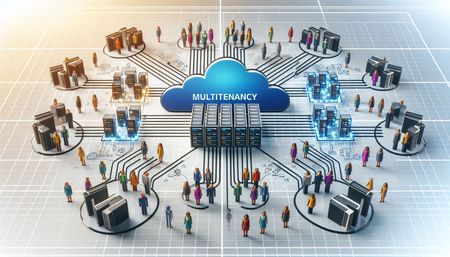
In this post, I’ll show how you can deploy an AI Agent on Azure Kubernetes Service (AKS) using a multi-tenant approach that maximizes both security and cost efficiency. By isolating each tenant’s agent instance within the cluster and ensuring that every agent has access only to its designated Azure Blob Storage container, cross-tenant data leakage risks are eliminated. This model allows you to allocate compute and storage resources per tenant, optimizing usage and spending while maintaining strong data segregation and operational flexibility—key requirements for scalable, enterprise-grade AI applications.August 2025 Recap: Azure Database for PostgreSQL
Hello Azure Community, August was an exciting month for Azure Database for PostgreSQL! We have introduced updates that make your experience smarter and more secure. From simplified Entra ID group login to integrations with LangChain and LangGraph, these updates help with improving access control and seamless integration for your AI agents and applications. Stay tuned as we dive deeper into each of these feature updates. Feature Highlights Enhanced Performance recommendations for Azure Advisor - Generally Available Entra-ID group login using user credentials - Public Preview New Region Buildout: Austria East LangChain and LangGraph connector Active-Active Replication Guide Enhanced Performance recommendations for Azure Advisor - Generally Available Azure Advisor now offers enhanced recommendations to further optimize PostgreSQL server performance, security, and resource management. These key updates are as follows: Index Scan Insights: Detection and recommendations for disabled index and index-only scans to improve query efficiency. Audit Logging Review: Identification of excessive logging via the pgaudit.log parameter, with guidance to reduce overhead. Statistics Monitoring: Alerts on server statistics resets and suggestions to restore accurate performance tracking. Storage Optimization: Analysis of storage usage with recommendations to enable the Storage Autogrow feature for seamless scaling. Connection Management: Evaluation of workloads for short-lived connections and frequent connectivity errors, with recommendations to implement PgBouncer for efficient connection pooling. These enhancements aim to provide deeper operational insights and support proactive performance tuning for PostgreSQL workloads. For more details read the Performance recommendations documentation. Entra-ID group login using user credentials - Public Preview The public preview for Entra-ID group login using user credentials is now available. This feature simplifies user management and improves security within the Azure Database for PostgreSQL. This allows administrators and users to benefit from a more streamlined process like: Changes in Entra-ID group memberships are synchronized on a periodic 30min basis. This scheduled syncing ensures that access controls are kept up to date, simplifying user management and maintaining current permissions. Users can log in with their own credentials, streamlining authentication, and improving auditing and access management for PostgreSQL environments. As organizations continue to adopt cloud-native identity solutions, this update represents a major improvement in operational efficiency and security for PostgreSQL database environments. For more details read the documentation on Entra-ID group login. New Region Buildout: Austria East New region rollout! Azure Database for PostgreSQL flexible server is now available in Austria East, giving customers in and around the region lower latency and data residency options. This continues our mission to bring Azure PostgreSQL closer to where you build and run your apps. For the full list of regions visit: Azure Database for PostgreSQL Regions. LangChain and LangGraph connector We are excited to announce that native LangChain & LangGraph support is now available for Azure Database for PostgreSQL! This integration brings native support for Azure Database for PostgreSQL into LangChain or LangGraph workflows, enabling developers to use Azure PostgreSQL as a secure and high-performance vector store and memory store for their AI agents and applications. Specifically, this package adds support for: Microsoft Entra ID (formerly Azure AD) authentication when connecting to your Azure Database for PostgreSQL instances, and, DiskANN indexing algorithm when indexing your (semantic) vectors. This package makes it easy to connect LangChain to your Azure-hosted PostgreSQL instances whether you're building intelligent agents, semantic search, or retrieval-augmented generation (RAG) systems. Read more at https://aka.ms/azpg-agent-frameworks Active-Active Replication Guide We have published a new blog article that guides you through setting up active-active replication in Azure Database for PostgreSQL using the pglogical extension. This walkthrough covers the fundamentals of active-active replication, key prerequisites for enabling bi-directional replication, and step-by-step demo scripts for the setup. It also compares native and pglogical approaches helping you choose the right strategy for high availability, and multi-region resilience in production environments. Read more about the active-active replication guide on this blog. Azure Postgres Learning Bytes 🎓 Enabling Zone-Redundant High Availability for Azure Database for PostgreSQL Flexible Server Using APIs. High availability (HA) is essential for ensuring business continuity and minimizing downtime in production workloads. With Zone-Redundant HA, Azure Database for PostgreSQL Flexible Server automatically provisions a standby replica in a different availability zone, providing stronger fault tolerance against zone-level failures. This section will guide you on how to enable Zone-Redundant HA using REST APIs. Using REST APIs gives you clear visibility into the exact requests and responses, making it easier to debug issues and validate configurations as you go. You can use any REST API client tool of your choice to perform these operations including Postman, Thunder Client (VS Code extension), curl, etc. to send requests and inspect the results directly. Before enabling Zone-Redundant HA, make sure your server is on the General Purpose or Memory Optimized tier and deployed in a region that supports it. If your server is currently using Same-Zone HA, you must first disable it before switching to Zone-Redundant. Steps to Enable Zone-Redundant HA: Get an ARM Bearer token: Run this in a terminal where Azure CLI is signed in (or use Azure Cloud Shell) az account get-access-token --resource https://management.azure.com --query accessToken -o tsv Paste token in your API client tool Authorization: `Bearer <token>` </token> Inspect the server (GET) using the following URL: https://management.azure.com/subscriptions/{{subscriptionId}}/resourceGroups/{{resourceGroup}}/providers/Microsoft.DBforPostgreSQL/flexibleServers/{{serverName}}?api-version={{apiVersion}} In the JSON response, note: sku.tier → must be 'GeneralPurpose' or 'MemoryOptimized' properties.availabilityZone → '1' or '2' or '3' (depends which availability zone that was specified while creating the primary server, it will be selected by system if the availability zone is not specified) properties.highAvailability.mode → 'Disabled', 'SameZone', or 'ZoneRedundant' properties.highAvailability.state → e.g. 'NotEnabled','CreatingStandby', 'Healthy' If HA is currently SameZone, disable it first (PATCH) using API. Use the same URL in Step 3, in the Body header insert: { "properties": { "highAvailability": { "mode": "Disabled" } } } Enable Zone Redundant HA (PATCH) using API: Use the same URL in Step 3, in the Body header insert: { "properties": { "highAvailability": { "mode": "ZoneRedundant" } } } Monitor until HA is Healthy: Re-run the GET from Step 3 every 30-60 seconds until you see: "highAvailability": { "mode": "ZoneRedundant", "state": "Healthy" } Conclusion That’s all for our August 2025 feature updates! We’re committed to making Azure Database for PostgreSQL better with every release, and your feedback plays a key role in shaping what’s next. 💬 Have ideas, questions, or suggestions? Share them with us: https://aka.ms/pgfeedback 📢 Want to stay informed about the latest features and best practices? Follow us here for the latest announcements, feature releases, and best practices: Azure Database for PostgreSQL Blog More exciting improvements are on the way—stay tuned for what’s coming next!1.2KViews2likes0CommentsCreating a Fun Multi-Agent Content Strategy System with Microsoft Agent Framework
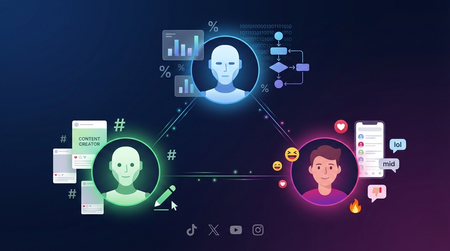
This tutorial walks you through building a multi-agent content strategy system using Microsoft's AutoGen framework. Three specialised AI agents — a Content Creator, an Algorithm Simulator, and an Audience Persona — collaborate to help gaming content creators pressure-test their social media posts before publishing. Using live Google Trends data and platform-specific scoring rubrics for TikTok, Twitter/X, YouTube, and Instagram, the system generates content, predicts how each platform's algorithm would distribute it, and simulates authentic audience reactions. The tutorial covers core multi-agent patterns including role specialisation, structured evaluation, iterative feedback loops, and resilient tool integration — all running on GitHub Models' free tier.1.1KViews0likes0Comments