agentic ai
29 TopicsTransforming Enterprise AKS: Multi-Tenancy at Scale with Agentic AI and Semantic Kernel
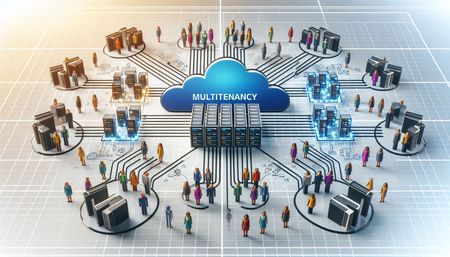
In this post, I’ll show how you can deploy an AI Agent on Azure Kubernetes Service (AKS) using a multi-tenant approach that maximizes both security and cost efficiency. By isolating each tenant’s agent instance within the cluster and ensuring that every agent has access only to its designated Azure Blob Storage container, cross-tenant data leakage risks are eliminated. This model allows you to allocate compute and storage resources per tenant, optimizing usage and spending while maintaining strong data segregation and operational flexibility—key requirements for scalable, enterprise-grade AI applications.Build Enterprise-Ready AI Agents with the New Azure Postgres LangChain + LangGraph Connector
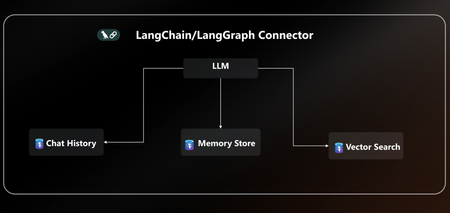
AI agents are only as powerful as the data layer behind them. That’s why we’re excited to announce native LangChain + LangGraph connector for Azure Database for PostgreSQL. With this release, Postgres becomes your single source of truth for AI agents, handling knowledge retrieval, chat history, and long-term memory all in one place. This new connector is packed with everything you need to build secure, scalable and enterprise-ready AI agents on Azure without the complexity. With EntraID authentication, DiskANN acceleration, vector store, and a dedicated agent store, you can go from prototype to production on Azure faster than ever. You can quickly get started with the LangChain + LangGraph connector today pip install langchain-azure-postgresql In this post, we’ll cover: How Azure Postgres connector for LangGraph can serve as the single persistence + retrieval layer for an AI agent New first-class connector for LangChain +LangGraph A practical example to help you get started Azure PostgreSQL as the single persistence + retrieval layer for an AI agent When building AI agents today, developers face a fragmented stack: Vector storage and search require a library, service or separate database. Chat history & short-term memory need yet another data source. Long-term memory often means bolting on yet another system. This sprawl leads to complex integrations, higher costs, and weaker security, making it hard to scale AI agents reliably. The Solution The new Azure Postgres connector for LangChain + LangGraph transforms your Azure Postgres database to the single persistence + retrieval layer for AI agents. Instead of working on a fragmented stack, developers can now: Run embeddings + semantic search with built-in DiskANN acceleration in the same database that powers their application logic. Persist chat history and short-term memory and keep agent conversations grounded via seamless context retrieval from data stored in Postgres. Capture, retrieve, and evolve knowledge over time with a built-in long-term memory without bolting on external systems. All in one database, simplified, secure, and enterprise ready. Postgres becomes the persistent and retrieval data layer for your AI agent. Built for Enterprise Readiness: LangChain + LangGraph Connector This release unlocks several new capabilities that make it easy to build robust, production-ready agents: Auth with EntraID: Enterprise-grade identity to securely connect LangChain + LangGraph workflows to Azure Database for PostgreSQL within a centrally managed security perimeter based on identity. DiskANN & Extensions: First-class support for faster vector search using pgvector combined with DiskANN indexing, enabling support for high-dimensional vectors and cost-efficient search. Additionally, helper functions ensure your favorite extensions are installed. Native Vector Store: Store and query embeddings, enabling semantic search and Retrieval-Augmented Generation (RAG) scenarios. Dedicated Agent Store: Persist agent state, memory, and chat history with structured access patterns, perfect for multi-turn conversations and long-term context. Together, these features give developers a turnkey persistence solution for building reliable AI agents without stitching together multiple storage systems. Using LangGraph on Azure Database for PostgreSQL Using LangGraph with Azure Database for PostgreSQL is easy. Enable the vector & pg_diskann Extension: Allowlist the vector and pg_diskann extension within your server configuration. Import LangChain + LangGraph connector pip install langchain-azure-postgresql pip install -qU langchain-openai pip install -qU azure-identity Login to Azure, to your Entra ID Run az login in your terminal, where you will also run the LangGraph code. az login To get started, you need to set up a production-ready vector store for your agent in a few lines of code. # 1. Auth: Securely connect to Azure Postgres connection_pool = AzurePGConnectionPool(azure_conn_info=ConnectionInfo(host=os.environ["PGHOST"])) #2. Create embeddings embeddings = AzureOpenAIEmbeddings(model="text-embedding-3-small") # 3. Initialize a vector store in Postgres with DiskANN vector_store = AzurePGVectorStore(connection=connection, embedding=embeddings) Use LangGraph to build a sample agent. Here’s a practical example that combines vector search and checkpointer inside Postgres: #4 Define the tool for data retrieval. def get_data_from_vector_store(query: str) -> str: """Get data from the vector store.""" results = vector_store.similarity_search(query) return results #5 Define the agent, checkpointer and memory store. with connection_pool.getconn() as conn: agent = create_react_agent( model=model, tools=[get_data_from_vector_store], checkpointer=PostgresSaver(conn) ) #6 Run the agent and print results config = {"configurable": {"thread_id": "1", "user_id": "1"}} response = agent.invoke( {"messages": [{"role": "user", "content": "What does my database say about cats? Make sure you address me with my name"}]}, config ) for msg in response["messages"][-2:]: msg.pretty_print() With just a few lines of code, you can: Uses the vector store backed by Postgres Enable DiskANN for semantic search Use checkpointers for short-term conversation history Learn More This is just the beginning. With native LangChain + LangGraph support in Azure PostgreSQL, developers can now rely on a single, secure, high-performance data layer for building the next generation of AI agents. 👉 Ready to start? All the code are available in the Azure Postgres Agents Demo GitHub repository. See how easy it is to bring your AI agent to life on Azure. 👉 Check out the docs for more details on the LangChain + LangGraph connector.4.6KViews3likes0CommentsFueling the Agentic Web Revolution with NLWeb and PostgreSQL
We’re excited to announce that NLWeb (Natural Language Web), Microsoft’s open project for natural language interfaces on websites now supports PostgreSQL. With this enhancement, developers can leverage PostgreSQL and NLWeb to transform any website into an AI-powered application or Model Context Protocol (MCP) server. This integration allows organizations to utilize a familiar, robust database as the foundation for conversational AI experiences, streamlining deployment and maximizing data security and scalability. Soon, autonomous agents, not just human users, will consume and interpret website content, transforming how information is accessed and utilized online. During Microsoft //Build 2025, Microsoft introduced the era of the open agentic web, in which the internet is an open agentic web a new paradigm in which autonomous agents seamlessly interact across individual, organizational, team and end-to-end business contexts. To realize the future of an open agentic web, Microsoft announced the NLWeb project. NLWeb transforms any website to an AI-powered application with just a few lines of code and by connecting to an AI model and a knowledge base. In this post, we’ll cover: What NLWeb is and how it works with vector databases How pgvector enables vector similarity search in PostgreSQL for NLWeb Get started using NLWeb with Postgres Let’s dive in and see how Postgres + NLWeb can redefine conversational web interfaces while keeping your data in a familiar, powerful database. What is NLWeb? A Quick Overview of Conversational Web Interfaces NLWeb is an open project developed by Microsoft to simplify adding conversational AI interfaces to websites. How NLWeb works under the hood: Processes existing data/website content that exists in semi-structured formats like Schema.org, RSS, and other data that websites already publish Embeds and indexes all the content in a vector store (i.e PostgreSQL with pgvector) Routes user queries through several processes which handle natural langague understanding, reranking and retrieval. Answers queries with an LLM The result is a high-quality natural language interface on top of web data, giving developers the ability to let users “talk to” web data. By default, every NLWeb instance is also a Model Context Protocol (MCP) server, allowing websites to make their content discoverable and accessible to agents and other participants in the MCP ecosystem if they choose. Importantly, NLWeb is platform-agnostic and supports many major operating systems, AI models, and vector stores and the NLWeb project is modular by design, so developers can bring their own retrieval system, model APIs, and define their own extensions. NLWeb with PostgreSQL PostgreSQL is now embedded into the NLWeb reference stack as a native retriever, creating a scalable and flexible path for deploying NLWeb instances using open-source infrastructure. Retrieval Powered by pgvector NLWeb leverages pgvector, a PostgreSQL extension for efficient vector similarity search, to handle natural language retrieval at scale. By integrating pgvector into the NLWeb stack, teams can eliminate the need for external vector databases. Web data stored in PostgreSQL becomes immediately searchable and usable for NLWeb experiences, streamlining infrastructure and enhancing security. PostgreSQL's robust governance features and wide adoption align with NLWeb’s mission to enable conversational AI for any website or content platform. With pgvector retrieval built in, developers can confidently launch NLWeb instances on their own databases no additional infrastructure required. Implementation example We are going to use NLWeb and Postgres, to create a conversational AI app and MCP server that will let us chat with content from the Talking Postgres with Claire Giordano Podcast! Prerequisites An active Azure account. Enable and configure the pg_vector extensions. Create an Azure AI Foundry project. Deploy models gpt-4.1, gpt-4.1-mini and text-embedding-3-small. Install Visual Studio Code. Install the Python extension. Install Python 3.11.x. Install the Azure CLI (latest version). Getting started All the code and sample datasets are available in this GitHub repository. Step 1: Setup NLWeb Server 1. Clone or download the code from the repo. git clone https://github.com/microsoft/NLWeb cd NLWeb 2. Open a terminal to create a virtual python environment and activate it. python -m venv myenv source myenv/bin/activate # Or on Windows: myenv\Scripts\activate 3. Go to the 'code/python' folder in NLWeb to install the dependencies. cd code/python pip install -r requirements.txt 4. Go to the project root folder in NLWeb and copy the .env.template file to a new .env file cd ../../ cp .env.template .env 5. In the .env file, update the API key you will use for your LLM endpoint of choice and update the Postgres connection string. For example: AZURE_OPENAI_ENDPOINT="https://TODO.openai.azure.com/" AZURE_OPENAI_API_KEY="<TODO>" # If using Postgres connection string POSTGRES_CONNECTION_STRING="postgresql://<HOST>:<PORT>/<DATABASE>?user=<USERNAME>&sslmode=require" POSTGRES_PASSWORD="<PASSWORD>" 6. Update your config files (located in the config folder) to make sure your preferred providers match your .env file. There are three files that may need changes. config_llm.yaml: Update the first line to the LLM provider you set in the .env file. By default it is Azure OpenAI. You can also adjust the models you call here by updating the models noted. By default, we are assuming 4.1 and 4.1-mini. config_embedding.yaml: Update the first line to your preferred embedding provider. By default it is Azure OpenAI, using text-embedding-3-small. config_retrieval.yaml: Update the first line to postgres. You should update write_endpoint to postgres and You should update postgres retrieval endpoint is enabled to 'true' in the following list of possible endpoints. Step 2: Initialize Postgres Server Go to the 'code/python/misc folder in NLWeb to run Postgres initializer. NOTE: If you are using Azure Postgres Flexible server make sure you have `vector` extension allow-listed and make sure the database has the vector extension enabled, cd code/python/misc python postgres_load.py Step 3: Ingest Data from Talk Postgres Podcast Now we will load some data in our local vector database to test with. We've listed a few RSS feeds you can choose from below. Go to the 'code/python folder in NLWeb and run the command. The format of the command is as follows (make sure you are still in the 'python' folder when you run this): python -m data_loading.db_load <RSS URL> <site-name> Talking Postgres with Claire Giordano Podcast: python -m data_loading.db_load https://feeds.transistor.fm/talkingpostgres Talking-Postgres (Optional) You can check the documents table in your Postgres database and verify the table looks like the one below. To verify all the data from the website was uploaded. Test NLWeb Server Start your NLWeb server (again from the 'python' folder): python app-file.py Go to http://localhost:8000/ Start ask questions about the Talking Postgres with Claire Giordano Podcast, you may try different modes. Trying List Mode: Sample Prompt: “I want to listen to something that talks about the advances in vector search such as DiskANN” Trying Generate Mode Sample Prompt: “What did Shireesh Thota say about the future of Postgres?” Running NLWeb with MCP 1. If you do not already have it, install MCP in your venv: pip install mcp 2. Next, configure your Claude MCP server. If you don’t have the config file already, you can create the file at the following locations: macOS: ~/Library/Application Support/Claude/claude_desktop_config.json Windows: %APPDATA%\Claude\claude_desktop_config.json The default MCP JSON file needs to be modified as shown below: macOS Example Configuration { “mcpServers”: { “ask_nlw”: { “command”: “/Users/yourname/NLWeb/myenv/bin/python”, “args”: [ “/Users/yourname/NLWeb/code/chatbot_interface.py”, “—server”, “http://localhost:8000”, “—endpoint”, “/mcp” ], “cwd”: “/Users/yourname/NLWeb/code” } } } Windows Example Configuration { “mcpServers”: { “ask_nlw”: { “command”: “C:\\Users\\yourusername\\NLWeb\\myenv\\Scripts\\python”, “args”: [ “C:\\Users\\yourusername\\NLWeb\\code\\chatbot_interface.py”, “—server”, “http://localhost:8000”, “—endpoint”, “/mcp” ], “cwd”: “C:\\Users\\yourusername\\NLWeb\\code” } } } Note: For Windows paths, you need to use double backslashes (\\) to escape the backslash character in JSON. 3. Go to the 'code/python’ folder in NLWeb and run the command. Enter your virtual environment and start your NLWeb local server. Make sure it is configured to access the data you would like to ask about from Claude. # On macOS source ../myenv/bin/activate python app-file.py # On Windows ..\myenv\Scripts\activate python app-file.py 4. Open Claude Desktop. It should ask you to trust the 'ask_nlw' external connection if it is configured correctly. After clicking yes and the welcome page appears, you should see 'ask_nlw' in the bottom right '+' options. Select it to start a query. 5. To query NLWeb, just type 'ask_nlw' in your prompt to Claude. You'll notice that you also get the full JSON script for your results. Remember, you must have your local NLWeb server started to use this option. Learn More Vector Store in Azure Postgres Flexible Server Generative AI in Azure Postgres Flexible Server NLWeb GitHub repo includes: A reference server for handling natural language queries PGvector integration1.1KViews3likes1CommentAI Agents in Production: From Prototype to Reality - Part 10
This blog post, the tenth and final installment in a series on AI agents, focuses on deploying AI agents to production. It covers evaluating agent performance, addressing common issues, and managing costs. The post emphasizes the importance of a robust evaluation system, providing potential solutions for performance issues, and outlining cost management strategies such as response caching, using smaller models, and implementing router models.1.7KViews3likes1CommentLand Your Offer - Anatomy of Revenue Generating Partner Offer - Part 1 - Copilot in 30
Copilot in 30: A Ready-Made Marketplace Offer to Grow Your SMB Practice Thirty days. Twenty-five users. One repeatable offer that turns AI curiosity into a long-term customer relationship. Small and medium businesses know AI matters. What they lack is a trusted guide and a low-risk way to start. Copilot in 30 gives you both: a $0, 25-user, 30-day Microsoft 365 Copilot Business trial from Microsoft, wrapped in a structured journey that only a partner can deliver. Package it as a Microsoft Marketplace offer and you have a scalable on-ramp to every SMB customer in your base — and to the managed services that follow. Start Here: Why Publishing on Microsoft Marketplace Matters Microsoft Marketplace is Microsoft's partner-focused business platform, designed to help you reach more customers and simplify how you sell. A published offer gives your practice a permanent, discoverable storefront in the place customers already look for Copilot help. More importantly, an offer turns your expertise into something repeatable. Instead of scoping every engagement from scratch, you define the journey once — activities, timeline, deliverables — and run it across dozens of customers. Professional service and managed service offer types are available in Partner Center, so the same offer can carry both the 30-day journey and what comes after it. The SMB Opportunity Hiding in Plain Sight SMB customer segment is still early in their AI journey. These are organisations with 300 or fewer users on Microsoft 365 Business Basic, Standard or Premium — typically without an in-house AI team. That combination is exactly where partners win: high demand, limited internal capacity, and a customer base large enough that a well-designed, repeatable offer scales far beyond what bespoke projects can. Why Copilot Is the Right First AI Step for SMBs Microsoft 365 Copilot Business is the cost-effective Copilot add-on built for SMB customers, delivering the same capabilities as Microsoft 365 Copilot inside the apps their people already use — Outlook, Teams, Word, Excel and PowerPoint. No platform overhaul, minimal training, immediate relevance. Copilot is also the on-ramp. Once a team works confidently with Copilot, the natural next steps are agents, automated workflows and Copilot Cowork — each one deepening the customer's dependence on the partner who guided them there. Meet Copilot in 30: 25 Users, 30 Days, $0 Copilot in 30 is a limited-time, CSP partner-led Microsoft 365 Copilot Business trial for SMB customers with fewer than 300 employees. The essentials: What the customer gets: 25 Microsoft 365 Copilot Business seats for 30 days at $0, transacted through CSP New Commerce (Product ID CFQ7TTC0MM8R · SKU 006Z) Who qualifies: Customers on Microsoft 365 Business Basic, Standard or Premium with no paid Microsoft 365 Copilot today — one trial per customer How long it runs: Available to transact until 31 December 2026 What happens at Day 30: The trial auto-converts to a paid subscription unless renewal settings are changed, with a 7-day cancellation window What Microsoft provides: A launch kit, campaign materials, setup guidance, the Copilot Success Planner and conversion guidance Microsoft supplies the licences and the assets. The offer — and the customer relationship — is yours. Your Role: The Guide Who Turns a Trial Into a Habit A trial alone rarely changes behaviour. A guided trial does. Your job across the 30 days is to make sure 25 people experience real value in real work, and that the sponsor can see it. Before Day 0 — pick the right customers, become "Customer Zero" by using Copilot in your own business, secure a named sponsor and Copilot admin, and build a 30-day success plan with agreed measures. Day 0 — transact the trial, set the paid renewal quantity and term, complete admin setup, assign all 25 licences and run the kick-off with starter prompts. Days 1–28 — lead a weekly scenario (Outlook, Teams, Apps, Agents), review Copilot Analytics, re-engage low-activity users and capture proof points in the customer's own words. Days 29–30 — run the outcome and ROI review, confirm the paid offer and open the expansion and consumption conversation. Every touchpoint is partner expertise the customer cannot get from a licence alone — and every one moves the decision at Day 30 from "should we?" to "how much more?" Inside the Offer: Activities, Timeline and Deliverables Below is the full activity plan behind the offer, ready to drop into your own offer description or statement of work. ID Stage Activity Trial day (of 30) Key deliverables — Pre-req Customer eligibility (Copilot Business trial) Before Day 0 Active M365 Business base licence; no paid M365 Copilot; one $0 trial per customer; CSP New Commerce transactable; offer open to 31 Dec 2026 I1 Identify Build the prioritised target list Pre-trial Tier A/B target list from ASPX and Cloud Ascent; 50–300 eligible seats I2 Identify Confirm eligibility and trial fit Pre-trial Eligibility check: M365 Business base licence, no paid Copilot, one trial I3 Identify Launch the acquisition campaign Pre-trial Campaign email sent; briefing delivered; responses triaged into pipeline I4 Identify Be Customer Zero: complete microskilling Pre-trial Microskilling complete; internal Copilot experience; team briefed P1 Plan Confirm sponsor and success measures Pre-trial Named sponsor and admin; 25 trial users; agreed success measures P2 Plan Build the 30-day success plan Pre-trial Personalised Success Planner output; weekly scenarios; admin and user views P3 Plan Confirm technical and compliance readiness Pre-trial Minimum requirements verified; data and compliance review; blocker log A1 Activate Transact the trial in CSP New Commerce Day 0 25-seat, 30-day, $0 trial ordered (CFQ7TTC0MM8R · SKU 006Z) A2 Activate Configure the paid renewal settings Day 0 Renewal quantity, term and billing set; Cowork usage-based billing if in scope A3 Activate Complete admin setup and assign licences Day 0 Recommended settings on; 25 licences assigned (starts the clock) A4 Activate Run the kick-off and share starter prompts Day 0 Kick-off email; starter prompts; four-week prompt series scheduled X1 Experience Week 1 · Outlook — catch up and communicate Days 1–7 Week 1 prompts landed; first-week activation rate reviewed X2 Experience Week 2 · Teams — meetings that run themselves Days 8–14 Copilot Analytics checkpoint; recaps adopted; low-activity users re-engaged X3 Experience Week 3 · Apps — create in minutes Days 15–21 App scenarios and proof points; week 3 training gate before day 30 X4 Experience Week 4 · Agents — unlock the next level Days 22–28 Role-built agents trialled; 30-day usage trends from the admin centre C1 Convert Outcome review, paid offer and expansion plan Days 29–30 ROI review; 50-seat offer confirmed in 7 days; wave 2 plan; consumption conversation opened Land Your Offer: What One Customer Is Worth The table below is the revenue anatomy of one Copilot in 30 engagement — and it shows that the money is not in the trial, but in what the trial sets up. Item Value Detail Offer duration 30 days Trial clock runs Days 1–30; identify, plan and Day 0 setup precede it Trial offer 25 seats M365 Copilot Business · 30 days · $0 · one per customer · to 31 Dec 2026 CSP incentive — 25 seats (K) $0.32K 5.0% direct bill (2.5% M365 CSP Core + 2.5% Strategic Product Accelerator Tier 1) on 25 M365 Copilot Business seats x $21/mo† ≈ $6.3K/yr; indirect reseller 2.5% ≈ $0.16K Conversion target 50 seats Lead with 50 paid seats at conversion; sets up the wave 2 expansion plan CSP incentive — 50 seats (K) $0.63K 5.0% direct bill (Core + SPA Tier 1) on 50 M365 Copilot Business seats x $21/mo† ≈ $12.6K/yr; indirect reseller 2.5% ≈ $0.32K Frontier Accelerate deployment funding (K) $2.5K Microsoft Commercial Incentives funding for the Copilot deployment engagement when the conversion lands with 50 paid seats†; funds the deployment and adoption work that leads into managed services † Illustrative estimates from the offer plan. Confirm current incentive rates, funding and eligibility in Partner Center. Three streams stack on top of each other: CSP incentive — earned on every paid Copilot Business seat from the moment the trial converts, and growing again when the customer expands from 25 to 50 seats. Frontier Accelerate deployment funding — $2,500 available when you lead the conversion with 50 paid seats, paying for the deployment work that makes the expansion stick. Managed services — the recurring engagement described in Day 31 and Beyond, which is where the largest and most durable share of revenue lives. Now multiply. Everything above is the anatomy of a single customer. Landing the offer means running it across every eligible customer in your base — and you don't need to guess who they are. Partner Center's growth insights reporting, available through the AI Business Solutions & Security Insights (ASPX) dashboard, gives you account-level Copilot eligibility, seat whitespace, free Copilot Chat usage and adoption signals for the customers you already manage. To turn that export into a ranked target list, my colleague Brian O'Shea has built a Copilot for 30 Power BI dashboard that sits over your ASPX data and scores each customer on a 0–100 priority scale from eligible seats, whitespace, free-to-paid potential and opportunity signals — so your first cohort is the ten customers most likely to convert, not the first ten who reply. How the Offer Fits Together: From Trial Inputs to Proof of Value The offer runs left to right in three layers: Trial inputs — 25 users, 30 days, $0 CSP trial SKU; an SMB with 50–300 eligible Microsoft 365 seats; no paid Copilot today; a Business Basic, Standard or Premium base; one trial per customer to 31 Dec 2026; a named sponsor and Copilot admin; auto-conversion to paid unless changed. Five stages — Identify (I1–I4), Plan (P1–P3), Activate (A1–A4), Experience (X1–X4) and Convert (C1, T1, T2, W2). Each stage produces a concrete output the sponsor can see. Proof of value — a prioritised list and campaign responses; agreed use cases and success measures; a provisioned trial with 25 licences assigned; weekly usage from the Microsoft 365 admin centre; adoption proof points in the customer's words; paid conversion confirmed in Partner Center — and a named wave 2 expansion beyond the first 25. The highlighted activities — admin setup (A3), Week 4 agents (X4), 25→50 paid seats (T1), Frontier Accelerate funding (T2) and the wave 2 expansion plan (W2) — are where the engagement stops being a project and starts becoming an ongoing relationship: managed services, agent build-out, Copilot Studio and Copilot Cowork follow-on once the trial converts. Day 31 and Beyond: Managed Services That Keep Delivering The end of the trial is the start of the real engagement. Package these as standing services in your offer: Copilot adoption management — monthly Copilot Analytics business reviews, prompt and scenario refreshes, champion programme and onboarding for each new wave of users Licence and expansion management — take the customer from 25 to 50 paid seats and on to wave 2, aligning renewals, terms and billing as the footprint grows Agent build-out — design, build and maintain role-based agents with Copilot Studio for sales, service, finance and operations scenarios surfaced in Week 4 Copilot Cowork enablement and governance — introduce consumption-based Cowork scenarios, set budgets and cost controls, and report on usage each month Security, compliance and readiness — keep data protection, permissions and governance in step with expanding AI use, including a path to Microsoft 365 Business Premium Quarterly value reviews — refresh success measures, capture new proof points and agree the next expansion plan with the sponsor Each of these is a recurring, outcome-based service rather than a one-off project — and each keeps you positioned as the customer's AI partner as their needs grow. Ready to Build Your Copilot in 30 Offer? Download the Copilot in 30 launch kit and Microsoft 365 Copilot Partner FAQ from the Microsoft AI Cloud Partner Program. Be Customer Zero — run Copilot and the microskilling series inside your own business first. Publish your offer in Partner Center as a professional service (the 30-day journey) with a managed service follow-on (Day 31 and beyond). Pick your first cohort — customers with 50–300 seats on a Microsoft 365 Business plan and no paid Copilot today. Transact your first trial through CSP New Commerce (Product ID CFQ7TTC0MM8R · SKU 006Z) and set the paid renewal on Day 0. Book the Day 30 review before Day 1 — so the conversion and expansion conversation is already on the calendar. The window closes on 31 December 2026. The customers are already in your base. Publish the offer and start the clock. Resources From AI curiosity to Copilot adoption in 30 days — Microsoft Partner Blog Copilot in 30 Launch Kit — partner GTM playbook, customer trial guide, invitation and weekly prompt emails, admin setup guidance Build Your 30-Day Copilot Success Plan Copilot Success Planner Walkthrough video Partner Skilling Hub | Microskilling for Copilot in 30 Power BI Dashboard that integrates with your ASPXi Partner Data · By Brian O'Shea Create compelling customer business cases634Views2likes1CommentIntegrating Microsoft Foundry with OpenClaw: Step by Step Model Configuration
Step 1: Deploying Models on Microsoft Foundry Let us kick things off in the Azure portal. To get our OpenClaw agent thinking like a genius, we need to deploy our models in Microsoft Foundry. For this guide, we are going to focus on deploying gpt-5.2-codex on Microsoft Foundry with OpenClaw. Navigate to your AI Hub, head over to the model catalog, choose the model you wish to use with OpenClaw and hit deploy. Once your deployment is successful, head to the endpoints section. Important: Grab your Endpoint URL and your API Keys right now and save them in a secure note. We will need these exact values to connect OpenClaw in a few minutes. Step 2: Installing and Initializing OpenClaw Next up, we need to get OpenClaw running on your machine. Open up your terminal and run the official installation script: curl -fsSL https://openclaw.ai/install.sh | bash The wizard will walk you through a few prompts. Here is exactly how to answer them to link up with our Azure setup: First Page (Model Selection): Choose "Skip for now". Second Page (Provider): Select azure-openai-responses. Model Selection: Select gpt-5.2-codex , For now only the models listed (hosted on Microsoft Foundry) in the picture below are available to be used with OpenClaw. Follow the rest of the standard prompts to finish the initial setup. Step 3: Editing the OpenClaw Configuration File Now for the fun part. We need to manually configure OpenClaw to talk to Microsoft Foundry. Open your configuration file located at ~/.openclaw/openclaw.json in your favorite text editor. Replace the contents of the models and agents sections with the following code block: { "models": { "providers": { "azure-openai-responses": { "baseUrl": "https://<YOUR_RESOURCE_NAME>.openai.azure.com/openai/v1", "apiKey": "<YOUR_AZURE_OPENAI_API_KEY>", "api": "openai-responses", "authHeader": false, "headers": { "api-key": "<YOUR_AZURE_OPENAI_API_KEY>" }, "models": [ { "id": "gpt-5.2-codex", "name": "GPT-5.2-Codex (Azure)", "reasoning": true, "input": ["text", "image"], "cost": { "input": 0, "output": 0, "cacheRead": 0, "cacheWrite": 0 }, "contextWindow": 400000, "maxTokens": 16384, "compat": { "supportsStore": false } }, { "id": "gpt-5.2", "name": "GPT-5.2 (Azure)", "reasoning": false, "input": ["text", "image"], "cost": { "input": 0, "output": 0, "cacheRead": 0, "cacheWrite": 0 }, "contextWindow": 272000, "maxTokens": 16384, "compat": { "supportsStore": false } } ] } } }, "agents": { "defaults": { "model": { "primary": "azure-openai-responses/gpt-5.2-codex" }, "models": { "azure-openai-responses/gpt-5.2-codex": {} }, "workspace": "/home/<USERNAME>/.openclaw/workspace", "compaction": { "mode": "safeguard" }, "maxConcurrent": 4, "subagents": { "maxConcurrent": 8 } } } } You will notice a few placeholders in that JSON. Here is exactly what you need to swap out: Placeholder Variable What It Is Where to Find It <YOUR_RESOURCE_NAME> The unique name of your Azure OpenAI resource. Found in your Azure Portal under the Azure OpenAI resource overview. <YOUR_AZURE_OPENAI_API_KEY> The secret key required to authenticate your requests. Found in Microsoft Foundry under your project endpoints or Azure Portal keys section. <USERNAME> Your local computer's user profile name. Open your terminal and type whoami to find this. Step 4: Restart the Gateway After saving the configuration file, you must restart the OpenClaw gateway for the new Foundry settings to take effect. Run this simple command: openclaw gateway restart Configuration Notes & Deep Dive If you are curious about why we configured the JSON that way, here is a quick breakdown of the technical details. Authentication Differences Azure OpenAI uses the api-key HTTP header for authentication. This is entirely different from the standard OpenAI Authorization: Bearer header. Our configuration file addresses this in two ways: Setting "authHeader": false completely disables the default Bearer header. Adding "headers": { "api-key": "<key>" } forces OpenClaw to send the API key via Azure's native header format. Important Note: Your API key must appear in both the apiKey field AND the headers.api-key field within the JSON for this to work correctly. The Base URL Azure OpenAI's v1-compatible endpoint follows this specific format: https://<your_resource_name>.openai.azure.com/openai/v1 The beautiful thing about this v1 endpoint is that it is largely compatible with the standard OpenAI API and does not require you to manually pass an api-version query parameter. Model Compatibility Settings "compat": { "supportsStore": false } disables the store parameter since Azure OpenAI does not currently support it. "reasoning": true enables the thinking mode for GPT-5.2-Codex. This supports low, medium, high, and xhigh levels. "reasoning": false is set for GPT-5.2 because it is a standard, non-reasoning model. Model Specifications & Cost Tracking If you want OpenClaw to accurately track your token usage costs, you can update the cost fields from 0 to the current Azure pricing. Here are the specs and costs for the models we just deployed: Model Specifications Model Context Window Max Output Tokens Image Input Reasoning gpt-5.2-codex 400,000 tokens 16,384 tokens Yes Yes gpt-5.2 272,000 tokens 16,384 tokens Yes No Current Cost (Adjust in JSON) Model Input (per 1M tokens) Output (per 1M tokens) Cached Input (per 1M tokens) gpt-5.2-codex $1.75 $14.00 $0.175 gpt-5.2 $2.00 $8.00 $0.50 Conclusion: And there you have it! You have successfully bridged the gap between the enterprise-grade infrastructure of Microsoft Foundry and the local autonomy of OpenClaw. By following these steps, you are not just running a chatbot; you are running a sophisticated agent capable of reasoning, coding, and executing tasks with the full power of GPT-5.2-codex behind it. The combination of Azure's reliability and OpenClaw's flexibility opens up a world of possibilities. Whether you are building an automated devops assistant, a research agent, or just exploring the bleeding edge of AI, you now have a robust foundation to build upon. Now it is time to let your agent loose on some real tasks. Go forth, experiment with different system prompts, and see what you can build. If you run into any interesting edge cases or come up with a unique configuration, let me know in the comments below. Happy coding!12KViews2likes2CommentsAugust 2025 Recap: Azure Database for PostgreSQL
Hello Azure Community, August was an exciting month for Azure Database for PostgreSQL! We have introduced updates that make your experience smarter and more secure. From simplified Entra ID group login to integrations with LangChain and LangGraph, these updates help with improving access control and seamless integration for your AI agents and applications. Stay tuned as we dive deeper into each of these feature updates. Feature Highlights Enhanced Performance recommendations for Azure Advisor - Generally Available Entra-ID group login using user credentials - Public Preview New Region Buildout: Austria East LangChain and LangGraph connector Active-Active Replication Guide Enhanced Performance recommendations for Azure Advisor - Generally Available Azure Advisor now offers enhanced recommendations to further optimize PostgreSQL server performance, security, and resource management. These key updates are as follows: Index Scan Insights: Detection and recommendations for disabled index and index-only scans to improve query efficiency. Audit Logging Review: Identification of excessive logging via the pgaudit.log parameter, with guidance to reduce overhead. Statistics Monitoring: Alerts on server statistics resets and suggestions to restore accurate performance tracking. Storage Optimization: Analysis of storage usage with recommendations to enable the Storage Autogrow feature for seamless scaling. Connection Management: Evaluation of workloads for short-lived connections and frequent connectivity errors, with recommendations to implement PgBouncer for efficient connection pooling. These enhancements aim to provide deeper operational insights and support proactive performance tuning for PostgreSQL workloads. For more details read the Performance recommendations documentation. Entra-ID group login using user credentials - Public Preview The public preview for Entra-ID group login using user credentials is now available. This feature simplifies user management and improves security within the Azure Database for PostgreSQL. This allows administrators and users to benefit from a more streamlined process like: Changes in Entra-ID group memberships are synchronized on a periodic 30min basis. This scheduled syncing ensures that access controls are kept up to date, simplifying user management and maintaining current permissions. Users can log in with their own credentials, streamlining authentication, and improving auditing and access management for PostgreSQL environments. As organizations continue to adopt cloud-native identity solutions, this update represents a major improvement in operational efficiency and security for PostgreSQL database environments. For more details read the documentation on Entra-ID group login. New Region Buildout: Austria East New region rollout! Azure Database for PostgreSQL flexible server is now available in Austria East, giving customers in and around the region lower latency and data residency options. This continues our mission to bring Azure PostgreSQL closer to where you build and run your apps. For the full list of regions visit: Azure Database for PostgreSQL Regions. LangChain and LangGraph connector We are excited to announce that native LangChain & LangGraph support is now available for Azure Database for PostgreSQL! This integration brings native support for Azure Database for PostgreSQL into LangChain or LangGraph workflows, enabling developers to use Azure PostgreSQL as a secure and high-performance vector store and memory store for their AI agents and applications. Specifically, this package adds support for: Microsoft Entra ID (formerly Azure AD) authentication when connecting to your Azure Database for PostgreSQL instances, and, DiskANN indexing algorithm when indexing your (semantic) vectors. This package makes it easy to connect LangChain to your Azure-hosted PostgreSQL instances whether you're building intelligent agents, semantic search, or retrieval-augmented generation (RAG) systems. Read more at https://aka.ms/azpg-agent-frameworks Active-Active Replication Guide We have published a new blog article that guides you through setting up active-active replication in Azure Database for PostgreSQL using the pglogical extension. This walkthrough covers the fundamentals of active-active replication, key prerequisites for enabling bi-directional replication, and step-by-step demo scripts for the setup. It also compares native and pglogical approaches helping you choose the right strategy for high availability, and multi-region resilience in production environments. Read more about the active-active replication guide on this blog. Azure Postgres Learning Bytes 🎓 Enabling Zone-Redundant High Availability for Azure Database for PostgreSQL Flexible Server Using APIs. High availability (HA) is essential for ensuring business continuity and minimizing downtime in production workloads. With Zone-Redundant HA, Azure Database for PostgreSQL Flexible Server automatically provisions a standby replica in a different availability zone, providing stronger fault tolerance against zone-level failures. This section will guide you on how to enable Zone-Redundant HA using REST APIs. Using REST APIs gives you clear visibility into the exact requests and responses, making it easier to debug issues and validate configurations as you go. You can use any REST API client tool of your choice to perform these operations including Postman, Thunder Client (VS Code extension), curl, etc. to send requests and inspect the results directly. Before enabling Zone-Redundant HA, make sure your server is on the General Purpose or Memory Optimized tier and deployed in a region that supports it. If your server is currently using Same-Zone HA, you must first disable it before switching to Zone-Redundant. Steps to Enable Zone-Redundant HA: Get an ARM Bearer token: Run this in a terminal where Azure CLI is signed in (or use Azure Cloud Shell) az account get-access-token --resource https://management.azure.com --query accessToken -o tsv Paste token in your API client tool Authorization: `Bearer <token>` </token> Inspect the server (GET) using the following URL: https://management.azure.com/subscriptions/{{subscriptionId}}/resourceGroups/{{resourceGroup}}/providers/Microsoft.DBforPostgreSQL/flexibleServers/{{serverName}}?api-version={{apiVersion}} In the JSON response, note: sku.tier → must be 'GeneralPurpose' or 'MemoryOptimized' properties.availabilityZone → '1' or '2' or '3' (depends which availability zone that was specified while creating the primary server, it will be selected by system if the availability zone is not specified) properties.highAvailability.mode → 'Disabled', 'SameZone', or 'ZoneRedundant' properties.highAvailability.state → e.g. 'NotEnabled','CreatingStandby', 'Healthy' If HA is currently SameZone, disable it first (PATCH) using API. Use the same URL in Step 3, in the Body header insert: { "properties": { "highAvailability": { "mode": "Disabled" } } } Enable Zone Redundant HA (PATCH) using API: Use the same URL in Step 3, in the Body header insert: { "properties": { "highAvailability": { "mode": "ZoneRedundant" } } } Monitor until HA is Healthy: Re-run the GET from Step 3 every 30-60 seconds until you see: "highAvailability": { "mode": "ZoneRedundant", "state": "Healthy" } Conclusion That’s all for our August 2025 feature updates! We’re committed to making Azure Database for PostgreSQL better with every release, and your feedback plays a key role in shaping what’s next. 💬 Have ideas, questions, or suggestions? Share them with us: https://aka.ms/pgfeedback 📢 Want to stay informed about the latest features and best practices? Follow us here for the latest announcements, feature releases, and best practices: Azure Database for PostgreSQL Blog More exciting improvements are on the way—stay tuned for what’s coming next!1.3KViews2likes0CommentsJuly 2025 Recap: Azure Database for PostgreSQL
Hello Azure Community, July delivered a wave of exciting updates to Azure Database for PostgreSQL! From Fabric mirroring support for private networking to cascading read replicas, these new features are all about scaling smarter, performing faster, and building better. This blog covers what’s new, why it matters, and how to get started. Catch Up on POSETTE 2025 In case you missed POSETTE: An Event for Postgres 2025 or couldn't watch all of the sessions live, here's a playlist with the 11 talks all about Azure Database for PostgreSQL. And, if you'd like to dive even deeper, the Ultimate Guide will help you navigate the full catalog of 42 recorded talks published on YouTube. Feature Highlights Upsert and Script activity in ADF and Azure Synapse – Generally Available Power BI Entra authentication support – Generally Available New Regions: Malaysia West & Chile Central Latest Postgres minor versions: 17.5, 16.9, 15.13, 14.18 and 13.21 Cascading Read Replica – Public Preview Private Endpoint and VNet support for Fabric Mirroring - Public Preview Agentic Web with NLWeb and PostgreSQL PostgreSQL for VS Code extension enhancements Improved Maintenance Workflow for Stopped Instances Upsert and Script activity in ADF and Azure Synapse – Generally Available We’re excited to announce the general availability of Upsert method and Script activity in Azure Data Factory and Azure Synapse Analytics for Azure Database for PostgreSQL. These new capabilities bring greater flexibility and performance to your data pipelines: Upsert Method: Easily merge incoming data into existing PostgreSQL tables without writing complex logic reducing overhead and improving efficiency. Script Activity: Run custom SQL scripts as part of your workflows, enabling advanced transformations, procedural logic, and fine-grained control over data operations. Together, these features streamline ETL and ELT processes, making it easier to build scalable, declarative, and robust data integration solutions using PostgreSQL as either a source or sink. Visit our documentation guide for Upsert Method and script activity to know more. Power BI Entra authentication support – Generally Available You can now use Microsoft Entra ID authentication to connect to Azure Database for PostgreSQL from Power BI Desktop. This update simplifies access management, enhances security, and helps you support your organization’s broader Entra-based authentication strategy. To learn more, please refer to our documentation. New Regions: Malaysia West & Chile Central Azure Database for PostgreSQL has now launched in Malaysia West and Chile Central. This expanded regional presence brings lower latency, enhanced performance, and data residency support, making it easier to build fast, reliable, and compliant applications, right where your users are. This continues to be our mission to bring Azure Database for PostgreSQL closer to where you build and run your apps. For the full list of regions visit: Azure Database for PostgreSQL Regions. Latest Postgres minor versions: 17.5, 16.9, 15.13, 14.18 and 13.21 PostgreSQL latest minor versions 17.5, 16.9, 15.13, 14.18 and 13.21 are now supported by Azure Database for PostgreSQL flexible server. These minor version upgrades are automatically performed as part of the monthly planned maintenance in Azure Database for PostgreSQL. This upgrade automation ensures that your databases are always running on the most secure and optimized versions without requiring manual intervention. This release fixes two security vulnerabilities and over 40 bug fixes and improvements. To learn more, please refer PostgreSQL community announcement for more details about the release. Cascading Read Replica – Public Preview Azure Database for PostgreSQL supports cascading read replica in public preview capacity. This feature allows you to scale read-intensive workloads more effectively by creating replicas not only from the primary database but also from existing read replicas, enabling two-level replication chains. With cascading read replicas, you can: Improve performance for read-heavy applications. Distribute read traffic more efficiently. Support complex deployment topologies. Data replication is asynchronous, and each replica can serve as a source for additional replicas. This setup enhances scalability and flexibility for your PostgreSQL deployments. For more details read the cascading read replicas documentation. Private Endpoint and VNET Support for Fabric Mirroring - Public Preview Microsoft Fabric now supports mirroring for Azure Database for PostgreSQL flexible server instances deployed with Virtual Network (VNET) integration or Private Endpoints. This enhancement broadens the scope of Fabric’s real-time data replication capabilities, enabling secure and seamless analytics on transactional data, even within network-isolated environments. Previously, mirroring was only available for flexible server instances with public endpoint access. With this update, organizations can now replicate data from Azure Database for PostgreSQL hosted in secure, private networks, without compromising on data security, compliance, or performance. This is particularly valuable for enterprise customers who rely on VNETs and Private Endpoints for database connectivity from isolated networks. For more details visit fabric mirroring with private networking support blog. Agentic Web with NLWeb and PostgreSQL We’re excited to announce that NLWeb (Natural Language Web), Microsoft’s open project for natural language interfaces on websites now supports PostgreSQL. With this enhancement, developers can leverage PostgreSQL and NLWeb to transform any website into an AI-powered application or Model Context Protocol (MCP) server. This integration allows organizations to utilize a familiar, robust database as the foundation for conversational AI experiences, streamlining deployment and maximizing data security and scalability. For more details, read Agentic web with NLWeb and PostgreSQL blog. PostgreSQL for VS Code extension enhancements PostgreSQL for VS Code extension is rolling out new updates to improve your experience with this extension. We are introducing key connections, authentication, and usability improvements. Here’s what we improved: SSH connections - You can now set up SSH tunneling directly in the Advanced Connection options, making it easier to securely connect to private networks without leaving VS Code. Clearer authentication setup - A new “No Password” option eliminates guesswork when setting up connections that don’t require credentials. Entra ID fixes - Improved default username handling, token refresh, and clearer error feedback for failed connections. Array and character rendering - Unicode and PostgreSQL arrays now display more reliably and consistently. Azure Portal flow - Reuses existing connection profiles to avoid duplicates when launching from the portal. Don’t forget to update to the latest version in the Marketplace to take advantage of these enhancements and visit our GitHub to learn more about this month’s release. Improved Maintenance Workflow for Stopped Instances We’ve improved how scheduled maintenance is handled for stopped or disabled PostgreSQL servers. Maintenance is now applied only when the server is restarted - either manually or through the 7-day auto-restart rather than forcing a restart during the scheduled maintenance window. This change reduces unnecessary disruptions and gives you more control over when updates are applied. You may notice a slightly longer restart time (5–8 minutes) if maintenance is pending. For more information, refer Applying Maintenance on Stopped/Disabled Instances. Azure Postgres Learning Bytes 🎓 Set Up HA Health Status Monitoring Alerts This section will talk about setting up HA health status monitoring alerts using Azure Portal. These alerts can be used to effectively monitor the HA health states for your server. To monitor the health of your High Availability (HA) setup: Navigate to Azure portal and select your Azure Database for PostgreSQL flexible server instance. Create an Alert Rule Go to Monitoring > Alerts > Create Alert Rule Scope: Select your PostgreSQL Flexible Server Condition: Choose the signal from the drop down (CPU percentage, storage percentage etc.) Logic: Define when the alert should trigger Action Group: Specify where the alert should be sent (email, webhook, etc.) Add tags Click on “Review + Create” Verify the Alert Check the Alerts tab in Azure Monitor to confirm the alert has been triggered. For deeper insight into resource health: Go to Azure Portal > Search for Service Health > Select Resource Health. Choose Azure Database for PostgreSQL Flexible Server from the dropdown. Review the health status of your server. For more information, check out the HA Health status monitoring documentation guide. Conclusion That’s a wrap for our July 2025 feature updates! Thanks for being part of our journey to make Azure Database for PostgreSQL better with every release. We’re always working to improve, and your feedback helps us do that. 💬 Got ideas, questions, or suggestions? We’d love to hear from you: https://aka.ms/pgfeedback 📢 Want to stay on top of Azure Database for PostgreSQL updates? Follow us here for the latest announcements, feature releases, and best practices: Azure Database for PostgreSQL Blog Stay tuned for more updates in our next blog!766Views2likes0CommentsWhen AI Stops Waiting for Instructions
Microsoft’s Autopilots mark a shift from AI that responds to prompts to persistent agents with identity, initiative and standing responsibilities. As AI begins to hold a “job,” the enterprise challenge moves beyond deploying agents to defining what they should own, how far their autonomy should extend, and where human accountability must remain.295Views1like0CommentsLand Your Offer - Anatomy of Revenue Generating Partner Offer - Part 2 - Copilot Envisioning
In Part 1 we dissected Copilot in 30 — a $0 trial offer for SMB customers. This time the customer is larger, the engagement is funded rather than free, and the anatomy of revenue changes with it. It also lands when Microsoft just introduced the new Copilot — Home, Code and Autopilot, running on usage-based billing and governed through FinOps for AI — which makes a structured envisioning engagement the front door to a much bigger conversation. Most organisations with 300 or more seats already believe Copilot and agents matter. What they lack is a clear picture of where AI will pay off, what it will take to get ready, and how they'll prove it before committing budget. The Frontier Accelerate for Copilot: Envisioning & POC engagement gives you a pre-sales, partner-led answer to all three — funded by Microsoft and sized from a 10-hour readiness sprint to a 280-hour enterprise programme. Package it as a Microsoft Marketplace offer and you have a repeatable front door to every Copilot, Agent 365 and Microsoft 365 E7 opportunity in your territory. Start Here: Why Publishing on Microsoft Marketplace Matters Microsoft Marketplace is Microsoft's partner-focused business platform, designed to help you reach more customers and simplify how you sell. A published offer gives your practice a permanent, discoverable storefront in the place customers and Microsoft sellers already look for Copilot expertise. More importantly, an offer turns your expertise into something repeatable. Define the engagement once — phases, activities, deliverables, sizing — and run it across every qualified customer instead of scoping from scratch. Professional service and managed service offer types are available in Partner Center, so one listing can carry the envisioning engagement, the POC and the ongoing services that follow. The Enterprise Opportunity: Interest Is High, Direction Is Missing The customers for this offer are organisations with at least 300 Office 365 / Microsoft 365 seats — mid-market through to the largest enterprises. They are the customers with the most to gain from Copilot and agents, and the most complexity to work through first: security and governance, tenant and access dependencies, adoption and change, and a credible way to measure value. That gap between ambition and a plan is where partners win. Microsoft is investing in the full Copilot journey in FY27, from envisioning and proof of concept through deployment and adoption — and the envisioning stage is where you shape the roadmap, the scope and the commercial conversation before anyone else does. Why Copilot and Agents Are the Right Place to Start Microsoft 365 Copilot puts AI inside the apps people already use every day — Outlook, Teams, Word, Excel and PowerPoint — so value arrives without a platform change. For larger organisations, that is only the first layer: Agent 365, custom agents built with Copilot Studio, and Microsoft 365 E7 extend Copilot from personal productivity into role-based and process-level automation. The new Copilot adds a third layer. Cowork takes delegated work and returns a finished result; Code lets knowledge workers build apps, dashboards and automations in natural language, hosted on Copilot Managed Runtime; and Autopilot is a persistent agent with its own identity that keeps work moving without a prompt. All three run on usage-based billing rather than the per-user subscription, which means every customer now has to decide which users and which scenarios justify consumption spend — and how to govern it with FinOps for AI. Each layer brings its own questions — which personas, which scenarios, what governance, what consumption model, which capabilities are worth paying for by the task — and each question is an envisioning conversation a partner is best placed to lead. Meet the Offer: Envisioning & POC, Sized to the Customer The Frontier Accelerate for Copilot: Envisioning & POC engagement is a pre-sales, partner-led engagement that identifies personas and use cases and builds a business case for Microsoft 365 Copilot, Agent 365, Microsoft 365 E7 and/or agents — with an optional proof of concept. The essentials: Who qualifies: Customers with a minimum of 300 Office 365 / Microsoft 365 seats; larger tiers unlock at 500, 1,000, 1,500, 3,000 / 5,000 and 10,000+ seats How it's sized: Six tiers — XXS (10 hrs), XS (20 hrs), S (40 hrs), M (100 hrs), L/XL (150 hrs) and XXL (280 hrs) — with hours scaling with the seats in scope What it covers: Five phases — Assess, Inspire, Design, POC and Executive Summary — with a working POC and measured results from the S tier upward What Microsoft provides: A delivery guide, pre-engagement planning resources and Microsoft Commercial Incentives (MCI) funding tied to proof of execution What the customer gets: Readiness findings, a business case and value plan including usage-based billing and Copilot Credits, technical requirements and a remediation plan, an adoption roadmap, a working POC and an executive readout Microsoft funds the engagement. You own the scope, the relationship and everything that follows. Your Role: From Trusted Assessor to Transformation Partner An envisioning engagement is not a workshop; it is a guided decision. Your job is to move the customer from curiosity to a signed proposal, with evidence at every step. Assess — identify high-value scenarios, choose the right assessments, define what success looks like and deliver readiness findings the customer can act on. Inspire — show what Copilot and agents can do across roles; make security, governance, adoption and reporting concrete rather than abstract concerns. Design — turn findings into a business case and value plan (including usage-based billing), a remediation plan, technical requirements, an adoption roadmap and clear POC criteria with risks, owners and dates. Prove — scope the POC users and products, prepare the environment, build the agent or solution, train the users and measure results including Copilot Credits consumed. Summarise — deliver the executive readout on seat growth and consumption, then convert: trial to paid licences, commercial proposal and signature, and a named wave 2 expansion plan. Every phase produces something the customer keeps — and every deliverable positions you as the partner who should build what comes next. Inside the Offer: Activities and Hours by Engagement Size Below is the full activity plan behind the offer, with hours for each of the six engagement sizes. Use it to size your own offer plans and statements of work. ID Phase Activity XXS XS S M L/XL XXL — Pre-req Customer eligibility (min. O365/M365 seats) 300+ 500+ 1,000+ 1,500+ 3,000+ / 5,000+ 10,000+ A1 Assess Identify high-value scenarios 0.5 1 1.75 3.75 5.5 10.5 A2 Assess Select assessment(s) 0.5 0.5 1 2.25 3.5 6.25 A3 Assess Define success 0.5 0.75 1.5 3 4.5 8.5 A4 Assess Deliver readiness assessment(s) 1 1.75 2.75 6 9 16.75 I1 Inspire Product overviews & demos across Copilot and agent capabilities 1 1.5 2 4.5 6.75 12.5 I2 Inspire Security/governance overview, incl. tenant and access dependencies 0.5 1 1.5 3 4.5 8.5 I3 Inspire Adoption/change overview 0.5 0.75 1 2.25 3.5 6.25 I4 Inspire Reporting/analytics overview 0.5 0.75 1 2.25 3.5 6.25 I5 Inspire Stories & Scenario Library 0.5 1 1.5 3 4.25 8.5 D1 Design Business case/value plan, incl. usage-based billing (UBB) 1 1.75 2.75 6.25 9.5 17.5 D2 Design Remediation plan 0.5 1 1.75 3.75 5.5 10.5 D3 Design Technical/functional requirements 0.75 1.5 2.25 5 7.5 14 D4 Design Adoption roadmap 0.5 1 1.75 3.75 5.5 10.5 D5 Design POC success criteria & environment prep 0.5 1 1.75 3.75 5.5 10.5 D6 Design Recommendations/risks/owners/dates, incl. validation and next-step owners 0.25 0.75 0.75 2.5 4 7 P1 POC Scope/users/products/features 0 0.25 1 3.5 5.25 9.75 P2 POC Confirm requirements/design 0 0.25 1 3.5 5.25 9.75 P3 POC IT access & environment prep 0 0.25 1.75 5.25 8 14.75 P4 POC Trial licenses 0 0.25 1 3.5 5.25 9.75 P5 POC Build POC agent(s)/solution(s); confirm Copilot Credits consumption 0 0.5 3.75 12.25 18.5 34.25 P6 POC Train POC users 0 0.25 1 3.5 5.25 9.75 P7 POC Measure/evaluate results, incl. usage and Copilot Credits consumed 0 0.25 1.5 3.5 5 10 E1 Exec summary Executive readout: seat growth and consumption implications 1 2 4 10 15 28 TOTAL Hours 10 20 40 100 150 280 Land Your Offer: What One Customer Is Worth The table below is the revenue anatomy of one Envisioning & POC engagement at each of the six sizes — and it shows that the funded engagement is only the first of three revenue streams. They stack on top of each other: MCI engagement incentive — Microsoft funds the envisioning and POC work itself, from $2K for a 10-hour XXS engagement to $100K for a 280-hour XXL programme, paid against proof of execution. CSP incentive on the licences that follow — earned on the Copilot revenue the business case unlocks, from the trial-to-paid conversion (T1) through the wave 2 expansion (X1), and growing as agent consumption and Copilot Credits scale. Managed services and follow-on professional services — the recurring engagement described in After the Readout, which is where the largest and most durable share of revenue lives. Item XXS XS S M L/XL XXL Minimum customer seats 300+ 500+ 1,000+ 1,500+ 3,000+ / 5,000+ 10,000+ Engagement hours 10 20 40 100 150 280 Post-delivery outcomes: Copilot rev (K) | Agent consumption (K) | Agent MAU 10 | 6 | 300 25 | 15 | 500 50 | 30 | 1,000 125 | 75 | 1,500 250/375 | 150/225 | 3,000/5,000 500 | 300 | 10,000 MCI engagement incentive (K) $2K $5K $10K $25K $50K / $75K $100K CSP incentive on Copilot revenue (K)† $1.95K $4.88K $9.75K $24.38K $48.75K / $73.13K $97.5K † CSP incentive shown at a blended 19.5% of the Copilot revenue outcome (direct bill 2.5 + 7 + 10; indirect reseller 7 + 12.5). Illustrative estimates from the offer plan — confirm current MCI payouts, CSP rates, eligibility and proof-of-execution requirements in the Microsoft Commercial Partner Incentives Guide. Now multiply. Everything above is the anatomy of a single customer. Landing the offer means running it across every qualifying customer in your territory — and you don't need to guess who they are. Partner Center's growth insights reporting, available through the AI Business Solutions & Security Insights (ASPX) dashboard, gives you account-level Copilot eligibility and seat whitespace, E7 opportunity, data security maturity, MCI eligibility and potential earnings for the customers you already manage. How the Offer Fits Together: From Sizing to Proof of Execution The offer runs left to right in three layers: Sizing & value — six engagement sizes from XXS (10 hrs) to XXL (280 hrs). Hours scale with the seats in scope, and value is tracked in the customer's own metrics. Five phases — Assess (A1–A4), Inspire (I1–I5), Design (D1–D6), POC (P1–P7) and Executive Summary (E1, T1, T2, X1). Each phase produces a concrete output the sponsor can see. Proof of execution — readiness and assessment findings; a business case and value plan including usage-based billing and Copilot Credits; technical requirements and a remediation plan; an adoption roadmap; a working POC with measured results; an executive readout covering next steps and consumption implications — and a named wave 2 expansion beyond the pilot team. The highlighted activities — security & governance (I2), adoption & change (I3), remediation plan (D2), technical requirements (D3), adoption roadmap (D4), IT access & environment (P3), build POC solution (P5), train POC users (P6), trial-to-paid conversion (T1), commercial proposal (T2) and the wave 2 expansion plan (X1) — are where the engagement stops being a project and becomes an ongoing relationship: managed services, ongoing optimisation and follow-on professional services after the engagement closes. After the Readout: Managed Services That Keep Delivering The executive readout is the start of the real engagement. Package these as standing services in your offer. Each one is sized in partner days so you can price it, and each one is tied to a result the customer's sponsor will recognise without a glossary: Managed service Partner activity — what you deliver and measure Customer business outcome — what it drives (illustrative targets, 1,500-seat customer) Deployment and remediation delivery • Effort: 5–10 days per wave • Activity: Close every item on the remediation plan and technical requirements (D2, D3) against dated owners, then licence and activate the wave's users by the roadmap date • Reported as: Items closed on time; seats activated; days from readout to go-live • Wave 1 live within 30 days of the readout, not 90 — two extra months of value on every seat • ≥95% of paid seats assigned and active; 75 idle seats would waste ≈$27K a year • Roll-out delivered within ±5% of the business-case budget Security and governance management • Effort: 2 days a month • Activity: Maintain the admin-settings baseline and data-protection controls, review agent permissions and access dependencies, approve plugins through the plugin registry and govern apps hosted on Copilot Managed Runtime, act on every Admin Settings Recommendation • Reported as: Recommended settings enabled; findings opened and closed; agents, plugins and apps with a named owner • Zero Copilot-related oversharing incidents; one enterprise data breach averages $4M+ • 100% of recommended settings on; findings closed within 30 days • Audit evidence produced in hours, not weeks — Data Security Maturity at Advanced-Healthy Adoption and change management • Effort: 3–4 days a month • Activity: Run the adoption roadmap (D4): coach champions, deliver role-based training, refresh scenarios, hold the monthly Copilot Analytics business review • Reported as: Active users as a share of assigned seats; people trained; low-activity users re-engaged • ≥80% of assigned seats active every month • 2–4 hours saved per user a week (≈3,000–6,000 hours across 1,500 seats) • ≈$0.5–1M a month of staff time released at $40/hour Agent and solution build-out • Effort: 5–15 days per agent or solution, then half a day a month to tune • Activity: Take each POC agent (P5) into production with Copilot Studio and Agent 365; release new Copilot Studio agents, Code-built apps and Autopilot agents from the scenario backlog, hosted on Copilot Managed Runtime • Reported as: Agents and apps live; active users per agent; tasks completed; Copilot Credits per completed task • 20–40% of tier-1 tickets or cases deflected per automated process • Cycle time cut 30–50% on each agent-run workflow; 200–500 hours removed a month per agent • Cost per completed task tracked and falling quarter on quarter FinOps for AI: consumption and licence management • Effort: 1-2 days a month • Activity: Track Copilot Credits and usage-based billing across Cowork, Code and Autopilot; set budgets, limits and model-family policies per user group; route credit requests through the customer's approval workflow; forecast spend and align seat additions, renewals and terms to each wave • Reported as: Reported as: Forecast versus actual variance; credits per active user; spend per business outcome; seats added; renewals completed on schedule • AI spend held within ±10% of forecast — no unplanned overage • Zero unused seats at renewal; 100% of renewals on schedule • Cost per outcome down 10–20% a year as usage matures Quarterly value reviews • Effort: 2 days a quarter • Activity: Refresh the business case (D1) with actuals, capture proof points in the customer's own words, agree and date the next named expansion wave with the executive sponsor • Reported as: Realised versus forecast value; proof points captured; next wave scheduled • ROI in dollars: ≈$125K a year of Copilot seats vs. $6M+ of time released • ≥3 quantified proof points in the sponsor's words each quarter • Each review dates the next wave: +100–300 seats or +1–2 agents a quarter Effort shown is indicative for an M-tier customer (1,500+ seats) and scales with seats and agents in scope, exactly as the engagement hours above do. Add the recurring rows together and one M-tier customer with three agents in production sustains roughly 9–10 partner days a month after the readout, before wave deployments and new agent or solution builds are counted. Every row pairs a number you can invoice against with a result the customer already cares about, which is what turns a recurring service into a renewable one and keeps you positioned as the customer's AI transformation partner as their ambitions grow. Each of these is a recurring, outcome-based service rather than a one-off project — and each keeps you positioned as the customer's AI transformation partner as their ambitions grow. Ready to Build Your Envisioning & POC Offer? Read the engagement terms in the Microsoft Commercial Partner Incentives Guide and download the delivery guide and pre-engagement planning resources. Confirm your eligibility for Microsoft Commercial Incentives engagements in Partner Center and align your delivery team on the five-phase model. Publish your offer in Partner Center as a professional service (Envisioning & POC) with a managed service follow-on (deployment, adoption and optimisation). Pick your first cohort — customers with 300+ Microsoft 365 seats and no clear Copilot or agent roadmap yet, then size each one to the right tier. Book the executive readout before Assess begins — so the conversion, proposal and wave 2 conversation is already on the calendar. The customers are already in your base. Publish the offer and open the conversation. Resources Frontier Accelerate for Copilot: Envisioning & POC | Microsoft Commercial Partner Incentives Guide Copilot Envisioning & POC — Delivery Guide Copilot Envisioning & POC — Pre-Engagement Planning The new Copilot is here: the opportunity for Microsoft partners303Views1like0Comments