agent flows
22 Topics
How to preserve document format and structure with Copilot Agent
Hi everyone, I was building a copilot agent that should be able to accept a document and then make changes to it before returning the new version of that document, which has the same format and structure as the original. What is the best way to accomplish this in copilot studio? So far, I have tried using a power automate flow and external tools but it seems that there is no free included tool that can achieve this task. All the document writing tools seem to be paid services requiring API keys. Is there an alternate free way of achieving this task? Thank you455Views0likes2Comments
Help building an Agent Flow to access specific folders in Sharepoint
Hi all, I am building an agent that needs to access specific subfolders (based on folder identifier) and then analyse this folder against the instructions for the agent. The planned flow is: User enters folder identifier (e.g. Vehicle registration number) The CoPilot Studio Agent uses an Agent Flow to find the Registration number folder within the SharePoint repository (which contains many folders for different cars). The Agent Flow helps the agent access the specific car's folder. The agent runs the instructions for this specific car, analysing the subfolders (e.g. Insurance documents, fuel expense history) to return to the user the outcome of the analysis for each subfolder within that registration's folder. My issue is getting the SharePoint access Agent Flow to work. I have tried using CoPilot chat to assist, but it gives a million different ways to accomplish the same thing. I understand that I need to trigger the flow, using "CarReg" as the input. Then I can use Get Files (Properties Only) to return and filter by folders to find the car registration. But now I only have the folder names, and not the underlying files for my agent to use. Also, once I perform the filter to get the relevant folder, I have many options of passing this back to the agent, such as via HTML tables or Compose. Is there a preferred method? Thanks, H77784Views0likes1Comment
Credits usage for Copilot Studio Workflow with agents
If I add an agent(for research and analyze from the JSON provided) in Copilot studio recurring workflow, whose and which credits will be used whenever it runs? Hi Team, I have a question regarding licensing and credit consumption in Copilot Studio. I have created a Copilot Studio agent that performs research and analysis based on a JSON payload. I am planning to invoke this agent from within a Copilot Studio recurring workflow that runs on a schedule. Could you please clarify the following: When the recurring workflow executes and calls the agent, whose credits are consumed? The user who created the workflow? The owner of the agent? The account under which the workflow runs? The environment's pooled credits? Are there separate credit charges for: Workflow execution Agent invocation Generative AI/research actions performed by the agent Any guidance or documentation links explaining the credit consumption model for this scenario would be greatly appreciated. Thank you!261Views0likes3Comments
New workflow designer accessing environment variables
Hi, I really enjoy using the new workflow designer. I've a triggered workflow (Email arrives) that I added into a solution. I'd like to use environment variables from within the workflow. The variables and the workflow are in the same solution. Unfortunatly the environment variables are not visible like they were in the old designer. How can I access them ? Thanks in advance710Views0likes4CommentsCopilot Studio Agent Tool Not Detecting File Input from Power Automate Flow
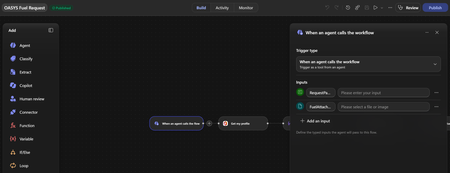
Hi everyone, I'm facing an issue with Copilot Studio and Power Automate Agent Flows. I created a flow using "When an agent calls the workflow" with the following inputs: RequestPayload (Text) AttachmentFiles (File) The flow saves successfully and the File input is visible in Power Automate. However, when I add the flow as a Tool in Copilot Studio, only the text input is detected: RequestPayload The File input (AttachmentFiles) does not appear in the Tool Inputs section. What I've tried: - Removed and re-added the tool - Refreshed the tool schema - Created a brand-new V2 flow - Changed the File input name multiple times (AttachmentFiles, UploadedFiles, FuelAttachments, etc.) - Saved and republished the agent - Removed and re-added the flow multiple times The result is always the same. Only the Text input is exposed in Copilot Studio. Additionally, if I manually try to add an input named "AttachmentFiles" in the Tool configuration, Copilot Studio returns: "There is an error: 'DuplicateItem'" This makes it seem like Copilot Studio recognizes the input internally, but it is not rendering or exposing it in the Tool UI. Questions: Are File/File Collection inputs currently supported for Agent Tools in Copilot Studio? Has anyone successfully passed uploaded files from an Agent to a Power Automate flow using Tool inputs? Is this a known limitation or a bug? Is there a recommended workaround for sending PDF/JPG attachments to a flow from an Agent? Any guidance would be greatly appreciated. Thank you.132Views0likes1CommentEnvironment Variable - New Workflow (Use Credits)
I’m unable to access the environment variables in the new workflow designer. The workflow is part of the same solution, and everything appears to be configured correctly. However, the issue persists. Please let me know if there is a workaround.184Views0likes1CommentAdding a shared connected-agent bot to a solution pulls in all parent bots, no way to exclude?
I'm trying to add a single Copilot Studio bot to a solution, and it's pulling in every other bot that references it as a connected agent with no prompt and no way to include just the one bot. Repro: 1. Created a brand-new, empty solution (single publisher, no components added yet). 2. Objects → Add existing → Bot → selected only "agent_1" 3. No "include required components" dialog appeared the add just happened. Expected: the solution contains only the selected bot (at most, plus its own connection references). Actual: the solution jumped to 238 objects, 6 agents, 229 agent components, 3 connection references. It pulled in every other bot in the environment that has a connected-agent action pointing at "agent_1" (5 parent bots), plus their own further connected-agent dependencies. This makes it impossible to build a scoped solution around one client-facing agent when it shares a connected-agent bot with unrelated agents elsewhere in the tenant. Normal Dataverse solution dependencies pull in what a component requires; this also seems to pull in everything that depends on it, in reverse, with no override. Questions: 1. Is this expected/intended behavior for connected-agent solution dependency tracking? 2. Is there any supported way UI, PAC CLI, or Dataverse API to add a shared connected-agent bot to a solution without including every bot that references it?101Views0likes0Comments
Custom Agent can’t read scanned PDF/Image received from Flows
I'm trying to build a Flow in Copilot Studio that triggers when a PDF/image is uploaded to SharePoint/OneDrive, passes it to a Custom Agent, which is able to extract text from the PDF/image to generate a standardized filename. The Custom Agent works well standalone (drag-and-dropping scanned PDF/image directly into the Copilot chat box works fine!) But passing the file to the Custom Agent via Flow fails. What I tried Approach A (Base64): Used Get file content, converted it to Base64 via base64(...), and sent a JSON payload (fileName, mimeType, documentBase64) to the Agent. Approach B (SharePoint Link): Used Create share link and passed the file's webUrl to the Agent instead of raw file content The issues Issue with Base64: The Agent receives the payload, but fails on scanned/image-based PDFs, replying: "The uploaded file content is a base64 stream for a PDF and contains no extractable text... requires manual verification." Issue with SharePoint Link: The Agent can't open/read the link, replying: "Since I cannot read SharePoint content directly from just the path, please upload the PDF file here." (even after added a SharePoint MCP tool for the Agent). Questions How can I pass a scanned PDF/Image via Flow so the Custom Agent can read & extract the text (just like it does on direct chat upload)? Thanks for any help!140Views0likes0CommentsUnanswered Questions on GitHub Copilot Harness in Copilot Studio
We're piloting the GitHub Copilot harness in Copilot Studio (GA August 2026) and several operational and architectural details remain undocumented in the GA FAQ, Microsoft Learn, or licensing guides. Looking for official answers or PM contacts on: Architecture & Execution – When the harness breaks tasks into subtasks, does it use internal sub-agents or only skills/connected agents, what are the exact timeout/retry/max-execution-duration limits for long-running workflows, and are planning/context-retrieval/orchestration internals documented anywhere or is the orchestrator a black box? Model Selection – Can individual skills within one agent use different models or is selection strictly agent-level, how are models chosen internally when multiple skills execute, are any internal models developer-configurable, and what's the roadmap for models being added/retired/deprecated plus the lag between public release and Copilot Studio availability? Cost & Token Optimization – How exactly is the ~45% token reduction achieved, how much control do makers have over context/caching/retrieval/tool calls, what are per-model credit consumption characteristics, which models are most cost-effective for specific workloads, and what's the minimum credit cost for trivial interactions? Memory Management – What are retention periods for session/working/agent memory beyond the documented 28-day user-memory expiry, is true long-term memory supported, and what changed versus earlier implementations? Knowledge Retrieval – Can skills or system instructions influence retrieval strategy/document selection/prioritization/filtering, can planning stages perform conflict/duplicate/version detection before retrieval, and how does the harness decide which sources to search? Apps Feature – What is the "Apps (preview)" capability for, when does it GA, and how does it differ from workflows/skills/adaptive cards/agents? Billing & Credit Sizing – Is there a framework to classify users/agents by expected consumption and size credit allocation per group (citizen vs pro developers), and what's the minimum/typical consumption for simple/medium/heavy interactions? Governance & Admin – Can usage limits be set at user level (not just environment/agent), is there an API/IaC path for large-scale credit assignment, can non-admins view their own consumption/remaining allocation, and is there a self-service request-more-credits dashboard? ALM & Environments – What's the recommended path to move harness agents across Dev/Test/UAT/Prod (Solutions/ALM "setup differs" per parity chart—how?), does GitHub integration replace or complement solution-based deployment, are there recommended AgentOps practices for source control/releases/versioning, and what baseline credits and onboarding model are suggested for citizen developers under usage billing—any enterprise reference implementations?642Views2likes1Comment
Agent response duplicated in email
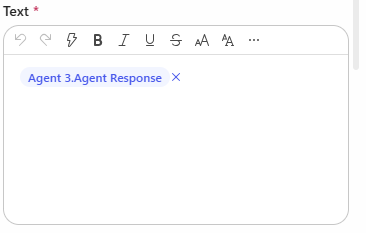
Hi, I have created a Copilot Studio Flow which has 3 agents. 2 agents do some research in parallel, I catch the results in 2 different string variables and hand the variables over to a third agent. The third agent should merge both variables, format them and hand them over to "Send Email". In the email body I add the output of agent 3. The workflow itself works. But I always have the complete email body text twice in the email received by the recipients. Where is the duplicate of the agent output coming from? I have this issue also when I add the agent response of agent 1 and agent 2 directly to the "send email" node. Does anyone have an idea? Would be great to get feedback. Appreciate it. Thanks!480Views0likes7Comments