admin
26 Topics
Unable to add record types to Sales Chat
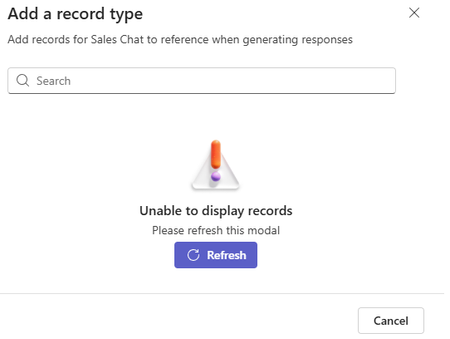
When attempting to add record types to Sales Chat, we are receiving an error message about being unable to display records. Refreshing from this window does nothing, and refreshing data from the Sales Chat settings page does nothing. This is happening within Version 59.26213.002, did not happen previously within our environment (we were able to add record types as soon as a few weeks ago), and we have validated that we have met all of the prereqs (https://learn.microsoft.com/en-us/microsoft-sales-copilot/set-up-sales-chat#prerequisites).
Sales Agent for Copilot Chat - DLP Policy
Setting the Sales Agent up for Salesforce in Copilot Chat. This sets up an environment called "msdyn_viva". Does anyone know what the minimum DLP connectors are required to make this work, other than Salesforce? Not finding any documentation on this. https://learn.microsoft.com/en-us/microsoft-sales-copilot/landingCopilot for Sales not prompting to add opportunity from email in outlook
Hi, We have Microsoft Copilot for Sales connected to Salesforce CRM. When an email is received from a sender who does not exist in Salesforce, Copilot correctly prompts us to create a new contact. After the contact is created and associated with an account, I can manually create or edit opportunity records without issue. I have verified the Salesforce configuration, permissions, and access assigned to the CopilotForSalesIntegrationProfile used by the Sales Agent. I have also confirmed that all required opportunity fields are configured in the Copilot for Sales forms. The issue is that Copilot is not prompting users to create an opportunity based on incoming emails. My understanding is that Copilot for Sales should be able to identify opportunity-related intent in an email and prompt for opportunity creation, with relevant information from the email prepopulated into the opportunity record. Has anyone experienced this behavior and found a resolution? Any guidance or recommendations would be appreciated. Thank you.Sales Agent for Copilot Chat - PPLAT DLP Policy
We are working on setting up the Sales Agent for Copilot Chat. The goal is to have it interact with Salesforce. We are aware that the Salesforce connector is required in the DLP policy for the environment "msdyn_viva". Does anyone know what other Microsoft connectors should or are recommended be approved in the Business category of the DLP policy? Not finding any documentation on this. https://learn.microsoft.com/en-us/microsoft-sales-copilot/landing
Copilot For Sales - Dynamics Environment Switching
Hello, We have 2 dynamics environments we've been using for the Copilot for Sales Roll-out (UAT and Production). We've currently deployed into Production and onboarded our Sales Team users. As an admin, I would like to switch my environment back to UAT to complete some customisation testing in our UAT environment, before I roll it out in Production. If I switch the environment from my account (as an Admin) from Prod to UAT. Is there any knock-on effect for other users? Will it affect the configuration I've already set-up? We currently have 2 full admins for Copilot for Sales, the other admin would stay in Production. Any guidance is appreciated. Kind regards, Adam
Copilot for Sales Adoption Report
I am reviewing the Copilot for Sales adoption report and have noticed discrepancies between the reported usage data and the number of licences allocated. This raises a concern that the Viva Insights report may not fully account for Microsoft’s recent change to merge Copilot and Copilot for Sales licences. Could you confirm whether the adoption metrics reflect this merged licensing model?
CoPilot for Sales Agent - Missing Permissions
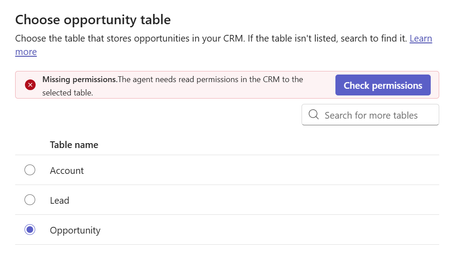
hello, I am trying to activate the Copilot for Sales agent for the first time. In the configuration, Leads and Account seem fine. When choosing the opportunity table I get a missing permissions error even though I confirmed the copilot user definitely has access to this table. Has anyone had a similar issue that can help? thanks, AndrewTo Surface the Custom Object Data From Salesforce In Copilot For Sales Side Panel
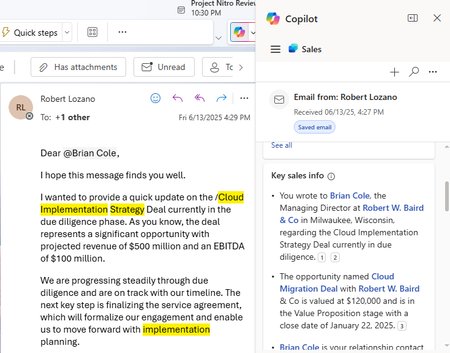
There is a Key Sales Info Card in Copilot For Sales on connecting to Salesforce CRM it fetches Opportunity, account and contact info in it . I need to display a custom object which is linked to contact and it's associated account in the key sales info . Is there any Process or do we have any workaround to build it in a separate card. Refere the image below
Extending Copilot for Sales (standard)
I could not find documentation that would clearly state licenses needed when extending Copilot for Sales. For example, if users have D365 sales enterprise license, can I extend Copilot for Sales with Copilot Studio by adding new topic that starts a flow and returns message to user in the Copilot for Sales side panel in D365? Or does this require the separate Copilot for Sales license?
Unable to launch Salesforce Login Pop-up
I am facing the problem when I try to login from copilot for sales side panel. Please give an idea to fix it. Error Code below, it happens when I click sign in production in side panel beforce input user ID and pass. "errorCodeName": "Microsoft.SalesProductivity.CRMProxy.ConnectionErrorCode.PowerAppsConnectionApiError", "message": "Copy the error details here, then share them with your admin or Microsoft support and ask if they can help you resolve this issue.", "title": "Something went wrong", "properties": {}, "troubleshootingLink": null, "sessionId": "655ef7b5-3504-4430-945b-c64bbbaf6cb3", "activityId": "61c173cf-6deb-4d95-8cf5-305689079fd5" }