adfs
55 Topics
O365 Email Migration to Another Tenant while Deferring Migration of Sharepoint files
Hi, This is the context: ChildCompany has O365 and it has an Azure AD in hybrid mode synchronizing to a on-prem AD server. They have an internal domain ChildCompany.com, and an external domain ChildCompany.com where they also receive and send email using O365. ParentCompany is going absorb the ChildCompany some time in next year, and I was asked about the integration options. According to this https://download.microsoft.com/download/b/a/1/ba19dfe7-96e2-4983-8783-4dcff9cebe7b/microsoft-365-tenant-to-tenant-migration.pdf I could do a phased migration, where the end state is that they decomm their onprem AD and that they only use our ParentCompany systems. The business requirement is to start their integration with Email, and then in later phases do the Sharepoint integration as that requires way more analysis on their data sources, as they also have wikis and many other on prem legacy stuff. They are less than 50 users, so I can use Quest migration tools for the email part, but I wonder what needs to happen in what order. This is what I have in mind: Migrate their current O365 into our ParentCompany Office 365 subscription, so that they can continue logging in into their domain joined windows machines using childCompany.co, so they start using ParentCompany.com email addresses, but the problem then is how can they continue using their sharepoint and onedrive resources associated with the Azure and local domain at ChildCompany.com? This is more or less what I have in mind, for the intermediate step, the cutover: Child Company ParentCompany --------------------- ---------------- On-Prem | MS Cloud: | MS Cloud: ---------------|----------------------|-------------- Local AD (ADFS)| Azure Subscription | Azure Sub | Azure AD | Azure AD |--------------------- |--------------------- | O365 Sub -> | O365 Sub | Exchange mailboxes-> | Exchange mailboxes | Sharepoint? -> | ??? | -------------------- |--------------------- I wonder how could it be possible to defer the sharepoint and onedrive migration, so that the child company users can still work on their sharepoint files using their normal auth methods, while disabling childcompany.com as MX so they start using ParentCompany.com mailboxes.Is that even possible? Would make more sense to try to migrate everything at once? That is way more work, but I'm weighting my options.1.7KViews0likes7CommentsAlternative hostname for ADFS proxy possible?
Dear Community, I have setuped a ADFS server with "adfs.customer.com" and a ADFS proxy, who also externally listening on this URL. Here is my question: Can I configure an additional "external" URL like "adfs.bla.com" in the ADFS proxy so, that its listening to incoming requests and redirect it to adfs.customer.com? Thanks André822Views0likes1CommentADFS - Service Unavaible over WAP
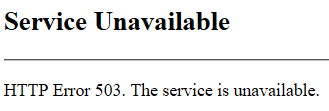
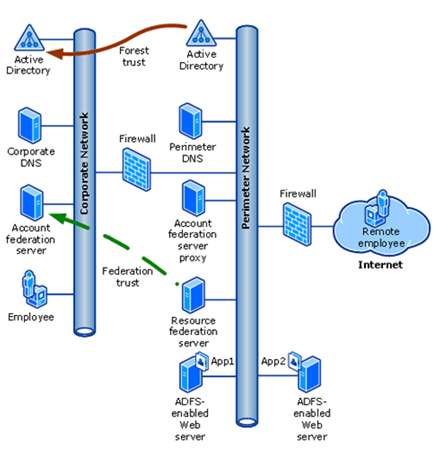
Hi, We have a simple ADFS enviroment with a WAP in a DMZ and an internal ADFS server. Problem is that we are not able to access the Test-Signon-Page (https://fqdn.domain.com/adfs/ls/IdpInitiatedSignon.aspx) or published OWA over the WAP. Internally everything is working fine and also from the WAP I can access the internel ADFS Server with the Test-Signon-Page and OWA with ADFS without problems. But from the internet over the WAP we are always getting: Through WAP we are also publishing Exchange Activesync which is working without problems. I dont see any events in the eventlog, also with tracelogs. I don't see anything interesting in Fiddler on the client. Do you have any ideas? Kind regards Patrick1.2KViews0likes1Comment
Android Teams login fails during ADFS federation with SSL error
Hello Android mobile users cannot sign in to Microsoft Teams The login fails during the ADFS federation step due to an SSL error Environment Android OS versions 10 to 14 Microsoft Teams mobile app Entra ID federated with on premises ADFS ADFS service URL is masked Public certificate issued by Sectigo Issue description After entering the account in Teams the sign in process redirects to ADFS The page does not load correctly and shows infinite loading or a blank screen The same account works normally on PC browser PC Teams and Outlook Web The issue occurs only on Android mobile apps that use WebView Android log summary OAuth2 WebView client received SSL error Primary error SSL untrusted Wildcard certificate for masked domain Certificate issued by Sectigo Public Server Authentication CA Troubleshooting performed Device date and time verified Teams app cache cleared and app reinstalled Issue reproduced on multiple Android versions and devices PC authentication works with the same certificate Questions Can Android WebView or Microsoft mobile authentication fail with SSL untrusted when the ADFS server does not provide a complete certificate chain Is full chain certificate configuration required on ADFS IIS for mobile authentication Can SSL inspection or proxy interception cause this issue only on Android apps while PC browsers work normally Are there official Microsoft recommendations for certificate configuration when using ADFS federation with Android mobile apps Additional information The same behavior occurs in other Microsoft mobile apps The suspected causes are incomplete certificate chain or network SSL inspection Thank you1.1KViews0likes1Comment
ADFS Server Updatepassword 407 Error
Hi fellow tech community participants, I have an ADFS Server (Windows Server 2016) which has recently started to throw errors when trying to use https://adfs.contoso.com/adfs/portal/updatepassword to change a user password. The user is getting a message like "user id or password is incorrect even though the username and password are correct. In the Eventlog of the ADFS I can see a 407 Error with the following content: Password change failed for following user: Additional Data User: user@domain.com Server on which password change was attempted: Error details: UserNotFound What bothers me the most is that there seems to be no server on whicht the change was attempted. Using nltest I get the following output: C:\Windows\system32>nltest /DsGetDc:contoso.com /pdc Getting DC name failed: Status = 1355 0x54b ERROR_NO_SUCH_DOMAIN I can ping the PDC just fine and I can see that it tried using that server 3 days ago when someone entered a wrong password in the change password dialog. Does anyone know how to resolve this? Regards Carste2.2KViews0likes1CommentFederation Issues - No protocol handlers?
Hi All, It's been a number of years since I've federated a domain with Entra, i'm flipping this back in a home environment to complete some testing. Would appreciate some troubleshooting thoughts. What from memory was a quick task, I've spent waaaaay to long on this today. I've rebuilt the environment a number of times with the same outcome. Install ADFS (Enabled the sign-in page). Install WAP. Generate Let's Encrypt certificate and provide to the servers. Port Forward 443 to the WAP server. Use Entra Connect to Federate the domain (AD FS Config looks good and generated as Microsoft Office 365 Identity Platform) WAP is configured via AAD Connect (Blank but seems alright talking back to ADFS) I can hit https://adfs.domain.com/adfs/ls/idpinitiatedsignon.aspx and authenticate with UPN internally/externally. I can hit https://adfs.domain.com/FederationMetadata/2007-06/FederationMetadata.xml internally/externally. I also setup IAMShowcase to test (https://sptest.iamshowcase.com/) and published the app via the WAP, worked fine for SP and IDP initiated flows. Interestingly enough, I am chucked the following error from the ADFS redirection with M365 authentication: Error details: MSIS7065: There are no registered protocol handlers on path /adfs/ls/ to process the incoming request. This raises an error on the ADFS server ID#364, I've rebuilt a few times and havent been able to find much in troubleshooting. Would love to hear if someone else has seen something similar, i'm at a bit of a loss here. Encountered error during federation passive request. Additional Data Protocol Name: Relying Party: Exception details: Microsoft.IdentityServer.Web.IdPInitiatedSignonPageDisabledException: MSIS7012: An error occurred while processing the request. Contact your administrator for details. at Microsoft.IdentityServer.Web.Protocols.Saml.IdpInitiatedSignOnRequestSerializer.ReadMessage(WrappedHttpListenerRequest httpRequest) at Microsoft.IdentityServer.Web.Protocols.Saml.HttpSamlMessageFactory.CreateMessage(WrappedHttpListenerRequest httpRequest) at Microsoft.IdentityServer.Web.Protocols.Saml.SamlContextFactory.CreateProtocolContextFromRequest(WrappedHttpListenerRequest request, ProtocolContext& protocolContext) at Microsoft.IdentityServer.Web.Protocols.Saml.SamlProtocolHandler.CreateProtocolContext(WrappedHttpListenerRequest request) at Microsoft.IdentityServer.Web.PassiveProtocolListener.GetProtocolHandler(WrappedHttpListenerRequest request, ProtocolContext& protocolContext, PassiveProtocolHandler& protocolHandler) at Microsoft.IdentityServer.Web.PassiveProtocolListener.OnGetContext(WrappedHttpListenerContext context) Get-MgFederatedDomainFederationConfiguration -Identity http://domain.com/ ActiveSignInUri : https://adfs.domain/adfs/services/trust/2005/usernamemixed IssuerUri : http://domain/adfs/services/trust/ MetadataExchangeUri : https://adfs.domain/adfs/services/trust/mex PassiveSignInUri : https://adfs.domain/adfs/ls/ PreferredAuthenticationProtocol : wsFed SignOutUri : https://adfs.domain/adfs/ls/Solved4.9KViews1like15Comments
Google Federation with Entra ID - doesn't support MultipleAuthN SAML claim
Entra ID has a new Microsoft-managed conditional access policy that will be enabled from October 2024. However, Google doesn't support the MultipleAuthN claim that ADFS (and other IdPs) do. Is there a work-around for this, or we just need to ensure that the new Microsoft-managed conditional access policy is disabled for all users? Otherwise, we somehow need to enable double MFA (MFA at both Google and Microsoft). I imagine this might be an issue for any other federated IdPs that don't support this specific SAML claim. There is a new alternative to the `SupportsMFA` setting in the `Set-MsolDomainFederationSettings` powershell command, but it doesn't allow you to 'always assume MFA is utilised in the federation' - https://learn.microsoft.com/en-us/graph/api/internaldomainfederation-update?view=graph-rest-1.0&tabs=http#federatedidpmfabehavior-values Thanks in advance, Nigel1.7KViews0likes2Comments
ADFS URL change for federated login to O365
Hello, I'm looking to update our ADFS URL, for example, adfs.123uk.com to adfs.123.com. The ADFS servers and infrastructure are remaining the same. I know how to update the federation server but I'm struggling to find a way to tell Office365 about the new url. Is it just a case of running 'Set-MsolADFSContext –computer <the FQDN of the AD FS server>' . Which is the step when you first setup ADFS with O365.530Views0likes0Comments