adaptive cloud
88 TopicsScheduled backups for Azure Local with disconnected operations: Advancing control plane resilience
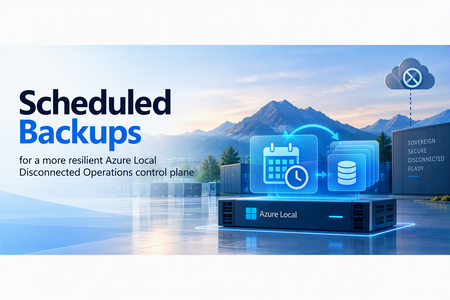
For organizations operating in sovereign and disconnected environments, resilience is more than keeping infrastructure available. It also means having a reliable way to recover critical platform services when something goes wrong. Backup and restore capabilities of the control plane for the Azure Local with disconnected operations is available today. Operators can create an on-demand backup of the control plane and use it to recover the environment when needed. With the Azure Local 2609 release, we are building on this foundation by introducing scheduled backups. We built this capability to reduce reliance on manual backup processes and help customers maintain recovery points more consistently. By automating backups on a defined cadence, organizations can improve recovery readiness and better align protection of the control plane with their recovery objectives. From on-demand recovery to routine protection On-demand backup and restore established an important recovery path for the disconnected operations control plane. However, the value of any backup depends on having an appropriate recovery point available when an incident occurs. When backups depend entirely on manual execution, they can be delayed or missed. Scheduled backups help address this operational risk by automatically creating control plane backups at a defined cadence. This moves the experience from: “An operator can create a backup” to: “Backups run automatically as part of regular platform operations.” Operators can continue to initiate on-demand backups whenever they need an additional recovery point. What scheduled backups provide With scheduled backups, operators can: Configure recurring control plane backups Select a frequency ranging from twice-daily, daily, weekly, or monthly Use the default backup configuration or create named configurations View the current schedule and its next planned run Pause, resume, update, or remove the schedule Continue creating on-demand backups when needed Backup schedules are managed through PowerShell. A schedule can reference either the default backup configuration or a named configuration, giving operators flexibility in how backup destinations are organized. Supporting recovery objectives Scheduled backups make it easier to maintain recovery points at a consistent cadence. They provide a more predictable and an automated mechanism to implement the recovery point objectives as required by the organization. Reduced manual dependency: Backups run automatically after the schedule is configured. More consistent recovery points: Organizations can establish a cadence aligned with their operational requirements. Greater flexibility: On-demand backups remain available before significant changes or whenever an additional recovery point is needed. Simpler operations: Operators can manage the schedule and backup configurations through a consistent PowerShell experience. Continuing the resilience journey Backup and restore established a supported recovery foundation for the Azure Local disconnected operations control plane. Scheduled backups strengthen that foundation by making backup creation automatic, recurring, and easier to incorporate into regular operations. This is an important step toward greater recovery readiness, helping operators maintain more consistent recovery points and reduce reliance on manual processes. Learn more in the Azure Local documentation: https://learn.microsoft.com/en-us/azure/azure-local/manage/disconnected-operations-back-up-restore?view=azloc-2609#configure-scheduled-backups257Views3likes0Comments
Introducing Azure Copilot for Azure Local: AI-powered operations for distributed infrastructure
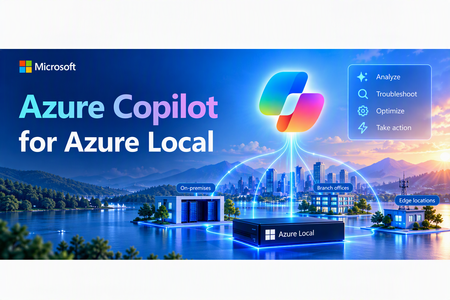
Managing distributed infrastructure can be complex. When an issue occurs, operators may need to navigate multiple tools, review health signals and diagnostics, interpret logs, and determine the right troubleshooting steps before they can move toward resolution. Azure Copilot for Azure Local helps bring an AI-powered, agentic experience to Azure Local operations, designed to make managing and troubleshooting infrastructure simpler and more intuitive. With Azure Copilot for Azure Local, operators can start with a natural-language question, such as: “Why is my Azure Local cluster disconnected?” “Is this node healthy?” “Why did my deployment fail?” “Is my environment ready for an update?” “Check my network configuration” Azure Copilot for Azure Local translates the operator’s intent into a troubleshooting workflow, bringing together infrastructure context, diagnostics, and relevant troubleshooting knowledge to help operators understand what is happening and determine the appropriate next steps for their infrastructure. Start troubleshooting with natural language Infrastructure problems rarely begin with a clearly identified root cause. An administrator may simply know that an update failed, a node is unhealthy, connectivity was lost, or a deployment cannot continue. Azure Copilot for Azure Local provides a natural language starting point for these investigations. Rather than first determining which command to run, which diagnostic tool to open, or which troubleshooting guide to follow, operators can describe the problem they are trying to understand. Copilot can help gather relevant information, analyze the results, explain findings, and guide the operator toward potential next steps. This provides operators with a more intuitive troubleshooting experience that helps bridge the gap between observing a problem and knowing what to investigate next. Guided, multi-step troubleshooting Azure Copilot for Azure Local is designed to go beyond simply answering questions. For supported scenarios, the experience can orchestrate multiple steps of an investigation, using infrastructure context, diagnostic capabilities, and troubleshooting knowledge to help operators work through a problem. The troubleshooting journey becomes: Ask a question → Gather context → Run diagnostics → Analyse findings → Recommend next steps The operator remains in control while Copilot helps with the investigative work required to understand the issue and identify a path forward. Designed for real Azure Local operational scenarios Azure Copilot for Azure Local can assist operators across common infrastructure management and troubleshooting scenarios, including: Infrastructure health Understand the health of an Azure Local system or individual node and identify areas that may require further investigation. Connectivity troubleshooting Investigate why an Azure Local system or machine is disconnected and surface information that can help narrow down the issue. Network configuration Investigate network-related conditions and help identify configuration issues affecting the environment. Deployment troubleshooting Investigate failed deployments and help operators understand potential blockers and next steps. Update readiness Evaluate the environment before an update and identify conditions that may require attention. Diagnostics and log collection Guide diagnostic collection when deeper troubleshooting or additional evidence is required. Helping operators move from questions to outcomes Troubleshooting infrastructure often involves connecting information spread across configuration, health signals, diagnostics, logs, and troubleshooting documentation. Azure Copilot for Azure Local is evolving toward an operator-focused experience where AI agents can help connect these pieces as part of a guided investigation. The goal is simple: reduce the effort required to understand what is happening and help operators get to the right next step faster. By combining natural-language interaction with agentic troubleshooting workflows, Azure Copilot for Azure Local can help make complex diagnostic information easier to understand and help operators navigate investigations while keeping them in control of applicable actions. Public preview planned for early 2027 Azure Copilot for Azure Local is planned to enter public preview in early 2027. Once available, customers can explore the agentic experience in their Azure Local environments, evaluate real operational scenarios, and provide feedback that helps shape future capabilities. For more details, reach out to us at AzureLocalCopilotTeam@microsoft.com641Views0likes0CommentsAdvancing sovereign AI with Foundry Local and Azure Local
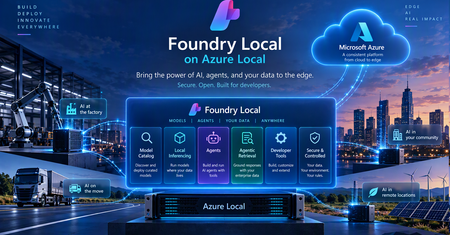
The next chapter of AI is about more than powerful models. It’s about bringing AI closer to the data, applications, and systems that organizations depend on every day. For governments, regulated industries, and organizations operating critical infrastructure, this means making AI accessible in environments where data is sensitive, connectivity may be limited, and greater operational control is essential. Microsoft’s approach to sovereign AI starts with the requirements of each workload. Our vision is to give organizations the choice and flexibility to determine where AI runs, which models they use, and how their data and infrastructure are managed. Depending on the workload, this can include control over where data and models reside, who can access and operate the environment, how AI workloads are governed, and whether critical operations can continue when cloud connectivity is restricted or unavailable. The goal is to help organizations meet their security, regulatory, and operational requirements while maintaining access to modern cloud and AI capabilities. With Foundry Local, entering general availability on Azure Local at Ignite, we're bringing advanced AI capabilities to customer-controlled environments. This enables organizations to build and run AI applications closer to their data, with greater control over how AI workloads are deployed and operated, extending the possibilities of AI beyond the public cloud. Bringing the Microsoft Foundry experience to customer-controlled environments AI delivers the greatest value when organizations can connect it securely to the data, applications, and processes that power their business. Microsoft Foundry is our unified platform for building, optimizing, and governing AI applications and agents. Foundry Local extends these capabilities to customer-controlled environments, allowing organizations to deploy and run supported AI models on Azure Local infrastructure, with local inference, model management, and GPU acceleration. Built on Azure Arc-enabled Kubernetes, Foundry Local supports CPU- and GPU-backed deployments, model lifecycle management, and OpenAI-compatible APIs. Developers can select from an integrated model catalog or bring their own supported models. Models and inference workloads can run locally, including in supported disconnected environments. We're also expanding what organizations can build with Foundry Local, moving beyond standalone inference toward intelligent applications and agents that can securely interact with enterprise data. These capabilities include: Model catalog (general available): Offers a curated model catalog, making it easy to discover and deploy AI models optimized for local and edge environments. Gives organizations greater flexibility to select models based on capability, performance, latency, resource requirements, and the sovereignty needs of individual workloads. Agentic Retrieval (general available): Enables applications to ground responses in enterprise knowledge through local data ingestion, indexing, and multistep retrieval, with citations that allow users to verify the underlying sources. Agents and enterprise connectors (available in preview): Emerging capabilities for orchestrating agents and connecting them to enterprise systems, including on-premises Exchange Server, SharePoint Server, and SQL databases through Model Context Protocol (MCP). Configurable AI guardrails (available in preview): Support for applying safety and compliance controls to local AI workloads, with flexibility to select guardrail models based on security requirements and available compute resources. Together, these capabilities help organizations build AI applications where the data lives instead of requiring the data to move to the AI. From local inference to sovereign AI applications Running AI models locally is an important first step, but sovereign AI extends beyond inference. Organizations need to connect models to enterprise knowledge, build intelligent applications and agents, and maintain control over how those applications are developed, deployed, and operated. Foundry Local helps make this possible by bringing AI capabilities closer to enterprise data and applications. Developers can use familiar Microsoft tools and technologies to build AI applications across cloud and customer-controlled environments, with greater flexibility over where models run and how they interact with organizational data. Azure Local provides the infrastructure foundation for running these workloads across datacenters, distributed locations, and edge environments, including sovereign private cloud scenarios. For organizations requiring greater operational independence, Azure Local disconnected operations enables supported infrastructure and services to operate through a local control plane without continuous connectivity to the public cloud. Sovereignty also extends to the software development lifecycle. With GitHub Enterprise Local, becoming generally available at Ignite, organizations can bring familiar GitHub development capabilities to customer-controlled infrastructure on Azure Local. Developers can manage source code, collaborate, and automate build and deployment processes using GitHub Actions and self-hosted runners while maintaining greater control over their repositories, workflows, and artifacts. Foundry Local can also provide locally hosted models for AI-assisted development scenarios in supported disconnected environments. Together, Foundry Local, Azure Local, and GitHub Enterprise Local provide a foundation for building, deploying, and operating AI applications within customer-controlled environments, extending sovereignty from the infrastructure to the models, applications, and development processes that run on it. What this means for customers The significance of these capabilities is ultimately about what they enable organizations to do. Keep sensitive data in the environment they control. Organizations can bring AI to data that may need to remain within a specific facility, geography, security boundary, or operational environment. Run AI where decisions need to happen. Manufacturers, retailers, transportation providers, healthcare organizations, governments, and others can bring intelligence closer to physical operations and distributed locations rather than depending on every interaction traveling to a remote cloud service. Support environments with limited or disconnected connectivity. Organizations operating in remote, isolated, or highly controlled environments can continue to pursue AI scenarios where constant public cloud connectivity may not be appropriate or possible. Maintain greater control over the AI stack. Customers can make deliberate choices across infrastructure, data, models, applications, operations, and governance based on the requirements of individual workloads. Turn enterprise data into useful AI experiences. Retrieval, connectors, agents, and model capabilities can help organizations build AI experiences grounded in their own information and business processes while keeping those capabilities closer to the systems they support. Most importantly, customers do not have to define a single architecture for every workload. Some AI workloads will benefit from the scale and rapid innovation of the public cloud. Others will require greater local control. Many organizations will need both. Our strategy is to give customers the flexibility to choose the right architecture for each workload while maintaining a consistent foundation across their environments. Sovereignty that enables innovation As AI becomes more deeply embedded across applications, operations, and critical infrastructure, organizations will need architecture that give them both powerful AI capabilities and meaningful control over how those capabilities are deployed. With Azure Local and Foundry Local, we’re continuing to bring Microsoft AI innovation to the places customers need it, from the cloud to customer-controlled datacenters and edge locations. That is the foundation of our approach to sovereign AI: giving every organization the control and choice to pursue its AI ambitions on its own terms. Resources Join us at Microsoft Ignite in San Francisco to explore the latest innovations across Microsoft AI, Azure Local, and sovereign cloud. Learn about AI workloads on Azure Local Explore digital sovereignty at Microsoft Learn more about Microsoft Sovereign Private Cloud510Views2likes0CommentsGitHub Enterprise Local: Bringing modern development to environments you control
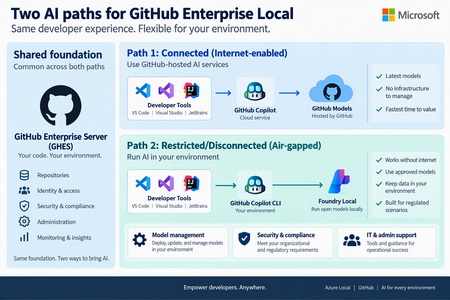
Today at the Frontier Tour in Paris, we’re announcing the next milestone for GitHub Enterprise Local, which will become generally available at Microsoft Ignite. GitHub Enterprise Local brings the GitHub Enterprise Server experience to organizations’ own environments, helping them keep source code and development workflows close to where their business operates. This is especially valuable for regulated industries, sovereign environments, remote locations, and organizations that need to continue working with limited or no internet connectivity. What's New Simpler deployment: A guided Azure experience brings the key deployment steps together and reduces manual configurations. Using AI for connected and disconnected environments: Customers can use GitHub Copilot when cloud connectivity is available or locally hosted models through Foundry Local when AI processing must remain within their environment, subject to current availability and requirements. A simpler way to deploy GitHub Enterprise Local GitHub Enterprise Local now uses Workload Orchestration to provide a guided, user-friendly deployment experience in Azure. Instead of coordinating separate tools and steps, administrators can enter the required settings in one workflow and let the platform prepare the core infrastructure and GitHub Enterprise Server appliance. Deployment secrets are securely stored in Azure Key Vault, helping organizations protect sensitive information and manage access within their environment. The result is a more consistent and repeatable deployment process, with fewer opportunities for configuration errors. Organizations still retain control over important choices such as networking, naming, security, and the environment in which GitHub Enterprise Local runs. This streamlined experience also makes it easier to establish a consistent operating model across multiple locations. Platform teams can apply repeatable deployment practices, protect deployment secrets in Azure Key Vault, and give application teams a familiar GitHub environment wherever the infrastructure is located. Choose the AI experience that fits your environment Organizations do not all operate with the same connectivity, security, or data requirements. GitHub Enterprise Local keeps repositories and core development workflows on customer-controlled Azure Local infrastructure, while giving customers a clear choice for adding AI assistance. Connected environments: use GitHub Copilot When controlled internet access is available, developers can use GitHub Copilot in supported development tools while their repositories remain hosted on GitHub Enterprise Local. To use GitHub Copilot in connected environments GitHub.com identity and license is required. This option is a good fit for organizations that allow managed outbound connectivity and want the broader GitHub Copilot experience without moving their source-code hosting away from their Azure Local environment. Restricted or disconnected environments: use local AI In environments where GitHub Cloud connectivity is unavailable or not permitted, Foundry Local can run approved AI models on Azure Local. AI requests are processed inside the customer-controlled environment, helping organizations support local data boundaries and disconnected operations. Developers can access the local AI endpoint through supported GitHub tooling, while administrators manage the models, security, certificates, and access controls within their own environment. Foundry Local provides a focused local AI option rather than the full cloud-backed GitHub Copilot experience. Availability and supported capabilities may vary, so customers should review the latest product documentation when planning their deployment. Find the right fit Environment Recommended AI path Key consideration Connected GitHub Copilot with GitHub-hosted services Best when approved internet access and GitHub Copilot licensing are available. Restricted / hybrid Use GitHub Copilot for approved connected work, or local models where data must remain in the environment. Choose the AI path based on network policy and data sensitivity. Disconnected Foundry Local with approved models running on Azure Local Designed for environments that cannot depend on GitHub Cloud connectivity. Built for hybrid, sovereign, and disconnected operations GitHub Enterprise Local brings together the familiar GitHub developer experience and the flexibility of Azure Local. Customers can keep code and development workflows in their own environment, deploy the solution through a more consistent process, and choose an AI approach that matches their connectivity and data requirements. Customers can begin with the operating model that best fits their current needs and expand over time. A connected site can use GitHub Copilot through approved cloud access, while a restricted site can keep AI processing local—both supported by the same Azure Local foundation and a consistent approach to management. GitHub Enterprise Local is entering general availability at Ignite. To get started, explore the product information, review deployment requirements, and work with your Microsoft account team to plan the right Azure Local environment for your organization. Learn more about GitHub Enterprise Local363Views0likes0Comments
Sovereign Private Cloud: Bringing more choice and control to AI and cloud infrastructure
To identify which sovereign cloud solution may fit your organization’s needs, take the Microsoft Sovereign Cloud assessment Digital sovereignty is essential for organizations as they modernize critical infrastructure and bring AI into more sensitive and regulated environments. We’re hearing from our customers in Europe and beyond that they want to take advantage of cloud and AI innovation while maintaining greater control over where their data, applications, and infrastructure operate. Microsoft Sovereign Private Cloud, built on Azure Local, extends cloud capabilities into customer-controlled environments, helping organizations meet sovereignty, regulatory, and operational requirements while continuing to modernize applications, infrastructure, data, and AI. At Microsoft Frontier Tour stops this month in London, Paris and Cologne, we’re showcasing exciting new capabilities that expand what our customers can achieve with Sovereign Private Cloud and Azure Local. These advancements range from running frontier AI models locally to strengthening resiliency and workload isolation, enhancing security, and improving developer productivity. Run AI where your data lives with Foundry Local Foundry Local, generally available on Azure Local at Ignite, brings the Microsoft Foundry stack into customer-controlled environments, extending AI capabilities to on-premises infrastructure. Organizations can deploy and run AI models close to their data, enabling local inference while maintaining greater control over their infrastructure, data, and operations. With Foundry Local, organizations can bring the Foundry experience to connected and disconnected environments, giving them greater flexibility in where and how they deploy AI. This enables customers to bring AI to locations and workloads where cloud connectivity, data residency, latency, or operational requirements make local processing important. We’re continuing to expand the Foundry Local model catalog, giving organizations greater choice in the models they can deploy and run locally. Developers can select models based on the needs of their applications while keeping inference close to their data, applications, and operations. Beyond model inference, Foundry Local is expanding to support agentic AI scenarios on Azure Local into public preview. Agentic Retrieval provides local data ingestion, indexing and search, along with agents, tool calling, and Model Context Protocol (MCP) server, and a built-in chat experience with citations. Together, these capabilities enable developers to build AI applications that can use locally available enterprise knowledge, interact through conversational experiences, and connect agents with tools through MCP. This extends Foundry Local from local model inference to a broader foundation for building grounded AI applications and agents in customer-controlled environments. Learn more about Foundry Local on Azure Local. Strengthen resilience and operational flexibility across Azure Local environments Sovereign environments need to remain resilient and adaptable while supporting different teams, tenants, and workloads across shared infrastructure. We’re bringing more choice over how and where our customers can operate infrastructure based on their sovereignty, connectivity, and operational requirements. Azure Local is expanding the ways organizations can operate in their environments. The ability to move from connected to disconnected Azure Local operations is entering public preview, enabling organizations to rehome Azure-connected infrastructure and workloads to a fully disconnected Azure Local environment while maintaining operational continuity and governance. The process includes safeguards such as phased execution, user approval stages, and secure environment back-ups that ensure the safe and accurate migration of both infrastructure resources and workloads to the Azure Local disconnected environment. This empowers customers to more easily transition their environments to Azure Local disconnected operations and meet their evolving operational requirements related to connectivity to the cloud and data sovereignty. Multitenancy, coming soon to Azure Local, provides greater flexibility provides greater flexibility in how organizations use and allocate shared infrastructure. Through logical isolation, organizations can consolidate workloads and make more efficient use of available capacity while maintaining separation across tenants, teams, and workloads. Initial access will be limited to qualified customer opportunities. Together, these capabilities help organizations build Sovereign Private Cloud environments that are more resilient, adaptable, and capable of supporting a diverse range of workloads and operating models. Protect sensitive workloads with confidential computing Protecting data at rest and in transit is critical. For highly sensitive workloads, organizations may also need stronger protections while data is actively being processed. With confidential virtual machines on Azure Local, now generally available, organizations can extend confidential computing protections to customer-controlled infrastructure. Confidential virtual machines provide hardware-encrypted memory and hardware-based isolation between the virtual machine, hypervisor, and host management environment, helping protect sensitive data while it is in use. Hardware-rooted attestation provides additional assurance by enabling the integrity of the platform and workload to be verified before sensitive data or keys are released. Customers can also use integrity protection for the guest operating system to help protect the OS disk and boot chain from unauthorized modification. For organizations running regulated, sensitive, or mission-critical workloads, these capabilities provide an additional layer of protection within Sovereign Private Cloud. By combining customer-controlled infrastructure with hardware-enforced isolation and attestation, organizations can strengthen protection for sensitive workloads while maintaining greater control over where their data and applications run. Learn more about confidential virtual machines on Azure Local. Bring development and DevOps into the sovereign boundary with GitHub Enterprise Local Sovereignty extends beyond production infrastructure. Organizations also need to consider where applications are developed and how development environments are operated. GitHub Enterprise Local, entering general availability at Ignite, brings GitHub Enterprise Server into Azure Local and Sovereign Private Cloud environments. This enables organizations to support local development and DevOps while keeping development environments within their sovereign operational boundary. Delivered as a prebuilt virtual appliance on Azure Local, it keeps repositories, metadata, CI/CD workflows, and development artifacts within the organization’s infrastructure and security boundaries. Developers can use familiar GitHub capabilities including private repositories, pull requests, code reviews, issues, GitHub Actions with self-hosted runners, GitHub Packages, and GitHub Advanced Security, while organizations maintain control over identity, networking, security policies, upgrades, and administration. GitHub Enterprise Local supports both connected and fully disconnected environments. GitHub Enterprise Local supports AI-enabled developer experiences across connectivity models. In connected environments, developers can continue using cloud-connected capabilities such as GitHub Copilot, while in disconnected environments, Foundry Local on Azure Local can provide locally hosted AI models for AI-assisted development scenarios. The general availability of GitHub Enterprise Local expands Microsoft’s Sovereign Private Cloud platform beyond infrastructure and workloads to the tools developers use to build and manage applications. Learn more about GitHub Enterprise Local. Run critical data workloads locally At FabCon, we announced the general availability of SQL Server on Azure Local across connected and disconnected environments, expanding the options organizations have to run critical data workloads where they need greater control over their data and infrastructure. We are continuing to expand the data services available on Sovereign Private Cloud with DocumentDB on Azure Local and Blob Storage on Azure Local, both entering public preview at Ignite. DocumentDB on Azure Local brings a MongoDB-compatible, open-source document database to customer-controlled environments, giving organizations more flexibility to run document and JSON workloads locally. Blob Storage on Azure Local provides cloud-native object storage for unstructured data while keeping the data local, giving organizations more flexibility to store and access data within sovereign environments. Together with SQL Server, these capabilities expand Azure Local beyond infrastructure to support a broader data estate across relational databases, document databases, and object storage. For Sovereign Private Cloud customers, that means greater flexibility to modernize applications and data while keeping critical workloads and data in customer-controlled environments. Resources Learn more about Azure Local Explore digital sovereignty at Microsoft Learn more about Microsoft Sovereign Private Cloud Join us at Microsoft Ignite in San Francisco this November To identify which sovereign cloud solution may fit your organization’s needs, take the Microsoft Sovereign Cloud assessment794Views2likes0Comments
Azure Local Storage: Choose the Architecture That Fits Your Business
Organizations modernize infrastructure in different ways. Some prioritize a simple, integrated platform; others need to preserve SAN investments, scale storage independently, or support workloads with different storage requirements. In this post, we'll explore the storage options available in Azure Local, when to use each one, and the business benefits they unlock. One Platform, Multiple Storage Architectures Azure Local brings multiple storage choices into a consistent, cloud-connected platform experience. Hyperconverged Infrastructure (Storage Spaces Direct) Storage Spaces Direct (S2D) provides a hyperconverged architecture where compute and storage are integrated into the same cluster. This model is ideal for customers looking for streamlined deployment experience, with infrastructure managed as a single platform and fewer organizational dependencies. Disaggregated Architecture (SAN Only) Azure Local supports validated external storage arrays connected through Fibre Channel or iSCSI. This architecture enables organizations to leverage existing storage investments and advanced storage services while independently scaling compute to support higher-capacity requirements. This gives customers the flexibility to work with supported storage vendors—including Dell, HPE, Hitachi, Lenovo, NetApp, and Everpure—while using the Fibre Channel or iSCSI connectivity already supported by Azure Local. Hybrid Architecture (Storage Spaces Direct + SAN) Customers can also combine Storage Spaces Direct and external storage to support different workload requirements within the same environment. This approach offers maximum flexibility, allowing organizations to align storage choices with application needs. Which Storage Option Should You Choose? If your goal is... Consider Simple integrated infrastructure Hyperconverged Expand an existing Azure Local cluster storage capacity Hybrid Reuse existing storage investments Hybrid or Disaggregated Independent compute and storage scaling Disaggregated Consolidate storage across workloads Disaggregated Advanced storage efficiency capabilities Disaggregated Flexible workload placement Hybrid Traditional three-tier architecture modernization Disaggregated Minimize infrastructure replacement Disaggregated Higher-scale compute clusters with more than 16 nodes Disaggregated Ready to size your solution? Use ODIN for Azure Local to translate workload, resiliency, growth, compute, and storage requirements into an example solution design. Use ODIN as a planning aid and validate the proposed configuration against official Azure Local documentation and with your preferred hardware and storage partners. Before finalizing your design, review External storage support for Azure Local for supported architectures and protocols, and Supported SAN solutions on Azure Local for validated storage partners and configurations. Use the comparison above to identify the most suitable architecture, then use ODIN, official Azure Local documentation, and partner guidance to validate workload sizing, supported configurations, and operational requirements. Modern Infrastructure Demands More Storage Flexibility Storage architecture decisions increasingly depend on more than capacity and performance. Organizations must also account for operational processes, maintenance planning, existing infrastructure, efficiency services, resiliency, and expected growth. These priorities influence whether an organization chooses an integrated, disaggregated, or hybrid architecture—and which benefits matter most in its environment. The following benefits explain where external storage can add value within that decision. Benefits of External Storage with Azure Local Protect Existing Investments Many organizations already operate enterprise storage platforms that support critical business applications. Azure Local enables customers to modernize compute infrastructure while continuing to leverage existing storage investments, operational expertise, backup strategies, and storage management processes. Get More Value from Every Terabyte Storage efficiency is becoming increasingly important as organizations scale virtualized environments, desktop infrastructure, databases, and application workloads. Many enterprise storage platforms offer advanced services such as compression, deduplication, thin provisioning, and capacity optimization. Organizations can leverage these capabilities while maintaining consistent Azure Local management experience. Spend Less Time Maintaining Infrastructure Operational efficiency is often just as important as infrastructure capabilities. Because compute and storage are separated in SAN-based architectures, organizations can independently manage storage and compute infrastructure. This can help simplify maintenance planning and reduce storage-related operational activities during maintenance events. Customers frequently cite more predictable maintenance windows, simplified update planning, mature storage monitoring practices, and reduced operational complexity. Scale on Your Terms One of the primary reasons organizations adopt external storage is flexibility. In hyperconverged environments, compute and storage typically scale together. With disaggregated storage, organizations can expand storage capacity independently from compute resources. This can be particularly valuable when storage growth outpaces CPU or memory requirements. Designed for Enterprise Resiliency Azure Local pairs cloud-connected infrastructure with the storage maturity Windows Server has refined over many generations. For external storage, that means working with the same well-understood technologies you already rely on—Fibre Channel and iSCSI connectivity, MPIO, dual fabrics, redundant controllers, and Cluster Shared Volumes—applied to the Azure Local platform. Because these are proven, standard building blocks, you have the flexibility to design highly available storage that fits your existing SAN investments and operational practices, rather than adapt to an unfamiliar model. For implementation requirements and configuration steps—including Fibre Channel, iSCSI, MPIO, array-side configuration, and presenting SAN-backed volumes as Cluster Shared Volumes see : Connect an external storage array to Azure Local. Real-World Scenarios Streamlined Infrastructure for Distributed Locations Retail stores, branch offices, and back-office environments can use a hyperconverged architecture to run applications on an integrated compute and storage platform. This approach simplifies deployment and day-to-day operations for locations that need consistent infrastructure without dedicated storage teams. Flexible Workload Placement Manufacturing and healthcare organizations can use a hybrid architecture when some workloads are best served by integrated Storage Spaces Direct and others require external SAN capacity or established storage services. This allows application teams to place workloads on the storage option that best meets their performance, resiliency, and operational requirements. Modernizing while Preserving SAN Investments A manufacturing organization, financial institution, or enterprise datacenter with established SAN platforms and processes can use a disaggregated architecture to modernize compute without redesigning storage operations, retraining teams, or immediately replacing proven infrastructure. Scaling Storage as Data Needs Grow Data-intensive environments—including manufacturing, fintech, and enterprise datacenters—may find that storage capacity grows faster than compute demand. A disaggregated architecture allows them to scale storage and compute independently, helping optimize infrastructure investments over time. Cost and Licensing Considerations Azure Local uses a monthly service fee based on the deployment configuration: Hyperconverged deployments (S2D only): Compute and storage are integrated in the same cluster using Storage Spaces Direct, with no external SAN storage. A monthly service fee of $10 per physical core/month applies. Disaggregated (SAN only), and hybrid storage configurations (S2D with SAN): Disaggregated deployments use external SAN storage instead of Storage Spaces Direct, while hybrid deployments with external storage combine Storage Spaces Direct with external SAN storage. Using external SAN storage has a monthly service fee of $20.1 per physical core/month applies. Prices are subjected to change. For current pricing details and applicable terms, visit Azure Local Pricing | Microsoft Azure. Choosing the Right Fit for Your Business Start with the operating model and workload requirements you need to support, then choose the architecture that best fits them. Azure Local provides a consistent platform experience across hyperconverged, disaggregated, and hybrid deployments. That consistency lets organizations modernize without treating storage architecture as a one-time, irreversible choice. The right storage strategy is the one that fits your workloads, operations, and growth plans. Learn more: Storage Spaces Direct overview; External storage support for Azure Local; Supported SAN solutions on Azure Local; Connect an external storage array to Azure Local; Azure Local pricing; and Azure Hybrid Benefit for Azure Local.678Views2likes3Comments
Workload Orchestration in the Azure portal is now available: Deploy in minutes, scale with ease
Edge deployments rarely stay simple for long. What begins as an application running on a single Kubernetes cluster can quickly expand across stores, factories, branches, or other distributed locations, each having different configuration needs. That is exactly where workload orchestration for Azure Arc comes in. Workload orchestration helps teams manage that complexity by providing a centralized approach to consistently define, configure, and deploy applications across distributed cloud, on-premises, and edge environments, all while catering to custom configuration needs of individual sites and deployment targets. See the experience in action Evaluating a new deployment approach often starts slowly: study the documentation, package an application, complete the setup, and only then decide whether it fits. The Azure portal reverses that order with its jumpstart onboarding experience. Bring your Azure Arc-enabled Kubernetes cluster and deploy a pre-packaged application in minutes. Whether you are validating a proof of concept or introducing the product to your broader team, the new portal onboarding experience turns the end-to-end workflow into something you can quickly try on your own cluster. Scale from first deployment to production Once you have validated the first deployment, you can evolve the same approach for production. Onboard your infrastructure into workload orchestration, organize your deployment sites into hierarchies, and define shared configurations for all deployments – all without leaving the portal. This lets you expand from one cluster to a distributed fleet while retaining centralized governance, repeatability, and site-level flexibility. Ready to try it? Try now by deploying your first application with workload orchestration in the Azure portal. Explore the product documentation for the complete set of capabilities.489Views0likes0CommentsWhat’s new for small form factor infrastructure
At Microsoft Build, we introduced smaller form factor infrastructure in public preview. Today, we’re refreshing that preview with version 2607, available right now in the Azure portal. This release introduces several new features: Expanded support for multiple network interfaces (NICs) and additional disks Just-in-Time (JIT) device access through the new Connect experience Cloud-managed operating system updates and recovery using an A/B image model These new capabilities give operators greater flexibility in how edge devices are configured, accessed, and maintained throughout their lifecycle. Let’s look at what each capability delivers and what it looked like in practice when I deployed the release on an OnLogic Helix 521. Greater networking and storage flexibility Small form factor infrastructure now supports multiple network interfaces (NICs) and disks on a single device. To give you full control, each NIC appears natively in Azure Resource Manager (ARM) as a child resource of the Machine, which you can view and configure through Azure portal and Azure CLI. Distributed infrastructure often faces unique and challenging requirements: for example, a device on a factory floor may need one network for management traffic and a separate, isolated network for operational technology (OT) or workload traffic, while a retail or robotics deployment may need additional local storage for AI models, video, or sensor data that shouldn’t leave the site. Support for multiple NICs allows a single device to connect to more than one network for segmentation, redundancy, or reaching equipment on a dedicated segment, while support for additional disks lets customers size local capacity to the workload rather than constraining the workload to fit the device. From Azure, you can configure each network interface individually, applying values like IP address, DNS server, and more. Azure also automatically detects and flags configuration drift to help maintain consistency with the desired state. resolve. This is an exciting step forward since the initial preview. Previously, each device was limited to a single network path and its built-in storage, forcing customers to compromise on network separation, add external hardware, or offload data sooner than they would like. Now the same compact device can support real-world network topologies and larger local datasets, without stepping up to larger, more costly infrastructure. Together, these enhancements allow Azure Local devices to align more closely with real-world edge deployment requirements without requiring additional infrastructure. Secure access when you need it: Just-in-Time (JIT) access Connecting to a distributed edge device for maintenance has traditionally required a difficult trade-off. Troubleshooting a device requires administrative access and granting that access permanently means standing permissions that remain in place on the resource whether or not anyone is using them. Across a fleet of hundreds or thousands of devices, often deployed in physically exposed locations such as store back rooms, remote sites, or factory floors, those always-on credentials become a persistent and hard-to-audit part of the attack surface. Just-In-Time (JIT) access, delivered through the new Connect experience, eliminates standing access. Rather than holding permanent permissions, users are granted eligible roles through Microsoft Entra Privileged Identity Management (PIM) and activate them only when access is actually needed. Activation requires a business justification and administrator approval, is bound to a defined duration of up to eight hours and connects the user to the device over SSH using a short-lived certificate. When the window expires, the role is deactivated automatically. The result is a model where access is the exception rather than the default: every session is requested, justified, approved, time-bound, and logged. For organizations operating critical infrastructure at the edge, administrators retain the ability to reach any device the moment they need to, without maintaining persistent access on every device for the rest of the time. Simplified OS lifecycle management with A/B image updates Last month’s preview introduced a novel capability: provisioning a bare metal OS onto an edge machine from Azure. With 2607, we’re building on that capability with the capability to update a bare metal OS using an image-swap approach. Updates now use an A/B image-swap model, one of the most impactful reliability improvements in this release. The new image is installed on an inactive partition while the current operating system continues running. During reboot, the device switches to the updated image. If the new image fails to boot successfully, the device automatically rolls back to the last known-good version. This design keeps the risk of a failed update tightly contained. Because the update is staged in the inactive slot while the current image stays live, workload downtime is minimal, and because the previous image is always preserved, a failed update rolls back on its own rather than leaving a device stranded. Every device either comes up healthy on the new image or returns to the one that was working. For organizations managing thousands of devices in locations with no on-site IT, this safeguard can be very helpful because a failed update has historically been one of the most costly failures to recover from: a device that does not come back online can require a costly on-site visit or a physical replacement. Putting it to the test on an OnLogic Helix 521 To see how these capabilities come together in practice, I deployed the release on an OnLogic Helix 521, one of the validated small form factor devices for Azure Local. The Helix 521 is great for exercising the new networking features, with its I/O dense design featuring four Ethernet ports on its front side. These new features move small form factor infrastructure closer to what production edge deployments require: the flexibility to match real network and storage needs, access that is secure by default, and updates that can be rolled out across an entire fleet with confidence. To try preview version 2607 for yourself, visit Microsoft Learn for information about supported hardware and https://learn.microsoft.com/azure/azure-local/small-form-factor/small-form-factor-overview in Azure portal. The preview is free of charge and typically takes about an hour to set up.992Views3likes1CommentGenerally Available: Windows Server 2016 Extended Security Updates enabled by Azure Arc
Today, the Azure Arc team is pleased to announce that Extended Security Updates (ESUs) enabled by Azure Arc is now generally available for Windows Server 2016. By connecting your Windows Server 2016 machines to Azure Arc-enabled servers, you can enroll in ESUs and receive security updates. Enroll machines into ESUs through the Azure portal, a streamlined, cloud-connected experience that protects your on-premises and multicloud workloads while you plan your upgrade or migration journey. Extended Security Updates give you access to Critical and Important security updates for Windows Server 2016 for up to three years after end of support, covering January 12, 2027 through January 2030. They provide a supported bridge for business-critical applications that need more time to migrate, without new features or non-security fixes, and without leaving systems exposed while you plan your move. Extended Security Updates enabled by Azure Arc Once your servers are connected to Azure Arc, ESUs enabled by Azure Arc provide flexible pricing and simpler delivery. Key benefits include: Pay-as-you-go billing means a monthly subscription you can stop when a server is migrated or decommissioned, so you only pay for the coverage you use. Azure-billed pricing draws down from your existing Microsoft Azure Consumption Commitment (MACC) and lets you analyze spend with Microsoft Cost Management and Billing. Built-in asset inventory shows the coverage and enrollment status of your machines directly in the Azure portal, highlighting gaps at a glance. Keyless delivery removes the need to acquire, install, or activate keys on each server. Access to Azure management services When you enroll eligible Azure Arc-enabled servers in Windows Server 2016 ESUs or you have Windows Server Software Assurance, you also gain free access to a set of Azure services that help you manage and secure those machines from the Azure portal: Azure Update Manager is a unified service which provides assessing, scheduling, deploying and managing OS updates across Azure and hybrid machines, including visibility into ESU patch compliance for your Windows Server 2016 estate. Change Tracking and Inventory provides a centralized asset inventory and tracks changes to servers hosted in Azure, on-premises, and other public cloud environments. Azure Policy guest configuration helps define, enforce, and audit compliance rules for Azure resources and guest OS settings across hybrid environments. It includes out of the box policy rules to help meet standards like CIS Benchmark. How to get started Everything starts by connecting your servers to Azure Arc, whether they run on-premises or in other public clouds. Getting started takes only a few steps: Connect your Windows Server 2016 machines to Azure Arc by installing the Azure Connected Machine agent. Enroll eligible servers in Extended Security Updates from the Azure portal, or at scale using Azure Policy (no keys required). Check out our click through demo to see how to apply Extended Security Updates using the Azure portal. Deliver ESU patches through Azure Update Manager or your existing patching solution once servers are enrolled. Extended Security Updates support the Standard and Datacenter editions of Windows Server 2016 and generally require Software Assurance through a Volume Licensing program (machines licensed through SPLA or a Server Subscription do not). For larger estates, you can onboard at scale using Configuration Manager, a Group Policy scheduled task, or VMware vCenter and SCVMM integration with Azure Arc. Beyond Extended Security Updates Enrolling in ESUs is often a customer's first step into Azure Arc — and it opens the door to more. Because your Windows Server 2016 machines are now attached to Azure Arc, you can manage, secure, and govern them alongside your wider hybrid and multicloud estate with Azure Policy, Azure Update Manager, and Microsoft Defender for Cloud. That same Arc foundation makes your next step easier when you are ready: upgrading to Windows Server 2025 or migrating to Azure. Learn more To plan for Windows Server 2016 end of support, explore these resources: Extended security updates enabled by Azure Arc guide Planning ahead for Windows Server 2016 end of support Windows Server and SQL Server End of Support | Microsoft Prepare to deliver Extended Security Updates through Azure Arc Join the Azure Arc customer and engineering virtual meetup Fill in this short intake form to join the quarterly Azure Arc and Windows Server customer meetup: https://aka.ms/arcserverforumsignup5.8KViews2likes0CommentsAzure Local expands SAN capabilities with iSCSI support
As organizations modernize datacenters and accelerate migration from legacy virtualization platforms, flexibility in storage architecture has become a key requirement. Customers increasingly want to reuse existing storage investments, scale infrastructure independently, and choose the connectivity model that best fits their environment. Building on the general availability of Fibre Channel (FC) SAN support, Azure Local now introduces iSCSI SAN integration, extending disaggregated architecture support to IP-based storage networks. With support for both Fibre Channel and iSCSI, Azure Local provides customers greater flexibility in how they modernize and scale their infrastructure while maintaining an Azure-consistent management experience. Expanding disaggregated infrastructure iSCSI support enables organizations to: Leverage existing IP-based storage networks Deploy cost-efficient disaggregated architectures without FC dependency Scale compute and storage independently Maintain an Azure-consistent management experience Architecture and deployment Azure Local supports 6-adapter configurations to balance cost, performance, and resiliency: 6 adapters: enhanced performance and redundancy with dedicated iSCSI paths. Today, iSCSI follows a manual configuration flow during deployment. Azure Local Deployment Azure Local supports two SAN deployment approaches: Hybrid deployments (S2D + SAN) Customers can attach external SAN storage to existing Azure Local deployments while continuing to use Storage Spaces Direct (S2D) for platform storage. This approach enables organizations to incrementally adopt SAN while reusing existing storage investments. Disaggregated deployments (SAN-only) Customers can also deploy Azure Local using external SAN storage as the primary storage platform for both infrastructure and workloads. This enables: Independent scaling of compute and storage Fibre Channel or iSCSI connectivity Larger-scale infrastructure deployments Connected and disconnected deployment models Manage rising disk costs associated with hyperconverged architectures Additionally, customers can create local availability zones to align VM placement with physical infrastructure boundaries and support more granular workload placement. The deployment also validates connected SAN arrays against the supported vendor ecosystem, helping ensure a streamlined and fully supported experience. Accelerating infrastructure modernization Azure Migrate now supports migration to Azure Local deployments that use external SAN storage, including NTFS-based volumes. This allows organizations to modernize compute infrastructure while preserving existing storage investments. Customers can: Reuse existing SAN arrays and operational processes Minimize disruption during modernization projects Retain familiar storage architectures while adopting Azure Local Simplify migration from existing virtualization environments What's next iSCSI support represents another step in our broader vision for external storage on Azure Local. Our goal is to provide a comprehensive storage platform that spans deployment, operations, protection, and recovery. Looking ahead, we are investing in: Integration of iSCSI node configuration into cluster deployment to simplify the initial setup. Business Continuity and Disaster Recovery (BCDR) for SAN-backed workloads, including replication, failover, and failback capabilities between two external SAN attached or disaggregated Azure local clusters. Day-N storage management experiences that simplify monitoring, troubleshooting, and operational workflows. Replication management capabilities that provide visibility into recovery readiness, replication health, and workload mobility across environments. Expanding enterprise storage vendors ecosystem for Azure Local, helping customers adopt Azure Local while preserving their existing storage investments. Together, these investments will extend Azure Local beyond SAN connectivity and deployment to deliver a unified storage management experience across a broad ecosystem of enterprise storage solutions. Summary With iSCSI support, Azure Local now delivers a more complete SAN strategy—giving customers the flexibility to choose Fibre Channel or iSCSI, deploy hybrid or fully disaggregated architectures, and modernize infrastructure without abandoning existing storage investments. As we continue to invest in SAN management, replication, and disaster recovery, Azure Local is evolving into a comprehensive platform for enterprise storage and infrastructure modernization—from edge deployments to sovereign-scale datacenters.972Views6likes2Comments