active directory
1033 Topics
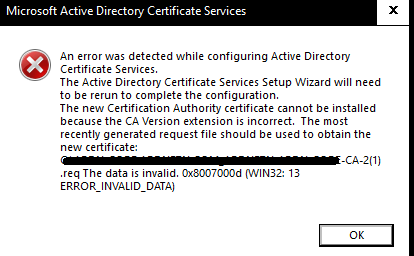
Two-tier AD Certificate Services error importing cert into SubCA
Hello, I'm new here, but excited about being able to hob nob with all you in furthering our IT goals. I'm setting up my root and Subordinate CA and I'm importing my rootCA issued, subCA certificate into the subCA. I get I get the same error when the subCA automatically exports its cert req to the root Ca and when I do it manually. I also get this error whether i'm using X.509 or p7b files. what's unusual about this error is that it seems to be referencing a .req file with a '(1)' added to the end of the title. Original .req did not have the '(1)'. any assistance I can get from the community would be appreciated.18Views0likes0Comments
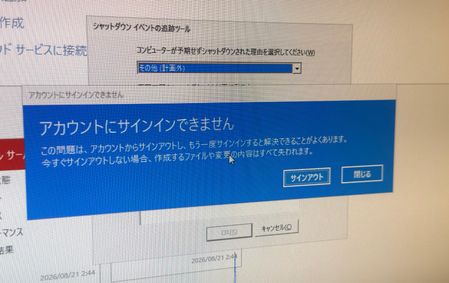
Issue with Temporary Profile on Windows Server 2025 after renaming built-in Administrator account
Hi everyone, I am facing an issue with a temporary profile on Windows Server. Environment details: ・OS: Windows Server 2025 Datacenter ・Setup: On-premises environment with 2 servers (AD DS Domain Controller and Web Server) ・Affected Server: Web Server (Domain joined) Recently, I renamed the built-in Administrator account on the Web Server. After that, the system became completely unresponsive, so I had to force a power off. Upon signing in after the reboot, I received the error message: "We can't sign in to your account" (or "You've been signed in with a temporary profile"). It seems the profile folder or registry mapping for the renamed Administrator account was corrupted due to the force shutdown. I tried restarting the server, but the issue persists. Could anyone please advise on the proper way to resolve this registry/profile conflict and safely restore the renamed Administrator profile? Please note that I am a native Japanese speaker and a beginner in IT, so I may not fully understand complex technical English. Simple, step-by-step instructions would be greatly appreciated! Thank you in advance for your help! Translated by Gemini, grammar checked by DeepL196Views2likes7Comments
Can't share a folder on a local network in Microsoft Windows Server 2025 STD
We have two Microsoft Windows Server 2025 Standard (Version 24H2, Build Number 26100.32995) servers in our Active Directory. We can't share folders; it constantly asks for a username and password. We've tried every solution, but nothing worked. I found a similar thread, but the solutions there didn't work either. topic : https://learn.microsoft.com/en-us/answers/questions/5559013/opening-fire-share-on-2025-server-from-another-202 How can i solve this sharing problem ?113Views0likes3Comments
Removal of old CA server stale data
Hi, I'm rebuilding some DC's and figured I'd tidy everything up before doing so as I've come into this with a messy environment. from this, I found an old Trusted Root CA, the certificate authority server was decommissioned in 2021 and all certificates have had an expiry date from 2021. its still being pushed out to domain devices such as servers and desktops. I tried running the 'certutil -dsdelca' command however this comes back with invalid command. I guess the best option is just to remove the class objects from the ADSI edit? as there is a class in AIA, CDP, Certification Authorities, KRA with the certificate nameSolved187Views0likes1CommentLooking for an on-prem MFA solution for Active Directory and RDP
Hi everyone, We're reviewing options for adding MFA to our on-premises Active Directory environment. Most of our users authenticate with Active Directory, while administrators also use RDP for managing Windows servers. Because part of our infrastructure is isolated from the Internet, we'd prefer an on-premises MFA solution instead of relying on a cloud-only service. Has anyone implemented something similar recently? I'm interested in hearing: Which solution did you choose? How difficult was the deployment? Did you run into any compatibility or performance issues? Is there anything you'd do differently if you were deploying it again? Any real-world experience or recommendations would be greatly appreciated. Thanks!236Views1like6Comments
How to check RDP access to the server
Hello, I have a virtual machine running Windows Server 2019 Datacenter with Active Directory, and all users access it via RDP. No specific access configurations have been set up; I wanted to know if it is possible to check how many times a specific user has connected and from which IP address—is that possible? Also, I wanted to ask if it is possible to determine whether a specific user copied files to their local PC using copy/paste during a session. Thank you205Views0likes2Comments
Can the built-in "No account? Create one" link redirect to a custom sign-up page?
I'm using Microsoft Entra External ID with a built-in sign-in/sign-up user flow. On the Microsoft-hosted sign-in page, the "No account? Create one" link always redirects users to the default Entra sign-up page. I already have a custom registration page and would like this built-in link to redirect to my custom URL instead. Is there any supported way to customize the destination of this link in a built-in user flow? If not, could someone confirm whether this behavior is fixed by design? Thanks!118Views0likes2CommentsUsing Cloud sync to sync AD to existing Entra Accounts
I want to sync in premise AD accounts with existing Entra accounts. The email on both accounts is the same, and I added the Entra/o365 suffix to the domain and set the UPN to that suffix, making both UPN(s) the same. It did not sync. It created a NEW Entra account. I thought I covered all my bases. How can I get on premise AD and existing Entra accounts to sync? thank youSolved190Views0likes5CommentsRegistering user becomes local admin on Joined Devices
This setting works exactly as named, but the confusion is understandable because the privilege is invisible in the places people normally look. Per Microsoft's official docs (assign-local-admin): at the moment of Microsoft Entra join, two principals get added to the local administrators group — the Microsoft Entra Joined Device Local Administrator role and the user performing the join. This happens only during the join operation itself. It's not a directory role assignment, so it won't show up in role assignments, audit logs, or under "Device Administrators" — that's by design. Critically: users aren't directly listed in the local admin group; the privilege is delivered through the Primary Refresh Token (PRT) at sign-in. So: To validate on the device itself, sign in as the user and run whoami /groups — you should see the device-local Administrators SID. If you just changed the setting and want to force re-evaluation, run dsregcmd /refreshprt, then sign out and back in (lock/unlock won't trigger it — you need a fresh PRT, which can take up to ~4 hours to propagate otherwise). This setting only applies to joined devices, not registered (workplace-joined) ones — so your distinction there is correct. The "Manage Additional local administrators on all Microsoft Entra joined devices" link is a separate, tenant-wide mechanism (the same Device Administrator role) — it can't be scoped to specific devices, which is also worth knowing if you're trying to limit blast radius. If you want to stop this going forward for new joins without ripping out existing admins, set "Registering user is added as local administrator" to None, and consider a Windows Autopilot profile or Intune Local Users and Groups policy to manage membership going forward — existing devices won't be retroactively changed.192Views0likes1Comment