active directory
900 Topics
dcdiag crash with incorrect /s parameter
Hello, I find a mistake in my script which cause DCDiag to crash : dcdiag /v /c /d /e /s:%computername% > C:\Temp\dcdiag.txt %computername% is the mistake. I replaced it by the real server name. Seems like input it not enough checked. VincentSolved29Views0likes1Comment
How to add a new domain controller to an existing Active Directory domain?
The specific situation is as follows: The company has one forest and domain, and two Active Directory (AD) servers. These two servers communicate and synchronize data. One server is deployed in the local data center, and the other is deployed on Azure Cloud. The forest and domain functional levels are both Windows Server 2008 R2. Both servers are running Windows Server 2016 Standard. Because there are computers running Windows XP and Windows 7 in the domain, upgrading the forest and domain functional levels is not possible. Windows Server 2008 R2 must be retained. The company now needs to add a new AD server on Huawei Cloud and join it to the company's forest and domain. The main questions are: How do I determine which operating system the new server should run? Excluding Windows Server 2016. How should I choose between Windows Server 2019, 2022, and 2025? How do I determine how to allocate CPU, memory, disk, and network resources during system deployment? How to determine which operating system is best suited for running a domain controller without conflicts or incompatibility? What preparations should be made before deploying a new server?52Views0likes1Comment
Beyond RC4 for Windows authentication - Question regarding KB5073381
In KB5021131 MS recommends setting the value for DefaultDomainSupportedEncTypes to 0x38, in the new KB 5073381 it's 0x18. This removes the setting that forces "AES Session Keys" which should be fine if Kerberos Tickets can only use AES Encryption. But what about accounts that have RC4 enabled in their msds-supportedEncryptionTypes attribute? They could still use RC4 for Kerberos ticket encryption and would then also fallback to RC4 session ticket encryption. As far as I believe the DefaultDomainSupportedEncTypes was explicitly introduced to avoid this scenario. Or is there now some hard-coded mechanism that always ensures that Session Keys are AES encrypted?874Views1like2Comments
Lots of DNS Server events 5504 on AD DNS server from Cloudflare etc
Hi! I'm getting about 18 events with id 5504 while trying to resolve some DNS names, like fullfiles.xyz. The DNS server is configured to use provider DNS and root hints. I can suppress these messages by disabling root hints or by disabling EDNS0 with dnscmd /config /enablednsprobes 0. I tried to use packet capture on the DC and on the router, and analyzed the results with AI, which answered: "You receive malformed patterns on the WAN interface." Can anybody explain the cause of this problem? Any ideas to fix it? Thanks!169Views0likes1Comment
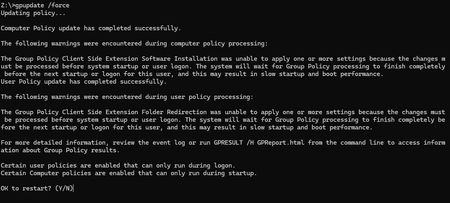
Issues with Group Policy Update (gpupdate)
I am getting an error when I attempt to perform a gpupdate /force on workstations. I have checked the health of the DC's and find no issues. I am going to include a screenshot of the error - hoping someone can guide me as on how to resolve. The system will say to reboot but the policy never seems to run just keeps prompting for reboot.217Views0likes1CommentTurning Off Tamper Protection on Workstations
How do I turn off Tamper Protection on a domain-joined Windows 11 workstation? The problem is a workstation has Windows Defender in Passive Mode instead of being in Not Running mode after installing a 3rd party antivirus. Windows Defender is making running network applications from the servers much slower because it's still real-time scanning. I also suspect Tamper Protection is also preventing network drive exclusions from working on this workstation and on the ones that use Windows Defender without a 3rd party antivirus. I've tried adding every registry entry, Group Policy, and PowerShell command on the local workstation I could find to disable Windows Defender, but nothing works. I'm assuming this is due to Tamper Protection ignoring everything? This is an on-premises domain and doesn't use Microsoft Intune or Microsoft Endpoint Configuration Manager.Solved439Views0likes2CommentsAdd support for sha-2 and sha3 in Supported Kerberos Encryption Types
https://techcommunity.microsoft.com/t5/core-infrastructure-and-security/decrypting-the-selection-of-supported-kerberos-encryption-types/ba-p/1628797 https://web.mit.edu/kerberos/krb5-devel/doc/admin/enctypes.html#enctype-compatibility It seems like `aes128-cts-hmac-sha256-128` and `aes256-cts-hmac-sha384-192` are supported by other Kerberos implimentations, but not yet supported by Windows Server. Can those be added to Windows Server? Also can you please think about adding sha-3 based ones too?2.6KViews1like4Comments
Securing ldap in WIndows AD
Hello everyone. I would like to secure the use of LDAP within an Active Directory domain. My domain has three Windows 2022 DCs. Searching online, I found these suggestions: Enforce LDAPS (LDAP over SSL/TLS) Disable Plain-text LDAP Bindings Block or Restrict Port 389 (Optional but Recommended) Enable Channel Binding Tokens (CBT) Does it make sense to only allow certain users to browse LDAP? Could limiting LDAP browsing to certain users cause problems? Thanks193Views0likes1CommentWindows 11 automatically restarting after install security Update — With GPO and WSUS.
Hi everyone, I’m facing a strange behavior with Windows 11 devices that receive updates through WSUS and are fully managed via Group Policy. Here’s the scenario: We have a GPO configured as follows: -Configure Automatic Updates → 4 (Auto download and schedule the install) -Scheduled installation every day at 10:00 -Install during automatic maintenance → disabled -Active Hours configured -Turn off auto-restart for updates during active hours → Enabled -Update deadlines set to 0 (to avoid any forced restart) -No other restart-related policies set in the domain Even with this configuration, after updates are installed, Windows 11 shows the following message: “Your organization manages update settings. We will restart and install this update at X minutes.” And then the device automatically restarts, even when: -a user is logged in -it is outside Active Hours -deadlines are disabled -no-auto-restart is enabled This behavior does not happen on Windows 10 — only on Windows 11.2KViews0likes1Comment