accessibility
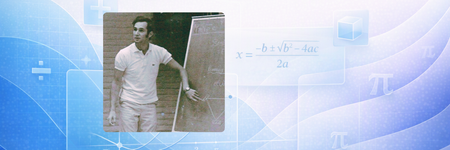
50 TopicsMeet Murray Sargent, the quiet force behind accessible math
If you’ve ever typed an equation into Microsoft Word, copied math from the web into a document, or relied on a screen reader to understand an equation, you’ve benefited from Murray Sargent’s work, even if you’ve never heard his name. As we celebrate Global Accessibility Awareness Day, we’re recognizing Murray, recipient of the Microsoft Accessibility Lifetime Achievement Award, for his extraordinary contributions to accessibility at Microsoft. At 85, Murray is still contributing to Microsoft products, with a goal that sounds simple but is surprisingly hard to get right: make math not only readable, but writable, editable, and accessible for everyone. Most people slow down at this stage of life. Murray is still shipping. And what makes his story compelling is that his work has never really been about equations alone. It’s been about people. Students trying to finish homework independently. Researchers trying to express an idea clearly. Blind users trying not just to hear math, but to write it, revise it, and make it their own. Murray is part of a long arc of computing history, from the earliest days of digital math display to accessibility breakthroughs that now reach millions of people every month. From lasers to letters to living math Murray’s path into this work started long before modern productivity software existed. As a Yale graduate student in theoretical physics, he was writing a dissertation in laser theory packed with Greek letters and notation that everyday typing tools handled badly. One memory sticks with him because it’s so physical. The wife of one of his professors was typing a dissertation on an IBM typewriter and literally removed keys and replaced them with different keys just to type Greek letters. Even by the standards of the time, it was clunky. For Murray, it was also revealing. The problem wasn’t the math. The problem was that the tools were getting in the way of people trying to express it. That problem stayed with him. When he finished his PhD and joined Bell Labs, he kept thinking about how math could be represented more naturally with computers. In 1968, because he needed to prepare slides and there was no PowerPoint waiting to save him, he created a way to display mathematical equations on presentation slides. It wasn’t just a technical win. It gave shape to a belief that would guide the rest of his career: math should not be frozen in place. It should behave like text. A career built around one stubborn question By the time Murray joined Microsoft in 1992, he had already spent decades thinking about how people write math digitally. When he moved into the TextServices team supporting Word and RichEdit, he had a long-term goal: to bring high-quality math editing and display into Microsoft products in a way that felt natural and direct. He’s candid that it took longer than he expected, but the goal never changed. If you want a peek at the engineering stories he points to himself, Murray calls out work like LineServices and Mathematical typography in Office. What fascinated him wasn’t just how equations looked. It was whether they could be edited like text. He wanted the promise of WYSIWYG editing: put your cursor where you want, change part of an equation, paste something into the middle of something else, and have it just work. That shift matters more than it sounds. When math is treated like a picture, it becomes fragile. Harder to edit. Harder to speak. Harder to braille. Harder to make accessible. But when it is treated as structured, editable content, the door opens wider for everyone. The part people miss about “math accessibility” When people hear “accessible math,” many assume it’s mostly about reading. Murray gently disagrees. “Most people seem to think that math accessibility is just providing math speech and braille for existing math in documents,” he says. “But for people documenting their own work or students writing up their math homework, math accessibility must include entering and editing math.” That one shift changes the whole goal. You are not just making equations understandable. You are making them authorable. For a blind student trying to finish homework independently, that difference is everything. When braille changed the whole problem Math braille became a turning point in Murray’s accessibility work. He points to the Nemeth braille code, a linear format that predates FORTRAN. What grabbed him was that Nemeth showed you can represent sophisticated math in a linear way and still preserve meaning, even without visual layout. That perspective fits perfectly with how he thinks about math formats like UnicodeMath. And it helps explain why he cares so much about structure. If the structure is right, math can travel. It can be spoken, displayed, edited, and felt on a refreshable braille display without losing what it means. The tiny shortcut he’s proud of If you ask Murray what behind the scenes contribution he’s proud of, he doesn’t point to something flashy. He points to a keyboard shortcut: Alt+X. Alt+X converts Unicode character codes into symbols. For instance, pressing Alt+X in Microsoft Word toggles the text between its Unicode code value (221E) and the corresponding character (∞) in the same location. It’s the kind of feature that feels small until you learn about it, and then it becomes part of how you think. It’s also very on brand for him: practical, efficient, and quietly empowering. The moment it stopped being hypothetical Around the same time Murray’s work was taking off, Microsoft was beginning to rethink how accessibility work happened in the first place. Instead of building features and hoping they helped later, teams were starting to work more closely with the disability community to understand how people were actually interacting with math in real scenarios. That shift toward co design is now reflected in the company’s Inclusive Design hub, which emphasizes solving for one person’s needs in ways that extend to many. For years, Murray hoped his work was helping people. But he didn’t always get direct confirmation. He says he didn’t have confirmation until “the DAISY folks reported back that they wanted to recommend Microsoft Word for navigating a complex equation and having it understand when you entered a part of the equation”, but they just needed to eliminate some limitations. “At that point, it really seemed like we could make math accessible,” he said. “I wish I had had that feedback back in 2017!” That is the emotional center of this story. A person can work on something for decades and still wonder if it matters. Then, one piece of feedback validates your hypothesis and suddenly it is not theoretical anymore. The power of Murray’s work is also evident when you hear stories like that of Alex Benoit, now a senior developer on the Excel team, who recalled relying on Word’s equation tools throughout college and being “really, really grateful, even at the time” because they allowed him to write clean mathematical notation in his reports, even if he “didn’t know who to thank” at the time. A moment of recognition, decades in the making Yesterday, Murray's impact was recognized in a big way. He received the first-ever Microsoft Accessibility Lifetime Achievement Award for his contributions to digital math accessibility. The award highlights the very work described throughout this story: helping make math in Microsoft Office more accessible for blind and low-vision users through innovations in equation editing, math speech, braille support, and structured digital math experiences. During the ceremony, his work was described as life-changing, noting that these breakthroughs made it possible for students and professionals to read, write, and work with math in ways that were previously difficult or inaccessible. It’s the kind of recognition that puts a spotlight on something Murray has focused on all along: not just making math visible, but making it usable for everyone. Still curious, still building In the past six months, in collaboration with Peter Wu and Rick Sailor, Murray has continued to build his legacy and make math accessible with new features like easier screen reading announcements while navigating equations and copy/paste equations using MathML. Murray stays active outside of his passion for writing math code, too. His advice is simple and very him: “Carpe diem! Regular exercise is possibly the best investment a person can make; eat healthful food; have good personal relationships; work hard on meaningful goals.” He also names recent hikes he loved, including Mt. Wrightson (south of Tucson) and Sahale Arm in the North Cascades. And yes, he has a cave photo near Sedona that belongs in the post because it’s the perfect visual shorthand for his whole vibe: still exploring, still climbing, still game. A legacy written in equations and people Murray’s legacy is not just standards work, file formats, or clever shortcuts. It’s about making sure math, the language of science, education, and discovery, is available to everyone. Not someday. Today. If you’re a Microsoft 365 user or educator, you can explore math accessibility features right now in Word, PowerPoint, and OneNote. And if you want to go deeper, Murray has documented much of this work in his own words across years of posts, including his retirement reflection, “It’s been so fine!” and his story about early Windows days.837Views2likes1Comment