wsus
85 Topics
WSUS edge update fail 0x80070643
Hello everyone, it's a little bit of time that one of my clients do not install from wsus server the update for microsoft edge properly. After the install get to 100% return the error code 0x80070643. Already tried to install manually (download edge business from ms site), reset all windows update components. Other updates are installed succesfully. The event log report a different error code (only a generic installation error with code 0x8024200B). The very wierd part is that if I disable the wsus policy and check for update in edge information page, the update install succesfully. Other clients install it from wsus without issues.4.7KViews0likes1Comment
Delivery Optimization breaking Windows 11 update downloads?
We started seeing Delivery Optimization–related issues with Windows updates after upgrading devices to Windows 11 24H2. In our SCCM environment, Windows updates begin downloading but consistently fail or stall partway through the download. In many cases, the download restarts multiple times and eventually errors out. This behavior is consistent across multiple devices and different boundaries. These same devices were patching normally prior to the 24H2 upgrade. Since moving to 24H2, patching has become unreliable, especially for larger updates. From what we’re seeing, this doesn’t look like a traditional content or boundary issue. It feels like Delivery Optimization is failing mid-transfer or not resuming downloads correctly after the OS upgrade. So far we’ve checked the following: - Boundaries and boundary groups are unchanged - Content is available and distributed correctly on DPs - No recent SCCM site or infrastructure changes - Network connectivity looks normal On the client side, we’ve been reviewing: - DataTransferService.log (downloads start but fail or restart mid-way) - DeliveryOptimization logs (showing repeated retries / stalled transfers) - CAS.log and LocationServices.log (content location looks normal) - WUAHandler.log (update detection looks fine) Overall, detection and policy seem healthy — the issue appears during the actual download phase. Has anyone else seen Delivery Optimization downloads stall or fail during Windows patching after upgrading to Windows 11 24H2? If so, did you find a specific DO setting, policy change, or workaround that stabilized patching?677Views0likes3CommentsDelivery Optimization breaking Windows 11 update downloads?
We started seeing Delivery Optimization–related issues with Windows updates after upgrading devices to Windows 11 24H2. In our SCCM environment, Windows updates begin downloading but consistently fail or stall partway through the download. In many cases, the download restarts multiple times and eventually errors out. This behavior is consistent across multiple devices and different boundaries. These same devices were patching normally prior to the 24H2 upgrade. Since moving to 24H2, patching has become unreliable, especially for larger updates. From what we’re seeing, this doesn’t look like a traditional content or boundary issue. It feels like Delivery Optimization is failing mid-transfer or not resuming downloads correctly after the OS upgrade. So far we’ve checked the following: - Boundaries and boundary groups are unchanged - Content is available and distributed correctly on DPs - No recent SCCM site or infrastructure changes - Network connectivity looks normal On the client side, we’ve been reviewing: - DataTransferService.log (downloads start but fail or restart mid-way) - DeliveryOptimization logs (showing repeated retries / stalled transfers) - CAS.log and LocationServices.log (content location looks normal) - WUAHandler.log (update detection looks fine) Overall, detection and policy seem healthy — the issue appears during the actual download phase. Has anyone else seen Delivery Optimization downloads stall or fail during Windows patching after upgrading to Windows 11 24H2? If so, did you find a specific DO setting, policy change, or workaround that stabilized patching?226Views0likes1Comment
Windows 11 automatically restarting after install security Update — With GPO and WSUS.
Hi everyone, I’m facing a strange behavior with Windows 11 devices that receive updates through WSUS and are fully managed via Group Policy. Here’s the scenario: We have a GPO configured as follows: -Configure Automatic Updates → 4 (Auto download and schedule the install) -Scheduled installation every day at 10:00 -Install during automatic maintenance → disabled -Active Hours configured -Turn off auto-restart for updates during active hours → Enabled -Update deadlines set to 0 (to avoid any forced restart) -No other restart-related policies set in the domain Even with this configuration, after updates are installed, Windows 11 shows the following message: “Your organization manages update settings. We will restart and install this update at X minutes.” And then the device automatically restarts, even when: -a user is logged in -it is outside Active Hours -deadlines are disabled -no-auto-restart is enabled This behavior does not happen on Windows 10 — only on Windows 11.2KViews0likes1CommentWorkstations stopped sending reports to WSUS
A month ago, domain WU-clients stopped sending reports to the WSUS server. However, the search/receipt of updates by clients is performed normally (both manually and scheduled). So, if an update is approved on WSUS, it is installed on the workstation. Re-registering the WU-client (cleaning "SoftwareDistribution" folder and "WindowsUpdate" registry branch) didn't help. The problem is only with workstations (MS Windows 10), servers continue to send reports regularly.566Views0likes2CommentsThrottle Downstream WSUS Update Pull from upstream
Is it possible to throttle the download of updates on a downstream WSUS server i.e. when it is pulling it's updates from an upstream WSUS server? We have some downstream WSUS servers on low bandwidth links and whilst we generally schedule the pull of updates during an out-of-hours window this is problematic for us for several reasons. I'd rather they pull during the day but with throttling. I’m aware the WSUS clients can do this in Windows 10 BITS etc. but wondering can the WSUS server do this on the synchronisation cycles.223Views0likes0Comments
Automatic installation of definition updates
Hi, we use a Windows 2022 environment with a WSUS server. I want to configure WSUS/GPOs in that way that defintion updates, which do not require a reboot will be installed automatically. The normal updates, even if they are permited by wsus, should only be installed when i start the installation at the specific computer/server. Is this/How is this possible? Greetings Jens1.1KViews0likes1CommentUnexpected Automatic Windows Server Updates Despite GPO and WSUS Configurations
Hello everyone, I am experiencing a disruptive issue across a number of our Windows servers (ranging from Server 2012 to Server 2022). Despite a carefully managed WSUS implementation and GPO enforcement for Windows Updates, we have been facing an issue where several updates are getting automatically installed on these servers. The problem is, these updates are not ones we have explicitly approved, nor are they manually triggered for download/installation. The automatic reboots following these installations are causing significant service disruptions. Furthermore, the behavior seems to be somewhat random, which makes it even more challenging to root cause. Here is a summary of the GPO and WSUS configurations, and what I have verified so far: The GPO for Windows Updates is configured to '4 - Auto download and schedule the install'. The RSOP confirmed that there are no conflicting GPOs. WSUS is functioning correctly and the automatic approval of updates has been disabled. Dual Scan is not a factor as it's not relevant to the Windows Server versions we're using. It has been confirmed that the updates in question are indeed WSUS updates, but they haven’t been approved by us. The issue does not pertain to pre-downloaded update files or Service Stack Updates (SSUs). Given the above points, I am having a hard time figuring out why these updates are being installed and causing unplanned reboots. I would really appreciate it if anyone who has encountered a similar issue or anyone with insights could shed some light on this. Thank you in advance for your assistance! Best3.9KViews1like3Comments
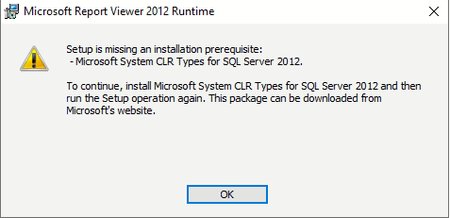
Installing Report Viewer 2012 Runtime
Hello, I have WSUS installed on Windows Server Standard 2019 (x64), so I'm trying to get access to some reports but the system is asking me for the Report Viewer 2012. When I launch the installer I got this message: Any clue where can I get it, because from MS I can't get it. Thank you guys,14KViews0likes9Comments