virtual network
238 Topics
Help! - How is VNet traffic reaching vWAN/on‑prem when the VNet isn’t connected to the vWAN hub
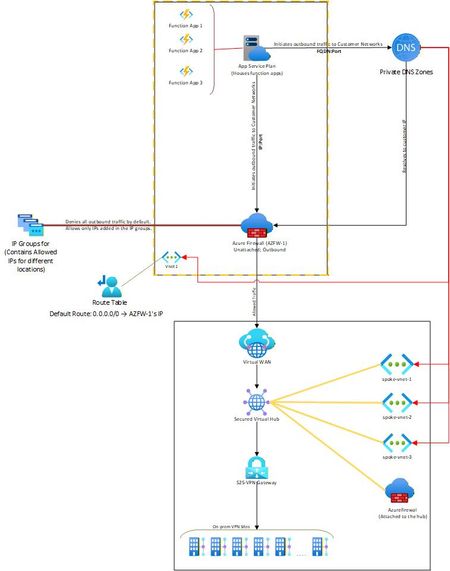
Hello, I needed some clarity on how the following is working: Attached is a network diagram of our current setup. The function apps (in VNet-1) initiate a connection(s) to a specific IP:Port or FQDN:Port in the on-premises network(s). A Private DNS zone ensures that any FQDN is resolved to the correct internal IP address of the on-prem endpoint. In our setup, both the function app and the external firewall reside in the same VNet. This firewall is described as “Unattached” because it is not the built-in firewall of a secured vWAN hub, but rather an independent Azure Firewall deployed in that VNet. The VNet has a user-defined default route (0.0.0.0/0) directing all outbound traffic to the firewall’s IP. The firewall then filters the traffic, allowing only traffic destined to whitelisted on-premises IP: Port or FQDN: Port combinations (using IP Groups), and blocking everything else. The critical question and the part that I am unable to figure out is: Once the firewall permits a packet, how does Azure know to route it to the vWAN hub and on to the site-to-site VPN? Because VNet-1 truly has no connection at all to the vWAN hub (no direct attachment, no peering, no VPN from the NVA). But the traffic is still reaching the on-prem sites. Unable to figure out how this is happening. Am I missing something obvious? Any help on this would be appreciated. Thank you!18Views0likes1Comment
Help ! - Hub Spoke Architecture and Routing via NVA
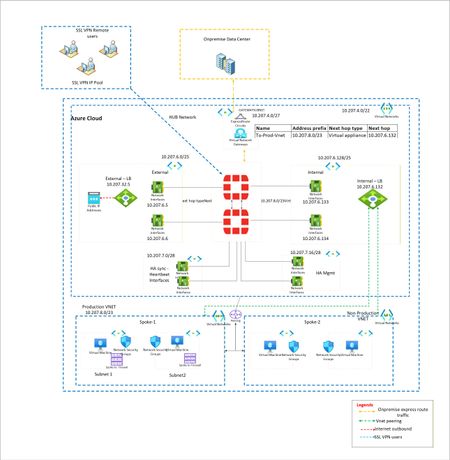
I have a classic example of routing. I want to force all traffic via Fortigate firewalls. EastWest and NorthSouth. However when large Supernet of Azure Vnet is used to route and force the traffic via UDR at gateway subnet, its not working. Because Routes learned at Hub Vnet via Vnet peering is taking precedence. To isolate, i have created multiple small subnet routes for Gateway subnet. Each pointing to spoke vnet and next hop as Fortigate firewall. However this is working, i want to make solution solid. Means if someone creates new vnet in future and peer with Hub, it should not get direct traffic. Is that possible? Or this is typical shortcoming of Azure where routing works with preference to vnet peeering.? Below is architecture -Solved104Views0likes2Comments
Advanced Container Apps Networking: VNet Integration and Centralized Firewall Traffic Logging
Azure community, I recently documented a networking scenario relevant to Azure Container Apps environments where you need to control and inspect application traffic using a third-party network virtual appliance. The article walks through a practical deployment pattern: • Integrate your Azure Container Apps environment with a Virtual Network. • Configure user-defined routes (UDRs) so that traffic from your container workloads is directed toward a firewall appliance before reaching external networks or backend services. • Verify actual traffic paths using firewall logs to confirm that routing policies are effective. This pattern is helpful for organizations that must enforce advanced filtering, logging, or compliance checks on container egress/ingress traffic, going beyond what native Azure networking controls provide. It also complements Azure Firewall and NSG controls by introducing a dedicated next-generation firewall within your VNet. If you’re working with network control, security perimeters, or hybrid network architectures involving containerized workloads on Azure, you might find it useful. Read the full article on my blog67Views0likes0Comments
Network Detection and Response (NDR) in Financial Services
New PCI DSS v4.0.1 requirements heighten the need for automated monitoring and analysis of security logs. Network Detection and Response solutions fulfill these mandates by providing 24/7 network traffic inspection and real-time alerting on suspicious activities. Azure’s native tools (Azure vTAP for full packets, VNET Flow Logs for all flows) capture rich network data and integrate with advanced NDR analytics from partners. This combination detects intrusions (satisfying IDS requirements under Requirement 11), validates network segmentation (for scope reduction under Req. 1), and feeds alerts into Microsoft Sentinel for rapid response (fulfilling incident response obligations in Req. 12). The result is a cloud architecture that not only meets PCI DSS controls but actively strengthens security.854Views0likes0Comments
IKEv2 and Windows 10/11 drops connectivity but stays connected in Windows
I’ve seen this with 2 different customers using IKEv2 User VPNs (virtual wan) and Point to Site gateways in hub and spoke whereby using the VPN in a Always On configuration (device and user tunnel) that after a specific amount of time (56 minutes) the IKEv2 connection will drop the tunnel but stay connected in Windows. To restore the connection, you just reconnect. has anyone else had a similar experience? I’ve seen the issue with ExpressRoute and with/without Azure firewalls in the topology too.1.4KViews0likes1Comment
How can I convert an website on Microsoft to IOS?
Hello everyone, Hope you all are doing good, I am Jeck. I have a website which I design and developed on my apple machine and basically made on IOS. Now, I want to change my website to Microsoft, my website is on https://www.bestelectricsmoker2021.com/ Can you guide me porperly or suggest me anyone who can work for me and extend my bussiness on Micosoft. Thank you Have a good day!665Views0likes1CommentSpoke-Hub-Hub Traffic with VPN Gateway BGP and Firewall Issue
Hello, I’m facing a situation where I’m trying to have Azure Firewall Inspection on the VPN Gateway VNET-VNET Connectivity. It seems to work if I go from SpokeA-HubAFirewall-HubAVPN—HubBVPN-SpokeB but if I try to go from SpokeA-HubAFirewall-HubAVPN-HubBVM or Inbound Resolver it fails to route correctly according to Connectivity Troubleshooter it stops at HubAVPN with Local Error: RouteMissing but then reaches destination health so makes me believe it’s getting there but not following the route I want it to take which might be causing routing issues. What Am I missing here? This connectivity was working before introducing the Azure Firewall for Inspection with the UDR. Is what I’m trying to accomplish not possible? I’ve tried different types of UDR rules on the Gateway Subnet, and this is my most recent configuration. The reason I’m trying to accomplish this is because I’m seeing a similar error in our Hub-Spoke Hybrid environment and I’m trying to replicate the issue. Current Configuration 2x Hubs with Spoke networks attached so example Hub-Spoke-A Configuration: Hub-A Contains following subnets and Resources VPN Gateway - GateWaySubnet Azure Firewall - AzureFirewallSubnet Inbound Private Resolver - PrivateResolverSubnet Virtual Machine – VM Subnet Gateway Subnet has an attached UDR with the following routes Propagation - True Prefix Destination – Hub-B Next Hop Type – Virtual Appliance Next Hope IP – Hub-A Firewall Prefix Destination – Spoke-B Next Hop Type – Virtual Appliance Next Hope IP – Hub-A Firewall Hub-Spoke-B Configuration: Hub-B Contains following subnets and Resources VPN Gateway - GateWaySubnet Azure Firewall - AzureFirewallSubnet Inbound Private Resolver - PrivateResolverSubnet Virtual Machine – VM Subnet Gateway Subnet has an attached UDR with the following Routes Propagation - True Prefix Destination – Hub-A Next Hop Type – Virtual Appliance Next Hope IP – Hub-B Firewall Prefix Destination – Spoke-A Next Hop Type – Virtual Appliance Next Hope IP – Hub-B Firewall Spoke Subnets has an attached UDR with the following Routes Propagation - True Prefix Destination – 0.0.0.0/0 Next Hop Type – Virtual Appliance Next Hope IP – HubA/HubB Firewall (Depending on what hub its peered to) VPN Gateways HA VNET-VNET with BGP Enabled. I can see that it knows the routes and like I said this was working prior introducing the UDRs for force traffic through the azure firewall.201Views0likes2CommentsAnnouncing Azure DNS security policy with Threat Intelligence feed general availability
Azure DNS security policy with Threat Intelligence feed allows early detection and prevention of security incidents on customer Virtual Networks where known malicious domains sourced by Microsoft’s Security Response Center (MSRC) can be blocked from name resolution. Azure DNS security policy with Threat Intelligence feed is being announced to all customers and will have regional availability in all public regions.2.2KViews3likes0CommentsAnnouncing the public preview of StandardV2 NAT Gateway and StandardV2 public IPs
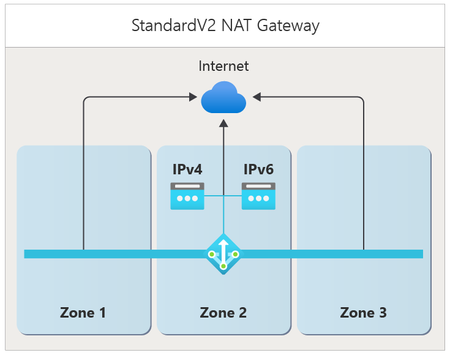
In today’s rapidly changing digital landscape, organizations are innovating faster and delivering cloud native experiences at global scale. With this acceleration comes higher expectations: applications must remain always available. An outage in a single availability zone can have a ripple effect on application performance, user experience, and business continuity. To safeguard against zone outages, making your cloud architecture zone resilient isn't an option—it’s a necessity. A key part of any resilient design is ensuring reliable outbound connectivity. Azure NAT Gateway is a fully managed network address translation service that provides highly scalable and secure internet connectivity for resources inside your virtual networks. We’re excited to announce the public preview of the StandardV2 SKU NAT Gateway, an evolution of Azure NAT Gateway built for the next generation of scale, performance, and resiliency. StandardV2 NAT Gateway delivers zone redundancy, enhanced data processing limits, IPv6 support, and flow logs all at the same price as the Standard SKU NAT Gateway. This release also marks the public preview of StandardV2 SKU public IP addresses and prefixes. A new SKU of public IPs that must be used with StandardV2 NAT Gateway. In combination, StandardV2 IPs provide high-throughput connectivity to support demanding workloads. What’s new in StandardV2 NAT Gateway Zone redundancy StandardV2 NAT Gateway is zone-redundant by default in regions with availability zones. Deployed as a single resource operating across multiple zones, StandardV2 NAT Gateway ensures outbound connectivity even if one zone becomes unavailable. For example, a virtual machine in zone 2 connects outbound from zones 1, 2, or 3 through a StandardV2 NAT Gateway (as shown in the figure). If zone 1 experiences an outage, existing connections in that zone may fail, but new connections will seamlessly flow through zones 2 and 3—keeping your applications online and resilient. All existing connections through zones 2 and 3 will persist. To learn more, see StandardV2 NAT Gateway zone-redundancy. remaining healthy zones with StandardV2 NAT Gateway. This kind of resiliency is essential for any critical workload to ensure high availability. Whether you’re a global SaaS provider that needs to maintain service continuity for your customers during zonal outages or an e-commerce platform that needs to ensure high availability during peak shopping seasons, StandardV2 NAT Gateway can help you achieve greater protection against zonal outages. Higher performance StandardV2 doubles the performance of the Standard SKU, supporting up to 100 Gbps throughput and 10 million packets per second. These enhanced data processing limits are ideal for data-intensive and latency-sensitive applications requiring consistent, high-throughput outbound access to the internet. For more information, see StandardV2 NAT Gateway performance. StandardV2 public IPs Alongside NAT Gateway, StandardV2 public IP Addresses and Prefixes are now available in public preview. StandardV2 SKU public IPs are a new offering of public IPs that must be used with StandardV2 NAT Gateway to provide outbound connectivity. Standard SKU public IPs are not compatible with StandardV2 NAT Gateway. See how to deploy StandardV2 public IPs. IPv6 (dual-stack) support StandardV2 NAT Gateway now supports dual-stack (IPv4 + IPv6) connectivity, enabling organizations to meet regulatory requirements, optimize performance for modern architectures, and future-proof workloads at internet scale. Each NAT Gateway supports up to 16 IPv4 and 16 IPv6 StandardV2 public IP addresses or prefixes. See IPv6 support for StandardV2 NAT gateway for more information. Flow logs With StandardV2, you can now enable flow logs to gain deeper visibility into outbound traffic patterns. Flow logs capture detailed IP-level traffic information, helping you: Troubleshoot connectivity issues more efficiently. Identify top talkers behind the NAT Gateway (which virtual machines initiate the most connections outbound). Analyze traffic for compliance and security auditing for your organization Learn more at Enable flow logs on StandardV2 NAT Gateway. Deploying StandardV2 NAT Gateway and public IPs You can deploy StandardV2 NAT Gateway and StandardV2 public IPs using ARM templates, Bicep, PowerShell, or CLI. Portal and Terraform support is coming soon. For more information on client support, see StandardV2 NAT Gateway SKU. Learn More StandardV2 NAT Gateway StandardV2 public IPs Create and validate StandardV2 NAT Gateway NAT Gateway pricing1.9KViews4likes0CommentsAzure Virtual Network Manager + Azure Virtual WAN
Azure continues to expand its networking capabilities, with Azure Virtual Network Manager and Azure Virtual WAN (vWAN) standing out as two of the most transformative services. When deployed together, they offer the best of both worlds: the operational simplicity of a managed hub architecture combined with the ability for spoke VNets to communicate directly, avoiding additional hub hops and minimizing latency Revisiting the classic hub-and-spoke pattern Element Traditional hub-and-spoke role Hub VNet Centralized network that hosts shared services including firewalls (e.g., Azure Firewall, NVAs), VPN/ExpressRoute gateways, DNS servers, domain controllers, and central route tables for traffic management. Acts as the connectivity and security anchor for all spoke networks. Spoke VNets Host individual application workloads and peer directly to the hub VNet. Traffic flows through the hub for north-south connectivity (to/from on-premises or internet) and cross-spoke communication (east-west traffic between spokes). Benefits • Single enforcement point for security policies and network controls • No duplication of shared services across environments • Simplified routing logic and traffic flow management • Clear network segmentation and isolation between workloads • Cost optimization through centralized resources However, this architecture comes with a trade-off: every spoke-to-spoke packet must route through the hub, introducing additional network hops, increased latency, and potential throughput constraints. How Virtual WAN modernizes that design Virtual WAN replaces a do-it-yourself hub VNet with a fully managed hub service: Managed hubs – Azure owns and operates the hub infrastructure. Automatic route propagation – routes learned once are usable everywhere. Integrated add-ons – Firewalls, VPN, and ExpressRoute ports are first-class citizens. By default, Virtual WAN enables any-to-any routing between spokes. Traffic transits the hub fabric automatically—no configuration required. Why direct spoke mesh? Certain patterns require single-hop connectivity Micro-service meshes that sit in different spokes and exchange chatty RPC calls. Database replication / backups where throughput counts, and hub bandwidth is precious. Dev / Test / Prod spokes that need to sync artifacts quickly yet stay isolated from hub services. Segmentation mandates where a workload must bypass hub inspection for compliance yet still talk to a partner VNet. Benefits Lower latency – the hub detour disappears. Better bandwidth – no hub congestion or firewall throughput cap. Higher resilience – spoke pairs can keep talking even if the hub is under maintenance. The peering explosion problem With pure VNet peering, the math escalates fast: For n spokes you need n × (n-1)/2 links. Ten spokes? 45 peerings. Add four more? Now 91. Each extra peering forces you to: Touch multiple route tables. Update NSG rules to cover the new paths. Repeat every time you add or retire a spoke. Troubleshoot an ever-growing spider web. Where Azure Virtual Network Manager Steps In? Azure Virtual Network Manager introduces Network Groups plus a Mesh connectivity policy: Azure Virtual Network Manager Concept What it gives you Network group A logical container that groups multiple VNets together, allowing you to apply configurations and policies to all members simultaneously Mesh connectivity Automated peering between all VNets in the group, ensuring every member can communicate directly with every other member without manual configuration Declarative config Intent-based approach where you define the desired network state, and Azure Virtual Network Manager handles the implementation and ongoing maintenance Dynamic updates Automatic topology management—when VNets are added to or removed from a group, Azure Virtual Network Manager reconfigures all necessary connections without manual intervention Operational complexity collapses from O(n²) to O(1)—you manage a group, not 100+ individual peerings. A complementary model: Azure Virtual Network Manager mesh inside vWAN Since Azure Virtual Network Manager works on any Azure VNet—including the VNets you already attach to a vWAN hub—you can apply mesh policies on top of your existing managed hub architecture: Spoke VNets join a vWAN hub for branch connectivity, centralized firewalling, or multi-region reach. The same spokes are added to an Azure Virtual Network Manager Network Group with a mesh policy. Azure Virtual Network Manager builds direct peering links between the spokes, while vWAN continues to advertise and learn routes. Result: All VNets still benefit from vWAN’s global routing and on-premises integration. Latency-critical east-west flows now travel the shortest path—one hop—as if the VNets were traditionally peered. Rather than choosing one over the other, organizations can leverage both vWAN and Azure Virtual Network Manager together, as the combination enhances the strengths of each service. Performance illustration Spoke-to-Spoke Communication with Virtual WAN without Azure Virtual Network Manager mesh: Spoke-to-Spoke Communication with Virtual WAN with Azure Virtual Network Manager mesh: Observability & protection NSG flow logs – granular packet logs on every peered VNet. Azure Virtual Network Manager admin rules – org-wide guardrails that trump local NSGs. Azure Monitor + SIEM – route flow logs to Log Analytics, Sentinel, or third-party SIEM for threat detection. Layered design – hub firewalls inspect north-south traffic; NSGs plus admin rules secure east-west flows. Putting it all together Virtual WAN offers fully managed global connectivity, simplifying the integration of branch offices and on-premises infrastructure into your Azure environment. Azure Virtual Network Manager mesh establishes direct communication paths between spoke VNets, making it ideal for workloads requiring high throughput or minimal latency in east-west traffic patterns. When combined, these services provide architects with granular control over traffic routing. Each flow can be directed through hub services when needed or routed directly between spokes for optimal performance—all without re-architecting your network or creating additional management complexity. By pairing Azure Virtual Network Manager’s group-based mesh with VWAN’s managed hubs, you get the best of both worlds: worldwide reach, centralized security, and single-hop performance where it counts.2.2KViews5likes0Comments