Standalone
46 TopicsAnnouncement: OneDrive Sync Updates
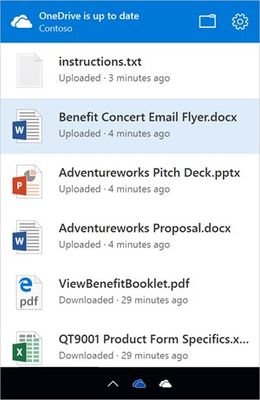
All of us here on the OneDrive Team have been hard at work delivering many of the OneDrive sync client updates we communicated at Ignite to further improve the user experience and administration of syncing files from Office 365. With the holidays rapidly approaching we wanted to give you an update on those enhancements. The best part is the latest OneDrive sync client will automatically update with these new capabilities. If you aren’t running the latest OneDrive sync client, or aren’t sure, you can learn more here. Activity center The activity center is now available in the latest OneDrive sync client on Mac and PC giving you visibility to the most recent sync activity and status. Simply click on the OneDrive icon in your system tray (PC) or Finder (Mac) to see your file sync Conditional access You can now restrict OneDrive sync to only domain joined or workplace joined devices. You can even make access contingent on PC health if you like. All of this can be managed through the new OneDrive admin center preview and by configuring Azure Active Directory policies. Learn more here. Syncing SharePoint sites Making sure you have the information that is critical to you on every device no matter where you are is key to our customers. The ability to sync SharePoint sites directly to OneDrive is one of these features that makes doing this easier and simpler for end users. We’ve had great feedback on the public preview of syncing SharePoint Online document libraries in the latest OneDrive sync client. We remain committed to providing a reliable and performant sync experience for all your Office 365 files and continue to refine the public preview to meet our quality expectations. We’re on target to make this capability generally available in January. Standalone Mac client Ever since we added OneDrive for Business support to the latest sync client, we’ve seen an increase of adoption and interest from the Mac community. However, one of the largest blockers for enterprise deployments is that most admins do not want to utilize the Mac App Store to deploy and distribute software due to its limitations. Today we’re releasing a standalone OneDrive sync client for Mac that you can deploy and manage outside of the Mac App Store. This standalone client also provides sync status visual overlays in Finder, a Finder shortcut for OneDrive, and the ability to set-up OneDrive sync to run at log in. This latest client also has built-in multi-language support. You can get the standalone client for Mac here. As we get ready for 2017, I want to take a moment to wish all of you a healthy and happy new year from the OneDrive/SharePoint teams here in Redmond. We look forward to continuing to bring all of you more great innovation while finding new ways to make you more productive no matter where and how you choose to work. Thank you and happy holidays! Stephen L Rose Director, OneDrive Product Marketing46KViews30likes51Comments
Difference between OneDrive for Business Vs Next Generation Sync Client (Microsoft OneDrive)
Hello, We are in the process of rolling out New OneDrive(https://support.office.com/en-us/article/New-OneDrive-sync-client-release-notes-845dcf18-f921-435e-bf28-4e24b95e5fc0#windows). I am looking for new enhancements added or differece between ODFB and NGSC so that we can put them in our comm mail for user awareness. Can some one please provide me above info?Solved17KViews0likes6Comments
Cloud problem "OneDrive"
There is a problem with the cloud, it’s definitely not local, but specifically in my account OneDrive. The problem is that through the parameters when emptying the recycle bin, an error appears "undefined" to be more precise it looks like this "will be cleared undefined storage". I contacted Microsoft technical support, first with the technical department, then with the accounts department, then with the department OneDrive. They said everything was fine with the account, there were no problems, initially I was sent to the accounts department, later I was sent here, but even then they only advised me to clear the cache, Log out of your account and unlink it, none of this helps, it’s useless. This doesn’t help, give me a link to reset the cloud or something else, well, I can’t log into my account from this account, because of the cloud, the computer is just going crazy, the application is on the computer because of the cloud constantly restarts, now constantly processing data, but impossible to work with the account. Give me some good advice already! In addition, due to the fact that the cloud storage is not detected, Clearing synchronized data in a partition does not work "devices".11KViews0likes5CommentsPhoto albums in OneDrive are not automatically updated when I add new pictures to the onedrive folde
When I add new photos to the folders that I created my Albums from, the OneDrive albums are not automatically updated. so for example 1 month ago I put all my photos to one folder on my OneDrive account and then used OneDrive app to create a photo album from that folder. now I added some more photos to that folder but my OneDrive album doesn't see them, and also the Windows 10 photos app doesn't see them because albums created in OneDrive also appear in the Photos app and that's where I see my photos and interact with them. Uservoice Feedback: https://onedrive.uservoice.com/forums/913522-onedrive-on-windows/suggestions/39122146-photo-albums-in-onedrive-are-not-automatically-upd7KViews1like1Comment
OneDrive StandAlone Update on Conference Room computers
For shared computers, such as conference rooms, I would like to know what other folks are doing to keep the OneDrive client up to date, without causing a disruption to the user. We don't really have control over the update process. The resulting issue for a shared resource such as a conference room pc is that the OneDrive StandAlone Updater Task launches off, often times during a presentation, resulting in DOS command windows popping up in front of the presentation. I believe that the last step in the update process is to run the following commands that result in the DOS command windows popping up. How does your company handle this situation? "C:\Windows\System32\cmd.exe" /q /c rmdir /s /q "C:\Users\userName\AppData\Local\Microsoft\OneDrive\21.030.0211.0002" "C:\Windows\System32\cmd.exe" /q /c rmdir /s /q "C:\Users\userName\AppData\Local\Microsoft\OneDrive\21.030.0211.0002\amd64" "C:\Windows\System32\cmd.exe" /q /c del /q "C:\Users\userName\AppData\Local\Microsoft\OneDrive\StandaloneUpdater\OneDriveSetup.exe" "C:\Windows\System32\cmd.exe" /q /c del /q "C:\Users\userName\AppData\Local\Microsoft\OneDrive\Update\OneDriveSetup.exe"4.9KViews0likes4Comments
OneDrive for Business without M365
Can I get OneDrive for business without getting a M365 subscription and the members in the group will still have the ability to access, add, save, remove files? Basically, we want it to act like a network drive that we can all access without having to share each document. I can't find any information on that and am not quite sure what to search and figure this was as good a place as any since you OneDrive for business already. Thanks for any information you can provide.Solved4.3KViews0likes4Comments
Why is OneDrive taking up space on C:drive
While this matter may have been previously addressed, I remain in search of viable resolutions to rectify the issue at hand. My computer currently operates on the Windows 11 platform, from which I have conscientiously uninstalled Microsoft OneDrive. It is noteworthy to mention that my OneDrive account contains no files or documents. Furthermore, upon conducting a examination of my computer's file structure, I have discerned no trace of OneDrive within the C: drive. This prompts the question of how to eliminate any residual files or dumps associated with OneDrive, particularly considering that it consumes a non-trivial 3 gigabytes of disk space. This space is particularly valuable given that system files already occupy a substantial portion of the available storage capacity on a 1tb drive.2.7KViews0likes2Comments
Adm الدفع بعد النتيجة شيخ روحاني في قطر// ٠٠٩٠٥٣٤٠٧٧٦٩٥٨
I'm a heavy OneDrive user and this issue happens when I delete and move too many large files at the same time. It happens https://rwhanyadam.site/%D8%A7%D9%84%D8%AF%D9%81%D8%B9-%D8%A8%D8%B9%D8%AF-%D8%A7%D9%84%D9%86%D8%AA%D9%8A%D8%AC%D8%A9-%D9%84%D8%A7%D9%8A%D9%88%D8%AC%D8%AF-%D9%85%D9%82%D8%AF%D9%85-%D9%85%D9%88%D9%82%D8%B9-%D8%A7%D9%84%D8%B4/every quarter when I start moving files from one of my OneDrive accounts to my other corporate One Drive account. https://rohani698.sharepoint.com/ I normally delete and change the file names to correct it. This time, however, I was changing too many GB with OneDrive at the same time at the sync issues are happening at the main folder level and I don't want to use "Disable file on demand" https://rwhanyadam.site/%d8%ac%d9%84%d8%a8-%d8%a7%d9%84%d8%ad%d8%a8%d9%8a%d8%a8-%d8%a7%d9%84%d8%af%d9%81%d8%b9-%d8%a8%d8%b9%d8%af-%d8%a7%d9%84%d9%86%d8%aa%d9%8a%d8%ac%d8%a9/ because I have too many GB purposely not on my computer. But given that I can only change the file name online (I can't change the file folders on my computer), this may be the only way. I'll post what happens ...2.3KViews3likes2Comments