standalone
47 Topics
Files-On-Demand status on OneDrive for Mac is confusing
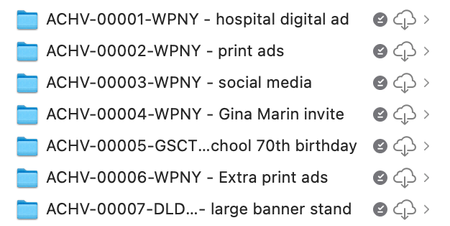
Setting the scene: I'm on an M1 MacBook Pro, MacOS Sequoia 15.5, OneDrive for Mac v.26.017.0126.0002 (standalone) Mystery #1: Okay, so I've got a folder chock full of large files (all neatly placed in nested subfolders, of course). This one folder totals about 400 GB, in fact. For obvious reasons I had set that folder to be cloud-only by electing it and choosing 'Free Up Space' from the contextual menu. It took a while to unload all that data but eventually my finder window showed '900 GB available' instead of '500 GB available', which is what it has said previously. Great. Except that when I looked at the actual folder in ~/Library/CloudStorage and used Cmd-i to 'Get info' on that folder, the info window said that the folder size was… 400GB. The third party disk analysis tool Daisy Disk also reported that folder as being 400 GB in size. Surely if the files have been released back to the cloud and only placeholder 'stubs' remain on the local file system, that folder should have a much smaller size. So what's up? Mystery #2: I want to make a cloned copy of my Mac for backup purposes and I want to include my OneDrive content in that backup (in case the Microsoft OneDrive servers explode, or get overrun by fire ants, or something). I know that there's no point backing up the placeholder stubs — they've got no real data in them (or do they? See Mystery #1) so I select that big old 400GB folder and select 'Always keep on this device'. The menubar icon shows activity, and I can see the individual files downloading if I click that menubar icon. About 20 hours later (because 400 GB) OneDrive finally reports 'Your files are synced'. And the Finder, sure enough, tells me that I now only have 500GB available, not 900 GB. HOWEVER, that folder, and each folder and file inside that folder, has both a 'downloaded locally' checkmark icon (dark grey) AND a 'in the cloud' icon (cloud with a downward arrow in it). Cmd-i (Get info) on one of the subfolders reports a theoretical size for that subfolder of ~230 GB but with only 11.4 MB on disk. If I click on the cloud-with arrow icon then OneDrive seems to redownload the file or folder-and-contents. At least I assume that that's what it's doing; this time the OneDrive menubar icon does NOT show activity, nor do any files show as being processed/downloaded if I open up that menubar window. But whatever the process is, it seems to take about as long as I would expect the download to take and the cloud-with-arrow icon turns into one of those 'time-remaining' icons that looks like a pie chart being filled up. So far I've only done this with small folders as an experiment, because if I'm right about what's going on then that 230 GB folder is going to be showing that pie chart icon for a LOOOONG time. So WTF is going on? If 'Always keep on this device' hasn't actually downloaded the full-fat versions of my files then what the heck was OneDrive doing all through the night and the whole of today? Pretending to download it just to mess with me? Do I actually have to download it twice? Can somebody either explain how and why this is the way that OneDrive is supposed to work (I can't believe that it is), or tell me what I'm doing wrong, or suggest a solution? Or even just confirm to me that I've not gone crazy?236Views0likes1Comment
OneDrive stops syncing folders at random
Hi team I've got a couple of devices that are syncing less then 300,000 items. A couple of times a month OneDrive just stops syncing and won't start until its reset. Just to clarify OneDrive is still running, it just doesn't sync anything and the OneDrive status icons in File Explorer disappear Reset OneDrive resolves the issue but its frustrating as some of the files are shared with other people and I don't see their updates. Pause OneDrive and restart it doesn't do anything I have 100gb free on one device, 66gb on another and 50gb on the third No shortcuts are syncing Onedrive metered network option is turned off Updated to 25.184.0921.0004 No bandwidth limits applied Has anyone else had this experience? If so what did you do for a solution? Any assistance is appreciated447Views1like1Comment
Social media links on these community pages
II don't know if this is due to my use of Firefox on my PC, but when I came here, I had to reduce the page size to 80% so those multiple social media links would not interfere with the display. Among other things, it make the past difficult for me to read. Can I eliminate those links?114Views0likes1CommentOneDrive deleted thousands of my files?
I'm hoping somebody here can help me, because I can't find any kind of "Support" link just for OneDrive. Yesterday, for no reason I can determine, OneDrive (personal) deleted a couple thousand old files of mine and put them in the Recycle Bin. I was not using even half of my 1 TB storage, and I did not delete these files myself. They were in various folders. Some had been accessed very recently, some had not been accessed in years. I looked for the files on the app on my phone, on the website, and by trying to find deleted files through apps on my phone (i.e. I looked for a deleted Excel file and it was not found). They were all different file types - Excel, Word, PDF, pictures. I cannot figure out why it did this, and I haven't been able to find any documentation of a known glitch. Has anyone else had this happen?206Views0likes2Comments
One Drive Keeps Coming Back
So I recently updated to a new laptop. I completely resent that MS now defaults to everything going to OneDrive. I should be given a choice. I went through the laborious process of unsyncing, unlinking, and uninstalling OneDrive. It worked for the most part - except the Pictures Folder that was still pointing to a now unlinked Pictures folder. I managed to create my own Pictues folder and pin it. Fast forward to a couple of days ago. I wake up to my computer having been restarted due to an update. And lo - OneDrive is back and syncing again. I took a picture with my webcam and it automatically saved to OneDrive. I went in and unlinked the account again and I cannot understand why MS is so adamant that everything point to OneDrive. I should be allowed to back up what I wish to back up.635Views0likes5Comments
Add option to change priority of file sync in the OneDrive app
There is no way to prioritise the download or upload of individual files in OneDrive. This is in contrast to Dropbox which has robust prioritisation features. Where this becomes an issue is if you want to download some files as a priority to allow you to continue work. This lacking feature is especially noticeable if you want to download/upload large files, but need smaller files to download/upload to continue working. It's features like this, and the lack of being able to cancel a download of an individual file that makes OneDrive feel half baked, dare I say, amature.345Views1like2CommentsAdd option to cancel download of individual files in the OneDrive App
Once a download starts in OneDrive on desktop, there is no way to stop it. This is a huge issue for anyone dealing with working files that link to multiple files. Files should be able to be cancelled on an individual basis. An example of when this lacking feature becomes a problem is if you open a Premiere Pro project that links to multiple videos, these videos will start downloading. If you then close the Premiere Pro project, the files linked within the project will still download. These may be many gigabytes worth of files. Other reasons why you might want to cancel a download: You may no longer need the file to be downloaded You may realise that your internet connection is too slow for the download but still need to download smaller files to continue working95Views0likes0Comments
OneDrive creates an alias instead of storing files at different location
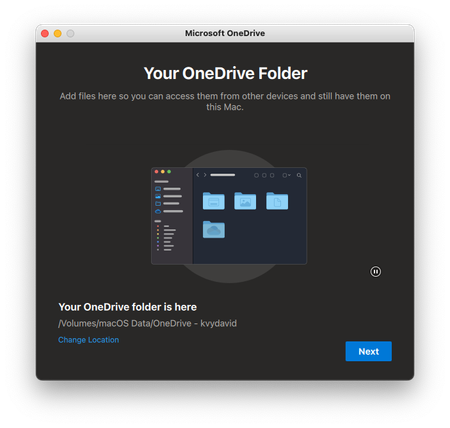
I want OneDrive stores my files at a different location. I chose and set it up normally, as Microsoft's guided. But when I go to my desired location, I see this: OneDrive didn't store my files at my chosen location at all and creates an alias instead! how do I make OneDrive actually stores my files at my desired location? Thank you! PS: my Mac is running the latest version of macOS Monterey and OneDrive2.3KViews1like1Comment
Moving Images between Albums and OneDrive ?
In relation to this post, first OneDrive doesn't start for me as shown in this screen shot. How do I use OneDrive for Business and do what is mentioned in the linked post, when from what I understand I'm not using OneDrive for Business ? And besides I'm working with images, so if someone could give me some clarity on this and how to do what is linked above I would appreciate it.56Views0likes0CommentsPublic Storage Best Practice
Hi, I have a tenant of 15 Office 365 users with varied licenses and have a need to share files like email signatures, sales brochures and product images. No downloads, no uploads, read only. We also use Power Platform heavily and a Sharepoint site that is for internal use only. Looks like One Drive is the best solution but Im not sure how to set up. Does it need to be set up under a user? Or can I just have some generic non user specific setup? Or would a Sharepoint Document Library be a better approach? Any other thoughts, ideas are also greatly appreciated. Thanks in advance. Todd139Views0likes1Comment