SharePoint Online
11 TopicsConfiguring approvals for lists and libraries
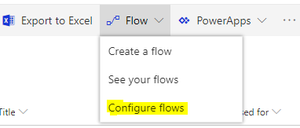
We are adding a new menu item under the Flow menu that will let customers configure the type of approvals they would like to use in their lists and libraries (Request sign-off, or Content approval), or turn approvals off altogether. We have added this feature based on the feedback that we received for the rollout of the Request sign-off feature, where some customers preferred to use the Content approval feature which changes the visibility of the current item based on the approval status, and there are fixed approvers for a given list or library, or other customers had other custom flows configured for their list or library, and did not want to have Request sign-off to become a source of confusion for their users. To make changes, as site owner, you will be able click on Flow->Configure flows in the command bar of your list or library: Then in the panel that appears, pick the approval method that you'd like, or turn approvals off altogether: The new configuration panel will become available for our Targeted Release customers in early September, and then go to the rest of our customers. We expect to complete the rollout by September 19. Please continue to keep the feedback for our features coming, and tell us how we can make SharePoint work better for you.
Can I create a flow that from SharePoint root site?
I am having trouble creating a flow from a list on my root site. Flow doesn't seem to find the lists within the root site (it does when I put in other 'fuller' site collection URLs). Has anyone else done this? What else can I put in other than "https://<tenant>.sharepoint.com" Thanks, Paul