sharepoint online
18384 TopicsNEW! SharePoint Lists & Libraries: Default Approvers for Configure Approvals Explained
🚀 New SharePoint Feature Alert! Microsoft has just introduced a super useful capability in SharePoint Lists and Document Libraries: the option to set Default Approvers when configuring approval workflows. This small but powerful enhancement removes repetitive manual steps and makes approval automation more consistent across teams using SharePoint + Power Automate. In my latest YouTube video, I walk through how this feature works, how to set it up, and why it can significantly streamline your approval processes. 🎥 Watch the full breakdown here: https://youtu.be/Xxn-IrKVh6E 👍 If you find it useful, let me know in the comments! #SharePoint #Microsoft365 #PowerAutomate #Productivity #M365 #SharePointOnline #Automation #DigitalTransformation37Views1like0Comments
Hero and Quick Links web parts not supporting library and folder links
In the last few days, I noticed the "picker" modal used by the Hero and Quick Links visually changed. I didn't think anything of it at first until I realized the Hero web part was no longer allowing me to select libraries or folders to serve as the link. This was using the "Site" blade, which appropriately shows all the libraries and lets me drill into each and see the contents, but the ability to select a library or folder doesn't work. To make matters much worse, the "From a link" blade doesn't work either. "From a link" now seems to have a new validation component, so when I attempt to paste in a library or folder URL (i.e. https://tenant.sharepoint.com/sites/HR/Benefits) it detects that it's a SharePoint resource and displays a folder for me to select before I'm allowed to commit it - problem is, I still can't select this. I've tried pointing to the .aspx page that correlates to a library/folder view - doesn't work. I tried creating a Link in the library/folder that points to itself - I can't select these either. The Quick Links web part, on the other hand, does allow me to select these - same exact UI but allows for selecting libraries and folders. This does work for folders, but does not work for libraries. It visually looks like it works for libraries, but when you save the change is not really committed. I'm genuinely surprised to not have found this issue reported elsewhere so far. I assume this has to be a bug and hope it's fixed soon - allowing your most popular web parts to link to the root of content in your own platform is one of the most basic feature requirements and for this to break and not be noticed is pretty alarming.325Views6likes4Comments
Adjust Context Menu Modern Document Library
Is there an option to adjust Context Menu for Modern Document Library. End Users prefer to have Version History and Checkout to be available on menu bar rather than click three dots to access those options. Please let me know.Solved6.6KViews0likes3Comments
SharePoint Library - Invisibile Metadata
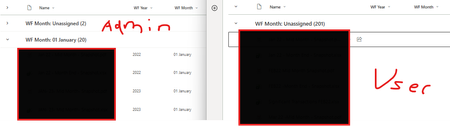
Hi All, Strange issue I'm running into on a library Left is my Admin profile where files are grouped by WF Year (metadata column) Right is a couple users with the issue where its showing Unassigned due to blank Year and Month I've exported the data from both accounts and both have the Year and Month Tried going to Properties on User account and the Year field appears like this ...very strange, any help would be appreciated :)Solved165Views0likes6Comments
Linking documents/pictures to other sites?
What is the correct way to use documents and images stored in a Home Site library on other SharePoint sites? I need to embed images and create hyperlinks to documents on pages in other sites. I have been using the “Copy link” button, which creates a sharing link with individual user permissions. The problem is that if I move the picture to another folder within the same library, the image sometimes disappears from the page. Occasionally the share link still works after moving the file, but not always. What is the recommended way to do this, and is it fully supported?18Views0likes0CommentsStock images -- insert or change not working
We are a GCC cloud client. Starting Tuesday, we are no longer able to add images or change images while accessing from the Stock Images option. When we click stock images, the app sits and spins and then throws an error "Your search didn't match any content. Please try another term". Does matter what the term is, it doesn't resolve. Prior to this, when clicking stock images, the window would open with images where we could then filter, etc. Now nothing will show not matter what. I am a SharePoint admin, we have also tried with Site owners and on different browsers with cache cleared. We did submit a ticket with MS, but response has been slow. Anyone else experiencing this?221Views1like4Comments
Integrated - PowerApps Customized Form - not working
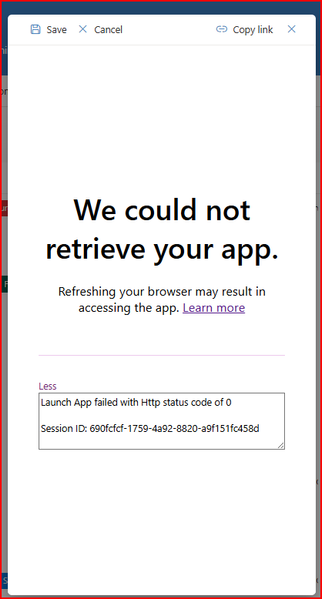
Hi, The Power App customised form is not being retrieved. When the user selects the 'Add new item' button a customised form should open, but getting this pop up. Does anyone know if there are any issues with SharePoint Online and this will hopefully resolve itself or any other potential solution as to why this is occurring. It was working yesterday50Views0likes3CommentsMigrating large number of Nintex based SPS 2019 Workflows to SPO
Hi SP Brain trust, We’re migrating a SharePoint 2019 on-prem farm (200+ sites) to SharePoint Online, which includes massive 100+ Nintex workflows heavily used across the business and we’re working within a tight timeline which makes it a massive challenge to go down the modernisation path. Has anyone migrated a large number of Nintex workflows (100+ ) from SharePoint 2019 to SharePoint Online using 3rd party tooling? What approach or tools did you use, how much manual rework was involved, and what was your overall success rate and effort like? Thank you!20Views0likes0Comments
Organization Asset Libraries not filtering in PowerPoint Brand Images
Hi, I have set up three Organization Asset Libraries on the same SharePoint site using the `Set-SPOOrgAssetsLibrary` PowerShell cmdlet. All three are image libraries, each intended for a different language version of our company assets. When I go to PowerPoint → Insert → Pictures → Brand Images, I can see a dropdown that allows me to switch between the libraries. However, regardless of which library I select, all images from all three libraries are displayed at the same time. My questions: 1. Is this expected behavior (by design), or is it a bug? 2. If by design — what is the actual purpose of the library switcher dropdown if it doesn't filter the content? Any insight or official documentation reference would be greatly appreciated. Thanks!23Views1like1CommentOneDrive & SharePoint PDF Updates: Watermarks, Password Protection, OCR & Navigation!
Exciting updates are coming to Microsoft OneDrive and SharePoint! I’ve just released a new video covering the latest PDF enhancements announced by Microsoft — all designed to improve security, productivity, and document governance across Microsoft 365. In this video, I walk through: 🔹 PDF Table of Contents navigation 🔹 Password-protected PDFs 🔹 Text recognition (OCR) 🔹 PDF watermarking for compliance and security These features significantly enhance how organizations manage and protect PDFs in OneDrive and SharePoint. 🎥 Watch the full breakdown here: https://youtu.be/fhu66EMqtuA #Microsoft365 #SharePoint #OneDrive #Productivity #Cloud #DigitalWorkplace53Views0likes0Comments