sharepoint embedded
92 Topics
PnP Search Results Handlebars template saves but does not reflect on UI
Hi everyone, I am working with the PnP Search Results web part in SharePoint Online and facing an issue where a custom Handlebars result template saves successfully but does not reflect on the UI. I created a table-style Handlebars template with columns Document, Region, Country, Language, Status and Validation Date, one row per document. Documents are returned correctly and filters based on the same refinable properties work as expected. Debug output using JSONstringify(item) confirms that all refinable values are present. The same if-condition logic using item.RefinableStringXX works in a list-style layout, but in a table layout the template saves without errors and either does not reflect on the UI or renders rows with empty metadata columns. Inline bindings do not render unless wrapped in if blocks and even after fixing this the UI sometimes continues to show the previous layout. Managed property mappings, selected properties, indexing and library reindexing have already been verified. Has anyone experienced this behavior with PnP Search Results templates or knows if this is related to caching, result types overriding templates or a known limitation with table-style Handlebars layouts?16Views0likes0Comments 115Views0likes1Comment
Microsoft 365 & Power Platform product updates call
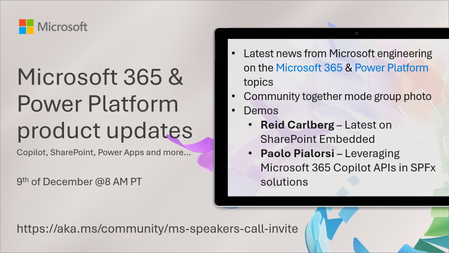
💡Microsoft 365 & Power Platform product updates call concentrates on the different use cases and features within the Microsoft 365 and in Power Platform. Call includes topics like Microsoft 365 Copilot, Copilot Studio, Microsoft Teams, Power Platform, Microsoft Graph, Microsoft Viva, Microsoft Search, Microsoft Lists, SharePoint, Power Automate, Power Apps and more. 👏 Weekly Tuesday call is for all community members to see Microsoft PMs, engineering and Cloud Advocates showcasing the art of possible with Microsoft 365 and Power Platform. 📅 On the 9th of December we'll have following agenda: News and updates from Microsoft Together mode group photo Reid Carlberg – SharePoint Embedded Wrapped 2025: Updates from Ignite and More Paolo Pialorsi – Leveraging Microsoft 365 Copilot APIs in SPFx solutions 📞 & 📺 Join the Microsoft Teams meeting live at https://aka.ms/community/ms-speakers-call-join 📅 You can also download recurrent invite to this call from https://aka.ms/community/ms-speakers-call-invite 👋 See you in the call! 🎅🎄 Notice that this call is on a holiday break after 16th of December call and back on 13th of January 2026. 💡 Building something cool for Microsoft 365 or Power Platform? We are always looking for presenters - Volunteer for a community call demo at https://aka.ms/community/request/demo 📖 Resources: Previous community call recordings and demos from the Microsoft Community Learning YouTube channel at https://aka.ms/community/youtube Microsoft 365 & Power Platform samples from Microsoft and community - https://aka.ms/community/samples Microsoft 365 & Power Platform community details - https://aka.ms/community/home93Views0likes0Comments
Get FileName from ServerRedirectedEmbedUrl in Excel
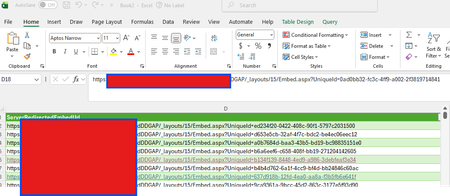
Greetings - I have a client requirement where we are using SharePoint as a datasource to excel - connecting to a library. Is there any way to get the filename in the output? Looks like I get a UniqueID - can I trace that back to the filename? Spreadsheet has 52,000 rows .... Thanks in advance!41Views0likes0Comments
Issue with ribbon permissions in Microsoft Project.
I am working on Microsoft Project (EPM) and want to hide the Status button from the ribbon for the Project Manager role. I have already tried adjusting the permissions in PWA settings, but the button is still visible. Could you please suggest an alternative method?120Views0likes1Comment
Edit' rights tries editing a document from a different device or browser it is grayed out
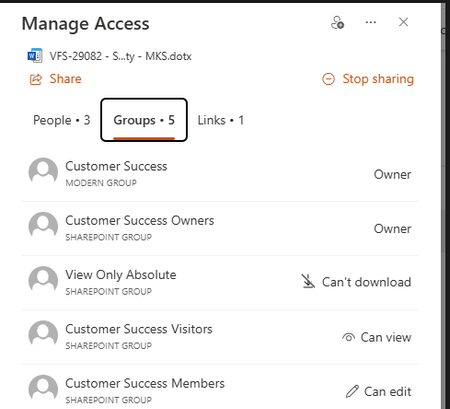
Hello Please i need your help on this issue. When a user with confirmed 'Edit' rights tries editing a document from a different device or browser it is grayed out using Edge browser as usually use Chrome. They are logged in to their Microsoft account and accessing the file to be edited in SharePoint. They are trying to edit the file in the browser as they only have an E1 license. The users are in the Customer Success SharePoint group and they are Members with Edit rights. I dont think the document library have the unique permissions that override site-level permissions? Here is the screenshot of the item-level permissions on individual documents or folders? I believe the group assigned at the site level or only at the document library level? The affected user can create or edit a new document in the same library.112Views0likes1CommentRecommendations for SharePoint Accessibility Training
Hello everyone, I'm looking for recommendations for good accessibility training courses or resources that are specifically focused on SharePoint. My team wants to ensure our sites are as accessible and inclusive as possible. Has anyone taken a course or used a particular resource that they found valuable? We are open to any format (e.g., online courses, workshops, documentation, etc.). Any suggestions would be greatly appreciated! Thank you.Solved114Views0likes1Comment
Accessing Teams Private Channels Files in SharePoint
Is there an issue currently with accessing Teams Private Channel files in SharePoint? I have looked but cannot find anything. Recently our users that used to access Teams Private channel files within SharePoint (by going to the sharepoint site and Documents and then In Channels) have noticed that when they click a folder it doesn't take them into a file list, it just does nothing. If they then press F5 to refresh it will usually take them into the list of files. Accessing the files with Teams is fine still, only an issue if you use SharePoint. I've tried this on a few other sites within our Tennant and it happens on our other sites too.164Views1like2CommentsModernizing Legacy Intranets with SharePoint Online
Modernizing Legacy Intranets with SharePoint Online: A Strategic Guide In today’s fast-paced digital landscape, legacy intranets often become bottlenecks rather than enablers of productivity.Outdated interfaces, limited mobile access, poor search capabilities, and siloed content can hinder collaboration and employee engagement. Enter SharePoint Online—Microsoft’s cloud-based platform that offers a modern, scalable, and secure solution to revamp your intranet experience. Why Modernize? Legacy intranets, typically built on older versions of SharePoint or custom platforms, struggle to meet the evolving needs of hybrid workplaces. Modernizing with SharePoint Online brings: Cloud-first agility: Seamless updates, scalability, and integration with Microsoft 365. Enhanced UX: Responsive design, intuitive navigation, and personalized content. Improved collaboration: Deep integration with Teams, OneDrive, and Viva. Security & compliance: Enterprise-grade governance and data protection. Key Benefits of SharePoint Online Modern Sites & Pages SharePoint Online introduces communication sites and team sites with rich, responsive layouts. These are easy to build and maintain, even for non-technical users. Powerful Search & AI Microsoft Search, powered by AI, delivers personalized and contextual results, making content discovery faster and smarter. Integration with Microsoft Viva Viva Connections brings your intranet into Microsoft Teams, creating a unified employee experience hub. Automation & Workflows With Power Automate and Power Apps, you can digitize forms, approvals, and business processes without writing code. Migration Strategy: From Legacy to Modern Modernization isn’t just a lift-and-shift. It requires a thoughtful approach: 1. Assessment & Planning Audit existing intranet content and usage. Identify what to migrate, archive, or redesign. Define goals aligned with business needs. 2. Information Architecture Redesign Reorganize content using modern taxonomy and metadata. Leverage hub sites for better navigation and governance. 3. Content Modernization Convert classic pages to modern pages. Use modern web parts for dynamic content delivery. 4. User Adoption & Training Engage stakeholders early. Provide training and support to ensure smooth transition. 5. Governance & Security Implement policies for content lifecycle, permissions, and compliance. Use Microsoft Purview for data governance. Real-World Impact Organizations that have modernized their intranets with SharePoint Online report: 30–50% increase in employee engagement Significant reduction in IT overhead Faster onboarding and knowledge sharing Final Thoughts Modernizing your legacy intranet with SharePoint Online is not just a tech upgrade, it’s a strategic move toward a more connected, agile, and empowered organization. With the right planning and execution, your intranet can become a central pillar of digital transformation.76Views0likes0Comments