Remediation
77 Topics
Investigating Alerts in Defender for Office 365
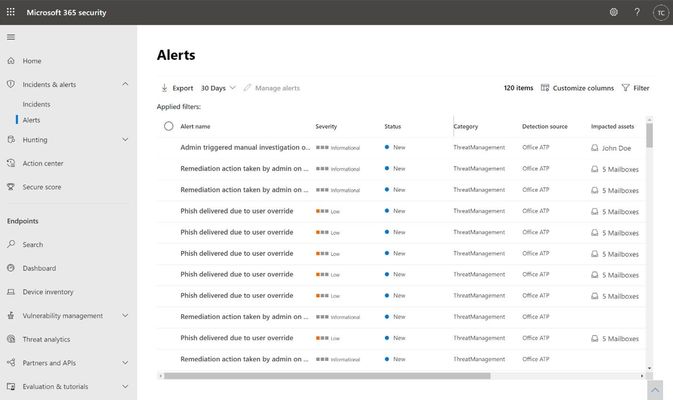
The extensive use of collaboration tools during the COVID-19 remote work era is putting many organizations at even higher risk for phishing attacks: via business emails or video conferencing solutions. This may be a good opportunity to refresh your workflows in investigating Microsoft Defender for Office 365 alerts, which can assist in catching cyberattacks in early stages.
Unifying AWS and Azure Security Operations with Microsoft Sentinel
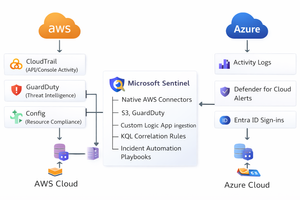
The Multi-Cloud Reality Most modern enterprises operate in multi-cloud environments using Azure for core workloads and AWS for development, storage, or DevOps automation. While this approach increases agility, it also expands the attack surface. Each platform generates its own telemetry: Azure: Activity Logs, Defender for Cloud, Entra ID sign-ins, Sentinel analytics AWS: CloudTrail, GuardDuty, Config, and CloudWatch Without a unified view, security teams struggle to detect cross-cloud threats promptly. That’s where Microsoft Sentinel comes in, bridging Azure and AWS into a single, intelligent Security Operations Center (SOC). Architecture Overview Connect AWS Logs to Sentinel AWS CloudTrail via S3 Connector Enable the AWS CloudTrail connector in Sentinel. Provide your S3 bucket and IAM role ARN with read access. Sentinel will automatically normalize logs into the AWSCloudTrail table. AWS GuardDuty Connector Use the AWS GuardDuty API integration for threat detection telemetry. Detected threats, such as privilege escalation or reconnaissance, appear in Sentinel as the AWSGuardDuty table. Normalize and Enrich Data Once logs are flowing, enrich them to align with Azure activity data. Example KQL for mapping CloudTrail to Sentinel entities: AWSCloudTrail | extend AccountId = tostring(parse_json(Resources)[0].accountId) | extend User = tostring(parse_json(UserIdentity).userName) | extend IPAddress = tostring(SourceIpAddress) | project TimeGenerated, EventName, User, AccountId, IPAddress, AWSRegion Then correlate AWS and Azure activities: let AWS = AWSCloudTrail | summarize AWSActivity = count() by User, bin(TimeGenerated, 1h); let Azure = AzureActivity | summarize AzureActivity = count() by Caller, bin(TimeGenerated, 1h); AWS | join kind=inner (Azure) on $left.User == $right.Caller | where AWSActivity > 0 and AzureActivity > 0 | project TimeGenerated, User, AWSActivity, AzureActivity Automate Cross-Cloud Response Once incidents are correlated, Microsoft Sentinel Playbooks (Logic Apps) can automate your response: Example Playbook: “CrossCloud-Containment.json” Disable user in Entra ID Send a command to the AWS API via Lambda to deactivate IAM key Notify SOC in Teams Create ServiceNow ticket POST https://api.aws.amazon.com/iam/disable-access-key PATCH https://graph.microsoft.com/v1.0/users/{user-id} { "accountEnabled": false } Build a Multi-Cloud SOC Dashboard Use Sentinel Workbooks to visualize unified operations: Query 1 – CloudTrail Events by Region AWSCloudTrail | summarize Count = count() by AWSRegion | render barchart Query 2 – Unified Security Alerts union SecurityAlert, AWSGuardDuty | summarize TotalAlerts = count() by ProviderName, Severity | render piechart Scenario Incident: A compromised developer account accesses EC2 instances on AWS and then logs into Azure via the same IP. Detection Flow: CloudTrail logs → Sentinel detects unusual API calls Entra ID sign-ins → Sentinel correlates IP and user Sentinel incident triggers playbook → disables user in Entra ID, suspends AWS IAM key, notifies SOC Strengthen Governance with Defender for Cloud Enable Microsoft Defender for Cloud to: Monitor both Azure and AWS accounts from a single portal Apply CIS benchmarks for AWS resources Surface findings in Sentinel’s SecurityRecommendations table114Views4likes0CommentsYou may be right after all! Disputing Submission Responses in Microsoft Defender for Office 365
Introduction As a Microsoft MVP (Most Valuable Professional) specializing in SIEM, XDR, and Cloud Security, I have witnessed the rapid evolution of cybersecurity technologies, especially those designed to protect organizations from sophisticated threats targeting email and collaboration tools. Microsoft Defender for Office 365 introduced an LLM-based engine to help better classify phishing emails that, these days, are mostly written using AI anyways about a year ago. Today, I'm excited to spotlight a new place AI has been inserted into a workflow to make it better…a feature that elevates the transparency and responsiveness of threat management: the ability to dispute a submission response directly within Microsoft Defender for Office 365. Understanding the Challenge While the automated and human-driven analyses are robust in Defender for Office 365, there are occasions where the response—be it a verdict of "benign" or "malicious"— doesn’t fully align with the security team's context or threat intelligence. If you are a Microsoft 365 organization with Exchange Online mailboxes, you’re probably familiar with how admins can use the Submissions page in the Microsoft Defender portal to submit messages, URLs, and attachments to Microsoft for analysis. As a recent enhancement, now all the admin submissions use LLM based response for better explainability. In the past, disputing such verdicts required separate support channels, using Community support, or manual email processes, often delaying resolution and impacting the speed of cyber operations. Introducing the Dispute Submission Response Feature With the new dispute submission response feature, Microsoft Defender for Office 365 bridges a critical gap in the incident response workflow. Now, when a security analyst or administrator receives a verdict on a submitted item, they have the option to dispute the response directly within the Microsoft 365 Defender portal. This feature streamlines feedback, allowing teams to quickly flag disagreements and provide additional context for review at the speed of operations. How It Works Upon submission of a suspicious item, Microsoft Defender for Office 365 provides a response indicating its assessment—malicious, benign, or other categorizations. If the security team disagrees with the verdict, they can select the "Dispute" option and submit their rationale, including supporting evidence and threat intelligence. The disputed case is escalated directly to Microsoft’s threat research team for further review, and the team is notified of progress and outcomes. This direct feedback loop not only empowers security teams to advocate for their organization's unique context, but also enables Microsoft to continually refine detection algorithms and verdict accuracy based on real-world input, because security is a team sport. Benefits for Security Operations Faster Resolution: Streamlined dispute submission eliminates the need for external support tickets and escalations, reducing turnaround time for critical cases. Greater Transparency: The feature fosters a collaborative relationship between customers and Microsoft, ensuring that verdicts are not final judgments but points in an ongoing dialogue. Continuous Improvement: Feedback from disputes enhances Microsoft’s threat intelligence and improves detection for all Defender for Office 365 users. Empowerment: Security teams gain a stronger voice in the protection of their environment, reinforcing trust in automated defenses. MVP Insights: Real-World Impact Having worked with global enterprises, I’ve seen how nuanced and context-specific threats can be. Sometimes, what appears benign to one organization may be a targeted attack for another, a slight modification to a URL may catch one email, but not others, as slight changes are made as billions of emails are sent. We are only as good as the consortium. The ability to dispute submission responses creates a vital safety net, ensuring that security teams are not forced to accept verdicts that could expose them to risk. It’s a welcome step toward adaptive, user-driven security operations. Conclusion The dispute submission response feature in Microsoft Defender for Office 365 is one of the most exciting features for me, because it focuses on enabling organizations striving for agility and accuracy in threat management. By enabling direct, contextual feedback, Microsoft empowers security teams to play an active role in shaping their defenses. As an MVP, I encourage all users to leverage this feature, provide detailed feedback, and help drive the future of secure collaboration in the cloud. You may be right after all. _________ This blog has been generously and expertly authored by Microsoft Security MVP, Mona Ghadiri with support of the Microsoft Defender for Office 365 product team. Mona Ghadiri Microsoft Security MVP Learn More and Meet the Author 1) December 16th Ask the Experts Webinar: Microsoft Defender for Office 365 | Ask the Experts: Tips and Tricks (REGISTER HERE) DECEMBER 16, 8 AM US Pacific You’ve watched the latest Microsoft Defender for Office 365 best practices videos and read the blog posts by the esteemed Microsoft Most Valuable Professionals (MVPs). Now bring your toughest questions or unique situations straight to the experts. In this interactive panel discussion, Microsoft MVPs will answer your real-world scenarios, clarify best practices, and highlight practical tips surfaced in the recent series. We’ll kick off with a who’s who and recent blog/video series recap, then dedicate most of the time to your questions across migration, SOC optimization, fine-tuning configuration, Teams protection, and even Microsoft community engagement. Come ready with your questions (or pre-submit here) for the expert Security MVPs on camera, or the Microsoft Defender for Office 365 product team in the chat! REGISTER NOW for 12/16. 2) Additional MVP Tips and Tricks Blogs and Videos in this Four-Part Series: 1. Microsoft Defender for Office 365: Migration & Onboarding by Purav Desai 2. Safeguarding Microsoft Teams with Microsoft Defender for Office 365 by Pierre Thoor 3. (This blog post) You may be right after all! Disputing Submission Responses in Microsoft Defender for Office 365 by Mona Ghadiri 4. Microsoft Defender for Office 365: Fine-Tuning | Real-world Defender for Office 365 tuning that closes real attack paths by Joe Stocker Learn and Engage with the Microsoft Security Community Log in and follow this Microsoft Defender for Office 365 blog and follow/post in the Microsoft Defender for Office 365 discussion space. Follow = Click the heart in the upper right when you're logged in 🤍 Learn more about the Microsoft MVP Program. Join the Microsoft Security Community and be notified of upcoming events, product feedback surveys, and more. Get early access to Microsoft Security products and provide feedback to engineers by joining the Microsoft Customer Connection Community. Join the Microsoft Security Community LinkedInStrengthening calendar security through enhanced remediation
In today’s evolving threat landscape, phishing attacks are becoming increasingly sophisticated, often leveraging meeting invites to bypass traditional defenses. While Security Operations (SOC) teams rely on Microsoft Defender’s remediation actions to remove malicious emails, a hidden risk persists: calendar entries created by Outlook during email delivery. These entries can remain active even after the email is deleted, leaving users exposed to harmful content. This update addresses that gap. Remediation supports cleaning up calendar entries SOC teams currently use remediation actions such as Move to Junk, Delete, Soft Delete, and Hard Delete to quickly eliminate email threats from user inboxes. However, meeting invite emails introduce an additional challenge. Even after the email is removed, Outlook automatically creates a calendar entry during delivery, which remains accessible to users. For example, consider a phishing email sent as a meeting invite. Despite the admin removing the email from the user’s inbox, the user can still interact with the same malicious content via the calendar entry. This residual entry may contain harmful links or phishing content, creating a security gap. With this update, we’re taking the first step toward closing that gap. Hard Delete will now also remove the associated calendar entry for any meeting invite email. This ensures threats are fully eradicated—not just from the inbox but also from the calendar—reducing the risk of user interaction with malicious content. This change applies to Hard Delete actions taken from any surface, including Explorer, Advanced Hunting, and API. Note: 1) Deleted calendar entries can be restored by resending the meeting invite. 2) This action does not remove calendar entries manually added by users via .ics files. Ability to Block URL domains via submission/TABL actions from Explorer SOC teams can currently add senders and URLs to the TABL block list when submitting false negatives to Microsoft. However, phishing campaigns often use variations of URLs under the same parent domain, making full URL blocking less effective. With this update, TABL options for URL domains are now dynamically surfaced, enabling SOC teams to block entire domains without leaving their workflow. This enhancement simplifies remediation and strengthens defenses against domain-based phishing attacks. These updates strengthen SOC remediation workflows by closing critical security gaps and ensuring threats are fully neutralized across all user touchpoints. By extending remediation to calendar entries and enabling domain-level URL blocking, we deliver comprehensive protection that reduces risk, streamlines operations, and safeguards user experiences. At Microsoft, our priority is your security, and we remain committed to empowering SOC teams with tools that make defense smarter and more effective. Learn more: Remediate malicious email that was delivered in Office 365 - Microsoft Defender for Office 365 | Microsoft Learn