product bug
53 Topics
Bookings - No more notes or extra fields available
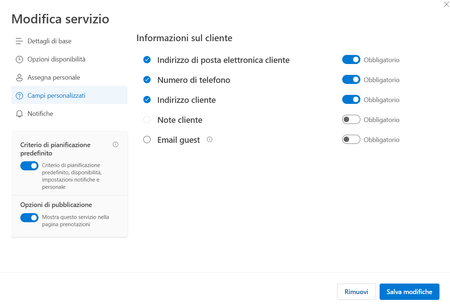
Hi there and happy new year to all. Starting from mid-december, we are facing an issue with our company Microsoft Bookings: basically the custom fields (like address, notes and so on). The book page will just ask for Name & Surname, E-mail Address and Phone Number. On our Administration back-end, the Customer Notes fileds is greyed out (you cannot enable it), and all the custom fields disappeared, you have just the standard ones. We have this issue in all our different booking pages, and all the services are affected. Any hint about this? Thanks!662Views0likes4Comments
Disable incessant nagware popups
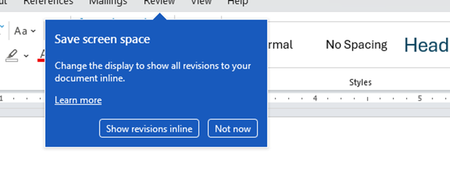
I don't know about everyone else, but I am sick and tired of the nagware pop ups in Word, Excel, PowerPoint, Outlook, etc. Every single product harasses me with pop ups trying to tell me "hey, did you know this feature was here?", "you can do this if you click that", "let me hold your hand through using products you've used for decades even though you don't want daddy Microslop to do that". This is a prime example. I keep getting the same ones again and again and again and everything I've read indicates they should only appear once. But they don't. They keep coming back like a psychotic stalker ex who wants alimony even though you were never married. How do I get this nagware to stop?!71Views0likes1Comment
Bookings Page not sending confirmation emails to customers
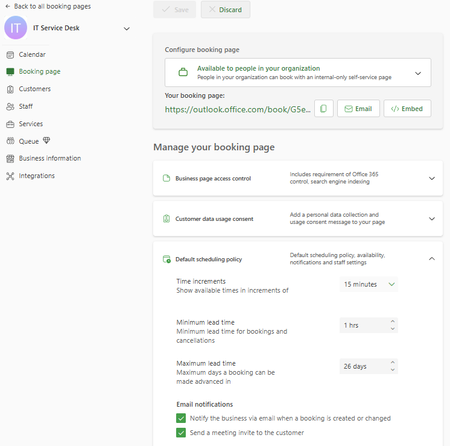
Hello, I am the main technician for my company's service desk. We have a Bookings page, but any time anyone books a time slot, they receive a message indicating that they will receive a confirmation email, but no email comes to them. In the settings, it shows the checkbox to send a confirmation email is checked. I have also looked in Exchange Admin and run a message trace and cannot find any confirmation email sent to myself or other testers. In Bookings, I have unchecked the confirmation email checkbox, saved, checked, saved, and tested - same result. Additionally, this Bookings page is only for internal users, and all of them are 'customers' with their full organization email address. In researching, I found that there was mention of the Bookings needing to have an Exchange account as a shared mailbox, which I do not believe we have - when I search the email that confirms for me that someone has booked with me, it is a long string of seemingly random letters and numbers with an internal domain address. I have also tried searching in Exchange Admin for 'IT' 'Service Desk' 'Service', and 'Desk', none of which have any results under Mailboxes (which would include shared mailboxes). Any advice/suggestions would be greatly appreciated. Screenshot:331Views0likes2Comments
Excel Power Query crashing 0xC000026F
Hi, I have the same error that was already reported by other users 0xC000026F. Since today, I have an error when I try to create a new “basic query” or if I try to refresh an existing one which was working fine last week (on January 22 it was still working fine). Error Message: Container unexpectedly exited. Exit code: 0xC000026F. PID: 19148 … From what I see my Excel is Version 2512 (build 19530.20184) from 21 January 2026… I am wondering if it is this update which crash PQ ? I have already tried: sfc /scannow then dism.exe /online /cleanup-image /restorehealth Without success… Any help would be appreciated. Regards,215Views0likes4Comments
Font issue Inter in PowerPoint
Hi everyone The font "Inter" in PowerPoint incorrectly displays some special characters (ß, –, —) when exported as PDF. It shows correctly in PowerPoint and only displays as "No Glyph" when exported. As the letter "ß" is commonly used in German, this is a noticeable problem for us. The phenomenon is happening on all checked company devices, in the desktop software and browser version. I deleted the font multiple times and installed different versions (variable and static from Google and GitHub). We only use the light weight, but it also happens in the other weights. Does anyone have any idea why that is and how to fix it? I'm thankful for any hints! Nele Microsoft 365 PowerPoint Version: 16.101.2 (25092825) for Mac Mac Tahoe 26.1 (25B78) Chrome Version 144.0.7559.97 (Offizieller Build) (arm64)192Views0likes2Comments
Insights from Copilot have stopped working for us
We're all licensed (verified) with M365 Copilot, and for about the last week, one of our workhorse intake forms has stopped working with regards to the "Insights from Copilot" feature. When we attempt to refresh the insights, it presents the message, "Your form has XX responses. Copilot is analyzing the data to provide insights.", then spins for about 30 seconds, and then presents the error, "The insights haven't been generated successfully. Please try again." We're syncing responses to an Excel workbook, and that seems fine, but after about a week these "insights" just started failing in this fashion. We've done basic troubleshooting like trying InPrivate browsing, cache clearing, and since we are only at about 100 responses for this particular small form we're not hitting any limits. Regardless, it's wedged stuck in this state. I reported it via the M365 Admin portal and received the usual "No issues found" reply. 🙄 Anyone else seeing this problem? Does anyone actually use this feature? 😜326Views0likes2CommentsIs there an acceptable method to convert pub to docx?
Unfortunately Microsoft has decided to end Publisher. So users are forced to find methods both for archiving old files and converting current files to be able to continue working. For the first PDF will most likely be the easiest. For the second I've been trying to find a converter. This proves to be a challenge. And the results have been very unsatisfactory so far. My main publication is a brochure which is printed double-sided on A4 paper, stapled and then folded to A5 size. The publication contains 99% text boxes (with formatted text) and pictures. Here and there a shape like a horizontal line. All things that Word definitely supports. So converting it should be a no-brainer - at least I thought so. Of course Publisher can save as DOCX. Unfortunately the function only supports plain text. So the text boxes are removed, which means a lot of manual rework. Also the text isn't converted continuously. For exapmle the text that was on the first sheet in my Publisher file, ended up on page 5 in Word. Bottom line: not acceptable. Microsoft therefore don't even refer to that save function in their official communication to Publisher retirement. They suggest a workaround instead: save the file as a PDF and open it with Word. The suggestion is embarrassing enough, since it implies that Microsoft are unable to provide suitable conversion between their own formats. I tested it anyway. But the layout ends up in Word in a way that requires a lot of manual rework. Tab stops are partially removed, page margins are shifted. The pagination is also incorrect, so that some pages are half empty. Bottom line: not acceptable. Also tried some online converters. Unfortunately the results haven't been satisfying either. Most of them convert text boxes into shapes with integrated text boxes. And even worse: big text boxes are often split into several smaller boxes. In any case there still remains a lot of manual rework. Bottom line: halfway acceptable. Disappoiting Conclusion: At present, I consider it the best option to rebuild the file from scratch in Word using Copy-Paste. If someone knows a better method, would be happy to hear about it.230Views0likes1Comment
Automating CRUD operations in MS Places
Hi, Has anyone been able to automate CRUD operations in MS Places yet? Given that the Places API calls support user access tokens only currently and Application access tokens isn't yet supported? We were able to do Get operations using App tokens but when run anything to modify, For Ex: Create a building using Set-Placev3 cmdlet it gives error. When raised an MS ticket they confirmed that the calls doesn't support application tokens yet.. We have a showstopper kind of situation.39Views0likes0Comments
Can't use a SPN in a PowerBi dashboard to access SharePoint lists
Hoping you can help with an ongoing issue I have. I have a PowerBi dashboard I built using regular account to fetch some SharePoint lists and uploaded it to PowerBi for others to view Now in PowerBi portal I want to change the credential from my account to an SPN. I've read what feels like a thousand articles describing the process to create the SPN 99% all the same. Yet when I go into Powerbi portal, edit the semantic model for the dashboard, click edit credentials, select Service Principal put in the tenant ID the Service principal ID (yes using the app id, in fact I tried everything) the service principal key (the secret) and choose any privacy level it fails 100% of the time. Error is: Failed to update data source credentials: The credentials provided for the SharePoint source are invalid. Same error regardless of what privacy level I choose. I'm sure the secret is correct also. Just for fun I tried the Secret ID and the Object ID in place of the Application ID for the Service principal ID field. All failed same error. I'm sure the secret is correct also. The SPN has Graph sites.read.all, Graph user.read and SharePoint Sites.Read.All api permissions configured. All are consented. Everything seems right but gives me the error failed to retrieve oauth token 100% of the time. Am i missing something else? More API permissions maybe? Do i still need ot actually add the SPN to the Sharepoint site itself even though I has API permissions SharePoint Sites.Read.All? I've done days of research and all I find is lots of people with same or similar issue but not resolution. Is this a bug? Help me I'm desperate to get this fixed or I'm going to have to allow people to bypass MFA across my organization which I cant have.311Views0likes1CommentOffice updater logs false “UpdateEnabled not found” warning despite registry compliance
Body: OfficeClickToRun.exe logs the following during scheduled updates: Code UpdateEnabled property not found in registry. Click-to-Run client found. Triggering update... Office update routine completed. However, all relevant registry flags under HKLM\SOFTWARE\Microsoft\Office\ClickToRun are correctly set (UpdateEnabled, EnableAutomaticUpdates, OfficeAutomaticUpdates, etc. = 1). ProcMon confirms the updater queries this path, yet logs NAME NOT FOUND. Updates still succeed (LastScenarioResult: Success), so this appears to be a cosmetic error from legacy registry validation. It confuses admins and monitoring systems. Ask: Can Microsoft standardize updater checks to avoid false warnings? Is this legacy logic still active in current Office builds?61Views0likes0Comments