power bi
1228 TopicsJoin the Fabric Partner Community for this Week's Fabric Engineering Connection calls!
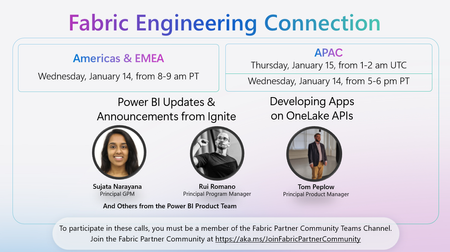
🚀 Upcoming Fabric Engineering Connection Call – Americas & EMEA & APAC! Join us on Wednesday, January 14, 8–9 am PT (Americas & EMEA) and Thursday, January 15, 1–2 am UTC (APAC) for a special session featuring the latest Power BI Updates & Announcements from Ignite with Sujata Narayana, Rui Romano, and other members of the Power BI Product Team. Plus, hear from Tom Peplow on Developing Apps on OneLake APIs. 🔗 To participate, make sure you’re a member of the Fabric Partner Community Teams Channel. If you haven’t joined yet, sign up here: https://lnkd.in/g_PRdfjt Don’t miss this opportunity to learn, connect, and stay up to date with the latest in Microsoft Fabric and Power BI!28Views0likes0Comments
In a Day (xIAD) Partner Events Program - Train the Trainer Events (DIAD/FAIAD/RTIAD/CDIAD)
We invite you to attend an upcoming Train the Trainer session for Microsoft Partners to learn more about the Microsoft In a Day (XIAD) Partner Events Programand how to lead workshops that empower customers to use and adopt Microsoft products. Our Train the Trainer events are designed to provide you with the knowledge and tools necessary to deliver successful Microsoft In a Day (XIAD) sessions. *Please note, participation is restricted to individuals representing a Microsoft Partner organization. You must register using your corporate email address that is associated with your Partner ID. Personal emails will not be approved. ✨ Why Attend? Expert Guidance: Learn from experienced trainers and get your questions answered. Comprehensive Resources: Access all the content and support you need to succeed. 📅 Upcoming Events: Dashboard in a Day This is a one-day, hands-on workshop for business analysts, covering the breadth of Power BI capabilities. February 19th, 2026 - Americas - CST time zone. Sign up at https://aka.ms/TTTSignUp Fabric Analyst in a Day This is an intermediate-level training designed for Power BI Data Analysts who have at least one year of experience on Power BI but are new to Microsoft Fabric. February 19th, 2026 - Americas - CST time zone. Sign up at https://aka.ms/TTTSignUp Real-Time Intelligence in a Day This is an intermediate-level training designed for Power BI developers looking to extract insights and visualize streaming and time sensitive data. February 19th, 2026 - Americas - CST time zone. Sign up at https://aka.ms/TTTSignUp Chat with your Data in a Day This is an intermediate-level training designed for Power BI data analysts and developers to help get their models chat-ready and unlock instant insights using natural language. Chat with Your Data in a Day - Americas - Jan 23 Chat with Your Data in a Day - APAC - Jan 28 Chat with Your Data in a Day - EMEA - Feb 17 Partner with us! Are you a Microsoft Partner interested in the opportunity to join the program and deliver Microsoft In a Day (XIAD) events? 🔍 Learn more about the program and review partner eligibility criteria: https://aka.ms/xiadpartneropportunity. 📧 Contact the XIAD Program team: xiadevents@microsoft.com 📤 Submit requests to deliver events: https://aka.ms/xIAD/PartnerEvents4.3KViews4likes3Comments
Moving a column of text data into 3 columns of data?
I have a column of text data cells 1,2,3,4,5,6,7,8,9 and longer. I want to create 3 column of data to graph and manipulate Cell in Columns. 1,2,3 3,4,5 5,6,7 8,9,10 and longer. So i need to create 3 columns of data from 1 column of data. I am using Mac Excel 16 and I can not make this happen. I have tried all sorts of solutions. Help? Thank you,145Views0likes3CommentsJoin the Fabric Partner Community for this Week's Fabric Engineering Connection calls!
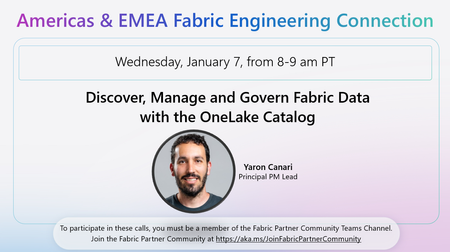
🚀 Happy New Year to all the amazing Microsoft partners I've had the privilege to work with during 2025. I'm excited to announce the first presenters of 2026 for this week's Fabric Engineering Connection calls! Join us Wednesday, January 7, from 8–9 am PT (Americas & EMEA) and Thursday, January 8, from 1–2 am UTC (APAC) for insightful sessions from Yaron Canari and Benny Austin This week’s focuses: 🎯 Americas & EMEA: Discover, Manage and Govern Fabric Data with OneLake Catalog 🎯 APAC: Updates and Enhancements made to the Fabric Accelerator This is your opportunity to learn more, ask questions, and provide feedback. To participate in the call, you must be a member of the Fabric Partner Community Teams channel. To join, complete the participation form at https://aka.ms/JoinFabricPartnerCommunity. We look forward to seeing you at the calls!48Views1like0Comments
Calculating hours using pivot table
Hi, I'm making a personell planning sheet and I want to calculate the sum of hours teachers give lessons. I have 2 tables and my data is formatted like this (simplified) Lesson name Hours Teacher 1 Teacher 2 Lesson 1 2 Paul Lesson 2 3 Pete Lesson 3 2 Paul Pete Teacher name Max working hours Paul 10 Pete 15 Now I want to create an overview of how many hours each teacher is teaching using a pivot table. This is easy when there is just one Teachter collumn but I need to calculate the sum using both teacher collumns... I need to overview to be something like this: Paul -> Lesson 1 + Lesson 3 = 4 hours Pete -> Lesson 2 + lessen 3 = 5 hours Then the next step is to use a metric or KPI to calculate if each teacher is exceeding their max working hours... Can anybody hlelp me with these problems? Thanks!126Views0likes2CommentsHow to Join Microsoft Tech Community & Leina Future Data & AI Hub (Step-by-Step Guide) - Arabic
This session provides a step-by-step walkthrough on how to officially join the Microsoft Tech Community and become a member of the Leina Future Data & AI Hub – Microsoft User Group. The event is designed to help learners, trainers, and data professionals understand: • How to create and verify a Microsoft Tech Community profile • How to join an official Microsoft User Group • How community membership supports learning, networking, and professional growth • How participants can access recorded sessions, resources, and future events This session supports community enablement and knowledge sharing within the Microsoft ecosystem, with a focus on Data, AI, Power BI, and Microsoft Fabric learners. Target Audience: • Students and fresh graduates • Data analysts and Excel/Power BI learners • Trainers and professionals interested in Microsoft communities Session Format: • Recorded session • Practical walkthrough • Community-focused learning Speaker / Host Dr. Leina Nazar Abdelgalil Microsoft Certified Trainer (MCT) Founder – Leina Future Data & AI Hub256Views2likes4Comments
PivotBy or GroupBy
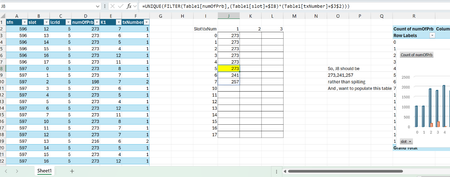
Dear Experts, Quick question, I have a data like this from Column A~F, and want to make a data like in Col J~L So, I want a summary , that for the slot0 && txnum==1, what are the unique values of numOfPrb, but in case of slot5, we have more than one unique value and it spills, could you please suggest a solution for this, I tried Filter function etc.. may be there's solution within , or if Groupby or Pivotby can help here. Attached is the worksheet, Br, AnupamSolved128Views0likes1Comment