office scripts
494 Topics
Tokyo Stock Exchange data
Does any one know, and can share, a sample excel file that can import updated information (ticker, name, last price, dividend yield, daily high and daily low and analysts average target price) for ~50 stocks traded on the Tokyo stock exchange, which is not covered by Microsoft?51Views0likes3Comments
Help needed with IF and COUNTIFS Formulas
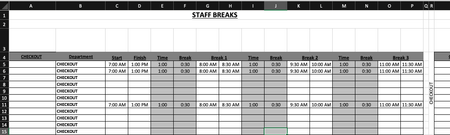
Is anyone able to advise the following formula: =COUNTIFS($B$5:$B$15,$R$4,$C5:$C15,"<=" & V3,$D5:$D15, ">" & V3)-COUNTIFS($B$5:$B$15,"="&$R$4,$G5:$G15,"<=" & V3,$H5:$H15, ">" & V3)-COUNTIFS($B$5:$B$15,"="&$R$4,$K5:$K15,"<=" & V3,$L5:$L15, ">" & V3)-COUNTIFS($B$5:$B$15,"="&$R$4,$O5:$O15,"<=" & V3,$P5:$P15, ">" & V3) Is there a way to simplify this? Is there a way to make this more accurate? Cells in column G & H, I & J, O & P are using the following format: =IF(C6="","",C6+E6) Cells in U4:CC4 are using the following format: =COUNTIFS($B$5:$B$15,$R$4,$C5:$C15,"<=" & U3,$D5:$D15, ">" & U3)-COUNTIFS($B$5:$B$15,"="&$R$4,$G5:$G15,"<=" & U3,$H5:$H15, ">" & U3)-COUNTIFS($B$5:$B$15,"="&$R$4,$K5:$K15,"<=" & U3,$L5:$L15, ">" & U3)-COUNTIFS($B$5:$B$15,"="&$R$4,$O5:$O15,"<=" & U3,$P5:$P15, ">" & U3) Cells in U5:CC15 are using the following format: =IF(U$4>=$T5,1,"") My issue is is when I put in the three break times, the mid break comes out at a shorter time. My other issue is is that when I put in the times in row 5,6and 11, the data is coming up as a combined data in rows 5, 6 and seven on the page two. Just for reference, "page two" is the same spreadsheet. What I need to happen is that I enter in the shift start time and finish time. This then populates through to Break 1, 2 and 3. The Time entry is the time the break starts. ie: 1 hour after start of shift, 1 hour after coming back from break, etc. The break entry is the duration of the break taken. ie: 30 minutes. Once all the info is put in, the relevant "Time Block" on "Page 2" shows a 1. What is happening at the moment is that when I enter all the time data, the time blocks are not populating correctly in accordance to the entry. Basically, If I have numerous people on shiftI need the time blocks to show where I have shortfalls in shift cover and not having too many people on break at the same time. IE: Link to Live Copy: https://www.dropbox.com/scl/fi/eur1j526htu1j8a4d4290/Staff-Breaks.xlsx?rlkey=r4tm9xts4tonofpa2th2cusfw&st=nueyk0d7&dl=0 Any ideas would be greatly appreciated.207Views0likes4CommentsDisappearing Script Button
In the online version of excel, I have a script button keeps disappearing. This same button is fine on desktop and I don't believe this was a problem before. When I load the page it isn't there. I found that if I added another button on another sheet in that workbook, that when I switch to that sheet and then I return to the first sheet the button returns, but if I refresh the page again, the button disappears. If I switch to a tab without a script button then the button does not return. i have tried minimizing the browser, changing zoom levels, scrolling and such but the only thing I have found to make the button re-appear is switching to another sheet that has a script button on it (I created a 'dummy button' on that sheet). I don't know why this button that I need disappears while that 'dummy' button I put on the other tab doesn't disappear and I don't know why having that other button makes it reappear by just switching to that tab and back. a) has anyone else experienced any problem like this? b) does anyone have any ideas to try or why it is happening? thank you.Solved241Views0likes4Comments
Moving a column of text data into 3 columns of data?
I have a column of text data cells 1,2,3,4,5,6,7,8,9 and longer. I want to create 3 column of data to graph and manipulate Cell in Columns. 1,2,3 3,4,5 5,6,7 8,9,10 and longer. So i need to create 3 columns of data from 1 column of data. I am using Mac Excel 16 and I can not make this happen. I have tried all sorts of solutions. Help? Thank you,210Views0likes3Comments
Unprotect in Office Scripts
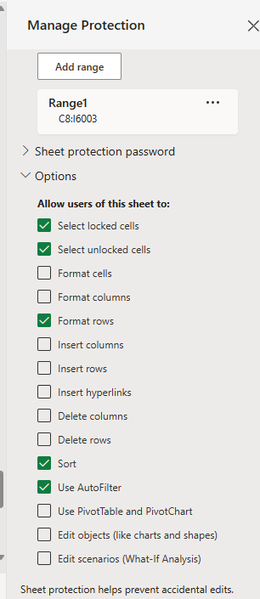
I am writing an office script that requires sorting on a sheet with the overall sheet protected and specific cells not protected. I need to be able to sort an unprotected range using an automation but the protection is restricting it even though I have "sort" allowed in the protection options. Is there a way to unprotect and then re-protect the sheet as part of the scripts? Including passwords? function main(workbook: ExcelScript.Workbook) { let selectedSheet = workbook.getActiveWorksheet(); // Clear auto filter on selectedSheet selectedSheet.getAutoFilter().clearCriteria(); // Custom sort on range range C9:I6001 on selectedSheet selectedSheet.getRange("C9:I6001").getSort().apply([{key: 0, ascending: true}], false, true, ExcelScript.SortOrientation.rows); // Apply values filter on selectedSheet selectedSheet.getAutoFilter().apply(selectedSheet.getAutoFilter().getRange(), 6, { filterOn: ExcelScript.FilterOn.values, values: ["1"] }); }89Views0likes1CommentUsing mode with several criteria
Hello everyone! I'm currently treating some data before I send it to do some machine learning. I have the following data: id Ano mês data_inversa dia_semana horario uf br km municipio causa_acidente tipo_acidente classificacao_acidente fase_dia sentido_via condicao_metereologica tipo_pista tracado_via uso_solo ano pessoas mortos feridos_leves feridos_graves ilesos ignorados feridos veiculos And I created a new table to summarize this data for months instead of accidents, here are the columns: BR KM Ano Mês Clima (Moda) Tipo Pista Acidentes Veículos Ilesos Feridos Leves Feridos Graves Mortes Causa (Moda) Risco What I want to do is calculate the mode of condicao_metereologica for each combination of BR, KM, Ano and Mês. But I can't wrap my head around on how I could do this. Any help is appreciated! Let me know if I made anything not as clear as it is in my head xD151Views0likes1Comment
Script changing dates to text
I"m trying to make a script to transform a column with dates to text. Normally i would just use the TEXT function but the issue is that the new text values need to replace the old date values. The dates are now in three columns with the number notation date and it needs to be a text with the form "dd/mm/yyyy". Since i need to do this for at least 50 files i tought about using a script to make a new column & use the text funcion to get the new values for all three columns Change the date notation on the new values to text copy the new text values to the old column Delete the new column. The issue i meet is at the second stap that the values are in a table and are not all the same length. At the moment i have this for first step in a script function main(workbook: ExcelScript.Workbook) { let selectedSheet = workbook.getActiveWorksheet(); // Insert at range E:E on selectedSheet, move existing cells right selectedSheet.getRange("E:E").insert(ExcelScript.InsertShiftDirection.right); // Set range E2 on selectedSheet selectedSheet.getRange("E2").setFormula("=TEXT([@Geboortedatum],\"dd/mm/jjjj\")"); // Insert at range Q:Q on selectedSheet, move existing cells right selectedSheet.getRange("Q:Q").insert(ExcelScript.InsertShiftDirection.right); // Set range Q2 on selectedSheet selectedSheet.getRange("Q2").setFormula("=TEXT([@[Datum Resultaat]],\"dd/mm/jjjj\")"); // Set range S2 on selectedSheet selectedSheet.getRange("S2").setFormula("=TEXT([@Startdatum],\"dd/mm/jjjj\")"); } And as second step function main(workbook: ExcelScript.Workbook) { let selectedSheet = workbook.getActiveWorksheet(); // Set format for range E:E on selectedSheet selectedSheet.getRange("E:E").setNumberFormatLocal("@"); // Set format for range Q:Q on selectedSheet selectedSheet.getRange("Q:Q").setNumberFormatLocal("@"); // Set format for range S:S on selectedSheet selectedSheet.getRange("S:S").setNumberFormatLocal("@"); } But i'm stuck at the third step. If there is an easier method that would be fine toSolved264Views0likes5CommentsExcel macro VBA issues
Hey guys. - I wrote a macro, which contain other macros using Call orders. If I running the macros separately everything ok, from the main macro one of them didn't running it's like it skipped from the list. Reason unknown. -On running I can see 4 application window get visible, and those didn't connect any kind of application. Also a Clipboard error message get visible, but I get a Clipboard cleaning macro, which several times cleaning the Clipboard, so it can't be. It's like a hack, or something which I don't recognize. - One a sheets called Total, I can't use the built in group function and can't collapse the selected section so the project I working on lost functionality. I didn't make any change on that side, but previously it was useable. Thanks for help in advance. Cheers. Zsolt107Views0likes2Comments