networking
247 TopicsApplying DevOps Principles on Lean Infrastructure. Lessons From Scaling to 102K Users.
Hi Azure Community, I'm a Microsoft Certified DevOps Engineer, and I want to share an unusual journey. I have been applying DevOps principles on traditional VPS infrastructure to scale to 102,000 users with 99.2% uptime. Why am I posting this in an Azure community? Because I'm planning migration to Azure in 2026, and I want to understand: What mistakes am I already making that will bite me during migration? THE CURRENT SETUP Platform: Social commerce (West Africa) Users: 102,000 active Monthly events: 2 million Uptime: 99.2% Infrastructure: Single VPS Stack: PHP/Laravel, MySQL, Redis Yes - one VPS. No cloud. No Kubernetes. No microservices. WHY I HAVEN'T USED AZURE YET Honest answer: Budget constraints in emerging market startup ecosystem. At our current scale, fully managed Azure services would significantly increase monthly burn before product-market expansion. The funding we raised needs to last through growth milestones. The trade: I manually optimize what Azure would auto-scale. I debug what Application Insights would catch. I do by hand what Azure Functions would automate. DEVOPS PRACTICES THAT KEPT US RUNNING Even on single-server infrastructure, core DevOps principles still apply: CI/CD Pipeline (GitHub Actions) • 3-5 deployments weekly • Zero-downtime deploys • Automated rollback on health check failures • Feature flags for gradual rollouts Monitoring & Observability • Custom monitoring (would love Application Insights) • Real-time alerting • Performance tracking and slow query detection • Resource usage monitoring Automation • Automated backups • Automated database optimization • Automated image compression • Automated security updates Infrastructure as Code • Configs in Git • Deployment scripts • Environment variables • Documented procedures Testing & Quality • Automated test suite • Pre-deployment health checks • Staging environment • Post-deployment verification KEY OPTIMIZATIONS Async Job Processing • Upload endpoint: 8 seconds → 340ms • 4x capacity increase Database Optimization • Feed loading: 6.4 seconds → 280ms • Strategic caching • Batch processing Image Compression • 3-8MB → 180KB (94% reduction) • Critical for mobile users Caching Strategy • Redis for hot data • Query result caching • Smart invalidation Progressive Enhancement • Server-rendered pages • 2-3 second loads on 4G WHAT I'M WORRIED ABOUT FOR AZURE MIGRATION This is where I need your help: Architecture Decisions • App Service vs Functions + managed services? • MySQL vs Azure SQL? • When does cost/benefit flip for managed services? Cost Management • How do startups manage Azure costs during growth? • Reserved instances vs pay-as-you-go? • Which Azure services are worth the premium? Migration Strategy • Lift-and-shift first, or re-architect immediately? • Zero-downtime migration with 102K active users? • Validation approach before full cutover? Monitoring & DevOps • Application Insights - worth it from day one? • Azure DevOps vs GitHub Actions for Azure deployments? • Operational burden reduction with managed services? Development Workflow • Local development against Azure services? • Cost-effective staging environments? • Testing Azure features without constant bills? MY PLANNED MIGRATION PATH Phase 1: Hybrid (Q1 2026) • Azure CDN for static assets • Azure Blob Storage for images • Application Insights trial • Keep compute on VPS Phase 2: Compute Migration (Q2 2026) • App Service for API • Azure Database for MySQL • Azure Cache for Redis • VPS for background jobs Phase 3: Full Azure (Q3 2026) • Azure Functions for processing • Full managed services • Retire VPS QUESTIONS FOR THIS COMMUNITY Question 1: Am I making migration harder by waiting? Should I have started with Azure at higher cost to avoid technical debt? Question 2: What will break when I migrate? What works on VPS but fails in cloud? What assumptions won't hold? Question 3: How do I validate before cutting over? Parallel infrastructure? Gradual traffic shift? Safe patterns? Question 4: Cost optimization from day one? What to optimize immediately vs later? Common cost mistakes? Question 5: DevOps practices that transfer? What stays the same? What needs rethinking for cloud-native? THE BIGGER QUESTION Have you migrated from self-hosted to Azure? What surprised you? I know my setup isn't best practice by Azure standards. But it's working, and I've learned optimization, monitoring, and DevOps fundamentals in practice. Will those lessons transfer? Or am I building habits that cloud will expose as problematic? Looking forward to insights from folks who've made similar migrations. --- About the Author: Microsoft Certified DevOps Engineer and Azure Developer. CTO at social commerce platform scaling in West Africa. Preparing for phased Azure migration in 2026. P.S. I got the Azure certifications to prepare for this migration. Now I need real-world wisdom from people who've actually done it!101Views0likes0Comments
Can I connect a DELL Wyse 3040 Thin Client to an Azure Virtual Desktop WITHOUT WMS?
The organisation I work for has moved away from WYSE 3040s with an on-premise RDS farm. We now use laptops, docks and Microsoft 365/SharePoint the whole thing. Intune management too. This is working fine but I have had "an idea". I now have a box of some 30 old thin clients. WYSE 3040 Thin OS 9.1.4234 Can I use a WYSE 3040 to connect straight to an Azure Virtual Desktop? Reason: We have some volunteer staff who come in to the office for just 2-3 hours one day a week. They do basic processing of physical paper forms, updating spreadsheets, entering invoice details etc etc, boring but essential tasks. They dont need anything fancy. BUT ... We (a charity) cant afford to buy them a laptop for 2-3 hours a week. So I have set up an AVD successfully, hoorah for me. I can access the AVD no problem using the Windows App on a Windows laptop or on a Mac device. Can I point a WYSE device straight at the AVD WITHOUT using Wyse Management Suite? The old WMS is on the local server which will be decommissioned. I dont want to use that. When I do a factory reset on a WYSE and go to configure Windows Virtual Desktop it does not seem to do anything. It does prompt me for MFA and does show our tenant welcome page background image so it is doing "something" Has anyone done this successfully?366Views0likes1Comment
🔒 Strengthening Azure DNS Zone Security with RBAC and Resource Locks
🔎 DNS security is more than just configuration it’s about protecting critical assets against unauthorized changes and accidental deletions. 🔎 Managing DNS zones effectively requires a layered security approach. 🔎 Two powerful mechanisms in Azure : Role-Based Access Control (RBAC) and Resource Locks 🚀 Role-Based Access Control (RBAC) 🚀 * Granular DNS Access Control * RBAC ensures controlled access management at both the DNS zone and record set levels. * Instead of assigning broad permissions, RBAC enables precise delegation using built-in roles such as: 🔹 Owner – Full control over the DNS zone, including configurations and deletions. 🔹 Contributor – Can modify DNS settings but cannot change access permissions. 🔹 Network Contributor – Can manage networking configurations related to DNS, but not modify records. 🔹 DNS Zone Contributor – Dedicated role for managing DNS zones without broader networking privileges. ✅ Key Advantages of RBAC in DNS Security: ✔ Prevent unauthorized modifications by restricting access to only necessary roles. ✔ Ensure operational integrity by limiting exposure to critical configurations. ✔ Improve governance by aligning roles with organizational security policies. 🔐 Resource Locks 🔐 * Guardrails for DNS Protection * Even with well-defined RBAC settings, accidental deletions can still occur. * Azure Resource Locks add an additional safeguard by preventing changes to a DNS zone or specific record sets. 🔹 Zone Lock ----> Protects an entire DNS zone from being deleted, preserving all associated record sets. 🔹 SOA Lock ----> Prevents unintentional zone deletions while allowing record modifications within the zone. ✅ How Resource Locks Enhance Security: ✔ Shields DNS zones from accidental or malicious deletions. ✔ Maintains continuity by ensuring record sets remain intact. ✔ Strengthens compliance controls for critical infrastructure. 🛠 Best Practices for Securing DNS with RBAC & Resource Locks 🔸 Assign least privilege roles—never give unnecessary access. 🔸 Implement locks on essential zones to prevent configuration errors. 🔸 Regularly audit access permissions using Azure Policy & Activity Logs. 🔸 Use Automation & Alerts to track modifications for enhanced security. 🔹 Implementing RBAC & Resource Locks ensures your cloud environment remains secure, operational, and fault-tolerant.545Views0likes1Comment
Scaling Smart with Azure: Architecture That Works
Hi Tech Community! I’m Zainab, currently based in Abu Dhabi and serving as Vice President of Finance & HR at Hoddz Trends LLC a global tech solutions company headquartered in Arkansas, USA. While I lead on strategy, people, and financials, I also roll up my sleeves when it comes to tech innovation. In this discussion, I want to explore the real-world challenges of scaling systems with Microsoft Azure. From choosing the right architecture to optimizing performance and cost, I’ll be sharing insights drawn from experience and I’d love to hear yours too. Whether you're building from scratch, migrating legacy systems, or refining deployments, let’s talk about what actually works.202Views0likes1CommentExpressRoute Gateway routing changes
I have an ExpressRoute Gateway that shows some route changes in the metrics. I'd like to see what routes changed, but I can't find them. I tried the "BGP route updates" query under Monitoring > Logs. However, it says "No results found from the specified time range." I am in the right time range. Can I see what routes changed another way? Should I be able to view the route changes the way that I was trying?166Views0likes2CommentsStorage Accounts - Networking
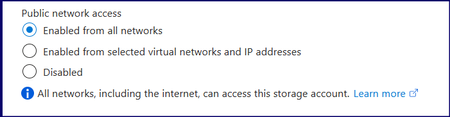
Hi All, Seems like a basic issue, however, I cannot seem to resolve the issue. In a nutshell, a number of storage accounts (and other resources) were created with the Public Network Access set as below: I would like to change them all to them all to Enabled from selected virtual networks and IP addresses or even Disabled. However, when I change to Enabled from selected virtual networks and IP addresses, connectivity from, for example, Power Bi to the Storage Account fails. I have added the VPN IP's my local IP etc. But all continue to fail connection or authentication. Once it is changed back to Enabled for All networks everything works, i.e. Power Bi can access the Azure Blob Storage and refresh successfully. I have also enabled 'Allow Azure services on the trusted services list to access this storage account'. But PBI fails to have access to the data. data Source Credentials error, whether using Key, Service Principal etc, it fails. As soon as I switch it back to Enable From All Networks, it authenticates straight away. One more idea I had was to add ALL of the Resource Instances, as this would white list more Azure services, although PBI should be covered by enabling 'Allow Azure services on the trusted services list to access this storage account'. I thought I might give it a try. Also, I created an NSG and used the ServiceTags file to create an inbound rule to allow Power BI from UK South. Also, I have created a Private Endpoint. This should all have worked but still can’t set it to restricted networks. I must be missing something fundamental or there is something fundamentally off with this tenant. When any of the two restrictive options are selected, do they also block various Microsoft services? Any help would be gratefully appreciated.300Views1like2CommentsComparision on Azure Cloud Sync and Traditional Entra connect Sync.
Introduction In the evolving landscape of identity management, organizations face a critical decision when integrating their on-premises Active Directory (AD) with Microsoft Entra ID (formerly Azure AD). Two primary tools are available for this synchronization: Traditional Entra Connect Sync (formerly Azure AD Connect) Azure Cloud Sync While both serve the same fundamental purpose, bridging on-prem AD with cloud identity, they differ significantly in architecture, capabilities, and ideal use cases. Architecture & Setup Entra Connect Sync is a heavyweight solution. It installs a full synchronization engine on a Windows Server, often backed by SQL Server. This setup gives administrators deep control over sync rules, attribute flows, and filtering. Azure Cloud Sync, on the other hand, is lightweight. It uses a cloud-managed agent installed on-premises, removing the need for SQL Server or complex infrastructure. The agent communicates with Microsoft Entra ID, and most configurations are handled in the cloud portal. For organizations with complex hybrid setups (e.g., Exchange hybrid, device management), is Cloud Sync too limited?796Views1like2CommentsTURN relay regional expansion for Azure Virtual Desktop
TURN (Traversal Using Relays around NAT) enables devices behind firewalls to establish reliable UDP connections. With RDP Shortpath for public networks, TURN acts as a fallback when a direct UDP-based connection isn’t possible—ensuring low-latency, high-reliability remote desktop sessions. Starting June 15, 2025, we are launching a dedicated TURN relay IP range across the Microsoft Azure public cloud. This new range—51.5.0.0/16—enhances RDP Shortpath connectivity and delivers faster, more reliable performance for Azure Virtual Desktop and Windows 365 users in 40 regions worldwide. For the full list of supported regions and guidance on how to plan for this change, read the full announcement: Expanded TURN relay regions for Windows 365 and Azure Virtual Desktop1.5KViews1like0CommentsAzure NSG Challenge : When NIC and Subnet Rules Collide
Imagine this real-world scenario: 🔹 A VM needs to connect outbound via RDP (TCP 3389) to an external server for management. 🔹 The NIC-level NSG allows outbound RDP, ensuring the VM can initiate connections. 🔹 However, the Subnet-level NSG has an inbound deny rule specifically for RDP. 💭 Question for IT Pros: 👉 Would the outbound RDP session succeed or be blocked due to the subnet-level NSG? 👉 How do you design NSG rules to prevent misconfigurations while maintaining security? ####################################################### Great challenge! Let's break it down: 🚦 Would the outbound RDP session succeed or be blocked? The outbound RDP session would succeed because the subnet-level NSG applies to inbound traffic coming into the subnet, not traffic leaving the VM. Since outbound RDP is explicitly allowed at the NIC level, the VM can initiate connections without issue. However, if the external server tries to respond back, the inbound deny rule at the subnet level would block the return traffic. This effectively disrupts the session, making it seem like the connection failed. 🔒 How to design NSG rules effectively? To prevent misconfigurations while maintaining security: 1- Understand NSG processing – Rules are evaluated independently at the NIC and Subnet levels, but both must allow the required traffic. 2- Use least privilege principles – Only allow necessary traffic and explicitly deny everything else. 3- Be careful with inbound rules at the subnet level – Blocking inbound traffic here can unintentionally interfere with legitimate outbound sessions. 4- Log traffic flows with NSG Flow Logs – Use diagnostic settings to capture insights for troubleshooting. 5- Consider Application Security Groups (ASGs) – These simplify NSG management by grouping resources dynamically.286Views1like4Comments🚀 Azure Application Gateway: Smart Load Balancing & Security
Ensuring high availability and efficient load balancing is crucial for web applications. Azure offers several traffic management solutions, including Application Gateway, Front Door, Load Balancer, and Traffic Manager. Today, let's focus on why Application Gateway stands out as a powerful tool for managing web traffic. 🚀 Why we should use Azure Application Gateway? 🔹 Layer 7 Load Balancing: Unlike Layer 3 or 4 solutions, Application Gateway makes intelligent routing decisions based on HTTP request properties. For example, requests to /images/ can be directed to dedicated image servers, while /videos/ traffic is routed to specialized video servers. 🔹 SSL/TLS Termination (Offloading): Reduces processing load on backend servers by decrypting traffic at the gateway before forwarding it unencrypted. Note: This might conflict with compliance requirements, so verify your app’s security needs !! 🔹 Autoscaling: Dynamically scales up or down based on traffic patterns, ensuring cost-effective resource utilization. 🔹 Zone Redundancy: Operates across multiple Availability Zones, enhancing fault tolerance without needing separate gateways in each zone. 🔹 Web Application Firewall (WAF): Provides centralized security against common exploits like SQL injection and cross-site scripting (XSS). Built on OWASP 3.1 (WAF_v2), it can function in Detection Mode (alerting admins) or Prevention Mode (blocking threats proactively). 🔹 URL-Based Routing: Enables smart traffic distribution by directing different types of content to the most appropriate backend pools. Example: http://contoso.com/video/* → VideoServerPool 🔹 Multiple-Site Hosting: Hosts multiple web applications on a single gateway, routing requests based on hostname or domain. Example: http://contoso.com → ContosoServerPool 🔹 Redirection & Rewrite Capabilities: ✔ Redirect HTTP → HTTPS to enforce encrypted traffic. ✔ Rewrite HTTP headers & URLs to enhance security (e.g., add HSTS or remove sensitive response headers). 🔹 Cookie-Based Session Affinity: Ensures users maintain session continuity by always connecting to the same backend server. Useful when session state is stored locally. ⚙️ How to Deploy & Configure Azure Application Gateway ⚙️ ✅ Dedicated Subnet: Create a subnet (e.g., myAGSubnet) within a Virtual Network. ✅ Frontend IP: Define whether to use a public or private IP or both (If you configured multiple listeners) to receive client requests. ✅ Backend Pool: Assign backend servers via NICs, Virtual Machine Scale Sets, public/internal IPs, or FQDNs. ✅ HTTP/HTTPS Listener: Specify which port (e.g., 80, 443) will handle incoming requests. ✅ Routing Rules: Set up domain-based (host-based routing) or path-based routing logic. 🔹 Host-Based Routing means routing traffic based on the hostname in the HTTP request header 🔹 Path-based Routing allows you to direct traffic to different backend pools based on the URL path in the request. ✅ Health Probes: Ensure backend servers are online using TCP or HTTP-based monitoring.147Views1like0Comments