microsoft defender for identity
236 TopicsKerberos and the End of RC4: Protocol Hardening and Preparing for CVE‑2026‑20833
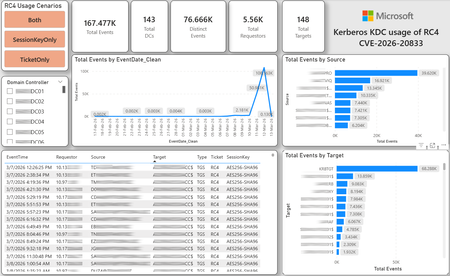
CVE-2026-20833 addresses the continued use of the RC4‑HMAC algorithm within the Kerberos protocol in Active Directory environments. Although RC4 has been retained for many years for compatibility with legacy systems, it is now considered cryptographically weak and unsuitable for modern authentication scenarios. As part of the security evolution of Kerberos, Microsoft has initiated a process of progressive protocol hardening, whose objective is to eliminate RC4 as an implicit fallback, establishing AES128 and AES256 as the default and recommended algorithms. This change should not be treated as optional or merely preventive. It represents a structural change in Kerberos behavior that will be progressively enforced through Windows security updates, culminating in a model where RC4 will no longer be implicitly accepted by the KDC. If Active Directory environments maintain service accounts, applications, or systems dependent on RC4, authentication failures may occur after the application of the updates planned for 2026, especially during the enforcement phases introduced starting in April and finalized in July 2026. For this reason, it is essential that organizations proactively identify and eliminate RC4 dependencies, ensuring that accounts, services, and applications are properly configured to use AES128 or AES256 before the definitive changes to Kerberos protocol behavior take effect. Official Microsoft References CVE-2026-25177 - Security Update Guide - Microsoft - Active Directory Domain Services Elevation of Privilege Vulnerability Microsoft Support – How to manage Kerberos KDC usage of RC4 for service account ticket issuance changes related to CVE-2026-20833 (KB 5073381) Microsoft Learn – Detect and Remediate RC4 Usage in Kerberos AskDS – What is going on with RC4 in Kerberos? Beyond RC4 for Windows authentication | Microsoft Windows Server Blog So, you think you’re ready for enforcing AES for Kerberos? | Microsoft Community Hub Risk Associated with the Vulnerability When RC4 is used in Kerberos tickets, an authenticated attacker can request Service Tickets (TGS) for valid SPNs, capture these tickets, and perform offline brute-force attacks, particularly Kerberoasting scenarios, with the goal of recovering service account passwords. Compared to AES, RC4 allows significantly faster cracking, especially for older accounts or accounts with weak passwords. Technical Overview of the Exploitation In simplified terms, the exploitation flow occurs as follows: The attacker requests a TGS for a valid SPN. The KDC issues the ticket using RC4, when that algorithm is still accepted. The ticket is captured and analyzed offline. The service account password is recovered. The compromised account is used for lateral movement or privilege escalation. Official Timeline Defined by Microsoft January 2026 – Audit Phase Starting in January 2026, Microsoft initiated the Audit Phase related to changes in RC4 usage within Kerberos, as described in the official guidance associated with CVE-2026-20833. The primary objective of this phase is to allow organizations to identify existing RC4 dependencies before enforcement changes are applied in later phases. During this phase, no functional breakage is expected, as RC4 is still permitted by the KDC. However, additional auditing mechanisms were introduced, providing greater visibility into how Kerberos tickets are issued in the environment. Analysis is primarily based on the following events recorded in the Security Log of Domain Controllers: Event ID 4768 – Kerberos Authentication Service (AS request / Ticket Granting Ticket) Event ID 4769 – Kerberos Service Ticket Operations (Ticket Granting Service – TGS) Additional events related to the KDCSVC service These events allow identification of: the account that requested authentication the requested service or SPN the source host of the request the encryption algorithm used for the ticket and session key This information is critical for detecting scenarios where RC4 is still being implicitly used, enabling operations teams to plan remediation ahead of the enforcement phase. If these events are not being logged on Domain Controllers, it is necessary to verify whether Kerberos auditing is properly enabled. For Kerberos authentication events to be recorded in the Security Log, the corresponding audit policies must be configured. The minimum recommended configuration is to enable Success auditing for the following subcategories: Kerberos Authentication Service Kerberos Service Ticket Operations Verification can be performed directly on a Domain Controller using the following commands: auditpol /get /subcategory:"Kerberos Service Ticket Operations" auditpol /get /subcategory:"Kerberos Authentication Service" In enterprise environments, the recommended approach is to apply this configuration via Group Policy, ensuring consistency across all Domain Controllers. The corresponding policy can be found at: Computer Configuration - Policies - Windows Settings - Security Settings - Advanced Audit Policy Configuration - Audit Policies - Account Logon Once enabled, these audits record events 4768 and 4769 in the Domain Controllers’ Security Log, allowing analysis tools—such as inventory scripts or SIEM/Log Analytics queries—to accurately identify where RC4 is still present in the Kerberos authentication flow. April 2026 – Enforcement with Manual Rollback With the April 2026 update, the KDC begins operating in AES-only mode (0x18) when the msDS-SupportedEncryptionTypes attribute is not defined. This means RC4 is no longer accepted as an implicit fallback. During this phase, applications, accounts, or computers that still implicitly depend on RC4 may start failing. Manual rollback remains possible via explicit configuration of the attribute in Active Directory. July 2026 – Final Enforcement Starting in July 2026, audit mode and rollback options are removed. RC4 will only function if explicitly configured—a practice that is strongly discouraged. This represents the point of no return in the hardening process. Official Monitoring Approach Microsoft provides official scripts in the repository: https://github.com/microsoft/Kerberos-Crypto/tree/main/scripts The two primary scripts used in this analysis are: Get-KerbEncryptionUsage.ps1 The Get-KerbEncryptionUsage.ps1 script, provided by Microsoft in the Kerberos‑Crypto repository, is designed to identify how Kerberos tickets are issued in the environment by analyzing authentication events recorded on Domain Controllers. Data collection is primarily based on: Event ID 4768 – Kerberos Authentication Service (AS‑REQ / TGT issuance) Event ID 4769 – Kerberos Service Ticket Operations (TGS issuance) From these events, the script extracts and consolidates several relevant fields for authentication flow analysis: Time – when the authentication occurred Requestor – IP address or host that initiated the request Source – account that requested the ticket Target – requested service or SPN Type – operation type (AS or TGS) Ticket – algorithm used to encrypt the ticket SessionKey – algorithm used to protect the session key Based on these fields, it becomes possible to objectively identify which algorithms are being used in the environment, both for ticket issuance and session establishment. This visibility is essential for detecting RC4 dependencies in the Kerberos authentication flow, enabling precise identification of which clients, services, or accounts still rely on this legacy algorithm. Example usage: .\Get-KerbEncryptionUsage.ps1 -Encryption RC4 -Searchscope AllKdcs | Export-Csv -Path .\KerbUsage_RC4_All_ThisDC.csv -NoTypeInformation -Encoding UTF8 Data Consolidation and Analysis In enterprise environments, where event volumes may be high, it is recommended to consolidate script results into analytical tools such as Power BI to facilitate visualization and investigation. The presented image illustrates an example dashboard built from collected results, enabling visibility into: Total events analyzed Number of Domain Controllers involved Number of requesting clients (Requestors) Most frequently involved services or SPNs (Targets) Temporal distribution of events RC4 usage scenarios (Ticket, SessionKey, or both) This type of visualization enables rapid identification of RC4 usage patterns, remediation prioritization, and progress tracking as dependencies are eliminated. Additionally, dashboards help answer key operational questions, such as: Which services still depend on RC4 Which clients are negotiating RC4 for sessions Which Domain Controllers are issuing these tickets Whether RC4 usage is decreasing over time This combined automated collection + analytical visualization approach is the recommended strategy to prepare environments for the Microsoft changes related to CVE‑2026‑20833 and the progressive removal of RC4 in Kerberos. Visualizing Results with Power BI To facilitate analysis and monitoring of RC4 usage in Kerberos, it is recommended to consolidate script results into a Power BI analytical dashboard. 1. Install Power BI Desktop Download and install Power BI Desktop from the official Microsoft website 2. Execute data collection After running the Get-KerbEncryptionUsage.ps1 script, save the generated CSV file to the following directory: C:\Temp\Kerberos_KDC_usage_of_RC4_Logs\KerbEncryptionUsage_RC4.csv 3. Open the dashboard in Power BI Open the file RC4-KerbEncryptionUsage-Dashboards.pbix using Power BI Desktop. If you are interested, please leave a comment on this post with your email address, and I will be happy to share with you. 4. Update the data source If the CSV file is located in a different directory, it will be necessary to adjust the data source path in Power BI. As illustrated, the dashboard uses a parameter named CsvFilePath, which defines the path to the collected CSV file. To adjust it: Open Transform Data in Power BI. Locate the CsvFilePath parameter in the list of Queries. Update the value to the directory where the CSV file was saved. Click Refresh Preview or Refresh to update the data. Click Home → Close & Apply. This approach allows rapid identification of RC4 dependencies, prioritization of remediation actions, and tracking of progress throughout the elimination process. List-AccountKeys.ps1 This script is used to identify which long-term keys are present on user, computer, and service accounts, enabling verification of whether RC4 is still required or whether AES128/AES256 keys are already available. Interpreting Observed Scenarios Microsoft recommends analyzing RC4 usage by jointly considering two key fields present in Kerberos events: Ticket Encryption Type Session Encryption Type Each combination represents a distinct Kerberos behavior, indicating the source of the issue, risk level, and remediation point in the environment. In addition to events 4768 and 4769, updates released starting January 13, 2026, introduce new Kdcsvc events in the System Event Log that assist in identifying RC4 dependencies ahead of enforcement. These events include: Event ID 201 – RC4 usage detected because the client advertises only RC4 and the service does not have msDS-SupportedEncryptionTypes defined. Event ID 202 – RC4 usage detected because the service account does not have AES keys and the msDS-SupportedEncryptionTypes attribute is not defined. Event ID 203 – RC4 usage blocked (enforcement phase) because the client advertises only RC4 and the service does not have msDS-SupportedEncryptionTypes defined. Event ID 204 – RC4 usage blocked (enforcement phase) because the service account does not have AES keys and msDS-SupportedEncryptionTypes is not defined. Event ID 205 – Detection of explicit enablement of insecure algorithms (such as RC4) in the domain policy DefaultDomainSupportedEncTypes. Event ID 206 – RC4 usage detected because the service accepts only AES, but the client does not advertise AES support. Event ID 207 – RC4 usage detected because the service is configured for AES, but the service account does not have AES keys. Event ID 208 – RC4 usage blocked (enforcement phase) because the service accepts only AES and the client does not advertise AES support. Event ID 209 – RC4 usage blocked (enforcement phase) because the service accepts only AES, but the service account does not have AES keys. https://support.microsoft.com/en-gb/topic/how-to-manage-kerberos-kdc-usage-of-rc4-for-service-account-ticket-issuance-changes-related-to-cve-2026-20833-1ebcda33-720a-4da8-93c1-b0496e1910dc They indicate situations where RC4 usage will be blocked in future phases, allowing early detection of configuration issues in clients, services, or accounts. These events are logged under: Log: System Source: Kdcsvc Below are the primary scenarios observed during the analysis of Kerberos authentication behavior, highlighting how RC4 usage manifests across different ticket and session encryption combinations. Each scenario represents a distinct risk profile and indicates specific remediation actions required to ensure compliance with the upcoming enforcement phases. Scenario A – RC4 / RC4 In this scenario, both the Kerberos ticket and the session key are issued using RC4. This is the worst possible scenario from a security and compatibility perspective, as it indicates full and explicit dependence on RC4 in the authentication flow. This condition significantly increases exposure to Kerberoasting attacks, since RC4‑encrypted tickets can be subjected to offline brute-force attacks to recover service account passwords. In addition, environments remaining in this state have a high probability of authentication failure after the April 2026 updates, when RC4 will no longer be accepted as an implicit fallback by the KDC. Events Associated with This Scenario During the Audit Phase, this scenario is typically associated with: Event ID 201 – Kdcsvc Indicates that: the client advertises only RC4 the service does not have msDS-SupportedEncryptionTypes defined the Domain Controller does not have DefaultDomainSupportedEncTypes defined This means RC4 is being used implicitly. This event indicates that the authentication will fail during the enforcement phase. Event ID 202 – Kdcsvc Indicates that: the service account does not have AES keys the service does not have msDS-SupportedEncryptionTypes defined This typically occurs when: legacy accounts have never had their passwords reset only RC4 keys exist in Active Directory Possible Causes Common causes include: the originating client (Requestor) advertises only RC4 the target service (Target) is not explicitly configured to support AES the account has only legacy RC4 keys the msDS-SupportedEncryptionTypes attribute is not defined Recommended Actions To remediate this scenario: Correctly identify the object involved in the authentication flow, typically: a service account (SPN) a computer account or a Domain Controller computer object Verify whether the object has AES keys available using analysis tools or scripts such as List-AccountKeys.ps1. If AES keys are not present, reset the account password, forcing generation of modern cryptographic keys (AES128 and AES256). Explicitly define the msDS-SupportedEncryptionTypes attribute to enable AES support. Recommended value for modern environments: 0x18 (AES128 + AES256) = 24 As illustrated below, this configuration can be applied directly to the msDS-SupportedEncryptionTypes attribute in Active Directory. AES can also be enabled via Active Directory Users and Computers by explicitly selecting: This account supports Kerberos AES 128 bit encryption This account supports Kerberos AES 256 bit encryption These options ensure that new Kerberos tickets are issued using AES algorithms instead of RC4. Temporary RC4 Usage (Controlled Rollback) In transitional scenarios—during migration or troubleshooting—it may be acceptable to temporarily use: 0x1C (RC4 + AES) = 28 This configuration allows the object to accept both RC4 and AES simultaneously, functioning as a controlled rollback while legacy dependencies are identified and corrected. However, the final objective must be to fully eliminate RC4 before the final enforcement phase in July 2026, ensuring the environment operates exclusively with AES128 and AES256. Scenario B – AES / RC4 In this case, the ticket is protected with AES, but the session is still negotiated using RC4. This typically indicates a client limitation, legacy configuration, or restricted advertisement of supported algorithms. Events Associated with This Scenario During the Audit Phase, this scenario may generate: Event ID 206 Indicates that: the service accepts only AES the client does not advertise AES in the Advertised Etypes In this case, the client is the issue. Recommended Action Investigate the Requestor Validate operating system, client type, and advertised algorithms Review legacy GPOs, hardening configurations, or settings that still force RC4 For Linux clients or third‑party applications, review krb5.conf, keytabs, and Kerberos libraries Scenario C – RC4 / AES Here, the session already uses AES, but the ticket is still issued using RC4. This indicates an implicit RC4 dependency on the Target or KDC side, and the environment may fail once enforcement begins. Events Associated with This Scenario This scenario may generate: Event ID 205 Indicates that the domain has explicit insecure algorithm configuration in: DefaultDomainSupportedEncTypes This means RC4 is explicitly allowed at the domain level. Recommended Action Correct the Target object Explicitly define msDS-SupportedEncryptionTypes with 0x18 = 24 Revalidate new ticket issuance to confirm full migration to AES / AES Conclusion CVE‑2026‑20833 represents a structural change in Kerberos behavior within Active Directory environments. Proper monitoring is essential before April 2026, and the msDS-SupportedEncryptionTypes attribute becomes the primary control point for service accounts, computer accounts, and Domain Controllers. July 2026 represents the final enforcement point, after which there will be no implicit rollback to RC4.103Views0likes0Comments
Understand New Sentinel Pricing Model with Sentinel Data Lake Tier
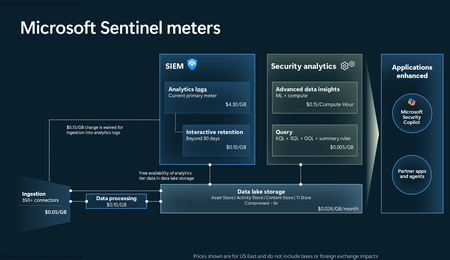
Introduction on Sentinel and its New Pricing Model Microsoft Sentinel is a cloud-native Security Information and Event Management (SIEM) and Security Orchestration, Automation, and Response (SOAR) platform that collects, analyzes, and correlates security data from across your environment to detect threats and automate response. Traditionally, Sentinel stored all ingested data in the Analytics tier (Log Analytics workspace), which is powerful but expensive for high-volume logs. To reduce cost and enable customers to retain all security data without compromise, Microsoft introduced a new dual-tier pricing model consisting of the Analytics tier and the Data Lake tier. The Analytics tier continues to support fast, real-time querying and analytics for core security scenarios, while the new Data Lake tier provides very low-cost storage for long-term retention and high-volume datasets. Customers can now choose where each data type lands—analytics for high-value detections and investigations, and data lake for large or archival types—allowing organizations to significantly lower cost while still retaining all their security data for analytics, compliance, and hunting. Please flow diagram depicts new sentinel pricing model: Now let's understand this new pricing model with below scenarios: Scenario 1A (PAY GO) Scenario 1B (Usage Commitment) Scenario 2 (Data Lake Tier Only) Scenario 1A (PAY GO) Requirement Suppose you need to ingest 10 GB of data per day, and you must retain that data for 2 years. However, you will only frequently use, query, and analyze the data for the first 6 months. Solution To optimize cost, you can ingest the data into the Analytics tier and retain it there for the first 6 months, where active querying and investigation happen. After that period, the remaining 18 months of retention can be shifted to the Data Lake tier, which provides low-cost storage for compliance and auditing needs. But you will be charged separately for data lake tier querying and analytics which depicted as Compute (D) in pricing flow diagram. Pricing Flow / Notes The first 10 GB/day ingested into the Analytics tier is free for 31 days under the Analytics logs plan. All data ingested into the Analytics tier is automatically mirrored to the Data Lake tier at no additional ingestion or retention cost. For the first 6 months, you pay only for Analytics tier ingestion and retention, excluding any free capacity. For the next 18 months, you pay only for Data Lake tier retention, which is significantly cheaper. Azure Pricing Calculator Equivalent Assuming no data is queried or analyzed during the 18-month Data Lake tier retention period: Although the Analytics tier retention is set to 6 months, the first 3 months of retention fall under the free retention limit, so retention charges apply only for the remaining 3 months of the analytics retention window. Azure pricing calculator will adjust accordingly. Scenario 1B (Usage Commitment) Now, suppose you are ingesting 100 GB per day. If you follow the same pay-as-you-go pricing model described above, your estimated cost would be approximately $15,204 per month. However, you can reduce this cost by choosing a Commitment Tier, where Analytics tier ingestion is billed at a discounted rate. Note that the discount applies only to Analytics tier ingestion—it does not apply to Analytics tier retention costs or to any Data Lake tier–related charges. Please refer to the pricing flow and the equivalent pricing calculator results shown below. Monthly cost savings: $15,204 – $11,184 = $4,020 per month Now the question is: What happens if your usage reaches 150 GB per day? Will the additional 50 GB be billed at the Pay-As-You-Go rate? No. The entire 150 GB/day will still be billed at the discounted rate associated with the 100 GB/day commitment tier bucket. Azure Pricing Calculator Equivalent (100 GB/ Day) Azure Pricing Calculator Equivalent (150 GB/ Day) Scenario 2 (Data Lake Tier Only) Requirement Suppose you need to store certain audit or compliance logs amounting to 10 GB per day. These logs are not used for querying, analytics, or investigations on a regular basis, but must be retained for 2 years as per your organization’s compliance or forensic policies. Solution Since these logs are not actively analyzed, you should avoid ingesting them into the Analytics tier, which is more expensive and optimized for active querying. Instead, send them directly to the Data Lake tier, where they can be retained cost-effectively for future audit, compliance, or forensic needs. Pricing Flow Because the data is ingested directly into the Data Lake tier, you pay both ingestion and retention costs there for the entire 2-year period. If, at any point in the future, you need to perform advanced analytics, querying, or search, you will incur additional compute charges, based on actual usage. Even with occasional compute charges, the cost remains significantly lower than storing the same data in the Analytics tier. Realized Savings Scenario Cost per Month Scenario 1: 10 GB/day in Analytics tier $1,520.40 Scenario 2: 10 GB/day directly into Data Lake tier $202.20 (without compute) $257.20 (with sample compute price) Savings with no compute activity: $1,520.40 – $202.20 = $1,318.20 per month Savings with some compute activity (sample value): $1,520.40 – $257.20 = $1,263.20 per month Azure calculator equivalent without compute Azure calculator equivalent with Sample Compute Conclusion The combination of the Analytics tier and the Data Lake tier in Microsoft Sentinel enables organizations to optimize cost based on how their security data is used. High-value logs that require frequent querying, real-time analytics, and investigation can be stored in the Analytics tier, which provides powerful search performance and built-in detection capabilities. At the same time, large-volume or infrequently accessed logs—such as audit, compliance, or long-term retention data—can be directed to the Data Lake tier, which offers dramatically lower storage and ingestion costs. Because all Analytics tier data is automatically mirrored to the Data Lake tier at no extra cost, customers can use the Analytics tier only for the period they actively query data, and rely on the Data Lake tier for the remaining retention. This tiered model allows different scenarios—active investigation, archival storage, compliance retention, or large-scale telemetry ingestion—to be handled at the most cost-effective layer, ultimately delivering substantial savings without sacrificing visibility, retention, or future analytical capabilities.Solved1.8KViews2likes4CommentsFrom signal to strategy: Closing attack paths with identity intelligence
Compromised credentials remain one of the most common entry points for attackers. In the first half of 2025 alone, identity-based attacks surged more than 32% and its estimated that 97% of them are password focused. While that scale is overwhelming, it only takes a single exposed account to give an attacker a foothold from which they can move laterally towards the critical assets they are after. At today’s attack scale, identity signals need to be connected with broader context to stop attacks earlier in the kill chain. Today we are excited to share more about how Microsoft Defender can help security professionals proactively understand how identity-related risks, like leaked credentials, relate back to critical assets, helping security professionals proactively close potential entry points before they can be exploited. Understanding leaked credentials and attack paths: Leaked credentials refer to valid usernames and passwords that have been exposed beyond their intended scope. Whether this exposure occurs as part of a data breach, phishing attack, or postings on dark web forums, the result is the same: an attacker may be using legitimate credentials to access your organization. Similarly, attack paths describe the sequence of misconfigurations, permissions, and trust relationships that an attacker can chain together to move from an initial foothold to high‑value resources. Rather than relying on a single vulnerability, attackers tend to think in graphs, following paths of least resistance to systematically escalate privileges and expand access. This makes identities the primary control plane they target and leaked credentials as an extremely common entry point. The recent Microsoft digital defense report put this into focus, stating that more than 61% of attack paths lead to a sensitive user. These user accounts have elevated privileges or access to critical resources meaning that if they were to be attacked or misused it would significantly impact the organization. Microsoft’s differentiated approach Most solutions stop at the alert and can only tell you that a password was exposed, found, or leaked. That information matters, but it is incomplete, it describes an event, not the risk. The real differentiation starts with the next question: what does this exposure mean for my environment right now. Not every exposed password creates the same level of risk. Context is what determines impact. Which identity does the password belong to? What assets can that identity access? Does that access still exists? And are those assets truly sensitive? That is why exposed password detection is a starting point, not an end state. Effective protection begins when organizations move beyond technical alerts and toward an identity-aware understanding. This shift from detection to context is where better decisions are made and where meaningful security value is created. This is why we took our identity alerts a step further, connecting these risks with broader security context to reveal how an initial identity signal can lead to sensitive users, critical assets, and core business operations. This perspective moves security beyond isolated alerts to prioritized, actionable insight that shows not just if risk exists, but how identity‑based threats could unfold and where to intervene to stop them before they have impact. In the case of leaked credentials, Microsoft continuously scans for exposed accounts across public and private breach sources. If a match is found, Microsoft’s Advanced Correlation Engine (MACE) automatically identifies the affected user within your organization and surfaces the exposure with clear severity and context. By bringing this powerful detection into Defender, teams can investigate and respond with better context, allowing leaked credentials to be evaluated alongside endpoint, email, and app activity, giving teams additional context needed to prioritize response. Additionally, for Microsoft Entra ID accounts we can go a step further validating whether the discovered credentials actually corresponds to a real, usable password for an identity in the tenant. This confirmation further reduces unnecessary noise and gives defenders an early signal - often before any malicious activity begins. Next, Microsoft Defender steps in to correlate these signals with your organization’s unique security context. Connecting the alert and associated account with other signals and like unusual authentications, lateral movement attempts, or privilege escalations, elevating the isolated alert into a complete story about any potential incidents related to that vulnerability. At the same time, Microsoft Exposure management is analyzing the same data to create a potential attack path related to the exposed credentials. By tracing permissions, consents, and access relationships, Attack Paths show exactly which routes an attacker could take and what controls will break that path. When these capabilities work together, visibility becomes action. MACE identifies who is exposed, Defender connects other signals into an incident level view and Attack Paths reveal where the attacker could go next. The result is a single, connected workflow that transforms early exposure data into prioritized, measurable risk reduction. Conclusion Leaked credentials should be treated as the beginning of a story, not an isolated event. Microsoft Defender is uniquely able to enrich security teams visibility and understanding of Identity-related threats from initial exposure to detection, risk prioritization, and remediation. This connected visibility fundamentally changes how defenders manage identity risk, shifting the focus from reacting to individual alerts to continuously reducing exposure and limiting blast radius. One leaked password doesn’t have to become a breach. With Microsoft’s identity security capabilities, it becomes a closed path, and a measurable step toward greater resilience. Learn more about attack paths and the new leaked credentials capabilities in Defender.855Views0likes0CommentsSecurity Copilot Skilling Series
Security Copilot joins forces with your favorite Microsoft Security products in a skilling series miles above the rest. The Security Copilot Skilling Series is your opportunity to strengthen your security posture through threat detection, incident response, and leveraging AI for security automation. These technical skilling sessions are delivered live by experts from our product engineering teams. Come ready to learn, engage with your peers, ask questions, and provide feedback. Upcoming sessions are noted below and will be available on-demand on the Microsoft Security Community YouTube channel. Coming Up February 5 | Identity Risk Management in Microsoft Entra Speaker: Marilee Turscak Identity teams face a constant stream of risky user signals, and determining which threats require action can be time‑consuming. This webinar explores the Identity Risk Management Agent in Microsoft Entra, powered by Security Copilot, and how it continuously monitors risky identities, analyzes correlated sign‑in and behavior signals, and explains why a user is considered risky. Attendees will see how the agent provides guided remediation recommendations—such as password resets or risk dismissal—at scale and supports natural‑language interaction for faster investigations. The session also covers how the agent learns from administrator instructions to apply consistent, policy‑aligned responses over time. February 19 | Agents That Actually Work: From an MVP Speaker: Ugur Koc, Microsoft MVP Microsoft MVP Ugur Koc will share a real-world workflow for building agents in Security Copilot, showing how to move from an initial idea to a consistently performing agent. The session highlights how to iterate on objectives, tighten instructions, select the right tools, and diagnose where agents break or drift from expected behavior. Attendees will see practical testing and validation techniques, including how to review agent decisions and fine-tune based on evidence rather than intuition to help determine whether an agent is production ready. March 5 | Conditional Access Optimization Agent: What It Is & Why It Matters Get a clear, practical look at the Conditional Access Optimization Agent—how it automates policy upkeep, simplifies operations, and uses new post‑Ignite updates like Agent Identity and dashboards to deliver smarter, standards‑aligned recommendations. Now On-Demand January 28 | Security Copilot in Purview Technical Deep Dive Speakers: Patrick David, Thao Phan, Alexandra Roland Discover how AI-powered alert triage agents for Data Loss Prevention (DLP) and Insider Risk Management (IRM) are transforming incident response and compliance workflows. Explore new Data Security Posture Management (DSPM) capabilities that deliver deeper insights and automation to strengthen your security posture. This session will showcase real-world scenarios and actionable strategies to help you protect sensitive data and simplify compliance. January 22 | Security Copilot Skilling Series | Building Custom Agents: Unlocking Context, Automation, and Scale Speakers: Innocent Wafula, Sean Wesonga, and Sebuh Haileleul Microsoft Security Copilot already features a robust ecosystem of first-party and partner-built agents, but some scenarios require solutions tailored to your organization’s specific needs and context. In this session, you'll learn how the Security Copilot agent builder platform and MCP servers empower you to create tailored agents that provide context-aware reasoning and enterprise-scale solutions for your unique scenarios. December 18 | What's New in Security Copilot for Defender Speaker: Doug Helton Discover the latest innovations in Microsoft Security Copilot embedded in Defender that are transforming how organizations detect, investigate, and respond to threats. This session will showcase powerful new capabilities—like AI-driven incident response, contextual insights, and automated workflows—that help security teams stop attacks faster and simplify operations. Why Attend: Stay Ahead of Threats: Learn how cutting-edge AI features accelerate detection and remediation. Boost Efficiency: See how automation reduces manual effort and improves SOC productivity. Get Expert Insights: Hear directly from product leaders and explore real-world use cases. Don’t miss this opportunity to future-proof your security strategy and unlock the full potential of Security Copilot in Defender! December 4 | Discussion of Ignite Announcements Speakers: Zineb Takafi, Mike Danoski and Oluchi Chukwunwere, Priyanka Tyagi, Diana Vicezar, Thao Phan, Alex Roland, and Doug Helton Ignite 2025 is all about driving impact in the era of AI—and security is at the center of it. In this session, we’ll unpack the biggest Security Copilot announcements from Ignite on agents and discuss how Copilot capabilities across Intune, Entra, Purview, and Defender deliver end-to-end protection. November 13 | Microsoft Entra AI: Unlocking Identity Intelligence with Security Copilot Skills and Agents Speakers: Mamta Kumar, Sr. Product Manager; Margaret Garcia Fani, Sr. Product Manager This session will demonstrate how Security Copilot in Microsoft Entra transforms identity security by introducing intelligent, autonomous capabilities that streamline operations and elevate protection. Customers will discover how to leverage AI-driven tools to optimize conditional access, automate access reviews, and proactively manage identity and application risks - empowering them into a more secure, and efficient digital future. October 30 | What's New in Copilot in Microsoft Intune Speaker: Amit Ghodke, Principal PM Architect, CxE CAT MEM Join us to learn about the latest Security Copilot capabilities in Microsoft Intune. We will discuss what's new and how you can supercharge your endpoint management experience with the new AI capabilities in Intune. October 16 | What’s New in Copilot in Microsoft Purview Speaker: Patrick David, Principal Product Manager, CxE CAT Compliance Join us for an insider’s look at the latest innovations in Microsoft Purview —where alert triage agents for DLP and IRM are transforming how we respond to sensitive data risks and improve investigation depth and speed. We’ll also dive into powerful new capabilities in Data Security Posture Management (DSPM) with Security Copilot, designed to supercharge your security insights and automation. Whether you're driving compliance or defending data, this session will give you the edge. October 9 | When to Use Logic Apps vs. Security Copilot Agents Speaker: Shiv Patel, Sr. Product Manager, Security Copilot Explore how to scale automation in security operations by comparing the use cases and capabilities of Logic Apps and Security Copilot Agents. This webinar highlights when to leverage Logic Apps for orchestrated workflows and when Security Copilot Agents offer more adaptive, AI-driven responses to complex security scenarios. All sessions will be published to the Microsoft Security Community YouTube channel - Security Copilot Skilling Series Playlist __________________________________________________________________________________________________________________________________________________________________ Looking for more? Keep up on the latest information on the Security Copilot Blog. Join the Microsoft Security Community mailing list to stay up to date on the latest product news and events. Engage with your peers one of our Microsoft Security discussion spaces.2.4KViews1like0CommentsMonthly news - December 2025
Microsoft Defender Monthly news - December 2025 Edition This is our monthly "What's new" blog post, summarizing product updates and various new assets we released over the past month across our Defender products. In this edition, we are looking at all the goodness from November 2025. Defender for Cloud has its own Monthly News post, have a look at their blog space. 😎 Microsoft Ignite 2025 - now on-demand! 🚀 New Virtual Ninja Show episode: Advancements in Attack Disruption Vulnerability Remediation Agent in Microsoft Intune Microsoft Defender Ignite 2025: What's new in Microsoft Defender? This blog summarizes our big announcements we made at Ignite. (Public Preview) Defender XDR now includes the predictive shielding capability, which uses predictive analytics and real-time insights to dynamically infer risk, anticipate attacker progression, and harden your environment before threats materialize. Learn more about predictive shielding. Security Copilot for SOC: bringing agentic AI to every defender. This blog post gives a great overview of the various agents supporting SOC teams. Account correlation links related accounts and corresponding insights to provide identity-level visibility and insights to the SOC. Coordinated response allows Defenders to take action comprehensively across connected accounts, accelerating response and minimizing the potential for lateral movement. Enhancing visibility into your identity fabric with Microsoft Defender. This blog describes new enhancements to the identity security experience within Defender that will help enrich your security team’s visibility and understanding into your unique identity fabric. (Public Preview) The IdentityAccountInfo table in advanced hunting is now available for preview. This table contains information about account information from various sources, including Microsoft Entra ID. It also includes information and link to the identity that owns the account. Microsoft Sentinel customers using the Defender portal, or the Azure portal with the Microsoft Sentinel Defender XDR data connector, now also benefit from Microsoft Threat Intelligence alerts that highlight activity from nation-state actors, major ransomware campaigns, and fraudulent operations. For more information, see Incidents and alerts in the Microsoft Defender portal. (Public Preview) New Entity Behavior Analytics (UEBA) experiences in the Defender portal! Microsoft Sentinel introduces new UEBA experiences in the Defender portal, bringing behavioral insights directly into key analyst workflows. These enhancements help analysts prioritize investigations and apply UEBA context more effectively. Learn more on our docs. (Public Preview) A new Restrict pod access response action is now available when investigating container threats in the Defender portal. This response action blocks sensitive interfaces that allow lateral movement and privilege escalation. (Public Preview) Threat analytics now has an Indicators tab that provides a list of all indicators of compromise (IOCs) associated with a threat. Microsoft researchers update these IOCs in real time as they find new evidence related to the threat. This information helps your security operations center (SOC) and threat intelligence analysts with remediation and proactive hunting. Learn more. In addition the overview section of threat analytics now includes additional details about a threat, such as alias, origin, and related intelligence, providing you with more insights on what the threat is and how it might impact your organization. Microsoft Defender for Identity (Public Preview) In addition to the GA release of scoping by Active Directory domains a few months ago, you can now scope by Organizational Units (OUs) as part of XDR User Role-Based Access Control. This enhancement provides even more granular control over which entities and resources are included in security analysis. For more information, see Configure scoped access for Microsoft Defender for Identity. (Public Preview). New security posture assessment: Change password for on-prem account with potentially leaked credentials. The new security posture assessment lists users whose valid credentials have been leaked. For more information, see: Change password for on-prem account with potentially leaked credentials. Defender for Identity is slowly rolling out automatic Windows event auditing for sensors v3.x, streamlining deployment by applying required auditing settings to new sensors and fixing misconfigurations on existing ones. As it becomes available, you will be able to enable automatic Windows event-auditing in the Advanced settings section in the Defender portal, or using the Graph API. Identity Inventory enhancements: Accounts tab, manual account linking and unlinking, and expanded remediation actions are now available. Learn more in our docs. Microsoft Defender for Cloud Apps (Public Preview) Defender for Cloud Apps automatically discovers AI agents created in Microsoft Copilot Studio and Azure AI Foundry, collects audit logs, continuously monitors for suspicious activity, and integrates detections and alerts into the XDR Incidents and Alerts experience with a dedicated Agent entity. For more information, see Protect your AI agents. Microsoft Defender for Endpoint Ignite 2025: Microsoft Defender now prevents threats on endpoints during an attack. This year at Microsoft Ignite, Microsoft Defender is announcing exciting innovations for endpoint protection that help security teams deploy faster, gain more visibility, and proactively block attackers during active attacks. (Public Preview) Defender for Endpoint now includes the GPO hardening and Safeboot hardening response actions. These actions are part of the predictive shielding feature, which anticipates and mitigates potential threats before they materialize. (Public Preview) Custom data collection enables organizations to expand and customize telemetry collection beyond default configurations to support specialized threat hunting and security monitoring needs. (Public Preview) Native root detection support for Microsoft Defender on Android. This enables proactive detection of rooted devices without requiring Intune policies, ensuring stronger security and validating that Defender is running on an uncompromised device, ensuring more reliable telemetry that is not vulnerable to attacker manipulation. (Public Preview) The new Defender deployment tool is a lightweight, self-updating application that streamlines onboarding devices to the Defender endpoint security solution. The tool takes care of prerequisites, automates migrations from older solutions, and removes the need for complex onboarding scripts, separate downloads, and manual installations. It currently supports Windows and Linux devices. Defender deployment tool: for Windows devices for Linux devices (Public Preview) Defender endpoint security solution for Windows 7 SP1 and Windows Server 2008 R2 SP1. A Defender for endpoint security solution is now available for legacy Windows 7 SP1 and Windows Server 2008 R2 SP1 devices. The solution provides advanced protection capabilities and improved functionality for these devices compared to other solutions. The new solution is available using the new Defender deployment tool. Microsoft Defender Vulnerability Management (Public Preview) The Vulnerability Management section in the Microsoft Defender portal is now located under Exposure management. This change is part of the vulnerability management integration to Microsoft Security Exposure Management, which significantly expands the scope and capabilities of the platform. Learn more. (General Availability) Microsoft Secure Score now includes new recommendations to help organizations proactively prevent common endpoint attack techniques. Require LDAP client signing and Require LDAP server signing - help ensure integrity of directory requests so attackers can't tamper with or manipulate group memberships or permissions in transit. Encrypt LDAP client traffic - prevents exposure of credentials and sensitive user information by enforcing encrypted communication instead of clear-text LDAP. Enforce LDAP channel binding - prevents man-in-the-middle relay attacks by ensuring the authentication is cryptographically tied to the TLS session. If the TLS channel changes, the bind fails, stopping credential replay. (General Availability) These Microsoft Secure Score recommendations are now generally available: Block web shell creation on servers Block use of copied or impersonated system tools Block rebooting a machine in Safe Mode Microsoft Defender for Office 365 Microsoft Ignite 2025: Transforming Phishing Response with Agentic Innovation. This blog post summarizes the following announcements: General Availability of the Security Copilot Phishing Triage Agent Agentic Email Grading System in Microsoft Defender Cisco and VIPRE Security Group join the Microsoft Defender ICES ecosystem. A separate blog explains these best practices in more detail and outline three other routing techniques commonly used across ICES vendors. Blog series: Best practices from the Microsoft Community Microsoft Defender for Office 365: Fine-Tuning: This blog covers our top recommendations for fine-tuning Microsoft Defender for Office 365 configuration from hundreds of deployments and recovery engagements, by Microsoft MVP Joe Stocker. You may be right after all! Disputing Submission Responses in Microsoft Defender for Office 365: Microsoft MVP Mona Ghadiri spotlights a new place AI has been inserted into a workflow to make it better… a feature that elevates the transparency and responsiveness of threat management: the ability to dispute a submission response directly within Microsoft Defender for Office 365. Blog post: Strengthening calendar security through enhanced remediation.4.9KViews0likes0Comments
Artificial Intelligence & Security
Understanding Artificial Intelligence Artificial intelligence (AI) is a computational system that perform human‑intelligence tasks, learning, reasoning, problem‑solving, perception, and language understanding by leveraging algorithmic and statistical methods to analyse data and make informed decisions. Artificial Intelligence (AI) can also be abbreviated as is the simulation of human intelligence through machines programmed to learn, reason, and act. It blends statistics, machine learning, and robotics to deliver following outcomes: Prediction: The application of statistical modelling and machine learning techniques to anticipate future outcomes, such as detecting fraudulent transactions. Automation: The utilisation of robotics and artificial intelligence to streamline and execute routine processes, exemplified by automated invoice processing. Augmentation: The enhancement of human decision-making and operational capabilities through AI-driven tools, for instance, AI-assisted sales enablement. Artificial Intelligence: Core Capabilities and Market Outlook Key capabilities of AI include: Data-driven decision-making: Analysing large datasets to generate actionable insights and optimise outcomes. Anomaly detection: Identifying irregular patterns or deviations in data for risk mitigation and quality assurance. Visual interpretation: Processing and understanding visual inputs such as images and videos for applications like computer vision. Natural language understanding: Comprehending and interpreting human language to enable accurate information extraction and contextual responses. Conversational engagement: Facilitating human-like interactions through chatbots, virtual assistants, and dialogue systems. With the exponential growth of data, ML learning models and computing power. AI is advancing much faster and as According to industry analyst reports breakthroughs in deep learning and neural network architectures have enabled highly sophisticated applications across diverse sectors, including healthcare, finance, manufacturing, and retail. The global AI market is on a trajectory of significant expansion, projected to increase nearly 5X by 2030, from $391 billion in 2025 to $1.81 trillion. This growth corresponds to a compound annual growth rate (CAGR) of 35.9% during the forecast period. These projections are estimates and subject to change as per rapid growth and advancement in the AI Era. AI and Cloud Synergy AI, and cloud computing form a powerful technological mixture. Digital assistants are offering scalable, cloud-powered intelligence. Cloud platforms such as Azure provide pre-trained models and services, enabling businesses to deploy AI solutions efficiently. Core AI Workloads Capabilities Machine Learning Machine learning (ML) underpins most AI systems by enabling models to learn from historical and real-time data to make predictions, classifications, and recommendations. These models adapt over time as they are exposed to new data, improving accuracy and robustness. Example use cases: Credit risk scoring in banking, demand forecasting in retail, and predictive maintenance in manufacturing. Anomaly Detection Anomaly detection techniques identify deviations from expected patterns in data, systems, or processes. This capability is critical for risk management and operational resilience, as it enables early detection of fraud, security breaches, or equipment failures. Example use cases: Fraud detection in financial transactions, network intrusion monitoring in cybersecurity, and quality control in industrial production. Natural Language Processing (NLP) NLP focuses on enabling machines to understand, interpret, and generate human language in both text and speech formats. This capability powers a wide range of applications that require contextual comprehension and semantic accuracy. Example use cases: Sentiment analysis for customer feedback, document summarisation for legal and compliance teams, and multilingual translation for global operations. Principles of Responsible AI To ensure ethical and trustworthy AI, organisations must embrace: Reliability & Safety Privacy & Security Inclusiveness Fairness Transparency Accountability These principles are embedded in frameworks like the Responsible-AI-Standard and reinforced by governance models such as Microsoft AI Governance Framework. Responsible AI Principles and Approach | Microsoft AI AI and Security AI introduces both opportunities and risks. A responsible approach to AI security involves three dimensions: Risk Mitigation: It Is addressing threats from immature or malicious AI applications. Security Applications: These are used to enhance AI security and public safety. Governance Systems: Establishing frameworks to manage AI risks and ensure safe development. Security Risks and Opportunities Due to AI Transformation AI’s transformative nature brings new challenges: Cybersecurity: This brings the opportunities and advancement to track, detect and act against Vulnerabilities in infrastructure and learning models. Data Security: This helps the tool and solutions such as Microsoft Purview to prevent data security by performing assessments, creating Data loss prevention policies applying sensitivity labels. Information Security: The biggest risk is securing the information and due to the AI era of transformation securing IS using various AI security frameworks. These concerns are echoed in The Crucial Role of Data Security Posture Management in the AI Era, which highlights insider threats, generative AI risks, and the need for robust data governance. AI in Security Applications AI’s capabilities in data analysis and decision-making enable innovative security solutions: Network Protection: applications include use of AI algorithms for intrusion detection, malware detection, security situational awareness, and threat early warning, etc. Data Management: applications refer to the use of AI technologies to achieve data protection objectives such as hierarchical classification, leak prevention, and leak traceability. Intelligent Security: applications refer to the use of AI technology to upgrade the security field from passive defence toward the intelligent direction, developing of active judgment and timely early warning. Financial Risk Control: applications use AI technology to improve the efficiency and accuracy of credit assessment, risk management, etc., and assisting governments in the regulation of financial transactions. AI Security Management Effective AI security requires: Regulations & Policies: Establish and safety management laws specifically designed to for governance by regulatory authorities and management policies for key application domains of AI and prominent security risks. Standards & Specifications: Industry-wide benchmarks, along with international and domestic standards can be used to support AI safety. Technological Methods: Early detection with Modern set of tools such as Defender for AI can be used to support to detect and mitigate and remediate AI threats. Security Assessments: Organization should use proper tools and platforms for evaluating AI risks and perform assessments regularly using automated tools approach Conclusion AI is transforming how organizations operate, innovate, and secure their environments. As AI capabilities evolve, integrating security and governance considerations from the outset remains critical. By combining responsible AI principles, effective governance, and appropriate security measures, organizations can work toward deploying AI technologies in a manner that supports both innovation and trust. Industry projections suggest continued growth in AI‑related security investments over the coming years, reflecting increased focus on managing AI risks alongside its benefits. These estimates are subject to change and should be interpreted in the context of evolving technologies and regulatory developments. Disclaimer References to Microsoft products and frameworks are for informational purposes only and do not imply endorsement, guarantee, or contractual commitment. Market projections referenced are based on publicly available industry analyses and are subject to change.
Host Microsoft Defender data locally in the United Arab Emirates
We are pleased to announce that local data residency support in the UAE is now generally available for Microsoft Defender for Endpoint and Microsoft Defender for Identity. This announcement reinforces our ongoing commitment to delivering secure, compliant services aligned with local data sovereignty requirements. Customers can now confidently onboard to Defender for Endpoint and Defender for Identity in the UAE, knowing that this Defender data will remain at rest within the UAE data boundary. This allows customers to meet their regulatory obligations and maintain control over their data. For more details on the Defender data storage and privacy policies, refer to Microsoft Defender for Endpoint data storage and privacy and Microsoft Defender for Identity data security and privacy. Note: Defender for Endpoint and Defender for Identity may potentially use other Microsoft services (i.e. Microsoft Intune for security settings management). Each Microsoft service is governed by its own data storage and privacy policies and may have varying regional availability. For more information, refer to our Online Product Terms. In addition to the UAE, Defender data residency capabilities are available in the United States, the European Union, the United Kingdom, Australia, Switzerland and India (see our recent announcement for local data hosting in India). Customers with Existing deployments for Defender for Endpoint and/or Defender for Identity Existing customers can check their deployment geo within the portal by going to Settings -> Microsoft Defender XDR-> Account; and see where the service is storing your data at rest. For example, in the image below, the service location for the Defender XDR tenant is UAE. ation information If you would like to update your service location, please reach out to Customer Service and Support for a tenant reset. Support can be accessed by clicking on the “?” icon in the top right corner of the portal when signed in as an Admin (see image below). If you are a Microsoft Unified support customer, please reach out to your Customer Success Account Manager for assistance with the migration process. More information: Ready to go local? Read our documentation for more information on how to get started. Microsoft Defender XDR data center location Not yet a customer? Take Defender XDR for a spin via a 90-day trial for Office 365 E5 or Defender for Endpoint via a 90-day trial for Defender for Endpoint Check out the Defender for Endpoint website to learn more about our industry leading Endpoint protection platform Check out the Defender for Identity website to learn how to keep your organization safe against rising identity threats1.1KViews1like2Comments
Defender Entity Page w/ Sentinel Events Tab
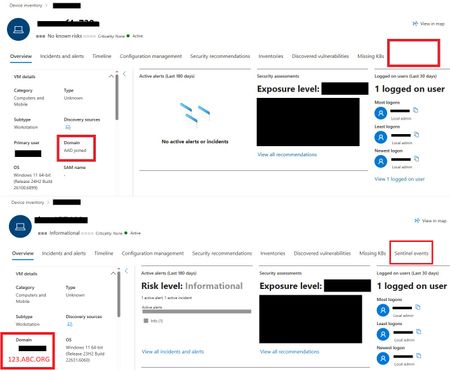
One device is displaying the Sentinel Events Tab, while the other is not. The only difference observed is that one device is Azure AD (AAD) joined and the other is Domain Joined. Could this difference account for the missing Sentinel events data? Any insight would be appreciated!256Views0likes2Comments