microsoft 365 groups
876 TopicsWhat to Expect from the Copilot & AI Sessions at Microsoft 365 Community Conference
AI isn’t a side conversation at the Microsoft 365 Community Conference—it’s at the center of how work is changing. The Copilot, Agents, & Copilot Services Sessions are designed for anyone who wants to move beyond curiosity and into real-world application. This is an opportunity to learn how Copilot works today and how agents extend it. You will also explore how organizations can govern, scale, and operationalize AI across Microsoft 365. Questions these sessions will help answer: How do we move from experimentation to real value? How do we scale AI responsibly? How do agents fit into the way we already work? What skills do teams need next? Business leaders, IT pros, developers, and community practitioners will join sessions to find practical insights into how AI shows up in your daily work, and what it takes to deploy it responsibly and effectively. There will also be a focus on change management, champion programs, and adoption frameworks, because deploying AI isn’t just a technical decision, it’s a cultural one. From Copilot to Agents: The Shift from Assistance to Action One of the biggest themes across the sessions are the evolution from AI as a helper to AI as an active participant in work. If you’re curious about what “agentic AI” actually means in practice, attending these sessions will make it concrete. Join your peers as you learn how Microsoft 365 Copilot is being extended through agents that reason, act, and automate. Learn about agent orchestration across tools like Copilot Studio, SharePoint, Teams, Planner, and Power Platform. Discover new agent patterns including declarative agents, multi-agent configurations, workflows agents, and computer-use agents. In these sessions you’ll explore how agents can: Take action on your behalf and do more than suggest content. Work across apps, data sources, and workflows. Participate alongside humans as part of the team. Real Adoption Stories (Not Just Demos)! Go beyond feature walkthroughs to focus on how organizations are actually adopting Copilot and agents at scale. In these adoption stories you’ll hear: How Microsoft uses Copilot and agents internally as Customer Zero. What adoption looks like across large enterprises, frontline environments, and regulated industries. Lessons learned from early adopters—what worked, what didn’t, and what they’d do differently. Governance, Trust, and Control Are Front and Center AI adoption only works when people trust it—and trust is built through strong governance. Learn how organizations are balancing innovation with oversight and enabling teams to build and use agents while maintaining enterprise-grade guardrails. A significant portion of the Copilot & AI track is dedicated to: Agent lifecycle management. Security, compliance, and data protection. Preventing oversharing and managing risk. Observability and control using tools like Agent 365, Microsoft Purview, and Copilot Control System. This is especially valuable for IT and security leaders who are being asked to “move fast” without compromising standards. Building with Copilot: No-Code, Low-Code, and Pro-Code Paths No matter where you sit on the technical spectrum, there’s a clear path to learning how to build responsibly and effectively. Not everyone builds the same way and organizations need prompt engineering that delivers results. In these sessions you’ll learn how to choose the right agent type for the job, extending Copilot with enterprise data, and designing agents that are production ready—not just impressive in demos. These sessions are tailored to: Business users and makers getting started with Copilot Studio Low-code developers extending Copilot with workflows, connectors, and prompts Pro developers building advanced agents using APIs, MCP servers, Microsoft Graph, SharePoint Embedded, and Azure AI Copilot in the Flow of Everyday Work Rather than abstract AI concepts, you’ll see end-to-end workflows that demonstrate how Copilot helps people save time, reduce manual work, and focus on higher-value outcomes. The emphasis in these sessions is on practical impact, not hype showing how AI is grounded in real work. These sessions will showcase Copilot and agents embedded into: Meetings, chats, and channels. Task and project management. Content creation and knowledge management. Business processes and frontline operations. Why the Copilot and AI track matters If AI is part of your roadmap, or already part of your day, this track will show you how strategy can meet execution. Join us to explore clear mental models for Copilots and agents, see real examples you can apply to your work, and gain a better understanding of what’s now—and what’s coming next. Each year, #M365Con26 is built around one simple idea: bringing our global community together to learn, grow, innovate, and get hands-on with the technologies shaping the next era of work. This year’s conference delivers our most expansive program yet, including: 200+ sessions, workshops, and AMAs, covering Microsoft 365 Copilot, Teams, SharePoint, OneDrive, Copilot Studio, and more. 100+ Microsoft-led sessions, giving you unprecedented access to the people building the apps and AI capabilities you use every day. A keynote lineup featuring Microsoft leaders including Jeff Teper, Charles Lamanna, Vasu Jakkal, Rohan Kumar, Jaime Teevan, and many more. Deep-dive workshops to elevate your skills with real-world scenarios and hands-on learning. Exclusive attendee parties and networking events where you can connect with peers and icons. You’ll also get the chance to meet hundreds of Microsoft executives, engineers, and product leaders—ask questions, share feedback, and help shape the roadmap of the technologies you rely on. Register now, save $150 with code SAVE150 - https://aka.ms/M365ConRegister106Views0likes0CommentsCopilot Pages & Notebooks, Microsoft Loop: IT Admin Update – December 2025
For background, check out last year's Nov 2024 IT Admin update. Here's this year's progress and summary: Many key governance, lifecycle, and compliance features for Loop workspaces and Copilot Pages & Notebooks are now available. Learn more here Key deliverables remaining: M365 Group enforcement for shared Loop workspaces Departed User workflows for Copilot Pages, Notebooks, and the My workspace in Loop Multi-Geo Create in user's PDL for shared Loop workspaces Read the rest for details What’s Delivered (since Nov 2024) Sensitivity Labels for Loop workspaces Learn more here Guest Sharing for Loop (Entra B2B: Jul 2024 | for orgs with Sensitivity Labels: Mar 2025) Learn more here Retention Labels for Loop pages and components Learn more here Admin Management: Membership, ownership, deletion, restoration, search, filter, in SharePoint Embedded Admin Center and PowerShell for containers Learn more here Promote Members to Owners for Loop workspaces Learn more here M365 Group owned workspaces: managed by M365 Groups for workspaces created within Teams channels Learn more here Also, check out the latest from Ignite 2025 on Unlocking Productivity with Copilot Pages. What’s In Progress / Coming Soon Feature / Scenario Status Target Date Notes Enforce Microsoft 365 group-owned Loop workspaces In development Q1 CY'26 - 422725 IT policy to require Microsoft 365 groups for lifecycle management of shared Loop workspaces Multi-Geo Create In development Q4 CY'25 - 421616 All new Loop workspaces saved in creator’s PDL geo Departed User Workflow In development Q1 CY’26 - 421612 Temporary or permanent reassignment of existing user-owned containers, copy capability for data URL to Open Containers in app In development Q1 CY'26 - 421612 Application Redirect URL that opens in app when clicked if user has permissions User-Accessible Recycle Bin In development H1 CY’26 - 421615 Restore deleted Copilot Pages, Notebooks from Microsoft 365 Copilot app, restore deleted workspaces from Loop app Groups as Members (tenant-owned) In development H1 CY’26 Invite Microsoft 365 groups as members to Notebooks and workspaces Graph APIs for management In development H1 CY'26 For organizations with dev teams and in house management tools Read-only members Paused Due to lower overall feedback volumes, this work is paused Target date disclaimer: dates and features are estimates and may change. For the latest status, see the Microsoft 365 Public Roadmap links. Instead of creating and repeating content directly in the post this year, our IT Admin documentation on learn.microsoft.com and the Microsoft 365 Public Roadmap has been updated based on the above. We recognize that lack of some of these capabilities may still block your rollout. Please drop questions in the comments or reach out to us through your account team. We're excited to be enabling the rollouts of Copilot Pages, Notebooks, and Loop workspaces in your organization.2.3KViews1like2CommentsBlock users from creating Public Microsoft Teams groups
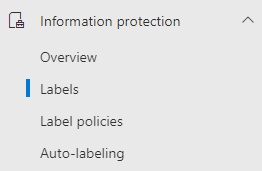
Hi Community, Is already know that Teams creation in Microsoft Teams is related to O365 groups, and if you would like to block users from creating teams, you need to block them from creating O365 groups, right? Ok, right. But what if we only want to block the possibility to create public teams, but still allow them to create private ones? Would that be possible? The answer is YES. And the solution is Microsoft Purview. You'll need to create a new Label/Label Policy under Information Protection. We'll configure the Label for the scope "Site, UnifiedGroup", with group settings as "Private" and applying the label automatically. Then we can configure/publish the Label Policy as mandatory for all the users, some of them or, as in my example, to a DL that contains all the users that I would like to block. Once published, depending on your tenant size, it can take up to 24 hours to propagate. In my test environment it was quite immediate. Now, the users added to the DL that I configured in the Label Policy can still create teams, but not Public ones ( and can't change the label ) as that option is greyed out. The answer is YES. And the solution is Microsoft Purview.18KViews0likes16Comments
Microsoft Feedback Portal account is not working
I changed my Microsoft password a year ago, and it updated everywhere other than the Feedback Portal. As a result, I get an error when I try to login, or do anything on the page. Microsoft account support's suggestion was to login to the Feedback Portal which is insane given I'm having issues accessing it. How can I get this issue resolved? I've got three separate support tickets now and they keep asking me to wait 24 hours to get the issue resolved. Can someone from the Feedback Portal team please contact me to resolve this?" This is what Microsoft Support have said: "understand your frustration, and yes—this is an account‑related issue because the Feedback Portal is still tied to your old alias, which causes login conflicts and forces you out. Your Microsoft account itself signs in correctly, but the Feedback Portal is pulling outdated identity data that you cannot update on your own. Since you cannot access the Portal to submit feedback, directing you back there is not a workable solution. What you need is for Support to escalate this to the internal Identity/Feedback Platform engineering team so they can manually correct the outdated alias mapping on the backend. In this situation, the Feedback Portal and Tech Community teams are the ones who manage and maintain that specific platform. Because the issue appears on the Feedback Portal side—even though your Microsoft account is working normally—only their dedicated team can make the necessary corrections on their end. That’s why we are guiding you to connect with them through the links provided: https://techcommunity.microsoft.com/ or https://feedbackportal.microsoft.com/feedback. They will be able to review the portal‑specific account data and assist you further. I understand why this is frustrating. Since you’re unable to stay signed in to the Feedback Portal, I completely see why posting there isn’t possible for you. However, I do need to be transparent: I’m not able to escalate this issue directly to the Feedback Portal team, as they don’t provide internal escalation channels for us and only accept requests through their own platform. "42Views0likes1CommentSynchronizing Security and Microsoft 365 Group Memberships
An article from 2018 uses the AzureAD and Exchange PowerShell modules to synchronize membership between a security and a Microsoft 365 group. The idea is to enable collaboration for the members of the security group. This version does the work with the Microsoft Graph PowerShell SDK. The code is better and it will work as an Azure Automation runbook, which is always nice. https://office365itpros.com/2026/01/20/group-membership-synchronization/29Views0likes0Comments
No labs for MB-500 in skillable and xtreme labs (for all MB series)
Hi, From past few months, we are unable to find the labs for MB-500. It's causing us trouble to do the trainings. Skillable and Xtreme labs providers are saying there is a problem from Microsoft end only. Kindly advise us when can we get the labs available.74Views0likes1CommentCan't add Viva Engage community calendar to Outlook
We would like to experiment with using the SharePoint Online Web part that allows you to display a group calendar on a SharePoint Online page. Our idea is to use a Viva Engage community as a means to create that group calendar so that the features of a community can also be used for this scenario. I assumed that it worked similarly to Microsoft Teams whereas along as the "HiddenFromExchangeClientsEnabled" property is FALSE for the connected group, that either all community admins/members would see the group calendar show up in Outlook automatically OR you could manually add the calendar in your calendar lists in Outlook. Neither seem to be the case. What's interesting about the group that connects to a Viva Engage community is the ""HiddenFromExchangeClientsEnabled" property is FALSE by default. However, the group calendar does not appear in Outlook. As a community admin, I tried to manually add the calendar and I get an error message "Couldn't add [group]. You may not have permissions". Does anyone know why I'm running into that error and/or why the group mailbox is not showing up in Outlook by default since the property states that it is not hidden? Is it not possible to view Viva Engage group calendars in Outlook? Thanks!1.1KViews1like3Comments
Integrating Microsoft Groups and Team Channels
We have a Shared Inbox called mailto:email address removed for privacy reasons that is shared with me and a member of the company. I'd like to convert this into a Microsoft Group to use it internally in Teams Chat and receive emails in Outlook under the Groups section. I'd also like to create a channel where all the files we want to share are available inside Teams. So, is there a way to integrate a group as a channel in Teams, or is there a different approach?145Views0likes1Comment
My hotmail account is blocked by Microsoft
My Hotmail account has been blocked by Microsoft due to “unusual activity,” and I urgently need help. I’ve attempted recovery multiple times, but the phone verification system is not working and all my requests keep getting rejected with the reason "that information I provided was not sufficient enough". I also have an active Microsoft 365 subscription tied to this email, and I can no longer access any of my Office 365 services. This issue needs immediate resolution.170Views0likes1Comment