microsoft 365 defender
570 Topics
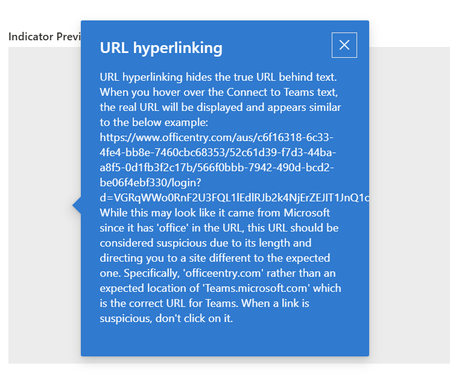
URL Hyperlinking phishing training
Mi using the Defender phishing simulations to perform testing. When creating a positive reinforcement email that goes to the person you have the option to use default text or put in your own text. When I put in my own text I have lines in the text, but when it renders the lines are not displayed so it looks like a bunch of text crammed together. Any idea how to get these lines to display?4Views0likes0CommentsIntroducing Security Dashboard for AI (Now in Public Preview)
AI proliferation in the enterprise, combined with the emergence of AI governance committees and evolving AI regulations, leaves CISOs and AI risk leaders needing a clear view of their AI risks, such as data leaks, model vulnerabilities, misconfigurations, and unethical agent actions across their entire AI estate, spanning AI platforms, apps, and agents. 53% of security professionals say their current AI risk management needs improvement, presenting an opportunity to better identify, assess and manage risk effectively. 1 At the same time, 86% of leaders prefer integrated platforms over fragmented tools, citing better visibility, fewer alerts and improved efficiency. 2 To address these needs, we are excited to announce the Security Dashboard for AI, previously announced at Microsoft Ignite, is available in public preview. This unified dashboard aggregates posture and real-time risk signals from Microsoft Defender, Microsoft Entra, and Microsoft Purview - enabling users to see left-to-right across purpose-built security tools from within a single pane of glass. The dashboard equips CISOs and AI risk leaders with a governance tool to discover agents and AI apps, track AI posture and drift, and correlate risk signals to investigate and act across their entire AI ecosystem. Security teams can continue using the tools they trust while empowering security leaders to govern and collaborate effectively. Gain Unified AI Risk Visibility Consolidating risk signals from across purpose-built tools can simplify AI asset visibility and oversight, increase security teams’ efficiency, and reduce the opportunity for human error. The Security Dashboard for AI provides leaders with unified AI risk visibility by aggregating security, identity, and data risk across Defender, Entra, Purview into a single interactive dashboard experience. The Overview tab of the dashboard provides users with an AI risk scorecard, providing immediate visibility to where there may be risks for security teams to address. It also assesses an organization's implementation of Microsoft security for AI capabilities and provides recommendations for improving AI security posture. The dashboard also features an AI inventory with comprehensive views to support AI assets discovery, risk assessments, and remediation actions for broad coverage of AI agents, models, MCP servers, and applications. The dashboard provides coverage for all Microsoft AI solutions supported by Entra, Defender and Purview—including Microsoft 365 Copilot, Microsoft Copilot Studio agents, and Microsoft Foundry applications and agents—as well as third-party AI models, applications, and agents, such as Google Gemini, OpenAI ChatGPT, and MCP servers. This supports comprehensive visibility and control, regardless of where applications and agents are built. Prioritize Critical Risk with Security Copilots AI-Powered Insights Risk leaders must do more than just recognize existing risks—they also need to determine which ones pose the greatest threat to their business. The dashboard provides a consolidated view of AI-related security risks and leverages Security Copilot’s AI-powered insights to help find the most critical risks within an environment. For example, Security Copilot natural language interaction improves agent discovery and categorization, helping leaders identify unmanaged and shadow AI agents to enhance security posture. Furthermore, Security Copilot allows leaders to investigate AI risks and agent activities through prompt-based exploration, putting them in the driver’s seat for additional risk investigation. Drive Risk Mitigation By streamlining risk mitigation recommendations and automated task delegation, organizations can significantly improve the efficiency of their AI risk management processes. This approach can reduce the potential hidden AI risk and accelerate compliance efforts, helping to ensure that risk mitigation is timely and accurate. To address this, the Security Dashboard for AI evaluates how organizations put Microsoft’s AI security features into practice and offers tailored suggestions to strengthen AI security posture. It leverages Microsoft’s productivity tools for immediate action within the practitioner portal, making it easy for administrators to delegate recommendation tasks to designated users. With the Security Dashboard for AI, CISOs and risk leaders gain a clear, consolidated view of AI risks across agents, apps, and platforms—eliminating fragmented visibility, disconnected posture insights, and governance gaps as AI adoption scales. Best of all, the Security Dashboard for AI is included with eligible Microsoft security products customers already use. If an organization is already using Microsoft security products to secure AI, they are already a Security Dashboard for AI customer. Getting Started Existing Microsoft Security customers can start using Security Dashboard for AI today. It is included when a customer has the Microsoft Security products—Defender, Entra and Purview—with no additional licensing required. To begin using the Security Dashboard for AI, visit http://ai.security.microsoft.com or access the dashboard from the Defender, Entra or Purview portals. Learn more about the Security Dashboard for AI at Microsoft Security MS Learn. 1AuditBoard & Ascend2 Research. The Connected Risk Report: Uniting Teams and Insights to Drive Organizational Resilience. AuditBoard, October 2024. 2Microsoft. 2026 Data Security Index: Unifying Data Protection and AI Innovation. Microsoft Security, 2026
Part 3: Build custom email security reports with Power BI and workbooks in Microsoft Sentinel
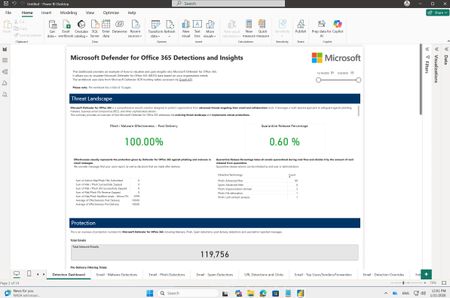
TL;DR: We're releasing a brand-new Power BI template for email security reporting and a major update (v3) to the Microsoft Sentinel workbook. Both solutions share the same rich visuals and insights. Choose Power BI for quick deployment without Sentinel, or the Sentinel workbook for extended data retention and multi-tenant scenarios. Get started in minutes with either option. Introduction Security teams in both small and large organizations track key metrics to make critical security decisions and identify meaningful trends in their organizations. While Microsoft Defender for Office 365 provides rich, built-in reporting capabilities, many security teams need custom reporting solutions to create dedicated views, combine multiple data sources, and derive deeper insights tailored to their unique requirements. Earlier last year (Part 1 and Part 2) we shared examples of how you can use workbooks in Microsoft Sentinel to build a custom email security insights dashboard for Microsoft Defender for Office 365. Today, we are excited to announce the release of a new Power BI template file for Microsoft Defender for Office 365 customers, along with an updated version of the Microsoft Defender for Office 365 Detections and Insights workbook in Microsoft Sentinel. Both solutions share the same visual design and structure, giving you a consistent experience regardless of which platform you choose. Power BI template file - Microsoft Defender for Office 365 Detections and Insights: Microsoft Sentinel workbook - Microsoft Defender for Office 365 Detections and Insights: NEW: Power BI template file for Microsoft Defender for Office 365 Detections and Insights This custom reporting template file utilizes Power BI and Microsoft Defender XDR Advanced Hunting through the Microsoft Graph security API. It is designed for Microsoft Defender for Office 365 customers who have access to Advanced Hunting but are not using Microsoft Sentinel. Advanced Hunting data in Microsoft Defender for Office 365 tables is available for up to 30 days. The reporting template uses these same data tables to visualize insights into an organization's email security, including protection, detection, and response metrics provided by Microsoft Defender for Office 365. Note: If data retention beyond 30 days is required, customers can use the Microsoft Defender for Office 365 Detections and Insights workbook in Microsoft Sentinel. You can find the new .pbit template file and detailed instructions on how to set up and use it in the unified Microsoft Sentinel and Microsoft 365 Defender GitHub repository. This new Power BI template uses the same visuals and structure as the Microsoft Defender for Office 365 Detections and Insights workbook in Microsoft Sentinel, providing an easy way to gain deep email security insights across a wide range of use cases. UPDATED: Microsoft Defender for Office 365 Detections and Insights workbook in Microsoft Sentinel We are excited to announce the release of a new version (3.0.0) of the Microsoft Defender for Office 365 Detections and Insights workbook in Microsoft Sentinel. The workbook is part of the Microsoft Defender XDR solution in Microsoft Sentinel and can be installed and started to use with a few simple clicks. In this new release we incorporated feedback we have received from many customers in the past few months to add new visuals, updated existing visuals and add insights focusing on security operations. What’s New Here are some notable changes and new capabilities available in the updated workbook template. Improved structure: Headings and grouped insights have been added to tabs for easier navigation and understanding of metrics. Contextual explanations: Each tab, section, and visual now includes descriptions to help users interpret insights effectively. Drill-down capability: A single “Open query link” action allows users to view the underlying KQL query for each visual, enabling quick investigation and hunting by modifying conditions or removing summaries to access raw data. Detection Dashboard tab enhancements: Added an example Effectiveness metric, updated visuals to focus on overall Microsoft Defender for Office 365 protection values, and introduced new sections for Emerging Threats and Microsoft 365 Secure Email Gateway Performance. New Security Operations Center (SOC) Insights tab: Provides operational metrics such as Security Incident Response, Investigation, and Response Actions for SOC teams. Advanced threat insights: Includes new LLM-based content analysis detections and threat classification insights on the Emails – Phish Detections tab. External forwarding insights: Added deep visibility into Inbox rules and SMTP forwarding in Outlook, including destination details to assess potential data leakage risks. Geo-location improvements: Sender IPv4 insights now include top countries for better geographic context for each Threat types (Malware, Spam, Phish). Enhanced top attacked users and top senders: Added TotalEmailCount and Bad_Traffic_Percentage for richer context in top attacked users and senders charts. Expanded URL click insights: URL click-based threat detection visuals now include Microsoft 365 Copilot as a workload. How to use the workbook across multiple tenants If you manage multiple environments with Microsoft Sentinel — or you are an MSSP (Managed Security Service Provider) working across multiple customer tenants — you can also use the workbook in multi‑tenant scenarios. Once the required configuration is in place, you can change the Subscription and Workspace parameters in the workbook to be multi select and load data from one or multiple tenants. This enables to see deep email security insights in multi‑tenant environments, including: Aggregated multi‑tenant view: You can view aggregated insights across tenants in a single workbook view. By multi‑selecting tenants in the Subscription and Workspace parameters, the workbook automatically loads and combines data from all selected environments for all visuals on all tabs. Side‑by-side‑ comparison: For example, you can compare phishing detection trends or top attacked users across two or more tenants simply by opening the workbook in two browser windows placed side by side. Note: For the multiselect option‑ to work in the current workbook version, you need to manually adjust the Subscription and Workspace parameters. This configuration is planned to become the default in the next release of the workbook. Until then, you can simply apply this change using the workbook’s Edit mode. How to get the updated workbook version The latest version of the Microsoft Defender for Office 365 Detections and Insights workbook is available as part of the Microsoft Defender XDR solution in the Microsoft Sentinel - Content hub. Version 3.0.13 of the solution has the updated workbook template. If you already have the Microsoft Defender XDR solution deployed, version 3.0.13 is available now as an update. After you install the update, you will have the new workbook template available to use. Note: If you had the workbook saved from a previous template version, make sure you delete the old workbook and use the save button on the new template to recreate a new local version with the latest updates. If you install the Microsoft Defender XDR solution for the first time, you are deploying the latest version and will have the updated template ready to use. How to edit and share the workbook with others You can customize each visual easily. Simply edit the workbook after saving, then adjust the underlying KQL query, change the type of the visual, or create new insights. More information: Visualize your data using workbooks in Microsoft Sentinel | Microsoft Learn Granting other users access to the workbook also possible, see the Manage Access to Microsoft Sentinel Workbooks with Lower Scoped RBAC on the Microsoft Sentinel Blog. Do you have feedback related to reporting in Microsoft Defender for Office 365? You can provide direct feedback via filling the form: aka.ms/mdoreportingfeedback Do you have questions or feedback about Microsoft Defender for Office 365? Engage with the community and Microsoft experts in the Defender for Office 365 forum. More information Integrate Microsoft Defender XDR with Microsoft Sentinel Learn more about Microsoft Sentinel workbooks Learn more about Microsoft Defender XDR
Unified detection rule management
Hi, I attended the webinar yesterday regarding the new unified custom detection rules in Defender XDR. I was wondering about the management of a library of rules. As with any SOC, our solution has a library of custom rules which we manage in a release cycle for a number of clients in different Tenants. To avoid having to manage rules individually we use the JSON approach, importing the library so it will update rules that we need to tune. Currently I'm not seeing an option to import unified detection rules in Defender XDR via JSON. Is that a feature that will be added? Thanks Ziv117Views0likes1Comment
Defender for Identity health issues - Not Closing
We have old issues and they're not being "Closed" as reported. Are we missing something or is this "Microsoft Defender for Identity" Health Issues process broken? Thanks! Closed: A health issue is automatically marked as Closed when Microsoft Defender for Identity detects that the underlying issue is resolved. If you have the Azure ATP (workspace name) Administrator role, you can also manually close a health issue.265Views0likes2CommentsLearn more about Microsoft Security Communities.
In the last five years, Microsoft has increased the emphasis on community programs – specifically within the security, compliance, and management space. These communities fall into two categories: Public and Private (or NDA only). In this blog, we will share a breakdown of each community and how to join.user-reported phishing emails
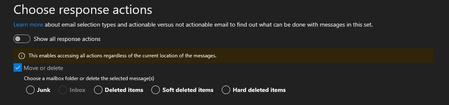
Dear Community I have a technical question regarding user-reported emails. In Defender, under “Action and Submissions” -> “Submissions,” I can see the emails that users have reported under the “user reported” option. There, we have the option to analyze these emails and mark them as “no threats found,” “phishing,” or “spam.” The user is then informed. Question: Do these reported emails remain in the user's inbox when they report them? If not, do we have the option to return these reported emails to the user's inbox with the “No threats found” action? Because I don't see this option. In another tenant, under “Choose response Action,” I see “move or delete,” but the “inbox” option is grayed out. Why is that? Thank you very much!
Very High Increase in CPU activity after Update Microsoft Defender for Identity sensor
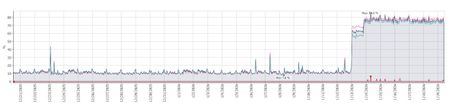
All our servers that are running this sensor (DCs, Certificate servers, AD Connect servers) showed a massive increase in average CPU utilization from virtually straight after the sensor was automatically updated to version 2.254.19112.470 (late night UK time). Two of our DCs are sitting on 100% CPU today and we can't find anything to resolve it. Has anyone else seen this since running this version and if so what actions did you take ? How would we go back to rolling back to the previous version when it appears it will just be automatically updated soon after ? This is our monitoring of CPU utilization from one of the majorly affected DCs but every server with the sensor had the exact same graph showing a major increase in CPU at the same date and time i.e. just after the sensor was updated.Solved727Views4likes7Comments