msignite
10 TopicsGenerally Available: Azure SQL Managed Instance Next-gen General Purpose
Overview Next-gen General Purpose is the evolution of General Purpose service tier that brings significantly improved performance and scalability to power up your existing Azure SQL Managed Instance fleet and helps you bring more mission-critical SQL workloads to Azure. We are happy to announce that Next-gen General Purpose is now Generally Available (GA) delivering even more scalability, flexibility, and value for organizations looking to modernize their data platform in a cost-effective way. The new #SQLMINextGen General Purpose tier delivers a built-in performance upgrade available to all customers at no extra cost. If you are an existing SQL MI General Purpose user, you get faster I/O, higher database density, and expanded storage - automatically. Summary Table: Key Improvements Capability Current GP Next-gen GP Improvement Average I/O Latency 5-10 ms 3-4 ms 2x lower Max Data IOPS 30-50k 80k 60% better Max Storage 16 TB 32 TB 2x better Max Databases/Instance 100 500 5x better Max vCores 80 128 40% better But that’s just the beginning. The new configuration sliders for additional IOPS and memory provide enhanced flexibility to tailor performance according to your requirements. Whether you require more resources for your application or seek to optimize resource utilization, you can adjust your instance settings to maximize efficiency and output. This release isn’t just about speed - It’s about giving you improved performance where it matters, and mechanisms to go further when you need them. Customer story - A recent customer case highlights how Hexure reduced processing time by up to 97.2% using Azure SQL Managed Instance on Next-gen General Purpose. What’s new in Next-gen General Purpose (Nov 2025)? 1. Improved baseline performance with the latest storage tech Azure SQL Managed Instance is built on Intel® Xeon® processors, ensuring a strong foundation for enterprise workloads. With the next-generation General Purpose tier, we’ve paired Intel’s proven compute power with advanced storage technology to deliver faster performance, greater scalability, and enhanced flexibility - helping you run more efficiently and adapt to growing business needs. The SQL Managed Instance General Purpose tier is designed with full separation of compute and storage layers. The Classic GP version uses premium page blobs for the storage layer, while the Next-generation GP tier has transitioned to Azure’s latest storage solution, Elastic SAN. Azure Elastic SAN is a cloud-native storage service that offers high performance and excellent scalability, making it a perfect fit for the storage layer of a data-intensive PaaS service like Azure SQL Managed Instance. Simplified Performance Management With ESAN as the storage layer, the performance quotas for the Next-gen General Purpose tier are no longer enforced for each database file. The entire performance quota for the instance is shared across all the database files, making performance management much easier (one fewer thing to worry about). This adjustment brings the General Purpose tier into alignment with the Business Critical service tier experience. 2. Resource flexibility and cost optimization The GA of Next-gen General Purpose comes together with the GA of a transformative memory slider, enabling up to 49 memory configurations per instance. This lets you right-size workloads for both performance and cost. Memory is billed only for the additional amount beyond the default allocation. Users can independently configure vCores, memory, and IOPS for optimal efficiency. To learn more about the new option for configuring additional memory, check the article: Unlocking More Power with Flexible Memory in Azure SQL Managed Instance. 3. Enhanced resource elasticity through decoupled compute and storage scaling operations With Next-gen GP, both storage and IOPS can be resized independently of the compute infrastructure, and these changes now typically finish within five minutes - a process known as an in-place upgrade. There are three distinct types of storage upgrade experiences depending on the kind of storage upgrade performed and whether failover occurs. In-place update: same storage (no data copy), same compute (no failover) Storage re-attach: Same storage (no data copy), changed compute (with failover) Data copy: Changed storage (data copy), changed compute (with failover) The following matrix describes user experience with management operations: Operation Data copying Failover Storage upgrade type IOPS scaling No No In-place Storage scaling* No* No In-place vCores scaling No Yes** Re-attach Memory scaling No Yes** Re-attach Maintenance Window change No Yes** Re-attach Hardware change No Yes** Re-attach Update policy change Yes Yes Data copy * If scale down is >5.5TB, seeding ** In case of update operations that do not require seeding and are not completed in place (examples are scaling vCores, scaling memory, changing hardware or maintenance window), failover duration of databases on the Next-gen General Purpose service tier scales with the number of databases, up to 10 minutes. While the instance becomes available after 2 minutes, some databases might be available after a delay. Failover duration is measured from the moment when the first database goes offline, until the moment when the last database comes online. Furthermore, resizing vCores and memory is now 50% faster following the introduction of the Faster scaling operations release. No matter if you have end-of-month peak periods, or there are ups and downs of usage during the weekdays and the weekend, with fast and reliable management operations, you can run multiple configurations over your instance and respond to peak usage periods in a cost-effective way. 4. Reserved instance (RI) pricing With Azure Reservations, you can commit to using Azure SQL resources for either one or three years, which lets you benefit from substantial discounts on compute costs. When purchasing a reservation, you'll need to choose the Azure region, deployment type, performance tier, and reservation term. Reservations are only available for products that have reached general availability (GA), and with this update, next-generation GP instances now qualify as well. What's even better is that classic and next-gen GP share the same SKU, just with different remote storage types. This means any reservations you've purchased automatically apply to Next-gen GP, whether you're upgrading an existing classic GP instance or creating a new one. What’s Next? The product group has received considerable positive feedback and welcomes continued input. The initial release will not include zonal redundancy; however, efforts are underway to address this limitation. Next-generation General Purpose (GP) represents the future of the service tier, and all existing classic GP instances will be upgraded accordingly. Once upgrade plans are finalized, we will provide timely communication regarding the announcement. Conclusion Now in GA, Next-gen General Purpose sets a new standard for cloud database performance and flexibility. Whether you’re modernizing legacy applications, consolidating workloads, or building for the future, these enhancements put more power, scalability, and control in your hands - without breaking the bank. If you haven’t already, try out the Next-gen General Purpose capabilities for free with Azure SQL Managed Instance free offer. For users operating SQL Managed Instance on the General Purpose tier, it is recommended to consider upgrading existing instances to leverage the advantages of next-gen upgrade – for free. Welcome to #SQLMINextGen. Boosted by default. Tuned by you. Learn more What is Azure SQL Managed Instance Try Azure SQL Managed Instance for free Next-gen General Purpose – official documentation Analyzing the Economic Benefits of Microsoft Azure SQL Managed Instance How 3 customers are driving change with migration to Azure SQL Accelerate SQL Server Migration to Azure with Azure Arc3KViews5likes2Comments2025 Year in Review: What’s new across SQL Server, Azure SQL and SQL database in Fabric
What a year 2025 has been for SQL! ICYMI and are looking for some hype, might I recommend you start with this blog from Priya Sathy, the product leader for all of SQL at Microsoft: One consistent SQL: The launchpad from legacy to innovation. In this blog post, Priya explains how we have developed and continue to develop one consistent SQL which “unifies your data estate, bringing platform consistency, performance at scale, advanced security, and AI-ready tools together in one seamless experience and creates one home for your SQL workloads in the era of AI.” For the FIFTH(!!) year in a row (my heart is warm with the number, I love SQL and #SQLfamily, and time is flying), I am sharing my annual Year in Review blog with all the SQL Server, Azure SQL and SQL database in Fabric news this year. Of course, you can catch weekly episodes related to what’s new and diving deeper on the Azure SQL YouTube channel at aka.ms/AzureSQLYT. This year, in addition to Data Exposed (52 new episodes and over 70K views!). We saw many new series related to areas like GitHub Copilot, SSMS, VS Code, and Azure SQL Managed Instance land in the channel, in addition to Data Exposed. Microsoft Ignite announcements Of course, if you’re looking for the latest announcements from Microsoft Ignite, Bob Ward and I compiled this slide of highlights. Comprehensive list of 2025 updates You can read this blog (or use AI to reference it later) to get all the updates and references from the year (so much happened at Ignite but before it too!). Here’s all the updates from the year: SQL Server, Arc-enabled SQL Server, and SQL Server on Azure VMs Generally Available SQL Server 2025 is Now Generally Available Backup/Restore capabilities in SQL Server 2025 SQL Server 2025: Deeply Integrated and Feature-rich on Linux Resource Governor for Standard Edition Reimagining Data Excellence: SQL Server 2025 Accelerated by Pure Storage Security Update for SQL Server 2022 RTM CU21 Cumulative Update #22 for SQL Server 2022 RTM Backup/Restore enhancements in SQL Server 2025 Unified configuration and governance Expanding Azure Arc for Hybrid and Multicloud Management US Government Virginia region support I/O Analysis for SQL Server on Azure VMs NVIDIA Nemotron RAG Integration Preview Azure Arc resource discovery in Azure Migrate Multicloud connector support for Google Cloud Migrations Generally Available SQL Server migration in Azure Arc Azure Database Migration Service Hub Experience SQL Server Migration Assistant (SSMA) v10.3, including Db2 SKU recommendation (preview) Database Migration Service: PowerShell, Azure CLI, and Python SDK SQL Server Migration Assistant (SSMA) v10.4, including SQL Server 2025 support, Oracle conversion Copilot Schema migration support in Azure Database Migration Service Preview Azure Arc resource discovery in Azure Migrate Azure SQL Managed Instance Generally Available Next-gen General Purpose Service Tier Improved connectivity types in Azure SQL Managed Instance Improved resiliency with zone redundancy for general purpose, improved log rate for business critical Apply reservation discount for zone redundant Business Critical databases Free offer Windows principals use to simplify migrations Data exfiltration improvements Preview Windows Authentication for Cloud-Native Identities New update policy for Azure SQL Managed Instance Azure SQL Database Generally Available LTR Backup Immutability Free Azure SQL Database Offer updates Move to Hyperscale while preserving existing geo-replication or failover group settings Improve redirect connection type to require only port 1433 and promote to default Bigint support in DATEADD for extended range calculations Restart your database from the Azure portal Replication lag metric Enhanced server audit and server audit action groups Read-access geo-zone redundant storage (RA-GZRS) as a backup storage type for non-Hyperscale Improved cutover experience to Hyperscale SLA-compliant availability metric Use database shrink to reduced allocated space for Hyperscale databases Identify causes of auto-resuming serverless workloads Preview Multiple geo-replicas for Azure SQL Hyperscale Backup immutability for Azure SQL Database LTR backups Updates across SQL Server, Azure SQL and Fabric SQL database Generally Available Regex Support and fuzzy-string matching Geo-replication and Transparent Data Encryption key management Optimized locking v2 Azure SQL hub in the Azure portal UNISTR intrinsic function and ANSI SQL concatenation operator (||) New vector data type JSON index JSON data type and aggregates Preview Stream data to Azure Event Hubs with Change Event Streaming (Azure SQL DB Public Preview/Fabric SQL Private Preview) DiskANN vector indexing SQL database in Microsoft Fabric and Mirroring Generally Available Fabric Databases SQL database in Fabric Unlocking Enterprise ready SQL database in Microsoft Fabric: ALM improvements, Backup customizations and retention, Copilot enhancements & more update details Mirroring for SQL Server Mirroring for Azure SQL Managed Instance in Microsoft Fabric Connect to your SQL database in Fabric using Python Notebook Updates to database development tools for SQL database in Fabric Using Fast Copy for data ingestion Copilot for SQL analytics endpoint Any updates across Microsoft Fabric that apply to the SQL analytics endpoint are generally supported in mirrored databases and Fabric SQL databases via the SQL analytics endpoint. This includes many exciting areas, like Data Agents. See the Fabric blog to get inspired Preview Data virtualization support Workspace level Private Link support (Private Preview) Customer-managed keys in Fabric SQL Database Auditing for Fabric SQL Database Fabric CLI: Create a SQL database in Fabric SQL database workload in Fabric with Terraform Spark Connector for SQL databases Tools and developer Blog to Read: How the Microsoft SQL team is investing in SQL tools and experiences SQL Server Management Studio (SSMS) 22.1 GitHub Copilot Walkthrough (Preview): Guided onboarding from the Copilot badge. Copilot right-click actions (Preview): Document, Explain, Fix, and Optimize. Bring your own model (BYOM) support in Copilot (Preview). Copilot performance: improved response time after the first prompt in a thread. Fixes: addressed Copilot “Run ValidateGeneratedTSQL” loop and other stability issues. SQL Server Management Studio (SSMS) 22 Support for SQL Server 2025 Modern connection dialog as default + Fabric browsing on the Browse tab. Windows Arm64 support (initial) for core scenarios (connect + query). GitHub Copilot in SSMS (Preview) is available via the AI Assistance workload in the VS Installer. T-SQL/UX improvements: open execution plan in new tab, JSON viewer, results grid zooms. New index support: create JSON and Vector indexes from Object Explorer SQL Server Management Studio (SSMS) 21 Installation and automatic updates via Visual Studio Installer. Workloads/components model: smaller footprint + customizable install. Git integration is available via the Code tools workload. Modern connection dialog experience (Preview). New customization options (e.g., vertical tabs, tab coloring, results in grid NULL styling). Always Encrypted Assessment in the Always Encrypted Wizard. Migration assistance via the Hybrid and Migration workload. mssql-python Driver ODBC: Microsoft ODBC Driver 18.5.2.1 for SQL Server OLE DB: Microsoft OLE DB Driver 19.4.1 for SQL Server JDBC (latest train): Microsoft JDBC Driver for SQL Server 13.2.1 Also updated in 2025: supported JDBC branches received multiple servicing updates (including Oct 13, 2025, security fixes). See the same JDBC release notes for the full list. .NET: Microsoft.Data.SqlClient 6.0.2 Related - some notes on drivers released/updated in 2025 (recap): MSSQL extension for VS Code 1.37.0 GitHub Copilot integration : Ask/Agent modes, slash commands, onboarding. Edit Data : interactive grid for editing table data (requires mssql.enableExperimentalFeatures: true). Data-tier Application dialog : deploy/extract .dacpac and import/export .bacpac (requires mssql.enableExperimentalFeatures: true). Publish SQL Project dialog : deploy .sqlproj to an existing DB or a local SQL dev container. Added “What’s New” panel + improved query results grid stability/accessibility. MSSQL extension for VS Code 1.36.0 Fabric connectivity : browse Fabric workspaces and connect to SQL DBs / SQL analytics endpoints. SQL database in Fabric provisioning : create Fabric SQL databases from Deployments. GitHub Copilot slash commands : connection, schema exploration, query tasks. Schema Compare extensibility: new run command for external extensions/SQL Projects (incl. Update Project from Database support). Query results in performance/reliability improvements (incremental streaming, fewer freezes, better settings handling). SqlPackage 170.0.94 release notes (April 2025) Vector: support for vector data type in Azure SQL Database target platform (import/export/extract/deploy/build). SQL projects: default compatibility level for Azure SQL Database and SQL database in Fabric set to 170. Parquet: expanded supported types (including json, xml, and vector) + bcp fallback for unsupported types. Extract: unpack a .dacpac to a folder via /Action:Extract. Platform: Remove .NET 6 support; .NET Framework build updated to 4.7.2. SqlPackage 170.1.61 release notes (July 2025) Data virtualization (Azure SQL DB): added support for data virtualization objects in import/export/extract/publish. Deployment: new publishing properties /p:IgnorePreDeployScript and /p:IgnorePostDeployScript. Permissions: support for ALTER ANY EXTERNAL MIRROR (Azure SQL DB + SQL database in Fabric) for exporting mirrored tables. SQL Server 2025 permissions: support for CREATE ANY EXTERNAL MODEL, ALTER ANY EXTERNAL MODEL, and ALTER ANY INFORMATION PROTECTION. Fixes: improved Fabric compatibility (e.g., avoid deploying unsupported server objects; fixes for Fabric extraction scripting). SqlPackage 170.2.70 release notes (October 2025) External models: support for external models in Azure SQL Database and SQL Server 2025. AI functions: support for AI_GENERATE_CHUNKS and AI_GENERATE_EMBEDDINGS. JSON: support for JSON indexes + functions JSON_ARRAYAGG, JSON_OBJECTAGG, JSON_QUERY. Vector: vector indexes + VECTOR_SEARCH and expanded vector support for SQL Server 2025. Regex: support for REGEXP_LIKE. Microsoft.Build.Sql 1.0.0 (SQL database projects SDK) Breaking: .NET 8 SDK required for dotnet build (Visual Studio build unchanged). Globalization support. Improved SDK/Templates docs (more detailed README + release notes links). Code analyzer template defaults DevelopmentDependency. Build validation: check for duplicate build items. Microsoft.Build.Sql 2.0.0 (SQL database projects SDK) Added SQL Server 2025 target platform (Sql170DatabaseSchemaProvider). Updated DacFx version to 170.2.70. .NET SDK targets imported by default (includes newer .NET build features/fixes; avoids full rebuilds with no changes Azure Data Studio retirement announcement (retirement February 28, 2026) Anna’s Pick of the Month Year It’s hard to pick a highlight representative of the whole year, so I’ll take the cheesy way out: people. I get to work with great people working on a great set of products for great people (like you) solving real world problems for people. So, thank YOU and you’re my pick of the year 🧀 Until next time… That’s it for now! We release new episodes on Thursdays and new #MVPTuesday episodes on the last Tuesday of every month at aka.ms/azuresqlyt. The team has been producing a lot more video content outside of Data Exposed, which you can find at that link too! Having trouble keeping up? Be sure to follow us on twitter to get the latest updates on everything, @AzureSQL. And if you lose this blog, just remember aka.ms/newsupdate2025 We hope to see you next YEAR, on Data Exposed! --Anna and Marisa903Views1like1CommentIgnite 2025: Advancing Azure Database for MySQL with Powerful New Capabilities
At Ignite 2025, we’re introducing a wave of powerful new capabilities for Azure Database for MySQL, designed to help organizations modernize, scale, and innovate faster than ever before. From enhanced high availability and seamless serverless integrations to AI-powered insights and greater flexibility for developers, these advancements reflect our commitment to delivering a resilient, intelligent data platform. Join us as we unveil what’s next for MySQL on Azure - and discover how industry leaders are already building the future with confidence. Enhanced Failover Performance with Dedicated SLB for High-Availability Servers We’re excited to announce the General Availability of Dedicated Standard Load Balancer (SLB) for HA-enabled servers in Azure Database for MySQL. This enhancement introduces a dedicated SLB to High Availability configurations for servers created with public access or private link. By managing the MySQL data traffic path, SLB eliminates the need for DNS updates during failover, significantly reducing failover time. Previously, failover relied on DNS changes, which caused delays due to DNS TTL (30 seconds) and client-side DNS caching. What’s new with GA: The FQDN consistently resolves to the SLB IP address before and after failover. Load-balancing rules automatically route traffic to the active node. Removes DNS cache dependency, delivering faster failovers. Note: This feature is not supported for servers using private access with VNet integration. Learn more Build serverless, event-driven apps at scale – now GA with Trigger Bindings for Azure Functions We’re excited to announce the General Availability of Azure Database for MySQL Trigger bindings for Azure Functions, completing the full suite of Input, Output, and Trigger capabilities. This feature lets you build real-time, event-driven applications by automatically invoking Azure Functions when MySQL table rows are created or updated - eliminating custom polling and boilerplate code. With native support across multiple languages, developers can now deliver responsive, serverless solutions that scale effortlessly and accelerate innovation. Learn more Enable AI agents to query Azure Database for MySQL using Azure MCP Server We’re excited to announce that Azure MCP Server now supports Azure Database for MySQL, enabling AI agents to query and manage MySQL data using natural language through the open Model Context Protocol (MCP). Instead of writing SQL, you can simply ask questions like “Show the number of new users signed up in the last week in appdb.users grouped by day.”, all secured with Microsoft Entra authentication for enterprise-grade security. This integration delivers a unified, secure interface for building intelligent, context-aware workflows across Azure services - accelerating insights and automation. Learn more Greater networking flexibility with Custom Port Support Custom port support for Azure Database for MySQL is now generally available, giving organizations the flexibility to configure a custom port (between 25001 and 26000) during new server creation. This enhancement streamlines integration with legacy applications, supports strict network security policies, and helps avoid port conflicts in complex environments. Supported across all network configurations - including public access, private access, and Private Link - custom port provisioning ensures every new MySQL server can be tailored to your needs. The managed experience remains seamless, with all administrative capabilities and integrations working as before. Learn more Streamline migrations and compatibility with Lower Case Table Names support Azure Database for MySQL now supports configuring lower_case_table_names server parameter during initial server creation for MySQL 8.0 and above, ensuring seamless alignment with your organization’s naming conventions. This setting is automatically inherited for restores and replicas, and cannot be modified. Key Benefits: Simplifies migrations by aligning naming conventions and reducing complexity. Enhances compatibility with legacy systems that depend on case-insensitive table names. Minimizes support dependency, enabling faster and smoother onboarding. Learn more Unlock New Capabilities with Private Preview Features at Ignite 2025 We’re excited to announce that you can now explore two powerful capabilities in early access - Reader Endpoint for seamless read scaling and Server Rename for greater flexibility in server management. Scale reads effortlessly with Reader Endpoint (Private Preview) We’re excited to announce that the Reader Endpoint feature for Azure Database for MySQL is now ready for private preview. Reader Endpoint provides a dedicated read-only endpoint for read replicas, enabling automatic connection-based load balancing of read-only traffic across multiple replicas. This simplifies application architecture by offering a single endpoint for read operations, improving scalability and fault tolerance. Azure Database for MySQL supports up to 10 read replicas per primary server. By routing read-only traffic through the reader endpoint, application teams can efficiently manage connections and optimize performance without handling individual replica endpoints. Reader endpoints continuously monitor the health of replicas and automatically exclude any replica that exceeds the configured replication lag threshold or becomes unavailable. To enroll in the preview, please submit your details using this form. Limitations During Private Preview: Only performance-based routing is supported in this preview. Certain settings such as routing method and the option to attach new replicas to the reader endpoint can only be configured at creation time. Only one reader endpoint can be created per replica group. Including the primary server as a fallback for read traffic when no replicas are available is not supported in this preview. Get flexibility in server management with Server Rename (Private Preview) We’re excited to announce the Private Preview of Server Rename for Azure Database for MySQL. This feature lets you update the name of an existing MySQL server without recreating it, migrating data, or disrupting applications - making it easier to adopt clear, consistent naming. It provides a near zero-downtime path to a new hostname of the server. To enroll in the preview, please submit your details using this form. Limitations During Private Preview: Primary server with read replicas: Renaming a primary server that has read replicas keeps replication healthy. However, the SHOW SLAVE STATUS output on the replicas will still display the old primary server's name. This is a display inconsistency only and does not affect replication. Renaming is currently unsupported for servers using Customer Managed Key (CMK) encryption or Microsoft Entra Authentication (Entra Id). Real-World Success: Azure Database for MySQL Powers Resilient Applications at Scale Factorial Factorial, a leading HR software provider, uses Azure Database for MySQL alongside Azure Kubernetes Service to deliver secure, scalable HR solutions for thousands of businesses worldwide. By leveraging Azure Database for MySQL’s reliability and seamless integration with cloud-native technologies, Factorial ensures high availability and rapid innovation for its customers. Learn more YES (Youth Employment Service) South Africa’s largest youth employment initiative, YES, operates at national scale by leveraging Azure Database for MySQL to deliver a resilient, centralized platform for real-time job matching, learning management, and career services - connecting thousands of young people and employers, and helping nearly 45 percent of participants secure permanent roles within six months. Learn more Nasdaq At Ignite 2025, Nasdaq will showcase how it uses Azure Database for MySQL - alongside Azure Database for PostgreSQL and other Azure products - to power a secure, resilient architecture that safeguards confidential data while unlocking new agentic AI capabilities. Learn more These examples demonstrate that Azure Database for MySQL is trusted by industry leaders to build resilient, scalable applications - empowering organizations to innovate and grow with confidence. We Value Your Feedback Azure Database for MySQL is built for scale, resilience, and performance - ready to support your most demanding workloads. With every update, we’re focused on simplifying development, migration, and management so you can build with confidence. Explore the latest features and enhancements to see how Azure Database for MySQL meets your data needs today and in the future. We welcome your feedback and invite you to share your experiences or suggestions at AskAzureDBforMySQL@service.microsoft.com Stay up to date by visiting What's new in Azure Database for MySQL, and follow us on YouTube | LinkedIn | X for ongoing updates. Thank you for choosing Azure Database for MySQL!417Views2likes0Comments
The new frontier of data for the next generation of innovation
A decade ago, an agent that could gather insights from data, trigger actions and make intelligent decisions was science fiction. Today, that kind of intelligent technology is not only possible, but it’s becoming a business requirement. Enterprises must find new and meaningful ways to propel AI innovation that meets customer and business needs. The next generation of innovation requires a data foundation that is unified, secure, and addresses persistent challenges of latency, rigidity, and complexity, while infusing data with AI to optimize performance and accelerate development. This week at Ignite, Microsoft is taking a bold step toward making a future-ready data foundation a reality, unveiling innovations that deliver performance, scale and flexibility, and bridge the gap between analytical intelligence and operational agility. The innovations we’re announcing are catalysts for businesses to modernize faster and build the intelligent applications of tomorrow. By leveraging a unified data strategy on Azure, BMW is much closer to their goal of predictive maintenance for vehicles and smart factories. With these releases announced today at Ignite, Azure is poised to deliver a resilient, scalable, and AI-integrated data foundation that will help you unlock innovation at scale. Modeling a future-proofed data platform A future-proofed data platform should deliver performance at scale, flexibility and openness, unified operations and analytics, streamlined management, and seamless integration with developer tools, all backed by security and trust. The innovations we’re announcing reflect these priorities. Performance at any scale We’re releasing performance enhancements across the database portfolio that let users easily scale performance to support intelligent agents and applications that can stand apart in any industry. These new features enable applications backed by Microsoft databases to seamlessly handle massive throughput and global user loads without performance bottlenecks. Introducing Azure HorizonDB We’re excited to unveil Azure HorizonDB in private preview, a new fully managed PostgreSQL service built for performance and AI workloads that will offer scaling up to 192 virtual cores and 128 TB of storage. Azure HorizonDB is built for business and engineered for developers. Ultra-low latency, high read scale, built in AI, and deep integration with developer tools including GitHub Copilot delivers performance, resilience and simplicity at any scale. With HorizonDB, teams can: Build AI apps that perform at scale with advanced DiskANN vector indexing, pre-provisioned AI models, semantic search, and unified support for relational and graph data. Accelerate app development with built-in extensions, including the PostgreSQL extension for Visual Studio (VS) Code integrated with GitHub Copilot. GitHub Copilot in VS Code is context aware of PostgreSQL and includes one-click performance debugging. Unlock data insights with deep integrations with Microsoft Fabric and Microsoft Foundry. Expect reliability with a service that is enterprise ready on day one, integrated with Entra ID, Private Link networking, and Azure Defender for Cloud. Perfecting performance across the portfolio We’re also addressing cloud-ready performance and scaling needs in Azure Database for PostgreSQL and Azure SQL. Elastic Clusters for Azure Database for PostgreSQL, now generally available, enables developers to easily scale a single database across a cluster of read and write nodes using a simple SQL command. Additionally, new v6 SKUs, which support up to 192 vCores, and general availability of PostgreSQL 18 gives Azure Database for PostgreSQL users a potent performance boost. With the release of the next-generation Azure SQL Managed Instance, we’re helping you modernize SQL Server in the cloud with better performance and easier migration. You’ll now have access to the latest technology, unlocking better performance and scale with more storage and database capacity. Flexible compute, storage and memory options also enhance the ROI of migration and offer broad compatibility for unique workload demands. Multi-modal, flexible and open A comprehensive data strategy isn’t one-size fits all. Openness and flexibility are core tenants of a future-ready data platform. Flexibility means you get to choose the deployment model that works for your business, whether it’s on-premises, cloud only or hybrid. Beyond having flexibility for where your data lives, the modern data platform should also support multiple data models and open APIs to reduce complexity and enable extensibility as workload needs and team resources evolve. That’s why Azure fully embraces, supports, and contributes to open-source innovation. Meet the new Azure DocumentDB We’re excited to announce the general availability of Azure DocumentDB, the new name for our MongoDB-compatible NoSQL document database service with hybrid and multi-cloud flexibility. Powered by the open-source DocumentDB engine managed by the Linux Foundation, Azure DocumentDB is designed for enterprise workloads with the flexibility to build anywhere and run managed on Azure. It includes native vector search powered by DiskANN and full-text search, and it supports advanced search scenarios that combine fuzzy search and BM25 ranking for smarter, more accurate query results. Support for translytical workloads A translytical data platform is designed to support both transactional and analytical workloads. This combo is crucial for responsive, real-time AI applications. A future-proofed data strategy should natively bridge operational data and analytical insight; a capability we’re delivering with Microsoft Fabric. Unifying data with Fabric databases Fabric databases are now generally available, bringing together SQL database and Cosmos DB inside Microsoft Fabric. Built natively into Microsoft Fabric, Fabric databases bridge the gap between traditional databases and data lakes, enabling real-time analytics, transactional processing, and AI workloads to run side by side in one governed environment. Every Fabric Database automatically connects to your organizational data mesh, ready for Power BI, AI, and Copilot experiences. Replicating databases with zero ETL, in near real time, with mirroring If you prefer to keep your operational databases where they are, you can still take advantage of Fabric’s unified data foundation with database mirroring, which is now generally available in Microsoft Fabric, supporting SQL Server, Azure Cosmos DB, and Azure Database for PostgreSQL. With mirroring, you can replicate these databases in Fabric for business analytics and AI scenarios without migrating or refactoring. Several early adopters are already experiencing real results with Fabric Databases and mirroring. AP Pension, a Danish pension fund, has consolidated decades of fragmented data using Microsoft Fabric, enabling a unified, governed analytics platform for actuarial, finance, and development teams. With Fabric, they’ve built a centralized medallion architecture, automated data delivery via APIs, and supported real-time write-back from Power BI through SQL Databases — all with strong governance and security baked in. General availability of SQL Server 2025 SQL Server 2025 is now generally available following an outstanding preview with 10,000 participating organizations, double the download rates of SQL Server 2022, and more than one million databases created so far. Built on SQL Server’s foundation of trusted security, performance and availability, SQL Server 2025 redefines what's possible for enterprise data. With built-in AI and developer-first enhancements, SQL Server 2025 empowers customers to accelerate AI innovation using the data they already have, securely and at scale, all within SQL Server using the familiar T-SQL language. AI at the core We believe that AI is a force multiplier for the data platform itself, so every Azure database is deeply embedded with AI capabilities transforming them from passive data stores into active, intelligent engines for AI-powered applications. Azure databases are built to understand, reason and act, which translates to faster, more accurate search, smarter recommendations, streamlined developer workflows, and the ability to power agentic and generative AI workloads without friction. Azure SQL integrates DiskANN DiskANN, Microsoft’s cutting-edge vector search algorithm, is now natively integrated into SQL Server 2025, Azure SQL Database and Azure SQL Managed Instance. DiskANN delivers fast, scalable, and highly accurate approximate nearest neighbor (ANN) search, handling millions to billions of vectors with low latency and high recall. This enables developers to build intelligent, AI-powered applications more efficiently directly within the database engine, eliminating the need for external vector databases and simplifying the architecture for future AI-native apps. Azure Cosmos DB supercharged by AI Azure Cosmos DB continues to evolve as the backbone for AI-powered, globally distributed applications. At Ignite, we’re introducing a new wave of enhancements that make vector search, text retrieval, and semantic relevance faster, more intuitive, and more intelligent for modern AI workloads. One of the biggest improvements comes from advancements in Azure Cosmos DB vector search powered by DiskANN. The latest engine optimizations significantly boost throughput and reduce latency for vector insert and update operations. Additional enhancements include: General availability of fuzzy search in Azure Cosmos DB full-text search, which enables more flexible text matching. General availability of Azure Cosmos DB Fleets, allowing multi-tenant apps to share throughput capacity across multiple database accounts while maintaining full security and performance isolation for their tenants. Public preview of fleet analytics that provide insights for multi-tenant workload optimization and growth planning. Azure Database for PostgreSQL optimizes developer experiences We’ve also made improvements to Azure Database for PostgreSQL to help developers streamline their workflows and build and scale next-gen AI solutions faster with confidence. The PostgreSQL extension for Visual Studio (VS) Code, now generally available, seamlessly unifies DBA and developer workflows for PostgreSQL databases—on Azure or anywhere. The improved extension, which already reached more than 250K installs in preview, gives developers a familiar, productive environment to work with PostgreSQL, complete with Azure AD authentication and GitHub Copilot AI assistance for SQL coding. Azure Database for PostgreSQL is also now natively integrated with Microsoft Foundry, enabling developers to build intelligent, secure AI apps and agents with minimal friction. Grounded in security and trust Innovation shouldn’t come at the expense of security. A unified data platform should have end-to-end governance and security built in for enterprise-grade resilience as you build what’s next. At Microsoft, we continue to deliver a secure cloud environment for your data with features like Microsoft Purview for data governance and unified identity and access controls across the entire Azure data estate. Most recently, we’ve announced: Access token refresh with Entra ID for Azure Database for PostgreSQL, which enables database connections using AD credentials to automatically renew tokens, eliminating disruptions and ensuring strong identity-based security without added complexity. Confidential Compute in Azure Database for PostgreSQL, which provides access to Confidential Virtual Machines (CVMs) to protect sensitive data even during processing. The next frontier of data is here BMW has already begun to embrace the next frontier of data. They modernized their Mobile Data Recorder (MDR) system on Azure to deploy multi-agent AI that enables their engineers to instantly analyze telemetry data. Azure Cosmos DB provides persistent storage for chat conversations and memory, while Azure Database for PostgreSQL supports structured telemetry analysis and feedback mechanisms. Both integrate seamlessly with Microsoft Foundry Agent Service, which BMW leverages to orchestrate specialized agents. This solution helped them deliver insights 12x faster, embed AI-driven workflows into daily engineering, and accelerate innovation across their global operations. As someone who’s seen data technology evolve, I’m excited about how the latest capabilities and integrations across the Azure database portfolio simplify architectures while opening new doors. They represent Microsoft’s commitment to helping customers innovate with a unified, intelligent data estate. The organizations that lead in the AI era will be those that have their data house in order; our goal at Microsoft is to give you the keys to that house. With a unified data platform, you’re not just solving today’s problems—you’re building a foundation for endless innovation. Join us online or in person at Microsoft Ignite November 18—21, 2025, to see these announcements in action and get insights on building your own future-ready data strategy.999Views3likes1Comment
Stream data in near real time from SQL to Azure Event Hubs - Public preview
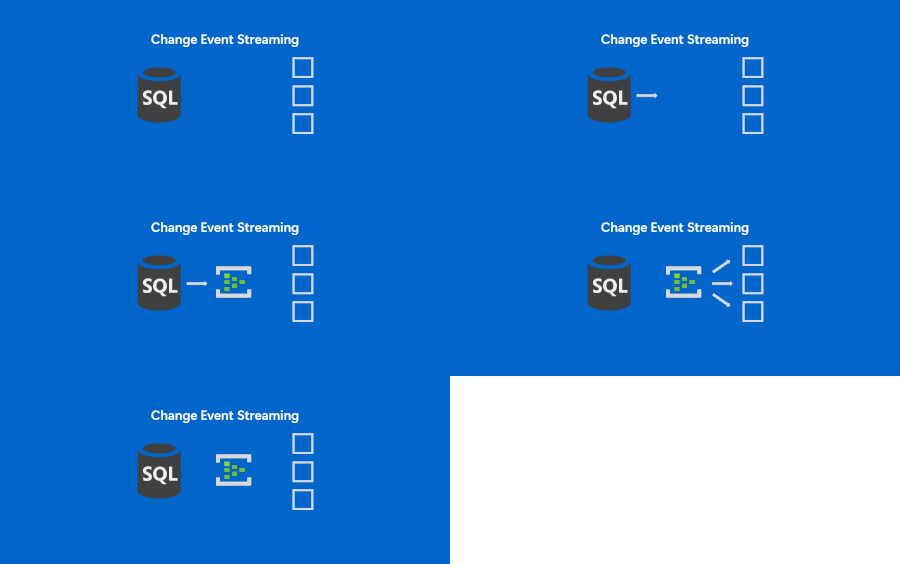
If near-real time integration is something you are looking to implement and you were looking for a simpler way to get the data out of SQL, keep reading. SQL is making it easier to integrate and Change Event Streaming is a feature continuing this trend. Modern applications and analytics platforms increasingly rely on event-driven architectures and real-time data pipelines. As the businesses speed up, real time decisioning is becoming especially important. Traditionally, capturing changes from a relational database requires complex ETL jobs, periodic polling, or third-party tools. These approaches often consume significant cycles of the data source, introduce operational overhead, and pose challenges with scalability, especially if you need one data source to feed into multiple destinations. In this context, we are happy to release Change Event Streaming ("CES") feature into Public Preview for Azure SQL Database. This feature enables you to stream row-level changes - inserts, updates, and deletes - from your database directly to Azure Event Hubs in near real time. Change Event Streaming addresses the above challenges by: Reducing latency: Changes are streamed (pushed by SQL) as they happen. This is in contrast with traditional CDC (change data capture) or CT (change tracking) based approaches, where an external component needs to poll SQL at regular intervals. Traditional approaches allow you to increase polling frequency, but it gets difficult to find a sweet spot between minimal latency and minimal overhead due to too frequent polls. Simplifying architecture: No need for Change Data Capture (CDC), Change Tracking, custom polling or external connectors - SQL streams directly to configured destination. This means simpler security profile (fewer authentication points), fewer failure points, easier monitoring, lower skill bar to deploy and run the service. No need to worry about cleanup jobs, etc. SQL keeps track of which changes are successfully received by the destination, handles the retry logic and releases log truncation point. Finally, with CES you have fewer components to procure and get approved for production use. Decoupling: The integration is done on the database level. This eliminates the problem of dual writes - the changes are streamed at transaction boundaries, once your source of truth (the database) has saved the changes. You do not need to modify your app workloads to get the data streamed - you tap right onto the data layer - this is useful if your apps are dated and do not possess real-time integration capabilities. In case of some 3rd party apps, you may not even have an option to do anything other than database level integration, and CES makes it simpler. Also, the publishing database does not concern itself with the final destination for the data - Stream the data once to the common message bus, and you can consume it by multiple downstream systems, irrespective of their number or capacity - the (number of) consumers does not affect publishing load on the SQL side. Serving consumers is handled by the message bus, Azure Event Hubs, which is purpose built for high throughput data transfers. onceptually visualizing data flow from SQL Server, with an arrow towards Azure Event Hubs, from where a number of arrows point to different final destinations. Key Scenarios for CES Event-driven microservices: They need to exchange data, typically thru a common message bus. With CES, you can have automated data publishing from each of the microservices. This allows you to trigger business processes immediately when data changes. Real-time analytics: Stream operational data into platforms like Fabric Real Time Intelligence or Azure Stream Analytics for quick insights. Breaking down the monoliths: Typical monolithic systems with complex schemas, sitting on top of a single database can be broken down one piece at a time: create a new component (typically a microservice), set up the streaming from the relevant tables on the monolith database and tap into the stream by the new components. You can then test run the components, validate the results against the original monolith, and cutover when you build the confidence that the new component is stable. Cache and search index updates: Keep distributed caches and search indexes in sync without custom triggers. Data lake ingestion: Capture changes continuously into storage for incremental processing. Data availability: This is not a scenario per se, but the amount of data you can tap into for business process mining or intelligence in general goes up whenever you plug another database into the message bus. E.g. You plug in your eCommerce system to the message bus to integrate with Shipping providers, and consequently, the same data stream is immediately available for any other systems to tap into. How It Works CES uses transaction log-based capture to stream changes with minimal impact on your workload. Events are published in a structured JSON format following the CloudEvents standard, including operation type, primary key, and before/after values. You can configure CES to target Azure Event Hubs via AMQP or Kafka protocols. For details on configuration, message format, and FAQs, see the official documentation: Feature Overview CES: Frequently Asked Questions Get Started Public preview CES is available today in public preview for Azure SQL Database and as a preview feature in SQL Server 2025. Private preview CES is also available as a private preview for Azure SQL Managed Instance and Fabric SQL database: you can request to join the private preview by signing up here: https://aka.ms/sql-ces-signup We encourage you to try the feature out and start building real-time integrations on top of your existing data. We welcome your feedback—please share your experience through Azure Feedback portal or support channels. The comments below on this blog post will also be monitored, if you want to engage with us. Finally, CES team can be reached via email: sqlcesfeedback [at] microsoft [dot] com. Useful resources Free Azure SQL Database. Free Azure SQL Managed Instance.825Views0likes0CommentsRemoving barriers to migrating databases to Azure with Striim’s Unlimited Database Migration program
Alok Pareek, co-founder and Executive Vice President of Product and Engineering at Striim Shireesh Thota, Corporate Vice President of Databases at Microsoft Every modernization strategy starts with data. It’s what enables advanced analytics and AI agents today, and prepares enterprises for what’s to come in the future. But before services like Microsoft Fabric, Azure AI Foundry, or Copilot can create that value, the underlying data needs to move into Microsoft’s cloud platforms. It’s within that first step, database migration, where the real complexity often lies. To simplify the process, Microsoft has expanded its investment in the Striim partnership. Striim continuously replicates data from existing databases into Azure in real time, enabling online migrations with zero downtime. Through this partnership, we have collaborated to enable modernization and migration into Azure at no additional cost to our customers. We’ve designed this Unlimited Database Migration program to accelerate adoption by making migrations easier to start, easier to scale, and easier to complete, all without disrupting business operations. Since launch, this joint program has already driven significant growth in customer adoption, indicating the demand for faster, more seamless modernization. And with Microsoft’s continued investment in this partnership, enterprises now have a proven, repeatable path to modernize their databases and prepare their data for the AI era. Watch or listen to our recent podcast episode (Apple Podcasts, Spotify, YouTube) to learn more. Striim’s Unlimited Migration Program Striim’s Unlimited Database Migration Program was designed to make modernization as straightforward as possible for Microsoft customers. Through this initiative, enterprises gain unlimited Striim licenses to migrate as many databases as they need at no additional cost. Highlights and benefits of the program include: Zero-downtime, zero-data-loss migrations. Supported sources include SQL Server, MongoDB, Oracle, MySQL, PostgreSQL, and Sybase. Supported targets include Azure Database for MySQL, Azure Database for PostgreSQL, Azure Cosmos DB, and Azure SQL. Mission-critical, heterogeneous workloads supported. Applies for SQL, Oracle, NoSQL, OSS. Drives faster AI adoption. Once migrated, data is ready for analytics & AI. Access is streamlined through Microsoft’s Cloud Factory Accelerator team, which manages program enrollment and coordinates the distribution of licenses. Once onboarded, customers receive installation walkthroughs, an enablement kit, and direct support from Striim architects. Cutover support, hands-on labs, and escalation paths are all built in to help migrations run smoothly from start to finish. Enterprises can start migrations quickly, scale across business units, and keep projects moving without slowing down for procurement hurdles. Now, migrations can begin when the business is ready, not when budgets or contracts catch up. How Striim Powers Online Migrations Within Striim’s database migrations, schema changes and metadata evolution are automatically detected and applied, preserving data accuracy and referential integrity. As the migration progresses, Striim automatically coordinates both the initial bulk load of historical data and the ongoing synchronization of live transactions. This ongoing synchronization keeps source and target systems in sync for as long as needed to actively test the target applications with real data before doing the cutoff, thereby minimizing risk. However, the foundation of Striim’s approach is log-based Change Data Capture (CDC), which streams database changes in real time from source to target with sub-second latency. This helps migrations avoid just moving the static snapshot of a database. Rather, they continuously replicate every update as it happens, so both environments remain aligned with minimal impact on operational systems throughout the process. While the snapshot (initial load) is being applied to the target system, Striim captures all the changes that occur. Once the initial load process is complete, Striim applies the changes using CDC, and from this point on, the source and target systems are in sync. This eliminates the need for shutting down the source system during the initial load process and enables customers to complete their migrations without any downtime of the source database. Striim is also designed to work across hybrid and multi-cloud architectures. It can seamlessly move workloads from on-premises databases, SaaS applications, or other clouds into Microsoft databases. By maintaining exactly-once delivery and ensuring downstream systems stay in sync, Striim can reduce risk and accelerates the path to modernization. Striim is available in the Azure Marketplace, giving customers a native, supported way to integrate it directly into their Azure environment. This means migrations can be deployed quickly, governed centrally, and scaled as business needs evolve, all while still aligning with Azure’s security and compliance standards. From Migration to Value With workloads fully landed in Azure, enterprises can immediately take advantage of the broader Microsoft data ecosystem. Fabric, Azure AI Foundry, and Copilot become available as extensions of the database foundation, allowing teams to analyze, visualize, and enrich data without delay. Enterprises can begin adopting Microsoft AI services with data that is current, trusted, and governed. Instead of treating migration as an isolated project, customers gain an integrated pathway to analytics and AI, creating value as soon as databases go live in Azure. How Enterprises Are Using the Program Today Across industries, we’re already seeing how this program changes the way enterprises approach modernization. Financial Services Moving from Oracle to Azure SQL, one global bank used Striim to keep systems in sync throughout the migration. With transactions flowing in real time, they stood up a modern fraud detection pipeline on Azure that identifies risks as they happen. Logistics For a logistics provider, shifting package-tracking data from MongoDB to Azure Cosmos DB meant customers could monitor shipments in real time. Striim’s continuous replication kept data consistent throughout the cutover, so the company didn’t have to trade accuracy for speed. Healthcare A provider modernizing electronic medical records from Sybase to Azure SQL relied on Striim to ensure clinicians never lost access. With data now in Azure, they can meet compliance requirements while building analytics that improve patient care. Technology InfoCert, a leading provider of digital trust services specializing in secure digital identity solutions, opted to migrate its critical Legalmail Enterprise application from Oracle to Azure Database for PostgreSQL. Using Striim and Microsoft, they successfully migrated 2 TB of data across 12 databases and completed the project within a six-month timeframe, lowering licensing costs, enhancing scalability, and improving security. What unites these stories is a common thread: once data is in Azure, it becomes part of a foundation that’s ready for analytics and AI. Accelerate Your Path to Azure Now, instead of database migration being the bottleneck for modernization, it’s the starting point for what comes next. With the Unlimited Database Migration Program, Microsoft and Striim have created a path that removes friction and clears the way for innovation. Most customers can simply reach out to their Microsoft account team or seller to begin the process. Your Microsoft representative will validate that your migration scenario is supported by Striim, and Striim will allocate the licenses, provide installation guidance, and deliver ongoing support. If you’re unsure who your Microsoft contact is, you can connect directly with Striim, and we’ll coordinate with Microsoft on your behalf. There’s no lengthy procurement cycle or complex setup to navigate. With Microsoft and Striim jointly coordinating the program, enterprises can begin migrations as soon as they’re ready, with confidence that support is in place from start to finish. Simplify your migration and move forward with confidence. Talk to your Microsoft representative or book a call with Striim team today to take advantage of the Unlimited Database Migration Program and start realizing the value of Azure sooner. Or if you’re attending Microsoft Ignite, visit Striim at booth 6244 to learn more, ask questions, and see how Striim and Microsoft can help accelerate your modernization journey together. 502Views2likes0Comments
SQL Server migration in Azure Arc – Generally Available
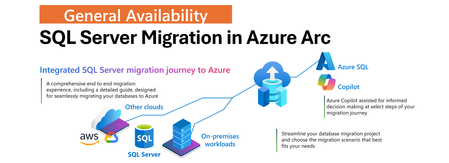
We’re excited to announce General Availability of the SQL Server migration in Azure Arc. This experience is designed to simplify and accelerate SQL Server migration journey to Azure SQL Managed Instance offering a unified, end-to-end workflow directly within the Azure portal. About the solution SQL Server migration in Azur Arc integrates existing Azure Database Migration Service capabilities into Azure Arc by enabling the entire end to end migration journey with the following capabilities: Continuous database migration assessments with Azure SQL target recommendations and cost estimates. Seamless provisioning of Azure SQL Managed Instance as destination target, also with an option of free instance evaluation. Option to choose between two built-in migration methods: real-time database replication using Distributed Availability Groups (powered by MI link feature), or log shipping via backup and restore (powered by Log Replay Service feature). Unified interface that eliminates the need to use multiple tools or to jump between various places in Azure portal. Microsoft Copilot is integrated to assist you at select points during the migration journey. Learn more about SQL Server Migration in Azure Arc. Benefits of the solution Traditionally, migrating SQL Server workloads to Azure required juggling between multiple tools, various places in portal, and some manual steps. This new experience changes that by: Providing a single pane of glass in the Azure portal for the entire migration journey. Reducing migration timelines from months to days. Offering a choice of two migration methods – real-time replication or log-shipping Enabling validation of target environments using read-only replicas before cutover for real-time replication. Automatically capturing application client connection data to simplify mapping between applications and databases. Optional failback from Azure SQL Managed Instancy with configured upgrade policy for SQL Server 2022 and SQL Server 2025 with external tooling. Providing intelligent step-by-step guidance with Microsoft Copilot at select points of the migration journey, helping you make informed decisions. Start Your Migration Journey Today In case your SQL Server is Arc enabled, you could proceed right away to Azure portal. If you need to enable it, then onboard your SQL Server to Azure Arc today. In the portal, navigate to Arc enabled SQL Server resource, and on the left-hand side select Migration, then Database Migration. This is where you will navigate to the new database migration experience. Shown below is illustrated experience of the database migration experience you are expected to see. From the main screen, you can navigate through each stage of the migration journey - starting with the database migration readiness assessment, followed by selecting or provisioning an Azure SQL Managed Instance as the target destination, choosing the appropriate migration method, monitoring progress, and performing the final cutover. By selecting the Azure SQL Benefits tab, you’ll gain insights into the advantages of Azure SQL - helping you make well-informed decisions about your migration. By selecting the Tutorials tab, you will access information helping you getting started with the solution. We've also integrated Microsoft Copilot at select points in the journey for any guidance and support you might need to ensure confident and informed decision-making. For next steps, click on the button below: Get started with SQL Server Migration in Azure Arc today. Feedback We love hearing from our customers! Any feedback or suggestions for the product group, use the following online form to let us know: Provide feedback to the product group We hope that you will enjoy our solution, and we look forward to your feedback as you embark on your migration journey to Azure.557Views1like0CommentsWhat’s new in Azure Managed Redis: Ignite 2025 feature announcements
Azure Managed Redis continues to power the world’s most demanding, low-latency workloads—from caching and session management to powering the next generation of AI agents. At Microsoft Ignite 2025, we’re excited to announce several new capabilities designed to make Azure Managed Redis even more scalable, manageable, and AI-ready. Bigger, faster, stronger: new enterprise-scale SKUs (generally available) We are expanding our capacity portfolio with the general availability of Memory Optimized 150 and 250, Balanced 150 and 250, Compute Optimized 150 and 250 SKUs/, bringing higher throughput, lower latency, and greater memory capacity for your most demanding workloads. Whether you’re running global gaming platforms, AI-powered personalization engines, or enterprise-scale caching tiers, these new SKUs offer the performance headroom to scale with confidence. Redis as a knowledge base for AI Agents Azure Managed Redis is now available as part of the Azure AI Foundry MCP tools catalog, allowing customers to use Redis as a knowledge store or memory store for AI agents. This integration makes it simple to connect Redis to Foundry-based agents, enabling semantic searching, long term and short term memory, and faster reasoning for multi-agent applications—all running on trusted Azure infrastructure. Scheduled Maintenance (public preview) You can now configure maintenance windows for their Azure Managed Redis instances, giving you greater control and predictability for planned service updates. This capability helps align maintenance with your own operational schedules—minimizing disruption and providing flexibility for mission-critical applications. Terraform Provider for Azure Managed Redis We’re making infrastructure automation even easier with a dedicated Terraform provider for Azure Managed Redis. This new provider enables you to declaratively create, manage, and configure AMR resources through code, improving consistency and streamlining CI/CD pipelines across environments. Reserved Instances: now in 30+ Regions Azure Managed Redis now supports Reserved Instances in over 30 regions, with more coming soon. Reserved pricing provides predictable costs and savings for long-term workloads.. Go to Azure Portal | Reservations | Add and search for ‘Azure Cache for Redis’. Azure Managed Redis SKUs like Balanced, Computer Optimized, Memory Optimized, and Flash Optimized, would show up as sub SKUs in the category. Reserved Instance is available for 35% discount with 1 year purchase and 55% discount with 3 year purchase. Learn More & Get Started Azure Managed Redis is redefining what’s possible for caching, data persistence, and agentic AI workloads. Explore the latest demos, architecture examples, and tutorials from Ignite: Learn more about Azure Managed Redis Try Azure Managed Redis samples on GitHub Watch the Azure Managed Redis session at Ignite on-demand (BRK129) Explore Redis as a memory store for Microsoft Agent Framework Introducing the PublicNetworkAccess property to Azure Managed Redis | Microsoft Community Hub Ready to build Internet-scale AI apps with Azure Managed Redis? Start today at aka.ms/hol-amr.463Views0likes0CommentsBuilding brighter futures: How YES tackles youth unemployment with Azure Database for MySQL
YES leverages Azure Database for MySQL to power South Africa’s largest youth employment initiative, delivering scalable, reliable systems that connect thousands of young people to jobs and learning opportunities.155Views0likes0Comments