MSignite
88 TopicsAnnouncing new hybrid deployment options for Azure Virtual Desktop
Today, we’re excited to announce the limited preview of Azure Virtual Desktop for hybrid environments, a new platform for bringing the power of cloud-native desktop virtualization to on-premises infrastructure.17KViews10likes28CommentsMicrosoft 365 Local is Generally Available
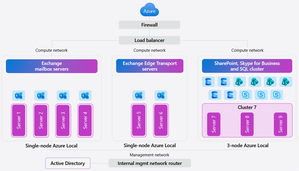
In today’s digital landscape, organizations and governments are prioritizing data sovereignty to comply with local regulations, protect sensitive information, and safeguard national security. This growing demand for robust jurisdictional controls makes the Microsoft Sovereign Cloud offering especially compelling, providing flexibility and assurance for complex requirements. For those with the most stringent needs, Azure Local enables data and workloads to remain within jurisdictional borders, supporting mission-critical workloads and now expanding to include Microsoft’s productivity solutions—so customers can securely collaborate and communicate within a sovereign private cloud environment. Today, we’re excited to announce the general availability of Microsoft 365 Local. Microsoft 365 Local is a deployment framework for enabling core collaboration and communication tools—including Exchange Server, SharePoint Server, and Skype for Business Server—on Azure Local. Built on a validated reference architecture using Azure Local Premier Solutions , it provides compatibility and support for sovereign deployments. Partner-led services provide guidance on sizing and configuration, ensuring a full-stack deployment including best practices for networking and security. Managing infrastructure across a wide range of workloads is simplified with Azure as your control plane, offering cloud-consistent, at-scale management capabilities. In the Azure portal, you get full visibility into your Microsoft 365 Local deployment across the servers and clusters. All hosts and virtual machines (VMs) are Arc-enabled out of the box, providing built-in visibility into connectivity, health, updates, and security alerts and recommendations. Microsoft 365 Local leverages Azure Local’s best-in-class sovereign and security controls, including Network Security Groups managed with Software Defined Networking enabled by Azure Arc, to isolate networks and secure access to infrastructure and workloads. Azure Local also uses a secure by default strategy by applying a security baseline of over 300 settings on both the host infrastructure and the VMs running the productivity workloads. These security baselines incorporate best practices for network security, identity management, privileged access, data protection, and more—helping organizations maintain compliance and reduce risk. Customers who want to take advantage of Azure as the control plane for Microsoft 365 Local can now benefit from a seamless cloud-based infrastructure management experience, including Azure services like Azure Monitor and Microsoft Defender for Cloud—available today with Microsoft 365 Local connected to Azure. For organizations with the most stringent jurisdictional requirements that need to operate Microsoft 365 Local in a fully disconnected environment, support for Azure Local disconnected operations will be available in early 2026. To learn more about Microsoft 365 Local, visit https://aka.ms/M365LocalDocs. If you’d like to connect with an authorized partner for consultation and deployment support, reach out to your Microsoft account team or visit https://aka.ms/M365LocalSignup.17KViews7likes6CommentsAnnouncing Cobalt 200: Azure’s next cloud-native CPU
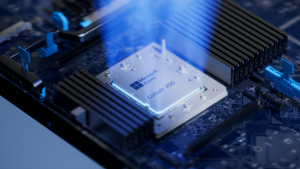
By Selim Bilgin, Corporate Vice President, Silicon Engineering, and Pat Stemen, Vice President, Azure Cobalt Today, we’re thrilled to announce Azure Cobalt 200, our next-generation Arm-based CPU designed for cloud-native workloads. Cobalt 200 is a milestone in our continued approach to optimize every layer of the cloud stack from silicon to software. Our design goals were to deliver full compatibility for workloads using our existing Azure Cobalt CPUs, deliver up to 50% performance improvement over Cobalt 100, and integrate with the latest Microsoft security, networking and storage technologies. Like its predecessor, Cobalt 200 is optimized for common customer workloads and delivers unique capabilities for our own Microsoft cloud products. Our first production Cobalt 200 servers are now live in our datacenters, with wider rollout and customer availability coming in 2026. Azure Cobalt 200 SoC and platform Building on Cobalt 100: Leading Price-Performance Our Azure Cobalt journey began with Cobalt 100, our first custom-built processor for cloud-native workloads. Cobalt 100 VMs have been Generally Available (GA) since October of 2024 and availability has expanded rapidly to 32 Azure datacenter regions around the world. In just one year, we have been blown away with the pace that customers have adopted the new platform, and migrated their most critical workloads to Cobalt 100 for the performance, efficiency, and price-performance benefits. Cloud analytics leaders like Databricks and Snowflake are adopting Cobalt 100 to optimize their cloud footprint. The compute performance and energy-efficiency balance of Cobalt 100-based virtual machines and containers has proven ideal for large-scale data processing workloads. Microsoft’s own cloud services have also rapidly adopted Azure Cobalt for similar benefits. Microsoft Teams achieved up to 45% better performance using Cobalt 100 than their previous compute platform. This increased performance means less servers needed for the same task, for instance Microsoft Teams media processing uses 35% fewer compute cores with Cobalt 100. Designing Compute Infrastructure for Real Workloads With this solid foundation, we set out to design a worthy successor – Cobalt 200. We faced a key challenge: traditional compute benchmarks do not represent the diversity of our customer workloads. Our telemetry from the wide range of workloads running in Azure (small microservices to globally available SaaS products) did not match common hardware performance benchmarks. Existing benchmarks tend to skew toward CPU core-focused compute patterns, leaving gaps in how real-world cloud applications behave at scale when using network and storage resources. Optimizing Azure Cobalt for customer workloads requires us to expand beyond these CPU core benchmarks to truly understand and model the diversity of customer workloads in Azure. As a result, we created a portfolio of benchmarks drawn directly from the usage patterns we see in Azure, including databases, web servers, storage caches, network transactions, and data analytics. Each of our benchmark workloads includes multiple variants for performance evaluation based on the ways our customers may use the underlying database, storage, or web serving technology. In total, we built and refined over 140 individual benchmark variants as part of our internal evaluation suite. With the help of our software teams, we created a complete digital twin simulation from the silicon up: beginning with the CPU core microarchitecture, fabric, and memory IP blocks in Cobalt 200, all the way through the server design and rack topology. Then, we used AI, statistical modelling and the power of Azure to model the performance and power consumption of the 140 benchmarks against 2,800 combinations of SoC and system design parameters: core count, cache size, memory speed, server topology, SoC power, and rack configuration. This resulted in the evaluation of over 350,000 configuration candidates of the Cobalt 200 system as part of our design process. This extensive modelling and simulation helped us to quickly iterate to find the optimal design point for Cobalt 200, delivering over 50% increased performance compared to Cobalt 100, all while continuing to deliver our most power-efficient platform in Azure. Cobalt 200: Delivering Performance and Efficiency At the heart of every Cobalt 200 server is the most advanced compute silicon in Azure: the Cobalt 200 System-on-Chip (SoC). The Cobalt 200 SoC is built around the Arm Neoverse Compute Subsystems V3 (CSS V3), the latest performance-optimized core and fabric from Arm. Each Cobalt 200 SoC includes 132 active cores with 3MB of L2 cache per-core and 192MB of L3 system cache to deliver exceptional performance for customer workloads. Power efficiency is just as important as raw performance. Energy consumption represents a significant portion of the lifetime operating cost of a cloud server. One of the unique innovations in our Azure Cobalt CPUs is individual per-core Dynamic Voltage and Frequency Scaling (DVFS). In Cobalt 200 this allows each of the 132 cores to run at a different performance level, delivering optimal power consumption no matter the workload. We are also taking advantage of the latest TSMC 3nm process, further improving power efficiency. Security is top-of-mind for all of our customers and a key part of the unique innovation in Cobalt 200. We designed and built a custom memory controller for Cobalt 200, so that memory encryption is on by default with negligible performance impact. Cobalt 200 also implements Arm’s Confidential Compute Architecture (CCA), which supports hardware-based isolation of VM memory from the hypervisor and host OS. When designing Cobalt 200, our benchmark workloads and design simulations revealed an interesting trend: several universal compute patterns emerged – compression, decompression, and encryption. Over 30% of cloud workloads had significant use of one of these common operations. Optimizing for these common operations required a different approach than just cache sizing and CPU core selection. We designed custom compression and cryptography accelerators – dedicated blocks of silicon on each Cobalt 200 SoC – solely for the purpose of accelerating these operations without sacrificing CPU cycles. These accelerators help reduce workload CPU consumption and overall costs. For example, by offloading compression and encryption tasks to the Cobalt 200 accelerator, Azure SQL is able to reduce use of critical compute resources, prioritizing them for customer workloads. Leading Infrastructure Innovation with Cobalt 200 Azure Cobalt is more than just an SoC, and we are constantly optimizing and accelerating every layer in the infrastructure. The latest Azure Boost capabilities are built into the new Cobalt 200 system, which significantly improves networking and remote storage performance. Azure Boost delivers increased network bandwidth and offloads remote storage and networking tasks to custom hardware, improving overall workload performance and reducing latency. Cobalt 200 systems also embed the Azure Integrated HSM (Hardware Security Module), providing customers with top-tier cryptographic key protection within Azure’s infrastructure, ensuring sensitive data stays secure. The Azure Integrated HSM works with Azure Key Vault for simplified management of encryption keys, offering high availability and scalability as well as meeting FIPS 140-3 Level 3 compliance. An Azure Cobalt 200 server in a validation lab Looking Forward to 2026 We are excited about the innovation and advanced technology in Cobalt 200 and look forward to seeing how our customers create breakthrough products and services. We’re busy racking and stacking Cobalt 200 servers around the world and look forward to sharing more as we get closer to wider availability next year. Check out Microsoft Ignite opening keynote Read more on what's new in Azure at Ignite Learn more about Microsoft's global infrastructure14KViews8likes0CommentsCloud Native Identity with Azure Files: Entra-only Secure Access for the Modern Enterprise
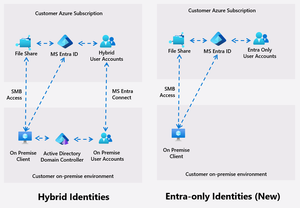
Azure Files introduces Entra only identities authentication for SMB shares, enabling cloud-only identity management without reliance on on-premises Active Directory. This advancement supports secure, seamless access to file shares from anywhere, streamlining cloud migration and modernization, and reducing operational complexity and costs.9.8KViews8likes14CommentsBuilding AI Agents: Workflow-First vs. Code-First vs. Hybrid
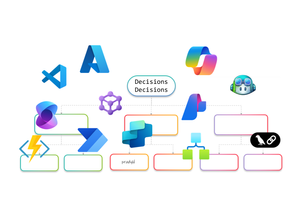
AI Agents are no longer just a developer’s playground. They’re becoming essential for enterprise automation, decision-making, and customer engagement. But how do you build them? Do you go workflow-first with drag-and-drop designers, code-first with SDKs, or adopt a hybrid approach that blends both worlds? In this article, I’ll walk you through the landscape of AI Agent design. We’ll look at workflow-first approaches with drag-and-drop designers, code-first approaches using SDKs, and hybrid models that combine both. The goal is to help you understand the options and choose the right path for your organization. Why AI Agents Need Orchestration Before diving into tools and approaches, let’s talk about why orchestration matters. AI Agents are not just single-purpose bots anymore. They often need to perform multi-step reasoning, interact with multiple systems, and adapt to dynamic workflows. Without orchestration, these agents can become siloed and fail to deliver real business value. Here’s what I’ve observed as the key drivers for orchestration: Complexity of Enterprise Workflows Modern business processes involve multiple applications, data sources, and decision points. AI Agents need a way to coordinate these steps seamlessly. Governance and Compliance Enterprises require control over how AI interacts with sensitive data and systems. Orchestration frameworks provide guardrails for security and compliance. Scalability and Maintainability A single agent might work fine for a proof of concept, but scaling to hundreds of workflows requires structured orchestration to avoid chaos. Integration with Existing Systems AI Agents rarely operate in isolation. They need to plug into ERP systems, CRMs, and custom apps. Orchestration ensures these integrations are reliable and repeatable. In short, orchestration is the backbone that turns AI Agents from clever prototypes into enterprise-ready solutions. Behind the Scenes I’ve always been a pro-code guy. I started my career on open-source coding in Unix and hardly touched the mouse. Then I discovered Visual Studio, and it completely changed my perspective. It showed me the power of a hybrid approach, the best of both worlds. That said, I won’t let my experience bias your ideas of what you’d like to build. This blog is about giving you the full picture so you can make the choice that works best for you. Workflow-First Approach Workflow-first platforms are more than visual designers and not just about drag-and-drop simplicity. They represent a design paradigm where orchestration logic is abstracted into declarative models rather than imperative code. These tools allow you to define agent behaviors, event triggers, and integration points visually, while the underlying engine handles state management, retries, and scaling. For architects, this means faster prototyping and governance baked into the platform. For developers, it offers extensibility through connectors and custom actions without sacrificing enterprise-grade reliability. Copilot Studio Building conversational agents becomes intuitive with a visual designer that maps prompts, actions, and connectors into structured flows. Copilot Studio makes this possible by integrating enterprise data and enabling agents to automate tasks and respond intelligently without deep coding. Building AI Agents using Copilot Studio Design conversation flows with adaptive prompts Integrate Microsoft Graph for contextual responses Add AI-driven actions using Copilot extensions Support multi-turn reasoning for complex queries Enable secure access to enterprise data sources Extend functionality through custom connectors Logic Apps Adaptive workflows and complex integrations are handled through a robust orchestration engine. Logic Apps introduces Agent Loop, allowing agents to reason iteratively, adapt workflows, and interact with multiple systems in real time. Building AI Agents using Logic Apps Implement Agent Loop for iterative reasoning Integrate Azure OpenAI for goal-driven decisions Access 1,400+ connectors for enterprise actions Support human-in-the-loop for critical approvals Enable multi-agent orchestration for complex tasks Provide observability and security for agent workflows Power Automate Multi-step workflows can be orchestrated across business applications using AI Builder models or external AI APIs. Power Automate enables agents to make decisions, process data, and trigger actions dynamically, all within a low-code environment. Building AI Agents using Power Automate Automate repetitive tasks with minimal effort Apply AI Builder for predictions and classification Call Azure OpenAI for natural language processing Integrate with hundreds of enterprise connectors Trigger workflows based on real-time events Combine flows with human approvals for compliance Azure AI Foundry Visual orchestration meets pro-code flexibility through Prompt Flow and Connected Agents, enabling multi-step reasoning flows while allowing developers to extend capabilities through SDKs. Azure AI Foundry is ideal for scenarios requiring both agility and deep customization. Building AI Agents using Azure AI Foundry Design reasoning flows visually with Prompt Flow Orchestrate multi-agent systems using Connected Agents Integrate with VS Code for advanced development Apply governance and deployment pipelines for production Use Azure OpenAI models for adaptive decision-making Monitor workflows with built-in observability tools Microsoft Agent Framework (Preview) I’ve been exploring Microsoft Agent Framework (MAF), an open-source foundation for building AI agents that can run anywhere. It integrates with Azure AI Foundry and Azure services, enabling multi-agent workflows, advanced memory services, and visual orchestration. With public preview live and GA coming soon, MAF is shaping how we deliver scalable, flexible agentic solutions. Enterprise-scale orchestration is achieved through graph-based workflows, human-in-the-loop approvals, and observability features. The Microsoft Agent Framework lays the foundation for multi-agent systems that are durable and compliant. Building AI Agents using Microsoft Agent Framework Coordinate multiple specialized agents in a graph Implement durable workflows with pause and resume Support human-in-the-loop for controlled autonomy Integrate with Azure AI Foundry for hosting and governance Enable observability through OpenTelemetry integration Provide SDK flexibility for custom orchestration patterns Visual-first platforms make building AI Agents feel less like coding marathons and more like creative design sessions. They’re perfect for those scenarios when you’d rather design than debug and still want the option to dive deeper when complexity calls. Pro-Code Approach Remember I told you how I started as a pro-code developer early in my career and later embraced a hybrid approach? I’ll try to stay neutral here as we explore the pro-code world. Pro-code frameworks offer integration with diverse ecosystems, multi-agent coordination, and fine-grained control over logic. While workflow-first and pro-code approaches both provide these capabilities, the difference lies in how they balance factors such as ease of development, ease of maintenance, time to deliver, monitoring capabilities, and other non-functional requirements. Choosing the right path often depends on which of these trade-offs matter most for your scenario. LangChain When I first explored LangChain, it felt like stepping into a developer’s playground for AI orchestration. I could stitch together prompts, tools, and APIs like building blocks, and I enjoyed the flexibility. It reminded me why pro-code approaches appeal to those who want full control over logic and integration with diverse ecosystems. Building AI Agents using LangChain Define custom chains for multi-step reasoning [it is called Lang“Chain”] Integrate external APIs and tools for dynamic actions Implement memory for context-aware conversations Support multi-agent collaboration through orchestration patterns Extend functionality with custom Python modules Deploy agents across cloud environments for scalability Semantic Kernel I’ve worked with Semantic Kernel when I needed more control over orchestration logic, and what stood out was its flexibility. It provides both .NET and Python SDKs, which makes it easy to combine natural language prompts with traditional programming logic. I found the planners and skills especially useful for breaking down goals into smaller steps, and connectors helped integrate external systems without reinventing the wheel. Building AI Agents using Semantic Kernel Create semantic functions for prompt-driven tasks Use planners for dynamic goal decomposition Integrate plugins for external system access Implement memory for persistent context across sessions Combine AI reasoning with deterministic code logic Enable observability and telemetry for enterprise monitoring Microsoft Agent Framework (Preview) Although I introduced MAF in the earlier section, its SDK-first design makes it relevant here as well for advanced orchestration and the pro-code nature… and so I’ll probably write this again in the Hybrid section. The Agent Framework is designed for developers who need full control over multi-agent orchestration. It provides a pro-code approach for defining agent behaviors, implementing advanced coordination patterns, and integrating enterprise-grade observability. Building AI Agents using Microsoft Agent Framework Define custom orchestration logic using SDK APIs Implement graph-based workflows for multi-agent coordination Extend agent capabilities with custom code modules Apply durable execution patterns with pause and resume Integrate OpenTelemetry for detailed monitoring and debugging Securely host and manage agents through Azure AI Foundry integration Hybrid Approach and decision framework I’ve always been a fan of both worlds, the flexibility of pro-code and the simplicity of workflow drag-and-drop style IDEs and GUIs. A hybrid approach is not about picking one over the other; it’s about balancing them. In practice, this to me means combining the speed and governance of workflow-first platforms with the extensibility and control of pro-code frameworks. Hybrid design shines when you need agility without sacrificing depth. For example, I can start with Copilot Studio to build a conversational agent using its visual designer. But if the scenario demands advanced logic or integration, I can call an Azure Function for custom processing, trigger a Logic Apps workflow for complex orchestration, or even invoke the Microsoft Agent Framework for multi-agent coordination. This flexibility delivers the best of both worlds, low-code for rapid development (remember RAD?) and pro-code for enterprise-grade customization with complex logic or integrations. Why go Hybrid Ø Balance speed and control: Rapid prototyping with workflow-first tools, deep customization with code. Ø Extend functionality: Call APIs, Azure Functions, or SDK-based frameworks from visual workflows. Ø Optimize for non-functional requirements: Address maintainability, monitoring, and scalability without compromising ease of development. Ø Enable interoperability: Combine connectors, plugins, and open standards for diverse ecosystems. Ø Support multi-agent orchestration: Integrate workflow-driven agents with pro-code agents for complex scenarios. The hybrid approach for building AI Agents is not just a technical choice but a design philosophy. When I need rapid prototyping or business automation, workflow-first is my choice. For multi-agent orchestration and deep customization, I go with code-first. Hybrid makes sense for regulated industries and large-scale deployments where flexibility and compliance are critical. The choice isn’t binary, it’s strategic. I’ve worked with both workflow-first tools like Copilot Studio, Power Automate, and Logic Apps, and pro-code frameworks such as LangChain, Semantic Kernel, and the Microsoft Agent Framework. Each approach has its strengths, and the decision often comes down to what matters most for your scenario. If rapid prototyping and business automation are priorities, workflow-first platforms make sense. When multi-agent orchestration, deep customization, and integration with diverse ecosystems are critical, pro-code frameworks give you the flexibility and control you need. Hybrid approaches bring both worlds together for regulated industries and large-scale deployments where governance, observability, and interoperability cannot be compromised. Understanding these trade-offs will help you create AI Agents that work so well, you’ll wonder if they’re secretly applying for your job! About the author Pradyumna (Prad) Harish is a Technology leader in the WW GSI Partner Organization at Microsoft. He has 26 years of experience in Product Engineering, Partner Development, Presales, and Delivery. Responsible for revenue growth through Cloud, AI, Cognitive Services, ML, Data & Analytics, Integration, DevOps, Open-Source Software, Enterprise Architecture, IoT, Digital strategies and other innovative areas for business generation and transformation; achieving revenue targets via extensive experience in managing global functions, global accounts, products, and solution architects across over 26 countries.8.6KViews4likes0CommentsFoundry Agent Service at Ignite 2025: Simple to Build. Powerful to Deploy. Trusted to Operate.
The upgraded Foundry Agent Service delivers a unified, simplified platform with managed hosting, built-in memory, tool catalogs, and seamless integration with Microsoft Agent Framework. Developers can now deploy agents faster and more securely, leveraging one-click publishing to Microsoft 365 and advanced governance features for streamlined enterprise AI operations.6.4KViews3likes1Comment
What’s new in Azure Local: Cloud infrastructure for distributed locations enabled by Azure Arc
Today’s enterprises are navigating competing challenges: delivering AI-enabled digital experiences at the edge while also meeting growing demands for data sovereignty and regulatory compliance. Whether it’s a hospital needing local compute for patient care, or a government agency requiring full control over its infrastructure, the need for flexible, secure, and cloud scale solutions has never been greater. That’s why we introduced Azure Local—Microsoft’s solution for running Azure services and workloads at distributed locations, all managed through Azure Arc. With Azure Local, customers can deploy cloud-native and traditional applications on their own infrastructure while maintaining centralized visibility and control through the Azure portal. This approach is resonating: Microsoft has been named a Leader in the Gartner® Magic Quadrant™ for Distributed Hybrid Infrastructure every year since its inception. Azure Local is the foundation of Microsoft’s Sovereign Private Cloud, delivering Azure consistent services in customer controlled environments which meet strict data residency and compliance requirements. Read more about our recent Sovereign announcements here. See the Sovereign Private Cloud come to life here: Today, we’re so excited to tell you about the incredible new capabilities on Azure Local including support for external SAN storage, rack aware clustering, larger scale deployments, and more. Operate and scale with the power of the cloud Azure Local empowers organizations to operate and scale infrastructure with the power of the cloud, no matter where it’s deployed. From the Azure portal, customers can define and deploy infrastructure across distributed locations, apply one-click updates to entire clusters, and centrally monitor performance, health, and security. This cloud-based control plane ensures consistency and agility across environments—whether in datacenters, branch offices, or sovereign sites. NEW: Local Identity with Azure Key Vault (Preview) Azure Local now supports deployments without Active Directory using local identity with Azure Key Vault, currently in preview. This new option simplifies setup by removing the need for domain controllers, while still providing secure access and centralized secret management through Azure. Read the announcement here. Ready for all your apps, VMs and containers alike Azure Local is built to run all your applications—whether they’re virtual machines, containers, or Azure services. It offers full-featured, general-purpose VMs with cloud-consistent management, and includes Azure Kubernetes Service (AKS) built-in for modern containerized workloads. Customers can also deploy some of Azure’s most popular PaaS services like Azure Virtual Desktop, SQL Managed Instance, and Azure IoT Operations directly on Azure Local. With support for GPU-enabled nodes and Arc VM extensions, Azure Local is ready for everything from legacy line-of-business apps to AI-powered workloads. Migrate from VMware to Azure Local (Generally Available) Azure Migrate from VMware to Azure Local is now generally available, enabling customers to seamlessly move VMware virtual machines into their Azure Local infrastructure. This agentless migration path keeps data flows local, minimizes downtime, and simplifies onboarding with a cloud-consistent experience. Customers can discover, replicate, and migrate workloads using the Azure portal, with support for validated hardware and reference architectures. Azure Migrate unlocks a fast path to modernization for organizations consolidating legacy infrastructure. Read the announcement here. Customer Spotlight: How Publix Employees Federal Credit Union strengthened its disaster recovery strategy with Azure Loc... NEW: Microsoft 365 Local to meet your Private Sovereign Cloud needs (Generally Available) Microsoft 365 Local brings trusted productivity services like Exchange Server, SharePoint Server, and Skype for Business Server into customer-controlled environments, running directly on Azure Local infrastructure. Designed for those who need productivity tools in a private cloud environment, it leverages Azure Arc to provide a unified control plane for easy infrastructure management, simplified deployment, and streamlined updates. The solution features a validated reference architecture with certified hardware to ensure optimal performance and reliability, along with a hardened security baseline and robust controls to safeguard your infrastructure. It’s a key part of Microsoft’s Sovereign Private Cloud strategy, now generally available. Read the announcement here. Flexibility to meet your requirements Azure Local gives customers the flexibility to deploy infrastructure that fits their exact needs—whether that’s choosing from over 100 validated hardware platforms in the Azure Local catalog or operating in fully connected or disconnected environments. You can run Azure Local in public Azure regions or in Azure Government cloud, supporting both commercial and regulated workloads. Azure Local adapts to everything from retail edge sites to sovereign datacenters, disconnected oil rigs to connected manufacturing plants, all while maintaining a consistent Azure management experience. NEW: SAN Support (Preview) Azure Local now delivers greater infrastructure flexibility with expanded support for leading external SAN storage solutions, a capability that customers have long sought. Customers can now integrate their existing Fiber Channel-based SAN storage from leading vendors such as Pure Storage, NetApp, Dell, Lenovo, HPE, and Hitachi directly with Azure Local clusters. External storage support allows organizations to achieve high performance, scalability, and resilience while continuing to use their trusted storage infrastructure. It also enables consistent management across virtual machines, AKS clusters, and Arc-enabled services through the familiar Azure experience. Customers now have the freedom to modernize their environments while maximizing the value of their existing investments. Our customers are already exploring the impact this brings to enterprise customers. “We’re excited to partner with Microsoft and their trusted storage vendors to test external storage support for Azure Local,” said David McKenney, VP of Public Cloud Products at TierPoint. “This milestone gives customers greater flexibility to address performance, scalability, resilience, and investment protection needs. It reflects Microsoft’s ongoing dedication to making Azure Local the leading distributed cloud solution by listening to the needs of their customers and partners.” Support for more Storage protocols and other storage capabilities coming soon. Reach out to Microsoft or our storage partners to be part of this limited preview. NEW: Rack Aware Clusters (Preview) Rack aware clustering is now available in preview for Azure Local, enabling intelligent placement and resiliency across multi-rack deployments using one storage pool. This feature allows Azure Local to detect physical rack boundaries and distribute workloads accordingly, improving fault tolerance and minimizing impact from localized hardware failures. It’s especially valuable for larger deployments where high availability and service continuity are critical. Rack awareness integrates seamlessly with Azure Local’s update orchestration and VM placement logic, helping ensure infrastructure stays resilient at scale. Read the announcement here. NEW: Support for NVIDIA RTX PRO 6000 Blackwell Server Edition GPUs (Generally Available) Azure Local now supports the NVIDIA RTX PRO 6000 Blackwell Server Edition GPU, generally available for high-performance workloads including AI inferencing, simulation, and visualization. This enterprise-grade GPU delivers exceptional compute density and energy efficiency, making it ideal for deployments that require advanced acceleration. Customers can deploy this powerful GPU in new Azure Local solutions—including Dell AX-770, Lenovo ThinkAgile MX650a V4, and HPE ProLiant DL380 Gen 12. Read the announcement here. NEW: Azure Local for larger deployments (Preview) Azure Local now scales further, with instances of up to 10,000+ cores across 100+ nodes delivered as multiple integrated racks with disaggregated storage. This enables customers to run the same familiar Azure Arc-enabled infrastructure and services at significantly larger scale, supporting a greater variety of workloads and scenarios. This new capability is available now in preview. Contact your Azure account representatives to learn more. Secure by default Azure Local is built with security at its core, offering a hardened infrastructure stack aligned with Microsoft’s secure-by-default principles, built-in Microsoft Defender for Cloud integration, and trusted launch VMs. Every VM is Azure Arc-enabled, allowing customers to apply security baselines, monitor threats, and enforce policies using familiar Azure tools. These protections are automatically enabled, so customers can operate confidently from day one. Network segmentation (Generally Available) To protect and isolate your network traffic between VMs or logical networks, Azure Local now supports network security groups (NSGs), generally available as of the 2510 release. NSGs enable precise filtering of network traffic using policy-driven access controls by applying inbound and outbound allow/deny rules. Rules support the full five-tuple of source IP, source port, destination IP, destination port, and protocol, and are enforced within the virtual switch at the virtual port level. NSGs can be applied to both logical networks and individual network interfaces and can be managed using the Azure Portal for centralized policy management of your edge workloads. Read the announcement here. Get Started Today For new production deployments Azure Local is generally available for production use. Explore the solutions catalog to find hardware from your preferred vendor and read the deployment overview to get started today. For evaluation (virtual) Want to try out Azure Local but don’t have hardware? Get a dedicated Azure Local sandbox in one click with Azure Arc Jumpstart. All you need is an Azure subscription to get started. Thank you! As we mark the second year since announcing Azure Local, we want to extend a heartfelt thank you to our customers, partners, and community. It’s incredibly rewarding to see Azure Local continue to be the infrastructure of choice for enterprises seeking flexibility, security, and innovation at the edge. We’re excited to continue delivering the solutions you need to thrive in a rapidly evolving world. Thank you for trusting Azure Local to power your most important workloads—here’s to another year of partnership and progress! If you’re at Ignite this week, please come say hello at: Our session dedicated to Azure Local What’s new in Azure Local Our booth “Azure Arc and Azure Local” in the Cloud and AI Platforms neighborhood See everything going on with Adaptive Cloud on our Ignite website Adaptive Cloud @Ignite 2025 FAQ What is Azure Local? Azure Local is Microsoft’s full-stack infrastructure software that runs on validated hardware in your own facilities. It brings Azure capabilities to distributed or sovereign locations, so you can run virtual machines, containers, and select Azure services locally while maintaining a consistent management experience through Azure Arc. How are Azure Local and Private Sovereign Cloud related? Azure Local is the foundation and core product fueling Microsoft’s Private Sovereign Cloud offering. It enables customers to meet strict data residency and regulatory requirements by hosting workloads on-premises, disconnected or semi-connected, while still benefiting from Azure innovation and security. When should I use Azure Local? Use Azure Local when you need modern cloud capabilities in locations where connectivity is limited, data sovereignty is critical, or latency-sensitive applications must run close to where data is generated. It’s ideal for industries like manufacturing, retail, and government that require local control with Azure consistency.6KViews4likes2CommentsOpen AI’s GPT-5.1-codex-max in Microsoft Foundry: Igniting a New Era for Enterprise Developers
Announcing GPT-5.1-codex-max: The Future of Enterprise Coding Starts Now We’re thrilled to announce the general availability of OpenAI's GPT-5.1-codex-max in Microsoft Foundry Models; a leap forward that redefines what’s possible for enterprise-grade coding agents. This isn’t just another model release; it’s a celebration of innovation, partnership, and the relentless pursuit of developer empowerment. At Microsoft Ignite, we unveiled Microsoft Foundry: a unified platform where businesses can confidently choose the right model for every job, backed by enterprise-grade reliability. Foundry brings together the best from OpenAI, Anthropic, xAI, Black Forest Labs, Cohere, Meta, Mistral, and Microsoft’s own breakthroughs, all under one roof. Our partnership with Anthropic is a testament to our commitment to giving developers access to the most advanced, safe, and high-performing models in the industry. And now, with GPT-5.1-codex-max joining the Foundry family, the possibilities for intelligent applications and agentic workflows have never been greater. GPT 5.1-codex-max is available today in Microsoft Foundry and accessible in Visual Studio Code via the Foundry extension . Meet GPT-5.1-codex-max: Enterprise-Grade Coding Agent for Complex Projects GPT-5.1-codex-max is engineered for those who build the future. Imagine tackling complex, long-running projects without losing context or momentum. GPT-5.1-codex-max delivers efficiency at scale, cross-platform readiness, and proven performance with top scores on SWE-Bench (77.9), the gold standard for AI coding. With GPT-5.1-codex-max, developers can focus on creativity and problem-solving, while the model handles the heavy lifting. GPT-5.1-codex-max isn’t just powerful; it’s practical, designed to solve real challenges for enterprise developers: Multi-Agent Coding Workflows: Automate repetitive tasks across microservices, maintaining shared context for seamless collaboration. Enterprise App Modernization: Effortlessly refactor legacy .NET and Java applications into cloud-native architectures. Secure API Development: Generate and validate secure API endpoints, with `compliance checks built-in for peace of mind. Continuous Integration Support: Integrate GPT-5.1-codex-max into CI/CD pipelines for automated code reviews and test generation, accelerating delivery cycles. These use cases are just the beginning. GPT-5.1-codex-max is your partner in building robust, scalable, and secure solutions. Foundry: Platform Built for Developers Who Build the Future Foundry is more than a model catalog—it’s an enterprise AI platform designed for developers who need choice, reliability, and speed. • Choice Without Compromise: Access the widest range of models, including frontier models from leading model providers. • Enterprise-Grade Infrastructure: Built-in security, observability, and governance for responsible AI at scale. • Integrated Developer Experience: From GitHub to Visual Studio Code, Foundry connects with tools developers love for a frictionless build-to-deploy journey. Start Building Smarter with GPT-5.1-codex-max in Foundry The future is here, and it’s yours to shape. Supercharge your coding workflows with GPT-5.1-codex-max in Microsoft Foundry today. Learn more about Microsoft Foundry: aka.ms/IgniteFoundryModels. Watch Ignite sessions for deep dives and demos: ignite.microsoft.com. Build faster, smarter, and with confidence on the platform redefining enterprise AI.3.3KViews2likes3Comments