MSignite
88 TopicsAnnouncing Kubernetes Center (Preview) On Azure Portal
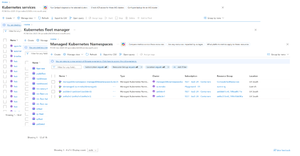
Today, we’re excited to introduce the Kubernetes Center in the Azure portal, a new experience to simplify how customers manage, monitor, and optimize Azure Kubernetes Services environments at scale. The Kubernetes Center provides a unified view across all clusters, intelligent insights, and streamlined workflows that help platform teams stay in control while enabling developers to move fast. As Kubernetes adoption accelerates, many teams face growing challenges in managing clusters and workloads at scale. Getting a quick snapshot of what needs attention across clusters and workloads can quickly become overwhelming. Kubernetes Center is designed to change that, offering a streamlined and intuitive experience that brings everything together in one place, brings the most critical Kubernetes capabilities into a single pane of glass for unified visibility and control. What is Kubernetes Center?: Actionable insights from the start: Kubernetes Center surfaces key issues like security vulnerabilities, cluster alerts, compliance gaps, and upgrade recommendations in a single, unified view. This helps teams focus immediately on what matters most, leading to faster resolution times, improved security posture, and greater operational clarity. Streamlined management experience: By bringing together AKS, AKS Automatic, Fleet Manager, and Managed Namespaces into a single experience, we’ve reduced the need to jump between services. Everything you need to manage Kubernetes on Azure is now organized in one consistent interface. Centralized Quickstarts: Whether you’re getting started or troubleshooting advanced scenarios, Kubernetes Center brings relevant documentation, learning resources, and in-context help into one place so you can spend less time searching and more time building. Azure Portal: From Distinct landing experiences for AKS, Fleet Manager, and Managed Kubernetes Namespaces: To a streamlined management experience: Get the big picture at a glance, then dive deeper with individual pages designed for effortless discovery. Centralized Quickstarts: Next Steps: Build on your momentum by exploring Kubernetes Center. Create your first AKS cluster or deploy your first application using the Deploy Your Application flow and track your progress in real time or Check out the new experience and instantly see your existing clusters in a streamlined management experience. Your feedback will help shape what comes next. Start building today with Kubernetes Center on Azure Portal! Learn more: Create and Manage Kubernetes resources in the Azure portal with Kubernetes Center (preview) - Azure Kubernetes Service | Microsoft Learn FAQ: What products from Azure are included in Kubernetes Center? A. Kubernetes Center brings together all your Azure Kubernetes resources such as AKS, AKS Automatic, Fleet Manager, and Managed Namespaces into a single interface for simplified operations. Create new resources or view your existing resources in Kubernetes Center. Does Kubernetes Center handle multi-cluster management? A. Kubernetes Center provides a unified interface aka single pane of glass to view and monitor all your Kubernetes resources in one place. For multi-cluster operations like upgrading Kubernetes Version, placing cluster resources on N clusters, policy management, and coordination across environments, Kubernetes Fleet Manager is the solution designed to handle that complexity at scale. It enables teams to manage clusters at scale with automation, consistency, and operational control. Does Kubernetes Center provide security and compliance insights? A. Absolutely. When Microsoft Defender for Containers is enabled, Kubernetes Center surfaces critical security vulnerabilities and compliance gaps across your clusters. Where can I find help and documentation? A. All relevant documentation, QuickStarts, and learning resources are available directly within Kubernetes Center, making it easier to get support without leaving the platform. For more information: Create and Manage Kubernetes resources in the Azure portal with Kubernetes Center (preview) - Azure Kubernetes Service | Microsoft Learn What is the status of this launch? A. Kubernetes Center is currently in preview, offering core capabilities with more features planned for the general availability release. What is the roadmap for GA? A. Our roadmap includes adding new features and introducing tailored views designed for Admins and Developers. We also plan to enhance support for multi-cluster capabilities in Azure Fleet Manager, enabling smoother and more efficient operations within the Kubernetes Center.3.1KViews10likes0CommentsAnnouncing new hybrid deployment options for Azure Virtual Desktop
Today, we’re excited to announce the limited preview of Azure Virtual Desktop for hybrid environments, a new platform for bringing the power of cloud-native desktop virtualization to on-premises infrastructure.17KViews10likes28CommentsAnnouncing Cobalt 200: Azure’s next cloud-native CPU
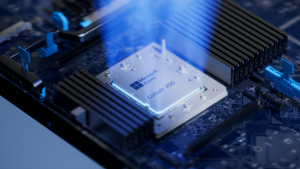
By Selim Bilgin, Corporate Vice President, Silicon Engineering, and Pat Stemen, Vice President, Azure Cobalt Today, we’re thrilled to announce Azure Cobalt 200, our next-generation Arm-based CPU designed for cloud-native workloads. Cobalt 200 is a milestone in our continued approach to optimize every layer of the cloud stack from silicon to software. Our design goals were to deliver full compatibility for workloads using our existing Azure Cobalt CPUs, deliver up to 50% performance improvement over Cobalt 100, and integrate with the latest Microsoft security, networking and storage technologies. Like its predecessor, Cobalt 200 is optimized for common customer workloads and delivers unique capabilities for our own Microsoft cloud products. Our first production Cobalt 200 servers are now live in our datacenters, with wider rollout and customer availability coming in 2026. Azure Cobalt 200 SoC and platform Building on Cobalt 100: Leading Price-Performance Our Azure Cobalt journey began with Cobalt 100, our first custom-built processor for cloud-native workloads. Cobalt 100 VMs have been Generally Available (GA) since October of 2024 and availability has expanded rapidly to 32 Azure datacenter regions around the world. In just one year, we have been blown away with the pace that customers have adopted the new platform, and migrated their most critical workloads to Cobalt 100 for the performance, efficiency, and price-performance benefits. Cloud analytics leaders like Databricks and Snowflake are adopting Cobalt 100 to optimize their cloud footprint. The compute performance and energy-efficiency balance of Cobalt 100-based virtual machines and containers has proven ideal for large-scale data processing workloads. Microsoft’s own cloud services have also rapidly adopted Azure Cobalt for similar benefits. Microsoft Teams achieved up to 45% better performance using Cobalt 100 than their previous compute platform. This increased performance means less servers needed for the same task, for instance Microsoft Teams media processing uses 35% fewer compute cores with Cobalt 100. Designing Compute Infrastructure for Real Workloads With this solid foundation, we set out to design a worthy successor – Cobalt 200. We faced a key challenge: traditional compute benchmarks do not represent the diversity of our customer workloads. Our telemetry from the wide range of workloads running in Azure (small microservices to globally available SaaS products) did not match common hardware performance benchmarks. Existing benchmarks tend to skew toward CPU core-focused compute patterns, leaving gaps in how real-world cloud applications behave at scale when using network and storage resources. Optimizing Azure Cobalt for customer workloads requires us to expand beyond these CPU core benchmarks to truly understand and model the diversity of customer workloads in Azure. As a result, we created a portfolio of benchmarks drawn directly from the usage patterns we see in Azure, including databases, web servers, storage caches, network transactions, and data analytics. Each of our benchmark workloads includes multiple variants for performance evaluation based on the ways our customers may use the underlying database, storage, or web serving technology. In total, we built and refined over 140 individual benchmark variants as part of our internal evaluation suite. With the help of our software teams, we created a complete digital twin simulation from the silicon up: beginning with the CPU core microarchitecture, fabric, and memory IP blocks in Cobalt 200, all the way through the server design and rack topology. Then, we used AI, statistical modelling and the power of Azure to model the performance and power consumption of the 140 benchmarks against 2,800 combinations of SoC and system design parameters: core count, cache size, memory speed, server topology, SoC power, and rack configuration. This resulted in the evaluation of over 350,000 configuration candidates of the Cobalt 200 system as part of our design process. This extensive modelling and simulation helped us to quickly iterate to find the optimal design point for Cobalt 200, delivering over 50% increased performance compared to Cobalt 100, all while continuing to deliver our most power-efficient platform in Azure. Cobalt 200: Delivering Performance and Efficiency At the heart of every Cobalt 200 server is the most advanced compute silicon in Azure: the Cobalt 200 System-on-Chip (SoC). The Cobalt 200 SoC is built around the Arm Neoverse Compute Subsystems V3 (CSS V3), the latest performance-optimized core and fabric from Arm. Each Cobalt 200 SoC includes 132 active cores with 3MB of L2 cache per-core and 192MB of L3 system cache to deliver exceptional performance for customer workloads. Power efficiency is just as important as raw performance. Energy consumption represents a significant portion of the lifetime operating cost of a cloud server. One of the unique innovations in our Azure Cobalt CPUs is individual per-core Dynamic Voltage and Frequency Scaling (DVFS). In Cobalt 200 this allows each of the 132 cores to run at a different performance level, delivering optimal power consumption no matter the workload. We are also taking advantage of the latest TSMC 3nm process, further improving power efficiency. Security is top-of-mind for all of our customers and a key part of the unique innovation in Cobalt 200. We designed and built a custom memory controller for Cobalt 200, so that memory encryption is on by default with negligible performance impact. Cobalt 200 also implements Arm’s Confidential Compute Architecture (CCA), which supports hardware-based isolation of VM memory from the hypervisor and host OS. When designing Cobalt 200, our benchmark workloads and design simulations revealed an interesting trend: several universal compute patterns emerged – compression, decompression, and encryption. Over 30% of cloud workloads had significant use of one of these common operations. Optimizing for these common operations required a different approach than just cache sizing and CPU core selection. We designed custom compression and cryptography accelerators – dedicated blocks of silicon on each Cobalt 200 SoC – solely for the purpose of accelerating these operations without sacrificing CPU cycles. These accelerators help reduce workload CPU consumption and overall costs. For example, by offloading compression and encryption tasks to the Cobalt 200 accelerator, Azure SQL is able to reduce use of critical compute resources, prioritizing them for customer workloads. Leading Infrastructure Innovation with Cobalt 200 Azure Cobalt is more than just an SoC, and we are constantly optimizing and accelerating every layer in the infrastructure. The latest Azure Boost capabilities are built into the new Cobalt 200 system, which significantly improves networking and remote storage performance. Azure Boost delivers increased network bandwidth and offloads remote storage and networking tasks to custom hardware, improving overall workload performance and reducing latency. Cobalt 200 systems also embed the Azure Integrated HSM (Hardware Security Module), providing customers with top-tier cryptographic key protection within Azure’s infrastructure, ensuring sensitive data stays secure. The Azure Integrated HSM works with Azure Key Vault for simplified management of encryption keys, offering high availability and scalability as well as meeting FIPS 140-3 Level 3 compliance. An Azure Cobalt 200 server in a validation lab Looking Forward to 2026 We are excited about the innovation and advanced technology in Cobalt 200 and look forward to seeing how our customers create breakthrough products and services. We’re busy racking and stacking Cobalt 200 servers around the world and look forward to sharing more as we get closer to wider availability next year. Check out Microsoft Ignite opening keynote Read more on what's new in Azure at Ignite Learn more about Microsoft's global infrastructure14KViews8likes0CommentsCloud Native Identity with Azure Files: Entra-only Secure Access for the Modern Enterprise
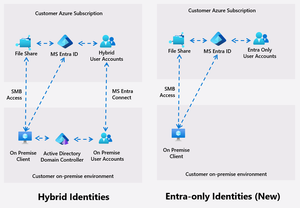
Azure Files introduces Entra only identities authentication for SMB shares, enabling cloud-only identity management without reliance on on-premises Active Directory. This advancement supports secure, seamless access to file shares from anywhere, streamlining cloud migration and modernization, and reducing operational complexity and costs.9.8KViews8likes14CommentsMicrosoft 365 Local is Generally Available
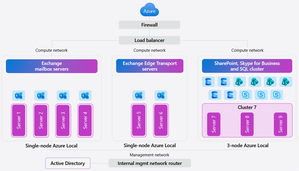
In today’s digital landscape, organizations and governments are prioritizing data sovereignty to comply with local regulations, protect sensitive information, and safeguard national security. This growing demand for robust jurisdictional controls makes the Microsoft Sovereign Cloud offering especially compelling, providing flexibility and assurance for complex requirements. For those with the most stringent needs, Azure Local enables data and workloads to remain within jurisdictional borders, supporting mission-critical workloads and now expanding to include Microsoft’s productivity solutions—so customers can securely collaborate and communicate within a sovereign private cloud environment. Today, we’re excited to announce the general availability of Microsoft 365 Local. Microsoft 365 Local is a deployment framework for enabling core collaboration and communication tools—including Exchange Server, SharePoint Server, and Skype for Business Server—on Azure Local. Built on a validated reference architecture using Azure Local Premier Solutions , it provides compatibility and support for sovereign deployments. Partner-led services provide guidance on sizing and configuration, ensuring a full-stack deployment including best practices for networking and security. Managing infrastructure across a wide range of workloads is simplified with Azure as your control plane, offering cloud-consistent, at-scale management capabilities. In the Azure portal, you get full visibility into your Microsoft 365 Local deployment across the servers and clusters. All hosts and virtual machines (VMs) are Arc-enabled out of the box, providing built-in visibility into connectivity, health, updates, and security alerts and recommendations. Microsoft 365 Local leverages Azure Local’s best-in-class sovereign and security controls, including Network Security Groups managed with Software Defined Networking enabled by Azure Arc, to isolate networks and secure access to infrastructure and workloads. Azure Local also uses a secure by default strategy by applying a security baseline of over 300 settings on both the host infrastructure and the VMs running the productivity workloads. These security baselines incorporate best practices for network security, identity management, privileged access, data protection, and more—helping organizations maintain compliance and reduce risk. Customers who want to take advantage of Azure as the control plane for Microsoft 365 Local can now benefit from a seamless cloud-based infrastructure management experience, including Azure services like Azure Monitor and Microsoft Defender for Cloud—available today with Microsoft 365 Local connected to Azure. For organizations with the most stringent jurisdictional requirements that need to operate Microsoft 365 Local in a fully disconnected environment, support for Azure Local disconnected operations will be available in early 2026. To learn more about Microsoft 365 Local, visit https://aka.ms/M365LocalDocs. If you’d like to connect with an authorized partner for consultation and deployment support, reach out to your Microsoft account team or visit https://aka.ms/M365LocalSignup.17KViews7likes6CommentsGenerally Available: Azure SQL Managed Instance Next-gen General Purpose
Overview Next-gen General Purpose is the evolution of General Purpose service tier that brings significantly improved performance and scalability to power up your existing Azure SQL Managed Instance fleet and helps you bring more mission-critical SQL workloads to Azure. We are happy to announce that Next-gen General Purpose is now Generally Available (GA) delivering even more scalability, flexibility, and value for organizations looking to modernize their data platform in a cost-effective way. The new #SQLMINextGen General Purpose tier delivers a built-in performance upgrade available to all customers at no extra cost. If you are an existing SQL MI General Purpose user, you get faster I/O, higher database density, and expanded storage - automatically. Summary Table: Key Improvements Capability Current GP Next-gen GP Improvement Average I/O Latency 5-10 ms 3-4 ms 2x lower Max Data IOPS 30-50k 80k 60% better Max Storage 16 TB 32 TB 2x better Max Databases/Instance 100 500 5x better Max vCores 80 128 40% better But that’s just the beginning. The new configuration sliders for additional IOPS and memory provide enhanced flexibility to tailor performance according to your requirements. Whether you require more resources for your application or seek to optimize resource utilization, you can adjust your instance settings to maximize efficiency and output. This release isn’t just about speed - It’s about giving you improved performance where it matters, and mechanisms to go further when you need them. Customer story - A recent customer case highlights how Hexure reduced processing time by up to 97.2% using Azure SQL Managed Instance on Next-gen General Purpose. What’s new in Next-gen General Purpose (Nov 2025)? 1. Improved baseline performance with the latest storage tech Azure SQL Managed Instance is built on Intel® Xeon® processors, ensuring a strong foundation for enterprise workloads. With the next-generation General Purpose tier, we’ve paired Intel’s proven compute power with advanced storage technology to deliver faster performance, greater scalability, and enhanced flexibility - helping you run more efficiently and adapt to growing business needs. The SQL Managed Instance General Purpose tier is designed with full separation of compute and storage layers. The Classic GP version uses premium page blobs for the storage layer, while the Next-generation GP tier has transitioned to Azure’s latest storage solution, Elastic SAN. Azure Elastic SAN is a cloud-native storage service that offers high performance and excellent scalability, making it a perfect fit for the storage layer of a data-intensive PaaS service like Azure SQL Managed Instance. Simplified Performance Management With ESAN as the storage layer, the performance quotas for the Next-gen General Purpose tier are no longer enforced for each database file. The entire performance quota for the instance is shared across all the database files, making performance management much easier (one fewer thing to worry about). This adjustment brings the General Purpose tier into alignment with the Business Critical service tier experience. 2. Resource flexibility and cost optimization The GA of Next-gen General Purpose comes together with the GA of a transformative memory slider, enabling up to 49 memory configurations per instance. This lets you right-size workloads for both performance and cost. Memory is billed only for the additional amount beyond the default allocation. Users can independently configure vCores, memory, and IOPS for optimal efficiency. To learn more about the new option for configuring additional memory, check the article: Unlocking More Power with Flexible Memory in Azure SQL Managed Instance. 3. Enhanced resource elasticity through decoupled compute and storage scaling operations With Next-gen GP, both storage and IOPS can be resized independently of the compute infrastructure, and these changes now typically finish within five minutes - a process known as an in-place upgrade. There are three distinct types of storage upgrade experiences depending on the kind of storage upgrade performed and whether failover occurs. In-place update: same storage (no data copy), same compute (no failover) Storage re-attach: Same storage (no data copy), changed compute (with failover) Data copy: Changed storage (data copy), changed compute (with failover) The following matrix describes user experience with management operations: Operation Data copying Failover Storage upgrade type IOPS scaling No No In-place Storage scaling* No* No In-place vCores scaling No Yes** Re-attach Memory scaling No Yes** Re-attach Maintenance Window change No Yes** Re-attach Hardware change No Yes** Re-attach Update policy change Yes Yes Data copy * If scale down is >5.5TB, seeding ** In case of update operations that do not require seeding and are not completed in place (examples are scaling vCores, scaling memory, changing hardware or maintenance window), failover duration of databases on the Next-gen General Purpose service tier scales with the number of databases, up to 10 minutes. While the instance becomes available after 2 minutes, some databases might be available after a delay. Failover duration is measured from the moment when the first database goes offline, until the moment when the last database comes online. Furthermore, resizing vCores and memory is now 50% faster following the introduction of the Faster scaling operations release. No matter if you have end-of-month peak periods, or there are ups and downs of usage during the weekdays and the weekend, with fast and reliable management operations, you can run multiple configurations over your instance and respond to peak usage periods in a cost-effective way. 4. Reserved instance (RI) pricing With Azure Reservations, you can commit to using Azure SQL resources for either one or three years, which lets you benefit from substantial discounts on compute costs. When purchasing a reservation, you'll need to choose the Azure region, deployment type, performance tier, and reservation term. Reservations are only available for products that have reached general availability (GA), and with this update, next-generation GP instances now qualify as well. What's even better is that classic and next-gen GP share the same SKU, just with different remote storage types. This means any reservations you've purchased automatically apply to Next-gen GP, whether you're upgrading an existing classic GP instance or creating a new one. What’s Next? The product group has received considerable positive feedback and welcomes continued input. The initial release will not include zonal redundancy; however, efforts are underway to address this limitation. Next-generation General Purpose (GP) represents the future of the service tier, and all existing classic GP instances will be upgraded accordingly. Once upgrade plans are finalized, we will provide timely communication regarding the announcement. Conclusion Now in GA, Next-gen General Purpose sets a new standard for cloud database performance and flexibility. Whether you’re modernizing legacy applications, consolidating workloads, or building for the future, these enhancements put more power, scalability, and control in your hands - without breaking the bank. If you haven’t already, try out the Next-gen General Purpose capabilities for free with Azure SQL Managed Instance free offer. For users operating SQL Managed Instance on the General Purpose tier, it is recommended to consider upgrading existing instances to leverage the advantages of next-gen upgrade – for free. Welcome to #SQLMINextGen. Boosted by default. Tuned by you. Learn more What is Azure SQL Managed Instance Try Azure SQL Managed Instance for free Next-gen General Purpose – official documentation Analyzing the Economic Benefits of Microsoft Azure SQL Managed Instance How 3 customers are driving change with migration to Azure SQL Accelerate SQL Server Migration to Azure with Azure Arc2.4KViews5likes1Comment
Moving the Logic Apps Designer Forward
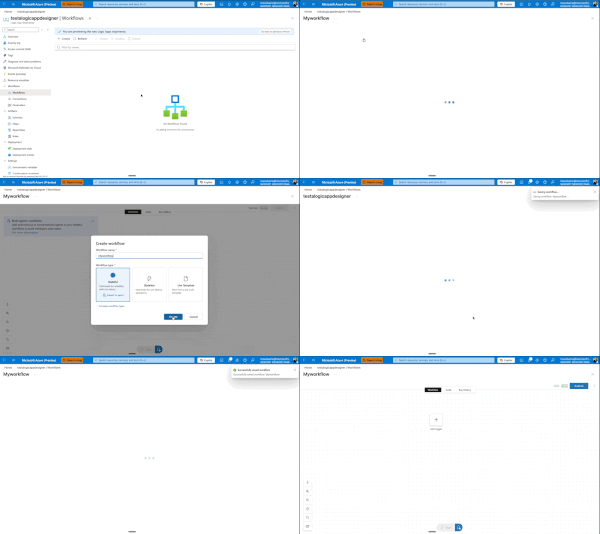
Today, we're excited to announce a major redesign of the Azure Logic Apps designer experience, now entering Public Preview for Standard workflows. While these improvements are currently Standard-only, our vision is to quickly extend them across all Logic Apps surfaces and SKUs. ⚠️ Important: As this is a Public Preview release, we recommend using these features for development and testing workflows rather than production workloads. We're actively stabilizing the experience based on your feedback. This Is Just the Beginning This is not us declaring victory and moving on. This is Phase I of a multi-phase journey, and I'm committed to sharing our progress through regular blog posts as we continue iterating. More importantly, we want to hear from you. Your feedback drives these improvements, and it will continue to shape what comes next. This redesign comes from listening to you—our customers—watching how you actually work, and adapting the designer to better fit your workflows. We've seen the pain points, heard the frustrations, and we're addressing them systematically. Our Roadmap: Three Phases Phase I: Perfecting the Development Loop (What we're releasing today) We're focused on making it cleaner and faster to edit your workflow, test it, and see the results. The development loop should feel effortless, not cumbersome. Phase II: Reimagining the Canvas Next, we'll rethink how the canvas works—introducing new shortcuts and workflows that make modifications easier and more intuitive. Phase III: Unified Experiences Across All Surfaces We'll ensure VS Code, Consumption, and Standard all deliver similarly powerful flows, regardless of where you're working. Beyond these phases, we have several standalone improvements planned: a better search experience, streamlined connection creation and management, and removing unnecessary overhead when creating new workflows. We're also tackling fundamental questions that shouldn't be barriers: What do stateful and stateless mean? Why can't you switch between them? Why do you have to decide upfront if something is an agent? You shouldn't. We're working toward making these decisions dynamic—something you can change directly in the designer as you build, not rigid choices you're locked into at creation time. We want to make it easier to add agentic capabilities to any workflow, whenever you need them. What's New in Phase I Let me walk you through what we're shipping at Ignite. Faster Onboarding: Get to Building Sooner We're removing friction from the very beginning. When you create a new workflow, you'll get to the designer before having to choose stateful, stateless, or agentic. Eventually, we want to eliminate that upfront choice entirely—making it a decision you can defer until after your workflow is created. This one still needs a bit more work, but it's coming soon. One View to Rule Them All We've removed the side panel. Workflows now exist in a single, unified view with all the tooling you need. No more context switching. You can easily hop between run history, code view, or visual editor, and change your settings inline—all without leaving your workflow. Draft Mode: Auto-Save Without the Risk Here's one of our biggest changes: draft mode with auto-save. We know the best practice is to edit locally in VS Code, store workflows in GitHub, and deploy properly to keep editing separate from production. But we also know that's not always possible or practical for everyone. It sucks to get your workflow into the perfect state, then lose everything if something goes wrong before you hit save. Now your workflow auto-saves every 10 seconds in draft mode. If you refresh the window, you're right back where you were—but your changes aren't live in production. There's now a separate Publish action that promotes your draft to production. This means you can work, test your workflow against the draft using the designer tools, verify everything works, and then publish to production—even when editing directly on the resource. Another benefit: draft saves won't restart your app. Your app keeps running. Restarts only happen when you publish. Smarter, Faster Search We've reorganized how browsing works—no more getting dropped into an endless list of connectors. You now get proper guidance as you explore and can search directly for what you need. Even better, we're moving search to the backend in the coming weeks, which will eliminate the need to download information about thousands of connectors upfront and deliver instant results. Our goal: no search should ever feel slow. Document Your Workflows with Notes You can now add sticky notes anywhere in your workflow. Drop a post-it note, add markdown (yes, even YouTube videos), and document your logic right on the canvas. We have plans to improve this with node anchoring and better stability features, but for now, you can visualize and explain your workflows more clearly than ever. Unified Monitoring and Run History Making the development loop smoother means keeping everything in one place. Your run history now lives on the same page as your designer. Switch between runs without waiting for full blade reloads. We've also added the ability to view both draft and published runs—a powerful feature that lets you test and validate your changes before they go live. We know there's a balance between developer and operator personas. Developers need quick iteration and testing capabilities, while operators need reliable monitoring and production visibility. This unified view serves both: developers can test draft runs and iterate quickly, while the clear separation between draft and published runs ensures operators maintain full visibility into what's actually running in production. New Timeline View for Better Debugging We experimented with a timeline concept in Agentic Apps to explain handoff—Logic Apps' first foray into cyclic graphs. But it was confusing and didn't work well with other Logic App types. We've refined it. On the left-hand side, you'll now see a hierarchical view of every action your Logic App ran, in execution order. This makes navigation and debugging dramatically easier when you're trying to understand exactly what happened during a run. What's Next This is Phase I. We're shipping these improvements, but we're not stopping here. As we move into Phase II and beyond, I'll continue sharing updates through blog posts like this one. How to Share Your Feedback We're actively listening and want to hear from you: Use the feedback button in the Azure Portal designer Join the discussion in GitHub/Community Forum – https://github.com/Azure/LogicAppsUX Comment below with your thoughts and suggestions Your input directly shapes our roadmap and priorities. Keep the feedback coming. It's what drives these changes, and it's what will shape the future of Azure Logic Apps. Let's build something great together.1KViews5likes2CommentsAI Toolkit Extension Pack for Visual Studio Code: Ignite 2025 Update
Unlock the Latest Agentic App Capabilities The Ignite 2025 update delivers a major leap forward for the AI Toolkit extension pack in VS Code, introducing a unified, end-to-end environment for building, visualizing, and deploying agentic applications to Microsoft Foundry, and the addition of Anthropic’s frontier Claude models in the Model Catalog! This release enables developers to build and debug locally in VS Code, then deploy to the cloud with a single click. Seamlessly switch between VS Code and the Foundry portal for visualization, orchestration, and evaluation, creating a smooth roundtrip workflow that accelerates innovation and delivers a truly unified AI development experience. Download the http://aka.ms/aitoolkit today and start building next-generation agentic apps in VS Code! What Can You Do with the AI Toolkit Extension Pack? Access Anthropic models in the Model Catalog Following the Microsoft, NVIDIA and Anthropic strategic partnerships announcement today, we are excited to share that Anthropic’s frontier Claude models including Claude Sonnet 4.5, Claude Opus 4.1, and Claude Haiku 4.5, are now integrated into the AI Toolkit, providing even more choices and flexibility when building intelligent applications and AI agents. Build AI Agents Using GitHub Copilot Scaffold agent applications using best-practice patterns, tool-calling examples, tracing hooks, and test scaffolds, all powered by Copilot and aligned with the Microsoft Agent Framework. Generate agent code in Python or .NET, giving you flexibility to target your preferred runtime. Build and Customize YAML Workflows Design YAML-based workflows in the Foundry portal, then continue editing and testing directly in VS Code. To customize your YAML-based workflows, instantly convert it to Agent Framework code using GitHub Copilot. Upgrade from declarative design to code-first customization without starting from scratch. Visualize Multi-Agent Workflows Envision your code-based agent workflows with an interactive graph visualizer that reveals each component and how they connect Watch in real-time how each node lights up as you run your agent. Use the visualizer to understand and debug complex agent graphs, making iteration fast and intuitive. Experiment, Debug, and Evaluate Locally Use the Hosted Agents Playground to quickly interact with your agents on your development machine. Leverage local tracing support to debug reasoning steps, tool calls, and latency hotspots—so you can quickly diagnose and fix issues. Define metrics, tasks, and datasets for agent evaluation, then implement metrics using the Foundry Evaluation SDK and orchestrate evaluations runs with the help of Copilot. Seamless Integration Across Environments Jump from Foundry Portal to VS Code Web for a development environment in your preferred code editor setting. Open YAML workflows, playgrounds, and agent templates directly in VS Code for editing and deployment. How to Get Started Install the AI Toolkit extension pack from the VS Code marketplace. Check out documentation. Get started with building workflows with Microsoft Foundry in VS Code 1. Work with Hosted (Pro-code) Agent workflows in VS Code 2. Work with Declarative (Low-code) Agent workflows in VS Code Feedback & Support Try out the extensions and let us know what you think! File issues or feedback on our GitHub repo for Foundry extension and AI Toolkit extension. Your input helps us make continuous improvements.2.2KViews4likes0CommentsAzure Intel® TDX confidential VMs momentum
Azure’s next generation of Confidential Virtual Machines powered by 5th Gen Intel® Xeon® processors (code-named Emerald Rapids) with Intel® Trust Domain Extensions (Intel® TDX) is out in preview now. This will help to enable organizations to bring confidential workloads to the cloud without code changes to applications. These instances also enable Intel® Advanced Matrix Extensions (Intel® AMX) to accelerate confidential AI scenarios. Supported SKUs include the general-purpose DCesv6-series, as well as the memory-optimized ECesv6-series. Confidential VMs are designed for tenants with high security and confidentiality requirements, providing a strong, attestable, hardware-enforced boundary. They ensure that your data and applications stay private and encrypted even while in use, keeping your sensitive code and other data encrypted in memory during processing. Improvements for next milestone As a first for Azure’s Confidential VM offerings, we are soon adding support for local NVMe SSDs for our DCedsv6-series and ECedsv6-series. These sizes are suited for storage workloads that need a balance of SSD capacity, compute, and memory. With NVMe we can achieve nearly 5× more throughput while reducing latency by about 16% compared to the previous SCSI generation. Overall, we see lower IO latency by ~27 microseconds across block size and thread count. Additionally, these TDX confidential VMs are Azure’s first offering to utilize our open-source paravisor, OpenHCL. This innovation allows us to enhance transparency with our customers, reinforcing our commitment to the "trust but verify" model. These VMs also support Azure Boost, enabling up to 205k IOPS and 4 GB/s throughput of remote storage along with 40 Gbps VM network bandwidth. Customers are excited to use TDX based Confidential VMs “At Bosch Trustworthy Collaboration Services, we’ve enrolled our collaboration platform on Azure’s latest Confidential VMs powered by Intel’s 5th Generation Xeon processors with TDX support. That means better transparency, stronger performance, and more robust verification: the foundation we need for cross-company teamwork. These improvements reinforce our capability to deliver best-in-class secure collaboration capabilities to our customers with our Trusted Collaboration Spaces.” - Dr. Sven Trieflinger, CTO Bosch Trustworthy Collaboration Services “Ensuring data security across its entire lifecycle has always been a key priority for me. Until recently, encryption for data-in-use was the missing link, preventing true end-to-end protection managed by the customer. Through collaboration with Microsoft and Intel, we have established a comprehensive ecosystem, called End-to-End Data Encryption. This ecosystem seamlessly unites data protection at rest, in transit, and now in use, thanks to the integration of Intel TDX technology. The root of trust remains Thales CipherTrust Data Security Platform, enabling us to manage and safeguard our data with confidence. Of course, leveraging that technology for our own use significantly strengthens our cyber defenses. I would like to thank Microsoft for bringing this innovation to fruition.” - Didier Espinet, Chief Information Security Officer for Thales Cyber & Digital Identity "In the public sector and other regulated industries, trust and fairness are paramount. By integrating Microsoft Azure confidential virtual machines with Intel® TDX and AMX technologies, Nuuday delivers a secure and compliant Confidential AI environment that upholds strict data sovereignty and privacy standards. These capabilities ensure sensitive information can be processed with verifiable confidentiality and integrity – while unlocking new opportunities for digital innovation." - John Henriksen, CEO, TDC Erhverv. “Arqit is delighted to partner with Microsoft and Intel on the launch of Azure’s latest Intel TDX-enabled Confidential VMs. Together we have demonstrated a combination of security-enhancing technologies to deliver provable protection of sensitive AI workloads processed across multi-region public cloud. This partnership underlines our shared commitment to giving customers full sovereign control over their data even outside of their own networks, in turn accelerating AI adoption and digital transformation.” - Jonathan Pope, VP Sales & Partnerships Offerings The DCesv6-series and DCedsv6-series VMs are designed to offer a balance of memory to vCPU ratio, with up to 128 vCPUs, and up to 512 GiB of memory. The ECesv6-series and ECedsv6-series VMs are designed to offer an even higher memory to vCPU ratio, with up to 64 vCPUs, and 512 GiB of memory. Availability We expect the DCesv6, DCedsv6, ECesv6 and ECedsv6 VMs with Intel® TDX to be generally available in the first quarter of 2026 in select US regions and Europe regions. In the meantime, please sign up for our DCesv6 and ECesv6 VM preview at aka.ms/acc/v6preview and we will contact you with further instructions.