login
3 TopicsIntroducing Edge Master Password | New feature
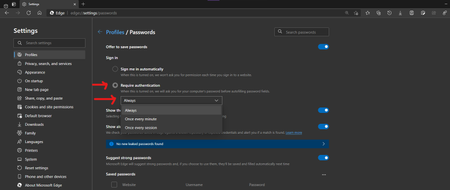
it's this feature: it's controlled feature rollout available in Edge canary, was added few versions ago. this helps your passwords stay safe, by requiring you to enter your Windows Pin/Password when you want to autofill your credentials on a web page. using the same strong authentication method Windows uses to secure your login screen, secure your disks pre-logon etc. next in line is this I'm already seeing some bits of it in Edge canary, but not fully implemented just yet.12KViews3likes2CommentsAutomatic login lost.
Currently on Version 83.0.472.0 but this problem started in 471. Edge stopped automatically logging me into all the about 3 dozen websites that it previously saved my credentials for. I have to manually log in on every single site. All the credentials are still present in Settings/Passwords. When I click on "log in" on each of these sites the user id and password fields on the next screen are already filled in with the correct values. So all I have to do is hit Enter. After that on several of the pages such as facebook etc. I have to go through the 2 factor authentication. Very very cumbersome. I am talking about sites such as Microsoft Techcommunity, Facebook, Reddit, etc. In the top right of the screenshot you can see that it shows my profile picture in top line (logged in my outlook acct) but asks me to log into the site on the line beneath it. All this happens every single time I reopen the browser after closing it. Am I the only one with this problem? Already provided feedback.Solved3.7KViews0likes6Comments