lists
3180 Topics
SharePoint view filtered to Me
Hello! Is it possible to create a view, or JSON format a view, when a field contains my information that is not a people picker field? I have a multiple line of text field where I enter a JSON object with user emails. Is there a way to change the view to only show the line item if that text field contains my email? I have tried using that field with Contains [Me] but that does not work. Presumably as [Me] is for people picker fields. Is there a way to add a filter to the view to look for my email?10Views0likes0CommentsNEW! SharePoint Lists & Libraries: Default Approvers for Configure Approvals Explained
🚀 New SharePoint Feature Alert! Microsoft has just introduced a super useful capability in SharePoint Lists and Document Libraries: the option to set Default Approvers when configuring approval workflows. This small but powerful enhancement removes repetitive manual steps and makes approval automation more consistent across teams using SharePoint + Power Automate. In my latest YouTube video, I walk through how this feature works, how to set it up, and why it can significantly streamline your approval processes. 🎥 Watch the full breakdown here: https://youtu.be/Xxn-IrKVh6E 👍 If you find it useful, let me know in the comments! #SharePoint #Microsoft365 #PowerAutomate #Productivity #M365 #SharePointOnline #Automation #DigitalTransformation109Views1like0Comments
SharePoint List Web Part - major caching issues
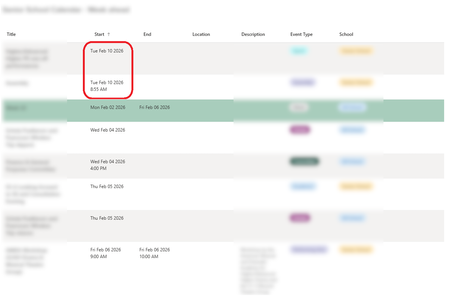
Hi All, I've spent a lot of time building a List based company calendar in our SharePoint Intranet Portal, and the calendar itself is working great, however I'm having no end of headaches with the List Web Part. (not just for this calendar, but all list web parts for that matter) The calendar has a Start and End field - both are Date and Time fields. A custom view is created for use with the List Web Part to embed an "upcoming week" view, this is based on a filter which checks both Start and End dates to see whether an event exists within or spans the date range from today to 7 days in the future, so it is a rolling 7 day window. This is based on a number of filter criteria which include [Today] and [Today]+6. The view also has a sort criteria to sort based on the Start (Date/Time) field. This all works fine when previewing the view within the list itself - at midnight the results update to include events from the day that is now 7 days in the future which were previously excluded. So the view itself is working fine. However the same view in a List Web part on another page suffers from a ridiculous amount of browser side (?) caching, to the point that it is basically broken and unusable. When I open the page the next day in a browser (even if the browser was closed) one of three things happens, somewhat at random: The events 7 days in the future (which just came into filter scope today) just don't appear until a forced page reload is done. The events 7 days in the future do appear but they are sorted incorrectly, appearing at the TOP when the date sort order should show them at the BOTTOM. Sometimes 2 happens but the event is shown with the Start and End Date/Time fields empty - so not only is it at the wrong end of the list it doesn't even show a date at all until the page is refreshed. Here is a picture showing the sort order being incorrect as in case 2: When these various problems happen a full CTRL-F5 browser refresh always updates the list to be complete, up to date and sorted correctly, however, if after that you click away from the page and follow a link to return to it OR press a regular F5 refresh it goes back to being incorrect! It takes many page reloads or a lot of time to pass (hours) before it finally settles down and gives the correct results every time. Then the next day the same caching problems happen again. If you go to a new browser or PC the same problems happen again, suggesting this is browser side caching not something at the servers. While the actual content of the list items update in real-time if you edit the list content in another page (which is pretty cool) the "result set" of list items (which items should or should not be seen) is heavily cached, and the sorting is unreliable. Has anyone else found a solution to this ? I have already done things like disabling offline mode for the list, (this only seems to affect caching of the actual data in the list items, not caching of filter results) etc and I cannot find a solution. The only thing I know which would probably work, as I have had to use this approach on another list is to extend the date range of the filter criteria for the view further into the future, then filter out the extra days using json code in "format view - however AFAIK you can only selectively hide rows like this if you use a custom rowFormatter, which means you have to fully re-implement the standard view including hard coding all the columns you want and it still won't look quite the same. This is a lot of work and maintenance overhead in the future to work around a caching problem that shouldn't exist in the first place. Any thoughts appreciated as a lot of time and effort has gone into building an entire calendar system around a SharePoint List, only to find that the list web part just doesn't work properly.113Views0likes1CommentUnable to filter embedded list
OMG- could they f up sharepoint any more. It used to be such a powerful tool. It is harder than ever now. So- embed a lits in a page with a list part. I am showing controls and on default view-no search. there is now also NO FILTER PART so i go to github patterns and practices to download. Butttttt, I can't upload because while I am global admin, I am not sharepoint admin and cannot change my permissions. Create second admin account with all permissions. Tr to update my normal account permissions, and it says "you do not have permission to save." SO- do you know any other way to get a search of a list on a page? And - any thoughts on my permissions hell?25Views0likes0Comments
SharePoint Online List: Filtered List View Not Refreshing After Change
Before recently, any time a change was made to a list row column that a view filter was based on, the items in view would automatically refresh to show the changes. Now the list view doesn't update unless the user refreshes the page in their browser. This is a consistent issue across all lists in the tenant. Our organization has SharePoint lists with a 'Status' column that impacts what items are shown in a view and its hurting productivity when these views aren't updating with new items unless the page is manually refreshed. Is there a new setting that is impacting the ability for filtered views to auto-refresh?315Views1like3CommentsIs it possible to add a Power Automate button to Form view
Hello! Is it possible to add a Power Automate button from the list view in a SharePoint list to the Form view? I was hoping that when a line item is open to view, we may be able to add this button onto the Form view as well somehow? Even just as a hyperlink and not a button? Just something clickable.62Views0likes2Comments
Best way to link to a list view?
Hello all, I created a list with a number of filtered views. I'd like to have a URL for each of those views that I can share. I'd thought the URL listed in the "Web address of this view" field of the 'edit current view' screen would do that, but when I plug that URL in to my browser it just brings me to the non-filtered default view of that list. Is there a different way to go about having a URL to go directly to a filtered view of a list? ThanksSolved30KViews0likes9Comments
Making list form anonymous
I had tried microsoft Forms, but because if the user attaches anything I get notified defeating the purpose of making any submissions anonymous. Decided to use 2 list with a power automate. first list is an intake that gets deleted, the second will have me as the creator for all submissions. Used the list form for the first time, and when in the preview i get the message "Hi nerdy, when you submit this form, the owner will see your email and name." There a way to remove that disclaimer? or set the form to not record? did not see an option to try and suppress the information. Next plan is to do a powerapp submission. thank you132Views0likes5Comments